


South East EA MT5 Settings Explained – Complete Configuration Guide
South East EA is a sophisticated grid and martingale Expert Advisor (EA) designed for MetaTrader traders who want advanced order management, smart recovery systems, virtual grid execution, trailing stop controls, news filters and drawdown reduction tools.
The EA combines automated lot progression, pending order logic, partial close management, and risk control features to optimize trading performance in volatile Forex market conditions.
South East EA Full Settings Explanation
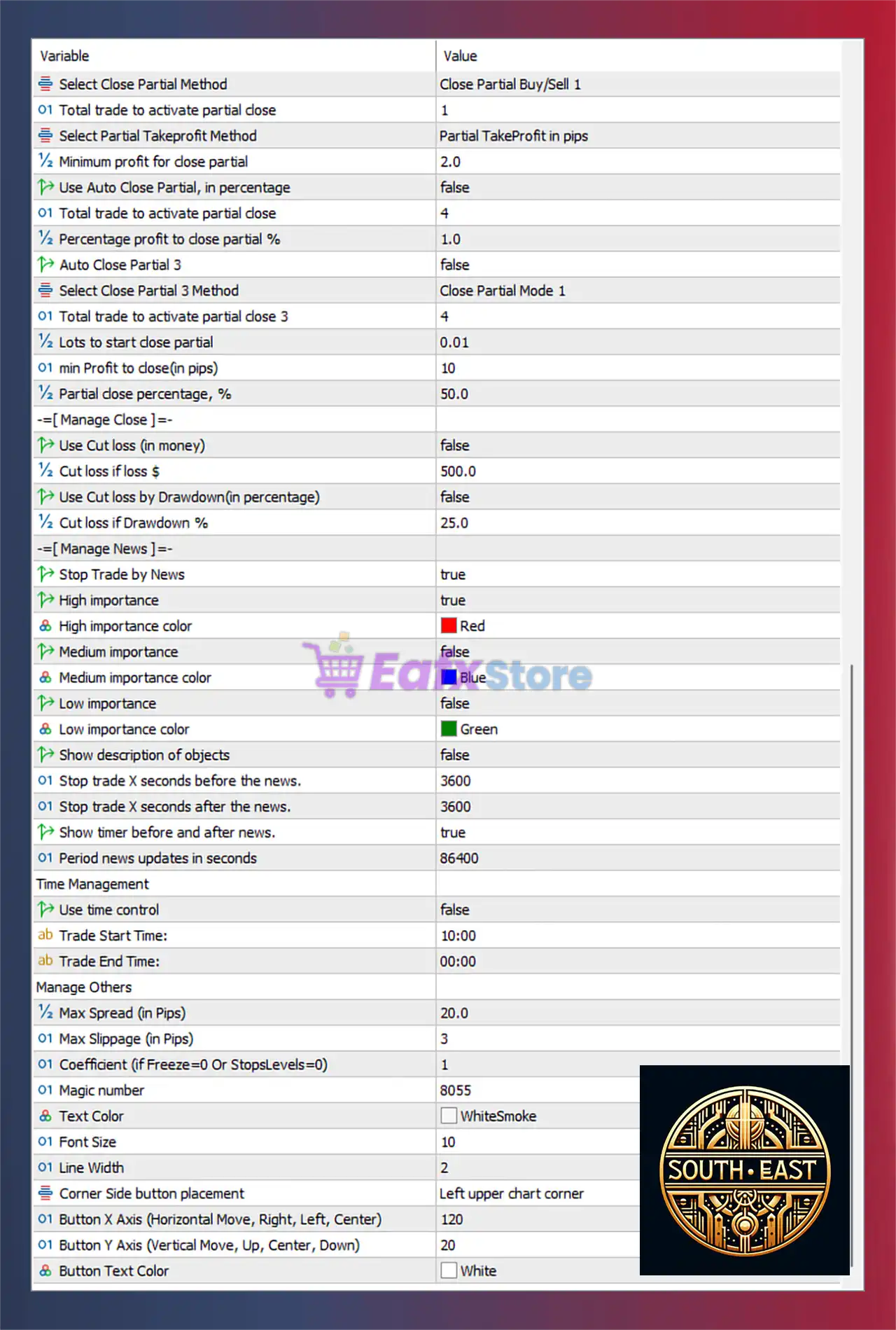
Below are the details of the parameters in the advisor’s trading system settings table:
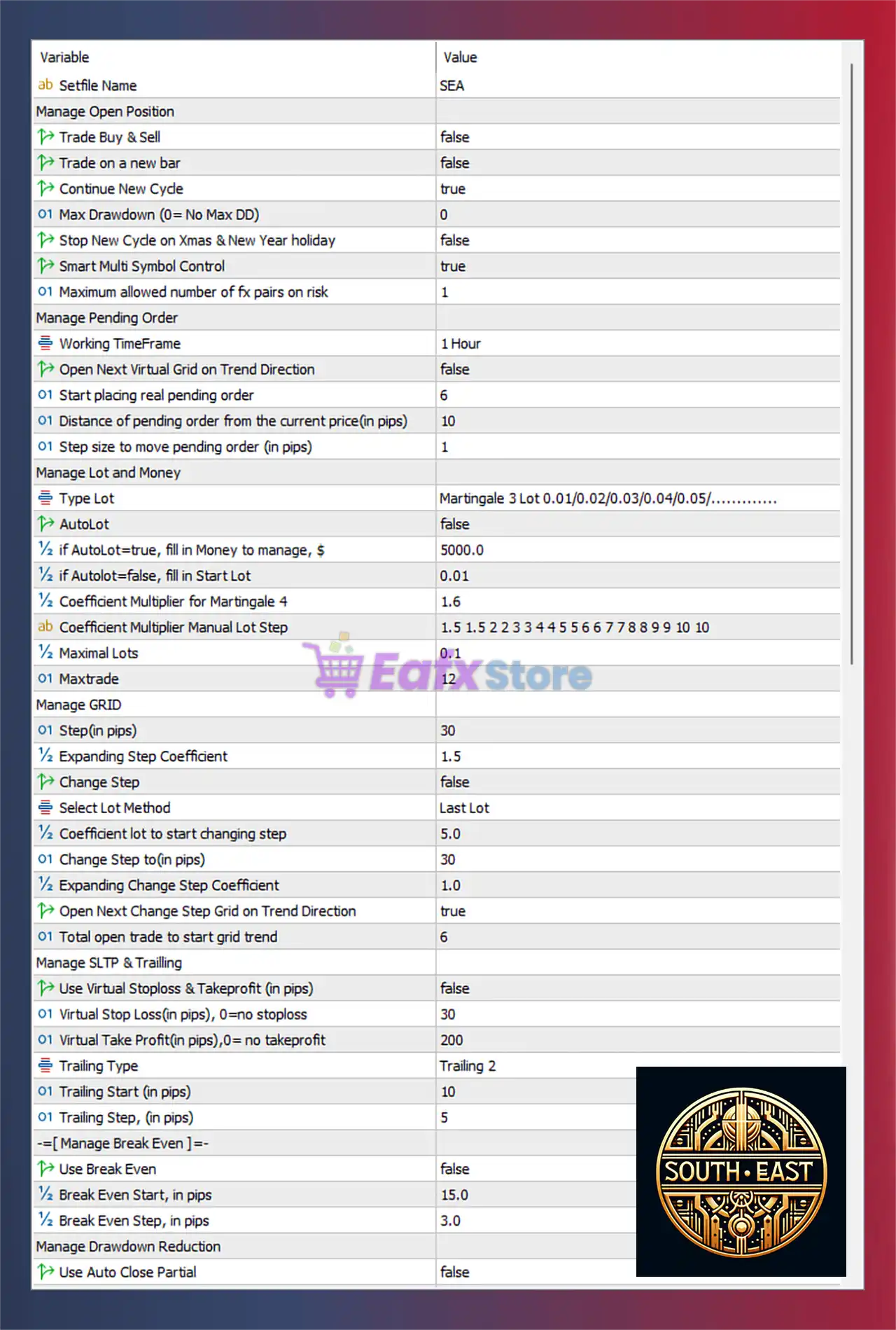
Manage Open Position Settings
🔹 Trade Buy & Sell = false: Disables simultaneous Buy and Sell trading mode.
🔹 Trade on a new bar = false: Disables opening trades only at the start of a new candle.
🔹 Continue New Cycle = true: Allows the EA to continue opening new trading cycles after completion.
🔹 Max Drawdown (0 = No Max DD) = 0: Disables maximum drawdown limitation.
🔹 Stop New Cycle on Xmas & New Year holiday = false: Keeps trading active during Christmas and New Year holidays.
🔹 Smart Multi Symbol Control = true: Enables intelligent multi-symbol trade management.
🔹 Maximum allowed number of fx pairs on risk = 1: Limits simultaneous risky currency pair exposure to 1 pair.
Manage Pending Order Settings
🔹 Working TimeFrame = 1 Hour: Uses the 1 Hour timeframe for pending order logic.
🔹 Open Next Virtual Grid on Trend Direction = false: Disables opening additional virtual grids based on trend direction.
🔹 Start placing real pending order = 6: Starts placing real pending orders after level 6.
🔹 Distance of pending order from the current price (in pips) = 10: Sets pending order distance at 10 pips.
🔹 Step size to move pending order (in pips) = 1: Adjusts pending orders in increments of 1 pip.
Manage Lot and Money Settings
🔹 Type Lot = Martingale 3 Lot 0.01/0.02/0.03/0.04/0.05/.............: Uses Martingale lot progression starting from 0.01.
🔹 AutoLot = false: Disables automatic lot calculation.
🔹 if AutoLot=true, fill in Money to manage, $ = 5000.0: Uses $5000.0 as balance reference for AutoLot calculations.
🔹 if AutoLot=false, fill in Start Lot = 0.01: Sets initial lot size to 0.01.
🔹 Coefficient Multiplier for Martingale 4 = 1.6: Uses 1.6 as lot multiplier during Martingale progression.
🔹 Coefficient Multiplier Manual Lot Step = 1.5 1.5 2 2 3 3 4 4 5 5 6 6 7 7 8 8 9 9 10 10: Defines custom multiplier sequence for manual lot scaling.
🔹 Maximal Lots = 0.1: Limits maximum lot size to 0.1.
🔹 Maxtrade = 12: Allows a maximum of 12 simultaneous trades.
Manage GRID Settings
🔹 Step (in pips) = 30: Sets grid spacing distance to 30 pips.
🔹 Expanding Step Coefficient = 1.5: Expands grid distance using multiplier 1.5.
🔹 Change Step = false: Disables dynamic grid step modification.
🔹 Select Lot Method = Last Lot: Uses the last opened lot size for calculations.
🔹 Coefficient lot to start changing step = 5.0: Starts changing grid behavior when lot reaches 5.0.
🔹 Change Step to (in pips) = 30: Changes grid spacing to 30 pips after trigger.
🔹 Expanding Change Step Coefficient = 1.0: Uses expansion coefficient 1.0 after step change.
🔹 Open Next Change Step Grid on Trend Direction = true: Opens new grid levels aligned with trend direction.
🔹 Total open trade to start grid trend = 6: Activates trend-based grid after 6 open trades.
Manage SLTP & Trailing Settings
🔹 Use Virtual Stoploss & Takeprofit (in pips) = false: Disables virtual SL and TP management.
🔹 Virtual Stop Loss (in pips), 0=no stoploss = 30: Sets virtual stop loss to 30 pips.
🔹 Virtual Take Profit (in pips), 0=no takeprofit = 200: Sets virtual take profit to 200 pips.
🔹 Trailing Type = Trailing 2: Uses Trailing 2 trailing stop mode.
🔹 Trailing Start (in pips) = 10: Starts trailing stop after 10 pips profit.
🔹 Trailing Step (in pips) = 5: Moves trailing stop in 5 pip increments.
Manage Break Even Settings
🔹 Use Break Even = false: Disables Break Even protection.
🔹 Break Even Start, in pips = 15.0: Break Even activates after 15.0 pips profit.
🔹 Break Even Step, in pips = 3.0: Moves Break Even in 3.0 pip steps.
Manage Drawdown Reduction Settings
🔹 Use Auto Close Partial = false: Disables automatic partial trade closure.
🔹 Select Close Partial Method = Close Partial Buy/Sell 1: Uses partial close strategy Buy/Sell 1.
🔹 Total trade to activate partial close = 1: Starts partial closure after 1 active trade.
🔹 Select Partial Takeprofit Method = Partial TakeProfit in pips: Uses pip-based partial TP logic.
🔹 Minimum profit for close partial = 2.0: Requires 2.0 pips profit before partial close.
🔹 Use Auto Close Partial, in percentage = false: Disables percentage-based partial closure.
🔹 Total trade to activate partial close = 4: Percentage-based partial close activates after 4 trades.
🔹 Percentage profit to close partial % = 1.0: Closes partial positions at 1.0% profit.
🔹 Auto Close Partial 3 = false: Disables third-level automatic partial closure.
🔹 Select Close Partial 3 Method = Close Partial Mode 1: Uses Close Partial Mode 1 strategy.
🔹 Total trade to activate partial close 3 = 4: Activates third-level partial closure after 4 trades.
🔹 Lots to start close partial = 0.01: Starts partial closure from 0.01 lot size.
🔹 min Profit to close (in pips) = 10: Requires 10 pips profit before closing partial trades.
🔹 Partial close percentage, % = 50.0: Closes 50.0% of trade volume during partial closure.
Manage Close Loss Settings
🔹 Use Cut loss (in money) = false: Disables money-based loss cutting.
🔹 Cut loss if loss $ = 500.0: Cuts losses when floating loss reaches $500.0.
🔹 Use Cut loss by Drawdown (in percentage) = false: Disables drawdown-based loss closure.
🔹 Cut loss if Drawdown % = 25.0: Closes trades when drawdown reaches 25.0%.
Manage News Filter Settings
🔹 Stop Trade by News = true: Enables news-based trading suspension.
🔹 High importance = true: Filters high-impact economic news.
🔹 High importance color = Red: Displays high-impact news in Red.
🔹 Medium importance = false: Disables medium-impact news filtering.
🔹 Medium importance color = Blue: Uses Blue color for medium news events.
🔹 Low importance = false: Disables low-impact news filtering.
🔹 Low importance color = Green: Uses Green color for low-impact news events.
🔹 Show description of objects = false: Hides graphical object descriptions on chart.
🔹 Stop trade X seconds before the news = 3600: Stops trading 3600 seconds before news releases.
🔹 Stop trade X seconds after the news = 3600: Resumes trading 3600 seconds after news events.
🔹 Show timer before and after news = true: Displays countdown timer around news releases.
🔹 Period news updates in seconds = 86400: Updates economic calendar every 86400 seconds.
Time Management Settings
🔹 Use time control = false: Disables trading time restrictions.
🔹 Trade Start Time = 10:00: Trading session starts at 10:00.
🔹 Trade End Time = 00:00: Trading session ends at 00:00.
Manage Others Settings
🔹 Max Spread (in Pips) = 20.0: Sets maximum allowed spread to 20.0 pips.
🔹 Max Slippage (in Pips) = 3: Limits slippage to 3 pips.
🔹 Coefficient (if Freeze=0 Or StopsLevels=0) = 1: Uses coefficient 1 for brokers with zero freeze or stop levels.
🔹 Magic number = 8055: Unique identifier used for EA trade management.
🔹 Text Color = WhiteSmoke: Sets interface text color to WhiteSmoke.
🔹 Font Size = 10: Uses font size 10 for chart elements.
🔹 Line Width = 2: Sets graphical line width to 2.
🔹 Corner Side button placement = Left upper chart corner: Places control buttons in the upper-left chart corner.
🔹 Button X Axis (Horizontal Move, Right, Left, Center) = 120: Sets button horizontal position to 120.
🔹 Button Y Axis (Vertical Move, Up, Center, Down) = 20: Sets button vertical position to 20.
🔹 Button Text Color = White: Uses White color for button text.
Conclusion
South East EA is a highly advanced MT4 trading robot that combines grid trading, martingale recovery, virtual pending orders, intelligent risk management and dynamic drawdown reduction tools.
With extensive customization options for news filters, trailing stops, partial close systems, and multi-symbol management, the EA provides traders with a flexible and powerful automated trading solution suitable for both conservative and aggressive trading styles.
FAQs
❓ What is South East EA?
South East EA is a grid and martingale Expert Advisor for MetaTrader designed for automated Forex trading.
❓ Does South East EA support martingale trading?
Yes, the EA includes configurable martingale lot progression and recovery systems.
❓ Can South East EA filter economic news events?
Yes, the EA includes advanced news filtering with high, medium, and low impact controls.
❓ Does South East EA support trailing stop and break even?
Yes, the EA includes customizable trailing stop and break even management settings.
❓ Is South East EA suitable for multi-symbol trading?
Yes, Smart Multi Symbol Control is enabled for efficient multi-pair management.


