




Daytrade Pro Algo EA MT4 v3.30 + Setfiles (Platform 1476+)

Subscriptions for Special Plan
- 30 EA package is more economical!
- Special package with 99%
- Download 1 EA/Day

Subscriptions for Premium Membership
- Download Unlimited in 1 Year
- Get 100% Discount
- Get free access to all

Subscriptions for Gold Membership
- 1 Year Membership
- Get 100% Discount
- Access EA+Indicator+Course
Frequently bought together 🎁
Add these products to enhance your purchase



What is Daytrade Pro Algo?
Daytrade Pro Algo EA is a trading robot strongly developed on the MetaTrader 4 (MT4) platform. EA has the ability to trade with Prop companies such as FTMO, MFF. Trade effectively on 13 currency pairs EURUSD, GBPUSD, USDJPY, AUDUSD, XAUUSD, GBPJPY, USDCAD, EURJPY, EURNZD, EURAUD, NZDUSD, AUDJPY, CHFJPY and the minimum capital is only $400.
➡️ Vendor Website: View here
About the author
This product is compiled by Wim Schrynemakers. This Malta author has more than +14 years of experience working on MQL5 with many famous products such as Daytrade Pro Algo EA, The Gold Reaper MT4, Indicement MT4 and other products. Among them, Daytrade Pro Algo EA is his best performing products.
Daytrade Pro Algo Overview
Key Features of Daytrade Pro Algo for MT4
🔹Broker-independent: Not dependent on a specific broker.
🔹Spread-independent: Not affected by spread width.
🔹Powerful system: Flexible settings ensure efficient trading for different currency pairs.
🔹Price action trading: Trade based on important daily support and resistance levels.
🔹Risk management: Apply Stop-loss (SL), Take-profit (TP) and trailing stoploss to maximize profits and minimize losses.
Additional Features
🔹Customize information size: Allows adjusting the size of information on the chart.
🔹Trading lot calculation method: Choose between fixed trading lot and automatic trading lot.
🔹Manage Trading Lot: Allows to increase or decrease trading lot based on trading results.
🔹Use Equity or Balance: Choose to use equity or balance to calculate trading lot.
Daytrade Pro Algo MT4 Review
Daytrade Pro Algo Myfxbook Results
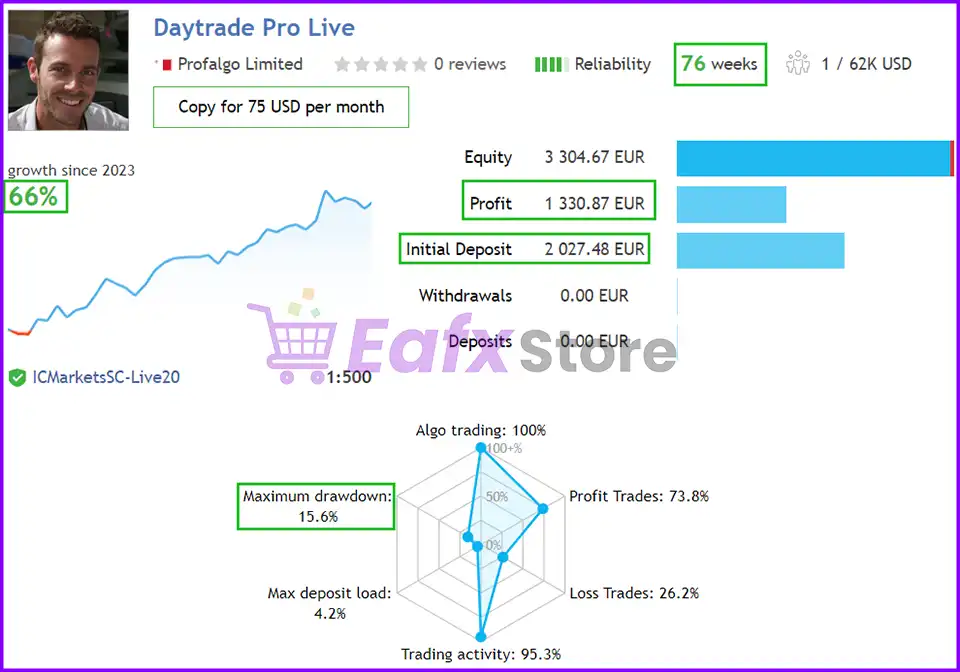
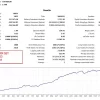
Daytrade Pro Algo’s real trading performance is meticulously verified by Myfxbook for 2 years (2023 – 2024). The total profit achieved is Gain: +65.64% and Drawdown: 15.61%.
➡️ Live Signal Myfxbook: Click here
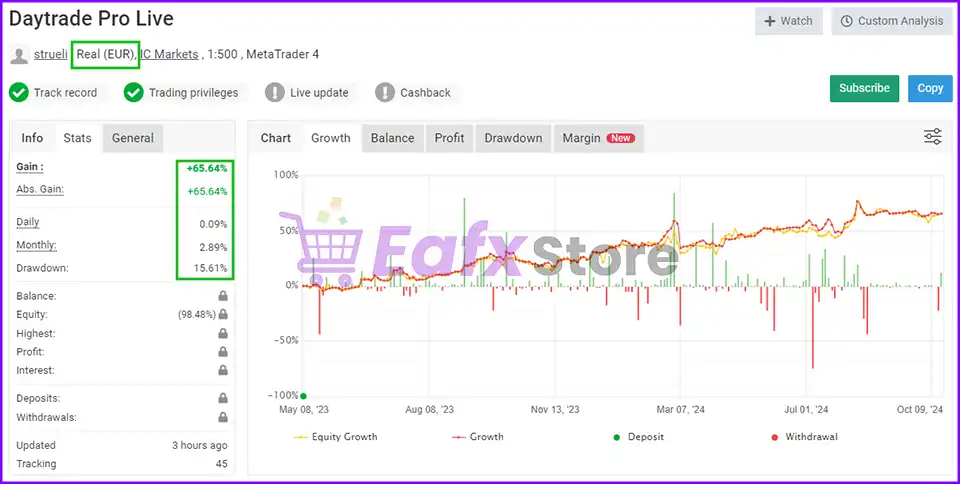
Daytrade Pro Algo Myfxbook
Daytrade Pro Algo EA Live Results
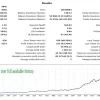
Daytrade Pro Algo real trading results show impressive trading potential and high stability in the long term. Deposit of $2,000 and total profit achieved in 77 weeks of trading reached 66%. High safety level drawdown: 15.6%.
➡️ Live Signal: Click here
Daytrade Pro Algo EA Results
Daytrade Pro Algo EA Backtests Results
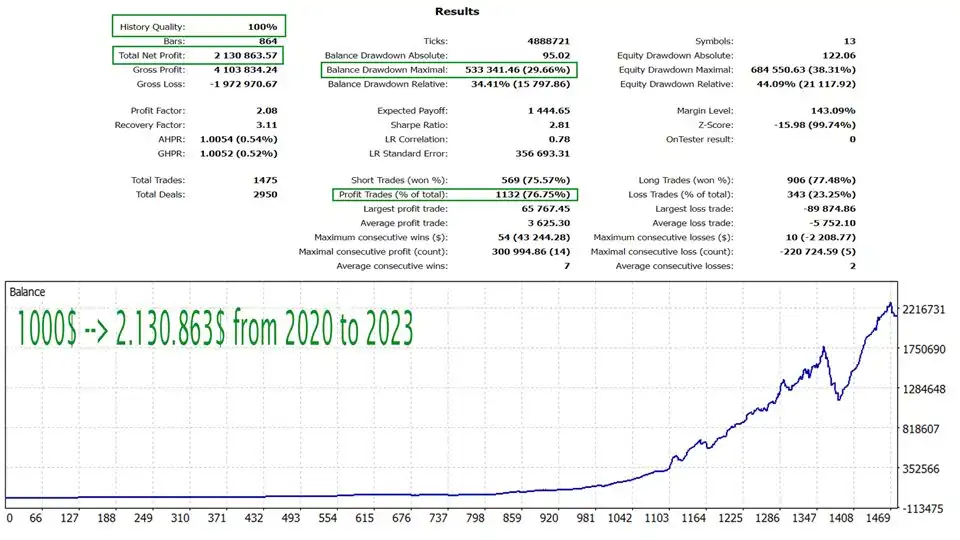
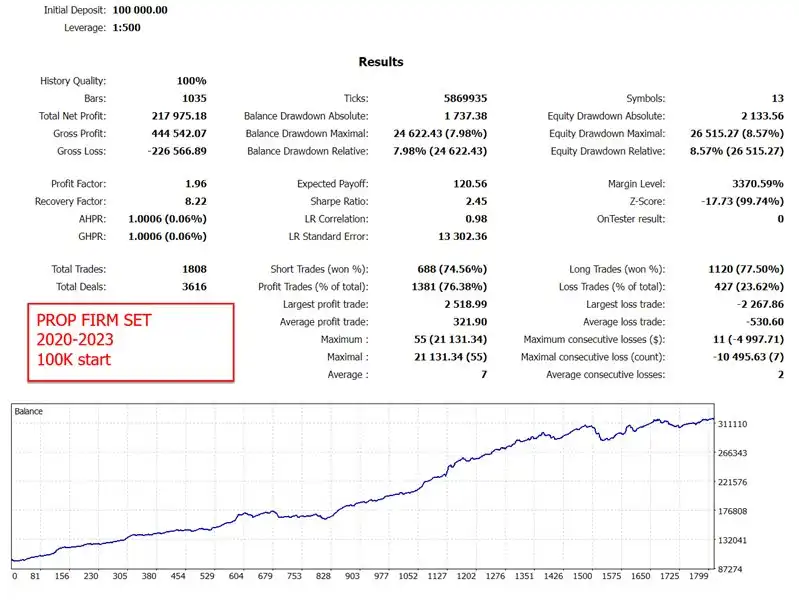
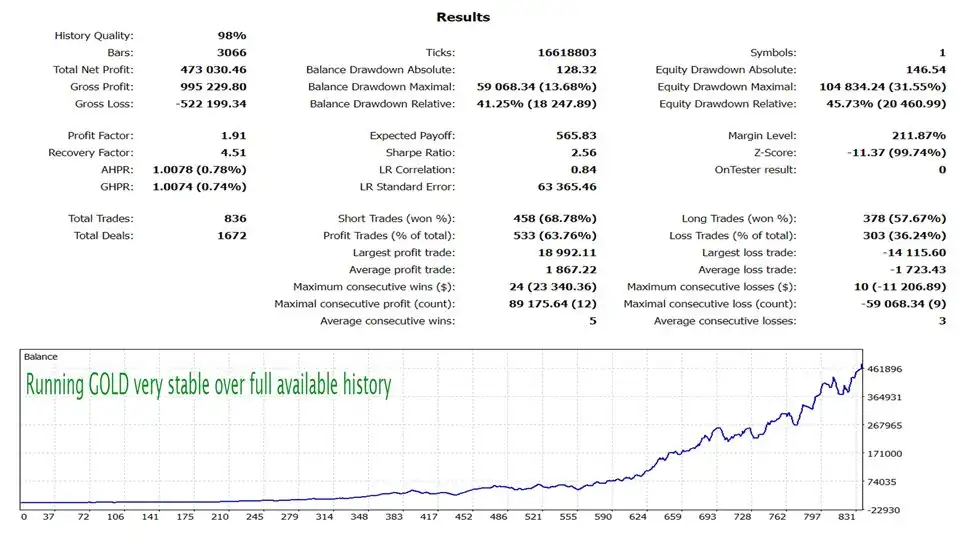
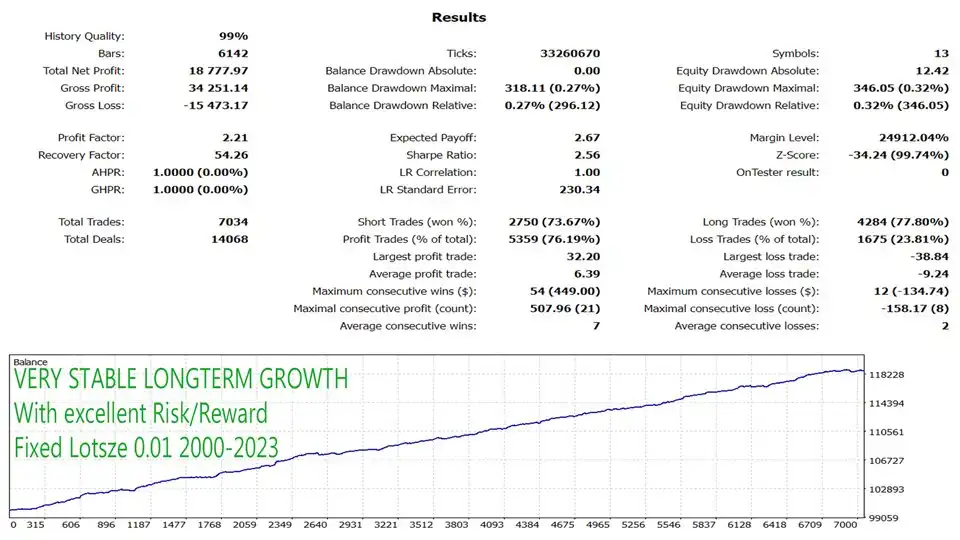
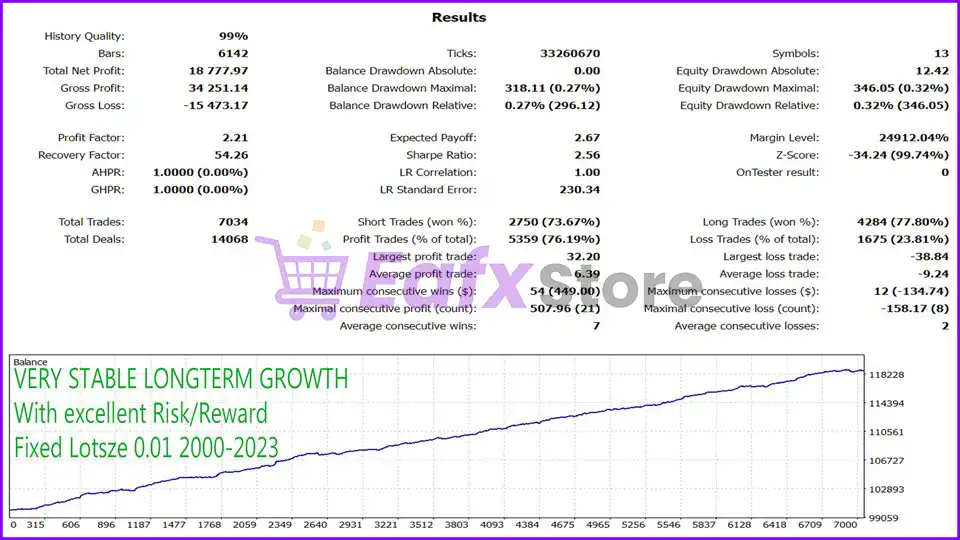
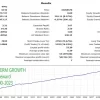
The advisor’s backtest trading results from 2000 to 2023 show impressive performance and high safety (Drawdown: 0.23%). The performance results show the advisor’s unlimited profit potential in the future, and its ability to overcome the challenges of the forex market.
Daytrade Pro Algo EA Backtests
Performance Rating by Users
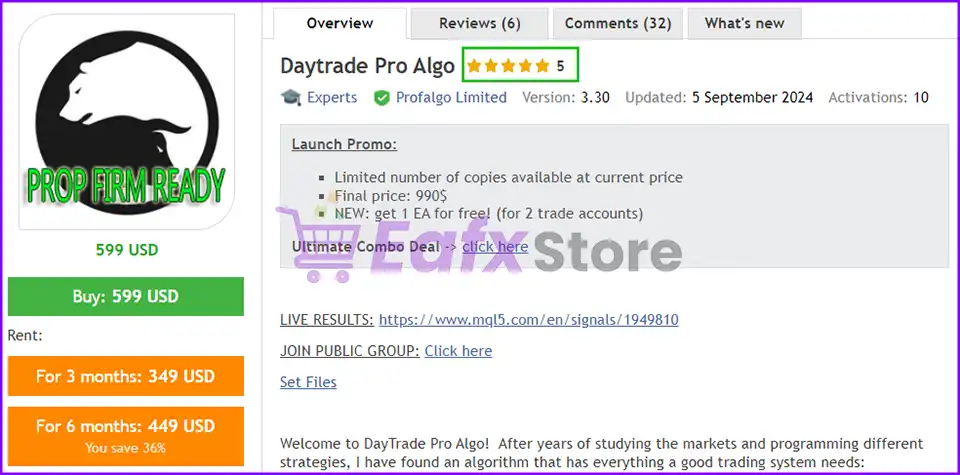
The Expert Advisor is highly rated by users on the MQL5 community for a long time, which shows that the advisor achieves stability in automated trading and has real efficiency.
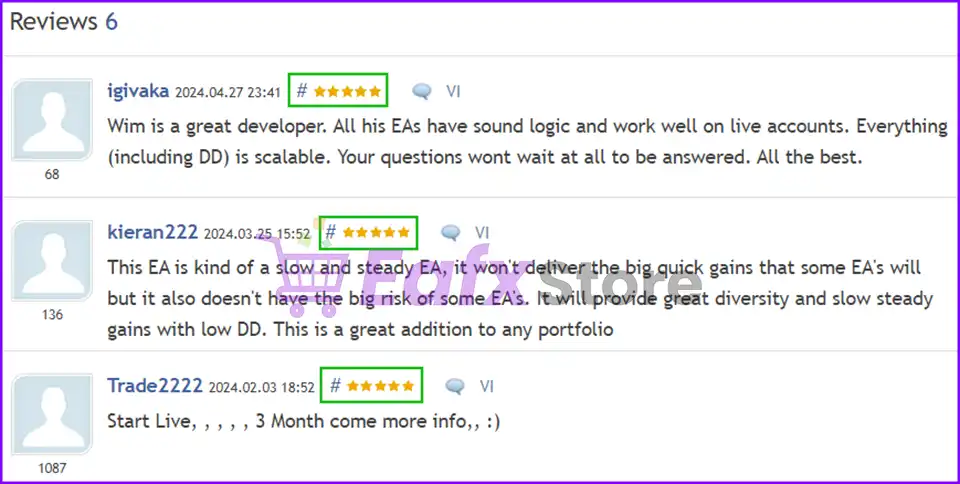
Daytrade Pro Algo EA Review
Recommended settings
Recommended settings and parameters to pay attention to from developers and experts:
| Features | Type |
|---|---|
| Trading platform | MetaTrader 4 (MT4) |
| Minimum / Recommended deposit | $400 |
| Minimum / Recommended leverage | 1:30 |
| Time frames | Any Times |
| Currency pairs | EURUSD, GBPUSD, USDJPY, AUDUSD, GBPJPY, USDCAD, EURJPY, EURNZD, EURAUD, NZDUSD, AUDJPY, CHFJPY and XAUUSD (Gold) |
| Setup files | Available |
| Product type | NoDLL / Fix |
| Additional services | Unlock and Decompile |
| Recommended brokers | Exness Broker, Icmarkets Broker |
| Recommended VPS | MyfxVPS.com ( Blue VPS, Golden VPS). Lowest Latency, 2 week Free Trial, 100% Free for 12-18 Months. |
Product Download Package?
The download package of the product suite includes:
Experts
✅ Daytrade Pro Algo EA v3.30_fix.ex4
SetFiles
✅ DaytradePro_Prop__1.set
✅ Daytrade_Pro_Max50sDD_highrisk.set
✅ Daytrade_Pro_Max204DD_mediumrisk.set
✅ Daytrade_Pro_Max91DD_lowrisk.set
➡️ Reviewed by David Easton
Conclusion
In short, Daytrade Pro Algo EA is a broker-independent and spread-independent trading system that applies price action logic, daily support/resistance, and robust risk management with SL, TP, and trailing stop. Verified by Myfxbook with +65% gain and low 15.6% drawdown, it delivers long-term stability and strong profitability. User-friendly with simple setup and flexible lot management, it offers a reliable solution for automated Forex trading.
🔢 Daytrade Pro Algo MT4 Settings Guide
Daytrade Pro Algo MT4 is an automated trading Expert Advisor designed for systematic day trading across multiple major and cross-currency pairs. Its configuration includes flexible multi-pair trading, virtual expiration, trade limits, position sizing, risk-per-pair controls, Prop Firm-oriented settings and free-margin protection.
Traders can also adjust entry, Stop Loss, Take Profit, trailing Stop Loss, trailing Take Profit, and break-even parameters to fine-tune the EA’s trade management behavior.
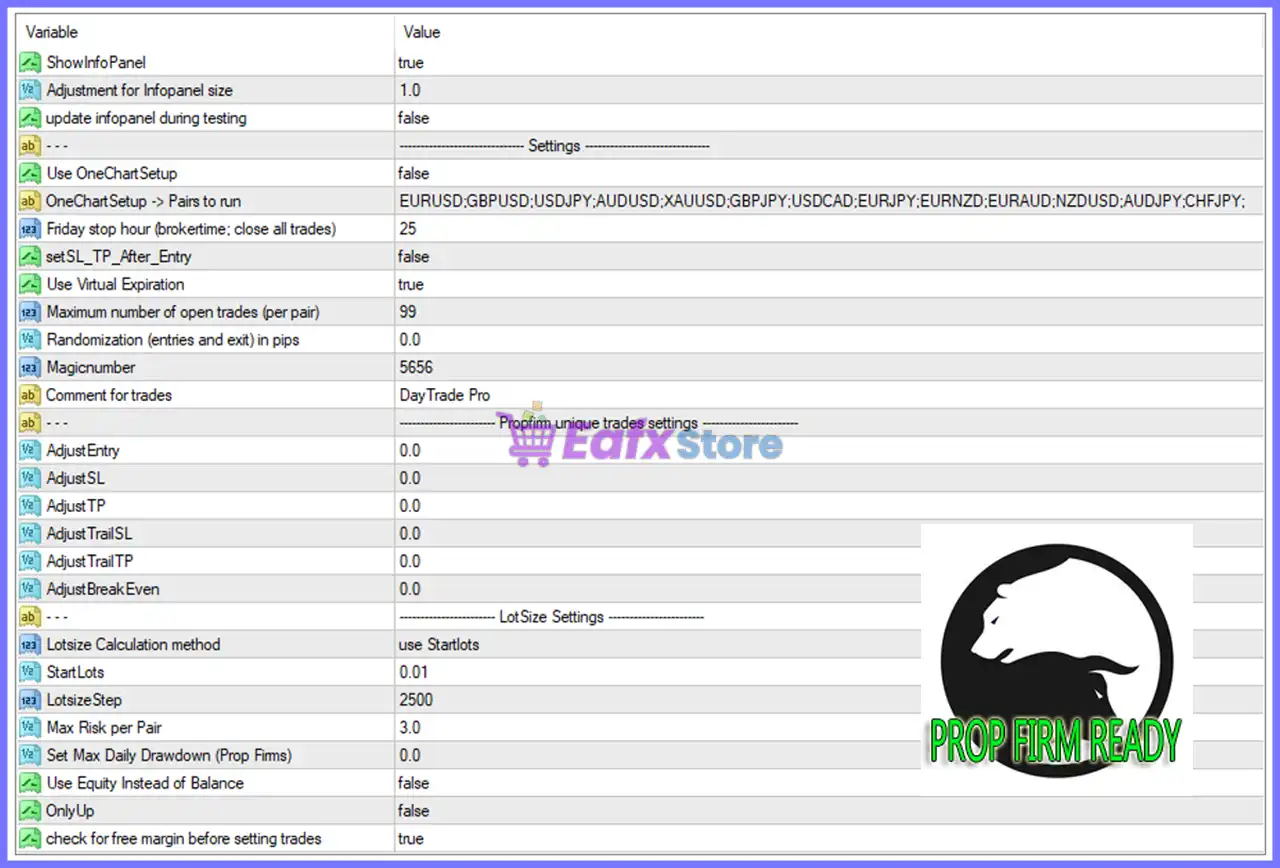
Daytrade Pro Algo MT4 Settings Panel
🔢 Daytrade Pro Algo MT4 Input Settings
🎯 General Information Panel
🔹 ShowInfoPanel = true — Enables the information panel on the MT4 chart so users can view relevant EA information while it is running.
🔹 Adjustment for Infopanel size = 1.0 — Sets the information-panel size adjustment to 1.0, representing the configured display scale.
🔹 update infopanel during testing = false — Disables information-panel updates while the EA is running inside the MT4 Strategy Tester.
🎯 General Trading Settings
🔹 Use OneChartSetup = false — Disables the One Chart Setup mode, meaning the EA is not configured to operate through a single chart using the listed currency pairs.
🔹 OneChartSetup → Pairs to run = EURUSD;GBPUSD;USDJPY;AUDUSD;XAUUSD;GBPJPY;USDCAD;EURJPY;EURNZD;EURAUD;NZDUSD;AUDJPY;CHFJPY; — Defines the currency pairs and trading symbols configured for the One Chart Setup mode, including EURUSD, GBPUSD, USDJPY, AUDUSD, XAUUSD, GBPJPY, USDCAD, EURJPY, EURNZD, EURAUD, NZDUSD, AUDJPY, and CHFJPY.
🔹 Friday stop hour (broker time: close all trades) = 25 — Sets the Friday stop-hour parameter to 25 for the configured broker-time schedule and trade-closing logic.
🔹 setSL_TP_After_Entry = false — Disables the option to set Stop Loss and Take Profit after the position has been opened.
🔹 Use Virtual Expiration = true — Enables virtual expiration management for trades according to the EA’s internal expiration logic.
🔹 Maximum number of open trades (per pair) = 99 — Allows a maximum configured limit of 99 open trades per pair.
🔹 Randomization (entries and exit) in pips = 0.0 — Sets entry and exit randomization to 0.0 pips, meaning no additional randomization is configured.
🔹 Magicnumber = 5656 — Sets the unique Magic Number to 5656, allowing the EA to identify and manage its own trades.
🔹 Comment for trades = DayTrade Pro — Sets DayTrade Pro as the trade comment used to identify positions opened by the EA.
🎯 Prop Firm Unique Trades Settings
🔹 AdjustEntry = 0.0 — Sets the entry adjustment value to 0.0, meaning no additional entry adjustment is configured.
🔹 AdjustSL = 0.0 — Sets the Stop Loss adjustment to 0.0, leaving the configured Stop Loss level unchanged by this adjustment parameter.
🔹 AdjustTP = 0.0 — Sets the Take Profit adjustment to 0.0, meaning no additional Take Profit adjustment is configured.
🔹 AdjustTrailSL = 0.0 — Sets the trailing Stop Loss adjustment to 0.0.
🔹 AdjustTrailTP = 0.0 — Sets the trailing Take Profit adjustment to 0.0.
🔹 AdjustBreakEven = 0.0 — Sets the break-even adjustment to 0.0, meaning no additional break-even offset is configured.
🎯 Lot Size Settings
🔹 Lotsize Calculation method = use Startlots — Selects use Startlots as the active method for calculating the initial trading volume.
🔹 StartLots = 0.01 — Sets the starting lot size to 0.01 lots, establishing the initial trade volume.
🔹 LotsizeStep = 2500 — Sets the account-balance step used by the EA’s lot-size calculation to 2500.
🔹 Max Risk per Pair = 3.0 — Sets the maximum configured risk per trading pair to 3.0.
🔹 Set Max Daily Drawdown (Prop Fimms) = 0.0 — Sets the maximum daily drawdown parameter for Prop Firm management to 0.0.
🔹 Use Equity Instead of Balance = false — Disables equity-based lot-size calculation, meaning the EA does not use equity instead of balance under this setting.
🔹 OnlyUp = false — Disables the OnlyUp option in the lot-size calculation system.
🔹 check for free margin before setting trades = true — Enables free-margin checking before the EA attempts to place trades, helping verify that sufficient available margin exists.
🔢 Daytrade Pro Algo MT4 Risk Management Overview
The displayed Daytrade Pro Algo MT4 configuration provides several controls for automated multi-pair trading and account management. The EA is configured with StartLots = 0.01, LotsizeStep = 2500, and Max Risk per Pair = 3.0, allowing the position-sizing system to be configured around account balance and pair-specific risk.
The EA also includes a dedicated Prop Firm settings section with AdjustEntry = 0.0, AdjustSL = 0.0, AdjustTP = 0.0, AdjustTrailSL = 0.0, AdjustTrailTP = 0.0, and AdjustBreakEven = 0.0. These values indicate that no additional numerical adjustments are configured in the displayed setup.
For trade protection and account management, Use Virtual Expiration = true and check for free margin before setting trades = true are enabled. Meanwhile, Set Max Daily Drawdown (Prop Fimms) = 0.0 means the displayed configuration does not specify a positive daily drawdown limit through this particular parameter.
The EA also uses Magicnumber = 5656 and the trade comment DayTrade Pro to distinguish its positions. The maximum configured number of open trades is 99 per pair, while entry and exit randomization remains disabled with Randomization = 0.0 pips.
🔢 Multi-Pair Trading Configuration
The displayed One Chart Setup list contains multiple Forex pairs as well as XAUUSD:
🔹 EURUSD — Included in the configured One Chart Setup pair list.
🔹 GBPUSD — Included in the configured One Chart Setup pair list.
🔹 USDJPY — Included in the configured One Chart Setup pair list.
🔹 AUDUSD — Included in the configured One Chart Setup pair list.
🔹 XAUUSD — Gold is included in the configured One Chart Setup pair list.
🔹 GBPJPY — Included in the configured One Chart Setup pair list.
🔹 USDCAD — Included in the configured One Chart Setup pair list.
🔹 EURJPY — Included in the configured One Chart Setup pair list.
🔹 EURNZD — Included in the configured One Chart Setup pair list.
🔹 EURAUD — Included in the configured One Chart Setup pair list.
🔹 NZDUSD — Included in the configured One Chart Setup pair list.
🔹 AUDJPY — Included in the configured One Chart Setup pair list.
🔹 CHFJPY — Included in the configured One Chart Setup pair list.
However, Use OneChartSetup = false in the displayed configuration, so this listed multi-symbol setup is not enabled by that input.
🔢 Conclusion
Daytrade Pro Algo MT4 offers a broad set of configuration options for automated day trading, including multi-pair symbol selection, trade identification, virtual expiration, maximum open trades, lot-size calculation, risk controls, Prop Firm-specific adjustments, and free-margin protection.
The displayed setup uses StartLots = 0.01, LotsizeStep = 2500, Max Risk per Pair = 3.0, Magicnumber = 5656, and Use Virtual Expiration = true. It also keeps all Prop Firm adjustment values at 0.0 and enables free-margin verification before placing trades.
Because the appropriate settings depend on the trading account, broker conditions, symbol specifications, and risk tolerance, traders should test Daytrade Pro Algo MT4 with their intended configuration before using it in a live environment.
User Reviews
Only logged in customers who have purchased this product may leave a review.
❓ What is the minimum deposit required to use Daytrade Pro Algo EA?
The recommended minimum deposit is $400, though higher capital can improve risk-adjusted performance.
❓ Which currency pairs can the Daytrade Pro Algo EA trade?
It works best on EURUSD daily chart (OneChartSetup) but also supports multiple pairs including GBPUSD, USDJPY, AUDUSD, GBPJPY, USDCAD, EURJPY, EURNZD, EURAUD, NZDUSD, AUDJPY, CHFJPY, and XAUUSD (Gold).
❓ Does the Daytrade Pro Algo EA depend on brokers or spreads?
No, the EA is broker-independent and spread-independent, ensuring stable performance across most MT4 brokers.
❓ What trading strategy does Daytrade Pro Algo use?
It is a price action-based system, trading daily support and resistance levels with built-in risk management.
❓ How often does the Daytrade Pro Algo EA trade?
On average, it executes around 10 trades per week, providing a balance between activity and stability.
❓ How does the Daytrade Pro Algo EA manage risk?
It applies stop-loss, take-profit, and trailing stop-loss to protect capital and secure profits.
❓ Are the results verified?
Yes, the EA’s performance is verified on Myfxbook, showing a +65.64% gain with 15.61% drawdown over 2 years of real trading.
❓ What do backtests show about Daytrade Pro Algo EA?
Backtests from 2000 to 2023 demonstrate impressive performance, minimal 0.23% drawdown, and long-term profitability potential.
🔥 Get This EA for FREE with Our Membership! 🚀🚀
Unlock access to this EA, premium Indicators, and exclusive trading tools completely FREE with any of our Membership Plans! Thousands of traders already benefit from our VIP library—join them and level up your trading instantly. Choose Your Membership:
- SPECIAL – 1 Month Membership
- GOLD – 1 Year Membership
- PREMIUM – 1 Year Membership
-
 Original price was: $999.00.$89.00Current price is: $89.00.
 -
 Original price was: $3,000.00.$89.00Current price is: $89.00.
 -
 Original price was: $1,400.00.$89.00Current price is: $89.00.
 -
 Original price was: $1,300.00.$89.00Current price is: $89.00.
-
 1Original price was: $599.00.$59.00Current price is: $59.00.
 -
 3Original price was: $999.00.$69.00Current price is: $69.00.
 -
 3Original price was: $999.00.$69.00Current price is: $69.00.
 -
 2Original price was: $898.00.$59.00Current price is: $59.00.
There are no reviews yet.