
🔢 DAX Robot MT5 Settings Explained – Complete Parameter Guide
DAX Robot MT5 is an automated trading Expert Advisor designed specifically for the DE40 (DAX) index on MetaTrader 5. It combines configurable trading sessions, built-in news protection, flexible money management, trend filtering, risk control, and position management features to help traders automate index trading while maintaining disciplined risk exposure.
🔢 DAX Robot MT5 Settings
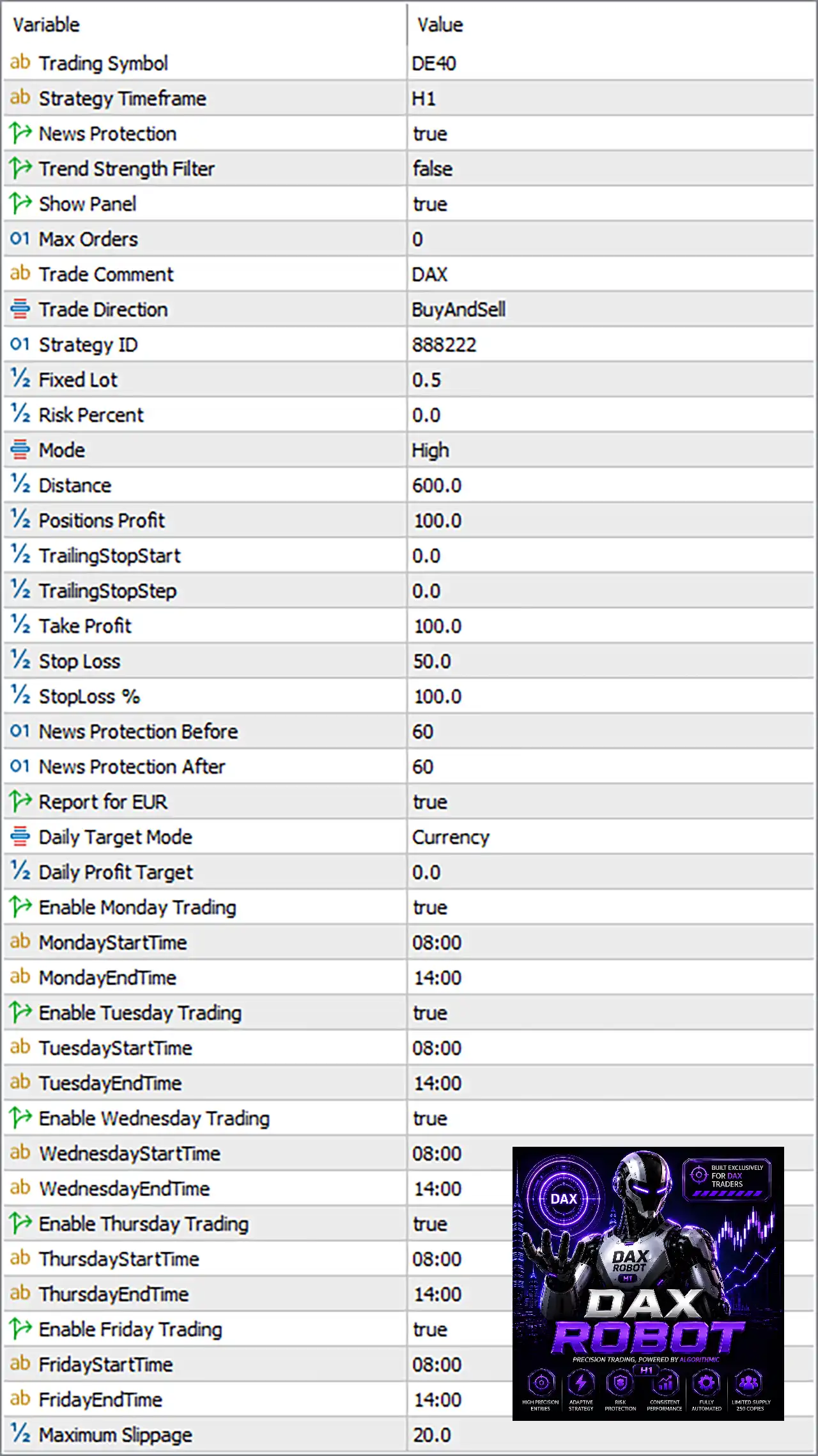
Below are the details of the parameters in the advisor’s trading system settings table:
🔶 General Settings
🔹 Trading Symbol = DE40 – Specifies DE40 (DAX) as the trading instrument used by the EA.
🔹 Strategy Timeframe = H1 – Executes the trading strategy using the H1 (1 Hour) timeframe.
🔹 News Protection = true – Enables the built-in news filter to avoid trading around important economic events.
🔹 Trend Strength Filter = false – Disables the trend strength confirmation filter.
🔹 Show Panel = true – Displays the EA information panel directly on the trading chart.
🔹 Max Orders = 0 – Sets the maximum number of simultaneous orders. A value of 0 means no limit.
🔹 Trade Comment = DAX – Adds "DAX" as the comment for every trade opened by the EA.
🔹 Trade Direction = BuyAndSell – Allows the EA to open both Buy and Sell positions.
🔹 Strategy ID = 888222 – Assigns the unique Strategy ID 888222 to distinguish EA trades.
🔶 Money Management
🔹 Fixed Lot = 0.5 – Uses a fixed trading volume of 0.5 lots.
🔹 Risk Percent = 0.0 – Disables percentage-based position sizing.
🔹 Mode = High – Selects the High trading mode, typically representing a more aggressive trading profile.
🔶 Trade Management
🔹 Distance = 600.0 – Sets the minimum trade spacing or grid distance to 600.0 points.
🔹 Positions Profit = 100.0 – Defines the basket profit target at 100.0.
🔹 TrailingStopStart = 0.0 – Disables the trailing stop activation threshold.
🔹 TrailingStopStep = 0.0 – Disables incremental trailing stop movement.
🔹 Take Profit = 100.0 – Sets the Take Profit target to 100.0.
🔹 Stop Loss = 50.0 – Sets the Stop Loss distance to 50.0.
🔹 StopLoss % = 100.0 – Defines the maximum Stop Loss percentage as 100.0%.
🔶 News Protection Settings
🔹 News Protection Before = 60 – Stops opening new trades 60 minutes before scheduled news events.
🔹 News Protection After = 60 – Resumes trading 60 minutes after news releases.
🔹 Report for EUR = true – Applies the news filter to EUR-related economic events.
🔶 Daily Target Settings
🔹 Daily Target Mode = Currency – Measures the daily profit target using account currency.
🔹 Daily Profit Target = 0.0 – No daily profit target is applied when set to 0.0.
🔶 Monday Trading
🔹 Enable Monday Trading = true – Allows trading on Monday.
🔹 MondayStartTime = 08:00 – Trading begins at 08:00 on Monday.
🔹 MondayEndTime = 14:00 – Trading stops at 14:00 on Monday.
🔶 Tuesday Trading
🔹 Enable Tuesday Trading = true – Allows trading on Tuesday.
🔹 TuesdayStartTime = 08:00 – Trading begins at 08:00 on Tuesday.
🔹 TuesdayEndTime = 14:00 – Trading stops at 14:00 on Tuesday.
🔶 Wednesday Trading
🔹 Enable Wednesday Trading = true – Allows trading on Wednesday.
🔹 WednesdayStartTime = 08:00 – Trading begins at 08:00 on Wednesday.
🔹 WednesdayEndTime = 14:00 – Trading stops at 14:00 on Wednesday.
🔶 Thursday Trading
🔹 Enable Thursday Trading = true – Allows trading on Thursday.
🔹 ThursdayStartTime = 08:00 – Trading begins at 08:00 on Thursday.
🔹 ThursdayEndTime = 14:00 – Trading stops at 14:00 on Thursday.
🔶 Friday Trading
🔹 Enable Friday Trading = true – Allows trading on Friday.
🔹 FridayStartTime = 08:00 – Trading begins at 08:00 on Friday.
🔹 FridayEndTime = 14:00 – Trading stops at 14:00 on Friday.
🔶 Execution Settings
🔹 Maximum Slippage = 20.0 – Allows a maximum execution slippage of 20.0 points before rejecting an order.
🔢 Conclusion
DAX Robot MT5 is a dedicated automated trading solution for the DE40 (DAX) index, offering a clean combination of scheduled trading sessions, integrated news protection, flexible money management and customizable risk controls.
With adjustable trade direction, stop loss, take profit, position management, and execution parameters, traders can optimize the EA to match different market conditions and risk preferences while maintaining disciplined automated trading.
🔢 FAQs
❓ Which market is DAX Robot MT5 designed for?
DAX Robot MT5 is specifically configured to trade the DE40 (DAX) index on the MetaTrader 5 platform.
❓ Does DAX Robot MT5 include a built-in news filter?
Yes. The EA includes a configurable news protection system that pauses trading before and after important EUR economic news releases.
❓ Can I trade only Buy or only Sell positions?
Yes. The Trade Direction parameter can be adjusted to allow Buy only, Sell only, or both Buy and Sell trading.
❓ How is position sizing managed in DAX Robot MT5?
The EA supports both fixed lot sizing and percentage-based risk management, although this preset uses a fixed lot of 0.5.
❓ Can I customize the trading schedule?
Yes. The EA allows independent trading sessions for Monday through Friday, enabling traders to define precise start and end times for each trading day.



