


🔢 Bright Nest EA MT5 Settings Explained – Complete Parameter Guide
Bright Nest EA is an intelligent multi-currency Expert Advisor for MetaTrader 5 that focuses on adaptive market flow, controlled risk management, spread protection and dynamic trade execution.
The EA supports multiple Forex pairs, flexible lot sizing methods, advanced drawdown protection, trading session scheduling, and intelligent spread and liquidity filters, making it suitable for traders seeking a balanced automated trading solution.

🔢 Bright Nest EA MT5 Settings
Below are the details of the parameters in the advisor’s trading system settings table:
🔶 General Settings
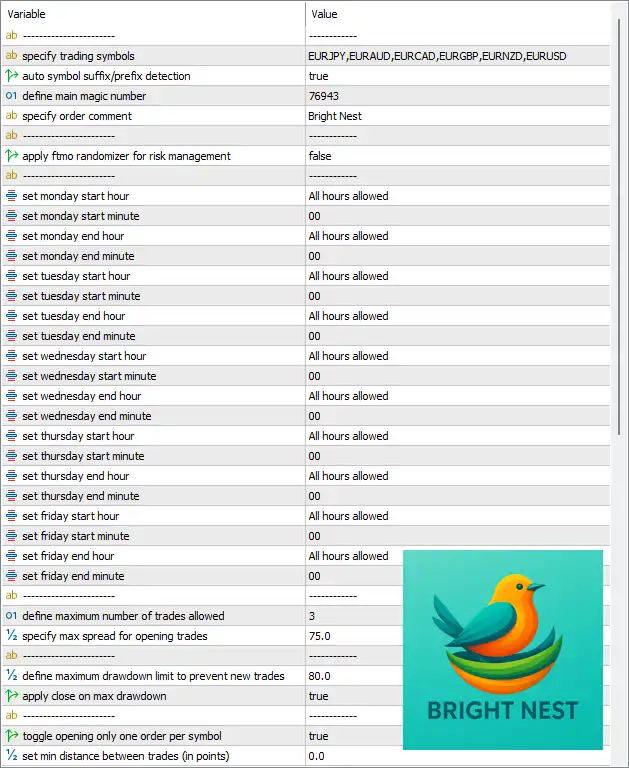
🔹 Specify trading symbols = EURJPY, EURAUD, EURCAD, EURGBP, EURNZD, EURUSD – Defines the list of currency pairs that the EA is allowed to trade.
🔹 Auto symbol suffix/prefix detection = true – Automatically detects broker-specific symbol suffixes or prefixes.
🔹 Define main magic number = 76943 – Assigns the unique Magic Number 76943 to identify all trades opened by the EA.
🔹 Specify order comment = Bright Nest – Adds "Bright Nest" as the comment for every trade.
🔹 Apply FIFO randomizer for risk management = false – Disables the FIFO randomization feature used for additional risk diversification.
🔶 Trading Schedule
🔹 Set Monday start hour = All hours allowed – Allows trading throughout Monday.
🔹 Set Monday start minute = 00 – Monday trading begins at minute 00.
🔹 Set Monday end hour = All hours allowed – Allows trading until the end of Monday.
🔹 Set Monday end minute = 00 – Monday ending minute setting.
🔹 Set Tuesday start hour = All hours allowed – Allows trading throughout Tuesday.
🔹 Set Tuesday start minute = 00 – Tuesday trading starts at minute 00.
🔹 Set Tuesday end hour = All hours allowed – Allows trading until the end of Tuesday.
🔹 Set Tuesday end minute = 00 – Tuesday ending minute setting.
🔹 Set Wednesday start hour = All hours allowed – Allows trading throughout Wednesday.
🔹 Set Wednesday start minute = 00 – Wednesday trading starts at minute 00.
🔹 Set Wednesday end hour = All hours allowed – Allows trading until the end of Wednesday.
🔹 Set Wednesday end minute = 00 – Wednesday ending minute setting.
🔹 Set Thursday start hour = All hours allowed – Allows trading throughout Thursday.
🔹 Set Thursday start minute = 00 – Thursday trading starts at minute 00.
🔹 Set Thursday end hour = All hours allowed – Allows trading until the end of Thursday.
🔹 Set Thursday end minute = 00 – Thursday ending minute setting.
🔹 Set Friday start hour = All hours allowed – Allows trading throughout Friday.
🔹 Set Friday start minute = 00 – Friday trading starts at minute 00.
🔹 Set Friday end hour = All hours allowed – Allows trading until the configured Friday closing time.
🔹 Set Friday end minute = 00 – Friday ending minute setting.
🔶 Trading Restrictions
🔹 Define maximum number of trades allowed = 3 – Limits the EA to a maximum of 3 simultaneous trades.
🔹 Specify max spread for opening trades = 75.0 – Prevents opening new trades when the spread exceeds 75.0 points.
🔹 Define maximum drawdown limit to prevent new trades = 80.0 – Stops opening new positions when account drawdown reaches 80.0%.
🔹 Apply close on max drawdown = true – Automatically closes positions if the maximum drawdown threshold is reached.
🔹 Toggle opening only one order per symbol = true – Restricts the EA to one active trade per trading symbol.
🔹 Set minimum distance between trades (in points) = 0.0 – No minimum distance is required between consecutive entries.
🔶 News Filter
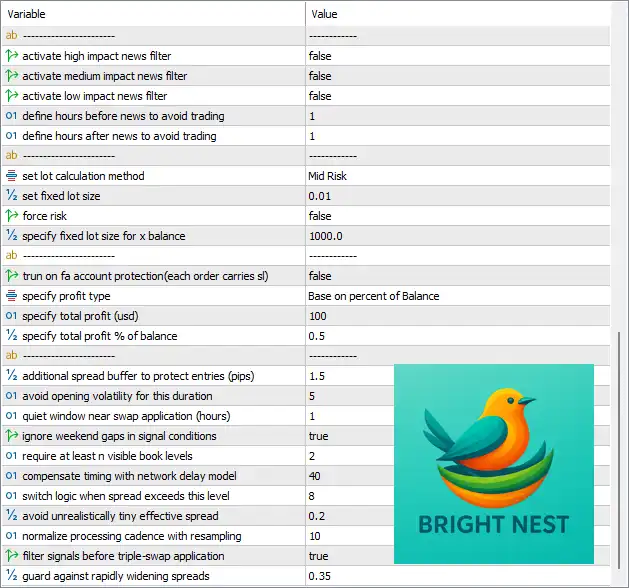
🔹 Activate high impact news filter = false – High-impact news filtering is disabled.
🔹 Activate medium impact news filter = false – Medium-impact news filtering is disabled.
🔹 Activate low impact news filter = false – Low-impact news filtering is disabled.
🔹 Define hours before news to avoid trading = 1 – Stops opening trades 1 hour before scheduled news events.
🔹 Define hours after news to avoid trading = 1 – Resumes trading 1 hour after news releases.
🔶 Money Management
🔹 Set lot calculation method = Mid Risk – Uses the predefined Mid Risk money management profile.
🔹 Set fixed lot size = 0.01 – Uses a starting fixed lot size of 0.01.
🔹 Force risk = false – Disables forced risk percentage calculation.
🔹 Specify fixed lot size for x balance = 1000.0 – Uses 0.01 lots for every $1000.0 of account balance when balance-based sizing is enabled.
🔹 Turn on FA account protection (each order carries SL) = false – Disables individual stop-loss protection for fund management accounts.
🔶 Profit Management
🔹 Specify profit type = Base on percent of Balance – Calculates profit targets as a percentage of account balance.
🔹 Specify total profit (USD) = 100 – Sets a basket profit target of 100 USD.
🔹 Specify total profit % of balance = 0.5 – Sets a total profit target equal to 0.5% of account balance.
🔶 Advanced Protection & Execution
🔹 Additional spread buffer to protect entries (pips) = 1.5 – Adds an extra 1.5-pip spread safety margin before opening trades.
🔹 Avoid opening volatility for this duration = 5 – Avoids entering trades during the first 5 units of configured high-volatility periods.
🔹 Quiet window near swap application (hours) = 1 – Avoids trading 1 hour around daily swap rollover.
🔹 Ignore weekend gaps in signal conditions = true – Prevents weekend price gaps from triggering false entry signals.
🔹 Require at least 1 visible book levels = 2 – Requires at least 2 visible market depth levels before executing trades.
🔹 Compensate timing with network delay model = 40 – Applies a latency compensation factor of 40 for order timing.
🔹 Switch logic when spread exceeds this level = 8 – Changes execution logic when spread exceeds 8 points.
🔹 Avoid unrealistically tiny effective spread = 0.2 – Ignores spreads below 0.2 to prevent unrealistic execution conditions.
🔹 Normalize processing cadence with resampling = 10 – Uses a resampling interval of 10 for internal signal processing.
🔹 Filter signals before triple-swap application = true – Prevents opening trades immediately before triple-swap periods.
🔹 Guard against rapidly widening spreads = 0.35 – Adds protection against sudden spread expansions greater than 0.35.
🔢 Conclusion
Bright Nest EA MT5 is a sophisticated multi-currency Expert Advisor designed for traders who prioritize adaptive execution, disciplined risk management, and stable long-term performance. With configurable trading sessions, intelligent money management, drawdown protection, spread filtering, and advanced execution safeguards, the EA provides extensive flexibility while maintaining strong control over trading risk. Proper optimization of these settings allows traders to tailor Bright Nest EA MT5 to different brokers, account sizes, and market environments.
🔢 FAQs
❓ What symbols can Bright Nest EA MT5 trade?
By default, the EA supports EURJPY, EURAUD, EURCAD, EURGBP, EURNZD, and EURUSD, but these symbols can be customized.
❓ Does Bright Nest EA MT5 include a news filter?
Yes. It includes configurable filters for high-, medium-, and low-impact news, along with adjustable trading suspension periods before and after news events.
❓ How does the money management system work?
The EA supports Mid Risk mode, fixed lot sizing, and balance-based lot calculations using configurable account balance ratios.
❓ Can Bright Nest EA MT5 protect against excessive drawdown?
Yes. It features maximum drawdown protection, prevents opening new trades after reaching the configured limit, and can automatically close all positions when necessary.
❓ Does Bright Nest EA MT5 include spread and execution protection?
Yes. The EA provides maximum spread filters, spread buffers, rollover protection, latency compensation, liquidity checks, and rapid spread expansion safeguards to improve execution quality.



