







Cable Brain MT5 (Latest version) – GroupBuy
Select a variant to see availability.
Quick Verdict – Intelligent Adaptive Grid Trading EA for GBPUSD
Cable Brain MT5 is an advanced grid-based Expert Advisor (EA) built exclusively for GBPUSD. Unlike conventional grid systems, it combines adaptive mean reversion, intelligent market analysis, and dynamic risk management to improve trade quality while protecting capital. Designed for traders seeking a professional automated grid solution with years of proven development behind it.
Best For
✅ GBPUSD (Cable) traders
✅ Experienced grid trading enthusiasts
✅ ECN and Raw Spread accounts
✅ Traders using VPS hosting
✅ Investors seeking adaptive mean reversion strategies
Overall Rating
9.6/10 ⭐⭐⭐⭐⭐
What is Cable Brain MT5?
Cable Brain MT5 is a professional automated Expert Advisor developed exclusively for GBPUSD on MetaTrader 5. Built upon years of research from successful systems including Gold Matrix, ChronomaX, Aussie Victor, and Neural Nexus, it introduces an intelligent grid engine that adapts to changing market conditions rather than blindly adding positions.
Instead of relying on a fixed grid distance, Cable Brain continuously evaluates volatility, price action, market regimes and risk before expanding its position structure. The result is a smarter grid strategy designed to maximize recovery opportunities while maintaining tighter risk control than traditional grid EAs.
 Vendor Website: View here
This is GroupBuy ==> How to Join
About the Developer
Cable Brain MT5 was created by Jesper Christensen, an experienced MQL5 developer with more than five years of algorithmic trading expertise and numerous highly rated Expert Advisors.
Some of the developer’s popular products include:
⭐ Gold Neural Core MT5
His EAs are widely recognized for combining advanced automation, intelligent market analysis and robust risk management.
How Does Cable Brain MT5 Work?
Intelligent Grid Engine
Rather than adding positions at fixed intervals, Cable Brain decides whether expanding the grid is statistically safe based on current market conditions.
Mean Reversion Strategy
The EA identifies overextended GBPUSD price movements and enters trades where probability favors a return toward equilibrium.
Adaptive Market Filters
Multiple filters analyze volatility, price action, trend strength, and market regime before allowing new grid levels.
Dynamic Position Management
Every open position is monitored continuously with adaptive exit logic and intelligent recovery management.
Automated Trading
Once configured, Cable Brain operates completely automatically with minimal user intervention.
Key Features of Cable Brain MT5
Intelligent Grid Management
Uses a proprietary adaptive grid algorithm that selectively expands positions instead of blindly averaging every market move.
Advanced Mean Reversion Engine
Targets statistically favorable reversal zones on GBPUSD using sophisticated price behavior analysis.
Adaptive Volatility Filters
Automatically adjusts trading decisions according to current volatility and changing market conditions.
Multi-LLayer Market Analysis
Combines price action recognition, trend detection, market regime analysis, and multi-timeframe confirmation before entering trades.
Professional AutoLot System
Automatically scales position sizes according to account balance while allowing manual risk customization.
Fully Automated Operation
Designed as a true “set-and-forget” trading system once appropriate risk parameters have been configured.
Historical Trading Results Performance
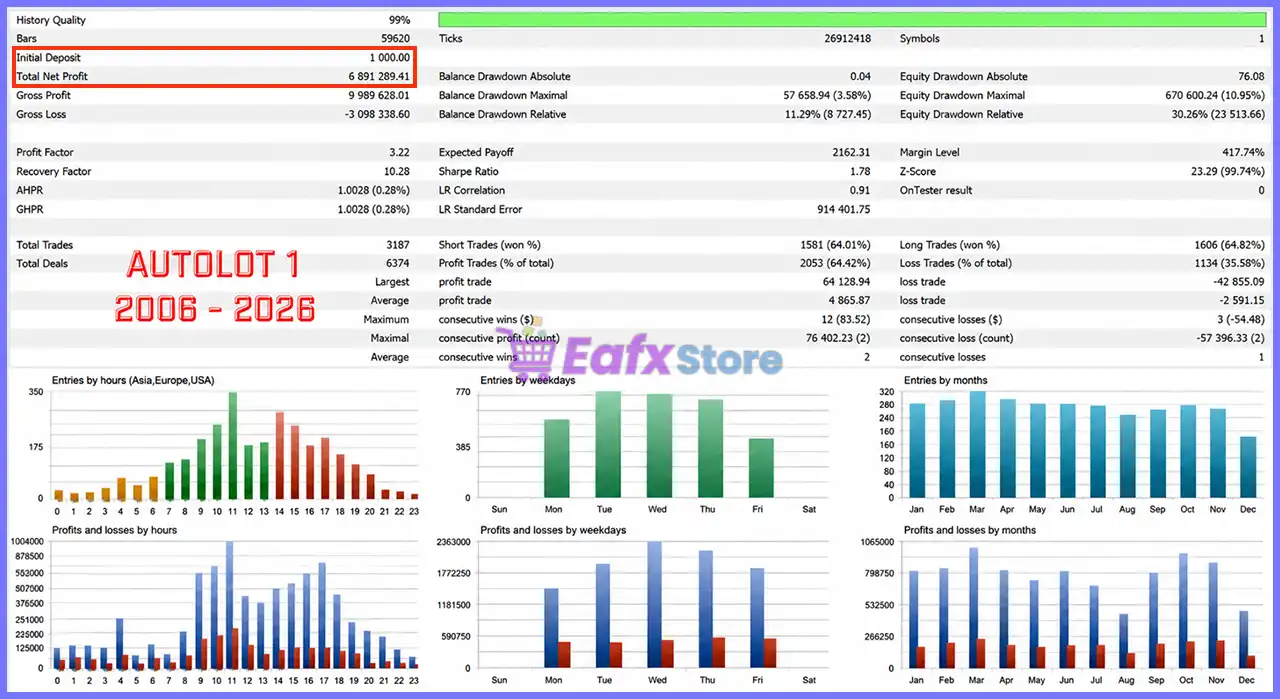
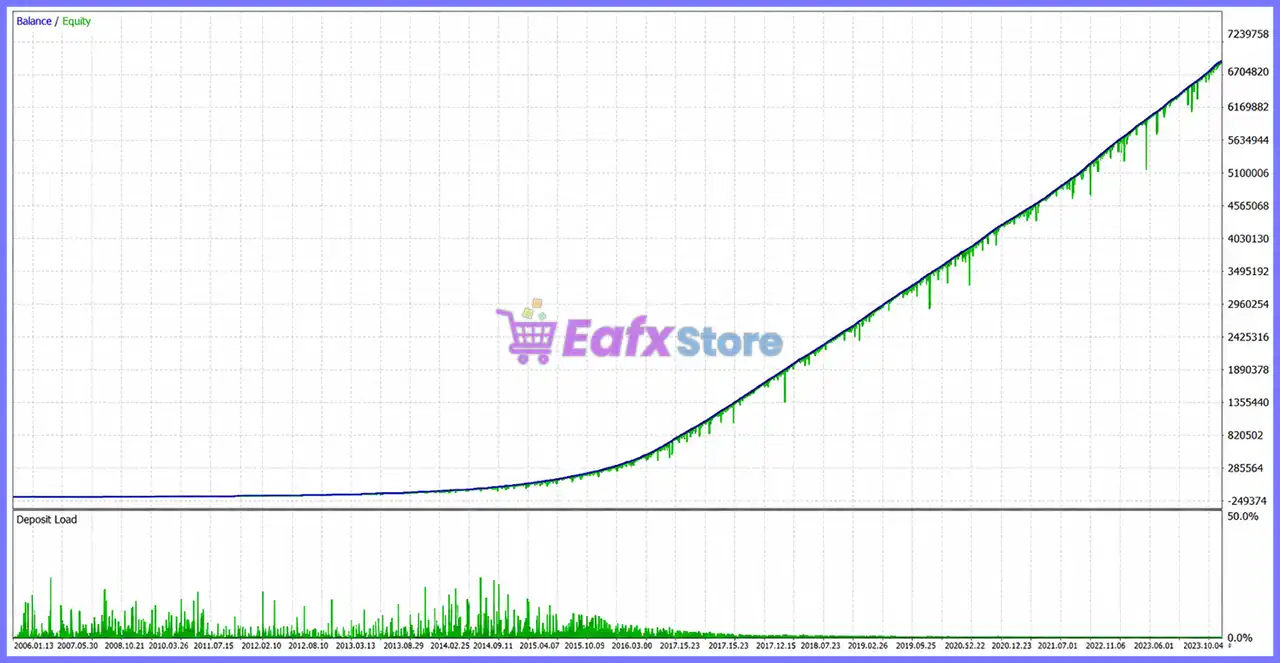
Backtest 1 (AutoLot Level 1 | 2006–2026)
Cable Brain MT5 Backtests Results
| Metric | Result |
|---|---|
| Initial Deposit | $1,000 |
| Total Net Profit | $6,891,289.41 |
| Profit Factor | 3.22 |
| Recovery Factor | 10.28 |
| Total Trades | 3,187 |
| Winning Trades | 64.42% |
| Balance Drawdown | 11.29% |
| Equity Drawdown | 30.26% |
Performance Analysis
This long-term 20-year backtest demonstrates the stability of Cable Brain’s adaptive grid algorithm. Despite thousands of trades across changing market conditions, the EA maintained a Profit Factor above 3, controlled drawdown, and consistent profitability while compounding account growth over an extended testing period.
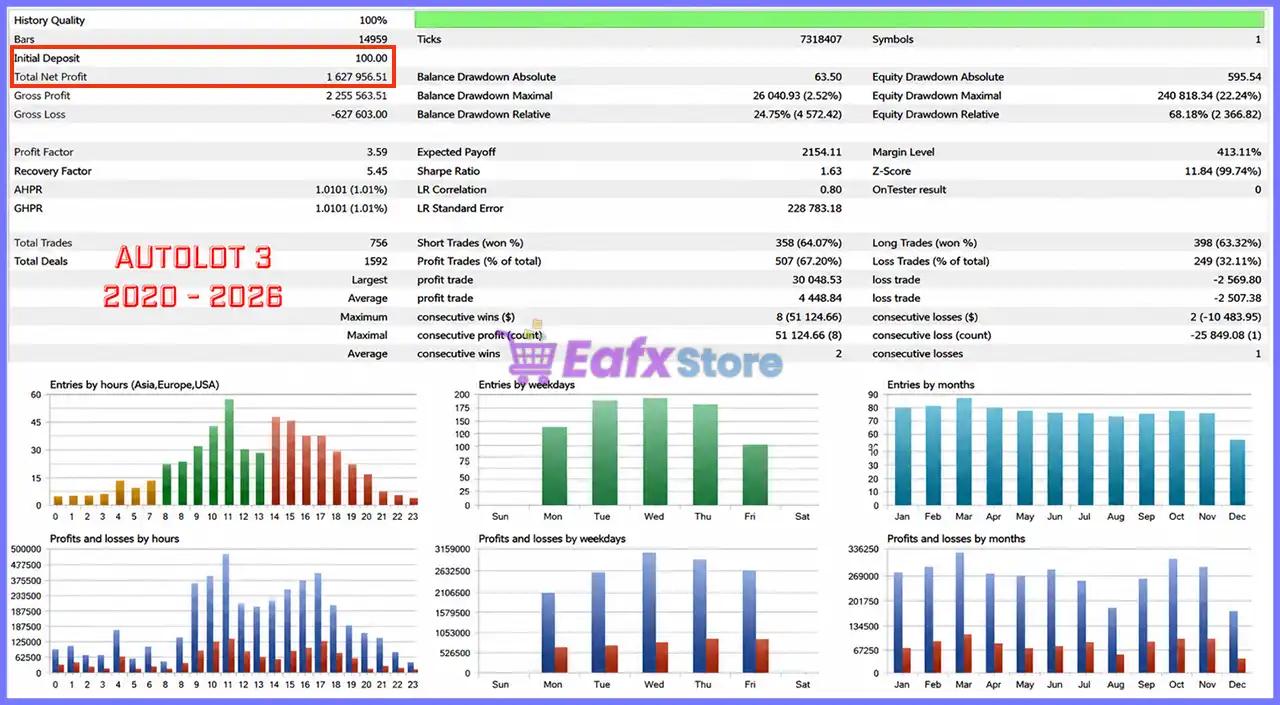
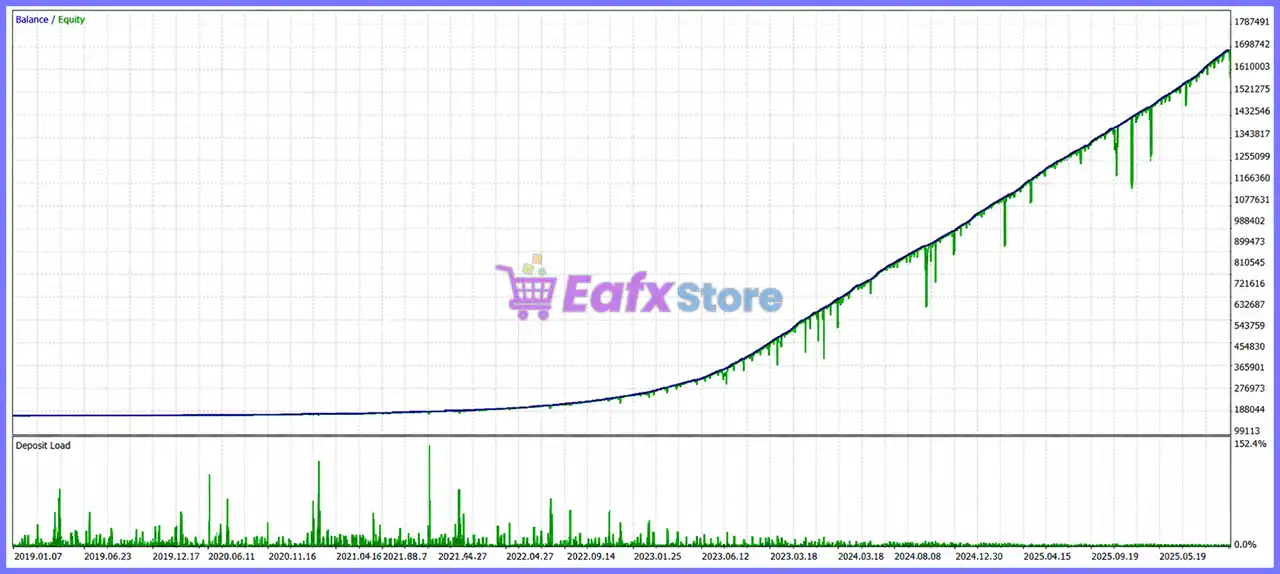
Backtest 2 (AutoLot Level 3 | 2020–2026)
Cable Brain MT5 Backtest Results
| Metric | Result |
|---|---|
| Initial Deposit | $100 |
| Total Net Profit | $1,627,956.51 |
| Profit Factor | 3.59 |
| Recovery Factor | 5.45 |
| Total Trades | 756 |
| Winning Trades | 67.20% |
| Balance Drawdown | 24.75% |
| Equity Drawdown | 68.18% |
Performance Analysis
The higher AutoLot configuration significantly increases profitability by allowing larger position sizes and more aggressive compounding. While returns improve substantially, drawdown also increases, making this profile more suitable for experienced traders with higher risk tolerance.
What Real Users Are Saying (User Reviews)
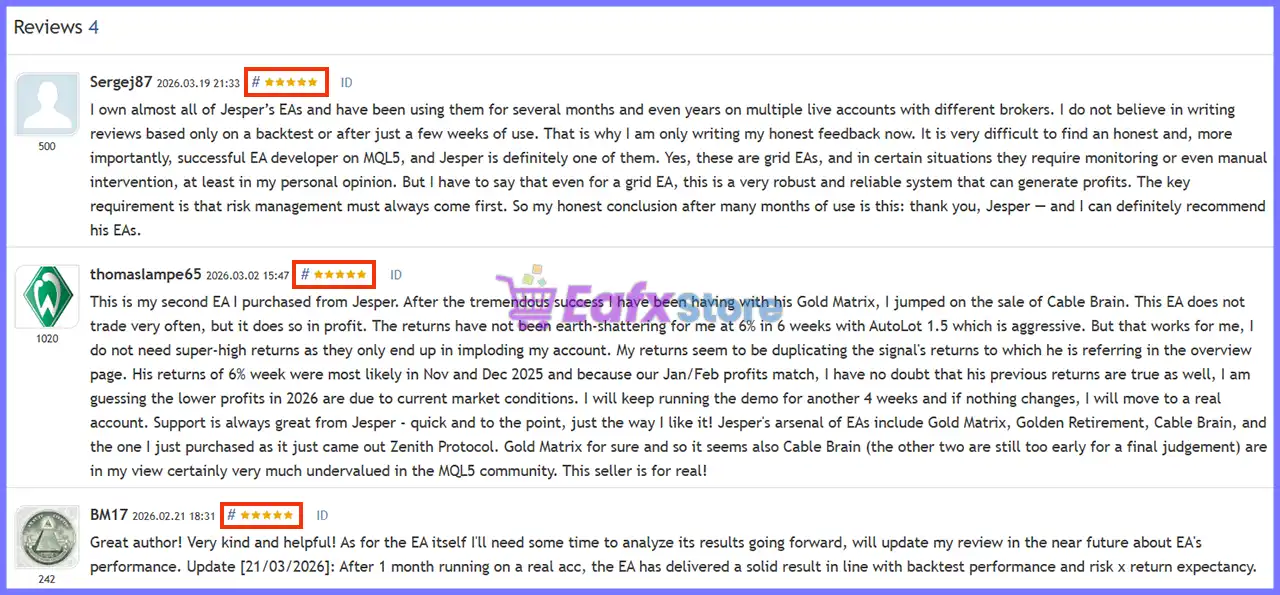
⭐⭐⭐⭐⭐ Sergej87 — March 19, 2026
“Owns nearly all of Jesper’s EAs and praises Cable Brain as a robust, reliable grid system. Recommends prioritizing proper risk management and considers Jesper one of the most trustworthy MQL5 developers.”
⭐⭐⭐⭐⭐ Thomaslampe65 — March 2, 2026
“Reports that Cable Brain trades selectively but delivers steady profits. Notes that live performance closely matches published signal results and highly values the developer’s responsive customer support.”
⭐⭐⭐⭐⭐ BM17 — February 21, 2026
“After one month on a real account, confirms that actual trading performance aligns well with historical backtests and expected risk-to-return characteristics.”
⭐⭐⭐⭐⭐ Indra Pratama — January 26, 2026
“States confidence in Jesper’s products after using several of his EAs and appreciates the developer’s continuous improvements and long-term commitment.”
User reviews of Cable Brain MT5
Why Cable Brain MT5 Stands Out
Proprietary Adaptive Grid Technology
Expands grid positions only when market conditions remain favorable.
Built on Proven Trading Systems
Combines years of experience from Gold Matrix, ChronomaX, Aussie Victor, and Neural Nexus.
Intelligent Market Analysis
Uses multiple advanced filters rather than relying solely on price distance.
GBPUSD Specialization
Entire strategy is optimized specifically for the behavior of the Cable currency pair.
Professional Automation
Offers a true institutional-style automated trading experience with minimal manual management.
Risk Management Features
Intelligent AutoLot Scaling
Automatically adjusts lot sizes based on account balance while allowing manual risk customization.
Dynamic Drawdown Protection
Includes configurable equity protection, emergency safeguards and maximum drawdown controls.
Smart Grid Expansion
Adds new positions only after multiple market filters confirm acceptable trading conditions.
News Event Protection
Can pause new entries around major economic releases while managing existing positions intelligently.
Cycle-Based Risk Controls
Supports cycle Stop Loss, configurable maximum active cycles, and equity-based trading suspension.
Recommended Trading Conditions
| Features | Type |
|---|---|
| Trading platform | MetaTrader 5 (MT5) |
| Time frames | Any |
| Currency pairs | GBPUSD, EURUSD |
| Minimum / Recommended deposit | $1,000 ($10 Cent Account) |
| Minimum / Recommended leverage | 1:30+ |
| Account type | ECN / Raw Spread |
| Additional services | Unlock and Decompile |
| Recommended brokers | Exness Broker, Icmarkets Broker |
| Recommended VPS | MyfxVPS.com (Blue VPS, Golden VPS). Lowest Latency, 2 week Free Trial, 100% Free for 12-18 Months. |
Product Download Package?
The download package of the product suite includes:
 Setting (If Any).docx
Installation Guide.docx
 Reviewed by David Easton
Weaknesses and Risk Warnings
🔹 Grid trading naturally carries higher risk during prolonged one-directional trends.
🔹 Higher AutoLot levels may significantly increase drawdown.
🔹 Performance depends on broker execution quality, spreads, and slippage.
🔹 Continuous VPS operation is strongly recommended.
🔹 Proper capital allocation and conservative risk settings remain essential.
🔹 Historical backtests cannot guarantee future trading performance.
Who Should Use Cable Brain MT5?
Cable Brain MT5 is best suited for:
🔹 Experienced GBPUSD traders.
🔹 Traders familiar with professional Grid strategies.
🔹 Investors seeking adaptive mean reversion systems.
🔹 Users wanting advanced automated portfolio management.
🔹 Traders who prioritize intelligent risk control over aggressive trade frequency.
🔹 VPS users operating MetaTrader 5 continuously.
Final Verdict
Cable Brain MT5 represents a significant evolution in automated grid trading by combining adaptive mean reversion, intelligent market filtering, and professional risk management into one sophisticated trading engine. Rather than following a traditional fixed-grid approach, it evaluates market conditions before expanding positions, helping improve trade quality while reducing unnecessary exposure.
Supported by impressive long-term backtests, positive customer feedback, and the proven development experience of Jesper Christensen, Cable Brain MT5 is an excellent choice for traders looking for a next-generation automated GBPUSD Expert Advisor that balances profitability, flexibility, and disciplined risk management.
🔢 Cable Brain MT5 Settings Guide
Cable Brain MT5 is a fully automated Expert Advisor designed specifically for GBPUSD (Cable), featuring intelligent risk management, adaptive AutoLot sizing, advanced grid trading, ATR-based lot scaling, comprehensive news filtering, drawdown protection and prop firm compliance tools.
The EA combines dynamic money management, emergency stop-out protection, customizable trading sessions, and sophisticated Take Profit calculations to help traders optimize performance while maintaining strict risk control across different market conditions.
🔢 Cable Brain MT5 Settings Explained
🔄 General Inputs
🔹 Enable spread filter? = false – Disables spread filtering, allowing entries regardless of current spread.
🔹 Max spread in points for entry = 400.0 – Maximum spread allowed for opening trades when the spread filter is enabled.
🔹 EA comment = Cable Brain – Custom trade comment attached to all positions opened by the EA.
🔹 Hide Entry Model Comments = false – Displays the entry model information in trade comments.
🔹 EA magic number = 391325 – Unique Magic Number used to identify Cable Brain MT5 trades.
🔹 Allow buy positions = true – Enables BUY orders.
🔹 Allow sell positions = true – Enables SELL orders.
🔹 Allow Hedging = true – Allows simultaneous BUY and SELL positions for non-FIFO brokers.
🔹 Set file used = Cable Brain Default – Loads the default configuration preset.
🔄 Debug Print Settings
🔹 Time frame for printing debug = 1 Hour – Uses the H1 timeframe for debugging information.
🔹 Show array debug prints = false – Disables array debugging messages.
🔹 Show Range Entry Print Statements = false – Disables range entry debugging.
🔹 Show ATR calculation debug prints = false – Hides ATR calculation logs.
🔹 Show lot multiplier ATR debug prints = false – Disables ATR lot multiplier diagnostics.
🔹 Show TP calculation debug prints = false – Disables Take Profit calculation logs.
🔹 Show grid debug prints in journal = false – Prevents grid-related logs from appearing.
🔹 Show Stop Loss Debug Prints = false – Hides Stop Loss diagnostics.
🔹 Show Price Action debug prints = false – Disables Price Action debugging.
🔹 Show emergency stop out debug prints in journal = false – Hides emergency stop-out logs.
🔹 Print currency checks in journal? = false – Disables currency validation logs.
🔹 Print new entry attempts in journal? = false – Prevents entry attempt logging.
🔄 Money Management
🔹 Maximum positions per currency in same direction across account = 1 – Allows only one directional position per currency.
🔹 Close grid on opposite signal? = false – Keeps existing grids active even after opposite signals appear.
🔹 Risk Model = AutoLot – Uses automatic position sizing.
🔹 Starting lot (if autolot is not used) = 0.01 – Fixed starting lot size.
🔹 AutoLot level (1 = 0.01 lots per 1000 account balance) = 1.0 – AutoLot ratio based on account balance.
🔄 AutoLot Risk Levels
🔹 Auto lot 0.25 – Low Risk (7–15% yearly), minimum balance 5k.
🔹 Auto lot 0.5 – Moderate Risk (10–50% yearly), minimum balance 2.5k.
🔹 Auto lot 1 – High Risk (40–80% yearly), minimum balance 1k.
🔹 Auto lot 1.5 – Aggressive Risk (50–100% yearly), minimum balance 750.
🔹 Auto lot 2 – Very Aggressive (70–150% yearly), minimum balance 500.
🔹 Auto lot 3 – YOLO Risk (150–300% yearly), minimum balance 300.
🔹 Recommended leverage = 1:500 or higher – Recommended broker leverage.
🔹 Cent account recommendation – Suitable when minimum balance is unavailable.
🔄 Safety Settings
Stop Loss
🔹 Enable stop loss? = false – Disables the built-in Stop Loss.
🔹 Stop loss at percentage or money drawdown? = PercentageDD – Uses percentage drawdown as Stop Loss trigger.
🔹 Drawdown money for stop loss = 100.0 – Monetary Stop Loss threshold.
🔹 Drawdown percentage for stop loss = 50.0 – Maximum account drawdown before Stop Loss activates.
Emergency Stop Out Protection
🔹 Enable emergency stop out protection = true – Protects the account before broker stop-out occurs.
🔹 Margin cushion above broker stop out (%) = 10.0 – Maintains a 10% safety margin.
🔹 Check interval in seconds = 60 – Checks account health every 60 seconds.
🔹 Aggressive level = 5 – Emergency protection sensitivity.
Drawdown Alerts
🔹 Enable drawdown alerts = true – Activates drawdown notifications.
🔹 Maximum allowed drawdown percentage = 15.0 – Warning threshold at 15%.
🔹 Alert interval in minutes = 15 – Sends alerts every 15 minutes.
🔄 Prop Firm Settings
🔹 Enable random time delay for entries = false – No random execution delay.
🔹 Maximum delay in milliseconds (0–1000) = 30 – Maximum optional delay.
🔹 Enable prop firm challenge win = false – Disables automatic challenge completion mode.
🔹 Close positions and stop trading at this equity = 110025 – Stops trading when equity reaches 110025.
🔄 Info Panel Settings
🔹 Show info panel? = false – Hides the statistics panel.
🔹 Number of days to calculate trading statistics = 600 – Uses 600 trading days for statistics.
🔹 Panel X position = 110 – Horizontal panel position.
🔹 Panel Y position = 20 – Vertical panel position.
🔹 Space between header and first text line = 50 – Header spacing.
🔹 Space between labels and values = 320 – Column spacing.
🔹 Width of the black background = 450 – Dashboard width.
🔹 Height of the black background = 560 – Dashboard height.
🔄 News Filter Settings
🔹 Minutes before un-selected news to stop trading = 240 – Stops trading 240 minutes before unselected news.
🔹 Minutes after un-selected news to start trading = 120 – Resumes after 120 minutes.
🔹 Minutes before selected news to stop trading = 600 – Stops trading 600 minutes before selected events.
🔹 Minutes after selected news to start trading = 5 – Resumes 5 minutes afterward.
🔹 Minutes before to stop grid = 60 – Stops new grid orders 60 minutes before news.
🔹 Minutes after to start grid = 60 – Restarts grid 60 minutes after news.
🔄 Selected News Events
🔹 Select NFP (Non-Farm Payrolls) = true – Filters NFP releases.
🔹 Select CPI (Consumer Price Index) = true – Filters CPI announcements.
🔹 Select FOMC Meetings/Statements = true – Filters FOMC events.
🔹 Select PPI (Producer Price Index) = true – Filters PPI releases.
🔹 Select Retail Sales = true – Filters Retail Sales.
🔹 Select GDP = true – Filters GDP reports.
🔹 Select Fed Interest Rate Decision = true – Filters Fed rate decisions.
🔹 Select Unemployment Rate = true – Filters unemployment reports.
🔹 Select Initial Jobless Claims = true – Filters jobless claims.
🔹 Select Average Hourly Earnings = true – Filters wage reports.
🔹 Select PMI = true – Filters PMI releases.
🔹 Select JOLTS Job Openings = true – Filters JOLTS reports.
🔹 Select Fed Chair Speaks = true – Filters Federal Reserve speeches.
🔹 Select ECB President Speaks = true – Filters ECB President speeches.
🔹 Select ECB Press Conference = true – Filters ECB press conferences.
🔹 Select ECB Interest Rate Decision = true – Filters ECB rate decisions.
🔄 Time Settings
🔹 Trade on Monday = true – Enables Monday trading.
🔹 Trade on Tuesday = true – Enables Tuesday trading.
🔹 Trade on Wednesday = true – Enables Wednesday trading.
🔹 Trade on Thursday = true – Enables Thursday trading.
🔹 Trade on Friday = true – Enables Friday trading.
🔹 Using Trade Hour = true – Restricts trading to configured hours.
🔹 Start Hour (Tuesday to Friday) = 3 – Trading begins at 03:00.
🔹 Last Hour (Monday to Thursday) = 20 – Trading ends at 20:00.
🔹 Start Hour (Monday) = 3 – Monday session starts at 03:00.
🔹 Last Hour (Friday) = 12 – Friday trading ends at 12:00.
🔄 Close End of Day
🔹 Close positions at hour? = false – End-of-day closing is disabled.
🔹 Hour to close all positions = 23 – Closing hour if enabled.
🔄 Christmas Holiday Filter
🔹 Enable Christmas Holiday Filter = true – Avoids trading during the Christmas holiday period.
🔹 First Trading Day (DD.MM) = 02.01 – Trading resumes on 02 January.
🔹 Last Trading Day (DD.MM) = 23.12 – Trading stops after 23 December.
🔄 Lot Multiplier Settings
Linear Lot Multiplier
🔹 Only increase lot at full distance intervals = false – Allows flexible lot increments.
🔹 Use ATR-based distance instead of static pips = true – Uses ATR for adaptive spacing.
🔹 Pips distance for lot increase = 5.0 – Fixed increment distance if ATR is disabled.
🔹 Lot amount to increase per distance = 0.01 – Adds 0.01 lot per increment.
ATR Settings
🔹 ATR timeframe = 1 Day – Uses Daily ATR.
🔹 ATR period = 24 – ATR calculation period.
🔹 ATR multiplier = 0.05 – Uses 5% of ATR for scaling.
Rolling Volatility
🔹 Rolling Volatility Window = 48 hours – Volatility calculation period.
🔹 Rolling Vol Weight = 50 – Equal weighting between ATR and rolling volatility.
Position Count Modifier
🔹 Enable position count modifier = false – Position-based scaling disabled.
🔹 Positions per modifier step = 3 – Step interval.
🔹 Change per step = 0.3 – Multiplier adjustment.
🔹 Floor multiplier = 0.5 – Minimum 50% of base lot.
🔹 Ceiling multiplier = 5.0 – Maximum 500% of base lot.
Maximum Lot Size
🔹 Max Lot per 1K balance = 1.0 – Caps position size.
🔹 FixedLot final size = MaxLot – Final position respects MaxLot.
🔄 Take Profit Settings
🔹 Money Target per 0.01 starting lot = 4.0 – Profit target equals 4 account currency units per 0.01 lot.
🔹 Commission per lot = 7.0 – Commission used in TP calculations.
🔹 Auto-detect commission = true – Automatically reads broker commission.
🔄 Commission Cost Settings
🔹 Include commission costs in TP calculation = true – TP includes commissions.
🔄 Swap Cost Settings
🔹 Include swap costs in TP calculation = true – TP considers overnight swap fees.
🔹 Broker swap charging method = Full swap on open position at rollover – Uses broker rollover model.
🔄 Grid Settings
🔹 Enable Grid = true – Enables grid trading.
🔹 Minimum minutes between grid positions = 60 – One-hour delay between grid entries.
🔹 Apply timer between initial entry and first grid = true – Delays first recovery position.
🔹 SL in pips (only used if grid is disabled) = 20.0 – Fixed Stop Loss for non-grid mode.
🔹 Max number of positions in a grid = 100 – Allows up to 100 grid trades.
🔹 Use maximum available margin when insufficient = true – Maximizes usable margin for lot sizing.
🔄 News Filter Options
🔹 Allow trading on NFP days = false – Prevents trading during NFP sessions.
🔹 Enable news filter (initial positions) = false – Initial-entry filter disabled.
🔹 Filter only selected news = true – Only selected economic events are filtered.
🔹 Disable grid positions during news events = false – Existing grids remain active.
🔹 Number of days loaded for news = 5 – Loads five days of economic events.
🔹 Print news info in journal = false – News logging disabled.
🔢 Conclusion
Cable Brain MT5 is a sophisticated GBPUSD Expert Advisor that combines adaptive AutoLot management, intelligent grid trading, ATR-driven lot scaling, advanced economic news filtering, emergency account protection and comprehensive prop firm features.
With flexible risk models, customizable trading schedules, detailed safety controls, and dynamic Take Profit calculations that include commissions and swap costs, it provides traders with a highly configurable environment suitable for both conservative and aggressive trading strategies.
🔢 FAQs
❓ What currency pair is Cable Brain MT5 designed for?
Cable Brain MT5 is primarily designed for GBPUSD (Cable), although many settings can be customized for different brokers.
❓ Does Cable Brain MT5 support automatic lot sizing?
Yes. The EA includes an advanced AutoLot system with multiple predefined risk levels and dynamic balance-based position sizing.
❓ Can Cable Brain MT5 trade with a grid strategy?
Yes. Grid trading is enabled by default and supports configurable spacing, timers, recovery positions, and maximum grid depth.
❓ Does the EA include news protection?
Yes. It features an extensive economic calendar filter covering NFP, CPI, FOMC, GDP, ECB announcements, PMI, Retail Sales, and many other major events.
❓ Is Cable Brain MT5 suitable for prop firm trading?
Yes. The EA includes drawdown monitoring, emergency stop-out protection, equity targets, controlled execution settings, and optional prop firm compliance features that can help traders manage funded trading accounts.
User Reviews
Only logged in customers who have purchased this product may leave a review.
❓ What currency pair is Cable Brain MT5 designed to trade?
Cable Brain MT5 is built exclusively for GBPUSD, using an intelligent mean reversion grid strategy optimized to adapt to changing market conditions.
❓ How is Cable Brain MT5 different from traditional grid EAs?
Cable Brain MT5 uses intelligent grid management that analyzes market conditions before adding positions instead of placing grid trades automatically.
❓ What trading strategy does Cable Brain MT5 use?
Cable Brain MT5 combines adaptive grid trading with a mean reversion strategy, identifying overextended GBPUSD price movements for precise entries.
❓ Does Cable Brain MT5 adjust to changing market conditions?
Yes. Cable Brain MT5 continuously evaluates volatility, price action, market regimes, and multi-timeframe signals to optimize trading decisions.
❓ What risk management features are included in Cable Brain MT5?
Cable Brain MT5 includes intelligent position sizing, dynamic stop-loss management, drawdown protection, emergency safeguards, and configurable grid limits.
❓ Can I customize the risk level in Cable Brain MT5?
Yes. Cable Brain MT5 lets you adjust risk through the Autolot Level parameter, increasing or reducing position size based on your preferences.
❓ What are the recommended account requirements for Cable Brain MT5?
Cable Brain MT5 recommends a minimum balance of $1,000 or a $10 cent account with at least 1:500 leverage and a VPS for stable execution.
❓ Does Cable Brain MT5 require a specific timeframe?
No. Cable Brain MT5 can be attached to any GBPUSD chart because the EA performs its own internal market analysis regardless of timeframe.
❓ Who should use Cable Brain MT5?
Cable Brain MT5 is ideal for traders who understand grid and mean reversion strategies and want intelligent automation with advanced risk management.
❓ Can Cable Brain MT5 run automatically after setup?
Yes. Cable Brain MT5 is designed for autonomous operation, analyzing markets, managing positions, and adapting its grid strategy with minimal intervention.
-
 Original price was: $500.00.$89.00Current price is: $89.00.
 -
 Original price was: $1,499.00.$199.00Current price is: $199.00.
 -
 Original price was: $3,999.00.$299.00Current price is: $299.00.
 -
 Price range: $60.00 through $599.00
-
 0
0 -
 7Original price was: $1,199.00.$229.00Current price is: $229.00.
 -
 2
2 -
 5Price range: $89.00 through $599.00
There are no reviews yet.