


NEXA Outcome Dominance EA MT5 Settings Guide
NEXA Outcome Dominance EA is an advanced Expert Advisor designed for short-term algorithmic trading using a proprietary outcome-dominance engine instead of traditional technical indicators.
Rather than relying on RSI, MACD, or Moving Averages as entry signals, it continuously evaluates BUY, SELL, and WAIT scenarios through virtual outcome learning, raw tick-state analysis, confidence scoring, and adaptive calibration.
The EA combines intelligent risk management, dynamic position evaluation, logical exit mechanisms, and strict safety controls to achieve consistent execution across changing market conditions.
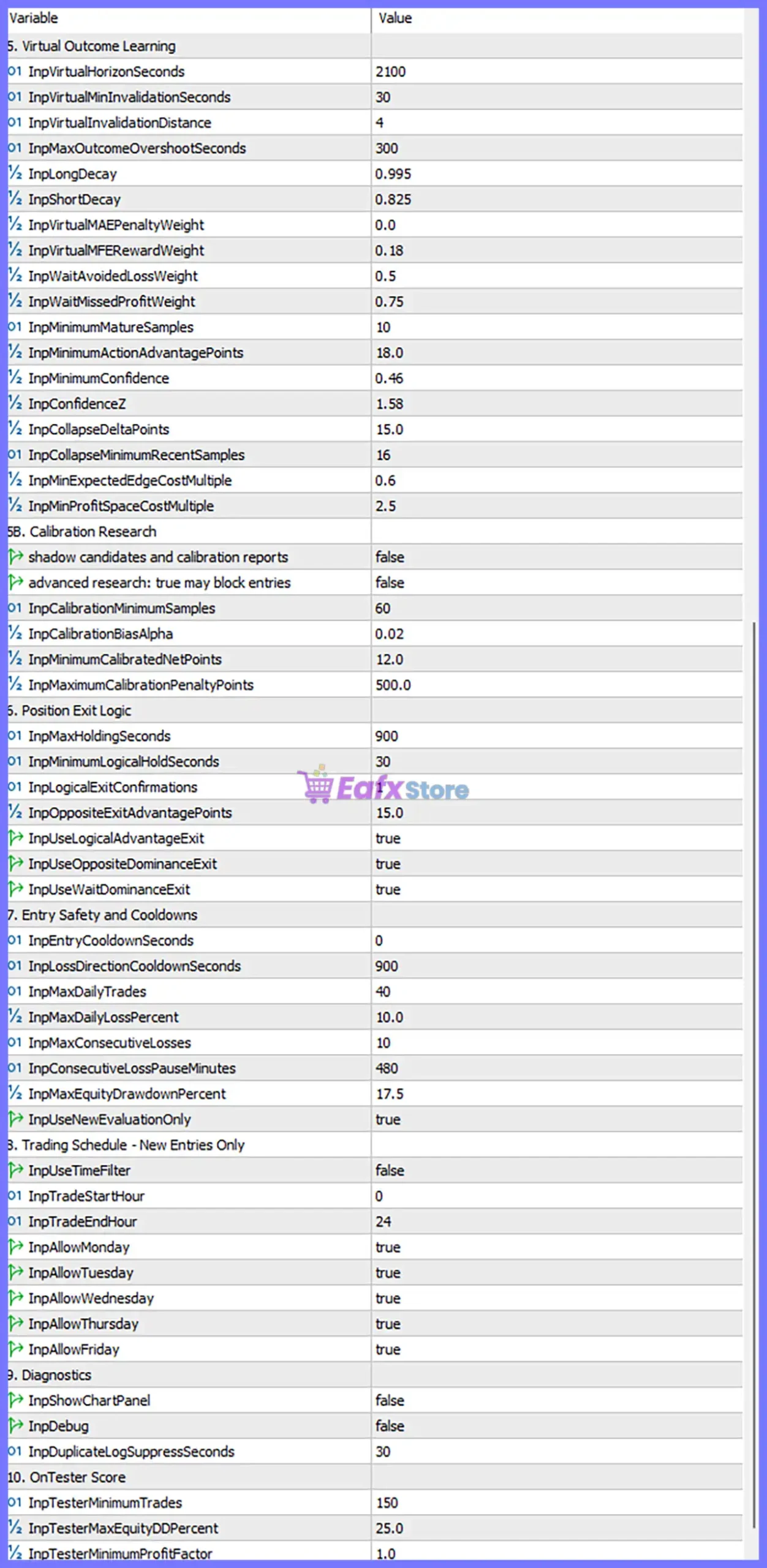
NEXA Outcome Dominance EA MT5 Settings Explained
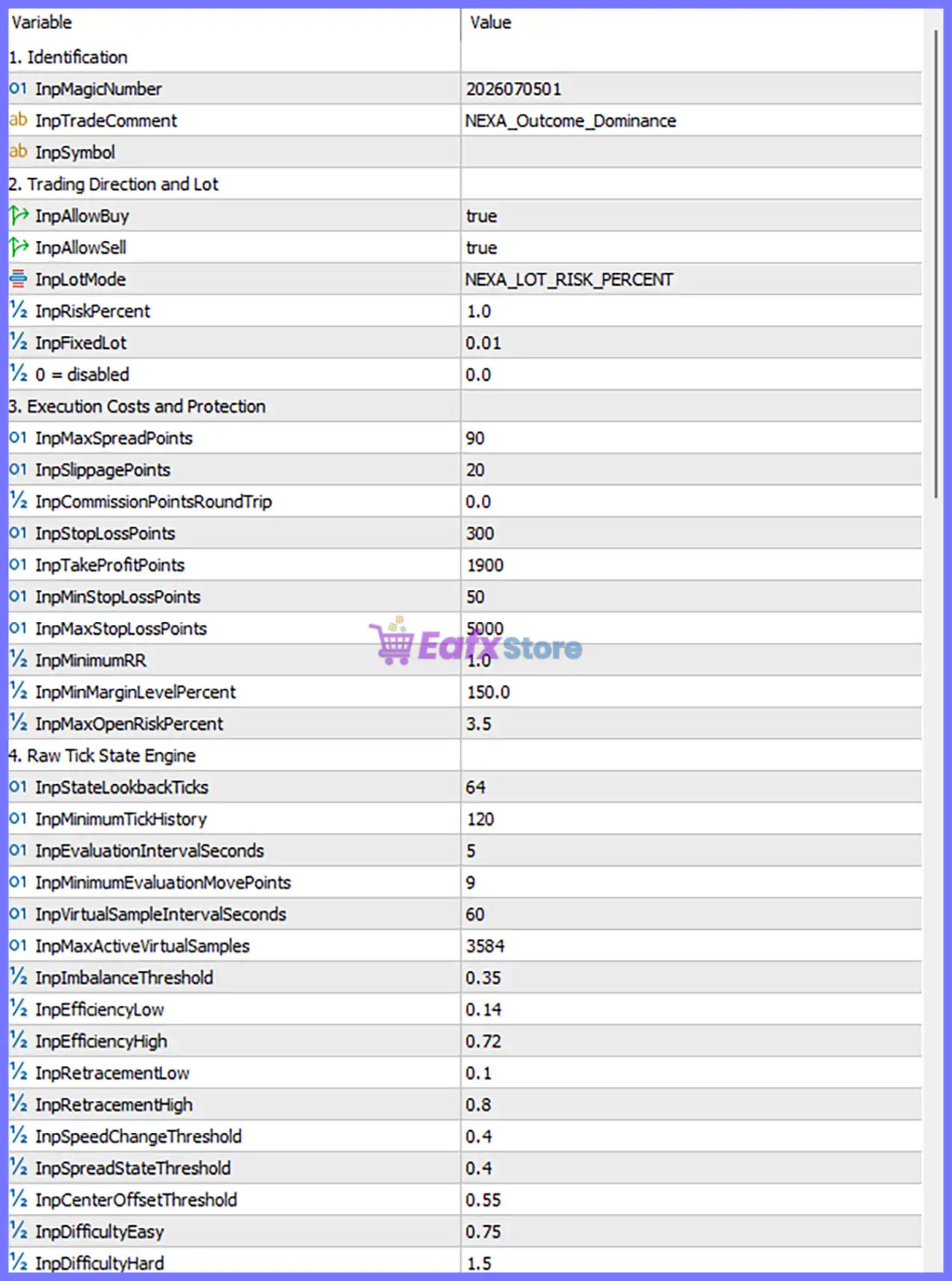
1. Identification
🔹 InpMagicNumber = 2026070501 – Unique Magic Number used to identify and manage all EA positions.
🔹 InpTradeComment = NEXA_Outcome_Dominance – Custom trade comment attached to every executed order.
🔹 InpSymbol = (Current Symbol) – Uses the chart symbol unless another instrument is specified.
2. Trading Direction and Lot Management
🔹 InpAllowBuy = true – Enables BUY positions.
🔹 InpAllowSell = true – Enables SELL positions.
🔹 InpLotMode = NEXA_LOT_RISK_PERCENT – Position sizing is calculated using percentage-based risk management.
🔹 InpRiskPercent = 1.0 – Risks 1.0% of account balance per trade.
🔹 InpFixedLot = 0.01 – Fixed lot size used when fixed-lot mode is selected.
🔹 0 = disabled = 0.0 – Disables the optional fixed-lot override.
3. Execution Costs and Protection
🔹 InpMaxSpreadPoints = 90 – Maximum allowable spread is 90 points before entries are blocked.
🔹 InpSlippagePoints = 20 – Maximum permitted execution slippage is 20 points.
🔹 InpCommissionPointsRoundTrip = 0.0 – Round-trip commission cost is disabled.
🔹 InpStopLossPoints = 300 – Default Stop Loss is 300 points.
🔹 InpTakeProfitPoints = 1900 – Default Take Profit is 1900 points.
🔹 InpMinStopLossPoints = 50 – Minimum Stop Loss allowed is 50 points.
🔹 InpMaxStopLossPoints = 5000 – Maximum Stop Loss allowed is 5000 points.
🔹 InpMinimumRR = 1.0 – Minimum Risk-to-Reward ratio is 1:1.
🔹 InpMinMarginLevelPercent = 150.0 – Requires at least 150% margin level before opening new trades.
🔹 InpMaxOpenRiskPercent = 3.5 – Limits total simultaneous portfolio risk to 3.5%.
4. Raw Tick State Engine
🔹 InpStateLookbackTicks = 64 – Uses the last 64 ticks for market-state analysis.
🔹 InpMinimumTickHistory = 120 – Requires at least 120 historical ticks before evaluation.
🔹 InpEvaluationIntervalSeconds = 5 – Refreshes market evaluation every 5 seconds.
🔹 InpMinimumEvaluationMovePoints = 9 – Requires at least 9 points of movement before re-evaluation.
🔹 InpVirtualSampleIntervalSeconds = 60 – Generates virtual learning samples every 60 seconds.
🔹 InpMaxActiveVirtualSamples = 3584 – Maximum simultaneous virtual samples is 3584.
🔹 InpImbalanceThreshold = 0.35 – Minimum imbalance threshold for market-state recognition.
🔹 InpEfficiencyLow = 0.14 – Lower efficiency threshold.
🔹 InpEfficiencyHigh = 0.72 – Upper efficiency threshold.
🔹 InpRetracementLow = 0.10 – Lower retracement ratio.
🔹 InpRetracementHigh = 0.80 – Upper retracement ratio.
🔹 InpSpeedChangeThreshold = 0.40 – Detects significant price acceleration.
🔹 InpSpreadStateThreshold = 0.40 – Spread-state sensitivity threshold.
🔹 InpCenterOffsetThreshold = 0.55 – Center-offset detection threshold.
🔹 InpDifficultyEasy = 0.75 – Easy-state classification threshold.
🔹 InpDifficultyHard = 1.50 – Hard-state classification threshold.
5. Virtual Outcome Learning
🔹 InpVirtualHorizonSeconds = 2100 – Virtual outcome horizon is 2100 seconds.
🔹 InpVirtualMinInvalidationSeconds = 30 – Minimum invalidation time is 30 seconds.
🔹 InpVirtualInvalidationDistance = 4 – Invalidation occurs after 4 points.
🔹 InpMaxOutcomeOvershootSeconds = 300 – Maximum overshoot duration is 300 seconds.
🔹 InpLongDecay = 0.995 – Long-position learning decay factor.
🔹 InpShortDecay = 0.825 – Short-position learning decay factor.
🔹 InpVirtualMAEPenaltyWeight = 0.0 – MAE penalty weight is disabled.
🔹 InpVirtualMFERewardWeight = 0.18 – Maximum Favorable Excursion reward weight.
🔹 InpWaitAvoidedLossWeight = 0.50 – Reward weight for avoiding losing trades.
🔹 InpWaitMissedProfitWeight = 0.75 – Penalty weight for missed profitable trades.
🔹 InpMinimumMatureSamples = 10 – Requires at least 10 mature learning samples.
🔹 InpMinimumActionAdvantagePoints = 18.0 – Minimum advantage score required for trade execution.
🔹 InpMinimumConfidence = 0.46 – Minimum confidence threshold is 46%.
🔹 InpConfidenceZ = 1.58 – Statistical confidence Z-score.
🔹 InpCollapseDeltaPoints = 15.0 – Collapse threshold equals 15 points.
🔹 InpCollapseMinimumRecentSamples = 16 – Minimum recent samples for collapse detection.
🔹 InpMinExpectedEdgeCostMultiple = 0.6 – Minimum expected edge multiplier.
🔹 InpMinProfitSpaceCostMultiple = 2.5 – Minimum profit-space multiplier before entry.
6. Calibration Research
🔹 Shadow candidates and calibration reports = false – Disables shadow calibration reports.
🔹 Advanced research = false – Disables advanced calibration mode.
🔹 InpCalibrationMinimumSamples = 60 – Calibration requires 60 samples.
🔹 InpCalibrationBiasAlpha = 0.02 – Bias correction alpha value.
🔹 InpMinimumCalibratedNetPoints = 12.0 – Minimum calibrated edge equals 12 points.
🔹 InpMaximumCalibrationPenaltyPoints = 500.0 – Maximum calibration penalty is 500 points.
7. Position Exit Logic
🔹 InpMaxHoldingSeconds = 900 – Maximum holding time is 900 seconds.
🔹 InpMinimumLogicalHoldSeconds = 30 – Minimum logical holding time is 30 seconds.
🔹 InpLogicalExitConfirmations = 1 – Requires 1 confirmation before logical exit.
🔹 InpOppositeExitAdvantagePoints = 15.0 – Opposite signal must exceed 15 points of advantage.
🔹 InpUseLogicalAdvantageExit = true – Enables logical advantage exits.
🔹 InpUseOppositeDominanceExit = true – Closes positions when opposite dominance becomes stronger.
🔹 InpUseWaitDominanceExit = true – Allows WAIT dominance to trigger exits.
8. Entry Safety and Cooldowns
🔹 InpEntryCooldownSeconds = 0 – No cooldown between entries.
🔹 InpLossDirectionCooldownSeconds = 900 – Waits 900 seconds after a losing directional trade.
🔹 InpMaxDailyTrades = 40 – Maximum 40 trades per day.
🔹 InpMaxDailyLossPercent = 10.0 – Stops trading after 10% daily loss.
🔹 InpMaxConsecutiveLosses = 10 – Maximum 10 consecutive losses allowed.
🔹 InpConsecutiveLossPauseMinutes = 480 – Pauses trading for 480 minutes after consecutive losses.
🔹 InpMaxEquityDrawdownPercent = 17.5 – Maximum equity drawdown allowed is 17.5%.
🔹 InpUseNewEvaluationOnly = true – Executes trades only using fresh evaluations.
9. Trading Schedule
🔹 InpUseTimeFilter = false – Time filter is disabled.
🔹 InpTradeStartHour = 0 – Trading starts at 00:00.
🔹 InpTradeEndHour = 24 – Trading runs until 24:00.
🔹 InpAllowMonday = true – Enables Monday trading.
🔹 InpAllowTuesday = true – Enables Tuesday trading.
🔹 InpAllowWednesday = true – Enables Wednesday trading.
🔹 InpAllowThursday = true – Enables Thursday trading.
🔹 InpAllowFriday = true – Enables Friday trading.
10. Diagnostics
🔹 InpShowChartPanel = false – Disables the information panel.
🔹 InpDebug = false – Debug mode is disabled.
🔹 InpDuplicateLogSuppressSeconds = 30 – Suppresses duplicate log messages for 30 seconds.
11. OnTester Score
🔹 InpTesterMinimumTrades = 150 – Strategy tester requires at least 150 trades.
🔹 InpTesterMaxEquityDDPercent = 25.0 – Maximum equity drawdown allowed in testing is 25%.
🔹 InpTesterMinimumProfitFactor = 1.0 – Minimum acceptable Profit Factor is 1.0.
Risk Level
🔹 Fixed Lot – Uses a constant lot size of 0.01 regardless of account growth.
🔹 Safe – Uses 1.0% risk per trade, logical exits, and strict drawdown protection.
🔹 Balanced – Suitable for moderate growth while maintaining adaptive outcome-learning protection.
🔹 Aggressive – Can increase trading frequency by adjusting confidence thresholds and evaluation parameters, but with higher portfolio risk.
Conclusion
NEXA Outcome Dominance EA MT5 introduces a modern AI-inspired trading methodology by replacing conventional indicator-based entries with a virtual outcome-learning engine driven by raw tick analysis. Its extensive configuration includes adaptive confidence scoring, calibration research, logical exit systems, sophisticated risk management, and intelligent safety filters. With flexible position sizing, advanced execution controls, and robust drawdown protection, the EA is well suited for traders seeking a data-driven automated trading system that continuously adapts to evolving market behavior.
FAQs
❓ What is NEXA Outcome Dominance EA MT5?
It is an automated MT5 Expert Advisor that evaluates BUY, SELL, and WAIT outcomes using virtual learning and raw tick-state analysis instead of traditional indicators.
❓ Does the EA use RSI, MACD, or Moving Averages for entries?
No. The EA relies on proprietary outcome-learning algorithms rather than conventional technical indicators for trade execution.
❓ Can I trade with percentage-based risk management?
Yes. The default configuration uses NEXA_LOT_RISK_PERCENT with 1.0% risk per trade, while fixed-lot trading is also available.
❓ How does the Virtual Outcome Learning system work?
It continuously creates virtual trade samples, measures expected outcomes, updates confidence scores, and only executes trades when a sufficient statistical advantage exists.
❓ Is NEXA Outcome Dominance EA MT5 suitable for risk-controlled trading?
Yes. It includes maximum spread filters, margin protection, daily trade limits, drawdown protection, logical exits, cooldown periods, and confidence-based trade validation for disciplined automated trading.



