


🔢 AI Scalping MT5 Settings Guide
AI Scalping MT5 is an intelligent multi-strategy Expert Advisor designed for automated Forex and cryptocurrency trading. It combines AI-assisted signal filtering, ONNX-based prediction models, pending order execution, adaptive risk management, stacked order techniques and flexible trading session controls.
With configurable money management, news protection, and broker-specific settings, AI Scalping MT5 offers traders a powerful and customizable solution for automated trading across multiple markets.
🔢 AI Scalping MT5 Settings Explained
Below are the details of the parameters in the advisor’s trading system settings table:
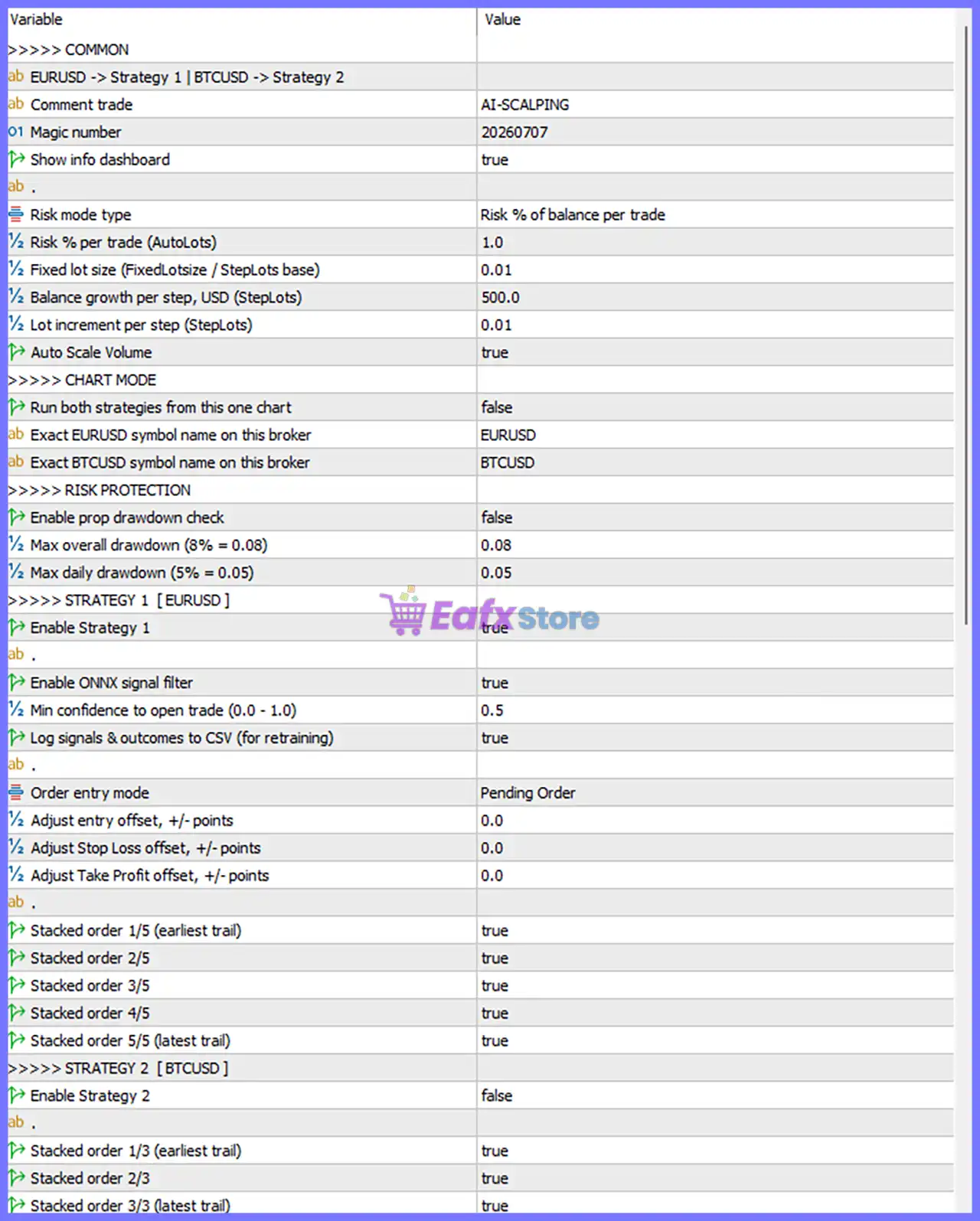
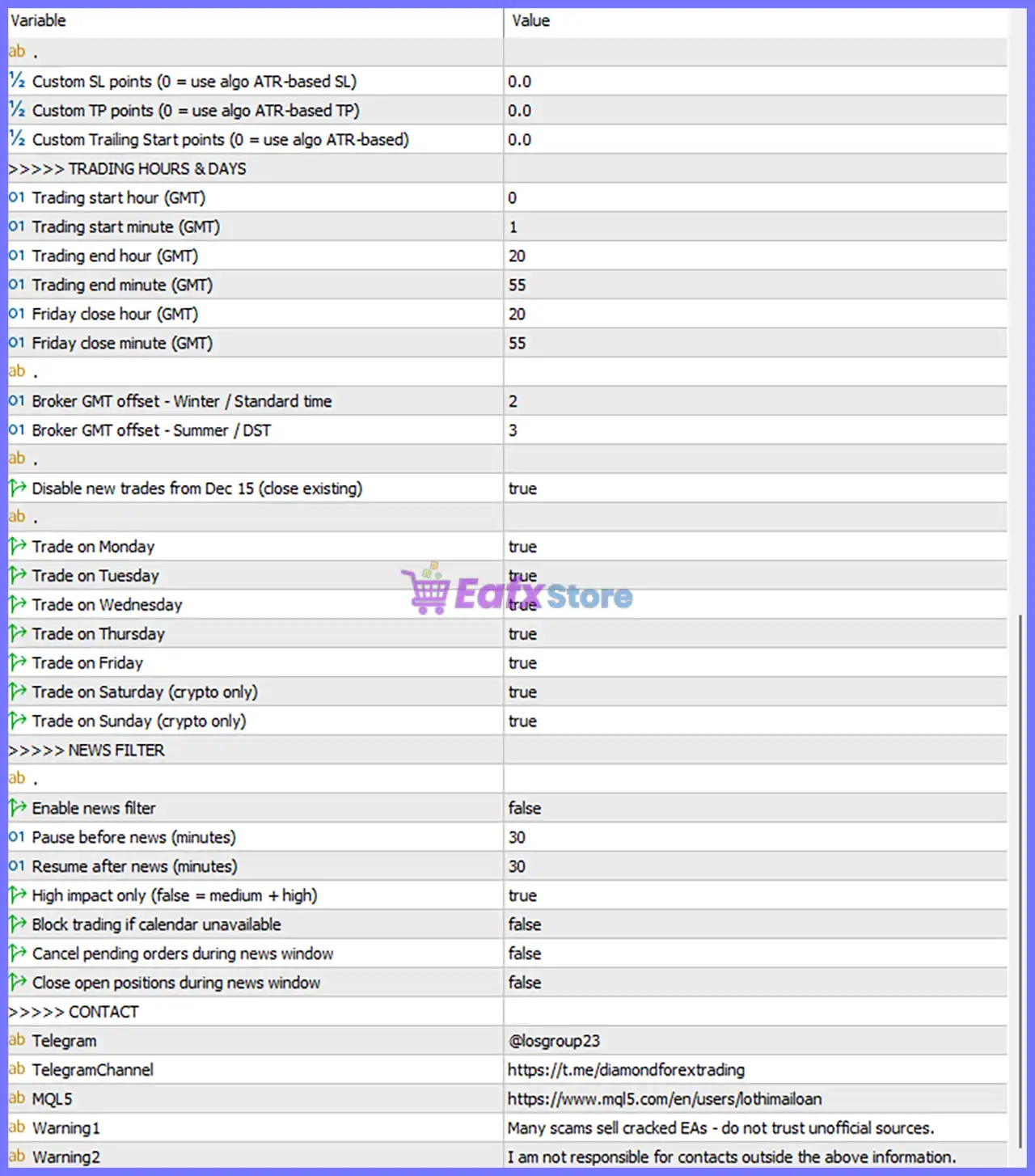
🔄 Common Settings
🔹 Strategy = EURUSD → Strategy 1 | BTCUSD → Strategy 2 – Assigns Strategy 1 for EURUSD and Strategy 2 for BTCUSD trading.
🔹 Comment trade = AI-SCALPING – Adds AI-SCALPING as the trade comment for every executed order.
🔹 Magic number = 20260707 – Unique identifier 20260707 used to distinguish this EA's trades.
🔹 Show info dashboard = true – Displays the information dashboard directly on the trading chart.
🔄 Money Management
🔹 Risk mode type = Risk % of balance per trade – Calculates position size using a percentage of account balance.
🔹 Risk % per trade (AutoLots) = 1.0 – Risks 1.0% of the account balance on each trade.
🔹 Fixed lot size (FixedLotsize / StepLots base) = 0.01 – Uses a fixed trading volume of 0.01 lots when fixed lot mode is selected.
🔹 Balance growth per step, USD (StepLots) = 500.0 – Increases lot size after every 500.0 USD account growth.
🔹 Lot increment per step (StepLots) = 0.01 – Adds 0.01 lots for each balance growth step.
🔹 Auto Scale Volume = true – Automatically adjusts lot size according to account growth.
🔄 Chart Mode
🔹 Run both strategies from this one chart = false – Runs only the selected strategy on the current chart.
🔹 Exact EURUSD symbol name on this broker = EURUSD – Specifies the broker symbol for EURUSD.
🔹 Exact BTCUSD symbol name on this broker = BTCUSD – Specifies the broker symbol for BTCUSD.
🔄 Risk Protection
🔹 Enable prop drawdown check = false – Prop firm drawdown protection is disabled.
🔹 Max overall drawdown (8% = 0.08) = 0.08 – Overall account drawdown limit is 8% (0.08).
🔹 Max daily drawdown (5% = 0.05) = 0.05 – Daily drawdown limit is 5% (0.05).
🔄 Strategy 1 (EURUSD)
🔹 Enable Strategy 1 = true – Activates the EURUSD trading strategy.
🔹 Enable ONNX signal filter = true – Uses the ONNX AI model to validate trading signals.
🔹 Min confidence to open trade (0.0–1.0) = 0.5 – Requires at least 0.5 confidence before opening a trade.
🔹 Log signals & outcomes to CSV (for retraining) = true – Saves trading signals and results into CSV files for future AI model training.
🔹 Order entry mode = Pending Order – Opens positions using pending orders instead of market execution.
🔹 Adjust entry offset, +/- points = 0.0 – No entry price adjustment is applied.
🔹 Adjust Stop Loss offset, +/- points = 0.0 – Stop Loss remains unchanged.
🔹 Adjust Take Profit offset, +/- points = 0.0 – Take Profit remains unchanged.
🔹 Stacked order 1/5 (earliest trail) = true – Enables the first stacked order with earliest trailing.
🔹 Stacked order 2/5 = true – Enables the second stacked order.
🔹 Stacked order 3/5 = true – Enables the third stacked order.
🔹 Stacked order 4/5 = true – Enables the fourth stacked order.
🔹 Stacked order 5/5 (latest trail) = true – Enables the fifth stacked order with the latest trailing behavior.
🔄 Strategy 2 (BTCUSD)
🔹 Enable Strategy 2 = false – BTCUSD strategy is disabled.
🔹 Stacked order 1/3 (earliest trail) = true – First BTC stacked order is available.
🔹 Stacked order 2/3 = true – Second BTC stacked order is available.
🔹 Stacked order 3/3 (latest trail) = true – Third BTC stacked order is available.
🔄 Stop Loss & Take Profit
🔹 Custom SL points (0 = use algo ATR-based SL) = 0.0 – Uses the EA's ATR-based Stop Loss calculation.
🔹 Custom TP points (0 = use algo ATR-based TP) = 0.0 – Uses the EA's ATR-based Take Profit calculation.
🔹 Custom Trailing Start points (0 = use algo ATR-based) = 0.0 – Uses the default ATR-based trailing start.
🔄 Trading Hours & Days
🔹 Trading start hour (GMT) = 0 – Trading begins at 00:00 GMT.
🔹 Trading start minute (GMT) = 1 – Trading starts at 00:01 GMT.
🔹 Trading end hour (GMT) = 20 – Trading ends at 20:00 GMT.
🔹 Trading end minute (GMT) = 55 – Trading stops at 20:55 GMT.
🔹 Friday close hour (GMT) = 20 – Friday trading ends at 20:00 GMT.
🔹 Friday close minute (GMT) = 55 – Friday trading stops at 20:55 GMT.
🔹 Broker GMT offset – Winter / Standard time = 2 – Winter broker time offset is GMT+2.
🔹 Broker GMT offset – Summer / DST = 3 – Summer broker time offset is GMT+3.
🔹 Disable new trades from Dec 15 (close existing) = true – Stops opening new trades after December 15 while allowing existing positions to close.
🔹 Trade on Monday = true – Enables Monday trading.
🔹 Trade on Tuesday = true – Enables Tuesday trading.
🔹 Trade on Wednesday = true – Enables Wednesday trading.
🔹 Trade on Thursday = true – Enables Thursday trading.
🔹 Trade on Friday = true – Enables Friday trading.
🔹 Trade on Saturday (crypto only) = true – Allows cryptocurrency trading on Saturday.
🔹 Trade on Sunday (crypto only) = true – Allows cryptocurrency trading on Sunday.
🔄 News Filter
🔹 Enable news filter = false – Economic news filtering is currently disabled.
🔹 Pause before news (minutes) = 30 – Pauses trading 30 minutes before news events when enabled.
🔹 Resume after news (minutes) = 30 – Resumes trading 30 minutes after news.
🔹 High impact only (false = medium + high) = true – Filters only high-impact economic events.
🔹 Block trading if calendar unavailable = false – Continues trading even if the news calendar is unavailable.
🔹 Cancel pending orders during news window = false – Pending orders remain active during news.
🔹 Close open positions during news window = false – Existing positions remain open during news events.
🔢 Risk Level
🔹 Fixed Lot – Uses a constant trading volume regardless of account balance.
🔹 Safe – Conservative settings designed to reduce drawdown and preserve capital.
🔹 Balanced – Offers a balance between risk and long-term growth.
🔹 Aggressive – Maximizes trading opportunities with higher risk exposure.
🔢 Conclusion
AI Scalping MT5 is a feature-rich automated trading system that combines AI-powered ONNX signal filtering, adaptive money management, pending-order execution, stacked order management, flexible session controls and configurable risk protection.
Whether trading Forex or cryptocurrencies, the EA provides traders with extensive customization options to optimize performance while maintaining disciplined risk management.
🔢 FAQs
❓ What markets does AI Scalping MT5 support?
AI Scalping MT5 supports both Forex pairs such as EURUSD and cryptocurrency pairs such as BTCUSD through separate trading strategies.
❓ Does AI Scalping MT5 use artificial intelligence?
Yes. The EA includes an ONNX-based AI signal filter that evaluates trade confidence before opening positions.
❓ Can I trade with automatic lot sizing?
Yes. The EA supports both fixed lot trading and automatic risk-based lot sizing with balance scaling.
❓ Does AI Scalping MT5 include economic news protection?
Yes. It includes a configurable news filter with adjustable pause times before and after high-impact economic events.
❓ Can I customize trading sessions and broker time settings?
Yes. You can configure trading hours, GMT offsets, trading days, Friday closing time, and holiday restrictions to match your broker and trading strategy.



