


🔢 Buster Diamond EA MT5 Settings Guide
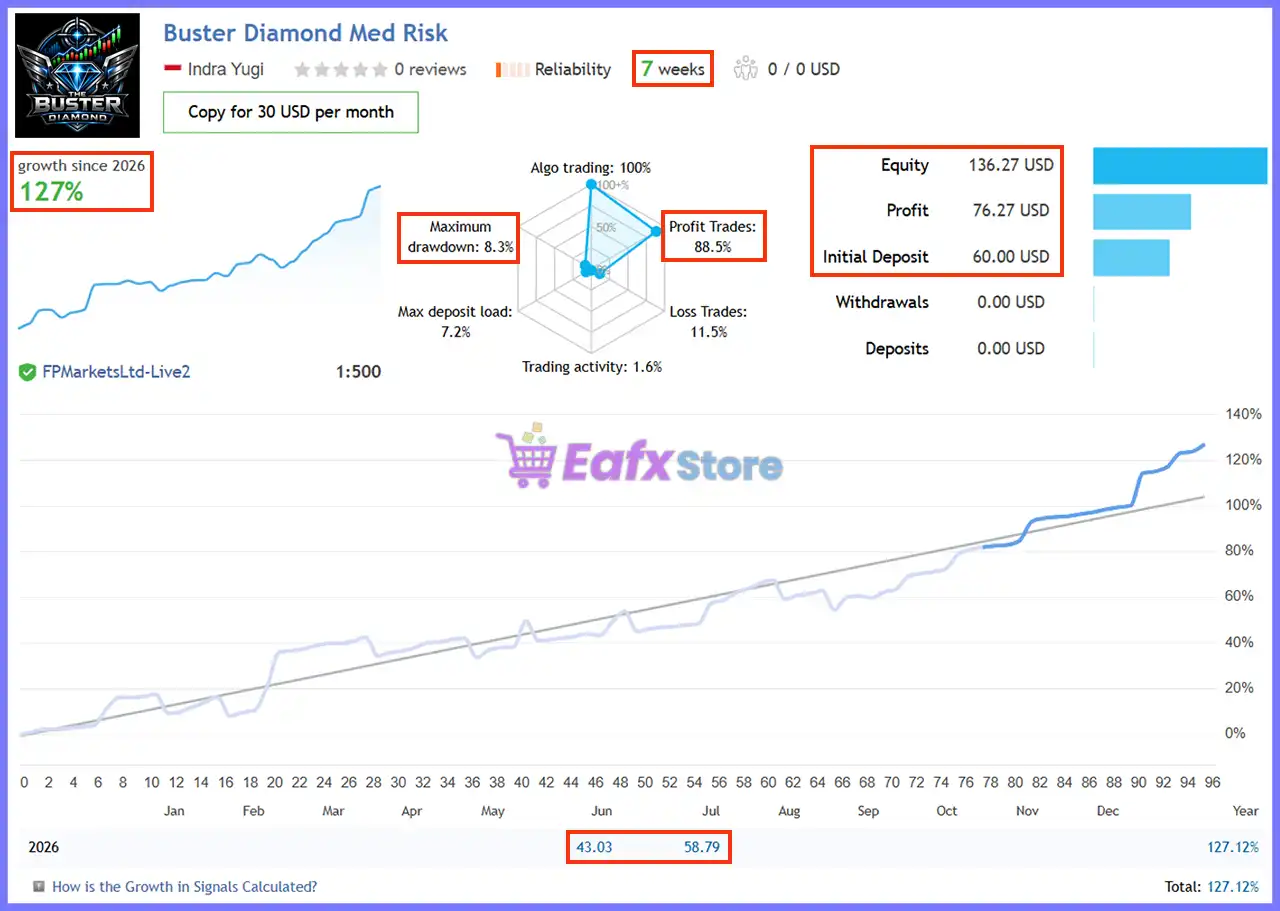
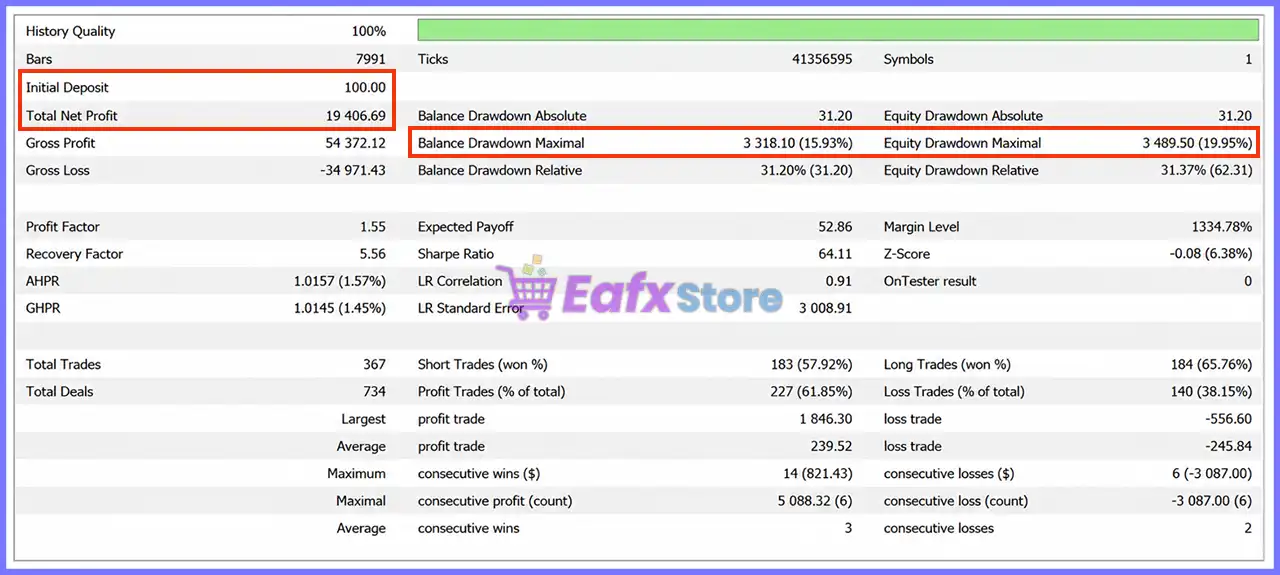
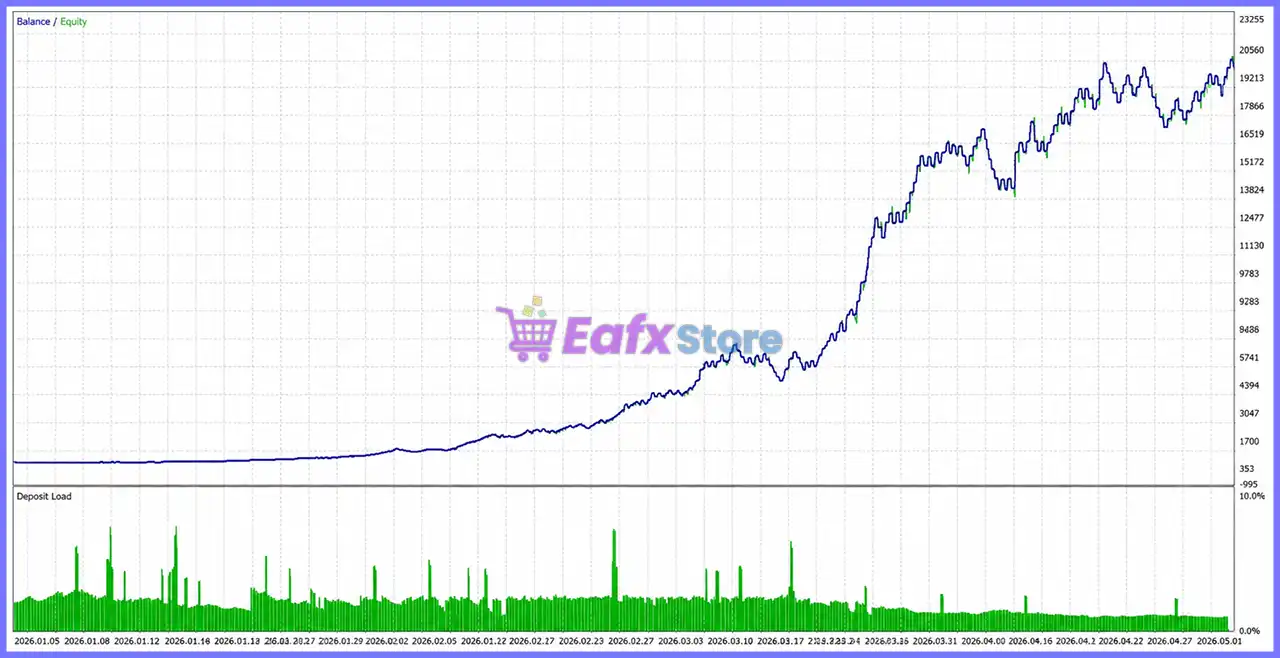
Buster Diamond EA is a fully automated Expert Advisor designed with a strong focus on intelligent money management, adaptive market filtering, advanced risk protection and prop firm compatibility.
The EA combines configurable position sizing, RSI-based market analysis, pending order logic, ATR adaptive trailing, hidden trailing stop technology, daily drawdown protection, and comprehensive dashboard customization. Its extensive settings allow traders to optimize execution according to their account size, trading style, and overall risk tolerance.
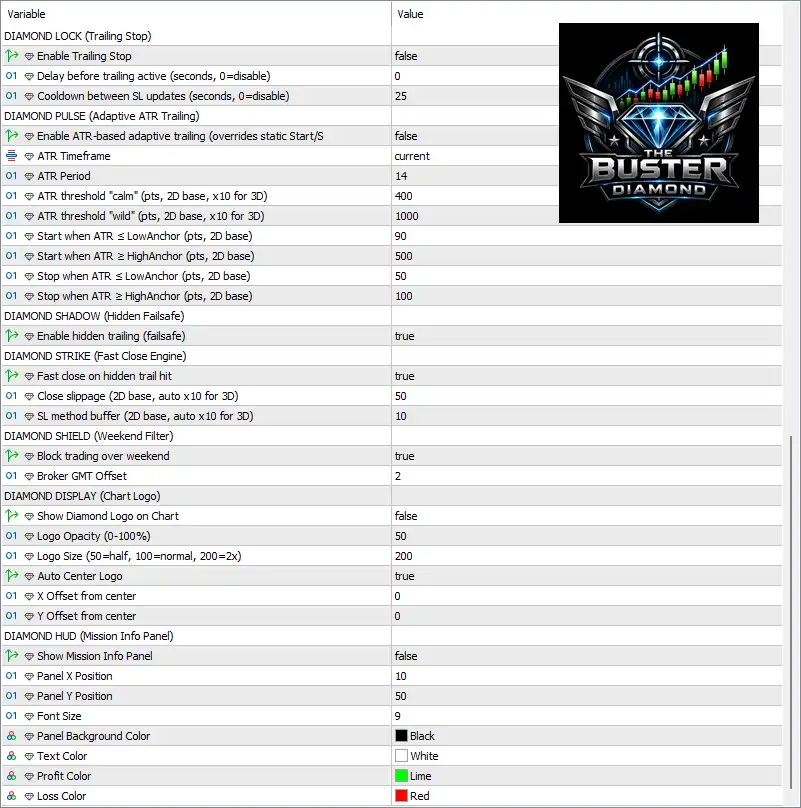
🔢 Buster Diamond EA MT5 Settings Explained
🔄 Diamond Core
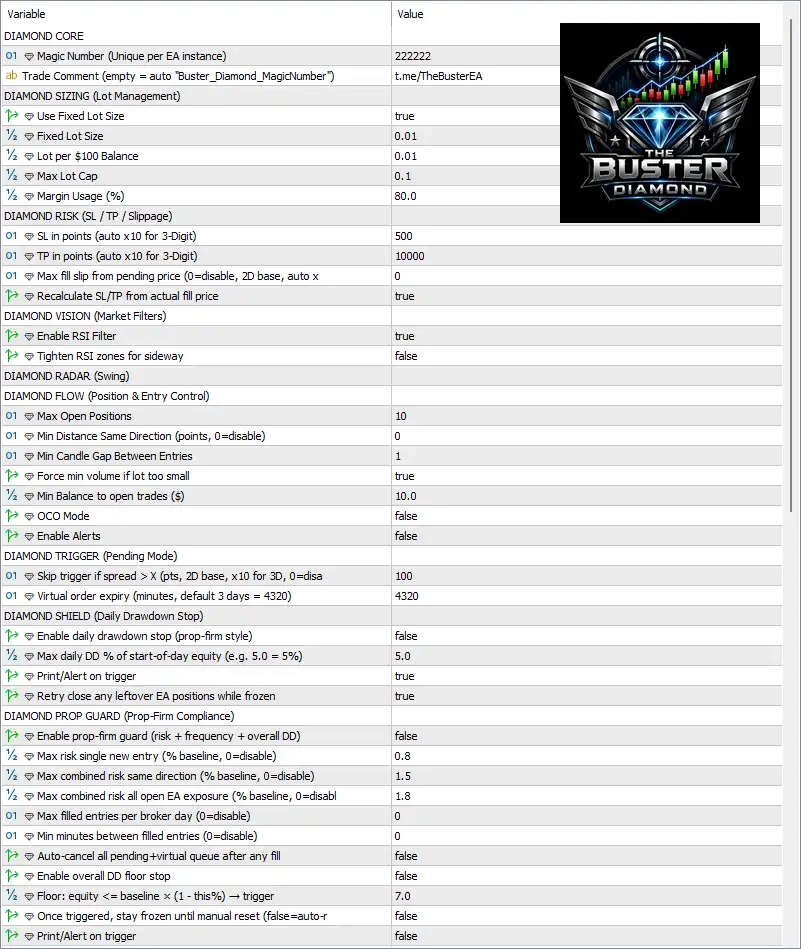
🔹 Magic Number (Unique per EA instance) = 222222 – Assigns 222222 as the unique Magic Number to identify all trades opened by this EA instance.
🔹 Trade Comment (empty = auto "Buster_Diamond_MagicNumber") = t.me/TheBusterEA – Sets t.me/TheBusterEA as the trade comment for every position.
🔄 Diamond Sizing (Lot Management)
🔹 Use Fixed Lot Size = true – Enables fixed lot trading instead of dynamic lot sizing.
🔹 Fixed Lot Size = 0.01 – Opens every new trade using 0.01 lots.
🔹 Lot per $100 Balance = 0.01 – Defines automatic scaling of 0.01 lots per every $100 of account balance when fixed lots are disabled.
🔹 Max Lot Cap = 0.1 – Restricts the maximum position size to 0.10 lots.
🔹 Margin Usage (%) = 80.0 – Allows the EA to utilize up to 80.0% of available margin.
🔄 Diamond Risk (SL / TP / Slippage)
🔹 SL in points (auto x10 for 3-Digit) = 500 – Sets the Stop Loss distance to 500 points.
🔹 TP in points (auto x10 for 3-Digit) = 10000 – Sets the Take Profit target to 10000 points.
🔹 Max fill slippage from pending price (0=disable, 2D base, auto x10) = 0 – Disables slippage tolerance for pending order execution.
🔹 Recalculate SL/TP from actual fill price = true – Recalculates Stop Loss and Take Profit using the actual execution price.
🔄 Diamond Vision (Market Filters)
🔹 Enable RSI Filter = true – Activates the RSI filter to validate market conditions before opening trades.
🔹 Tighten RSI zones for sideway = false – Uses normal RSI zones during ranging markets.
🔄 Diamond Radar (Swing)
🔹 Diamond Radar (Swing) – Reserved section for swing-based market detection.
🔄 Diamond Flow (Position & Entry Control)
🔹 Max Open Positions = 10 – Limits the EA to a maximum of 10 simultaneous positions.
🔹 Min Distance Same Direction (points, 0=disable) = 0 – No minimum spacing restriction between trades in the same direction.
🔹 Min Candle Gap Between Entries = 1 – Requires at least 1 completed candle before opening another position.
🔹 Force min volume if lot too small = true – Automatically raises the lot size to the broker's minimum allowed value.
🔹 Min Balance to open trades ($) = 10.0 – Requires at least $10.0 account balance before trading.
🔹 OCO Mode = false – One-Cancels-the-Other mode is disabled.
🔹 Enable Alerts = false – Trading alerts are disabled.
🔄 Diamond Trigger (Pending Mode)
🔹 Skip trigger if spread > X (pts, 2D base, x10 for 3D, 0=disable) = 100 – Cancels pending entries if spread exceeds 100 points.
🔹 Virtual order expiry (minutes, default 3 days = 4320) = 4320 – Virtual pending orders expire after 4320 minutes (3 days).
🔄 Diamond Shield (Daily Drawdown Stop)
🔹 Enable daily drawdown stop (prop-firm style) = false – Daily drawdown protection is currently disabled.
🔹 Max daily DD % of start-of-day equity (e.g. 5.0 = 5%) = 5.0 – Daily drawdown threshold is configured at 5.0%.
🔹 Print/Alert on trigger = true – Sends notifications whenever drawdown protection is activated.
🔹 Retry close any leftover EA positions while frozen = true – Continues attempting to close remaining EA trades after protection is triggered.
🔄 Diamond Prop Guard (Prop-Firm Compliance)
🔹 Enable prop-firm guard (risk + frequency + overall DD) = false – Prop Firm protection module is disabled.
🔹 Max risk single new entry (% baseline, 0=disable) = 0.8 – Limits each new position to 0.8% baseline risk.
🔹 Max combined risk same direction (% baseline, 0=disable) = 1.5 – Restricts same-direction exposure to 1.5%.
🔹 Max combined risk all open EA exposure (% baseline, 0=disable) = 1.8 – Limits total EA exposure to 1.8%.
🔹 Max filled entries per broker day (0=disable) = 0 – No daily trade limit is applied.
🔹 Min minutes between filled entries (0=disable) = 0 – No minimum waiting period between filled trades.
🔹 Auto-cancel all pending + virtual queue after any fill = false – Pending orders remain active after executions.
🔹 Enable overall DD floor stop = false – Overall drawdown floor protection is disabled.
🔹 Floor: equity <= baseline × (1 - this%) → trigger = 7.0 – Overall drawdown threshold is configured at 7.0%.
🔹 Once triggered, stay frozen until manual reset (false=auto-reset) = false – Trading resumes automatically after conditions recover.
🔹 Print/Alert on trigger = false – Trigger notifications are disabled.
🔄 Diamond Lock (Trailing Stop)
🔹 Enable Trailing Stop = false – Standard trailing stop is disabled.
🔹 Delay before trailing active (seconds, 0=disable) = 0 – No activation delay.
🔹 Cooldown between SL updates (seconds, 0=disable) = 25 – Updates Stop Loss every 25 seconds while trailing.
🔄 Diamond Pulse (Adaptive ATR Trailing)
🔹 Enable ATR-based adaptive trailing (overrides static Start/S) = false – ATR trailing system is disabled.
🔹 ATR Timeframe = current – Uses the current chart timeframe for ATR calculations.
🔹 ATR Period = 14 – Calculates ATR using 14 periods.
🔹 ATR threshold "calm" (pts, 2D base, x10 for 3D) = 400 – Defines calm market volatility at 400 points.
🔹 ATR threshold "wild" (pts, 2D base, x10 for 3D) = 1000 – Defines high volatility at 1000 points.
🔹 Start when ATR ≤ LowAnchor (pts, 2D base) = 90 – Trailing starts at 90 points under calm conditions.
🔹 Start when ATR ≥ HighAnchor (pts, 2D base) = 500 – Trailing starts at 500 points during volatile markets.
🔹 Stop when ATR ≤ LowAnchor (pts, 2D base) = 50 – Trailing stop distance becomes 50 points in calm markets.
🔹 Stop when ATR ≥ HighAnchor (pts, 2D base) = 100 – Trailing stop distance becomes 100 points in highly volatile markets.
🔄 Diamond Shadow (Hidden Failsafe)
🔹 Enable hidden trailing (failsafe) = true – Uses hidden server-side trailing protection for additional safety.
🔄 Diamond Strike (Fast Close Engine)
🔹 Fast close on hidden trail hit = true – Immediately closes positions when the hidden trailing level is reached.
🔹 Close slippage (2D base, auto x10 for 3D) = 50 – Allows 50 points slippage during emergency closing.
🔹 SL method buffer (2D base, auto x10 for 3D) = 10 – Uses a 10-point Stop Loss buffer.
🔄 Diamond Shield (Weekend Filter)
🔹 Block trading over weekend = true – Prevents new trades during weekends.
🔹 Broker GMT Offset = 2 – Uses GMT+2 broker server time.
🔄 Diamond Display (Chart Logo)
🔹 Show Diamond Logo on Chart = false – Hides the EA logo from the chart.
🔹 Logo Opacity (0–100%) = 50 – Sets logo transparency to 50%.
🔹 Logo Size (50=half, 100=normal, 200=2x) = 200 – Displays the logo at 200% size.
🔹 Auto Center Logo = true – Automatically centers the logo.
🔹 X Offset from center = 0 – No horizontal logo offset.
🔹 Y Offset from center = 0 – No vertical logo offset.
🔄 Diamond HUD (Mission Info Panel)
🔹 Show Mission Info Panel = false – Disables the on-chart information panel.
🔹 Panel X Position = 10 – Positions the panel 10 pixels from the left.
🔹 Panel Y Position = 50 – Positions the panel 50 pixels from the top.
🔹 Font Size = 9 – Uses font size 9.
🔹 Panel Background Color = Black – Sets the panel background to Black.
🔹 Text Color = White – Uses White for panel text.
🔹 Profit Color = Lime – Displays profitable values in Lime.
🔹 Loss Color = Red – Displays losing values in Red.
🔢 Conclusion
Buster Diamond EA MT5 offers a comprehensive collection of professional trading controls, including fixed and dynamic lot management, RSI market filtering, pending order execution, hidden trailing protection, adaptive ATR logic, daily drawdown monitoring and optional prop firm compliance tools.
These settings allow traders to customize the EA for conservative, balanced, or aggressive trading while maintaining strong capital protection and execution precision.
🔢 FAQs
❓ What market is Buster Diamond EA MT5 designed for?
Buster Diamond EA MT5 is designed for automated MetaTrader 5 trading and can be configured according to the supported broker symbols.
❓ Does Buster Diamond EA MT5 include automatic money management?
Yes. The EA supports both Fixed Lot trading and balance-based automatic lot sizing with configurable maximum lot limits.
❓ Can I use Buster Diamond EA MT5 for prop firm accounts?
Yes. The EA includes a dedicated Prop Guard module with risk exposure, drawdown, and trading frequency controls, although it is disabled by default.
❓ Does the EA support trailing stop functionality?
Yes. It supports standard Trailing Stop, ATR-based adaptive trailing, hidden trailing protection, and a Fast Close engine for advanced trade management.
❓ How does the daily protection system work?
The EA can monitor daily drawdown, trigger trading freezes, retry closing remaining positions, and provide alerts when predefined equity loss thresholds are reached.



