



🔢 Chiroptera EA MT5 Settings Explained (Full Parameters)
Chiroptera EA is a sophisticated multi-currency automated trading Expert Advisor (EA) designed for the MetaTrader 5 platform. The EA combines adaptive filtering, spread analysis, risk-factor money management, news handling, and multi-pair trading automation into one intelligent trading system.
With support for One Chart Setup, adaptive data processing, and customizable trading filters, Chiroptera EA is suitable for traders seeking scalable and diversified forex automation.
🔶 General
🔹 Magic = 12345: Unique trade identifier (12345) used for managing and tracking EA positions.
🔹 OneChartSetup = true: Enables management of multiple currency pairs from a single chart.
🔹 AllPairs = EURUSD; GBPUSD; AUDCAD; EURAUD; EURCAD; GBPAUD; GBPCAD; EURCHF; GBPCHF; USDJPY; EURJPY; USDCAD; EURGBP; USDCHF; CADCHF; CHFJPY; AUDJPY; AUDCHF; AUDUSD; GBPJPY: Defines the complete list of supported trading pairs.
🔹 BestPairs = CHFJPY; EURJPY; GBPJPY; EURAUD; GBPAUD; EURCAD; GBPCAD; USDCAD: Specifies the preferred or optimized trading pairs.
🔹 UseBestPairs = true: Restricts trading activity to the BestPairs list only.
🔹 UserComment = Chiroptera: Adds “Chiroptera” as the trade comment for orders and positions.
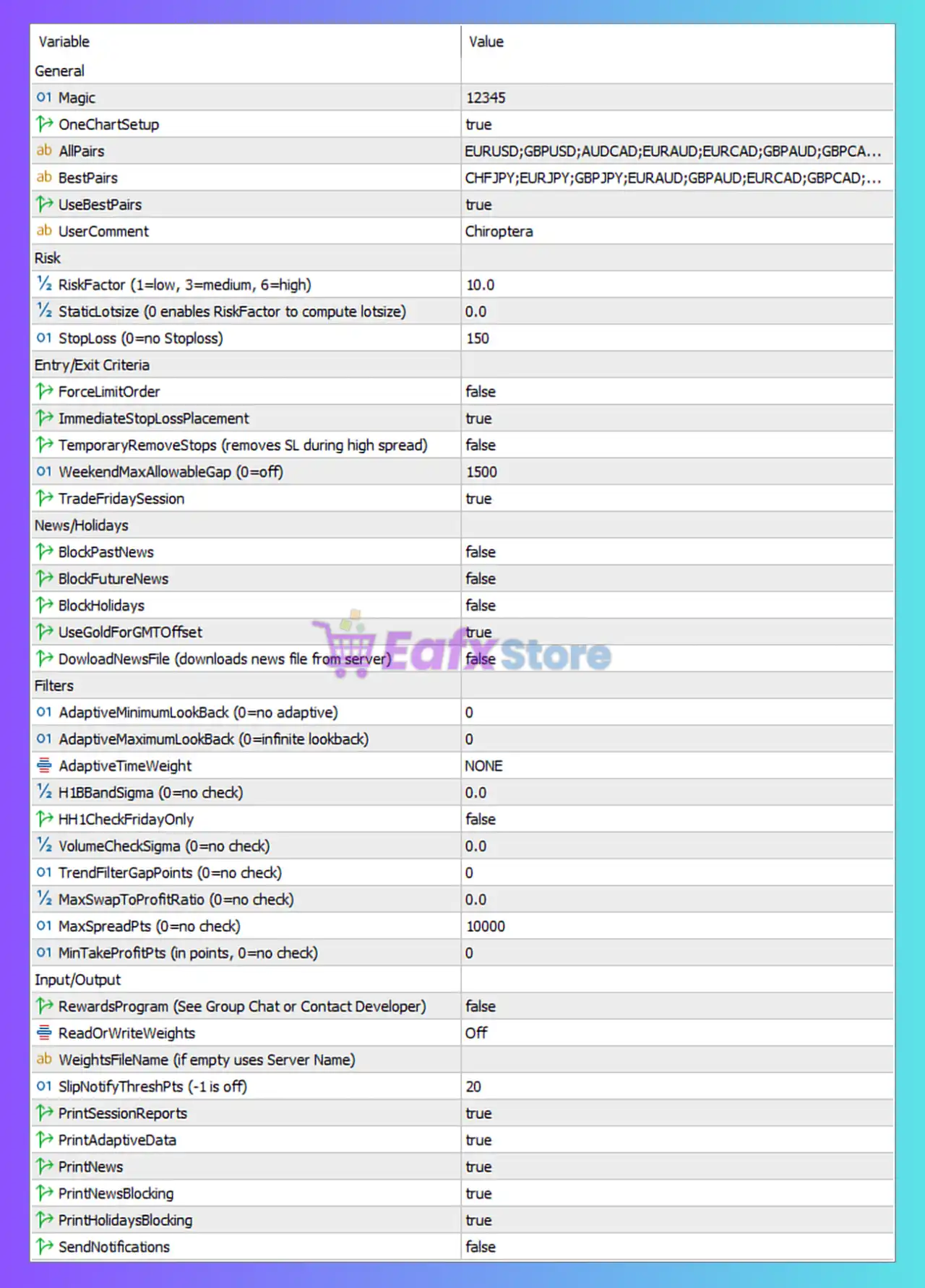
🔶 Risk
🔹 RiskFactor (1=low, 3=medium, 6=high) = 10.0: Sets trading risk level to 10.0, which is higher than the documented high-risk benchmark.
🔹 StaticLotsize (0 enables RiskFactor to compute lotsize) = 0.0: Enables automatic lot size calculation using the RiskFactor setting.
🔹 StopLoss (0=no Stoploss) = 150: Sets Stop Loss distance to 150 points/pips.
🔶 Entry/Exit Criteria
🔹 ForceLimitOrder = false: Disables mandatory limit order entries.
🔹 ImmediateStopLossPlacement = true: Places Stop Loss immediately after opening trades.
🔹 TemporaryRemoveStops (removes SL during high spread) = false: Keeps Stop Loss active even during high-spread conditions.
🔹 WeekendMaxAllowableGap (0=off) = 1500: Maximum allowed weekend market gap set to 1500 points.
🔹 TradeFridaySession = true: Allows trading during Friday sessions.
🔶 News/Holidays
🔹 BlockPastNews = false: Does not block trading after past news events.
🔹 BlockFutureNews = false: Does not block trading before future news releases.
🔹 BlockHolidays = false: Holiday trading restrictions disabled.
🔹 UseGoldForGMTOffset = true: Uses Gold/XAUUSD pricing behavior to calculate GMT offset.
🔹 DowloadNewsFile (downloads news file from server) = false: Disables automatic downloading of external news files.
🔶 Filters
🔹 AdaptiveMinimumLookBack (0=no adaptive) = 0: Adaptive minimum lookback disabled.
🔹 AdaptiveMaximumLookBack (0=infinite lookback) = 0: Infinite adaptive lookback enabled.
🔹 AdaptiveTimeWeight = NONE: No adaptive time weighting applied.
🔹 H1BBandSigma (0=no check) = 0.0: Bollinger Band sigma filtering disabled.
🔹 HH1CheckFridayOnly = false: Friday-only H1 checks disabled.
🔹 VolumeCheckSigma (0=no check) = 0.0: Volume sigma filtering disabled.
🔹 TrendFilterGapPoints (0=no check) = 0: Trend gap filtering disabled.
🔹 MaxSwapToProfitRatio (0=no check) = 0.0: Swap-to-profit ratio filtering disabled.
🔹 MaxSpreadPts (0=no check) = 10000: Maximum spread filtering set extremely high at 10000 points.
🔹 MinTakeProfitPts (in points, 0=no check) = 0: Minimum Take Profit filtering disabled.
🔶 Input/Output
🔹 RewardsProgram (See Group Chat or Contact Developer) = false: Rewards program participation disabled.
🔹 ReadOrWriteWeights = Off: Disables reading or writing adaptive weighting data.
🔹 WeightsFileName (if empty uses Server Name) =: Empty value causes the EA to use the server name as the weights filename.
🔹 SlipNotifyThreshPts (-1 is off) = 20: Sends slippage notifications when slippage exceeds 20 points.
🔹 PrintSessionReports = true: Enables session report logging.
🔹 PrintAdaptiveData = true: Enables adaptive data logging.
🔹 PrintNews = true: Enables news event logging.
🔹 PrintNewsBlocking = true: Enables logging for news blocking conditions.
🔹 PrintHolidaysBlocking = true: Enables logging for holiday blocking conditions.
🔹 SendNotifications = false: Push notifications disabled.
🔢 Conclusion
The Chiroptera EA MT5 settings provide a highly advanced multi-pair automated trading environment with adaptive filtering, intelligent risk control, and detailed market monitoring features. By combining One Chart Setup, automatic lot sizing, spread analysis, and customizable filters, the EA is designed to support diversified and scalable forex trading strategies. Understanding these parameters helps traders optimize execution quality, improve risk management, and maximize automated trading efficiency.
🔢 FAQs
❓ What does OneChartSetup = true mean?
It allows the EA to manage multiple currency pairs from a single chart window.
❓ Why is RiskFactor = 10.0 important?
It controls the aggressiveness of automatic lot sizing and overall trading risk.
❓ What is the purpose of UseBestPairs = true?
It restricts trading to the EA’s optimized list of preferred currency pairs.
❓ Why is ImmediateStopLossPlacement = true beneficial?
It ensures Stop Loss protection is applied immediately after trades are opened.
❓ What does SlipNotifyThreshPts = 20 do?
It generates notifications whenever slippage exceeds 20 points during execution.


