



🔢 Currency Pros Breakout EA MT5 Settings Explained – Complete Configuration Guide
Currency Pros Breakout EA is an automated breakout trading Expert Advisor (EA) developed for MetaTrader 5 traders who want to trade market session breakouts with advanced risk management and smart filtering tools. The EA supports London, Asian, and New York breakout strategies, trailing stop management, breakeven functions and news filters.
With flexible lot sizing and session-based controls, Currency Pros Breakout EA MT5 is designed to help traders capture volatility during major market trading sessions.

🔢 Currency Pros Breakout EA MT5 Full Settings Explanation
Below are the details of the parameters in the advisor’s trading system settings table:
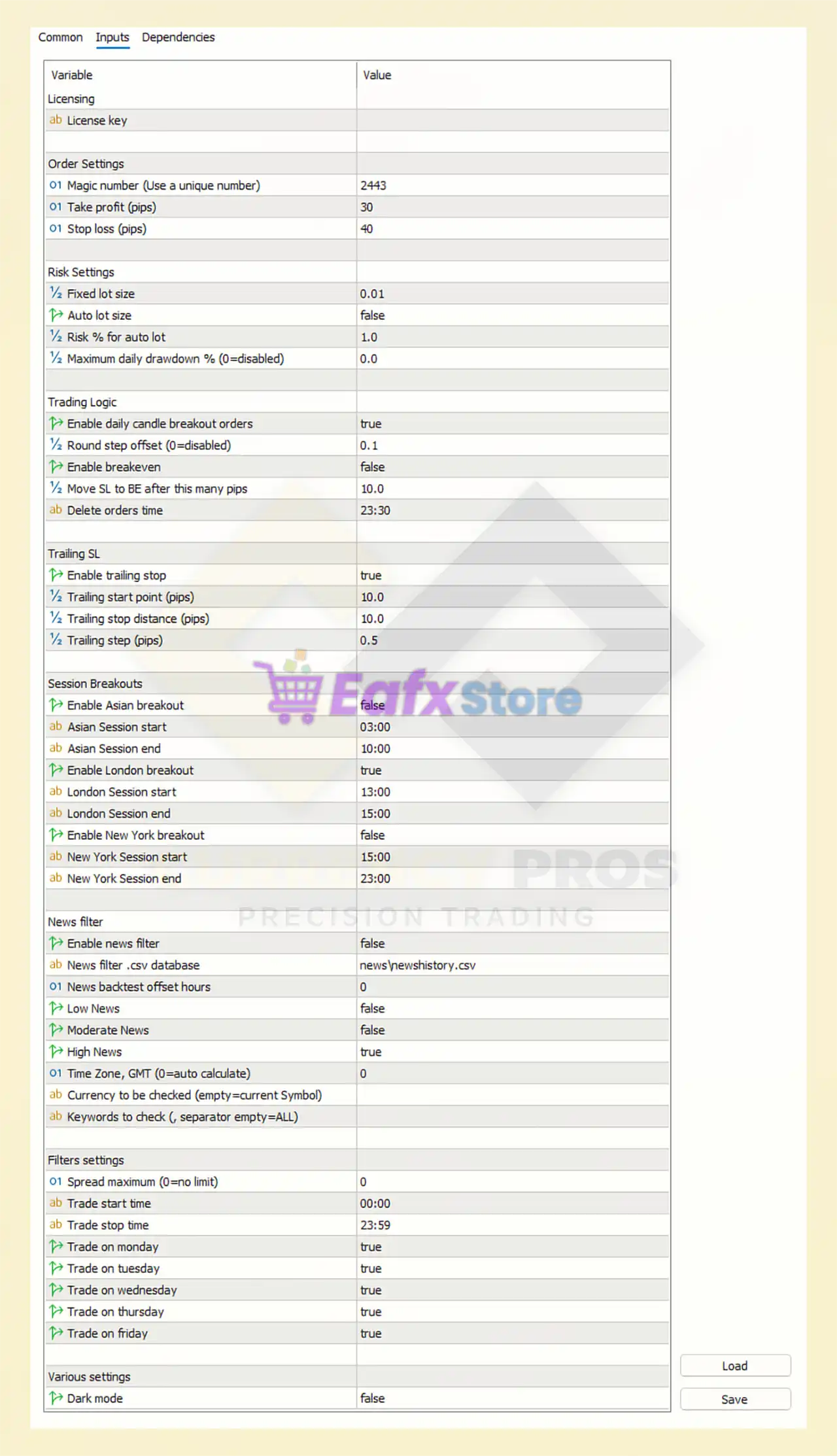
🔶 Order Settings
🔹 Magic number (Use a unique number) = 2443: Unique identifier used by the EA to manage its own trades separately from other EAs.
🔹 Take profit (pips) = 30: The EA closes trades automatically after reaching 30 pips profit.
🔹 Stop loss (pips) = 40: Maximum loss protection per trade is configured at 40 pips.
🔶 Risk Settings
🔹 Fixed lot size = 0.01: Fixed trading lot size is set to 0.01.
🔹 Auto lot size = false: Automatic lot calculation based on account balance is disabled.
🔹 Risk % for auto lot = 1.0: If auto lot is enabled, the EA risks 1.0% of account balance per trade.
🔹 Maximum daily drawdown % (0=disabled) = 0.0: Daily drawdown protection is disabled because the value is 0.0.
🔶 Trading Logic
🔹 Enable daily candle breakout orders = true: The EA uses daily candle breakout logic to place pending orders.
🔹 Round step offset (0=disabled) = 0.1: Price offset adjustment for breakout entries is configured at 0.1.
🔹 Enable breakeven = false: Automatic breakeven functionality is disabled.
🔹 Move SL to BE after this many pips = 10.0: If breakeven is enabled, Stop Loss moves to breakeven after 10.0 pips profit.
🔹 Delete orders time = 23:30: Pending breakout orders are deleted automatically at 23:30.
🔶 Trailing SL Settings
🔹 Enable trailing stop = true: Trailing Stop functionality is enabled.
🔹 Trailing start point (pips) = 10.0: Trailing Stop activates after 10.0 pips profit.
🔹 Trailing stop distance (pips) = 10.0: Distance between market price and trailing Stop Loss is 10.0 pips.
🔹 Trailing step (pips) = 0.5: Stop Loss moves in increments of 0.5 pips while trailing.
🔶 Session Breakouts
🔄 Asian Session
🔹 Enable Asian breakout = false: Asian session breakout trading is disabled.
🔹 Asian Session start = 03:00: Asian session monitoring starts at 03:00.
🔹 Asian Session end = 10:00: Asian session monitoring ends at 10:00.
🔄 London Session
🔹 Enable London breakout = true: London breakout trading strategy is enabled.
🔹 London Session start = 13:00: London session breakout monitoring starts at 13:00.
🔹 London Session end = 15:00: London session breakout monitoring ends at 15:00.
🔄 New York Session
🔹 Enable New York breakout = false: New York breakout strategy is disabled.
🔹 New York Session start = 15:00: New York session monitoring starts at 15:00.
🔹 New York Session end = 23:00: New York session monitoring ends at 23:00.
🔶 News Filter Settings
🔹 Enable news filter = false: News filtering system is disabled.
🔹 News filter .csv database = newsnewshistory.csv: News data source file used by the EA is newsnewshistory.csv.
🔹 News backtest offset hours = 0: No time offset is applied during news backtesting.
🔹 Low News = false: Low-impact news events are ignored.
🔹 Moderate News = false: Medium-impact news events are ignored.
🔹 High News = true: High-impact news events are monitored.
🔹 Time Zone, GMT (0=auto calculate) = 0: GMT offset is automatically calculated.
🔹 Currency to be checked (empty=current Symbol): Empty field means the EA checks news related to the current trading symbol.
🔹 Keywords to check (, separator empty=ALL): Empty field means all keywords are included in news filtering.
🔶 Filter Settings
🔹 Spread maximum (0=no limit) = 0: No spread limit restriction is applied.
🔹 Trade start time = 00:00: Trading is allowed starting from 00:00.
🔹 Trade stop time = 23:59: Trading stops at 23:59.
🔹 Trade on monday = true: Trading is enabled on Monday.
🔹 Trade on tuesday = true: Trading is enabled on Tuesday.
🔹 Trade on wednesday = true: Trading is enabled on Wednesday.
🔹 Trade on thursday = true: Trading is enabled on Thursday.
🔹 Trade on friday = true: Trading is enabled on Friday.
🔶 Various Settings
🔹 Dark mode = false: Dark mode user interface is disabled.
🔢 Conclusion
Currency Pros Breakout EA is a professional breakout trading robot built for traders who want to automate session breakout strategies on MetaTrader 5. The EA combines breakout order placement, trailing stop management, trading session filters, and optional news filtering to create a structured and disciplined trading environment.
With support for London, Asian, and New York sessions, Currency Pros Breakout EA MT5 offers traders flexible customization and reliable breakout execution.
🔢 FAQs
❓ What is Currency Pros Breakout EA MT5?
Currency Pros Breakout EA MT5 is an automated breakout trading Expert Advisor for MetaTrader 5.
❓ Which trading sessions does Currency Pros Breakout EA MT5 support?
The EA supports Asian, London, and New York breakout trading sessions.
❓ Does Currency Pros Breakout EA MT5 include trailing stop functionality?
Yes, the EA includes configurable trailing stop settings with activation and step controls.
❓ Can Currency Pros Breakout EA MT5 filter news events?
Yes, the EA supports built-in news filtering using a CSV news database.
❓ Is automatic lot sizing available in Currency Pros Breakout EA MT5?
Yes, the EA supports auto lot sizing based on risk percentage, although it is disabled in the current settings.



