


🔢 Oxy EA MT4 Settings Explained – Complete Configuration Guide
🔶 Introduction to Oxy EA MT4
Oxy EA MT4 is an automated Forex trading robot developed for the MetaTrader 4 platform. The EA focuses on simplified trading automation with configurable lot sizing, trailing stop management, fixed stop loss and take profit settings and trading session control.
Oxy EA MT4 is suitable for traders who want a lightweight Expert Advisor with customizable risk and time-based trading filters.
🔶 Oxy EA MT4 Full Settings Explanation
Below are the details of the parameters in the advisor’s trading system settings table:
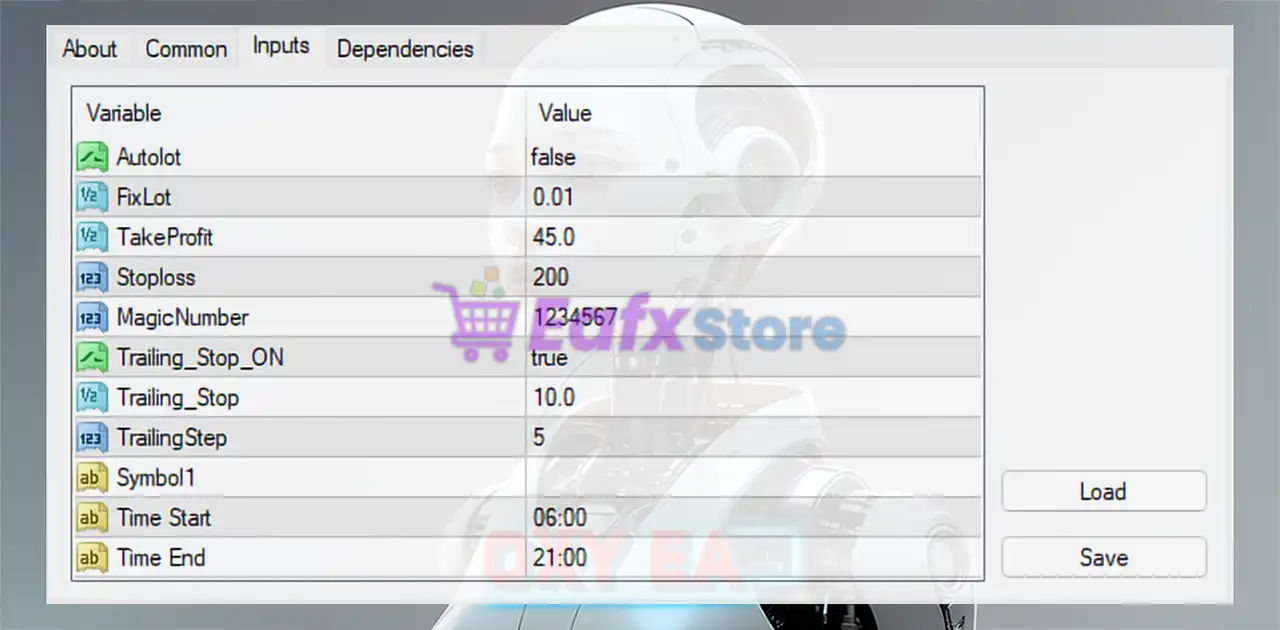
🔹 Autolot = false: Automatic lot sizing is disabled, meaning the EA uses manual fixed lot settings.
🔹 FixLot = 0.01: Sets the fixed trading lot size to 0.01.
🔹 TakeProfit = 45.0: Defines the Take Profit (TP) target at 45.0 points/pips.
🔹 Stoploss = 200: Sets the Stop Loss (SL) level to 200 points/pips.
🔹 MagicNumber = 1234567: Unique Magic Number 1234567 used to identify and manage EA trades separately.
🔹 Trailing_Stop_ON = true: Enables the trailing stop function for dynamic profit protection.
🔹 Trailing_Stop = 10.0: Sets the trailing stop distance to 10.0 points/pips.
🔹 TrailingStep = 5: Defines the trailing stop adjustment step at 5 points/pips.
🔹 Symbol1: Reserved field for specifying or filtering the trading symbol/pair.
🔹 Time Start = 06:00: Trading operations begin at 06:00.
🔹 Time End = 21:00: Trading operations stop at 21:00.
🔢 Conclusion
Oxy EA MT4 is a straightforward and efficient MetaTrader 4 Expert Advisor designed for traders who prefer simple configuration and automated execution.
With features such as fixed lot trading, trailing stop protection, configurable stop loss and take profit levels, and trading session filters, Oxy EA MT4 offers flexible automation while maintaining easy setup and operation. The EA is suitable for traders seeking stable and controlled automated Forex trading.
🔢 FAQs
❓ What is Oxy EA MT4?
Oxy EA MT4 is an automated Forex trading Expert Advisor for MetaTrader 4 with trailing stop and session-based trading features.
❓ Does Oxy EA MT4 support automatic lot sizing?
Yes, but in the displayed configuration Autolot = false, meaning fixed lot trading is currently enabled.
❓ What does the Magic Number 1234567 do?
The Magic Number uniquely identifies trades opened by Oxy EA MT4 to avoid conflicts with manual trades or other EAs.
❓ How does the trailing stop work in Oxy EA MT4?
The trailing stop automatically moves the stop loss to protect profits once trades move favorably.
❓ Can I limit trading hours in Oxy EA MT4?
Yes, the EA allows traders to define custom trading sessions using Time Start and Time End settings.



