




Famous EA MT5 Settings Explained – Complete Configuration Guide
Famous EA MT5 is an advanced automated trading robot for MetaTrader 5 that combines intelligent money management, multi-position scaling, trailing stop systems and built-in economic news filtering.
The EA is designed to help Forex traders automate trading decisions while maintaining flexible control over lot sizing, risk exposure and trading schedules.
With customizable news filters and dynamic balance-ratio money management, Famous EA MT5 is suitable for traders seeking scalable and semi-aggressive automated trading strategies.

Famous EA MT5 Full Settings Explanation
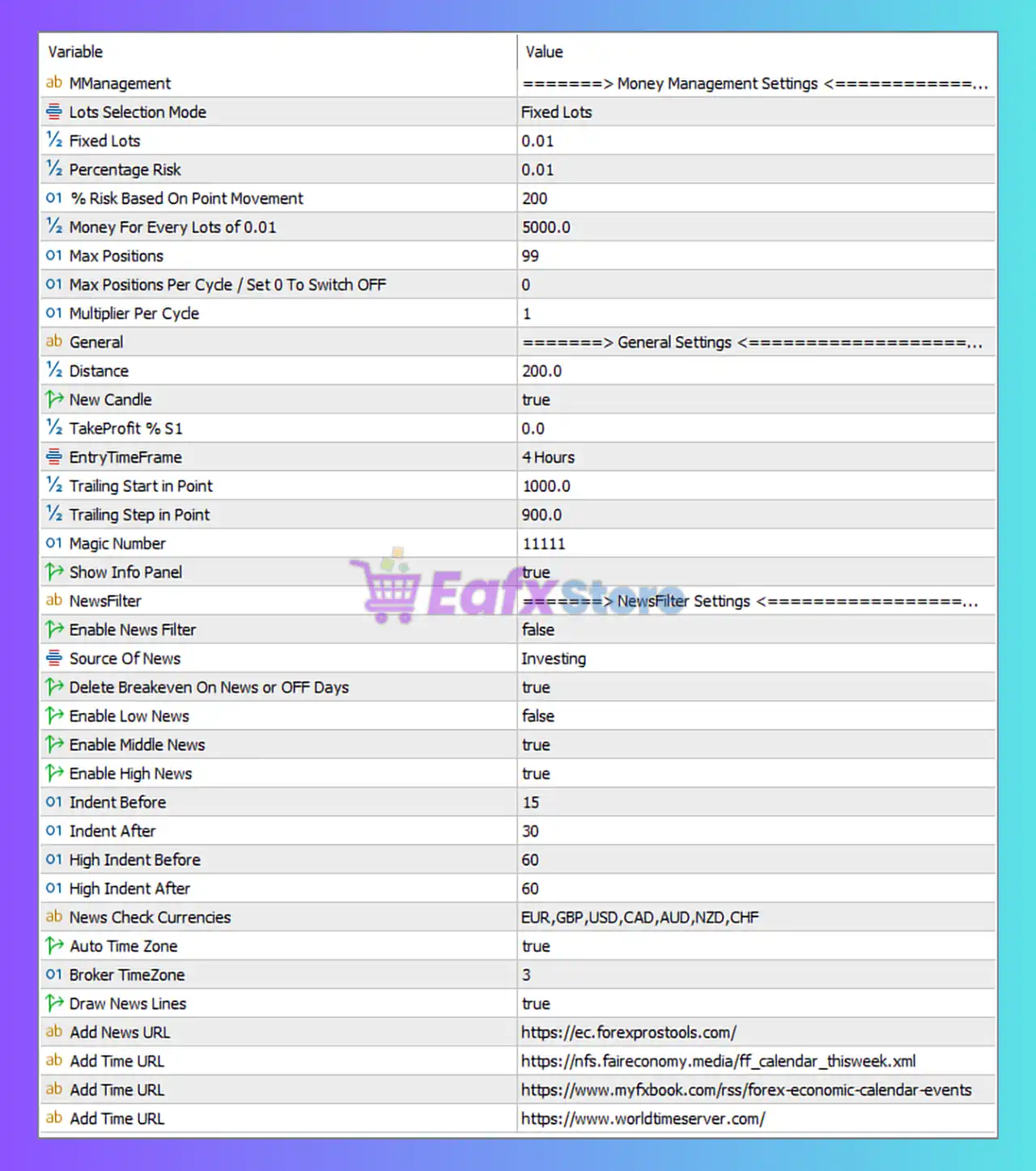
Below are the details of the parameters in the advisor’s trading system settings table:
Money Management Settings
🔹 Lots Selection Mode = Balance Ratio: Uses account balance ratio to calculate automatic lot sizing.
🔹 Fixed Lots = 0.01: Sets the fixed trading lot size to 0.01 lots.
🔹 Percentage Risk = 0.01: Risk percentage per trade is set to 0.01%.
🔹 % Risk Based On Point Movement = 200: Calculates risk exposure based on 200 points market movement.
🔹 Money For Every Lots of 0.01 = 2500.0: Uses $2500.0 account balance for every 0.01 lot.
🔹 Max Positions = 99: Maximum number of simultaneously opened positions is 99.
🔹 Max Positions Per Cycle / Set 0 To Switch OFF = 1: Allows 1 position per cycle; setting 0 disables the limit.
🔹 Multiplier Per Cycle of Max Positions = 2: Lot multiplier per trading cycle is 2.
🔹 Addition If Multiplier is 1 = 0: Additional lot increment is disabled when multiplier equals 1.
General Settings
🔹 Distance = 200.0: Distance between trading entries is set to 200.0 points.
🔹 New Candle = true: Opens trades only when a new candle forms.
🔹 TakeProfit % S1 = 0.0: Take Profit percentage for strategy S1 is disabled with value 0.0.
🔹 EntryTimeFrame = 4 Hours: EA executes trades using the H4 timeframe.
🔹 Trailing Start in Point = 1000.0: Trailing stop activates after 1000.0 points profit.
🔹 Trailing Step in Point = 900.0: Trailing stop adjusts every 900.0 points.
🔹 Days To Trade (Monday=1) = 1,2,3,4,5: Trading is enabled from Monday to Friday.
🔹 Start Trading Time = 00:00: Trading session starts at 00:00.
🔹 End Trading Time = 00:00: Trading session ends at 00:00.
🔹 Magic Number = 11111: Unique identifier used by the EA to manage its own trades.
🔹 Show Info Panel = true: Displays the information panel on the chart.
News Filter Settings
🔹 Enable News Filter = false: Economic news filter is currently disabled.
🔹 Source Of News = Investing: Uses Investing as the news data provider.
🔹 Delete Breakeven On News or OFF Days = true: Removes breakeven settings during news events or disabled trading days.
🔹 Enable Low News = false: Low-impact news filtering is disabled.
🔹 Enable Middle News = true: Medium-impact news filtering is enabled.
🔹 Enable High News = true: High-impact news filtering is enabled.
🔹 Indent Before = 15: Stops trading 15 minutes before medium-impact news.
🔹 Indent After = 30: Resumes trading 30 minutes after medium-impact news.
🔹 High Indent Before = 60: Stops trading 60 minutes before high-impact news.
🔹 High Indent After = 60: Resumes trading 60 minutes after high-impact news.
🔹 News Check Currencies = EUR,GBP,USD,CAD,AUD,NZD,CHF: Monitors economic news for these currencies.
🔹 Auto Time Zone = true: Automatically detects and adjusts broker/server timezone.
🔹 Broker TimeZone = 3: Broker server timezone is set to GMT+3.
🔹 Draw News Lines = true: Displays economic news event lines directly on the chart.
External News & Time URLs
🔹 Add News URL = https://ec.forexprostools.com/: External news source URL used by the EA.
🔹 Add Time URL = https://nfs.faireconomy.media/ff_calendar_thisweek.xml: XML economic calendar feed URL.
🔹 Add Time URL = https://www.myfxbook.com/rss/forex-economic-calendar-events: Myfxbook economic calendar RSS feed.
🔹 Add Time URL = https://www.worldtimeserver.com/: World time synchronization source.
Conclusion
Famous EA MT5 is a highly customizable MetaTrader 5 Expert Advisor (EA) designed with advanced balance-based money management, trailing stop systems and integrated economic news filtering. The EA offers flexible trade scaling, multi-position handling, and intelligent time-based controls that help traders optimize automated Forex trading performance.
With support for multiple news sources and dynamic risk management settings, Famous EA MT5 provides traders with a robust framework for automated trading in volatile market conditions.
FAQs
❓ What is Famous EA MT5?
Famous EA MT5 is an automated Forex trading robot for MetaTrader 5 with advanced money management and news filtering features.
❓ Does Famous EA MT5 support automatic lot sizing?
Yes, the EA supports automatic lot calculation using the Balance Ratio money management mode.
❓ Can Famous EA MT5 filter economic news events?
Yes, the EA includes configurable low, medium, and high-impact news filters.
❓ What timeframe does Famous EA MT5 use for entries?
The EA currently uses the 4 Hours (H4) timeframe for trade entries.
❓ Does Famous EA MT5 include trailing stop functionality?
Yes, the EA includes customizable trailing stop activation and trailing step settings.



