




🔢 Ghost Scalper MT5 – Complete Settings & Configuration Guide
Ghost Scalper MT5 is a multi-module automated trading Expert Advisor designed around four configurable trading components: Ghost A, Ghost B, Ghost C, and Ghost D. The supplied settings show a unified entry mode combining all four Ghost modules, while each module has its own fixed-lot or risk-percentage money-management option.
The configuration is built for flexible trade allocation, allowing each Ghost module to operate independently through dedicated lot-size/risk settings and unique Magic Numbers. With Ghost A + Ghost B + Ghost C + Ghost D selected, the EA is configured to use the complete four-module structure.
Important: The explanations below are based on the settings and values visible in the supplied configuration image. The exact internal trading logic of each Ghost module cannot be determined from these parameters alone.
🔢 Ghost Scalper MT5 Settings
🔶 Entry Mode
🔹 DEFAULT: Ghost A + B + C + D = Ghost A + Ghost B + Ghost C + Ghost D — Selects the default entry configuration, enabling the EA to operate with all four Ghost modules: A, B, C, and D.
🔶 Ghost A Money Management
🔹 Ghost A: Fixed Lot or Risk % = Fixed Lot — Determines how Ghost A calculates its trading volume; the current configuration uses a Fixed Lot rather than percentage-based risk sizing.
🔹 Ghost A Fixed Lot = 0.01 — Sets Ghost A's fixed trading volume to 0.01 lot when Fixed Lot mode is selected.
🔹 Ghost A Risk (%) = 0.25 — Defines Ghost A's risk allocation as 0.25% when percentage-based risk mode is selected
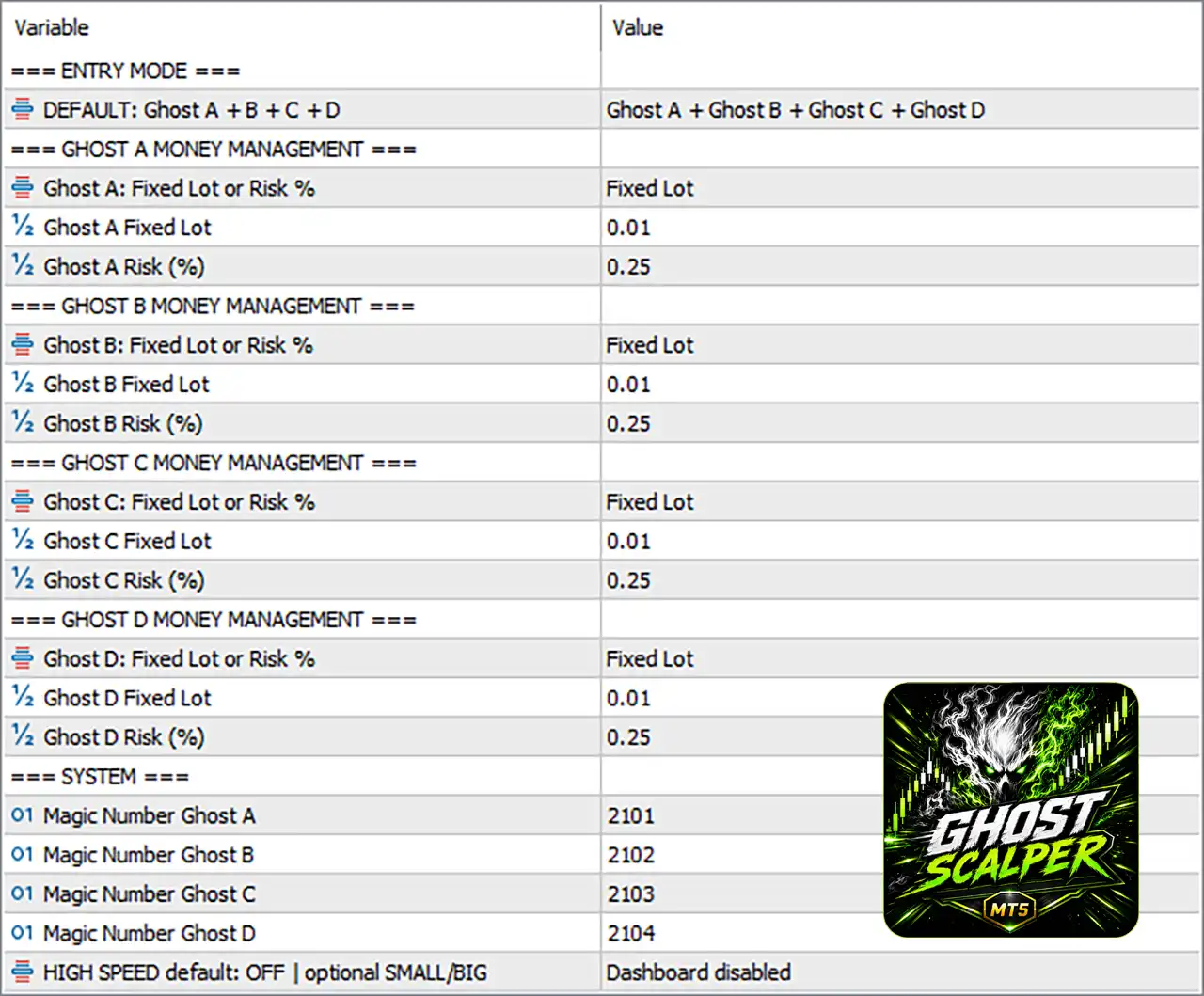
Ghost Scalper MT5 EA Settings Panel
; because the current mode is Fixed Lot, this value is not the active sizing method.
🔶 Ghost B Money Management
🔹 Ghost B: Fixed Lot or Risk % = Fixed Lot — Determines how Ghost B calculates position size; the current setting uses Fixed Lot.
🔹 Ghost B Fixed Lot = 0.01 — Sets Ghost B's fixed trading volume to 0.01 lot.
🔹 Ghost B Risk (%) = 0.25 — Defines a 0.25% risk allocation for Ghost B if Risk % mode is selected; the current configuration instead uses Fixed Lot.
🔶 Ghost C Money Management
🔹 Ghost C: Fixed Lot or Risk % = Fixed Lot — Determines Ghost C's position-sizing method, currently configured to use Fixed Lot.
🔹 Ghost C Fixed Lot = 0.01 — Sets Ghost C's fixed trading volume to 0.01 lot.
🔹 Ghost C Risk (%) = 0.25 — Defines a 0.25% risk allocation for Ghost C when Risk % mode is selected; it is not the active sizing method in the current configuration.
🔶 Ghost D Money Management
🔹 Ghost D: Fixed Lot or Risk % = Fixed Lot — Determines Ghost D's position-sizing method, currently configured to use Fixed Lot.
🔹 Ghost D Fixed Lot = 0.01 — Sets Ghost D's fixed trading volume to 0.01 lot.
🔹 Ghost D Risk (%) = 0.25 — Defines a 0.25% risk allocation for Ghost D if percentage-based sizing is selected; the current mode remains Fixed Lot.
🔶 System Settings
🔹 Magic Number Ghost A = 2101 — Gives Ghost A the unique trade identifier 2101, allowing its positions to be distinguished from other EA trades.
🔹 Magic Number Ghost B = 2102 — Gives Ghost B the unique Magic Number 2102 for trade identification and management.
🔹 Magic Number Ghost C = 2103 — Gives Ghost C the unique Magic Number 2103 for identifying its orders and positions.
🔹 Magic Number Ghost D = 2104 — Gives Ghost D the unique Magic Number 2104 for identifying and managing its trades.
🔹 HIGH SPEED default: OFF | optional SMALL/BIG = Dashboard disabled — Indicates that the HIGH SPEED option is currently configured with the dashboard disabled; the parameter description shows OFF as the default and references optional SMALL/BIG configurations.
🔢 Ghost Scalper MT5 Configuration Summary
🔹 Entry Mode = Ghost A + Ghost B + Ghost C + Ghost D — The EA is configured to use the complete four-Ghost entry structure.
🔹 Ghost A Money Management = Fixed Lot — Ghost A uses fixed-volume sizing.
🔹 Ghost A Fixed Lot = 0.01 — Ghost A trades at 0.01 lot under the active sizing mode.
🔹 Ghost A Risk = 0.25% — Alternative Ghost A risk setting is 0.25%.
🔹 Ghost B Money Management = Fixed Lot — Ghost B uses fixed-volume sizing.
🔹 Ghost B Fixed Lot = 0.01 — Ghost B trades at 0.01 lot under the active sizing mode.
🔹 Ghost B Risk = 0.25% — Alternative Ghost B risk setting is 0.25%.
🔹 Ghost C Money Management = Fixed Lot — Ghost C uses fixed-volume sizing.
🔹 Ghost C Fixed Lot = 0.01 — Ghost C trades at 0.01 lot under the active sizing mode.
🔹 Ghost C Risk = 0.25% — Alternative Ghost C risk setting is 0.25%.
🔹 Ghost D Money Management = Fixed Lot — Ghost D uses fixed-volume sizing.
🔹 Ghost D Fixed Lot = 0.01 — Ghost D trades at 0.01 lot under the active sizing mode.
🔹 Ghost D Risk = 0.25% — Alternative Ghost D risk setting is 0.25%.
🔹 Ghost A Magic Number = 2101 — Unique identifier for Ghost A trades.
🔹 Ghost B Magic Number = 2102 — Unique identifier for Ghost B trades.
🔹 Ghost C Magic Number = 2103 — Unique identifier for Ghost C trades.
🔹 Ghost D Magic Number = 2104 — Unique identifier for Ghost D trades.
🔹 HIGH SPEED Dashboard = disabled — The displayed configuration shows the dashboard disabled.
🔢 Key Benefits of the Configuration
🔹 Four-Module Architecture — Ghost A, Ghost B, Ghost C, and Ghost D can operate within the selected entry configuration.
🔹 Independent Money Management — Each Ghost module has its own Fixed Lot and Risk % parameters.
🔹 Low Fixed Volume — All four modules are configured at 0.01 lot under the current Fixed Lot mode.
🔹 Alternative Risk Allocation — Each module has a 0.25% Risk % setting available as an alternative.
🔹 Separate Trade Identification — Magic Numbers 2101–2104 distinguish the four Ghost modules.
🔹 Configurable Presentation — The HIGH SPEED dashboard is currently disabled, keeping the displayed setup streamlined.
🔢 Conclusion
Ghost Scalper MT5 provides a structured multi-module framework where Ghost A, Ghost B, Ghost C, and Ghost D can be managed independently while operating under a unified entry configuration.
The supplied setup selects Ghost A + Ghost B + Ghost C + Ghost D, with all four modules using Fixed Lot = 0.01. Each module additionally has a 0.25% Risk (%) parameter available if the trader chooses percentage-based money management instead.
The dedicated Magic Numbers—2101, 2102, 2103, and 2104—create clear identification between the four modules, while the HIGH SPEED Dashboard is shown as disabled.
Overall, the configuration emphasizes multi-module flexibility, independent position sizing, clear trade identification, and straightforward control of the EA's operating structure. Traders should thoroughly backtest any combination of modules and money-management settings before applying them to a live account.




