




🔢 MoonDog EA – Complete MT5 Settings & Configuration Guide
MoonDog EA is an advanced automated trading Expert Advisor designed around a modular gold-trading framework. Its configuration combines multiple strategy modules, adaptive position sizing, MoonLock profit protection, virtual-stop fallback, economic-news protection, NFP/CPI/FOMC event controls, execution-quality monitoring, and prop-firm risk management.
The supplied settings show a configuration specifically structured to manage XAUUSD/gold trading, with all five MoonDog strategy modules enabled: Moon Nova, Moon Apex, Moon Zenith, Moon Pulse, and Moon Eclipse. The EA also provides detailed controls for trading hours, spread protection, risk-based lot sizing, automatic lot scaling, Take Profit management, trailing protection, and account-level drawdown limits.
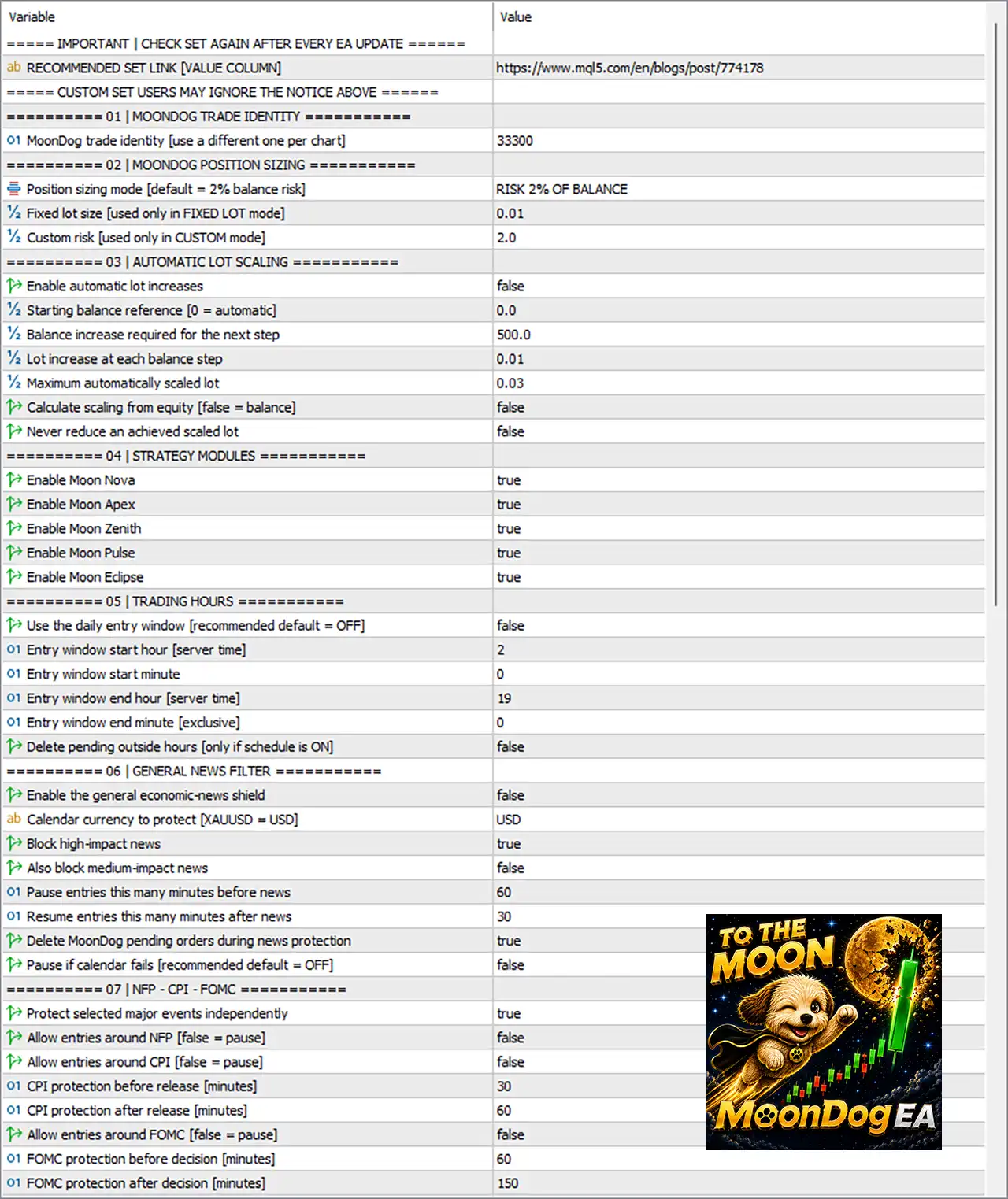
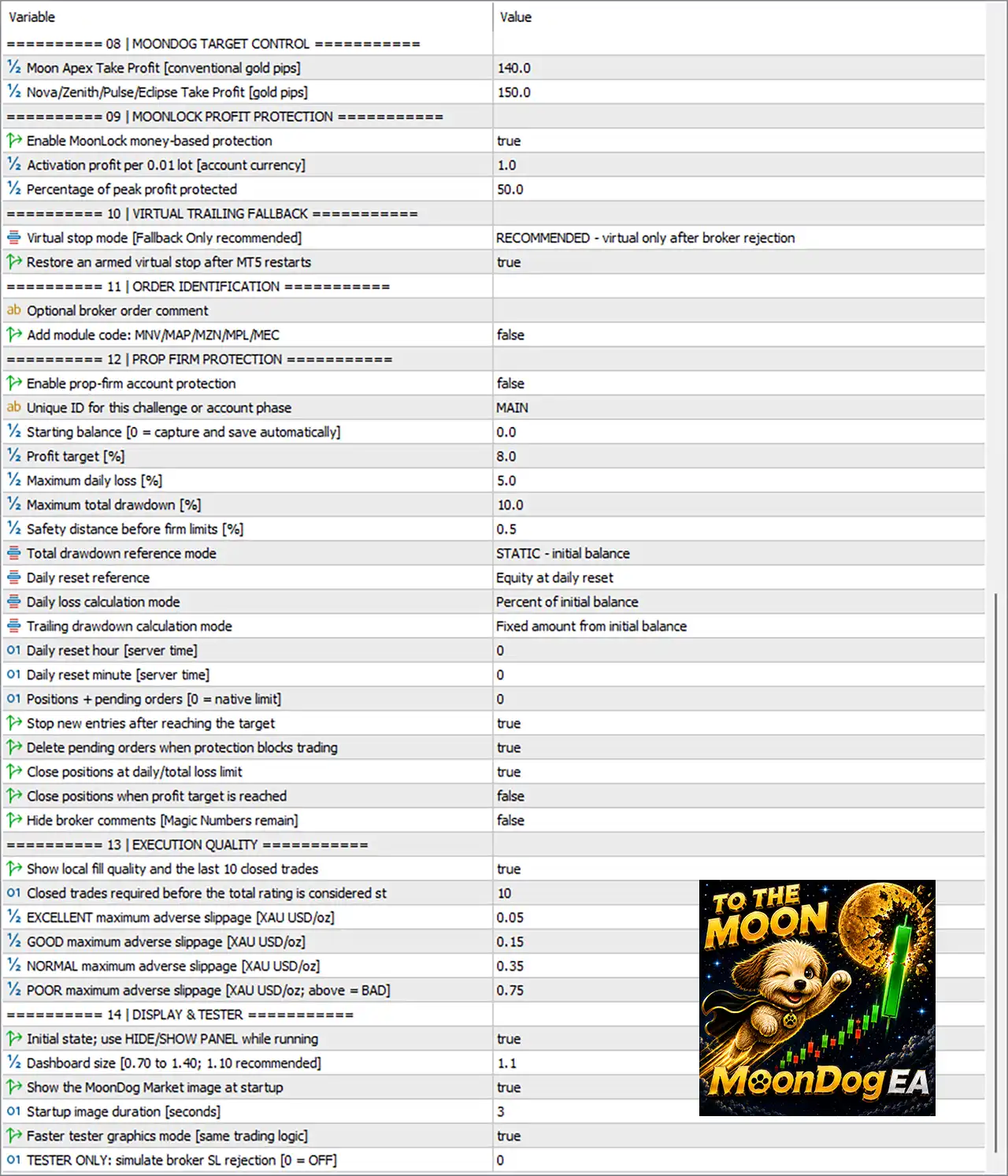
Important: The explanations below describe what each parameter appears to control based on its name, value, and section in the supplied MT5 settings. They should not be interpreted as a guarantee of trading performance or risk.
🔢 MoonDog EA MT5 Settings
🔄 MoonDog Position Sizing
🔹 Position sizing mode [default = 2% balance risk] = RISK 2% OF BALANCE — Calculates position size according to a target risk of 2% of account balance rather than using a fixed lot.
🔹 Fixed lot size [used only in FIXED LOT mode] = 0.01 — Defines a fixed position size of 0.01 lot if Fixed Lot mode is selected.
🔹 Custom risk [used only in CUSTOM mode] = 2.0 — Defines the custom risk value as 2.0 when Custom risk mode is selected.
🔄 Automatic Lot Scaling
🔹 Enable automatic lot increases = false — Disables automatic increases in lot size as the account balance grows.
🔹 Starting balance reference [0 = automatic] = 0.0 — Uses 0.0, meaning the starting balance reference is determined automatically.
🔹 Balance increase required for the next step = 500.0 — Requires a 500.0 balance increase before the next automatic lot-scaling step.
🔹 Lot increase at each balance step = 0.01 — Adds 0.01 lot at each qualifying balance step when automatic scaling is enabled.
🔹 Maximum automatically scaled lot = 0.03 — Caps automatically scaled position size at 0.03 lot.
🔹 Calculate scaling from equity [false = balance] = false — Calculates scaling from balance, because the equity-based option is disabled.
🔹 Never reduce an achieved scaled lot = false — Allows a previously increased lot size to be reduced when the scaling conditions subsequently require it.
🔄 Strategy Modules
🔹 Enable Moon Nova = true — Enables the Moon Nova trading module.
🔹 Enable Moon Apex = true — Enables the Moon Apex trading module.
🔹 Enable Moon Zenith = true — Enables the Moon Zenith trading module.
🔹 Enable Moon Pulse = true — Enables the Moon Pulse trading module.
🔹 Enable Moon Eclipse = true — Enables the Moon Eclipse trading module.
🔄 Trading Hours
🔹 Use the daily entry window [recommended default = OFF] = false — Disables the dedicated daily entry-window restriction.
🔹 Entry window start hour [server time] = 2 — Defines the entry-window starting hour as 02:00 server time if the schedule is enabled.
🔹 Entry window start minute = 0 — Defines the starting minute as 00.
🔹 Entry window end hour [server time] = 19 — Defines the entry-window ending hour as 19:00 server time.
🔹 Entry window end minute [exclusive] = 0 — Defines the ending minute as 00, with the end boundary treated as exclusive.
🔹 Delete pending outside hours [only if schedule is ON] = false — Does not delete pending orders outside the configured trading window.
🔄 General News Filter
🔹 Enable the general economic-news shield = false — Disables the general economic-news protection shield.
🔹 Calendar currency to protect [XAUUSD = USD] = USD — Sets USD as the economic-calendar currency to monitor for XAUUSD protection.
🔹 Block high-impact news = true — Enables blocking of new entries around high-impact economic events when the general news shield is active.
🔹 Also block medium-impact news = false — Does not block medium-impact events.
🔹 Pause entries this many minutes before news = 60 — Pauses new entries 60 minutes before a qualifying news event.
🔹 Resume entries this many minutes after news = 30 — Resumes entries 30 minutes after the qualifying news event.
🔹 Delete MoonDog pending orders during news protection = true — Deletes MoonDog pending orders while news protection is active.
🔹 Pause if calendar fails [recommended default = OFF] = false — Continues normal operation if the economic-calendar service fails rather than automatically pausing trading.
🔄 NFP – CPI – FOMC
🔹 Protect selected major events independently = true — Enables independent protection for the selected major economic events.
🔹 Allow entries around NFP [false = pause] = false — Blocks/pause entries around NFP rather than allowing new entries during the event-protection period.
🔹 NFP protection before release [minutes] = 30 — Applies NFP protection beginning 30 minutes before release.
🔹 NFP protection after release [minutes] = 60 — Maintains NFP protection for 60 minutes after release.
🔹 Allow entries around CPI [false = pause] = false — Blocks/pause entries around CPI releases.
🔹 CPI protection before release [minutes] = 30 — Applies CPI protection 30 minutes before release.
🔹 CPI protection after release [minutes] = 60 — Maintains CPI protection for 60 minutes after release.
🔹 Allow entries around FOMC [false = pause] = false — Blocks/pause entries around FOMC decisions.
🔹 FOMC protection before decision [minutes] = 60 — Starts FOMC protection 60 minutes before the decision.
🔹 FOMC protection after decision [minutes] = 150 — Maintains FOMC protection for 150 minutes after the decision.
🔄 MoonDog Target Control
🔹 Moon Apex Take Profit [conventional gold pips] = 140.0 — Sets the Moon Apex Take Profit target to 140.0 conventional gold pips.
🔹 Nova/Zenith/Pulse/Eclipse Take Profit [gold pips] = 150.0 — Sets the Take Profit target for Moon Nova, Moon Zenith, Moon Pulse, and Moon Eclipse to 150.0 gold pips.
🔄 MoonLock Profit Protection
🔹 Enable MoonLock money-based protection = true — Enables the MoonLock money-based profit-protection system.
🔹 Activation profit per 0.01 lot [account currency] = 1.0 — Activates MoonLock protection after reaching 1.0 account-currency unit of profit per 0.01 lot.
🔹 Percentage of peak profit protected = 50.0 — Protects 50.0% of the peak profit once the MoonLock mechanism is active.
🔄 Virtual Trailing Fallback
🔹 Virtual stop mode [Fallback Only recommended] = RECOMMENDED - virtual only after broker rejection — Uses a virtual stop only as a fallback when the broker rejects the corresponding physical stop operation.
🔹 Restore an armed virtual stop after MT5 restarts = true — Restores an armed virtual stop after an MT5 restart.
🔄 Order Identification
🔹 Optional broker order comment = [blank] — No optional broker order comment is specified in the supplied configuration.
🔹 Add module code: MNV/MAP/MZN/MPL/MEC = false — Disables adding strategy-module codes such as MNV, MAP, MZN, MPL, or MEC to order identification.
🔄 Prop Firm Protection
🔹 Enable prop-firm account protection = false — Disables the dedicated prop-firm account-protection module.
🔹 Unique ID for this challenge or account phase = MAIN — Uses MAIN as the unique identifier for the challenge/account phase.
🔹 Starting balance [0 = capture and save automatically] = 0.0 — Uses 0.0, allowing the EA to capture and save the starting balance automatically.
🔹 Profit target [%] = 8.0 — Defines an 8.0% profit target.
🔹 Maximum daily loss [%] = 5.0 — Defines a maximum daily loss threshold of 5.0%.
🔹 Maximum total drawdown [%] = 10.0 — Defines a maximum total drawdown threshold of 10.0%.
🔹 Safety distance before firm limits [%] = 0.5 — Provides a 0.5% safety margin before the configured prop-firm limits are reached.
🔹 Total drawdown reference mode = STATIC - initial balance — Calculates total drawdown against the initial balance using a static reference.
🔹 Daily reset reference = Equity at daily reset — Uses account equity at the daily reset as the daily reference.
🔹 Daily loss calculation mode = Percent of initial balance — Measures daily loss as a percentage of the initial balance.
🔹 Trailing drawdown calculation mode = Fixed amount from initial balance — Uses a fixed monetary amount derived from the initial balance for trailing-drawdown calculation.
🔹 Daily reset hour [server time] = 0 — Sets the daily reset hour to 00:00 server time.
🔹 Daily reset minute [server time] = 0 — Sets the daily reset minute to 00.
🔹 Positions + pending orders [0 = native limit] = 0 — Uses 0, meaning the native limit is used for positions and pending orders.
🔹 Stop new entries after reaching the target = true — Stops opening new entries once the configured target is reached.
🔹 Delete pending orders when protection blocks trading = true — Deletes pending orders when prop-firm protection prevents trading.
🔹 Close positions at daily/total loss limit = true — Closes positions when the daily or total loss limit is reached.
🔹 Close positions when profit target is reached = false — Does not automatically close existing positions when the profit target is reached.
🔹 Hide broker comments [Magic Numbers remain] = false — Keeps broker comments visible while Magic Numbers remain available.
🔄 Execution Quality
🔹 Show local fill quality and the last 10 closed trades = true — Displays local execution/fill quality information and evaluates the last 10 closed trades.
🔹 Closed trades required before the total rating is considered stable = 10 — Requires 10 closed trades before the execution-quality rating is considered stable.
🔹 EXCELLENT maximum adverse slippage [XAU USD/oz] = 0.05 — Defines 0.05 XAU USD/oz as the maximum adverse-slippage threshold for the EXCELLENT category.
🔹 GOOD maximum adverse slippage [XAU USD/oz] = 0.15 — Defines 0.15 XAU USD/oz as the maximum adverse-slippage threshold for the GOOD category.
🔹 NORMAL maximum adverse slippage [XAU USD/oz] = 0.35 — Defines 0.35 XAU USD/oz as the maximum adverse-slippage threshold for the NORMAL category.
🔹 POOR maximum adverse slippage [XAU USD/oz; above = BAD] = 0.75 — Defines 0.75 XAU USD/oz as the maximum POOR threshold; adverse slippage above 0.75 is classified as BAD.
🔄 Display & Tester
🔹 Initial state; use HIDE/SHOW PANEL while running = true — Starts with the EA panel functionality enabled and allows the panel to be hidden/shown while running.
🔹 Dashboard size [0.70 to 1.40; 1.10 recommended] = 1.1 — Sets the dashboard size to 1.1, matching the stated recommended value.
🔹 Show the MoonDog Market image at startup = true — Displays the MoonDog Market image when the EA starts.
🔹 Startup image duration [seconds] = 3 — Displays the startup image for 3 seconds.
🔹 Faster tester graphics mode [same trading logic] = true — Enables faster graphical rendering in the strategy tester while retaining the same trading logic.
🔹 TESTER ONLY: simulate broker SL rejection [0 = OFF] = 0 — Simulation of broker Stop Loss rejection is OFF because the value is 0.
🔢 Key MoonDog EA Configuration at a Glance
🔹 Trade Identity = 33300 — Unique MoonDog trade identifier.
🔹 Position Sizing = RISK 2% OF BALANCE — Uses balance-based risk sizing at the configured 2% level.
🔹 Fixed Lot Backup = 0.01 — Fixed lot value if Fixed Lot mode is selected.
🔹 Custom Risk = 2.0 — Custom risk parameter.
🔹 Automatic Lot Scaling = false — Automatic lot increases are disabled.
🔹 Balance Step = 500.0 — Each scaling step requires 500.0 additional balance.
🔹 Lot Increase = 0.01 — Each scaling step adds 0.01 lot.
🔹 Maximum Scaled Lot = 0.03 — Automatic scaling cannot exceed 0.03 lot.
🔹 Moon Nova = true — Enabled.
🔹 Moon Apex = true — Enabled.
🔹 Moon Zenith = true — Enabled.
🔹 Moon Pulse = true — Enabled.
🔹 Moon Eclipse = true — Enabled.
🔹 Moon Apex TP = 140.0 gold pips — Apex target.
🔹 Nova/Zenith/Pulse/Eclipse TP = 150.0 gold pips — Other module target.
🔹 MoonLock = true — Money-based profit protection enabled.
🔹 MoonLock Activation = 1.0 per 0.01 lot — Activation threshold.
🔹 Peak Profit Protected = 50.0% — Half of peak profit is targeted for protection.
🔹 Virtual Stop = Broker-Rejection Fallback — Virtual stop protection is reserved for broker rejection.
🔹 Major Event Protection = true — NFP/CPI/FOMC protection is independently enabled.
🔹 NFP Protection = 30 minutes before / 60 minutes after — New entries are paused around NFP.
🔹 CPI Protection = 30 minutes before / 60 minutes after — New entries are paused around CPI.
🔹 FOMC Protection = 60 minutes before / 150 minutes after — New entries are paused around FOMC decisions.
🔹 Prop-Firm Protection = false — The dedicated prop-firm protection engine is currently disabled despite having 8.0%, 5.0%, 10.0%, and 0.5% thresholds configured.
🔹 Execution Quality Sample = 10 closed trades — Rating stabilization requires 10 trades.
🔹 Dashboard Size = 1.1 — Uses the recommended 1.10 display scale.
🔢 Conclusion
MoonDog EA MT5 presents a comprehensive automated-trading configuration with multiple strategy modules, adaptive position sizing, profit protection, news controls, execution monitoring, and optional prop-firm safeguards.
The supplied configuration has all five MoonDog strategy modules enabled, uses RISK 2% OF BALANCE, and keeps automatic lot increases disabled. Profit management is configured around 140.0 gold pips for Moon Apex and 150.0 gold pips for Nova/Zenith/Pulse/Eclipse, while MoonLock protects 50.0% of peak profit after its 1.0-per-0.01-lot activation threshold.
The major-event protection settings are also clearly defined: NFP 30/60 minutes, CPI 30/60 minutes, and FOMC 60/150 minutes before/after the relevant event. Meanwhile, execution quality is evaluated using the last 10 closed trades, with adverse-slippage categories ranging from 0.05 for EXCELLENT to 0.75 XAU USD/oz for POOR.
One important distinction is that Prop Firm Protection is currently false, even though its parameters — 8.0% profit target, 5.0% maximum daily loss, 10.0% maximum total drawdown, and 0.5% safety distance — are configured. Traders who intend to use the EA for a prop-firm challenge should verify that this module is intentionally disabled before deployment.
As with any automated trading system, these settings should be backtested and forward-tested under the exact broker, symbol specification, spread, execution, and account conditions intended for live trading.



