


🔢 C4X BOT MT5 Settings: Complete Parameter Guide
C4X BOT MT5 is an automated trading solution designed to execute trading strategies on the MetaTrader 5 (MT5) platform with configurable lot sizing, grid entries, take-profit management, trading-hour restrictions, multipliers, trend triggers, and minimum favorable volume conditions. Understanding each input parameter is essential for configuring the EA according to your preferred trading strategy, risk level, and market conditions.
Below is a complete breakdown of all settings shown in the provided C4X BOT MT5 configuration panel, with the original numerical values preserved.
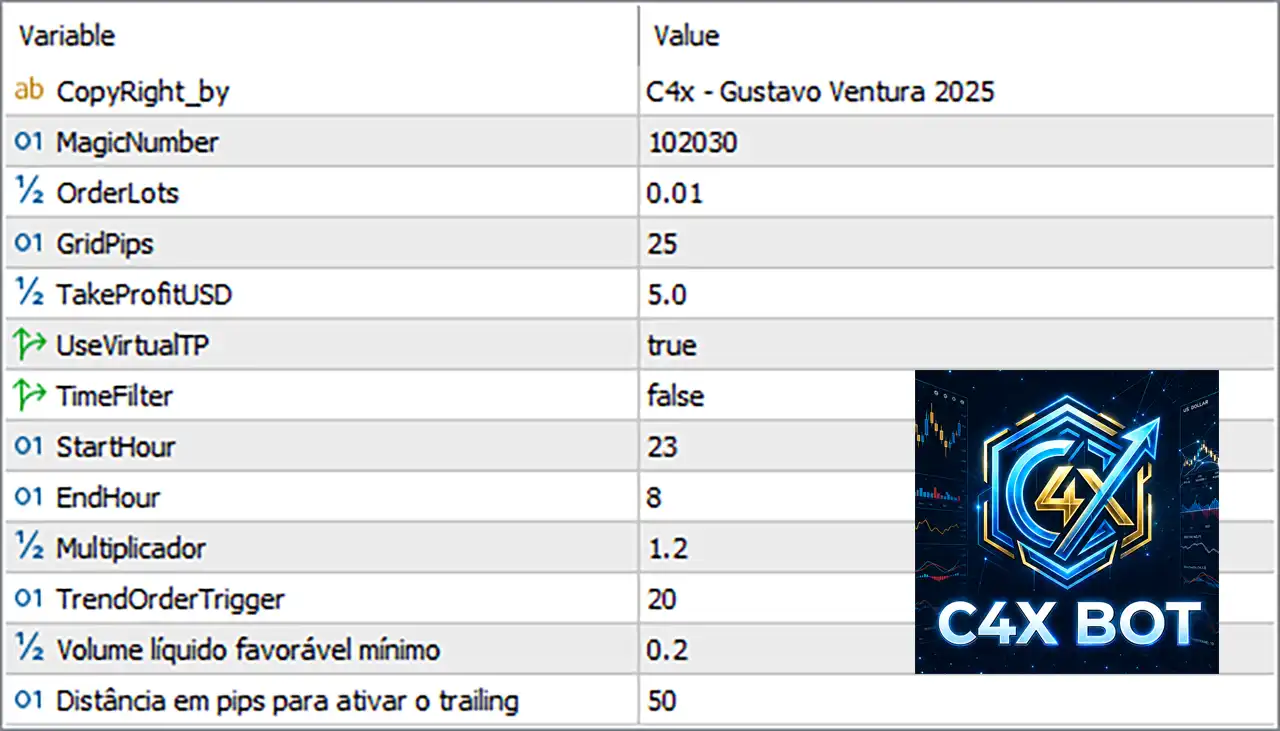
🔢 C4X BOT MT5 Parameters
🔹 CopyRight_by = C4x - Gustavo Ventura 2025 — Copyright/author information displayed for the EA. It identifies the C4X BOT MT5 as the C4x - Gustavo Ventura 2025 version.
🔹 MagicNumber = 102030 — The unique identifier used by the EA to distinguish its own trades from trades opened by other Expert Advisors or manually. The configured Magic Number is 102030.
🔹 OrderLots = 0.01 — Defines the initial or default trading lot size for orders opened by the EA. The configured lot size is 0.01 lots, which represents a small starting position size.
🔹 GridPips = 25 — Determines the distance between grid orders in pips. With a setting of 25, the EA uses a 25-pip spacing between relevant grid positions.
🔹 TakeProfitUSD = 5.0 — Sets the target profit in US dollars for the EA's take-profit management. The configured target is 5.0 USD.
🔹 UseVirtualTP = true — Enables the EA's virtual take-profit mechanism. With the value set to true, the EA uses virtual TP management rather than relying solely on a conventional broker-side take-profit level.
🔹 TimeFilter = false — Controls whether the EA restricts trading according to the configured trading hours. Because the value is false, the time filter is currently disabled.
🔹 StartHour = 23 — Specifies the starting hour for the trading-time window when the time filter is enabled. The configured start time is 23:00.
🔹 EndHour = 8 — Specifies the ending hour for the trading-time window when the time filter is enabled. The configured end time is 08:00.
🔹 Multiplier = 1.2 — Defines the position-size multiplier used when the EA increases subsequent order sizes according to its trading logic. The configured multiplier is 1.2, meaning the applicable next position can be calculated using a 1.2× factor.
🔹 TrendOrderTrigger = 20 — Determines the trigger threshold associated with the EA's trend-order logic. The configured trigger value is 20.
🔹 Volume líquido favorável mínimo = 0.2 — Defines the minimum favorable net volume condition required by the EA's trading logic. The configured minimum value is 0.2.
🔹 Distância em pips para ativar o trailing = 50 — Defines the price distance required to activate the trailing mechanism. The configured activation distance is 50 pips.
🔢 Quick Configuration Summary
🔹 Author/Copyright: C4x - Gustavo Ventura 2025
🔹 Magic Number: 102030
🔹 Order Lots: 0.01
🔹 Grid Distance: 25 pips
🔹 Take Profit: 5.0 USD
🔹 Virtual TP: Enabled (true)
🔹 Time Filter: Disabled (false)
🔹 Start Hour: 23
🔹 End Hour: 8
🔹 Multiplier: 1.2
🔹 Trend Order Trigger: 20
🔹 Minimum Favorable Net Volume: 0.2
🔹 Trailing Activation Distance: 50 pips
🔢 Conclusion
🔹 C4X BOT MT5 provides a flexible set of parameters for controlling automated trade execution, grid spacing, profit targets, position scaling, trading hours, trend conditions, volume requirements, and trailing management.
🔹 With the current configuration, the EA is set to use 0.01 lots, a 25-pip grid distance, a 5.0 USD take-profit target, virtual TP enabled, a 1.2 multiplier, a 20 trend-order trigger, 0.2 minimum favorable net volume, and a 50-pip trailing activation distance.
🔹 Since TimeFilter = false, the StartHour = 23 and EndHour = 8 settings are not currently enforcing a trading-time restriction. Always test EA parameters on a demo account and evaluate drawdown, exposure, spread, and broker-specific execution conditions before using them on a live account.
🔢 FAQs
❓ What is the default lot size of C4X BOT MT5?
The configured OrderLots value is 0.01 lots, which is the starting/default order size shown in the settings.
❓ What does GridPips = 25 mean?
It indicates a 25-pip distance between applicable grid orders according to the EA's grid-trading logic.
❓ Is the virtual take-profit function enabled?
Yes. UseVirtualTP = true, meaning the virtual TP function is enabled.
❓ Does C4X BOT MT5 currently restrict trading to specific hours?
No. TimeFilter = false, so the configured StartHour = 23 and EndHour = 8 are currently inactive for time filtering.
❓ What does Multiplier = 1.2 mean?
It specifies a 1.2× position-sizing multiplier for the EA's applicable subsequent orders, according to its money-management logic.


