


🔢 XU Dynamics EA MT5 Settings: Complete Parameter Guide
XU Dynamics EA MT5 is a sophisticated automated trading system designed for MetaTrader 5, combining adaptive market analysis, dynamic risk management, spread and slippage controls, signal filtering, trading-day restrictions, smart lot scaling, event protection, and funded-account protection. Its configuration is organized into dedicated modules, allowing traders to fine-tune execution conditions, trade direction, risk exposure, exit behavior, and chart presentation.
The following guide provides a complete breakdown of every setting visible in the supplied XU Dynamics EA configuration panels, while preserving all original values, numbers, and parameter names.
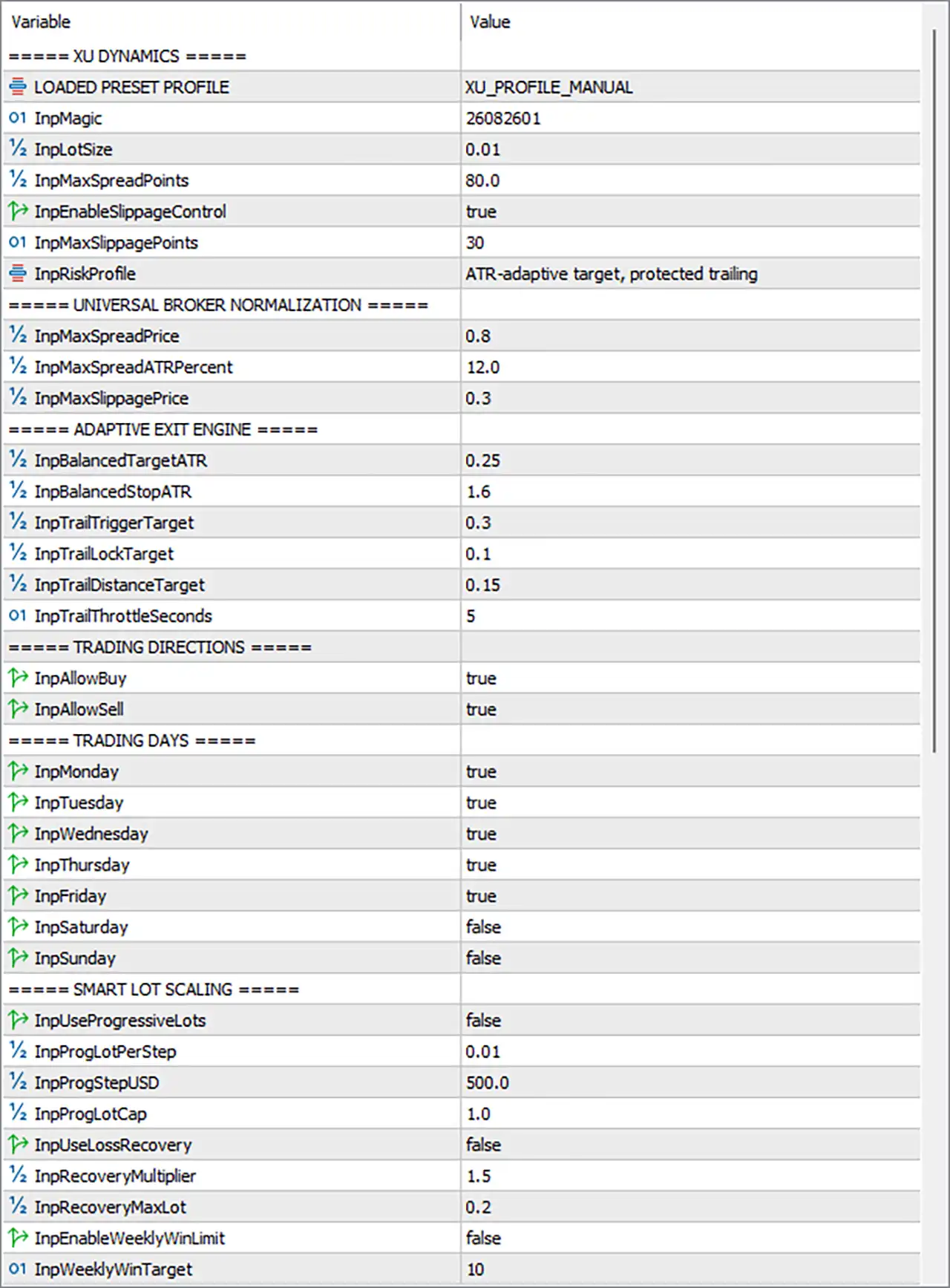
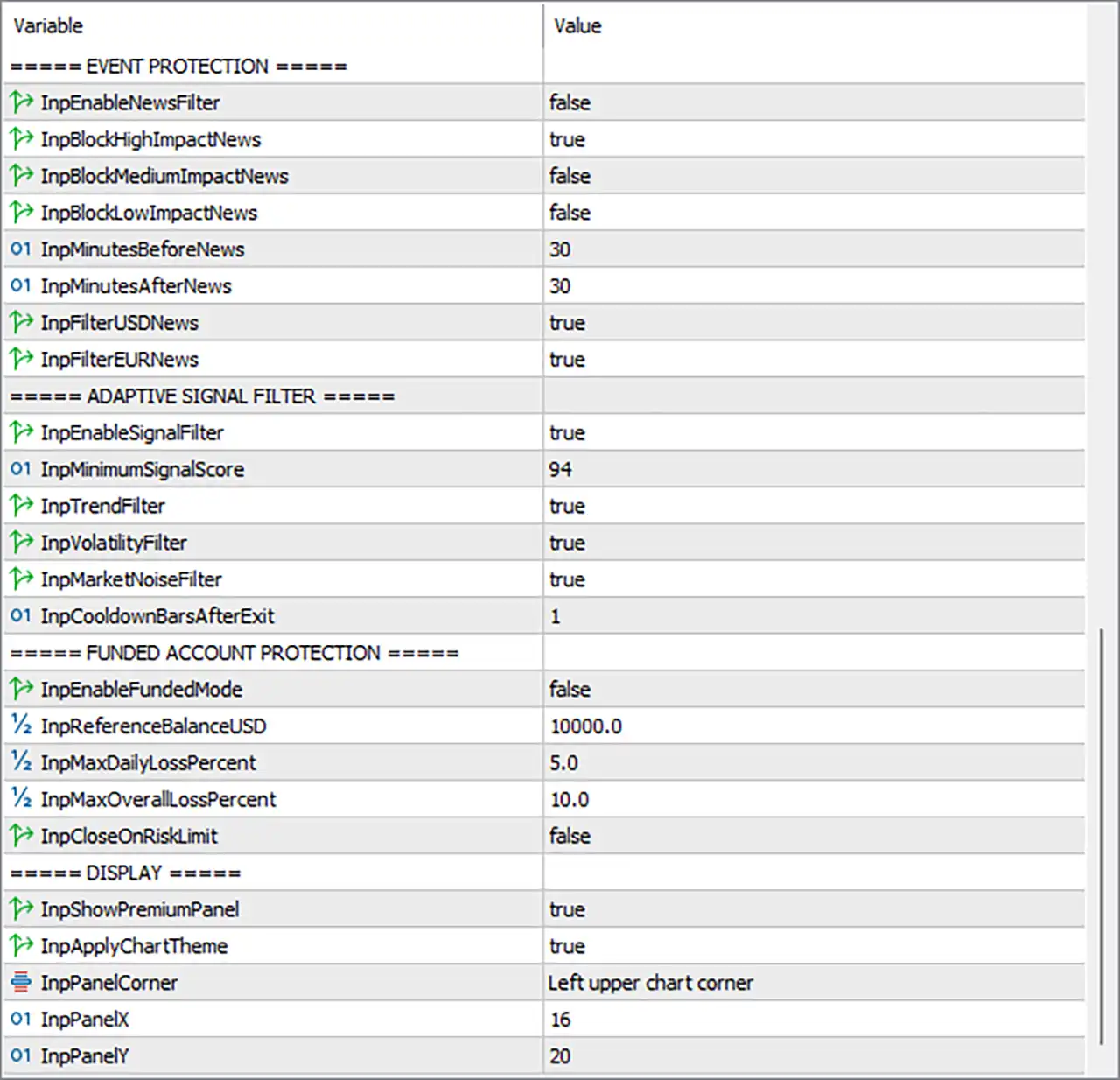
🔢 XU Dynamics EA MT5 Settings
🔄 XU DYNAMICS — Core Settings
🔹 LOADED PRESET PROFILE = XU_PROFILE_MANUAL — Displays the preset profile currently loaded into the EA. XU_PROFILE_MANUAL indicates that the manual XU Dynamics profile is currently selected.
🔹 InpMagic = 26082601 — The unique Magic Number used by the EA to identify and manage its own trades. The configured value is 26082601.
🔹 InpLotSize = 0.01 — Defines the base trading lot size used for new positions. The current configuration uses 0.01 lots.
🔹 InpMaxSpreadPoints = 80.0 — Sets the maximum acceptable spread measured in broker points before the EA is allowed to execute a trade. The configured maximum is 80.0 points.
🔹 InpEnableSlippageControl = true — Enables the EA's slippage-control mechanism. With the value set to true, the EA actively checks slippage conditions before or during trade execution.
🔹 InpMaxSlippagePoints = 30 — Defines the maximum permitted execution slippage in points when slippage control is enabled. The configured limit is 30 points.
🔹 InpRiskProfile = ATR-adaptive target, protected trailing — Specifies the selected risk and exit-management profile. The configuration uses an ATR-adaptive target combined with protected trailing, allowing trade targets and trailing behavior to adapt to market volatility.
🔄 UNIVERSAL BROKER NORMALIZATION
🔹 InpMaxSpreadPrice = 0.8 — Defines the maximum permitted spread using the normalized price-based spread limit. The configured value is 0.8.
🔹 InpMaxSpreadATRPercent = 12.0 — Sets the maximum spread relative to ATR as a percentage. The configured threshold is 12.0%, helping prevent entries when the spread is disproportionately large compared with current market volatility.
🔹 InpMaxSlippagePrice = 0.3 — Defines the maximum permitted slippage using a normalized price-distance measurement. The configured value is 0.3.
🔄 ADAPTIVE EXIT ENGINE
🔹 InpBalancedTargetATR = 0.25 — Defines the adaptive profit-target component in relation to ATR. The configured target factor is 0.25 ATR.
🔹 InpBalancedStopATR = 1.6 — Defines the adaptive stop-loss distance relative to ATR. The configured stop factor is 1.6 ATR.
🔹 InpTrailTriggerTarget = 0.3 — Determines the target/profit threshold at which the trailing-management logic can begin to become active. The configured value is 0.3.
🔹 InpTrailLockTarget = 0.1 — Defines the target level used for profit-locking within the trailing mechanism. The configured value is 0.1.
🔹 InpTrailDistanceTarget = 0.15 — Determines the trailing distance used by the adaptive exit system. The configured value is 0.15.
🔹 InpTrailThrottleSeconds = 5 — Controls the minimum time interval, in seconds, used to throttle trailing-stop updates. The configured interval is 5 seconds.
🔄 TRADING DIRECTIONS
🔹 InpAllowBuy = true — Enables Buy trades. With the value true, the EA is permitted to open/manage Buy positions.
🔹 InpAllowSell = true — Enables Sell trades. With the value true, the EA is permitted to open/manage Sell positions.
🔄 TRADING DAYS
🔹 InpMonday = true — Enables EA trading on Monday.
🔹 InpTuesday = true — Enables EA trading on Tuesday.
🔹 InpWednesday = true — Enables EA trading on Wednesday.
🔹 InpThursday = true — Enables EA trading on Thursday.
🔹 InpFriday = true — Enables EA trading on Friday.
🔹 InpSaturday = false — Disables EA trading on Saturday.
🔹 InpSunday = false — Disables EA trading on Sunday.
🔄 SMART LOT SCALING
🔹 InpUseProgressiveLots = false — Controls whether progressive lot scaling is enabled. With the value false, progressive lot sizing is currently disabled.
🔹 InpProgLotPerStep = 0.01 — Defines the additional lot amount applied for each progressive-lot step when progressive sizing is enabled. The configured increment is 0.01 lots.
🔹 InpProgStepUSD = 500.0 — Defines the USD account-equity/balance step associated with progressive lot scaling. The configured step is 500.0 USD.
🔹 InpProgLotCap = 1.0 — Sets the maximum lot size allowed by the progressive-lot mechanism. The configured cap is 1.0 lot.
🔹 InpUseLossRecovery = false — Controls the loss-recovery lot-sizing mechanism. With false, loss recovery is currently disabled.
🔹 InpRecoveryMultiplier = 1.5 — Defines the multiplier used for the loss-recovery position-sizing mechanism when enabled. The configured multiplier is 1.5×.
🔹 InpRecoveryMaxLot = 0.2 — Sets the maximum lot size permitted by the loss-recovery mechanism. The configured maximum is 0.2 lots.
🔹 InpEnableWeeklyWinLimit = false — Enables or disables the weekly profit-target/limit mechanism. With false, the weekly win limit is currently disabled.
🔹 InpWeeklyWinTarget = 10 — Defines the weekly winning target used when the weekly win-limit feature is enabled. The configured target value is 10.
🔄 EVENT PROTECTION
🔹 InpEnableNewsFilter = false — Controls the EA's economic-news filtering system. With false, the news filter itself is currently disabled.
🔹 InpBlockHighImpactNews = true — Specifies whether high-impact economic news should be blocked. The setting is true, meaning high-impact news is configured to be blocked when the news-filter functionality is active.
🔹 InpBlockMediumImpactNews = false — Controls whether medium-impact news events are blocked. The value false means medium-impact events are not configured to be blocked.
🔹 InpBlockLowImpactNews = false — Controls whether low-impact news events are blocked. The value false means low-impact events are not configured to be blocked.
🔹 InpMinutesBeforeNews = 30 — Defines how many minutes before a relevant news event the EA should apply the configured news protection. The configured period is 30 minutes.
🔹 InpMinutesAfterNews = 30 — Defines how many minutes after a relevant news event the EA should continue applying news protection. The configured period is 30 minutes.
🔹 InpFilterUSDNews = true — Enables filtering of economic events related to USD. The configured value is true.
🔹 InpFilterEURNews = true — Enables filtering of economic events related to EUR. The configured value is true.
🔄 ADAPTIVE SIGNAL FILTER
🔹 InpEnableSignalFilter = true — Enables the adaptive signal-filtering system. With true, the EA requires its signal conditions to pass the configured filtering logic.
🔹 InpMinimumSignalScore = 94 — Defines the minimum signal-quality score required for a trading signal to qualify. The configured minimum is 94.
🔹 InpTrendFilter = true — Enables trend-condition filtering. The EA therefore incorporates trend analysis into its signal validation.
🔹 InpVolatilityFilter = true — Enables volatility filtering, allowing the EA to evaluate current market volatility before accepting signals.
🔹 InpMarketNoiseFilter = true — Enables market-noise filtering, designed to help reject signals under unfavorable or excessively noisy market conditions.
🔹 InpCooldownBarsAfterExit = 1 — Defines the number of bars the EA waits after an exit before allowing a new applicable entry. The configured cooldown is 1 bar.
🔄 FUNDED ACCOUNT PROTECTION
🔹 InpEnableFundedMode = false — Controls the dedicated funded-account protection mode. With false, funded-account mode is currently disabled.
🔹 InpReferenceBalanceUSD = 10000.0 — Defines the reference account balance used by the funded-account risk calculations. The configured reference balance is 10,000.0 USD.
🔹 InpMaxDailyLossPercent = 5.0 — Sets the maximum daily loss threshold as a percentage of the relevant reference/account value. The configured limit is 5.0%.
🔹 InpMaxOverallLossPercent = 10.0 — Sets the maximum overall loss threshold used by funded-account protection. The configured limit is 10.0%.
🔹 InpCloseOnRiskLimit = false — Determines whether positions should be closed automatically when a configured funded-account risk limit is reached. With false, automatic closing at the risk limit is disabled.
🔄 DISPLAY
🔹 InpShowPremiumPanel = true — Enables the EA's premium information/dashboard panel on the MT5 chart. The configured value is true.
🔹 InpApplyChartTheme = true — Enables the EA's chart-theme customization. With true, the EA is configured to apply its chart presentation/theme.
🔹 InpPanelCorner = Left upper chart corner — Determines where the EA's information panel is anchored on the chart. The current position is the Left upper chart corner.
🔹 InpPanelX = 16 — Defines the horizontal X-axis offset of the information panel from its selected chart corner. The configured value is 16.
🔹 InpPanelY = 20 — Defines the vertical Y-axis offset of the information panel from its selected chart corner. The configured value is 20.
🔢 XU Dynamics EA MT5 Configuration Summary
🔹 Loaded Preset Profile: XU_PROFILE_MANUAL
🔹 Magic Number: 26082601
🔹 Base Lot Size: 0.01
🔹 Maximum Spread: 80.0 points
🔹 Slippage Control: true
🔹 Maximum Slippage: 30 points
🔹 Risk Profile: ATR-adaptive target, protected trailing
🔹 Maximum Spread Price: 0.8
🔹 Maximum Spread ATR: 12.0%
🔹 Maximum Slippage Price: 0.3
🔹 Balanced Target: 0.25 ATR
🔹 Balanced Stop: 1.6 ATR
🔹 Trail Trigger Target: 0.3
🔹 Trail Lock Target: 0.1
🔹 Trail Distance Target: 0.15
🔹 Trail Throttle: 5 seconds
🔹 Buy Trading: Enabled
🔹 Sell Trading: Enabled
🔹 Monday: Enabled
🔹 Tuesday: Enabled
🔹 Wednesday: Enabled
🔹 Thursday: Enabled
🔹 Friday: Enabled
🔹 Saturday: Disabled
🔹 Sunday: Disabled
🔹 Progressive Lots: Disabled
🔹 Progressive Lot Step: 0.01
🔹 Progressive Step: 500.0 USD
🔹 Progressive Lot Cap: 1.0 lot
🔹 Loss Recovery: Disabled
🔹 Recovery Multiplier: 1.5
🔹 Recovery Maximum Lot: 0.2
🔹 Weekly Win Limit: Disabled
🔹 Weekly Win Target: 10
🔹 News Filter: Disabled
🔹 High-Impact News Blocking: Enabled
🔹 Medium-Impact News Blocking: Disabled
🔹 Low-Impact News Blocking: Disabled
🔹 Minutes Before News: 30
🔹 Minutes After News: 30
🔹 USD News Filter: Enabled
🔹 EUR News Filter: Enabled
🔹 Adaptive Signal Filter: Enabled
🔹 Minimum Signal Score: 94
🔹 Trend Filter: Enabled
🔹 Volatility Filter: Enabled
🔹 Market Noise Filter: Enabled
🔹 Cooldown After Exit: 1 bar
🔹 Funded Mode: Disabled
🔹 Reference Balance: 10000.0 USD
🔹 Maximum Daily Loss: 5.0%
🔹 Maximum Overall Loss: 10.0%
🔹 Close on Risk Limit: Disabled
🔹 Premium Panel: Enabled
🔹 Chart Theme: Enabled
🔹 Panel Corner: Left upper chart corner
🔹 Panel X Offset: 16
🔹 Panel Y Offset: 20
🔢 Conclusion
🔹 XU Dynamics EA MT5 is configured with a relatively detailed multi-layer control system covering trade execution, ATR-based exits, signal quality, trend confirmation, volatility, market noise, trading days, news protection, position sizing, and account-level risk management.
🔹 The current profile uses 0.01 lots, permits both Buy and Sell trading, and allows trading from Monday through Friday, while Saturday and Sunday are disabled.
🔹 The EA currently has a strict Minimum Signal Score of 94, with Trend Filter, Volatility Filter, and Market Noise Filter all enabled, creating a highly selective signal-validation configuration.
🔹 The exit engine uses 0.25 ATR for the balanced target and 1.6 ATR for the balanced stop, while trailing parameters are set to 0.3, 0.1, and 0.15, with a 5-second trailing throttle.
🔹 Although InpEnableNewsFilter = false, the configuration specifies High-Impact News = true, USD News = true, and EUR News = true, with 30 minutes before and 30 minutes after news protection configured. These settings become operational according to the EA's news-filter implementation when the main news filter is enabled.
🔹 Smart progressive lots and loss recovery are both currently disabled, while the configured safeguards remain 0.01 progressive lot steps, 500.0 USD progression steps, 1.0 lot cap, 1.5 recovery multiplier, and 0.2 maximum recovery lot.
🔹 Funded-account protection is also currently disabled, but its parameters are configured around a 10000.0 USD reference balance, 5.0% maximum daily loss, and 10.0% maximum overall loss.
🔹 Overall, the displayed configuration emphasizes high-quality signal selection, adaptive volatility-based exits, controlled execution, and conservative base position sizing, while several additional risk-control modules remain available for activation when required.
🔢 FAQs
❓ What is the default lot size configured for XU Dynamics EA MT5?
The EA is configured with InpLotSize = 0.01, meaning the base position size is 0.01 lots.
❓ What is the minimum signal score required by XU Dynamics EA MT5?
The current InpMinimumSignalScore is 94, so the signal-filter module is configured around a minimum score of 94.
❓ Does XU Dynamics EA MT5 trade both Buy and Sell positions?
Yes. InpAllowBuy = true and InpAllowSell = true, so both trading directions are enabled.
❓ Is funded-account protection enabled in the current configuration?
No. InpEnableFundedMode = false. However, the configured protection thresholds are 5.0% maximum daily loss and 10.0% maximum overall loss, based on a 10000.0 USD reference balance.
❓ Which days is XU Dynamics EA MT5 configured to trade?
Trading is enabled for Monday, Tuesday, Wednesday, Thursday, and Friday, while Saturday and Sunday are disabled.


