


Sakura EA MT5 Settings Guide
Sakura EA MT5 is an automated trading Expert Advisor with configurable trade type, lot sizing, risk-to-profit preferences, and unique trade identification. The displayed Inputs provide a simple configuration structure, allowing traders to define the trading direction, select between fixed-lot and risk/profit-based position sizing, and choose the desired risk/profit profile. The settings also include important identification and author information for the EA.
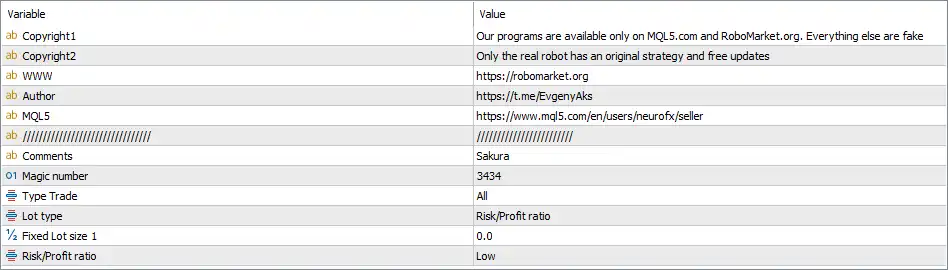
Sakura EA MT5 Inputs and Settings
Sakura EA Trading Settings
🔹 Comments = Sakura — Sets the trade comment to Sakura, allowing trades generated by the EA to be identified more easily in the trading terminal.
🔹 Magic number = 3434 — Sets the EA's unique Magic Number to 3434, which helps the Expert Advisor distinguish its own trades from positions opened by other EAs or manually.
🔹 Type Trade = All — Allows the EA to use All available trade directions according to its internal strategy, rather than restricting the configuration to only BUY or SELL trades.
🔹 Lot type = Risk/Profit ratio — Selects Risk/Profit ratio as the active lot-sizing method instead of directly using a fixed lot size.
🔹 Fixed Lot size 1 = 0.0 — Sets the first fixed lot-size parameter to 0.0. With the current Lot type = Risk/Profit ratio, this fixed-lot parameter is not the active position-sizing method.
🔹 Risk/Profit ratio = Low — Sets the Risk/Profit ratio profile to Low, determining the selected risk/profit configuration used by the EA's internal trading and position-sizing logic.
Current Configuration Summary
🔹 Trade Comment: The EA identifies its trades using the comment Sakura.
🔹 Magic Number: The configured Magic Number is 3434, providing a unique identifier for EA-managed trades.
🔹 Trade Direction: Type Trade = All, allowing the EA's strategy to operate across its available trading directions.
🔹 Lot Calculation: The selected method is Risk/Profit ratio, rather than fixed-lot sizing.
🔹 Fixed Lot Size: Fixed Lot size 1 = 0.0, meaning no fixed lot value is configured through this parameter.
🔹 Risk/Profit Profile: The current setting is Low, representing the selected Risk/Profit ratio profile.
Important Notes
🔹 Magic Number 3434: The Magic Number is important when multiple EAs or manual trading strategies are running on the same MT5 account because it allows trades to be differentiated.
🔹 Fixed Lot Size 0.0: The value 0.0 should not automatically be interpreted as zero trading volume because the active Lot type is Risk/Profit ratio.
🔹 Risk/Profit Ratio: The Low setting is a predefined profile rather than a numerical risk percentage. The exact lot calculation should therefore be confirmed from the EA's internal documentation or behavior.
🔹 Type Trade = All: This setting does not necessarily mean that every BUY and SELL signal will be executed simultaneously. Actual entries remain dependent on the EA's internal strategy conditions.
🔹 Broker Conditions: Before using the EA on a live account, traders should verify the broker's minimum lot, maximum lot, contract specifications, margin requirements, and symbol availability.
Conclusion
The Sakura EA MT5 configuration shown in the Inputs panel uses Magic Number 3434, the Sakura trade comment, Type Trade = All, and Lot type = Risk/Profit ratio. The displayed Fixed Lot size 1 = 0.0 is therefore not the primary position-sizing method in the current configuration, while Risk/Profit ratio = Low defines the selected risk profile.
For accurate live deployment, traders should test the EA with their chosen broker and confirm how the Low Risk/Profit ratio setting translates into actual position volume and risk exposure. Demo testing is recommended before applying the configuration to a live trading account.
FAQs
❓ What is the Magic Number of Sakura EA MT5?
The configured Magic Number is 3434, which the EA can use to identify and manage its own trades.
❓ What is the trade comment for Sakura EA MT5?
The Comments parameter is set to Sakura, providing an identifiable comment for trades generated by the EA.
❓ Does Sakura EA MT5 use a fixed lot size?
The displayed Fixed Lot size 1 is 0.0, while Lot type = Risk/Profit ratio is selected. Therefore, the current configuration uses the Risk/Profit ratio method rather than fixed-lot sizing.
❓ What does Risk/Profit ratio = Low mean?
It selects the EA's Low predefined Risk/Profit profile. The exact numerical risk calculation is not shown in the Inputs, so the precise percentage should be confirmed from the EA's documentation or testing results.
❓ What does Type Trade = All mean?
Type Trade = All allows the EA to use all supported trade directions according to its internal strategy rather than restricting trading to a specific direction.


