🔢 Gold House EA – Complete Settings & Configuration Guide
Gold House EA is a versatile MetaTrader Expert Advisor configuration built around multi-strategy execution, flexible lot sizing, conservative risk controls, drawdown protection, weekend management, news filtering and on-chart monitoring.
With five independent strategies (A–E) enabled in the supplied setup, the EA is configured for broad strategy participation while retaining several layers of account and execution protection.
The settings below reproduce all parameters and numerical values visible in the supplied configuration, with each parameter explained individually.
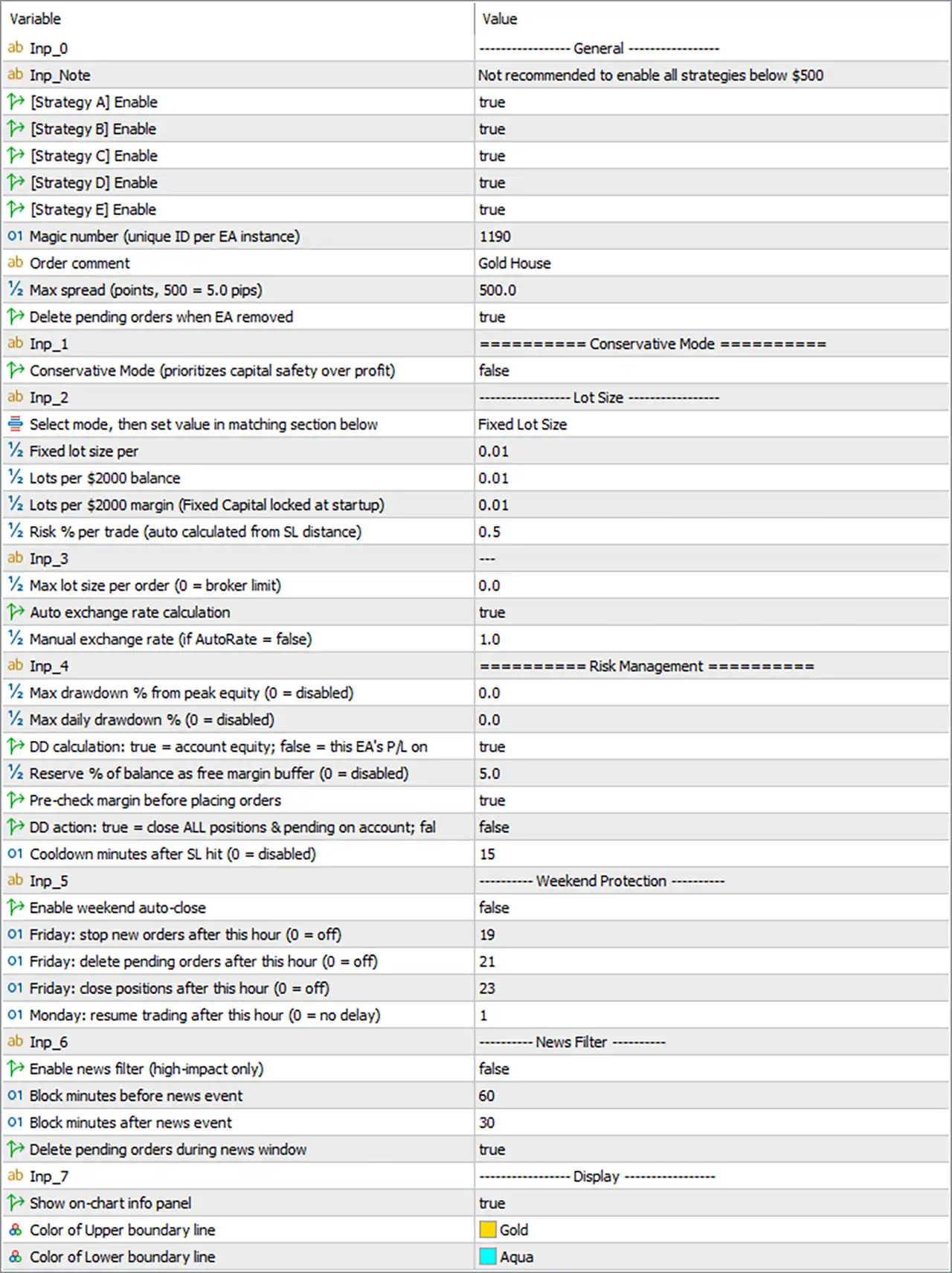
🔄 General Settings
🔹 [Strategy A] Enable = true — Enables Strategy A for trading.
🔹 [Strategy B] Enable = true — Enables Strategy B for trading.
🔹 [Strategy C] Enable = true — Enables Strategy C for trading.
🔹 [Strategy D] Enable = true — Enables Strategy D for trading.
🔹 [Strategy E] Enable = true — Enables Strategy E for trading.
🔹 Magic number (unique ID per EA instance) = 1190 — Uses 1190 as the unique Magic Number for identifying this EA instance's trades.
🔹 Order comment = Gold House — Sets Gold House as the trade/order comment.
🔹 Max spread (points, 500 = 5.0 pips) = 500.0 — Allows a maximum configured spread of 500.0 points, with the parameter description indicating that 500 points = 5.0 pips.
🔹 Delete pending orders when EA is removed = true — Automatically deletes the EA's pending orders when the EA is removed from the chart.
🔄 Conservative Mode
🔹 Conservative Mode (prioritizes capital safety over profit) = false — Conservative Mode is currently disabled, meaning the EA is not using its dedicated capital-safety-over-profit mode.
🔄 Lot Size
🔹 Select mode, then set value in matching section below = Fixed Lot Size — Selects Fixed Lot Size as the active position-sizing method.
🔹 Fixed lot size per = 0.01 — Sets the fixed lot size to 0.01 lot.
🔹 Lots per $2000 balance = 0.01 — Configures 0.01 lot per $2,000 account balance when this sizing method is selected.
🔹 Lots per $2000 margin (Fixed Capital locked at startup) = 0.01 — Configures 0.01 lot per $2,000 margin, with the parameter description indicating that the capital reference is fixed at startup.
🔹 Risk % per trade (auto calculated from SL distance) = 0.5 — Sets the automatic risk calculation to 0.5% per trade, based on the Stop Loss distance.
🔄 Lot Limits & Exchange Rate
🔹 Max lot size per order (0 = broker limit) = 0.0 — No EA-specific maximum lot size is imposed; 0.0 means the broker's maximum limit is used.
🔹 Auto exchange rate calculation = true — Enables automatic exchange-rate calculation.
🔹 Manual exchange rate (if AutoRate = false) = 1.0 — Uses 1.0 as the manual exchange rate if automatic exchange-rate calculation is disabled.
🔄 Risk Management
🔹 Max drawdown % from peak equity (0 = disabled) = 0.0 — Sets the maximum drawdown from peak equity to 0.0%, which disables this protection according to the parameter description.
🔹 Max daily drawdown % (0 = disabled) = 0.0 — Sets maximum daily drawdown protection to 0.0%, meaning this protection is disabled.
🔹 DD calculation: true = account equity; false = this EA's P/L on = true — Calculates drawdown using account equity rather than only this EA's own profit/loss.
🔹 Reserve % of balance as free margin buffer (0 = disabled) = 5.0 — Reserves 5.0% of account balance as a free-margin buffer.
🔹 Pre-check margin before placing orders = true — Checks available margin before attempting to place orders.
🔹 DD action: true = close ALL positions & pending on account; false = [EA-specific action] = false — The global account-wide drawdown action is disabled because the value is false.
🔹 Cooldown minutes after SL hit (0 = disabled) = 15 — After a Stop Loss event, the EA observes a 15-minute cooldown before the relevant trading activity can resume.
🔄 Weekend Protection
🔹 Enable weekend auto-close = false — Weekend automatic position closing is disabled.
🔹 Friday: stop new orders after this hour (0 = off) = 19 — New orders are stopped after 19:00 Friday when this control is applied.
🔹 Friday: delete pending orders after this hour (0 = off) = 21 — Pending orders are deleted after 21:00 Friday.
🔹 Friday: close positions after this hour (0 = off) = 23 — Positions are scheduled to be closed after 23:00 Friday when the corresponding weekend protection mechanism is active.
🔹 Monday: resume trading after this hour (0 = no delay) = 1 — Trading resumes after 01:00 Monday, according to the configured server-time schedule.
🔄 News Filter
🔹 Enable news filter (high-impact only) = false — The high-impact news filter is currently disabled.
🔹 Block minutes before news event = 60 — Configures a 60-minute pre-news blocking window.
🔹 Block minutes after news event = 30 — Configures a 30-minute post-news blocking window.
🔹 Delete pending orders during news window = true — Pending orders are deleted during the configured news-protection window when the news-filter functionality is active.
🔄 Display
🔹 Show on-chart info panel = true — Displays the Gold House EA information panel directly on the trading chart.
🔹 Color of Upper boundary line = Gold — Sets the upper boundary line color to Gold.
🔹 Color of Lower boundary line = Aqua — Sets the lower boundary line color to Aqua.
🔢 Key Gold House EA Configuration Highlights
🔹 Strategies Enabled = A, B, C, D, E — All five available strategies are enabled.
🔹 Magic Number = 1190 — Unique EA trade identifier is 1190.
🔹 Order Comment = Gold House — Trades are labeled Gold House.
🔹 Maximum Spread = 500.0 points — Maximum configured spread is 500.0 points / 5.0 pips according to the panel.
🔹 Delete Pending Orders on EA Removal = true — EA-associated pending orders are deleted when the EA is removed.
🔹 Conservative Mode = false — Dedicated conservative mode is disabled.
🔹 Lot Mode = Fixed Lot Size — Fixed-lot sizing is selected.
🔹 Fixed Lot = 0.01 — The configured fixed position size is 0.01 lot.
🔹 Risk-Based Lot Setting = 0.5% — Automatic risk calculation is configured at 0.5% per trade.
🔹 Maximum Lot per Order = 0.0 — Uses the broker's maximum lot limit.
🔹 Automatic Exchange Rate = true — Exchange-rate conversion is automated.
🔹 Peak Equity Drawdown Limit = 0.0% — Disabled.
🔹 Daily Drawdown Limit = 0.0% — Disabled.
🔹 Free Margin Buffer = 5.0% — Reserves 5.0% of balance as a margin buffer.
🔹 Margin Pre-Check = true — Margin availability is checked before order placement.
🔹 SL Cooldown = 15 minutes — Applies a 15-minute cooldown after an SL hit.
🔹 Weekend Auto-Close = false — Automatic weekend closing is disabled.
🔹 Friday New-Order Cutoff = 19:00 — New orders are stopped after 19:00 Friday.
🔹 Friday Pending-Order Deletion = 21:00 — Pending orders are deleted after 21:00 Friday.
🔹 Friday Position Closing = 23:00 — Position closing threshold is 23:00 Friday.
🔹 Monday Resume Time = 01:00 — Trading resumes after 01:00 Monday.
🔹 News Filter = false — High-impact news filtering is currently disabled.
🔹 Pre-News Block = 60 minutes — Configured protection window is 60 minutes before an event.
🔹 Post-News Block = 30 minutes — Configured protection window is 30 minutes after an event.
🔹 Delete Pending Orders During News = true — Pending orders are configured for deletion during the news window when applicable.
🔹 Info Panel = true — The on-chart information panel is enabled.
🔹 Upper Boundary Color = Gold — Upper chart boundary uses Gold.
🔹 Lower Boundary Color = Aqua — Lower chart boundary uses Aqua.
🔢 Conclusion
Gold House EA is configured as a multi-strategy automated trading system with all five strategies enabled, fixed-lot execution at 0.01, a 0.5% risk-per-trade setting, margin pre-checking, a 5.0% free-margin reserve, and several operational safeguards.
The supplied setup also includes detailed Friday and Monday trading controls, with new orders stopping after 19:00 Friday, pending orders being deleted after 21:00, positions scheduled for closing after 23:00, and trading resuming after 01:00 Monday.
One important observation is that Conservative Mode = false, while both maximum peak-equity drawdown = 0.0% and maximum daily drawdown = 0.0% are disabled. Therefore, users should pay particular attention to the actual risk characteristics of the enabled strategies rather than assuming those optional drawdown limits are active.
The configuration also uses automatic exchange-rate calculation, account-equity-based drawdown measurement, 15-minute SL cooldown, and an on-chart information panel with Gold and Aqua boundary colors.
Risk note: The settings shown are the supplied configuration values, not necessarily recommended values. The 0.01 fixed lot, 0.5% risk setting, spread limit, and all strategy-specific behavior should be validated with backtesting and demo testing before live deployment.
🔢 FAQs
❓ How many Gold House EA strategies are enabled?
All five strategies — Strategy A, B, C, D, and E — are set to true.
❓ What is the current lot size configuration?
The active mode is Fixed Lot Size, with Fixed lot size per = 0.01.
❓ What is the configured risk percentage?
The automatic risk-based setting is 0.5% per trade, although the currently selected sizing mode is Fixed Lot Size.
❓ Does Gold House EA have drawdown protection enabled?
The dedicated maximum drawdown values are 0.0% for both peak equity and daily drawdown, meaning those two limits are disabled. However, the EA does have a 5.0% free-margin buffer and pre-check margin before placing orders = true.
❓ What are the weekend and news protection settings?
Friday new orders stop after 19:00, pending orders are deleted after 21:00, and positions are scheduled for closing after 23:00. Monday trading resumes after 01:00. The news filter itself is false, with configured windows of 60 minutes before and 30 minutes after news, while Delete pending orders during news window = true.