


🔢 Adaptive Gold Scalper EA – Complete MT5 Settings & Configuration Guide
Adaptive Gold Scalper EA is a configurable MetaTrader 5 Expert Advisor designed for systematic gold trading with a strong focus on risk control, broker-side Stop Loss management, adaptive level detection, pending-order execution, trailing-stop protection, and scheduled order placement.
Its settings provide detailed control over position sizing, Take Profit and Stop Loss, news protection, pending-order expiry, trailing behavior, strategy detection, chart visualization, and decision logging. The configuration below reproduces all parameters and numerical values visible in the supplied settings panel.
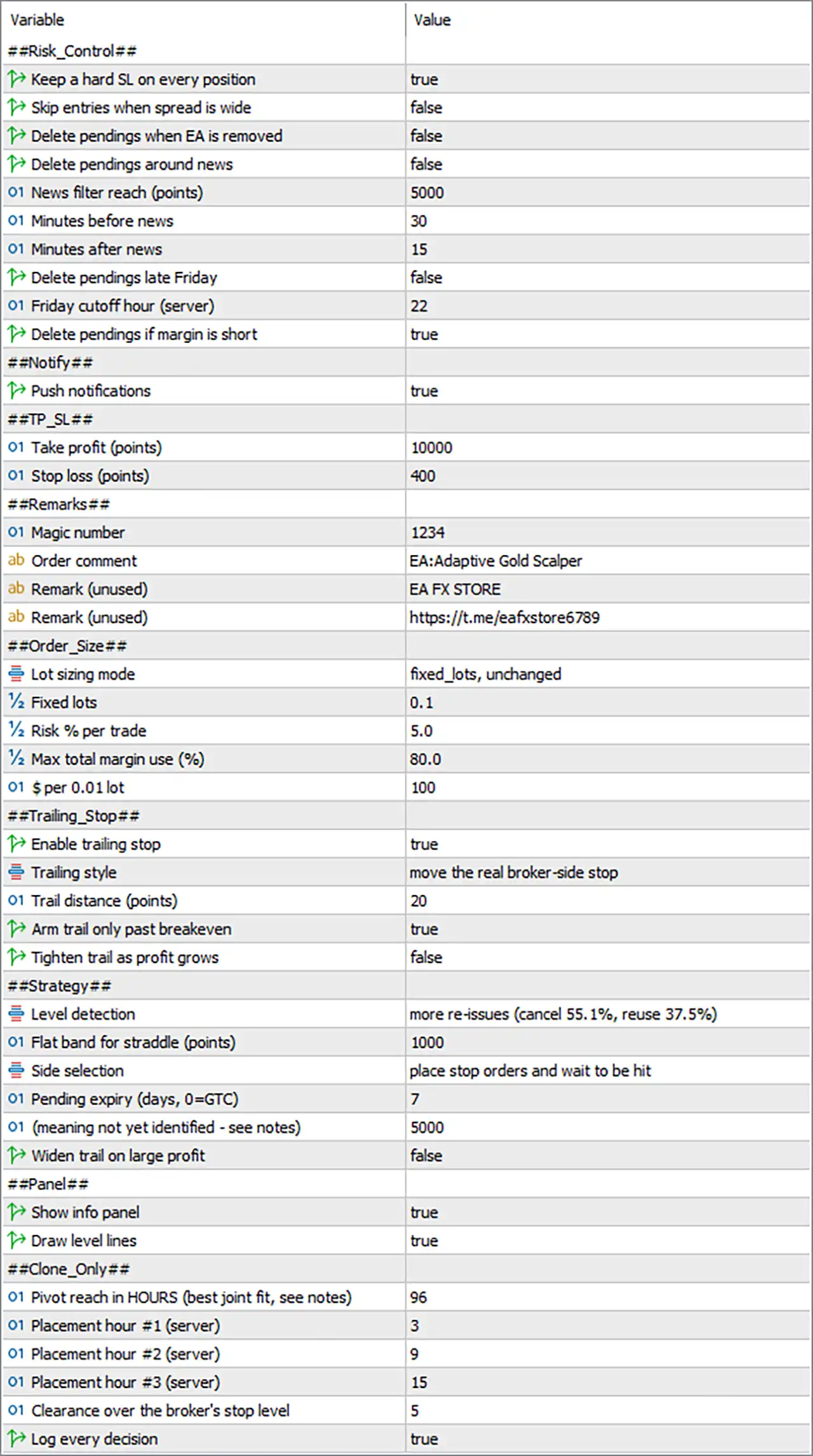
🔄 Risk Control
🔹 Keep a hard SL on every position = true — Keeps a hard Stop Loss attached to every open position.
🔹 Skip entries when spread is wide = false — The EA is currently allowed to enter trades even when the spread is considered wide.
🔹 Delete pendings when EA is removed = false — Pending orders are not automatically configured to be deleted when the EA is removed.
🔹 Delete pendings around news = false — Pending orders are not automatically deleted around news events.
🔹 News filter reach (points) = 5000 — Sets the news-filter price-distance parameter to 5000 points.
🔹 Minutes before news = 30 — Defines a 30-minute pre-news protection period.
🔹 Minutes after news = 15 — Defines a 15-minute post-news protection period.
🔹 Delete pendings late Friday = false — Pending orders are not automatically deleted during the configured late-Friday period.
🔹 Friday cutoff hour (server) = 22 — Sets the Friday server-time cutoff hour to 22:00.
🔹 Delete pendings if margin is short = true — Enables deletion of pending orders when available margin becomes insufficient.
🔄 Notifications
🔹 Push notifications = true — Enables MT5 push notifications for supported EA events or decisions.
🔄 TP & SL
🔹 Take profit (points) = 10000 — Sets the Take Profit distance to 10,000 points.
🔹 Stop loss (points) = 400 — Sets the Stop Loss distance to 400 points.
🔄 Remarks & Trade Identification
🔹 Magic number = 1234 — Uses 1234 as the unique Magic Number for identifying the EA's trades.
🔹 Order comment = EA:Adaptive Gold Scalper — Applies EA:Adaptive Gold Scalper as the trade/order comment.
🔹 Remark (unused) = EA FX STORE — Stores EA FX STORE as an unused remark field.
🔄 Order Size
🔹 Lot sizing mode = fixed_lots, unchanged — Uses the fixed_lots, unchanged lot-sizing mode.
🔹 Fixed lots = 0.1 — Sets the fixed trading volume to 0.1 lot.
🔹 Risk % per trade = 5.0 — Sets the configured risk percentage per trade to 5.0%.
🔹 Max total margin use (%) = 80.0 — Limits the configured total margin usage to 80.0%.
🔹 $ per 0.01 lot = 100 — Defines the configured monetary value/reference as 100 per 0.01 lot.
🔄 Trailing Stop
🔹 Enable trailing stop = true — Enables trailing-stop management.
🔹 Trailing style = move the real broker-side stop — The EA is configured to move the actual broker-side Stop Loss rather than relying solely on a virtual trailing mechanism.
🔹 Trail distance (points) = 20 — Sets the trailing-stop distance to 20 points.
🔹 Arm trail only past breakeven = true — The trailing stop is activated only after the position has moved beyond Break-Even.
🔹 Tighten trail as profit grows = false — The EA does not progressively tighten the trailing distance as profit increases.
🔄 Strategy
🔹 Level detection = more re-issues (cancel 55.1%, reuse 37.5%) — Uses the displayed adaptive level-detection mode, with the panel indicating 55.1% cancellation and 37.5% reuse figures.
🔹 Flat band for straddle (points) = 1000 — Defines a 1000-point flat band for the straddle logic.
🔹 Side selection = place stop orders and wait to be hit — The EA places pending Stop orders and waits for price to trigger them rather than immediately entering at market.
🔹 Pending expiry (days, 0=GTC) = 7 — Pending orders are configured to expire after 7 days; a value of 0 would represent GTC according to the parameter description.
🔹 (meaning not yet identified - see notes) = 5000 — Uses the supplied value of 5000; the screenshot explicitly indicates that the meaning of this parameter should be checked in the EA's notes.
🔹 Widen trail on large profit = false — Disables widening of the trailing stop when the position reaches a large profit.
🔄 Panel
🔹 Show info panel = true — Displays the EA's information panel on the chart.
🔹 Draw level lines = true — Enables the drawing of strategy level lines on the chart.
🔄 Clone Only
🔹 Pivot reach in HOURS (best joint fit, see notes) = 96 — Sets the pivot-reach period to 96 hours according to the supplied parameter description.
🔹 Placement hour #1 (server) = 3 — Sets the first scheduled placement hour to 03:00 server time.
🔹 Placement hour #2 (server) = 9 — Sets the second scheduled placement hour to 09:00 server time.
🔹 Placement hour #3 (server) = 15 — Sets the third scheduled placement hour to 15:00 server time.
🔹 Clearance over the broker's stop level = 5 — Sets the clearance above the broker's minimum stop level to 5 points/units, according to the EA's internal specification.
🔹 Log every decision = true — Enables logging of every EA decision for monitoring and analysis.
🔢 Key Risk & Trading Highlights
🔹 Lot Size = 0.1 — Fixed lot volume is configured at 0.1.
🔹 Risk per Trade = 5.0% — The configured risk percentage is 5.0%.
🔹 Maximum Margin Use = 80.0% — Maximum total margin-use parameter is 80.0%.
🔹 Take Profit = 10000 points — The TP distance is 10,000 points.
🔹 Stop Loss = 400 points — The SL distance is 400 points.
🔹 Trailing Stop = Enabled — Trailing-stop management is active.
🔹 Trailing Distance = 20 points — The trailing distance is 20 points.
🔹 Break-Even Requirement = Enabled — Trailing activates only after the trade passes Break-Even.
🔹 News Protection Before = 30 minutes — The pre-news protection period is 30 minutes.
🔹 News Protection After = 15 minutes — The post-news protection period is 15 minutes.
🔹 Friday Cutoff = 22:00 server time — The configured Friday cutoff hour is 22.
🔹 Pending Expiry = 7 days — Pending orders can expire after 7 days.
🔹 Magic Number = 1234 — The EA identifies its trades using 1234.
🔹 Strategy Flat Band = 1000 points — The straddle flat-band setting is 1000 points.
🔹 Pivot Reach = 96 hours — The configured pivot-reach period is 96 hours.
🔹 Scheduled Placement Hours = 3, 9, 15 — Three server-time placement hours are configured.
🔢 Conclusion
Adaptive Gold Scalper EA offers a broad set of controls for automated trading, combining fixed-lot execution, risk-per-trade settings, hard Stop Loss protection, Take Profit management, broker-side trailing stops, news filtering, pending-order management, adaptive level detection, and scheduled order placement.
The supplied configuration is particularly notable for its 0.1 fixed lot, 5.0% risk-per-trade value, 80.0% maximum margin-use setting, 10,000-point Take Profit, and 400-point Stop Loss. These parameters can materially affect exposure, so traders should validate them carefully against their account size, broker contract specifications, symbol digits, and historical testing results.
The EA is also configured to use broker-side trailing stops, with a 20-point trail distance that only becomes active after Break-Even. Strategy execution relies on pending Stop orders, with a 1000-point straddle band, 7-day pending expiry, and placement times at 03:00, 09:00, and 15:00 server time.
For live deployment, the most important parameters to review are lot size, risk percentage, margin usage, Stop Loss, Take Profit, spread/news behavior, and pending-order rules.
🔢 FAQs
❓ What lot size is Adaptive Gold Scalper EA currently using?
The supplied configuration uses fixed_lots, unchanged with Fixed lots = 0.1.
❓ What are the Take Profit and Stop Loss settings?
The EA is configured with Take profit = 10000 points and Stop loss = 400 points.
❓ How does the trailing stop work?
Trailing is enabled with Trail distance = 20 points, and Arm trail only past breakeven = true, meaning trailing is intended to activate only after the trade moves beyond Break-Even.
❓ Does the EA use news protection?
The configuration includes a 5000-point News filter reach, 30 minutes before news, and 15 minutes after news. However, Delete pendings around news = false, so pending orders are not automatically deleted by that particular setting.
❓ When does Adaptive Gold Scalper EA place its scheduled orders?
The supplied configuration specifies Placement hour #1 = 3, Placement hour #2 = 9, and Placement hour #3 = 15, all based on server time.