🔢 Gold Snap EA – Complete Settings & Configuration Guide
Gold Snap EA is a specialized automated trading solution designed for structured gold-market execution, combining H1 market-structure analysis, pivot detection, adaptive ATR protection, dynamic trade management, trailing-stop logic, break-even protection, and automated order control.
The configuration provides extensive control over position sizing, Buy/Sell permissions, entry levels, pending-order expiration, spread limits, Stop Loss, Take Profit, reward-to-risk targeting, trailing protection, runner management, and Friday order cleanup.
One of the key features is its flexible lot-sizing system, which supports both GS_FIXED_LOT and GS_RISK_PERCENT modes, allowing traders to choose between a fixed position size and risk-percentage-based position sizing.
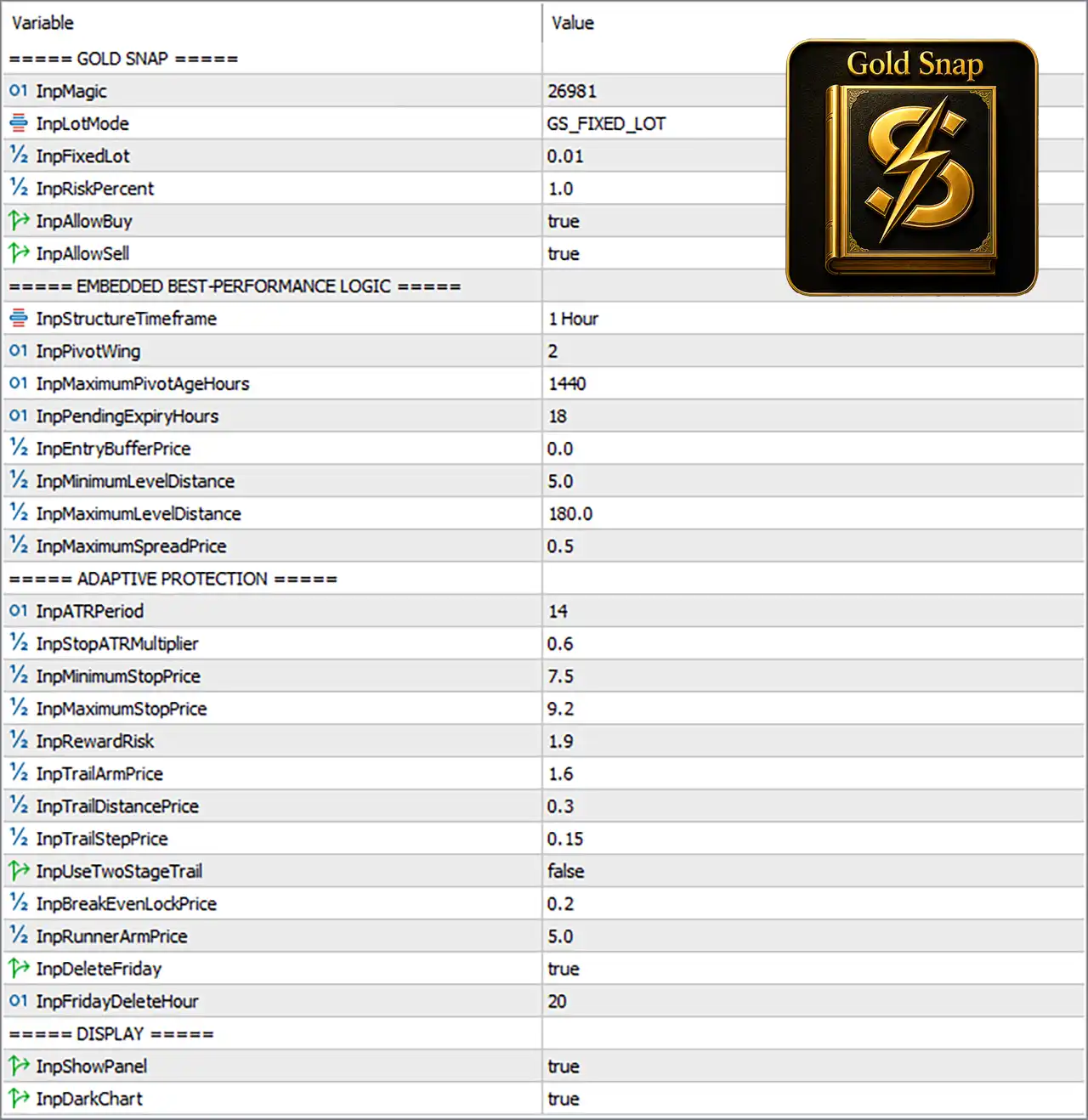
🔄 GOLD SNAP – Core Trading Settings
🔹 InpMagic = 26981 — Sets the EA's unique Magic Number to 26981, allowing Gold Snap trades to be identified and managed separately from other trades.
🔹 InpLotMode = GS_FIXED_LOT — Selects the GS_FIXED_LOT position-sizing mode in the supplied configuration, meaning the EA uses the fixed lot value defined by InpFixedLot.
🔹 InpLotMode = GS_RISK_PERCENT — Alternative position-sizing mode that calculates the trading lot according to the configured InpRiskPercent value and the EA's calculated trade risk, allowing position volume to adapt to account size and risk requirements.
🔹 InpFixedLot = 0.01 — Sets the fixed trading volume to 0.01 lot when InpLotMode = GS_FIXED_LOT is selected.
🔹 InpRiskPercent = 1.0 — Sets the risk target to 1.0% when InpLotMode = GS_RISK_PERCENT is selected; the EA can calculate the appropriate position size based on the configured percentage and applicable Stop Loss distance.
🔹 InpAllowBuy = true — Enables Buy trades.
🔹 InpAllowSell = true — Enables Sell trades.
🔄 EMBEDDED BEST-PERFORMANCE LOGIC
🔹 InpStructureTimeframe = 1 Hour — Uses the 1 Hour (H1) timeframe for structural market analysis.
🔹 InpPivotWing = 2 — Sets the pivot-wing parameter to 2, defining the surrounding candles used to identify pivot structures.
🔹 InpMaximumPivotAgeHours = 1440 — Allows recognized pivot structures to remain eligible for up to 1440 hours, subject to the EA's internal logic.
🔹 InpPendingExpiryHours = 18 — Sets pending-order expiration to 18 hours, after which eligible unfilled pending orders can expire.
🔹 InpEntryBufferPrice = 0.0 — Sets the entry-price buffer to 0.0, meaning no additional price buffer is applied.
🔹 InpMinimumLevelDistance = 5.0 — Requires a minimum distance of 5.0 between relevant trading levels.
🔹 InpMaximumLevelDistance = 180.0 — Sets the maximum permitted level distance to 180.0.
🔹 InpMaximumSpreadPrice = 0.5 — Sets the maximum acceptable spread to 0.5 according to the EA's price-based spread calculation.
🔄 ADAPTIVE PROTECTION
🔹 InpATRPeriod = 14 — Uses an ATR calculation period of 14 for adaptive volatility and Stop Loss calculations.
🔹 InpStopATRMultiplier = 0.6 — Applies a 0.6× ATR multiplier when calculating the adaptive Stop Loss.
🔹 InpMinimumStopPrice = 7.5 — Sets the minimum adaptive Stop Loss distance to 7.5 price units.
🔹 InpMaximumStopPrice = 9.2 — Sets the maximum adaptive Stop Loss distance to 9.2 price units.
🔹 InpRewardRisk = 1.9 — Sets the target reward-to-risk ratio to 1.9, making the intended reward approximately 1.9× the associated risk distance.
🔹 InpTrailArmPrice = 1.6 — Sets the profit threshold of 1.6 price units for activating the trailing mechanism.
🔹 InpTrailDistancePrice = 0.3 — Sets the trailing distance to 0.3 price units after trailing protection becomes active.
🔹 InpTrailStepPrice = 0.15 — Sets the minimum trailing adjustment step to 0.15 price units.
🔹 InpUseTwoStageTrail = false — Disables the two-stage trailing-stop mechanism.
🔹 InpBreakEvenLockPrice = 0.2 — Sets the break-even locked-profit level to 0.2 price units.
🔹 InpRunnerArmPrice = 5.0 — Sets the runner-management activation threshold to 5.0 price units.
🔹 InpDeleteFriday = true — Enables the Friday pending-order cleanup function.
🔹 InpFridayDeleteHour = 20 — Sets the Friday cleanup hour to 20:00 according to the applicable server/trading-time convention.
🔄 DISPLAY
🔹 InpShowPanel = true — Enables the Gold Snap information panel on the trading chart.
🔹 InpDarkChart = true — Enables the EA's dark-chart display/theme.
🔄 LOT-SIZING MODES EXPLAINED
GS_FIXED_LOT
🔹 GS_FIXED_LOT — Uses a predetermined position volume regardless of changes in account balance or equity, with the supplied configuration using InpFixedLot = 0.01.
🔹 Fixed Lot Example — With InpLotMode = GS_FIXED_LOT and InpFixedLot = 0.01, the EA uses 0.01 lot for eligible trades, subject to broker and strategy restrictions.
GS_RISK_PERCENT
🔹 GS_RISK_PERCENT — Calculates the position size according to the configured risk percentage rather than simply using a fixed lot.
🔹 Risk Percentage Setting = 1.0% — The supplied InpRiskPercent = 1.0 represents a target risk level of 1.0% when GS_RISK_PERCENT is selected.
🔹 Risk-Based Position Sizing — Under GS_RISK_PERCENT, the EA can adjust lot size according to the account's available capital and the calculated Stop Loss distance, seeking to maintain the selected percentage risk per trade.
🔹 Adaptive Stop-Loss Relationship — Because Gold Snap uses an adaptive Stop Loss based on ATRPeriod = 14, StopATRMultiplier = 0.6, Minimum Stop = 7.5, and Maximum Stop = 9.2, the resulting risk-based lot calculation can vary according to the EA's calculated protection distance.
🔹 Current Configuration — The screenshot shows InpLotMode = GS_FIXED_LOT, so GS_RISK_PERCENT is an available alternative rather than the currently selected mode.
🔢 Gold Snap EA – Complete Configuration Summary
🔹 Magic Number = 26981 — Unique EA trade identifier.
🔹 Lot Mode = GS_FIXED_LOT — Current position-sizing method.
🔹 Alternative Lot Mode = GS_RISK_PERCENT — Risk-percentage-based position sizing option.
🔹 Fixed Lot = 0.01 — Active fixed volume under GS_FIXED_LOT.
🔹 Risk Percentage = 1.0% — Configured risk level under GS_RISK_PERCENT.
🔹 Buy Trading = true — Buy setups are allowed.
🔹 Sell Trading = true — Sell setups are allowed.
🔹 Structure Timeframe = 1 Hour — H1 structural analysis.
🔹 Pivot Wing = 2 — Pivot recognition parameter.
🔹 Maximum Pivot Age = 1440 hours — Maximum configured pivot age.
🔹 Pending Expiry = 18 hours — Pending orders can expire after 18 hours.
🔹 Entry Buffer = 0.0 — No additional entry-price buffer.
🔹 Minimum Level Distance = 5.0 — Minimum structural level distance.
🔹 Maximum Level Distance = 180.0 — Maximum structural level distance.
🔹 Maximum Spread Price = 0.5 — Maximum configured spread threshold.
🔹 ATR Period = 14 — ATR calculation period.
🔹 Stop ATR Multiplier = 0.6 — ATR-based Stop Loss multiplier.
🔹 Minimum Stop Price = 7.5 — Minimum adaptive Stop Loss distance.
🔹 Maximum Stop Price = 9.2 — Maximum adaptive Stop Loss distance.
🔹 Reward/Risk = 1.9 — Target reward-to-risk relationship.
🔹 Trail Arm Price = 1.6 — Trailing activation threshold.
🔹 Trail Distance = 0.3 — Trailing distance.
🔹 Trail Step = 0.15 — Trailing adjustment step.
🔹 Two-Stage Trail = false — Two-stage trailing is disabled.
🔹 Break-Even Lock = 0.2 — Configured break-even locked-profit distance.
🔹 Runner Arm Price = 5.0 — Runner-management activation threshold.
🔹 Friday Delete = true — Friday pending-order cleanup is enabled.
🔹 Friday Delete Hour = 20 — Friday cleanup occurs at 20:00 under the applicable time convention.
🔹 Show Panel = true — On-chart information panel is enabled.
🔹 Dark Chart = true — Dark chart presentation is enabled.
🔢 Overview
Gold Snap EA settings provide a comprehensive framework for automated gold trading with configurable lot sizing, risk management, H1 market-structure analysis, pivot detection, pending-order control, adaptive Stop Loss, reward-to-risk management, trailing protection, break-even functionality, and trading-session cleanup.
A major advantage of the configuration is its flexible position-sizing architecture. GS_FIXED_LOT allows traders to use a predefined lot size such as 0.01, while GS_RISK_PERCENT provides an alternative approach where position size can be calculated around the configured 1.0% risk.
The strategy uses 1 Hour structural analysis, PivotWing = 2, a 1440-hour maximum pivot age, and 18-hour pending-order expiry. Level filtering is controlled by 5.0 minimum and 180.0 maximum distances, with a maximum spread setting of 0.5.
Gold Snap's adaptive protection system uses ATRPeriod = 14 and StopATRMultiplier = 0.6, constrained by a 7.5 minimum Stop Loss and 9.2 maximum Stop Loss. The strategy targets a 1.9 reward-to-risk ratio, with trailing protection configured using 1.6 activation, 0.3 distance, and 0.15 step.
🔢 Conclusion
Gold Snap EA is built around a flexible combination of market-structure analysis and adaptive trade protection. Its configuration allows traders to choose between GS_FIXED_LOT and GS_RISK_PERCENT, providing either predictable fixed-volume execution or risk-based position sizing.
The supplied configuration currently selects GS_FIXED_LOT with 0.01 lot, while the alternative GS_RISK_PERCENT mode is configured around 1.0% risk. This makes the EA adaptable to different money-management preferences without changing its core structural trading logic.
The remaining configuration provides detailed control over H1 pivots, entry distances, pending-order expiry, ATR-based Stop Loss, 1.9 reward-to-risk targeting, trailing protection, break-even locking, runner management, and Friday cleanup.
These settings represent the values visible in the supplied configuration and should not automatically be interpreted as universally optimal parameters. Proper backtesting, forward testing, and demo validation are recommended before deploying the EA with real capital.
🔢 FAQs
❓ What is the difference between GS_FIXED_LOT and GS_RISK_PERCENT?
GS_FIXED_LOT uses a predetermined lot size such as 0.01, while GS_RISK_PERCENT calculates position size according to the configured risk percentage, such as 1.0%, and the applicable trade risk.
❓ Which lot mode is currently active in Gold Snap EA?
The supplied configuration shows InpLotMode = GS_FIXED_LOT, so the current active fixed position size is 0.01 lot.
❓ What happens if GS_RISK_PERCENT is selected?
The EA can calculate the trade volume according to InpRiskPercent = 1.0, with the position size influenced by account capital and the applicable Stop Loss distance.
❓ What timeframe does Gold Snap EA use for structural analysis?
The configuration uses InpStructureTimeframe = 1 Hour, meaning H1 market structure is used for the strategy's analysis.
❓ What are Gold Snap EA's main protection settings?
The adaptive protection uses ATRPeriod = 14, StopATRMultiplier = 0.6, Minimum Stop = 7.5, Maximum Stop = 9.2, Reward/Risk = 1.9, Trail Arm = 1.6, Trail Distance = 0.3, and Trail Step = 0.15.