

Immortal Dynasty EA MT4 Settings Explained
Immortal Dynasty EA is an advanced automated Forex trading Expert Advisor (EA) designed for MetaTrader 4 traders seeking intelligent market filtering, adaptive money management and precise trade execution.
The EA combines volatility-based calculations, trailing stop systems, session filters, and advanced risk management features to improve trading efficiency across different market conditions.
With customizable controls and flexible trading parameters, Immortal Dynasty EA is suitable for both scalping and long-term algorithmic trading strategies.

Installation Panel Parameters
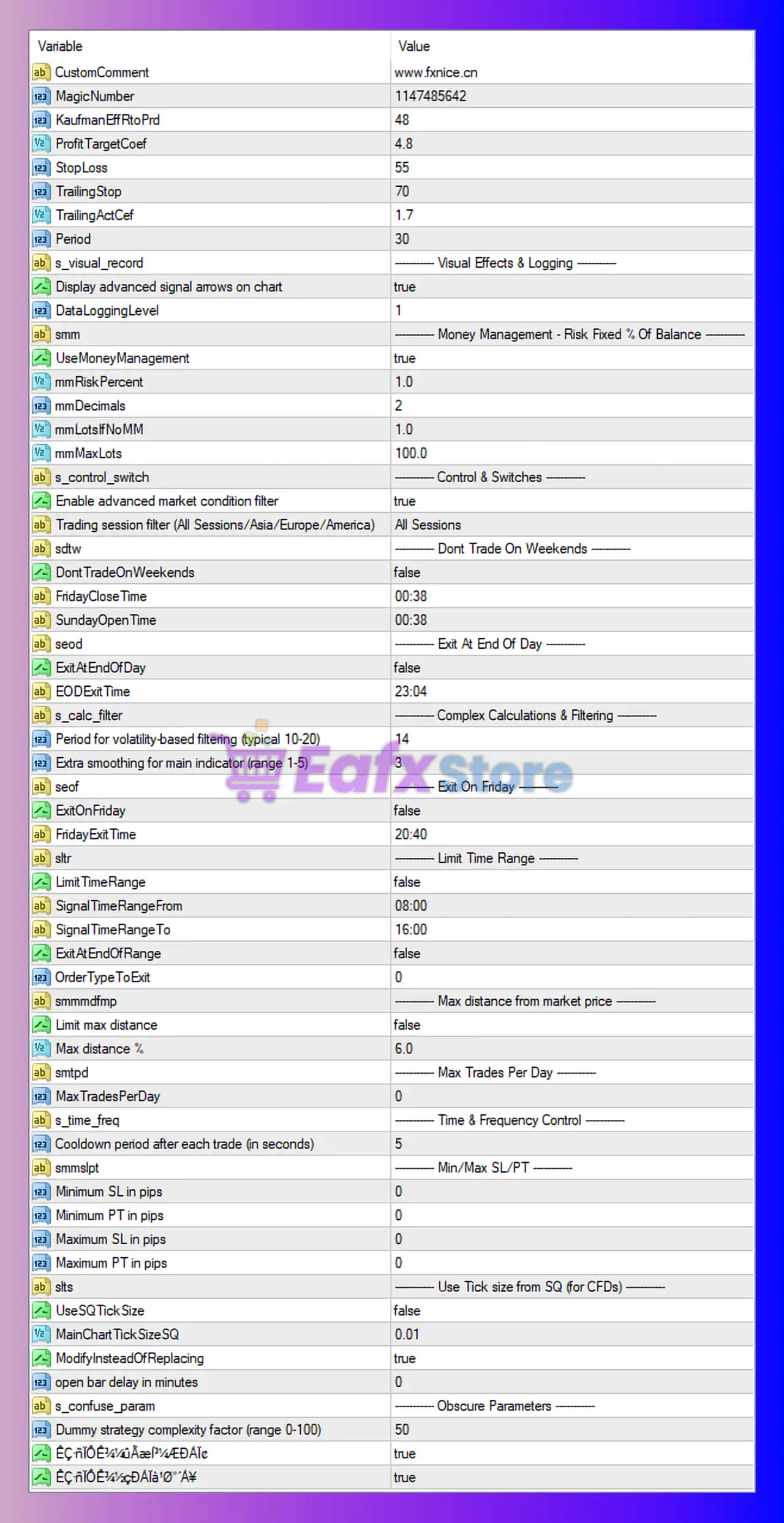
Below are the details of the parameters in the advisor’s trading system settings table:
Immortal Dynasty EA MT4 Full Settings Explanation
🔹 CustomComment = www.fxnice.cn: Adds the custom trade comment www.fxnice.cn to all EA-generated orders.
🔹 MagicNumber = 1147485642: Unique identification number used by the EA to track and manage its own trades independently.
🔹 KaufmanEffRtoPrd = 48: Sets the Kaufman Efficiency Ratio period to 48 for measuring market efficiency and trend strength.
🔹 ProfitTargetCoef = 4.8: Defines the profit target coefficient value at 4.8 for trade exit calculations.
🔹 StopLoss = 55: Sets the Stop Loss (SL) distance to 55 points or pips depending on broker pricing format.
🔹 TrailingStop = 70: Activates a Trailing stop distance of 70 points to secure profits dynamically.
🔹 TrailingActCoef = 1.7: Defines the activation coefficient for the trailing stop system at 1.7.
🔹 Period = 30: Sets the main indicator calculation period to 30.
Visual Effects & Logging Settings
🔹 Display advanced signal arrows on chart = true: Enables advanced buy/sell signal arrows directly on the trading chart.
🔹 DataLoggingLevel = 1: Sets the data logging detail level to 1 for EA activity monitoring.
Money Management – Risk Fixed % Of Balance
🔹 UseMoneyManagement = true: Enables automatic money management based on account balance percentage.
🔹 mmRiskPercent = 1.0: Risks 1.0% of the account balance per trade.
🔹 mmDecimals = 2: Uses 2 decimal places for lot size calculations.
🔹 mmLotsIfNoMM = 1.0: Uses a fixed lot size of 1.0 when money management is disabled.
🔹 mmMaxLots = 100.0: Limits the maximum allowable lot size to 100.0.
Control & Switches Settings
🔹 Enable advanced market condition filter = true: Activates advanced market condition filtering to improve trade quality.
🔹 Trading session filter (All Sessions/Asia/Europe/America) = All Sessions: Allows trading during all market sessions.
Don’t Trade On Weekends Settings
🔹 DontTradeOnWeekends = false: Allows the EA to trade during weekends if broker permits.
🔹 FridayCloseTime = 00:38: Sets Friday market close handling time to 00:38.
🔹 SundayOpenTime = 00:38: Defines Sunday market reopening time at 00:38.
Exit At End Of Day Settings
🔹 ExitAtEndOfDay = false: Disables automatic closing of trades at the end of the trading day.
🔹 EODExitTime = 23:04: Sets the scheduled end-of-day exit time to 23:04.
Complex Calculations & Filtering Settings
🔹 Period for volatility-based filtering (typical 10-20) = 14: Uses a volatility filter calculation period of 14.
🔹 Extra smoothing for main indicator (range 1-5) = 3: Applies smoothing level 3 to the primary indicator calculations.
Exit On Friday Settings
🔹 ExitOnFriday = false: Keeps positions open on Friday instead of closing them automatically.
🔹 FridayExitTime = 20:40: Defines the Friday exit time as 20:40.
Limit Time Range Settings
🔹 LimitTimeRange = false: Disables restricted trading hours.
🔹 SignalTimeRangeFrom = 08:00: Defines the trading signal start time at 08:00.
🔹 SignalTimeRangeTo = 16:00: Defines the trading signal end time at 16:00.
🔹 ExitAtEndOfRange = false: Disables forced position closing at the end of the trading range.
🔹 OrderTypeToExit = 0: Specifies order type selection for exit handling with value 0.
Max Distance From Market Price Settings
🔹 Limit max distance = false: Disables market distance limitation for order execution.
🔹 Max distance % = 6.0: Defines the maximum allowable market distance percentage at 6.0.
Max Trades Per Day Settings
🔹 MaxTradesPerDay = 0: Sets unlimited daily trades because value 0 disables the limit.
Time & Frequency Control Settings
🔹 Cooldown period after each trade (in seconds) = 5: Waits 5 seconds between trade executions.
Min/Max SL/PT Settings
🔹 Minimum SL in pips = 0: No minimum stop loss restriction applied.
🔹 Minimum PT in pips = 0: No minimum profit target restriction applied.
🔹 Maximum SL in pips = 0: No maximum stop loss restriction applied.
🔹 Maximum PT in pips = 0: No maximum take profit restriction applied.
Use Tick Size From SQ (for CFDs) Settings
🔹 UseSQTickSize = false: Disables custom CFD tick size usage.
🔹 MainChartTickSizeSQ = 0.01: Sets the custom chart tick size to 0.01.
🔹 ModifyInsteadOfReplacing = true: Enables modification of existing orders instead of replacing them.
🔹 open bar delay in minutes = 0: No delay applied after opening a new bar.
Obscure Parameters Settings
🔹 Dummy strategy complexity factor (range 0-100) = 50: Internal complexity adjustment parameter set to 50.
🔹 ÉçñîȽ¼úÀæ³¹¼ÆÀÎè = true: Internal hidden system parameter enabled with value true.
🔹 ÉçñîȽ¼çÐÀ¹ä°´Á¥ = true: Internal hidden system parameter enabled with value true.
Conclusion
Immortal Dynasty EA is a sophisticated automated trading system that combines adaptive money management, volatility filtering, trailing stop protection and advanced market condition analysis. The EA provides flexible trading session controls, risk management tools, and customizable execution parameters for traders seeking optimized algorithmic trading performance.
With extensive filtering and automation capabilities, Immortal Dynasty EA MT4 can be tailored for different trading styles and market environments.
FAQs
❓ What is Immortal Dynasty EA MT4?
Immortal Dynasty EA MT4 is an automated Forex Expert Advisor for MetaTrader 4 that uses advanced filtering and money management systems.
❓ Does Immortal Dynasty EA MT4 support automatic risk management?
Yes, the EA includes percentage-based money management with customizable risk settings.
❓ What does the Trading Session Filter do?
The Trading Session Filter controls whether the EA trades during Asian, European, American, or all market sessions.
❓ Can Immortal Dynasty EA MT4 trade during weekends?
Yes, weekend trading can be enabled or disabled using the DontTradeOnWeekends setting.
❓ What is the purpose of the Trailing Stop feature?
The Trailing Stop automatically adjusts stop loss levels to protect profits as the market moves in a favorable direction.