


🔢 InfinX Classic MT4 Settings Guide: Complete Inputs and Parameters Explained
InfinX Classic MT4 is an automated trading Expert Advisor designed for the MetaTrader 4 platform. Its configuration includes automatic and fixed lot sizing, trade-entry management, spread filtering, equity protection, basket-profit controls, trading-session filters, and daily or weekly profit targets.
The InfinX Classic MT4 settings panel also provides individual basket management options, overall basket controls, and session-based trading restrictions for New York, London, Tokyo, and Sydney. Understanding these inputs helps traders configure the EA according to their account size, trading preferences, risk tolerance, and preferred market sessions.
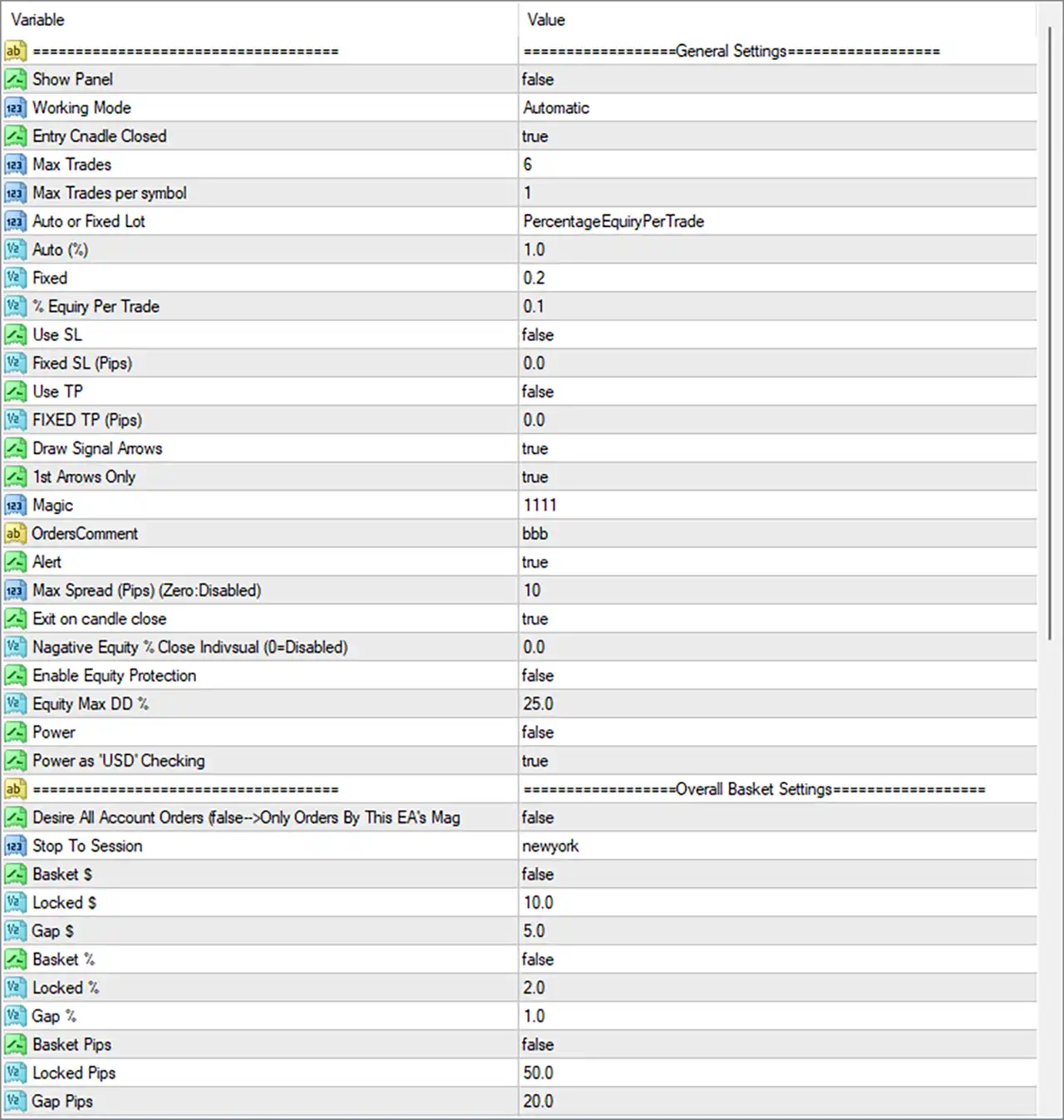
⚙️ General Settings
🔹 General Settings = Section Header: This heading identifies the main configuration section containing trade execution, money management, signal display, and risk-control parameters.
🔹 Show Panel = false: Disables the EA's information panel on the chart. Trading functionality may remain active even when the visual panel is hidden.
🔹 Working Mode = Automatic: Selects automatic operating mode, allowing InfinX Classic MT4 to manage trading activities according to its programmed strategy rather than requiring manual control of every trading action.
🔹 Entry Candle Closed = true: Enables the option to wait for a candle to close before confirming an entry signal, if supported by the EA's signal logic. This may help avoid acting on signals that change before a candle finishes forming.
🔹 Max Trades = 6: Sets the configured maximum trade count to 6. Depending on the EA's implementation, this may limit the total number of trades or positions managed by the strategy.
🔹 Max Trades per symbol = 1: Limits trading to 1 trade per symbol according to the EA's order-management rules, helping prevent multiple entries on the same instrument when this restriction is enforced.
⚙️ Lot Sizing and Money Management
🔹 Auto or Fixed Lot = PercentageEquityPerTrade: Selects the PercentageEquityPerTrade money management mode, indicating that position sizing is linked to account equity and the configured percentage-per-trade parameter.
🔹 Auto (%) = 1.0: Sets the automatic lot-sizing percentage to 1.0. Its precise role depends on the selected money management mode and the EA's internal volume calculation.
🔹 Fixed = 0.2: Sets the fixed-lot parameter to 0.2 lots. This value may be used when fixed-lot sizing is selected instead of the percentage-based mode.
🔹 % Equity Per Trade = 0.1: Sets the equity-per-trade parameter to 0.1. Confirm whether this represents a percentage, a risk factor, or another internal sizing input before using it to calculate actual trade exposure.
⚙️ Stop Loss and Take Profit Settings
🔹 Use SL = false: Disables the EA's configured fixed stop-loss option. This means the fixed SL mechanism controlled by this setting is not enabled, although other basket or equity protection features may operate separately.
🔹 Fixed SL (Pips) = 0.0: Sets the fixed stop-loss distance to 0.0 pips. With Use SL = false, this value does not enable a fixed stop loss by itself.
🔹 Use TP = false: Disables the EA's configured fixed take-profit option, meaning individual trades may not receive a fixed take-profit level through this particular setting.
🔹 FIXED TP (Pips) = 0.0: Sets the fixed take-profit distance to 0.0 pips. Because Use TP = false, the fixed TP mechanism is disabled in the displayed configuration.
⚙️ Signal Display and Trade Identification
🔹 Draw Signal Arrows = true: Enables signal arrows on the chart, allowing traders to visualize the entry signals generated by the EA when the corresponding drawing function is supported.
🔹 1st Arrows Only = true: Enables the option to display only the first signal arrow within the EA's defined signal sequence or condition, potentially reducing repeated visual markers on the chart.
🔹 Magic = 1111: Assigns the magic number 1111 to help identify trades managed by InfinX Classic MT4 and distinguish them from trades opened manually or by other Expert Advisors.
🔹 OrdersComment = bbb: Sets the order comment to bbb, providing a short descriptive label for identifying the EA's orders in the trading terminal, where broker-side order comments are preserved.
🔹 Alert = true: Enables the EA's alert function, allowing supported notifications to be generated when specified trading signals or events occur.
⚙️ Spread Protection and Trade Exit Settings
🔹 Max Spread (Pips) (Zero) = 10: Sets the maximum permitted spread to 10 pips according to the parameter's stated unit. A value of 0 disables this spread restriction; the current value of 10 does not disable it.
🔹 Exit on candle close = true: Enables the candle-close exit option. Depending on the EA's strategy logic, trades may be closed when the relevant exit condition is confirmed at a candle close.
🔹 Negative Equity % Close Individual (0=Disabled) = 0.0: Sets the individual negative-equity closing threshold to 0.0. According to the parameter label, a value of 0 disables this particular individual-position closing rule.
🔹 Enable Equity Protection = false: Disables the dedicated equity-protection feature. The EA's equity drawdown threshold is configured separately, but this protection option is not active in the displayed settings.
🔹 Equity Max DD % = 25.0: Sets the maximum equity drawdown threshold to 25.0%. This defines the configured drawdown limit for the equity-protection logic if that feature is enabled and uses this parameter.
🔹 Power = false: Disables the option labeled Power. Its precise function is not specified in the input panel and should be verified through the EA's documentation.
🔹 Power as 'USD' Checking = true: Enables the option labeled Power as 'USD' Checking. This setting may control a USD-based check associated with the Power feature, but its exact purpose and interaction with Power = false require confirmation from the EA documentation.
⚙️ Overall Basket Settings
🔹 Overall Basket Settings = Section Header: Identifies the settings that control basket-level management across the trades covered by the EA's overall basket logic.
🔹 Desire All Account Orders (false-->Only Orders By This EAs Mag) = false: Disables the option to include all account orders in the relevant basket calculation. The parameter label indicates that the false setting restricts the scope to orders identified by this EA's magic number rather than all account orders.
🔹 Stop To Session = newyork: Selects the New York session as the configured session reference for the relevant basket-management behavior. The precise stopping condition depends on the EA's internal session logic.
🔹 Basket $ = false: Disables the basket management option based on a fixed monetary target. The associated Locked $ and Gap $ values remain configured but may not be used by this disabled basket mode.
🔹 Locked $ = 10.0: Sets the monetary locked-profit parameter to 10.0. When the applicable basket-dollar management feature is active, this value may define a profit level to protect or lock.
🔹 Gap $ = 5.0: Sets the monetary gap parameter to 5.0. In basket management, this may represent a monetary distance or increment used when adjusting the basket's locked-profit level.
🔹 Basket % = false: Disables the basket percentage-based management option. The associated Locked % and Gap % inputs remain available for configuration but may not affect basket behavior while this mode is disabled.
🔹 Locked % = 2.0: Sets the basket locked-percentage parameter to 2.0. If percentage-based basket management is enabled, this value may define the percentage threshold used to protect accumulated basket profit.
🔹 Gap % = 1.0: Sets the basket percentage gap to 1.0. When the percentage-based basket function is active, this parameter may determine the percentage increment between relevant profit-management levels.
🔹 Basket Pips = false: Disables the overall basket-pips management option. The corresponding Locked Pips and Gap Pips values are configured but may not be applied by this disabled mode.
🔹 Locked Pips = 50.0: Sets the overall basket locked-profit parameter to 50.0 pips. If the basket-pips feature is enabled, this value may define the threshold used to protect accumulated basket profit.
🔹 Gap Pips = 20.0: Sets the overall basket gap parameter to 20.0 pips. When basket-pips management is active, this value may control the distance between relevant profit-locking levels.
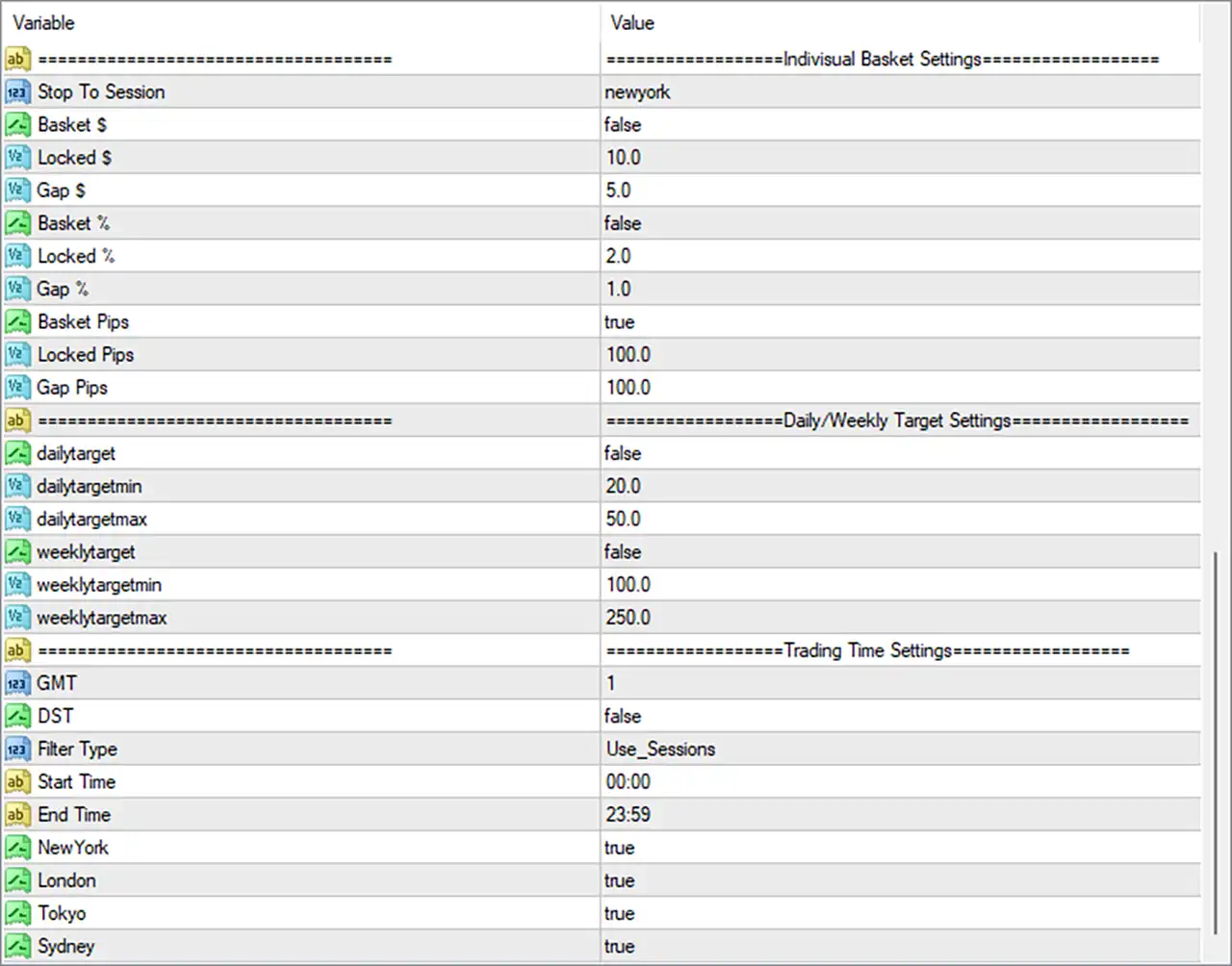
⚙️ Individual Basket Settings
🔹 Individual Basket Settings = Section Header: Identifies the controls used for basket management associated with the selected trading session or individual basket logic.
🔹 Stop To Session = newyork: Selects the New York session as the reference for the individual basket's session-related stopping behavior.
🔹 Basket $ = false: Disables individual basket management based on a monetary target. The Locked $ and Gap $ parameters remain configured but may not be used while this option is inactive.
🔹 Locked $ = 10.0: Sets the individual basket's monetary locked-profit parameter to 10.0. If the dollar-based basket feature is enabled, this value may be used to determine the monetary profit threshold to protect.
🔹 Gap $ = 5.0: Sets the individual basket's monetary gap parameter to 5.0. This may control the distance or increment used by the basket's dollar-based profit-locking mechanism.
🔹 Basket % = false: Disables individual basket management based on a percentage target, leaving the Locked % and Gap % parameters inactive for this particular mode unless the EA uses them elsewhere.
🔹 Locked % = 2.0: Sets the individual basket's percentage-based locked-profit parameter to 2.0. If percentage-based basket management is activated, the EA may use this threshold to protect a portion of the basket's accumulated profit.
🔹 Gap % = 1.0: Sets the individual basket's percentage gap to 1.0. When the corresponding basket-percentage mode is enabled, this value may determine the spacing between profit-locking adjustments.
🔹 Basket Pips = true: Enables the individual basket-pips management option. This selects the pip-based basket method for the individual basket, subject to the EA's programmed conditions.
🔹 Locked Pips = 100.0: Sets the individual basket's locked-profit parameter to 100.0 pips. With Basket Pips = true, this value may define the basket-profit threshold used by the EA's pip-based management logic.
🔹 Gap Pips = 100.0: Sets the individual basket gap parameter to 100.0 pips. This may determine the pip distance between relevant basket-management or profit-locking levels when the individual basket-pips mode is active.
⚙️ Daily and Weekly Target Settings
🔹 Daily/Weekly Target Settings = Section Header: Identifies the settings for controlling daily and weekly profit targets.
🔹 dailytarget = false: Disables the daily-target feature. The minimum and maximum daily target values remain configured, but they may not trigger target-based actions while this option is disabled.
🔹 dailytargetmin = 20.0: Sets the minimum daily target parameter to 20.0. If the daily-target feature is enabled, this value may define the lower target threshold in the EA's configured measurement unit.
🔹 dailytargetmax = 50.0: Sets the maximum daily target parameter to 50.0. When daily target management is enabled, this value may define the upper target threshold used by the EA.
🔹 weeklytarget = false: Disables the weekly-target feature. The weekly minimum and maximum values remain configured but may not trigger weekly target-based actions while this option is inactive.
🔹 weeklytargetmin = 100.0: Sets the minimum weekly target parameter to 100.0. If weekly target management is enabled, this value may define the lower weekly target threshold.
🔹 weeklytargetmax = 250.0: Sets the maximum weekly target parameter to 250.0. When the weekly-target feature is enabled, this value may define the upper weekly target threshold.
⚙️ Trading Time Settings
🔹 Trading Time Settings = Section Header: Groups the parameters that determine the EA's time zone, session filter, permitted trading window, and enabled market sessions.
🔹 GMT = 1: Sets the GMT offset parameter to 1, corresponding to GMT+1 if the EA interprets the value as a direct UTC/GMT offset. Confirm the EA's time convention and whether this setting is intended to represent broker time.
🔹 DST = false: Disables the daylight-saving-time option. The EA will use its configured time-handling logic without applying the adjustment associated with this switch.
🔹 Filter Type = Use_Sessions: Selects the Use_Sessions filtering mode, indicating that the EA is configured to use its session-selection settings to control trading availability.
🔹 Start Time = 00:00: Sets the start of the configured trading window to 00:00, or midnight, according to the EA's applicable time reference.
🔹 End Time = 23:59: Sets the end of the configured trading window to 23:59, or one minute before midnight. Combined with the start time, this defines an almost full-day window, subject to the session filter and enabled session settings.
🔹 NewYork = true: Enables the New York trading session in the session filter, allowing the EA to consider this session when determining permitted trading activity.
🔹 London = true: Enables the London trading session, allowing trading during this session when the EA's other entry conditions and restrictions are satisfied.
🔹 Tokyo = true: Enables the Tokyo trading session, allowing the EA to consider trading opportunities during the Tokyo market session.
🔹 Sydney = true: Enables the Sydney trading session, making this session available under the EA's configured session-filtering rules.
⚙️ Important Configuration Considerations
🔹 Review the Risk and Position Sizing: The configured mode is PercentageEquityPerTrade, with Auto (%) = 1.0 and % Equity Per Trade = 0.1. Verify the EA's sizing formula and which percentage input takes priority before using the EA on a live account.
🔹 Check Stop-Loss Protection: Use SL = false and Fixed SL (Pips) = 0.0 indicate that the configured fixed stop-loss mechanism is disabled. Consider how this affects risk exposure, especially if the strategy can keep multiple positions open.
🔹 Understand Equity Protection: Enable Equity Protection = false means the configured Equity Max DD % = 25.0 is not necessarily enforced by that protection feature. Verify whether another independent mechanism controls drawdown.
🔹 Review Basket Management Modes: The overall basket-dollar and percentage modes are disabled, while the overall Basket Pips mode is also disabled. In the individual basket section, Basket Pips = true with Locked Pips = 100.0 and Gap Pips = 100.0. Confirm how the two basket sections interact.
🔹 Verify the Trade Limits: Max Trades = 6 and Max Trades per symbol = 1 establish the configured trade limits. Confirm how the EA counts open positions, pending orders, and trades belonging to different symbols.
🔹 Confirm Session and Time Zone Settings: GMT = 1, DST = false, Filter Type = Use_Sessions, and all four session switches are enabled. Verify that the session times correspond to your broker's clock and the EA's intended market-session definitions.
🔹 Test Daily and Weekly Targets: Both dailytarget and weeklytarget are false, so their respective configured thresholds of 20.0–50.0 and 100.0–250.0 may not be enforced. Enable these features only after confirming how the EA measures targets and what actions it takes when a threshold is reached.
🔢 Conclusion
InfinX Classic MT4 provides a comprehensive set of controls for automated entries, lot sizing, signal display, spread filtering, equity protection, basket-profit management, daily and weekly targets, and session-based trading.
The displayed configuration permits up to 6 trades, limits trading to 1 trade per symbol, selects PercentageEquityPerTrade money management, and enables individual basket-pips management with Locked Pips = 100.0 and Gap Pips = 100.0. It also enables the New York, London, Tokyo, and Sydney sessions while disabling fixed stop loss, fixed take profit, daily targets, weekly targets, and equity protection.
Before running InfinX Classic MT4 on a live account, verify the lot-sizing calculations, assess the consequences of disabled stop-loss and equity-protection options, and test the basket-management rules on a demo account. The settings describe the selected configuration but do not guarantee profitability or prevent trading losses.


