




Eve EA MT4 (Latest version) - Unlimited

Subscriptions for Special Plan
- 30 EA package is more economical!
- Special package with 99%
- Download 1 EA/Day

Subscriptions for Premium Membership
- Download Unlimited in 1 Year
- Get 100% Discount
- Get free access to all

Subscriptions for Gold Membership
- 1 Year Membership
- Get 100% Discount
- Access EA+Indicator+Course
Frequently bought together 🎁
Add these products to enhance your purchase



Quick Overview
Eve EA is a fully automated price action Expert Advisor (EA) for MetaTrader 4, recommended for EURUSD on the H1 chart. It uses filters to skip poor entries, places pending orders to reduce slippage, offers a two level trailing stop and spread protection, and includes a recovery module that opens extra orders in the same direction when it is switched on.
Best For:
✅ EURUSD traders on the H1 chart.
✅ Users who like price action systems.
✅ Traders who want spread protection.
✅ Users who prefer pending orders.
✅ Testers who will review the recovery module.
What is Eve EA MT4?
Eve EA is a fully automated Expert Advisor (EA) for MetaTrader 4 (MT4) that uses a price action trading strategy to identify potential market opportunities. It incorporates entry filters designed to help avoid low-quality trade setups and improve trade selection.
Key features include pending order execution, spread protection, a two-level trailing stop system, and an optional recovery module that can be disabled according to the trader’s risk management preferences.
⭐ Vendor Website: View here
⭐ Delivery time 24h-48h after payment.
⭐ Refund if not delivered.
⭐ You will receive the current version without any limitations (ID+Time).
Eve EA MT4 Review
How Does Eve EA MT4 Work?
Price Action Filters
The EA analyzes each potential trade with price action and filters, and excludes entries it considers poor.
Pending Orders
Entries use pending orders, which is described as a way to reduce slippage.
Trailing and Spread
A two level trailing stop manages profit, and a spread filter blocks trades in high spread conditions.
Recovery Module
Extra orders in the same direction can be opened with a soft lot multiplier, and the maximum trades parameter limits or disables them.
Key Features of Eve EA MT4
Price Action Entries
The strategy reads price action and applies filters that aim to pick the better trading opportunities and to exclude poor entries.
Pending Order Execution
Entries use pending orders, which the product says significantly reduce slippage and give more control over the price of each entry.
High Spread Protection
The EA blocks new trades when the spread is high, which protects entries from costly conditions around news and rollover.
Two Level Trailing Stop
Trailing works in two levels, so open profit can be protected in steps as the trade moves in favor of the position.
Smart Recovery Module
A built in module opens orders in the same direction with a soft lot multiplier, and it can be switched off by setting the maximum trades to zero.
Money Management Module
Position size can follow a chosen risk level, and the product describes high, medium and low risk groups for different accounts.
FIFO Compatibility and Filters
The EA is described as FIFO compatible and offers flexible trading filters, which suits accounts with stricter order rules.
Historical Trading Results Performance
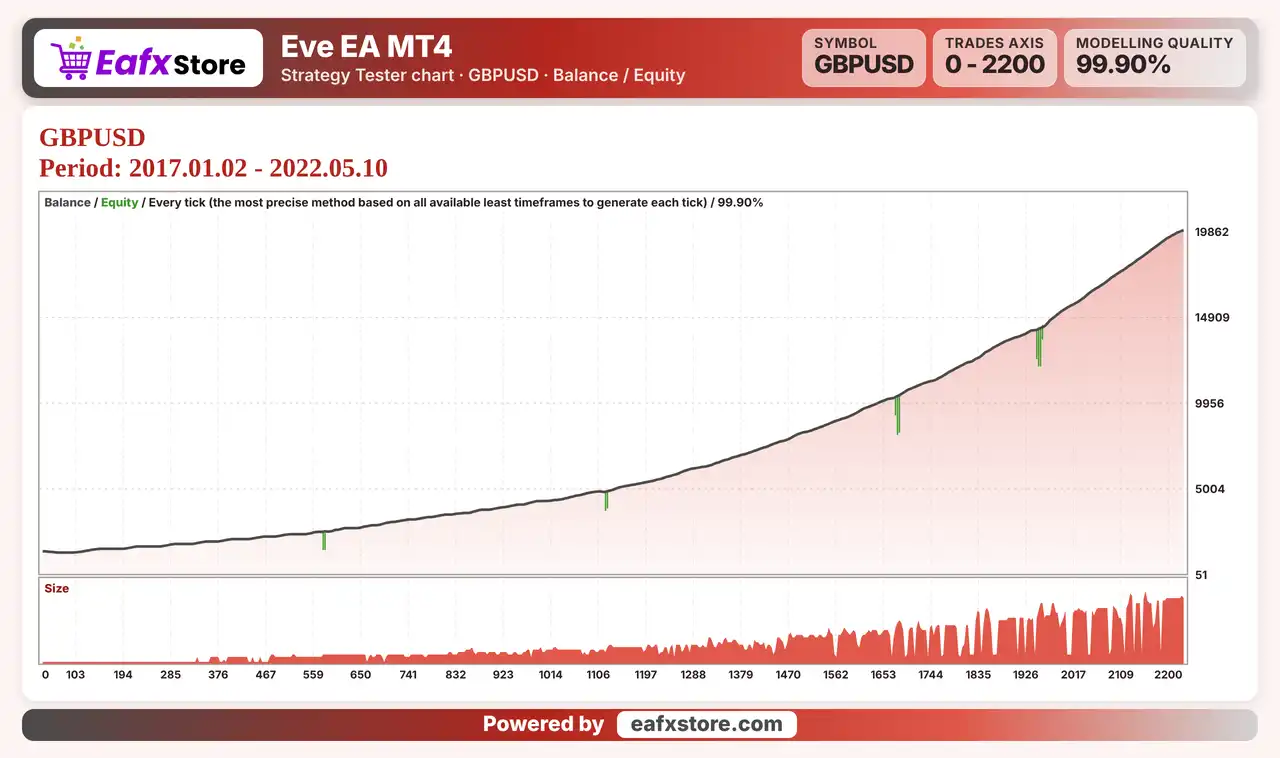
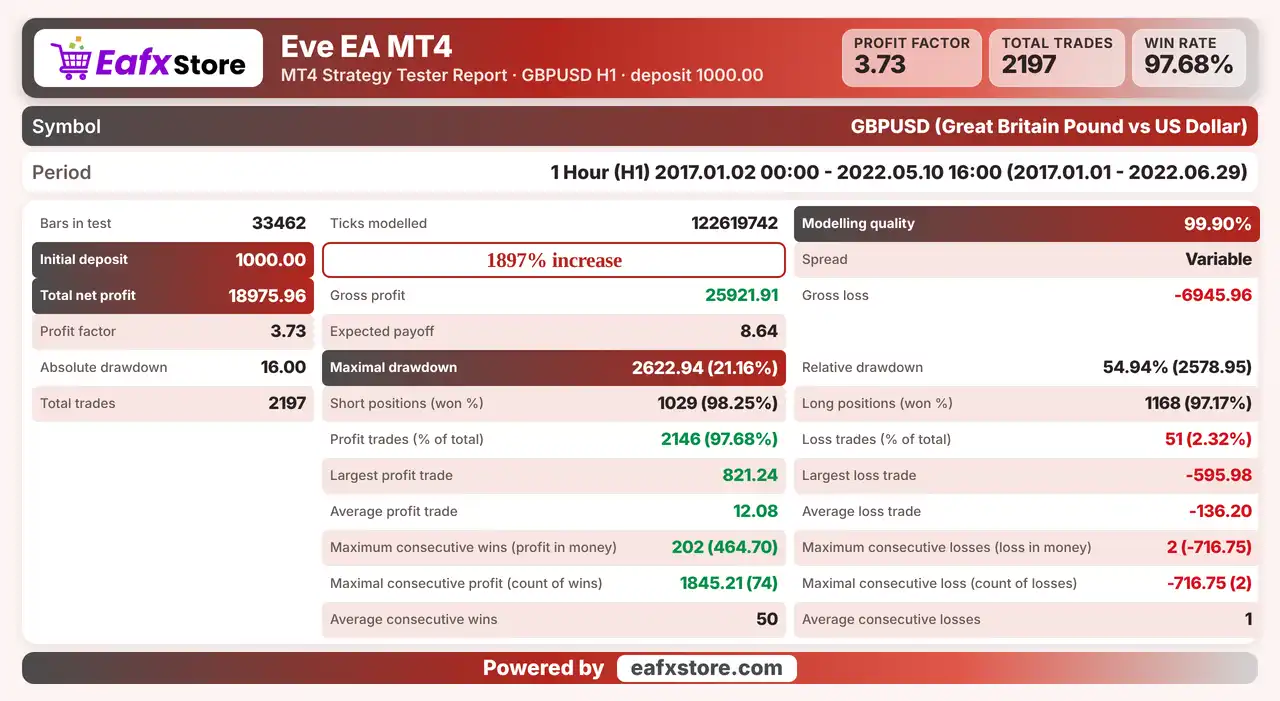
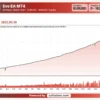
✅ The backtest was conducted on GBPUSD using the H1 timeframe, covering approximately 5.5 years. The test recorded a net profit of $18,975.96 from an initial deposit of $1,000.
Eve EA Backtest Results
| Parameter | Results |
|---|---|
| Trading Symbol | GBPUSD |
| Timeframe | H1 |
| Testing Period | Jan 1, 2017 – Jun 29, 2022 |
| Initial Deposit | $1,000 |
| Total Net Profit | $18,975.96 |
| Profit Factor | 3.73 |
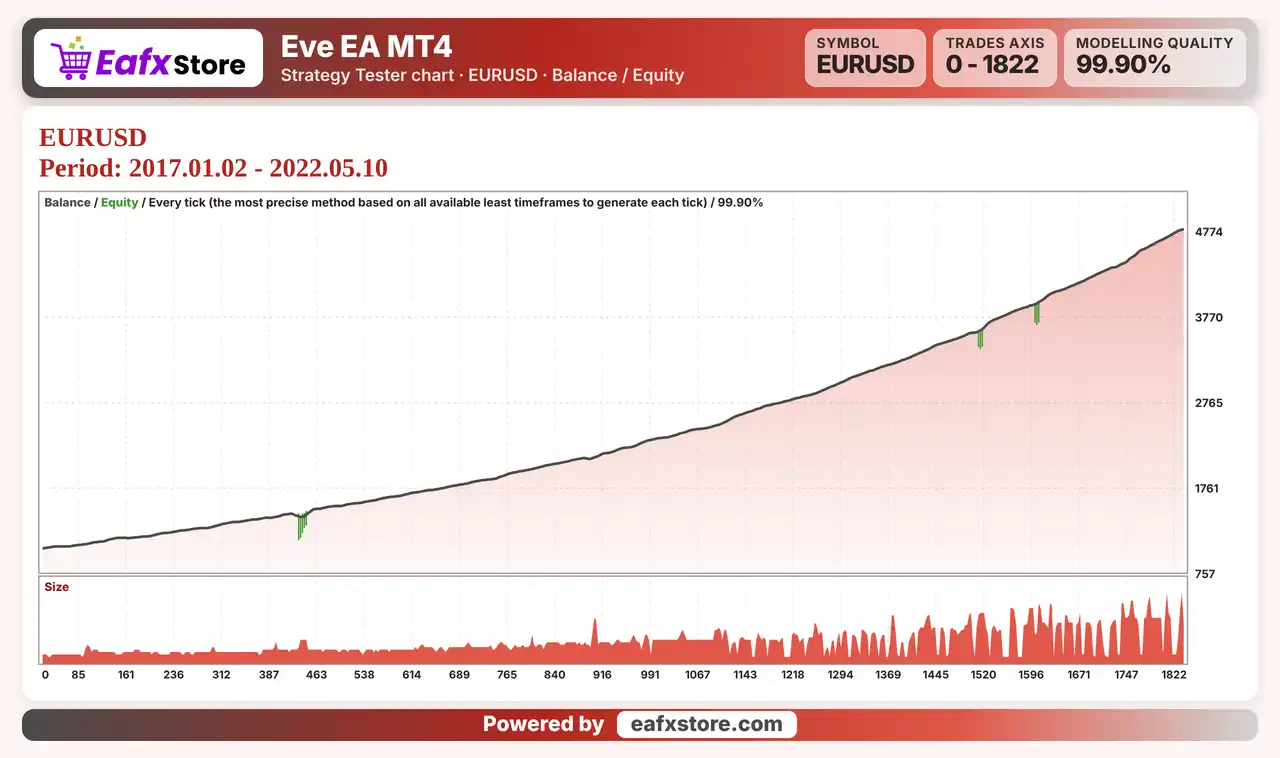
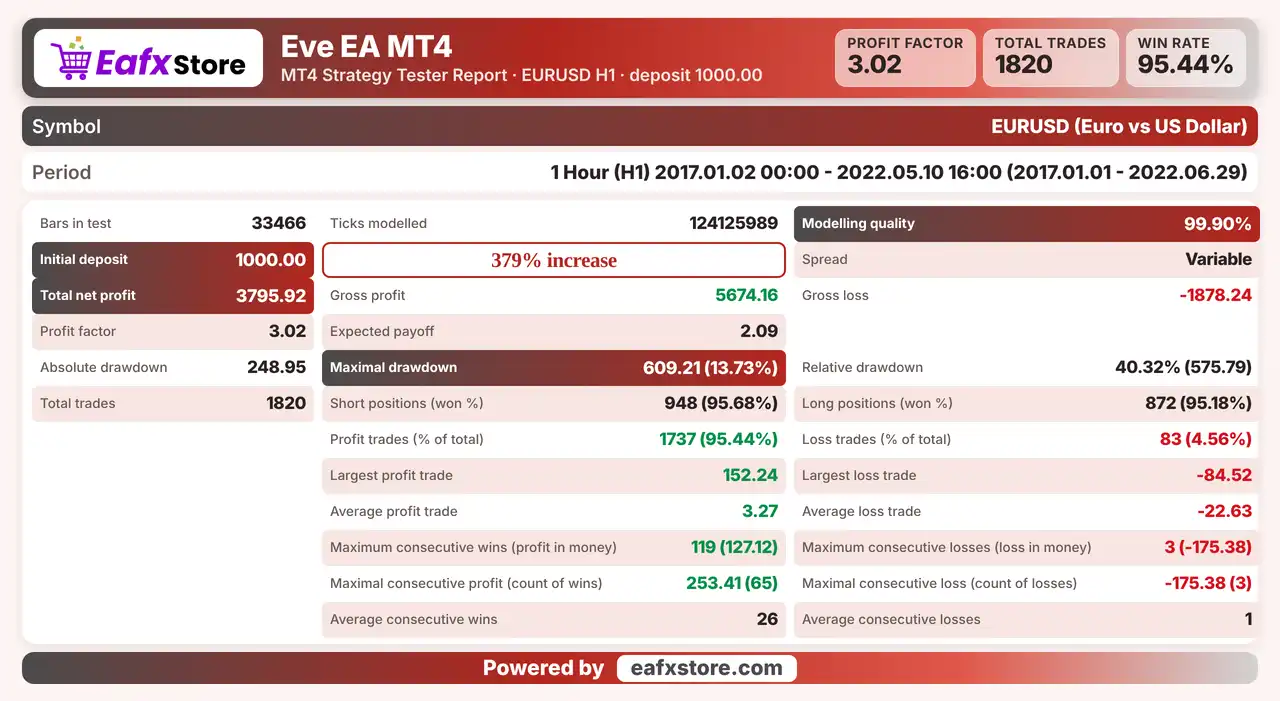
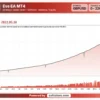
✅ The backtest was conducted on EURUSD using the H1 timeframe, covering approximately 5.5 years. The test recorded a net profit of $3,795.92 from an initial deposit of $1,000.
Eve EA MT4 Backtest Results
| Parameter | Results |
|---|---|
| Trading Symbol | EURUSD |
| Timeframe | H1 |
| Testing Period | Jan 1, 2017 – Jun 29, 2022 |
| Initial Deposit | $1,000 |
| Total Net Profit | $3,795.92 |
| Profit Factor | 3.02 |
Risk Management
Recovery Orders Can Stack Losses
Extra orders in the same direction raise exposure, so a strong move against the account can cause a deep drawdown.
A Stop Loss Can Still Slip
Gaps and fast moves can pass the stop-loss level, so the real loss can be larger than planned.
Trailing Can End a Trade Early
A trailing stop may close a position before it reaches a take-profit level, which gives up part of the move.
A High Risk Level Hurts Fast
The product groups risk levels, and a high level can reduce the balance quickly after a few losing trades.
Stability Is Only a Claim
Words like accuracy and long term stability describe the aim of the EA, and only a demo test can show the real behavior.
What Sets It Apart
Pending Order Entries
The EA avoids market orders for entries, which reduces slippage in fast conditions on EURUSD.
Two Stage Trailing
A trailing stop with two levels is more flexible than a single trailing distance for many robots.
Switchable Recovery
The recovery module can be turned off completely, so the trader can choose between a visual stop and added orders.
FIFO Ready
Compatibility with FIFO rules makes the EA usable on accounts that restrict order handling in some regions.
Who Should Use Eve EA MT4?
EURUSD H1 Traders
People who want a price action robot on the main pair with pending order entries and spread protection.
Cost Conscious Traders
Users who value protection against high spread and slippage and who prefer limit style entries.
Careful Testers
Traders who will review the recovery module, the maximum trades and the risk level on a demo account first.
Not for Traders Who
Want a strict stop loss on every trade, a published track record or any guaranteed profit from a robot.
Recommended Trading Conditions
Recommended settings and parameters to pay attention to from developers and experts:
| Features | Type |
|---|---|
| Trading platform | MetaTrader 4 (MT4) |
| Time frames | H1 |
| Currency pairs | EURUSD |
| Minimum / Recommended deposit | $100+ |
| Minimum / Recommended leverage | 1:100+ |
| Account type | Any |
| Additional services | Unlock and Decompile |
| Recommended brokers | Exness Broker, Icmarkets Broker |
| Recommended VPS | MyfxVPS.com (Blue VPS, Golden VPS). Lowest Latency, 2 week Free Trial, 100% Free for 12-18 Months. |
Product Download Package?
The download package of the product suite includes:
✅ Experts: Eve EA.ex4
Final Verdict
Eve EA is a price action robot for EURUSD on H1 that uses pending orders, spread protection, a two level trailing stop and a money management module. It also includes a recovery module that adds orders in the same direction and can replace the visual stop loss, which raises risk and can be switched off. It suits traders who will test carefully and who understand the risk of added orders. The accuracy claims are unverified and no results are published, so a demo trial should come before any live trading.
🔢 Eve EA MT4 Settings Guide: Complete Inputs and Parameters Explained
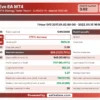
Eve EA MT4 is an automated trading Expert Advisor designed for the MetaTrader 4 platform, with the displayed trade comment identifying its configuration as EVE EA EURUSD. Its settings cover automatic lot sizing, take-profit and stop-loss levels, trailing stop management, economic news protection, spread filtering, trading hours, permitted trading days, and order management.
Understanding the inputs of Eve EA MT4 helps traders configure the EA according to their account size, trading schedule, broker conditions, and risk management requirements. This guide explains every parameter and preserves all values shown in the settings panel.
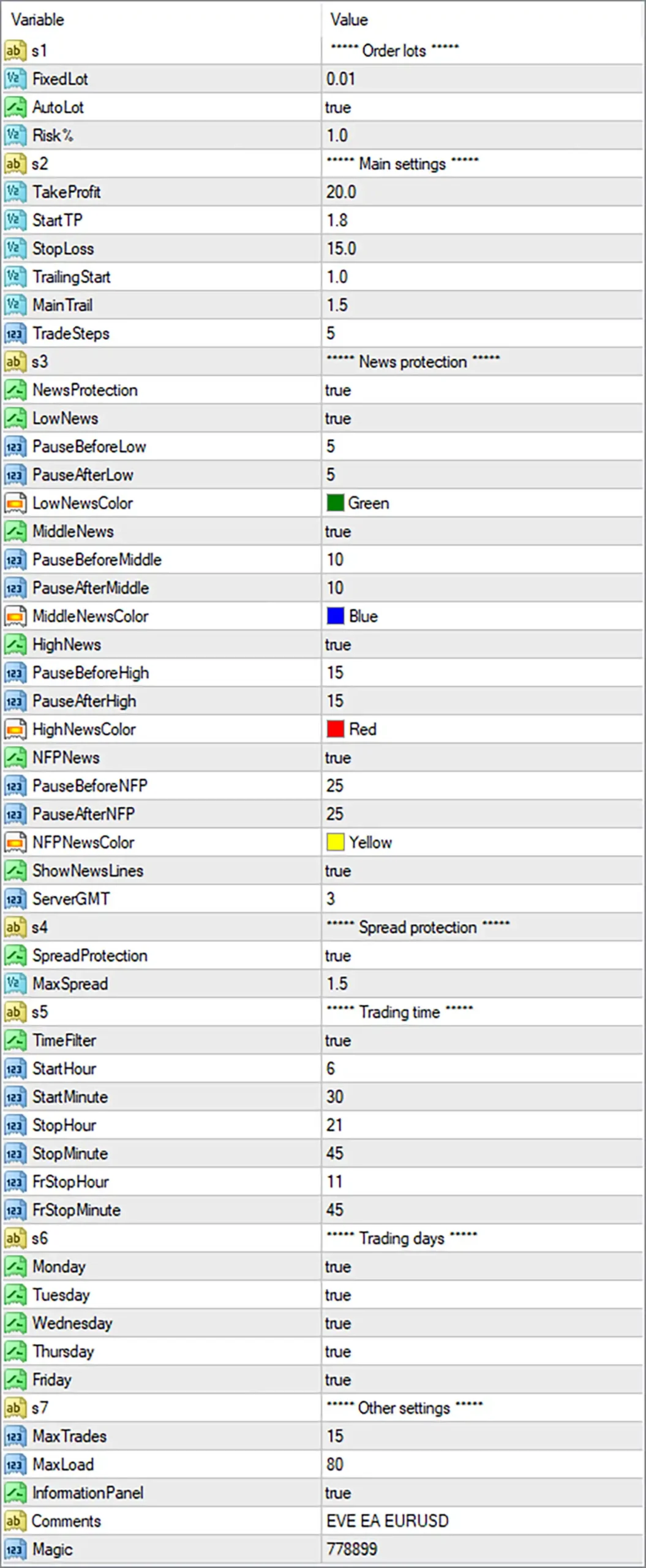
Eve EA MT4 Settings Panel
⚙️ Order Lots Settings
🔹 s1 = Order lots: This is a section label identifying the order lot-sizing settings in Eve EA MT4. It organizes the volume-related parameters and is not necessarily a trading control itself.
🔹 FixedLot = 0.01: Specifies a fixed trading volume of 0.01 lots when fixed-lot sizing is used. This value serves as the configured base lot size for opening positions.
🔹 AutoLot = true: Enables automatic lot sizing, allowing Eve EA MT4 to calculate position volume according to its programmed money management logic rather than relying exclusively on a fixed lot size.
🔹 Risk% = 1.0: Sets the configured risk percentage to 1.0. This may be used to calculate position size based on account equity, balance, or another internal risk formula; the exact calculation depends on the EA’s implementation.
⚙️ Main Trading Settings
🔹 s2 = Main settings: This section label groups the primary trade-management parameters, including take profit, stop loss, trailing stop activation, trailing distance, and trade steps.
🔹 TakeProfit = 20.0: Sets the configured take-profit parameter to 20.0. This value defines the intended profit target according to the EA’s internal unit convention, which should be verified before live trading.
🔹 StartTP = 1.8: Sets the starting threshold for the EA’s take-profit or trailing management logic to 1.8. Its precise meaning depends on how Eve EA MT4 implements this parameter.
🔹 StopLoss = 15.0: Sets the configured stop-loss value to 15.0, defining the intended loss-limiting distance or threshold used by the EA. Confirm whether the value represents pips, points, or another unit.
🔹 TrailingStart = 1.0: Configures the trailing-stop activation threshold to 1.0. The EA may begin applying trailing management after the relevant profit or price-movement condition reaches this level.
🔹 MainTrail = 1.5: Sets the main trailing-stop parameter to 1.5. This value may control the trailing distance or another part of the trailing mechanism, depending on the EA’s internal logic.
🔹 TradeSteps = 5: Sets the trade-step parameter to 5. It may control the number of trading stages or increments used by the strategy; its exact function should be confirmed from the EA documentation.
⚙️ Economic News Protection Settings
🔹 s3 = News protection: This section label groups the settings responsible for managing trading activity around scheduled economic announcements.
🔹 NewsProtection = true: Enables the EA’s economic news protection feature, allowing its programmed news-filtering logic to restrict or manage trading around designated news events.
🔹 LowNews = true: Enables the low-impact news category, allowing the EA to apply the configured pause period around economic announcements classified as low impact.
🔹 PauseBeforeLow = 5: Sets the pre-news pause for low-impact events to 5, typically interpreted as 5 minutes before the scheduled announcement.
🔹 PauseAfterLow = 5: Sets the post-news pause for low-impact events to 5, typically interpreted as 5 minutes after the scheduled announcement.
🔹 LowNewsColor = Green: Assigns Green to the low-impact news category, potentially allowing related news events or chart markers to be identified visually.
🔹 MiddleNews = true: Enables filtering for medium-impact economic news, allowing the EA to apply its configured trading restrictions around announcements in this category.
🔹 PauseBeforeMiddle = 10: Sets the pre-news pause for medium-impact events to 10, typically interpreted as 10 minutes before the scheduled release.
🔹 PauseAfterMiddle = 10: Sets the post-news pause for medium-impact events to 10, typically interpreted as 10 minutes after the scheduled release.
🔹 MiddleNewsColor = Blue: Assigns Blue to medium-impact news events for visual identification within the EA’s news display or chart markings.
🔹 HighNews = true: Enables filtering for high-impact economic announcements, allowing the EA to restrict trading around potentially market-moving releases.
🔹 PauseBeforeHigh = 15: Sets the pre-news pause for high-impact events to 15, typically interpreted as 15 minutes before the announcement.
🔹 PauseAfterHigh = 15: Sets the post-news pause for high-impact events to 15, typically interpreted as 15 minutes after the announcement.
🔹 HighNewsColor = Red: Assigns Red to high-impact news events, helping distinguish these announcements from lower-impact categories in the EA’s visual display.
🔹 NFPNews = true: Enables the dedicated Non-Farm Payrolls (NFP) news filter, allowing the EA to apply separate trading restrictions around this major US employment report.
🔹 PauseBeforeNFP = 25: Sets the pre-news pause for NFP announcements to 25, typically interpreted as 25 minutes before the scheduled release.
🔹 PauseAfterNFP = 25: Sets the post-news pause for NFP announcements to 25, typically interpreted as 25 minutes after the scheduled release.
🔹 NFPNewsColor = Yellow: Assigns Yellow to NFP events, providing a distinct visual identifier for this specific economic announcement category.
🔹 ShowNewsLines = true: Enables the display of news lines on the chart, if supported by the EA, helping traders visualize the timing of relevant economic announcements.
🔹 ServerGMT = 3: Sets the server time offset to GMT+3 for the news and time calculations that use this parameter. Verify that this matches the broker’s actual server time and daylight-saving arrangements.
⚙️ Spread Protection Settings
🔹 s4 = Spread protection: This section label groups the parameters used to control spread-related trading restrictions.
🔹 SpreadProtection = true: Enables spread protection, allowing Eve EA MT4 to check the current spread against its configured maximum before permitting trades, subject to the EA’s execution rules.
🔹 MaxSpread = 1.5: Sets the maximum permitted spread to 1.5 in the EA’s configured spread units. Verify whether the value is measured in pips, points, or another format and confirm that it is suitable for the EURUSD symbol and broker.
⚙️ Trading Time Settings
🔹 s5 = Trading time: This section label organizes the parameters that determine when Eve EA MT4 is permitted to trade.
🔹 TimeFilter = true: Enables the trading-time filter, allowing the EA to restrict trading to the configured schedule instead of operating throughout the entire trading day.
🔹 StartHour = 6: Sets the main trading session’s start hour to 6, corresponding to 06:00 in the time reference used by the EA.
🔹 StartMinute = 30: Sets the main trading session’s start minute to 30, making the configured start time 06:30.
🔹 StopHour = 21: Sets the main trading session’s stop hour to 21, corresponding to 21:00 in the time reference used by the EA.
🔹 StopMinute = 45: Sets the main trading session’s stop minute to 45, making the configured end time 21:45.
🔹 FrStopHour = 11: Sets the Friday-specific stop hour to 11, potentially restricting Friday trading according to a separate cutoff schedule.
🔹 FrStopMinute = 45: Sets the Friday-specific stop minute to 45, making the configured Friday cutoff time 11:45 in the EA’s applicable time reference.
⚙️ Trading Days Settings
🔹 s6 = Trading days: This section label groups the weekday switches that determine which days Eve EA MT4 may trade.
🔹 Monday = true: Enables trading on Monday, allowing the EA to open trades when its strategy conditions and other filters are satisfied.
🔹 Tuesday = true: Enables trading on Tuesday, permitting the EA to operate on this weekday subject to its trading rules and risk controls.
🔹 Wednesday = true: Enables trading on Wednesday, allowing new trading activity when the strategy’s entry conditions are met.
🔹 Thursday = true: Enables trading on Thursday, keeping this weekday available for trading under the EA’s configured restrictions.
🔹 Friday = true: Enables trading on Friday, although the separate Friday cutoff settings of 11:45 may restrict trading later in the day.
⚙️ Other Settings
🔹 s7 = Other settings: This section label groups the remaining operational parameters, including trade limits, workload settings, information-panel visibility, order comments, and trade identification.
🔹 MaxTrades = 15: Sets the configured maximum number of trades to 15. Depending on the EA’s implementation, this may limit simultaneous positions, total managed orders, or another defined measure of trading activity.
🔹 MaxLoad = 80: Sets the maximum load parameter to 80. Its exact purpose and unit are not evident from the input panel, so consult the EA documentation before changing this value.
🔹 InformationPanel = true: Enables the information panel, allowing the EA to display supported trading information or status details directly on the chart.
🔹 Comments = EVE EA EURUSD: Sets the trade comment to EVE EA EURUSD, providing a descriptive label that can help identify orders associated with this EA in the trading terminal, if the broker preserves order comments.
🔹 Magic = 778899: Assigns the magic number 778899 to identify and distinguish trades managed by Eve EA MT4 from trades belonging to other EAs or manual trading activity.
⚙️ Important Configuration Considerations
🔹 Automatic Lot Sizing and Risk: With AutoLot = true and Risk% = 1.0, verify how the EA calculates volume and whether the 1.0 risk setting represents risk per trade or another internal risk measure before using a live account.
🔹 Take Profit and Stop Loss Units: The TakeProfit = 20.0 and StopLoss = 15.0 values should be checked against the EA’s unit conventions. Do not assume these values represent pips without confirming the implementation.
🔹 News Filter Timing: The configured pause periods range from 5 minutes before and after low-impact news to 25 minutes before and after NFP announcements. Confirm that the economic calendar is available and that ServerGMT = 3 is correct for your broker.
🔹 Trading Schedule and Friday Cutoff: The main session is configured for 06:30–21:45, while the Friday cutoff is 11:45. Check how the EA applies these schedules and whether the times refer to broker server time.
🔹 Spread and Trade Limits: SpreadProtection = true and MaxSpread = 1.5 enable a spread-related restriction, while MaxTrades = 15 sets a trade limit. Verify the spread units and how the EA counts open or managed trades.
🔢 Conclusion
Eve EA MT4 provides a broad set of configuration options for position sizing, trade exits, trailing management, economic news protection, spread filtering, trading hours, weekday selection, and order identification. The displayed setup enables automatic lot sizing with a Risk% value of 1.0, a take-profit setting of 20.0, a stop-loss setting of 15.0, news protection, spread protection, and trading from Monday through Friday.
Before running Eve EA MT4 on a live account, verify the meaning and units of its main trading parameters, confirm the broker’s GMT offset, test the trading schedule and news filter, and evaluate the EA using historical data and a demo account. The settings describe the EA’s configuration but do not guarantee profitability or eliminate trading risk.
User Reviews
Only logged in customers who have purchased this product may leave a review.
❓ What is Eve EA MT4?
A fully automated price action Expert Advisor for MetaTrader 4, recommended for EURUSD on the H1 timeframe.
❓ Which pair does Eve EA MT4 trade?
EURUSD is recommended.
❓ Which timeframe does Eve EA MT4 use?
H1
❓ What is the recovery module in Eve EA MT4?
A module that opens orders in the same direction with a soft lot multiplier, used instead of the visual stop loss in some cases.
❓ Can the recovery module of Eve EA MT4 be turned off?
Yes. Setting the maximum trades parameter to zero disables it, and the EA then uses the visual stop loss.
❓ Does Eve EA MT4 use pending orders?
Yes. Pending orders are used, which is described as a way to reduce slippage.
❓ Does Eve EA MT4 have a trailing stop?
Yes. It has a two level trailing stop.
❓ Does Eve EA MT4 protect against high spread?
Yes. A spread protection filter blocks new trades when the spread is high.
❓ Is Eve EA MT4 a grid or martingale EA?
The recovery module adds orders with a lot multiplier, so it is not a pure single order system. A demo test should confirm its behavior.
❓ What deposit does Eve EA MT4 need?
A minimum deposit per pair and a minimum leverage are stated, and a larger balance gives more room for drawdown.
-
 Original price was: $1,200.00.$249.00Current price is: $249.00.
 -
 Original price was: $1,000.00.$249.00Current price is: $249.00.
 -
 Original price was: $1,999.00.$249.00Current price is: $249.00.
 -
 Original price was: $999.00.$249.00Current price is: $249.00.
-
 0Original price was: $1,299.00.$249.00Current price is: $249.00.
 -
 0Original price was: $778.00.$249.00Current price is: $249.00.
 -
 0Original price was: $500.00.$199.00Current price is: $199.00.
 -
 0Original price was: $430.00.$249.00Current price is: $249.00.
There are no reviews yet.