





Eakao MT4 EA (Latest version) - Unlimited

Subscriptions for Special Plan
- 30 EA package is more economical!
- Special package with 99%
- Download 1 EA/Day

Subscriptions for Premium Membership
- Download Unlimited in 1 Year
- Get 100% Discount
- Get free access to all

Subscriptions for Gold Membership
- 1 Year Membership
- Get 100% Discount
- Access EA+Indicator+Course
Frequently bought together 🎁
Add these products to enhance your purchase




Quick Overview
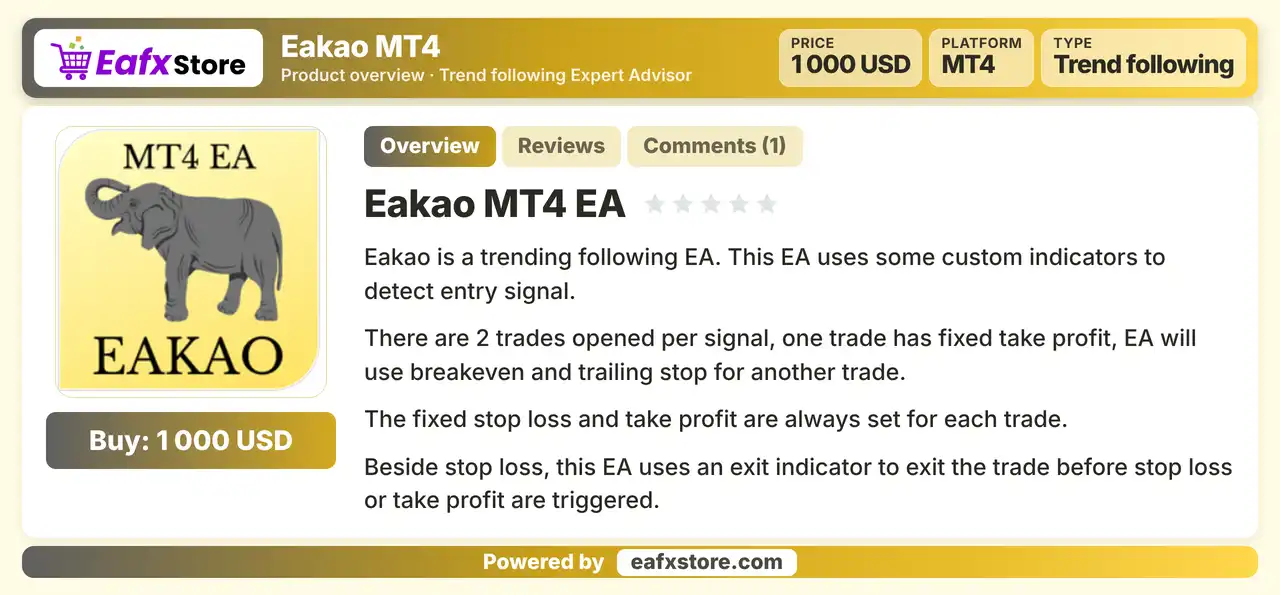
Eakao MT4 is a trend following Expert Advisor (EA) for MetaTrader 4 that uses custom indicators to detect entry signals. It opens two trades per signal, one with a fixed take profit and one managed by breakeven and a trailing stop. Lot size is calculated from the loss the trader accepts, and an optional news filter and an exit indicator are included.
Best For:
✅ Trend followers on the H1 chart.
✅ Multi pair forex and gold traders.
✅ Users who want lots based on accepted loss.
✅ Traders who like breakeven and trailing.
✅ Users who want an optional news filter.
What is Eakao MT4 EA?
Eakao MT4 EA is an automated Expert Advisor (EA) for MetaTrader 4 (MT4) designed to follow market trends using custom indicators to identify potential trading entry signals. The EA opens two trades per signal and includes automated money management, breakeven functionality, trailing stop protection, spread control, and an economic news filter to help manage trading risks and execution conditions.
⭐ Vendor Website: View here
⭐ Delivery time 24h-48h after payment.
⭐ Refund if not delivered.
⭐ You will receive the current version without any limitations (ID+Time).
Eakao MT4 EA Review
Trading Strategy
Detect Trend Signals
Custom indicators with a fast and a slow period search for entry signals in the direction of the trend on the H1 chart.
Open Two Trades Per Signal
Each signal opens two trades, one with a fixed take profit and the other left to a breakeven and trailing stop.
Set a Fixed Stop and Target
Every trade carries a fixed stop loss and take profit, so the loss and the target are defined before the trade is placed.
Exit with an Indicator
Besides the stop loss, an exit indicator can close a trade before the stop or the target is reached when conditions change.
Size the Lot from the Accepted Loss
The trader sets the loss accepted for each trade, and the EA calculates the lot size from the stop loss distance.
Key Features of Eakao MT4
Custom Indicator Entries
Custom indicators with fast and slow settings detect trend signals, which gives the EA its own entry logic for the H1 chart.
Two Trades per Signal
One trade has a fixed target while the other is managed with breakeven and a trailing stop, which mixes a quick gain with a longer run.
Exit Indicator
An exit indicator can close a trade before the stop loss or take profit is hit, which may limit a loss when the signal fades.
Money Management by Accepted Loss
Lot size is calculated from the accepted loss and the stop loss distance, so the risk of each trade follows the chosen amount.
Breakeven and Trailing Stop
Breakeven and trailing settings move the stop behind price in profit, which helps to protect open gains on the second trade.
Optional News Filter
A news filter can pause trading before and after selected events by currency and impact level, using a downloaded calendar.
Spread and Session Controls
A maximum spread, a slippage limit and a trading window with start and stop times control when new trades may open.
Historical Trading Results Performance
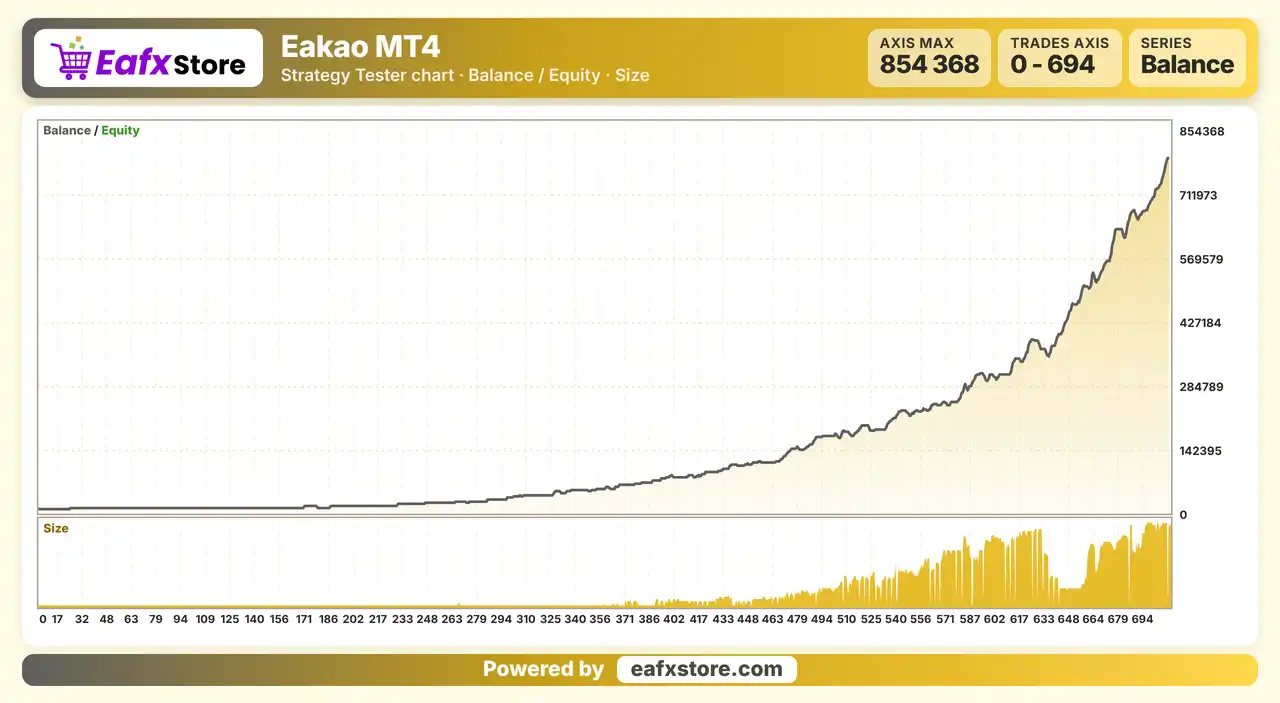
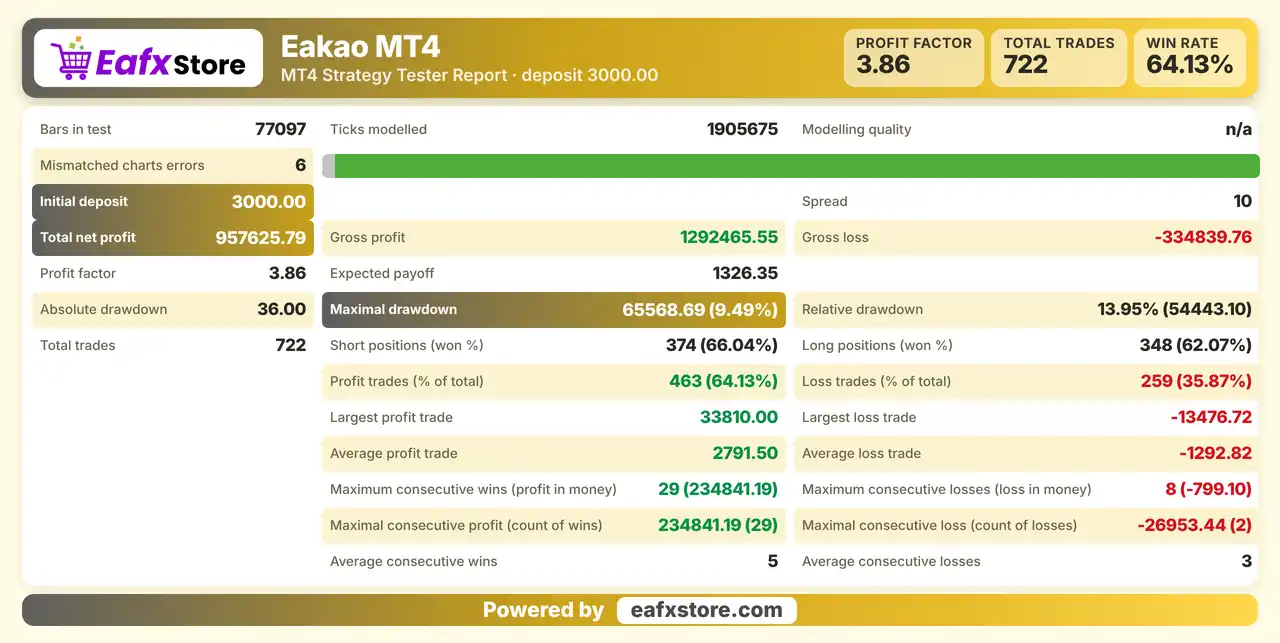
The backtest results show a total net profit of $957,625.79 from an initial deposit of $3,000, with a Profit Factor of 3.86 across 722 trades.
Eakao MT4 EA Backtest Results
Eakao MT4 Backtest Results
| Parameter | Results |
|---|---|
| Initial Deposit | $3,000 |
| Total Net Profit | $957,625.79 |
| Profit Factor | 3.86 |
| Total Trades | 722 |
| Profit Trades | 64.13% |
| Maximal Drawdown | 9.49% |
Risk Management
The Default Risk Is High
A large risk percentage per trade means a few losing trades can reduce the balance fast, so a lower value is wise.
A Stop Loss Can Still Slip
Gaps and fast moves can pass the stop-loss level, so the real loss can be larger than the accepted loss.
The Fixed Target May Cap Gains
One trade closes at a set take-profit, while price may keep moving, and the trailing trade may end early.
Two Trades Double the Exposure
Each signal opens two trades, so a losing signal can cost more than a single trade would.
What Sets It Apart
Two Trade Design
Each signal splits into a fixed target trade and a trailing trade, which mixes two exit styles in one entry.
Exit Indicator
The EA can leave a trade before the stop or target, which adds a layer beyond a plain stop loss and take profit.
Loss Based Lot Sizing
Position size comes from the accepted loss, which links the volume directly to the risk the trader wants.
Wide Pair List
The product names a long list of pairs and gold, so the same EA can be tried on several instruments.
Who Should Use Eakao MT4?
H1 Trend Followers
People who want a plain trend following EA with custom indicators on the hourly chart of major pairs.
Multi Pair Traders
Users who like to test one EA across several forex pairs and gold with the same management rules.
Careful Risk Takers
Traders who will lower the default risk and turn on the news filter before using real money.
Not for Traders Who
Want a proven record, a set and forget system with no review or any guaranteed profit from a robot.
Recommended Trading Conditions
Recommended settings and parameters to pay attention to from developers and experts:
| Features | Type |
|---|---|
| Trading platform | MetaTrader 4 (MT4) |
| Time frames | H1 |
| Currency pairs | EURUSD, GBPUSD, USDJPY, USDCAD, EURAUD, EURJPY, GBPCHF, GBPJPY, EURCAD, GBPAUD and XAUUSD |
| Minimum / Recommended deposit | $100+ |
| Minimum / Recommended leverage | Any |
| Account type | Any |
| Additional services | Unlock and Decompile |
| Recommended brokers | Exness Broker, Icmarkets Broker |
| Recommended VPS | MyfxVPS.com (Blue VPS, Golden VPS). Lowest Latency, 2 week Free Trial, 100% Free for 12-18 Months. |
Product Download Package?
The download package of the product suite includes:
✅ Experts: Eakao MT4 EA.ex4
Final Verdict
Eakao MT4 is a trend following robot for the H1 chart that uses custom indicators, opens two trades per signal and manages them with a fixed target, breakeven, a trailing stop and an exit indicator. Lot size follows the loss the trader accepts, and a news filter is available but off in the supplied setup. The default risk is high, the very safe claim is unverified and no results are published, so a demo test with a lower risk setting should come first, before any live trading with real money.
🔢 Eakao MT4 Settings Guide: Complete Inputs and Parameters Explained
Eakao MT4 is an automated trading Expert Advisor (EA) designed for the MetaTrader 4 platform. Its configuration panel includes parameters for automatic money management, trading risk, stop-loss settings, spread control, trading hours, breakeven protection, trailing stops, and economic news filtering.
Understanding the Eakao MT4 settings helps traders configure the EA according to their account balance, risk tolerance, broker execution conditions, and preferred trading schedule. This guide explains every parameter displayed in the input panel, preserving the exact names and numerical values shown in the screenshot.
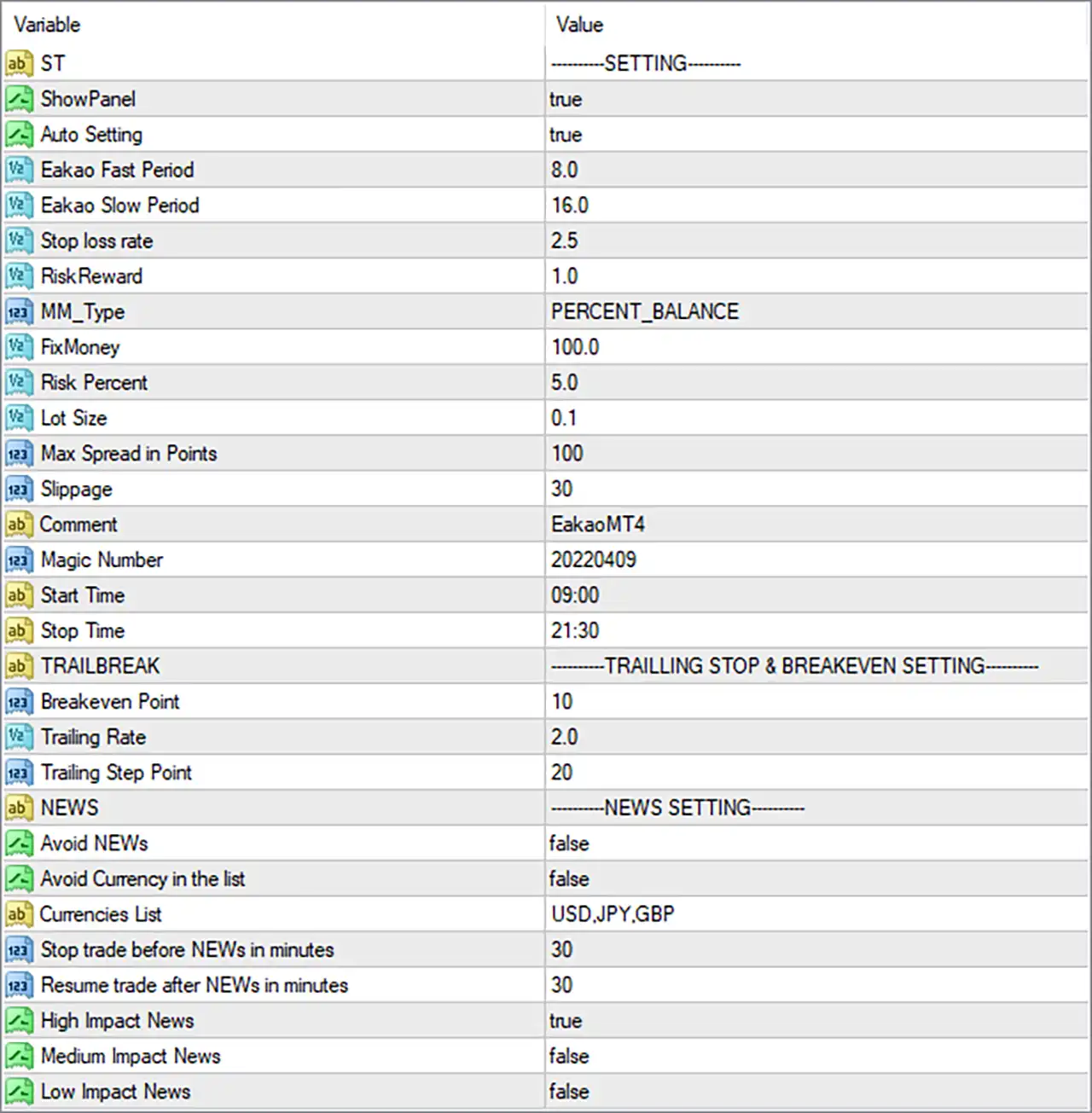
Eakao MT4 EA Settings Panel
⚙️ General Settings
🔹 ST = SETTING: This is a section label that identifies the general configuration area of Eakao MT4. It organizes the main inputs and does not necessarily control a trading function itself.
🔹 ShowPanel = true: Enables the display of the EA’s information panel on the chart, allowing traders to view the information provided by the interface while the EA is running.
🔹 Auto Setting = true: Enables the automatic settings option, allowing Eakao MT4 to use its programmed configuration logic where supported. The precise parameters affected by this option depend on the EA’s internal implementation.
🔹 Eakao Fast Period = 8.0: Sets the fast calculation period to 8.0. This parameter may control a faster component of the EA’s signal calculation, such as a moving average or another indicator, depending on the strategy implementation.
🔹 Eakao Slow Period = 16.0: Sets the slow calculation period to 16.0. If these inputs represent fast and slow indicators, the EA may compare their values to identify potential market direction or trading signals.
🔹 Stop loss rate = 2.5: Sets the stop-loss rate parameter to 2.5. This value may determine the stop-loss distance or calculation factor used by the EA; its precise unit and formula should be confirmed in the EA documentation.
🔹 RiskReward = 1.0: Sets the risk-reward parameter to 1.0. If interpreted as a reward-to-risk ratio, this represents a nominal 1:1 relationship between the target profit and the amount risked, although the EA’s actual calculation method must be verified.
⚙️ Money Management and Lot Sizing
🔹 MM_Type = PERCENT_BALANCE: Selects the percentage-of-balance money management mode. This setting indicates that position sizing is intended to be linked to the trading account balance rather than relying solely on a fixed monetary amount.
🔹 FixMoney = 100.0: Sets the fixed-money parameter to 100.0. This may serve as a monetary reference for a supported money management mode; its exact role when MM_Type = PERCENT_BALANCE depends on the EA’s implementation.
🔹 Risk Percent = 5.0: Sets the configured risk percentage to 5.0. This may be used in position-sizing calculations based on the account balance, but traders should verify whether it represents risk per trade or another internal risk calculation before live deployment.
🔹 Lot Size = 0.1: Sets the configured lot size to 0.1 lots. This may be used as a fixed or reference volume depending on the selected money management mode and how Eakao MT4 implements its lot-sizing rules.
⚙️ Spread, Slippage, and Trade Identification
🔹 Max Spread in Points = 100: Sets the maximum permitted spread to 100 points. If spread filtering is implemented, the EA may restrict new entries when the current spread exceeds this threshold.
🔹 Slippage = 30: Sets the permitted slippage parameter to 30. This typically defines the allowable difference between the requested and executed price, although the actual behavior depends on the EA and broker execution model.
🔹 Comment = EakaoMT4: Sets the order comment to EakaoMT4, providing a descriptive label that may help traders identify the EA’s orders in the MetaTrader 4 trading terminal.
🔹 Magic Number = 20220409: Assigns the magic number 20220409 to the EA’s trades. This identifier helps distinguish orders managed by Eakao MT4 from manual trades and orders belonging to other Expert Advisors.
🔹 Start Time = 09:00: Sets the configured trading start time to 09:00, or 9:00 AM, according to the time reference used by the EA.
🔹 Stop Time = 21:30: Sets the configured trading stop time to 21:30, or 9:30 PM, according to the time reference used by the EA. The setting defines the end of the configured trading window, but does not by itself establish whether existing positions are closed at that time.
⚙️ Trailing Stop and Breakeven Settings
🔹 TRAILBREAK = TRAILLING STOP & BREAKEVEN SETTING: This section label groups the trailing-stop and breakeven parameters used for managing open positions.
🔹 Breakeven Point = 10: Sets the breakeven activation parameter to 10. When the EA’s applicable activation condition is reached, it may adjust the stop-loss level toward the entry price to reduce the risk of a losing trade.
🔹 Trailing Rate = 2.0: Sets the trailing-rate parameter to 2.0. This value may determine the distance or calculation factor used to trail the stop-loss behind the market price as a position moves into profit.
🔹 Trailing Step Point = 20: Sets the trailing step to 20 points. If implemented as a step-based trailing mechanism, the EA may update the stop-loss only after the market price moves by the specified increment.
⚙️ Economic News Settings
🔹 NEWS = NEWS SETTING: This is a section label that groups the economic news filtering parameters of Eakao MT4.
🔹 Avoid NEWs = false: Disables the general option to avoid trading around economic news. News-related restrictions may still depend on other enabled options and the EA’s internal logic.
🔹 Avoid Currency in the list = false: Disables the option to avoid trading based on currencies listed in the Currencies List parameter. The list remains configured, but this specific exclusion option is switched off.
🔹 Currencies List = USD,JPY,GBP: Defines USD, JPY, and GBP as the currencies included in the configured list. These represent the US dollar, Japanese yen, and British pound, respectively, and may be used by the EA’s currency-based news filtering logic.
🔹 Stop trade before NEWs in minutes = 30: Sets the pre-news trading pause to 30 minutes. When the relevant news filter is active, the EA may stop opening new trades 30 minutes before a qualifying economic announcement.
🔹 Resume trade after NEWs in minutes = 30: Sets the post-news waiting period to 30 minutes. When the applicable news filter is active, the EA may resume opening new trades 30 minutes after the qualifying announcement.
🔹 High Impact News = true: Enables the high-impact news category. If the news filter is active, the EA can use this option to apply restrictions around major economic announcements.
🔹 Medium Impact News = false: Disables the medium-impact news category. Under this configuration, medium-impact events are not selected by this particular category switch for news-related restrictions.
🔹 Low Impact News = false: Disables the low-impact news category. Under this configuration, low-impact events are not selected by this particular category switch for news-related restrictions.
⚙️ Important Configuration Considerations
🔹 Review the Risk Percentage: Risk Percent = 5.0 may represent substantial exposure if applied to every trade. Confirm the EA’s risk calculation and consider testing a lower setting to align the position size with your account’s risk limits.
🔹 Verify the Money Management Mode: With MM_Type = PERCENT_BALANCE, Auto Setting = true, and Lot Size = 0.1, confirm which settings take priority and whether the EA calculates volume from the account balance or uses the configured lot size directly.
🔹 Check the Meaning of Stop Loss Rate: Stop loss rate = 2.5 should be verified against the EA’s documented formula. Do not assume that the value represents 2.5 pips, percent, or another specific unit without confirmation.
🔹 Understand the Breakeven and Trailing Logic: Breakeven Point = 10, Trailing Rate = 2.0, and Trailing Step Point = 20 may use different units or activation rules. Test how these parameters interact to avoid unexpected stop-loss adjustments.
🔹 Verify Spread and Slippage Units: Max Spread in Points = 100 and Slippage = 30 should be checked against your broker’s quote precision, execution conditions, and the instrument being traded.
🔹 Check News Filter Activation: Avoid NEWs = false and Avoid Currency in the list = false indicate that the general news-avoidance options are disabled. Although High Impact News = true, confirm whether that category switch operates independently or requires the main news filter to be enabled.
🔹 Confirm the Trading Time Reference: Start Time = 09:00 and Stop Time = 21:30 define the configured trading window. Verify whether these values use broker server time or another time zone before enabling the EA on a live account.
🔢 Conclusion
Eakao MT4 offers configurable controls for indicator periods, money management, risk parameters, trade execution, trading hours, breakeven protection, trailing stops, and economic news filtering. The displayed configuration includes Eakao Fast Period = 8.0, Eakao Slow Period = 16.0, Risk Percent = 5.0, Lot Size = 0.1, and a trading schedule from 09:00 to 21:30.
The settings also include a breakeven parameter of 10, a trailing rate of 2.0, a trailing step of 20 points, and a 30-minute news pause before and after qualifying events. However, the general news-avoidance options are disabled, so traders should verify how the EA applies the individual news-category switches.
Before using Eakao MT4 on a live account, test the configuration on a demo account, confirm the units and calculation rules of each risk-related parameter, and ensure the selected settings are appropriate for the account balance and broker conditions. No input configuration guarantees trading profits or eliminates market risk.
User Reviews
Only logged in customers who have purchased this product may leave a review.
❓ What is Eakao MT4?
A trend following Expert Advisor for MetaTrader 4 that uses custom indicators to detect entry signals.
❓ Which timeframe does Eakao MT4 use?
H1 is the recommended timeframe.
❓ Which pairs does Eakao MT4 recommend?
Major pairs and crosses such as EURUSD, GBPUSD, USDJPY, USDCAD, EURAUD, EURJPY, GBPCHF, GBPJPY, EURCAD and GBPAUD, plus XAUUSD.
❓ How many trades does Eakao MT4 open per signal?
Two. One has a fixed take profit and the other uses breakeven and a trailing stop.
❓ Does Eakao MT4 use a stop loss?
Yes. A fixed stop loss and take profit are set for each trade, and an exit indicator can close a trade earlier.
❓ How is lot size set in Eakao MT4?
The trader sets the accepted loss for each trade, and the EA calculates the lot from the stop loss distance.
❓ Does Eakao MT4 have a news filter?
Yes. It can pause trading around news by currency and impact level, but the main options are off in the supplied setup.
❓ Does Eakao MT4 filter the spread?
Yes. A maximum spread setting blocks new trades when the spread is too high.
❓ Is Eakao MT4 a grid or martingale EA?
The product information describes no grid or martingale logic. A demo test helps confirm this before real money is used.
❓ Is Eakao MT4 safe?
The product calls it very safe, but no report supports this, and all trading carries risk of loss.
-
 Original price was: $1,200.00.$249.00Current price is: $249.00.
 -
 Original price was: $1,000.00.$249.00Current price is: $249.00.
 -
 Original price was: $1,999.00.$249.00Current price is: $249.00.
 -
 Original price was: $999.00.$249.00Current price is: $249.00.
-
 4Original price was: $499.00.$249.00Current price is: $249.00.
 -
 0Original price was: $2,288.00.$249.00Current price is: $249.00.
 -
 0Original price was: $290.00.$179.00Current price is: $179.00.
 -
 0Original price was: $199.00.$179.00Current price is: $179.00.
There are no reviews yet.