



🔢 HkRecoil MT4 Settings Guide: Complete Inputs and Parameters Explained
HkRecoil MT4 is an automated trading Expert Advisor designed for the MetaTrader 4 platform. Its configuration combines moving average indicators, RSI-based trading conditions, trailing-stop management, and grid trading functionality.
The EA provides adjustable lot sizing, grid volume settings, indicator periods, RSI reference levels, and separate grid-management configurations. These parameters allow traders to customize entry conditions, manage open positions, and control how additional grid orders are handled.
This guide explains all the settings displayed in the HkRecoil MT4 input panel, preserving the original parameter names and exact default values.
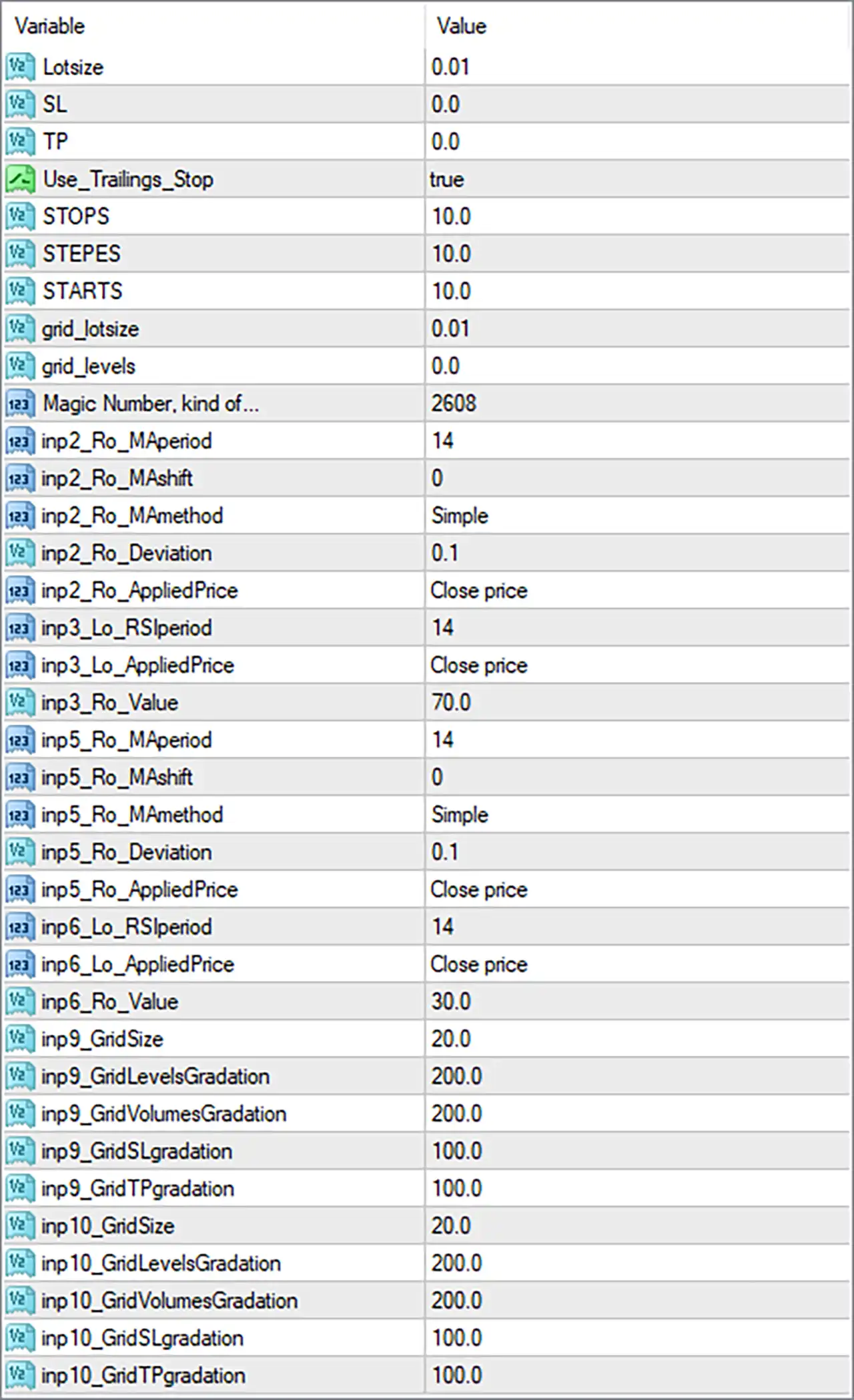
⚙️ Basic Trading and Risk Management Settings
🔹 Lotsize = 0.01: Sets the initial trading volume to 0.01 lots. This determines the default position size used when HkRecoil MT4 opens a new trade under its standard lot-sizing configuration.
🔹 SL = 0.0: Sets the fixed stop-loss parameter to 0.0. This indicates that no fixed stop-loss distance is configured through this input, although other stop-management mechanisms may be available.
🔹 TP = 0.0: Sets the fixed take-profit parameter to 0.0. This indicates that no fixed take-profit distance is configured through this input, although other exit-management mechanisms may still be used.
🔹 Use_Trailings_Stop = true: Enables the trailing-stop feature, allowing HkRecoil MT4 to adjust stop-loss levels as trades move into profit according to its programmed trailing rules.
🔹 STOPS = 10.0: Sets the trailing-stop distance parameter to 10.0. This value determines the configured stop distance used by the trailing mechanism, subject to the EA's internal calculation and unit conventions.
🔹 STEPES = 10.0: Sets the trailing-stop step parameter to 10.0. It defines the configured price movement or increment required before the EA updates the trailing-stop level.
🔹 STARTS = 10.0: Sets the trailing-stop activation threshold to 10.0. This determines the configured profit or price-movement level at which trailing-stop management may begin.
🔹 grid_lotsize = 0.01: Sets the grid trading volume to 0.01 lots. This parameter determines the configured lot size for additional grid positions when the grid mechanism is active.
🔹 grid_levels = 0.0: Sets the main grid-level parameter to 0.0. Depending on the EA's internal logic, this may disable the main grid-level configuration or represent a default grid setting.
🔹 Magic Number, kind of... = 2608: Assigns the magic number 2608 to trades managed by HkRecoil MT4, helping distinguish its orders from manually opened positions and trades belonging to other Expert Advisors.
⚙️ Moving Average Settings – First Indicator
🔹 inp2_Ro_MAperiod = 14: Sets the moving average period to 14, determining the number of price observations used in the first moving average calculation.
🔹 inp2_Ro_MAshift = 0: Sets the moving average shift to 0, keeping the indicator aligned with its standard chart position without additional displacement.
🔹 inp2_Ro_MAmethod = Simple: Selects the Simple Moving Average (SMA) calculation method, giving equal weighting to the price observations within the selected 14-period calculation.
🔹 inp2_Ro_Deviation = 0.1: Sets the indicator deviation parameter to 0.1. This value may control a deviation-based calculation or tolerance associated with the indicator, depending on the EA's implementation.
🔹 inp2_Ro_AppliedPrice = Close price: Uses the closing price as the applied price for the moving average calculation, ensuring that the indicator references candle closing-price data.
⚙️ RSI Settings – Second Indicator
🔹 inp3_Lo_RSIperiod = 14: Sets the Relative Strength Index (RSI) calculation period to 14, determining the number of price periods used to measure market momentum.
🔹 inp3_Lo_AppliedPrice = Close price: Uses candle closing prices as the applied price for the RSI calculation, allowing the indicator to evaluate momentum based on closing-price movements.
🔹 inp3_Ro_Value = 70.0: Sets the RSI reference level to 70.0, which is commonly associated with the overbought threshold and may help identify potentially overextended upward price movements.
⚙️ Moving Average Settings – Third Indicator
🔹 inp5_Ro_MAperiod = 14: Sets the third indicator's moving average period to 14, defining the number of price observations included in its calculation.
🔹 inp5_Ro_MAshift = 0: Sets the moving average shift to 0, ensuring that the third indicator remains aligned with its standard chart position.
🔹 inp5_Ro_MAmethod = Simple: Selects the Simple Moving Average (SMA) method for the third indicator, calculating the average price over 14 periods with equal weighting.
🔹 inp5_Ro_Deviation = 0.1: Sets the third indicator's deviation parameter to 0.1. This may be used as a tolerance or deviation factor within the EA's indicator calculations.
🔹 inp5_Ro_AppliedPrice = Close price: Selects the closing price as the applied price for the third indicator, ensuring that its calculation references candle closing-price data.
⚙️ RSI Settings – Fourth Indicator
🔹 inp6_Lo_RSIperiod = 14: Sets the fourth indicator's RSI period to 14, determining the number of price periods used to calculate the Relative Strength Index.
🔹 inp6_Lo_AppliedPrice = Close price: Uses the closing price as the applied price for the fourth RSI calculation, allowing the indicator to evaluate market momentum based on closing-price data.
🔹 inp6_Ro_Value = 30.0: Sets the RSI reference level to 30.0, commonly associated with the oversold threshold and used to identify potentially overextended downward price movements.
⚙️ Grid Trading Settings – Grid Configuration 9
🔹 inp9_GindSize = 20.0: Sets the grid-size parameter for configuration 9 to 20.0. This may determine the spacing or distance between successive grid entries, depending on the EA's internal grid calculation.
🔹 inp9_GindLevelsGradation = 200.0: Sets the grid-level gradation parameter to 200.0, controlling the configured progression or adjustment of spacing between successive grid levels.
🔹 inp9_GindVolumesGradation = 200.0: Sets the grid-volume gradation parameter to 200.0, defining the configured progression of trading volume across additional grid positions.
🔹 inp9_GindSLgradation = 100.0: Sets the grid stop-loss gradation parameter to 100.0, providing an adjustment factor for stop-loss management across positions within this grid configuration.
🔹 inp9_GindTPgradation = 100.0: Sets the grid take-profit gradation parameter to 100.0, providing an adjustment factor for take-profit management across positions within this grid configuration.
⚙️ Grid Trading Settings – Grid Configuration 10
🔹 inp10_GindSize = 20.0: Sets the grid-size parameter for configuration 10 to 20.0, defining the configured spacing or distance used by this grid-management component.
🔹 inp10_GindLevelsGradation = 200.0: Sets the grid-level gradation parameter to 200.0, controlling how the spacing between successive grid levels may progress within this configuration.
🔹 inp10_GindVolumesGradation = 200.0: Sets the grid-volume gradation parameter to 200.0, determining the configured volume progression for additional grid positions.
🔹 inp10_GindSLgradation = 100.0: Sets the grid stop-loss gradation parameter to 100.0, defining the configured adjustment factor for stop-loss management across grid positions.
🔹 inp10_GindTPgradation = 100.0: Sets the grid take-profit gradation parameter to 100.0, defining the configured adjustment factor for take-profit management across grid positions.
⚙️ Important Configuration Considerations
🔹 Review the Initial Lot Size: Lotsize = 0.01 and grid_lotsize = 0.01 establish the configured initial and grid trading volumes. Check whether the EA uses these values independently or applies additional volume calculations when opening subsequent positions.
🔹 Understand Trailing-Stop Management: With Use_Trailings_Stop = true, STOPS = 10.0, STEPES = 10.0, and STARTS = 10.0, the EA is configured to use trailing-stop management. Verify the units and activation conditions before live trading.
🔹 Check the Fixed Exit Settings: SL = 0.0 and TP = 0.0 indicate that fixed stop-loss and take-profit distances are not configured through these inputs. Make sure the EA's trailing-stop and grid-management mechanisms provide appropriate position-exit controls.
🔹 Review Moving Average Confirmation: The two moving average configurations both use MAperiod = 14, MAshift = 0, MAmethod = Simple, Deviation = 0.1, and AppliedPrice = Close price. These settings establish consistent calculation parameters for the configured moving average indicators.
🔹 Understand RSI Reference Levels: The RSI configurations use a period of 14, with reference levels of 70.0 and 30.0. These are commonly associated with overbought and oversold conditions, respectively, but the EA's actual entry rules depend on its programmed logic.
🔹 Evaluate Grid Volume Progression: Both grid configurations use GindVolumesGradation = 200.0. Verify whether this represents a 200% progression, a multiplier, or another internal scaling factor because aggressive volume increases can significantly raise account exposure.
🔹 Check Grid-Level Configuration: The main grid_levels parameter is 0.0, while the two additional grid configurations use GindSize = 20.0. Confirm how the EA activates and coordinates these grid components before running it on a live account.
🔢 Conclusion
HkRecoil MT4 provides configurable trading controls combining moving average indicators, RSI-based conditions, trailing-stop management, and grid trading functionality. Its displayed configuration uses an initial lot size of 0.01, a grid lot size of 0.01, and an enabled trailing-stop feature with STOPS = 10.0, STEPES = 10.0, and STARTS = 10.0.
The indicator settings include two 14-period Simple Moving Average configurations and two 14-period RSI configurations, with reference levels of 70.0 and 30.0. In addition, grid configurations 9 and 10 use a grid size of 20.0, grid-level and volume gradation values of 200.0, and stop-loss and take-profit gradation values of 100.0.
Before deploying HkRecoil MT4 on a live account, traders should carefully evaluate the grid-volume progression, verify the trailing-stop calculation units, and understand how the EA manages positions when fixed SL and TP values are set to 0.0. Backtesting and demo testing are recommended to assess its trading behavior and potential risk exposure.


