


Market Master EA MT5 Settings Explained
Market Master EA is an advanced automated trading robot for MetaTrader 5 designed to manage grid trading strategies with flexible risk management and position control. The EA includes features such as auto lot sizing, hedging support, drawdown protection, profit targeting and optimization tools.
Market Master EA MT5 is suitable for traders looking for a systematic approach to Forex and Gold trading with customizable money management settings.

Market Master EA MT5 Full Settings Explanation
Below are the details of the parameters in the advisor’s trading system settings table:
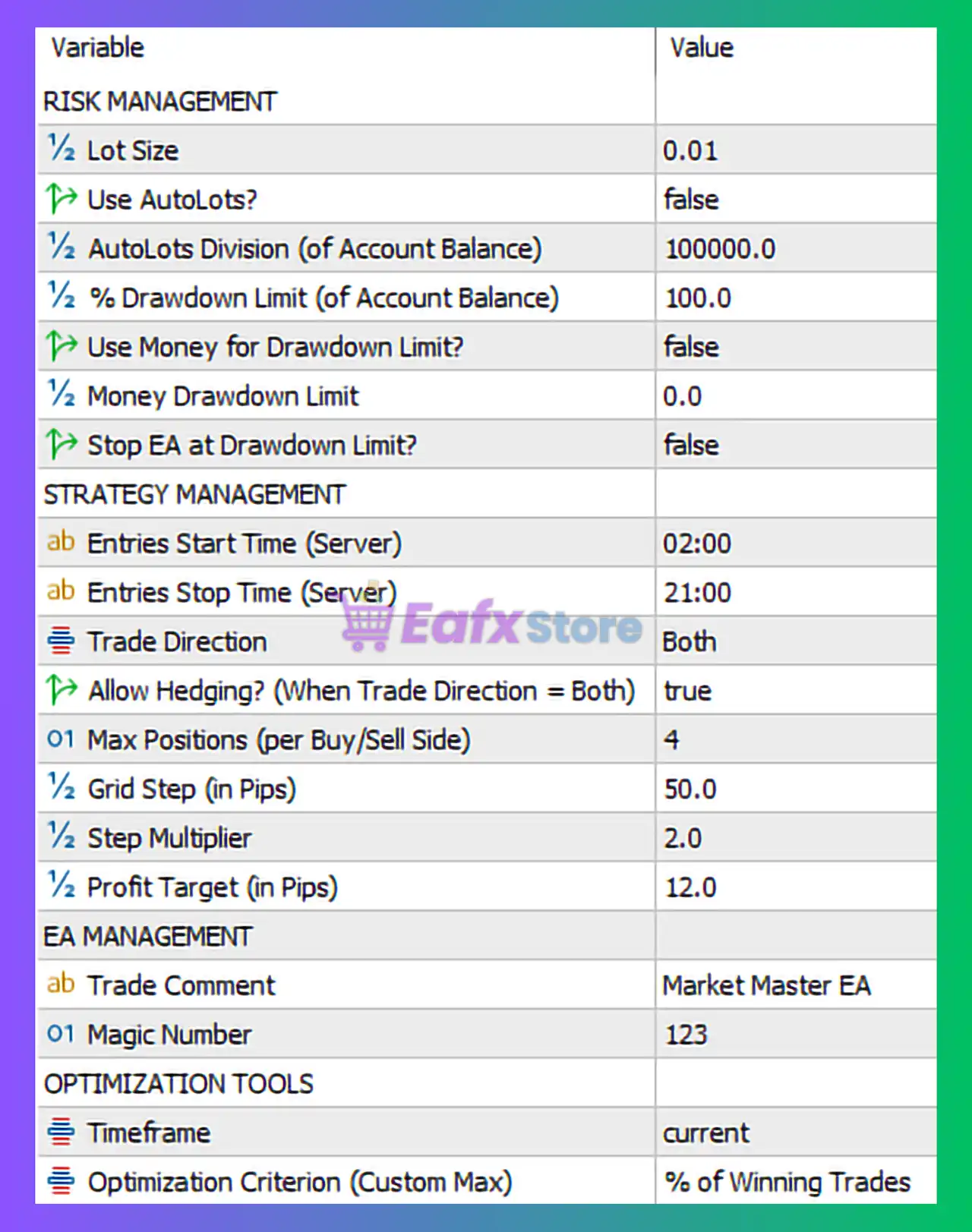
Risk Management Settings
🔹 Lot Size = 0.01: Defines the fixed starting trading lot size at 0.01.
🔹 Use AutoLots? = false: Automatic lot size calculation is disabled.
🔹 AutoLots Division (of Account Balance) = 100000.0: Balance divisor used for calculating automatic lot sizes when AutoLots is enabled.
🔹 % Drawdown Limit (of Account Balance) = 100.0: Maximum allowed drawdown percentage is set to 100.0%.
🔹 Use Money for Drawdown Limit? = false: Drawdown protection based on fixed money value is disabled.
🔹 Money Drawdown Limit = 0.0: Monetary drawdown limit value is 0.0.
🔹 Stop EA at Drawdown Limit? = false: The EA will continue operating even after reaching the drawdown threshold.
Strategy Management Settings
🔹 Entries Start Time (Server) = 02:00: The EA begins opening new trades at 02:00 server time.
🔹 Entries Stop Time (Server) = 21:00: The EA stops opening new trades at 21:00 server time.
🔹 Trade Direction = Both: The EA can open both buy and sell trades.
🔹 Allow Hedging? (When Trade Direction = Both) = true: Hedging mode is enabled, allowing simultaneous buy and sell positions.
🔹 Max Positions (per Buy/Sell Side) = 4: Maximum number of buy or sell positions allowed per side is 4.
🔹 Grid Step (in Pips) = 50.0: Distance between grid orders is 50.0 pips.
🔹 Step Multiplier = 2.0: Grid step expansion multiplier is 2.0.
🔹 Profit Target (in Pips) = 12.0: Profit target per trading cycle is 12.0 pips.
EA Management Settings
🔹 Trade Comment = Market Master EA: Comment attached to all EA-generated trades.
🔹 Magic Number = 123: Unique identifier used by the EA to manage and track trades.
Optimization Tools Settings
🔹 Timeframe = current: The EA operates using the currently selected chart timeframe.
🔹 Optimization Criterion (Custom Max) = % of Winning Trades: Optimization process focuses on maximizing the percentage of winning trades.
Conclusion
Market Master EA MT5 is a flexible grid-based Expert Advisor designed for traders who want automated position management, hedging capabilities and customizable risk control. With adjustable grid settings, profit targets, and optimization tools, the EA provides traders with the ability to adapt to different market conditions and trading strategies. Proper risk management and careful optimization are essential for maximizing long-term trading performance.
FAQs
❓ What is Market Master EA MT5?
Market Master EA MT5 is an automated MetaTrader 5 Expert Advisor designed for grid trading and advanced position management.
❓ Does Market Master EA MT5 support hedging?
Yes, the EA supports hedging and can open buy and sell trades simultaneously.
❓ Can I use automatic lot sizing in Market Master EA MT5?
Yes, the EA includes an AutoLots feature, although it is disabled by default.
❓ What is the default grid distance in Market Master EA MT5?
The default grid step is 50.0 pips.
❓ What is the default profit target in Market Master EA MT5?
The default profit target is 12.0 pips.


