
RTX Parody MT5 Settings Explained – Complete Setup Guide
RTX Parody MT5 is a powerful automated trading Expert Advisor (EA) developed for MetaTrader 5 traders who want advanced trend-following, pyramiding, martingale recovery and intelligent risk management in one trading system.
The EA combines EMA trend analysis, RSI filtering, break-even protection, trailing stop management, and averaging techniques to optimize both profit opportunities and drawdown control.
With highly customizable settings, RTX Parody MT5 allows traders to fine-tune trading behavior based on market volatility and personal risk tolerance.
RTX Parody MT5 Full Settings Explanation
Below are the details of the parameters in the advisor’s trading system settings table:
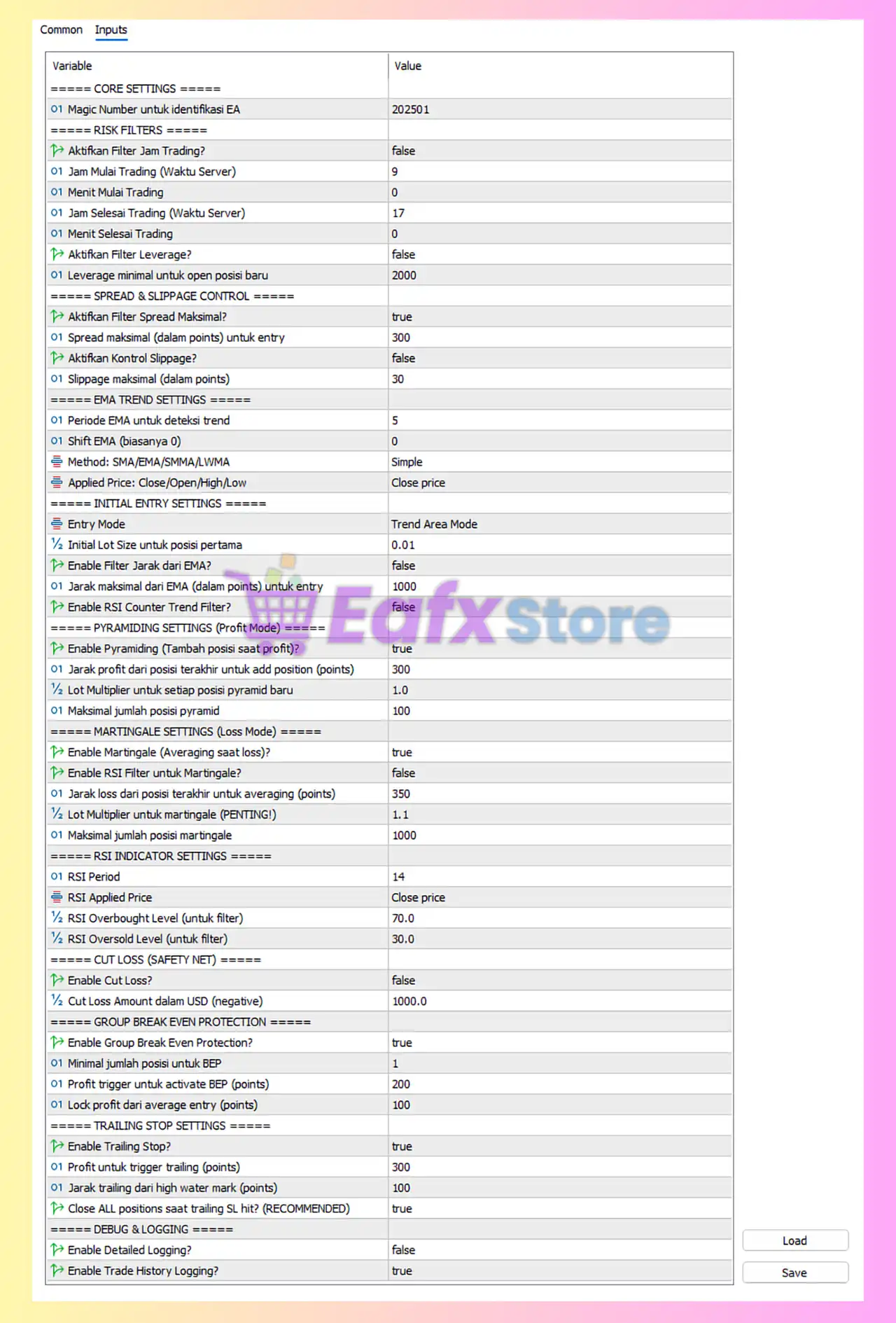
CORE SETTINGS
🔹 Magic Number untuk identifikasi EA = 202501: Assigns the unique Magic Number 202501 to identify and manage trades opened by RTX Parody MT5.
RISK FILTERS
🔹 Aktifkan Filter Jam Trading? = false: Disables the trading session time filter when set to false.
🔹 Jam Mulai Trading (Waktu Server) = 9: Sets the trading start hour to 09:00 server time.
🔹 Menit Mulai Trading = 0: Defines the trading start minute at 00.
🔹 Jam Selesai Trading (Waktu Server) = 17: Sets the trading end hour to 17:00 server time.
🔹 Menit Selesai Trading = 0: Defines the trading end minute at 00.
🔹 Aktifkan Filter Leverage? = false: Disables leverage filtering when set to false.
🔹 Leverage minimal untuk open posisi baru = 2000: Requires minimum leverage of 1:2000 to allow opening new trades.
SPREAD & SLIPPAGE CONTROL
🔹 Aktifkan Filter Spread Maksimal? = true: Enables maximum spread filtering to avoid trading during high spread conditions.
🔹 Spread maksimal (dalam points) untuk entry = 300: Limits trade entries when spread exceeds 300 points.
🔹 Aktifkan Kontrol Slippage? = false: Disables slippage control protection.
🔹 Slippage maksimal (dalam points) = 30: Sets the maximum allowed slippage to 30 points.
EMA TREND SETTINGS
🔹 Periode EMA untuk deteksi trend = 5: Uses EMA period 5 for trend identification.
🔹 Shift EMA (biasanya 0) = 0: Applies EMA shift value 0.
🔹 Method: SMA/EMA/SMMA/LWMA = Simple: Uses the Simple Moving Average (SMA) calculation method.
🔹 Applied Price: Close/Open/High/Low = Close price: Uses the candle closing price for indicator calculations.
INITIAL ENTRY SETTINGS
🔹 Entry Mode = Trend Area Mode: Activates trend-area based entry logic.
🔹 Initial Lot Size untuk posisi pertama = 0.01: Sets the initial trading lot size to 0.01.
🔹 Enable Filter Jarak dari EMA? = false: Disables EMA distance filtering.
🔹 Jarak maksimal dari EMA (dalam points) untuk entry = 1000: Allows entries within 1000 points from the EMA.
🔹 Enable RSI Counter Trend Filter? = false: Disables RSI counter-trend trade filtering.
PYRAMIDING SETTINGS (Profit Mode)
🔹 Enable Pyramiding (Tambah posisi saat profit)? = true: Enables adding additional positions while trades are profitable.
🔹 Jarak profit dari posisi terakhir untuk add position (points) = 300: Adds new pyramid trades after 300 points profit distance.
🔹 Lot Multiplier untuk setiap posisi pyramid baru = 1.0: Uses a 1.0 multiplier for additional pyramid positions.
🔹 Maksimal jumlah posisi pyramid = 100: Allows up to 100 pyramid positions.
MARTINGALE SETTINGS (Loss Mode)
🔹 Enable Martingale (Averaging saat loss)? = true: Enables martingale averaging during losing positions.
🔹 Enable RSI Filter untuk Martingale? = false: Disables RSI filtering for martingale entries.
🔹 Jarak loss dari posisi terakhir untuk averaging (points) = 350: Opens averaging trades after 350 points adverse movement.
🔹 Lot Multiplier untuk martingale (PENTING!) = 1.1: Increases lot size by multiplier 1.1 for each martingale trade.
🔹 Maksimal jumlah posisi martingale = 1000: Allows up to 1000 martingale positions.
RSI INDICATOR SETTINGS
🔹 RSI Period = 14: Uses RSI indicator period 14.
🔹 RSI Applied Price = Close price: Calculates RSI based on candle closing prices.
🔹 RSI Overbought Level (untuk filter) = 70.0: Defines the RSI overbought level at 70.0.
🔹 RSI Oversold Level (untuk filter) = 30.0: Defines the RSI oversold level at 30.0.
CUT LOSS (SAFETY NET)
🔹 Enable Cut Loss? = false: Disables emergency cut loss protection.
🔹 Cut Loss Amount dalam USD (negative) = 1000.0: Sets maximum allowed floating loss at $1000.0.
GROUP BREAK EVEN PROTECTION
🔹 Enable Group Break Even Protection? = true: Enables break-even protection for grouped positions.
🔹 Minimal jumlah posisi untuk BEP = 1: Requires minimum 1 position before activating BEP.
🔹 Profit trigger untuk activate BEP (points) = 200: Activates break-even protection after 200 points profit.
🔹 Lock profit dari average entry (points) = 100: Locks 100 points profit from the average entry level.
TRAILING STOP SETTINGS
🔹 Enable Trailing Stop? = true: Activates trailing stop functionality.
🔹 Profit untuk trigger trailing (points) = 300: Starts trailing after reaching 300 points profit.
🔹 Jarak trailing dari high water mark (points) = 100: Maintains 100 points trailing distance from peak profit.
🔹 Close ALL positions saat trailing SL hit? (RECOMMENDED) = true: Closes all active trades when trailing stop loss is triggered.
DEBUG & LOGGING
🔹 Enable Detailed Logging? = false: Disables detailed EA activity logging.
🔹 Enable Trade History Logging? = true: Enables trade history recording for monitoring and analysis.
Conclusion
RTX Parody MT5 is an advanced MetaTrader 5 Expert Advisor that combines trend trading, pyramiding, martingale recovery, RSI filtering and strong risk management tools into one automated trading system.
With customizable EMA trend settings, break-even protection, trailing stops, and flexible averaging controls, the EA provides traders with both aggressive profit potential and structured account protection. Proper optimization of lot sizing, spread control, and martingale settings is essential for achieving long-term stable performance.
FAQs
❓ What is RTX Parody MT5?
RTX Parody MT5 is an automated trading EA for MetaTrader 5 that uses trend-following, pyramiding, and martingale strategies with advanced risk management.
❓ What does the Magic Number do in RTX Parody MT5?
The Magic Number uniquely identifies trades opened by the EA, allowing independent trade management.
❓ Can RTX Parody MT5 trade automatically with martingale enabled?
Yes, the EA supports automatic martingale averaging using customizable lot multipliers and averaging distances.
❓ How does Group Break Even Protection work?
The EA automatically moves grouped trades into break-even once profit conditions are met, helping secure profits and reduce risk.
❓ Is RTX Parody MT5 suitable for beginners?
RTX Parody MT5 is more suitable for intermediate and advanced traders because it includes complex features like pyramiding, martingale recovery, and advanced trend filtering.



