


🔢 Marvelous EA MT5 – Complete Settings & Parameters Guide
Marvelous EA MT5 is an automated MetaTrader 5 trading robot designed with flexible money management, position scaling, trailing profit protection, drawdown controls, trading session filters, and integrated economic news filtering. The EA allows traders to customize risk exposure, position spacing, and news-event behavior while maintaining a structured approach to automated trading.

🔢 Marvelous EA MT5 Settings Explained
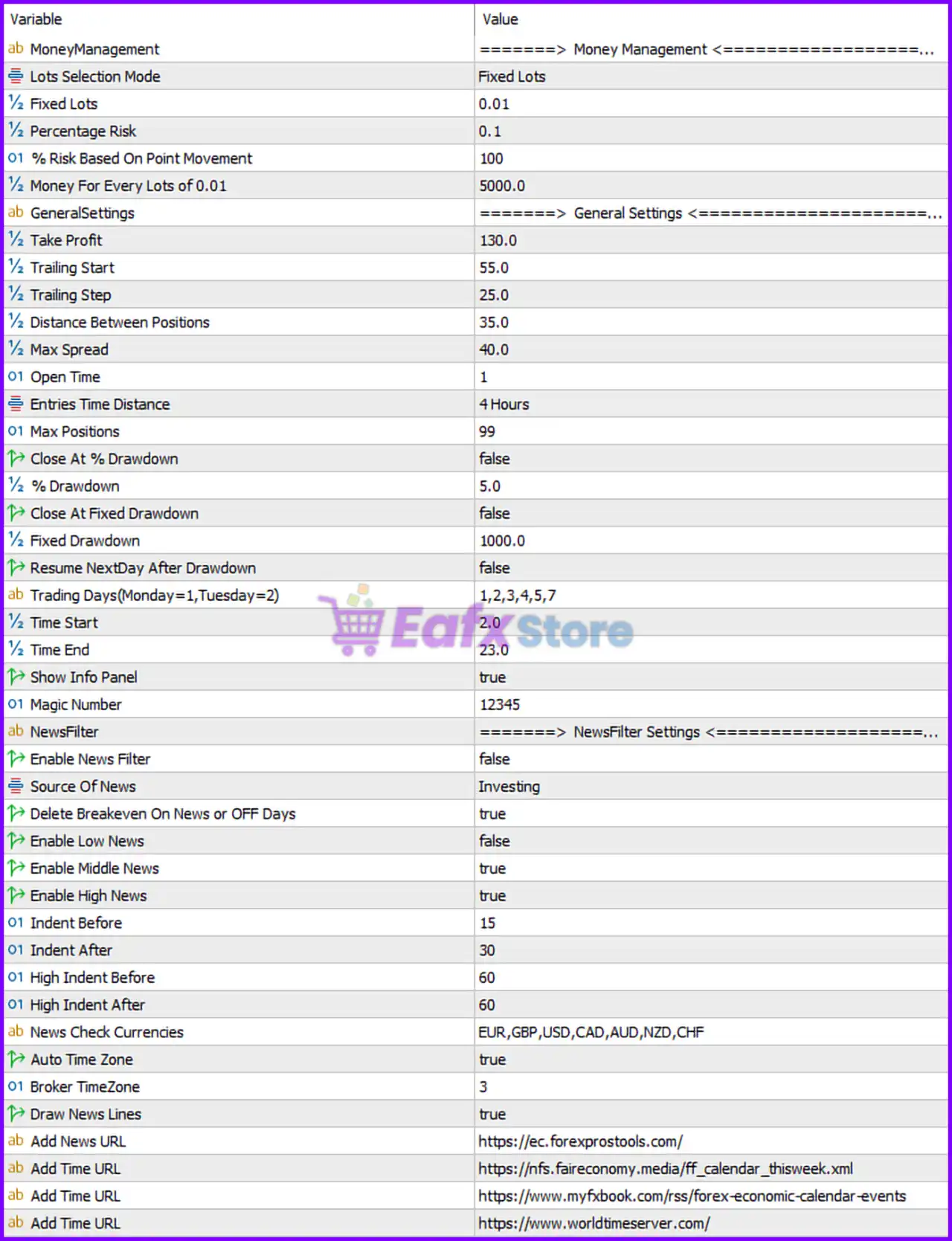
Below are the details of the parameters in the advisor’s trading system settings table:
🔶 Money Management Settings
🔹 MoneyManagement = Money Management Section — Main category containing all position sizing and risk management parameters.
🔹 Lots Selection Mode = Fixed Lots — The EA uses a fixed lot sizing method instead of percentage-based risk calculation.
🔹 Fixed Lots = 0.01 — Every new trade is opened with a fixed volume of 0.01 lots.
🔹 Percentage Risk = 0.1 — Risk percentage per trade is set to 0.1% when percentage-based money management is enabled.
🔹 % Risk Based On Point Movement = 100 — Risk calculations are based on a movement of 100 points.
🔹 Money For Every Lots of 0.01 = 5000.0 — The EA allocates 0.01 lots for every 5000.0 units of account balance when dynamic money management is used.
🔶 General Settings
🔹 GeneralSettings = General Settings Section — Core trading behavior and execution configuration.
🔹 Take Profit = 130.0 — Sets the profit target at 130.0 points.
🔹 Trailing Start = 55.0 — Trailing stop activates after the position gains 55.0 points.
🔹 Trailing Step = 25.0 — The trailing stop moves in increments of 25.0 points.
🔹 Distance Between Positions = 35.0 — Minimum spacing between positions is 35.0 points.
🔹 Max Spread = 40.0 — Trading is allowed only when spread remains below 40.0 points.
🔹 Open Time = 1 — Defines the EA’s order opening timing mode value of 1.
🔹 Entries Time Distance = 4 Hours — A minimum interval of 4 Hours is required between entries.
🔹 Max Positions = 99 — The EA can manage up to 99 open positions simultaneously.
🔶 Drawdown Protection
🔹 Close At % Drawdown = false — Percentage-based account protection is currently disabled.
🔹 % Drawdown = 5.0 — If enabled, the EA would close trades when drawdown reaches 5.0%.
🔹 Close At Fixed Drawdown = false — Fixed monetary drawdown protection is disabled.
🔹 Fixed Drawdown = 1000.0 — Fixed drawdown threshold is set to 1000.0 account currency units.
🔹 Resume NextDay After Drawdown = false — Trading will not automatically resume the next day after a drawdown event.
🔶 Trading Schedule
🔹 Trading Days (Monday=1, Tuesday=2) = 1,2,3,4,5,7 — Trading is allowed on Monday, Tuesday, Wednesday, Thursday, Friday, and Sunday.
🔹 Time Start = 2.0 — Trading begins at 02:00 server time.
🔹 Time End = 23.0 — Trading stops at 23:00 server time.
🔶 User Interface & Trade Identification
🔹 Show Info Panel = true — Displays the EA information panel directly on the chart.
🔹 Magic Number = 12345 — Unique identifier used to manage and track the EA’s trades.
🔢 News Filter Settings
🔶 News Filter Configuration
🔹 NewsFilter = News Filter Settings Section — Group containing all economic news protection parameters.
🔹 Enable News Filter = false — Economic news filtering is currently disabled.
🔹 Source Of News = Investing — The EA uses Investing as its economic calendar source.
🔹 Delete Breakeven On News or OFF Days = true — Removes break-even settings during news events or non-trading days.
🔶 News Impact Filters
🔹 Enable Low News = false — Low-impact news events are ignored.
🔹 Enable Middle News = true — Medium-impact news events are monitored.
🔹 Enable High News = true — High-impact news events are monitored.
🔶 Medium Impact News Timing
🔹 Indent Before = 15 — Trading pauses 15 minutes before medium-impact news.
🔹 Indent After = 30 — Trading resumes 30 minutes after medium-impact news.
🔶 High Impact News Timing
🔹 High Indent Before = 60 — Trading pauses 60 minutes before high-impact news.
🔹 High Indent After = 60 — Trading resumes 60 minutes after high-impact news.
🔶 News Monitoring Configuration
🔹 News Check Currencies = EUR,GBP,USD,CAD,AUD,NZD,CHF — Economic events for these currencies are monitored.
🔹 Auto Time Zone = true — The EA automatically detects and adjusts for the broker's timezone.
🔹 Broker TimeZone = 3 — Broker server timezone offset is set to GMT+3.
🔹 Draw News Lines = true — Upcoming news events are displayed as vertical lines on the chart.
🔶 External News & Time Sources
🔹 Add News URL = https://ec.forexprostools.com/ — Primary source used for economic calendar data.
🔹 Add Time URL = https://nfs.faireconomy.media/ff_calendar_thisweek.xml — Additional source for weekly economic calendar updates.
🔹 Add Time URL = https://www.myfxbook.com/rss/forex-economic-calendar-events — Alternative economic calendar feed.
🔹 Add Time URL = https://www.worldtimeserver.com/ — Source used for time synchronization.
🔢 Conclusion
Marvelous EA MT5 is a highly configurable trading robot that combines fixed or risk-based money management, 130-point take profit targets, 55-point trailing activation, drawdown controls, 4-hour entry spacing, and a comprehensive economic news filtering framework.
With support for up to 99 simultaneous positions, broker timezone synchronization, and multi-source news feeds, the EA provides traders with a flexible environment for managing automated trading strategies while maintaining operational control and risk awareness.
🔢 FAQs
❓ What lot size does Marvelous EA MT5 use by default?
The default trading volume is 0.01 lots using the Fixed Lots mode.
❓ What is the default take profit setting?
The EA uses a 130.0-point Take Profit target.
❓ When does the trailing stop activate?
The trailing stop begins once a trade reaches 55.0 points of profit and moves by 25.0-point increments.
❓ Does Marvelous EA MT5 include a news filter?
Yes, it includes a complete news filtering system, although Enable News Filter = false by default.
❓ How many positions can Marvelous EA MT5 open simultaneously?
The EA allows up to 99 open positions at the same time according to the Max Positions = 99 setting.



