


NKV EA MT5 Settings Explained – Complete Setup & User Guide
NKV EA MT5 is an automated trading Expert Advisor for the MetaTrader 5 platform that uses the Money Flow Index (MFI) indicator to identify potential buy and sell opportunities. The EA includes customizable risk management, trading filters, simultaneous buy/sell capability, stop loss and take profit controls, working hour restrictions and visual chart information. NKV EA is designed for traders seeking an indicator-based automated trading system with flexible configuration options.

NKV EA MT5 Full Settings Explanation
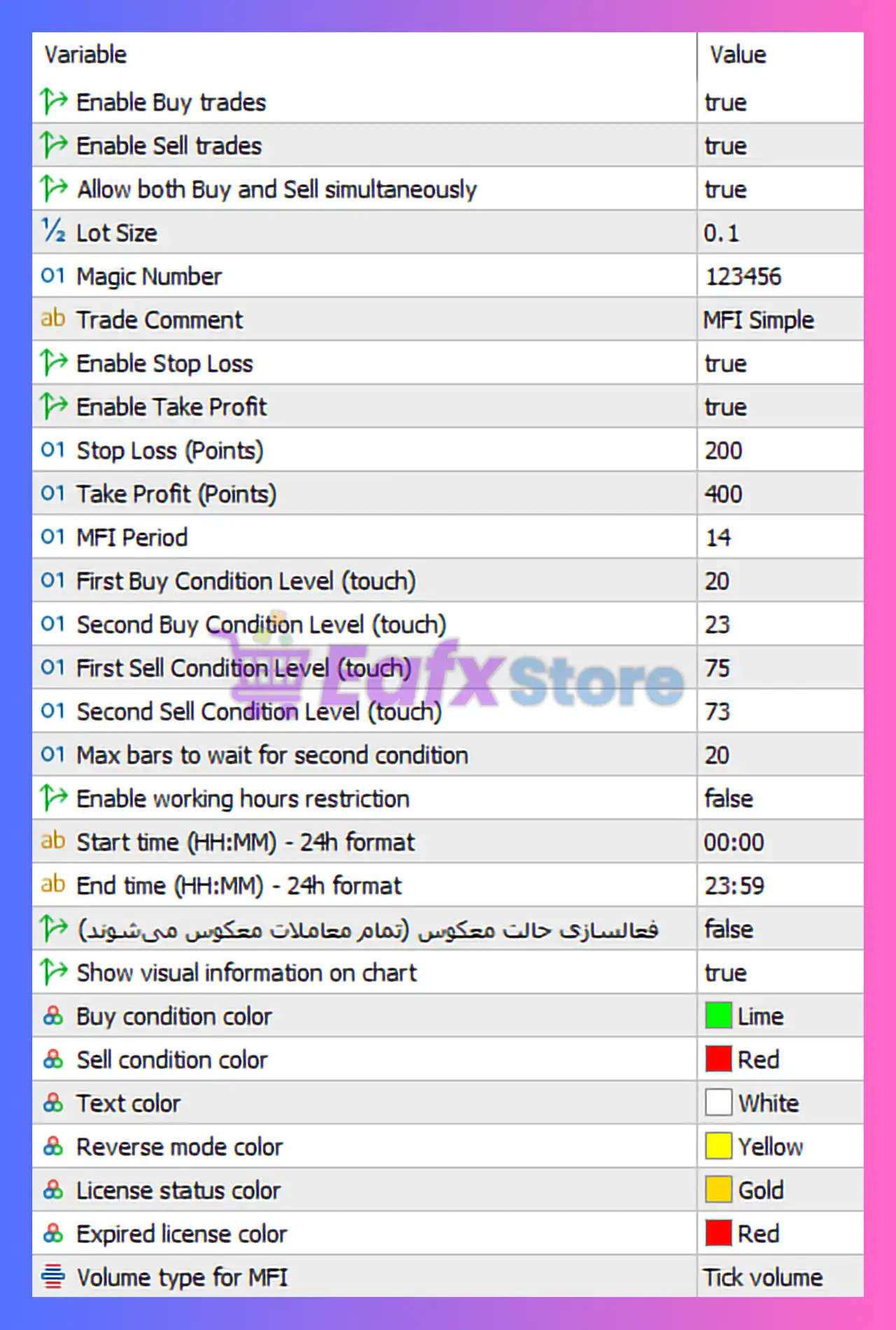
🔹 Enable Buy trades = true: Allows the EA to open BUY positions automatically.
🔹 Enable Sell trades = true: Allows the EA to open SELL positions automatically.
🔹 Allow both Buy and Sell simultaneously = true: Enables the EA to hold BUY and SELL positions at the same time.
🔹 Lot Size = 0.1: Sets the fixed trading volume to 0.1 lots for each order.
🔹 Magic Number = 123456: Unique identifier used by the EA to track and manage its own trades independently.
🔹 Trade Comment = MFI Simple: Adds the comment “MFI Simple” to all trades opened by the EA.
🔹 Enable Stop Loss = true: Activates Stop Loss protection for all positions.
🔹 Enable Take Profit = true: Activates Take Profit targets for all positions.
🔹 Stop Loss (Points) = 200: Sets the Stop Loss distance to 200 points from the trade entry.
🔹 Take Profit (Points) = 400: Sets the Take Profit target to 400 points from the trade entry.
🔹 MFI Period = 14: Uses a 14-period Money Flow Index calculation for trade analysis.
🔹 First Buy Condition Level (touch) = 20: Defines the first BUY trigger level when MFI touches level 20.
🔹 Second Buy Condition Level (touch) = 23: Defines the confirmation BUY level when MFI reaches 23.
🔹 First Sell Condition Level (touch) = 75: Defines the first SELL trigger level when MFI touches level 75.
🔹 Second Sell Condition Level (touch) = 73: Defines the confirmation SELL level when MFI reaches 73.
🔹 Max bars to wait for second condition = 20: Sets the maximum waiting period to 20 candles for the second trading condition to occur.
🔹 Enable working hours restriction = false: Disables trading session restrictions and allows trading all day.
🔹 Start time (HH:MM) - 24h format = 00:00: Defines the trading start time when hour restrictions are enabled.
🔹 End time (HH:MM) - 24h format = 23:59: Defines the trading end time when hour restrictions are enabled.
🔹 Reverse mode activation (Persian text) = false: Disables reverse trading mode where trade directions would be inverted.
🔹 Show visual information on chart = true: Displays EA information and trading conditions directly on the chart.
🔹 Buy condition color = Lime: Sets the visual color for BUY trading conditions to Lime.
🔹 Sell condition color = Red: Sets the visual color for SELL trading conditions to Red.
🔹 Text color = White: Sets the chart text display color to White.
🔹 Reverse mode color = Yellow: Sets the visual color used for reverse mode indicators to Yellow.
🔹 License status color = Gold: Displays license status information using Gold color.
🔹 Expired license color = Red: Displays expired license warnings in Red color.
🔹 Volume type for MFI = Tick volume: Uses tick volume data for Money Flow Index calculations.
Conclusion
The NKV EA MT5 settings provide a structured and flexible framework for automated MFI-based trading on MetaTrader 5. With configurable buy/sell conditions, risk controls, working hour management, and visual chart tools, the EA is suitable for traders who want a simple yet customizable indicator-driven trading system. Proper adjustment of MFI levels and risk settings can help optimize trading performance and account protection.
FAQs
❓ What indicator does NKV EA MT5 use for trading decisions?
NKV EA MT5 primarily uses the Money Flow Index (MFI) indicator for trade entries and exits.
❓ Can NKV EA MT5 open BUY and SELL trades simultaneously?
Yes, the setting “Allow both Buy and Sell simultaneously = true” enables hedging positions.
❓ What does MFI Period = 14 mean?
It means the EA calculates the Money Flow Index using 14 periods or candles.
❓ Why are Stop Loss and Take Profit enabled by default?
These features help manage risk automatically and secure profits without manual intervention.
❓ What is the purpose of the Magic Number 123456?
The Magic Number uniquely identifies trades opened by NKV EA MT5 so they can be managed separately from other EAs or manual trades.


