RTX Barbar EA MT5
RTX Barbar EARTX Barbar EA MT5 BacktestRTX Barbar MT5 BacktestRTX Barbar MT5 SettingsRTX Barbar MT5 Settings Panel
MT5XAUUSD (Gold) · AnyUpdated 18 May 2026

RTX Barbar EA MT5 v3.35 with SetFiles (Unlimited)

RTX Barbar EA is a trading robot for XAUUSD (Gold). Profit performance has been verified on a real accounts.

Out of stockThis item is no longer available. Ask us via chat for a similar EA.
Pay with Visa · MastercardUSDT · BTC · ETHBinance Pay
Not sure it fits your broker or account?Ask a question
Check before you buy

Will it work for me?

Trading platform
Time frames
Any
Currency pairs
XAUUSD (Gold)
Minimum / Recommended deposit
$100 (For use with Cent accounts)
Minimum / Recommended leverage
Any
Account types
Any
Product type
NoDLL / Unlimited
Additional services
Recommended brokers
What you get

In the download

COMRTX Barbar MT5 by eafxstore.com
Optimize Settings

Recommended settings for RTX Barbar EA MT5 v3.35

RTX Barbar MT5 Settings Explained – Complete Configuration Guide

RTX Barbar MT5 is an advanced grid and martingale Expert Advisor (EA) developed for MetaTrader 5 traders seeking aggressive trade recovery, smart entry filtering, dynamic breakeven systems and automated trade management.

The EA combines technical indicators such as SAR, EMA, and RSI with advanced recovery and trailing mechanisms to optimize trade execution across multiple market conditions. RTX Barbar MT5 is designed for traders who require flexible risk control, automated grid expansion, and customizable trading session filters.
RTX Barbar MT5 Settings

RTX Barbar MT5 Full Settings Explanation

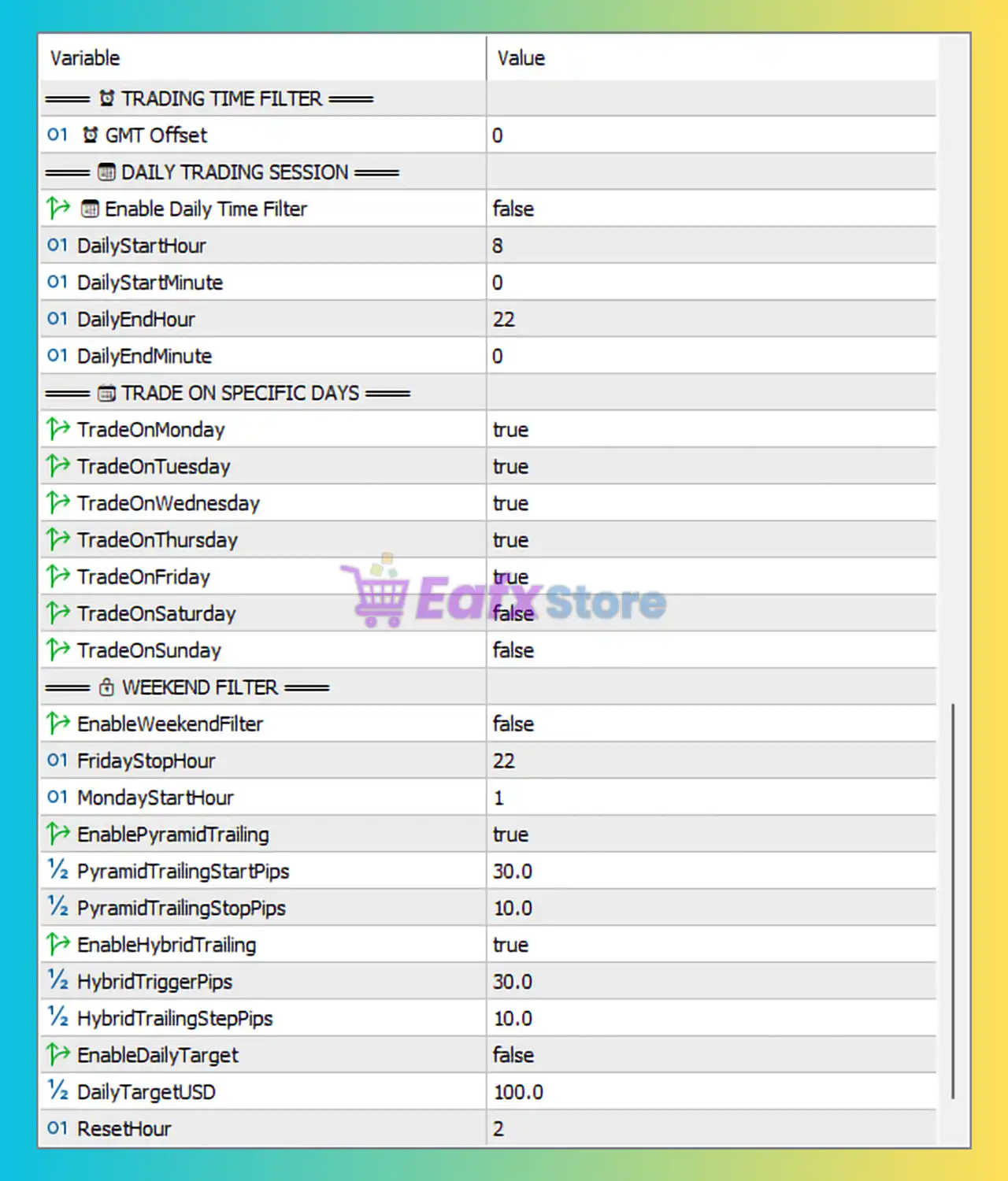
Below are the details of the parameters in the advisor’s trading system settings table:
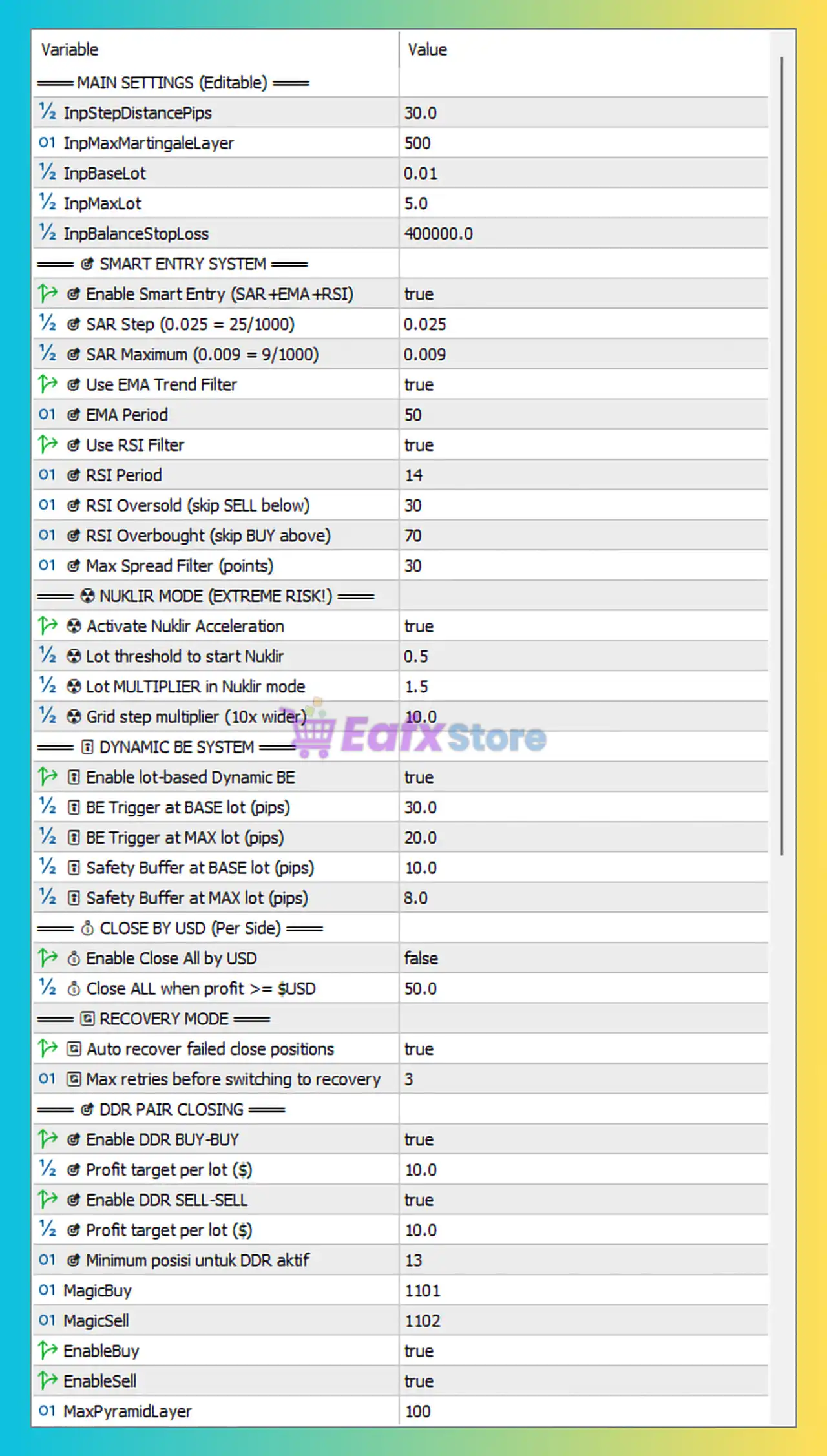
RTX Barbar EA MT5 Settings Panel

RTX Barbar EA MT5 Settings Panel
RTX Barbar MT5 Settings Panel

RTX Barbar MT5 Settings Panel

Main Settings (Editable)

🔹 InpStepDistancePips = 30.0: Sets the grid step distance between positions to 30.0 pips.

🔹 InpMaxMartingaleLayer = 500: Maximum allowed martingale layers is 500.

🔹 InpBaseLot = 0.01: Base starting lot size is 0.01.

🔹 InpMaxLot = 5.0: Maximum lot size allowed by the EA is 5.0.

🔹 InpBalanceStopLoss = 400000.0: Equity or balance protection stop level is set to 400000.0.


Smart Entry System

🔹 Enable Smart Entry (SAR+EMA+RSI) = true: Activates smart trade entry logic using SAR, EMA, and RSI indicators.

🔹 SAR Step (0.025 = 25/1000) = 0.025: Parabolic SAR acceleration step value is 0.025.

🔹 SAR Maximum (0.009 = 9/1000) = 0.009: Maximum Parabolic SAR acceleration value is 0.009.

🔹 Use EMA Trend Filter = true: Enables EMA-based trend direction filtering.

🔹 EMA Period = 50: EMA trend filter uses period 50.

🔹 Use RSI Filter = true: Enables RSI market condition filtering.

🔹 RSI Period = 14: RSI indicator uses period 14.

🔹 RSI Oversold (skip SELL below) = 30: Prevents SELL trades when RSI falls below 30.

🔹 RSI Overbought (skip BUY above) = 70: Prevents BUY trades when RSI rises above 70.

🔹 Max Spread Filter (points) = 30: Maximum spread allowed for opening trades is 30 points.


Nuklir Mode (Extreme Risk)

🔹 Activate Nuklir Acceleration = true: Enables aggressive Nuklir acceleration mode.

🔹 Lot threshold to start Nuklir = 0.5: Nuklir mode activates when lot size reaches 0.5.

🔹 Lot MULTIPLIER in Nuklir mode = 1.5: Lot multiplier during Nuklir mode is 1.5.

🔹 Grid step multiplier (10x wider) = 10.0: Expands grid distance by multiplier 10.0.


Dynamic BE System

🔹 Enable lot-based Dynamic BE = true: Activates dynamic breakeven management based on lot size.

🔹 BE Trigger at BASE lot (pips) = 30.0: Breakeven activates at 30.0 pips for base lot positions.

🔹 BE Trigger at MAX lot (pips) = 20.0: Breakeven activates at 20.0 pips for maximum lot positions.

🔹 Safety Buffer at BASE lot (pips) = 10.0: Safety buffer for base lot breakeven is 10.0 pips.

🔹 Safety Buffer at MAX lot (pips) = 8.0: Safety buffer for maximum lot breakeven is 8.0 pips.


Close By USD (Per Side)

🔹 Enable Close All by USD = false: Automatic USD profit closure is disabled.

🔹 Close ALL when profit >= $USD = 50.0: Closes all positions when profit reaches $50.0 if enabled.


Recovery Mode

🔹 Auto recover failed close positions = true: Automatically retries closing failed positions.

🔹 Max retries before switching to recovery = 3: Maximum retries before activating recovery mode is 3.


DDR Pair Closing

🔹 Enable DDR BUY-BUY = true: Enables DDR pair closing for BUY positions.

🔹 Profit target per lot ($) = 10.0: Profit target per lot is $10.0.

🔹 Enable DDR SELL-SELL = true: Enables DDR pair closing for SELL positions.

🔹 Profit target per lot ($) = 10.0: SELL pair profit target per lot is $10.0.

🔹 Minimum posisi untuk DDR aktif = 13: DDR activates when minimum open positions reach 13.

🔹 MagicBuy = 1101: Magic Number identifier for BUY trades is 1101.

🔹 MagicSell = 1102: Magic Number identifier for SELL trades is 1102.

🔹 EnableBuy = true: BUY trading operations are enabled.

🔹 EnableSell = true: SELL trading operations are enabled.

🔹 MaxPyramidLayer = 100: Maximum pyramid trade layers allowed is 100.


Trading Time Filter

🔹 GMT Offset = 0: GMT timezone offset is set to 0.


Daily Trading Session

🔹 Enable Daily Time Filter = false: Daily time filtering system is disabled.

🔹 DailyStartHour = 8: Daily trading session starts at hour 8.

🔹 DailyStartMinute = 0: Daily trading session starts at minute 0.

🔹 DailyEndHour = 22: Daily trading session ends at hour 22.

🔹 DailyEndMinute = 0: Daily trading session ends at minute 0.


Trade On Specific Days

🔹 TradeOnMonday = true: Trading is allowed on Monday.

🔹 TradeOnTuesday = true: Trading is allowed on Tuesday.

🔹 TradeOnWednesday = true: Trading is allowed on Wednesday.

🔹 TradeOnThursday = true: Trading is allowed on Thursday.

🔹 TradeOnFriday = true: Trading is allowed on Friday.

🔹 TradeOnSaturday = false: Trading is disabled on Saturday.

🔹 TradeOnSunday = false: Trading is disabled on Sunday.


Weekend Filter

🔹 EnableWeekendFilter = false: Weekend filter is disabled.

🔹 FridayStopHour = 22: Friday trading stops at hour 22.

🔹 MondayStartHour = 1: Monday trading resumes at hour 1.


Pyramid Trailing Settings

🔹 EnablePyramidTrailing = true: Enables pyramid trailing functionality.

🔹 PyramidTrailingStartPips = 30.0: Pyramid trailing activates after 30.0 pips profit.

🔹 PyramidTrailingStopPips = 10.0: Pyramid trailing stop distance is 10.0 pips.


Hybrid Trailing Settings

🔹 EnableHybridTrailing = true: Enables hybrid trailing stop system.

🔹 HybridTriggerPips = 30.0: Hybrid trailing activates after 30.0 pips.

🔹 HybridTrailingStepPips = 10.0: Hybrid trailing adjustment step is 10.0 pips.


Daily Target Settings

🔹 EnableDailyTarget = false: Daily profit target system is disabled.

🔹 DailyTargetUSD = 100.0: Daily profit target amount is $100.0.

🔹 ResetHour = 2: Daily target reset hour is 2.


Conclusion

RTX Barbar MT5 is a highly advanced martingale and grid trading Expert Advisor built for traders seeking powerful recovery systems, intelligent entry filtering, dynamic breakeven management, and aggressive trade acceleration modes. With features such as SAR+EMA+RSI smart entry logic, Nuklir acceleration mode, DDR pair closing, pyramid trailing, and hybrid trailing systems, RTX Barbar MT5 provides deep customization and sophisticated risk management for MetaTrader 5 automated trading.


FAQs

❓ What is RTX Barbar MT5?
RTX Barbar MT5 is a grid and martingale Expert Advisor for MetaTrader 5 with advanced recovery and smart entry systems.

❓ Does RTX Barbar MT5 use technical indicators for entries?
Yes, the EA uses SAR, EMA, and RSI indicators for smart trade filtering and entries.

❓ What is Nuklir Mode in RTX Barbar MT5?
Nuklir Mode is an aggressive acceleration mode that increases lot scaling and grid expansion during recovery phases.

❓ Can I control trading days in RTX Barbar MT5?
Yes, the EA allows enabling or disabling trading individually for each weekday.

❓ Does RTX Barbar MT5 include trailing stop systems?
Yes, the EA includes Pyramid Trailing and Hybrid Trailing systems with customizable trigger levels and stop distances.


Full review

What is RTX Barbar EA MT5?

RTX Barbar EA is an advanced automated trading system built for experienced traders who require adaptability, layered risk control and intelligent execution. It combines indicator-filtered entries with dynamic position management, recovery logic, and protective mechanisms to operate across volatile and ranging markets while maintaining stability, controlled exposure and disciplined risk management.

🔶 Join Our Channel Telegram

Key Features of RTX Barbar for MT5

🔹 Advanced Smart Entry Technology: Uses Parabolic SAR, EMA and RSI Indicators to improve trade filtering accuracy.
🔹 Dynamic Grid Recovery System: Expands grid positions intelligently with customizable recovery controls.
🔹 Hybrid And Pyramid Trailing Logic: Protects profits dynamically using advanced trailing management systems.
🔹 Flexible Trading Session Filters: Supports custom trading hours, weekdays and weekend protection rules.
🔹 Automated Risk And Breakeven Control: Integrates dynamic breakeven and equity safety protection features.

What is the RTX Barbar EA Trading Strategy?

🔹 Indicator-Based Market Confirmation: Combines EMA trends, RSI momentum and SAR direction filtering.
🔹 Adaptive Grid Expansion Logic: Uses configurable Grid spacing to manage positions during volatility phases.
🔹 Dynamic Breakeven Optimization: Adjusts Breakeven targets automatically based on active lot exposure.
🔹 Recovery And Position Management: Uses automated recovery retries and DDR pair closing mechanisms.
🔹 Volatility And Spread Protection: Filters high spreads and unstable market conditions before entry signals.

RTX Barbar EA MT5 Review

The RTX Barbar EA have achieved impressive profit performance over many years of trading. The advisor shows amazing ability to master the market and increase profits.

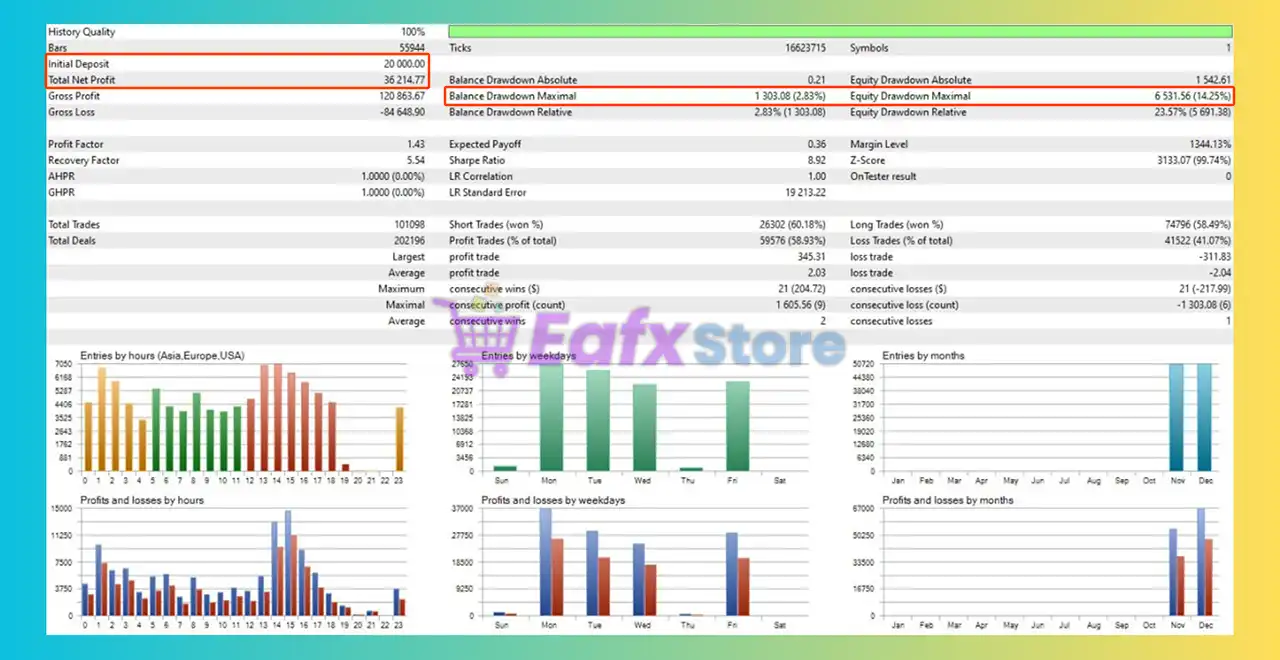
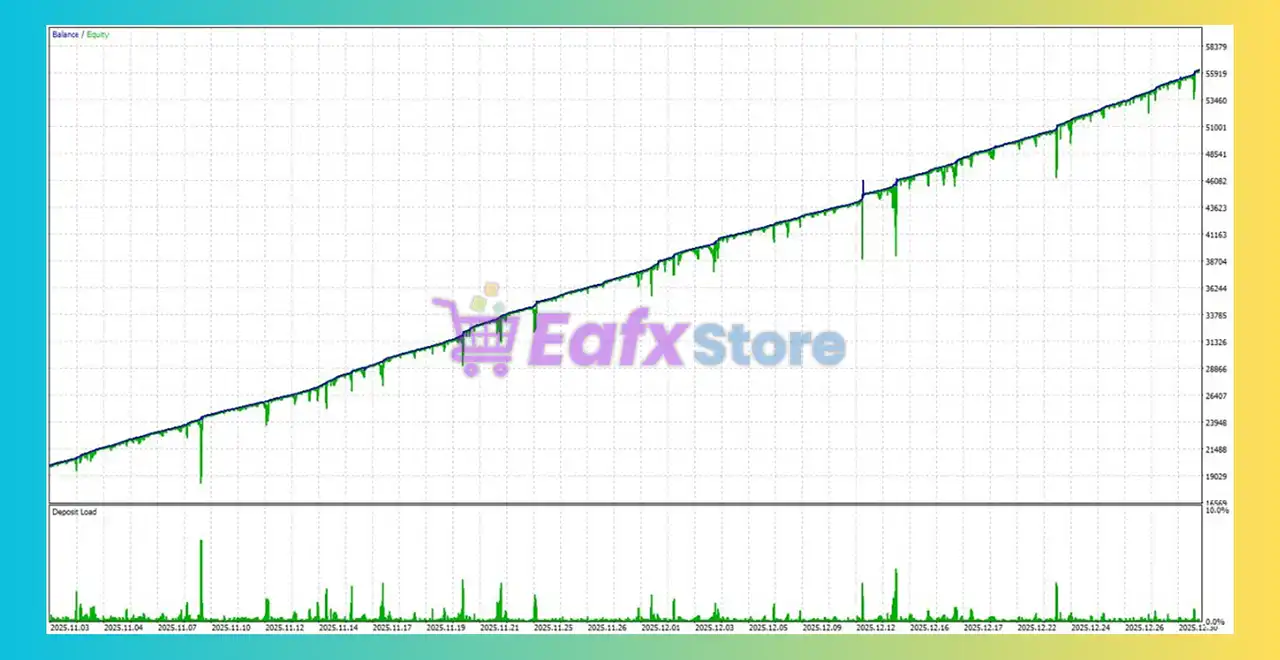
The results of the RTX Barbar MT5’s reverse test trading showed impressive profit performance over 2 months on the XAUUSD pair.

✅ Initial Deposit: $20,000
✅ Total Net Profit: $36,214.77
✅ Maximum Drawdown: 2.83%

RTX Barbar EA MT5 Backtest
RTX Barbar MT5 Backtest

RTX Barbar MT5 Backtest

Why Choose & Use RTX Barbar EA?

🔹 Designed For Continuous Automation: Supports stable automated trading with customizable market controls.
🔹 Advanced Risk Management Features: Includes trailing systems, spread filters and balance protection tools.
🔹 Flexible For Different Trading Styles: Adapts efficiently to ranging, trending and volatile market behavior.
🔹 Professional Trade Management System: Combines smart recovery and structured position handling logic.
🔹 Optimized For Marketplace Traders: Suitable for traders seeking customizable and scalable EA automation.

➡️ Reviewed by David Easton

Product Download Package?

The download package of the product suite includes:

✅ Experts: RTX Barbar.ex5

✅ SetFiles: RTX Barbar_Signal.set

Conclusion

In short, RTX Barbar for MT5 is a powerful tool for those who want the high returns of a grid/martingale system but with the safety of modern indicator filters. Its ability to "pair close" losing trades makes it much more resilient during long one-way trends than standard grid bots. To maximize stability, it is best paired with a high-leverage (1:500) account and a low-latency VPS.

Questions about RTX Barbar EA MT5 v3.35

❓ What is the core trading strategy of RTX Barbar EA?

The EA uses a Multi-Indicator Filter strategy. It analyzes market momentum and trends using SAR (Parabolic Stop and Reverse), EMA (Exponential Moving Average), and RSI (Relative Strength Index). Trades are only initiated when these indicators align, ensuring the bot enters during high-probability setups rather than just random price movements.

❓ How does the "Recovery Mode" work?

If a trade moves into a drawdown, the EA activates its Advanced Recovery & Pair Closing logic. It uses a structured grid system to place additional orders at strategic levels. Crucially, it employs "Paired Closing," where profitable orders are used to offset and close the furthest losing orders in a basket, effectively reducing net exposure and "cleaning up" the drawdown without needing a full market reversal.

❓ Is RTX Barbar EA suitable for Gold (XAUUSD)?

Yes, it is primarily designed and optimized for Gold. Gold is known for having sharp trends followed by significant retracements; RTX Barbar’s strategy is built to survive the "trend" phase and exit profitably during the "retracement" or ranging phase.

❓ What are the verified backtest results?

In 2-month reverse testing on XAUUSD: ✅ Initial Deposit: $20,000 ✅ Total Net Profit: $36,214.77 ✅ Maximum Drawdown: 2.83% Note: These results indicate a very high-performance setup with low risk, but real-world results depend heavily on the broker's spread and execution speed.

❓ Does it use Martingale logic?

It uses a Structured Martingale/Grid Scaling logic. However, it is not "blind" martingale. The lot multiplication is controlled by specific caps and recovery systems, meaning it won't infinitely double lot sizes until the account is blown. It focuses on "Smart Scaling" based on indicator confirmations.

❓ What is the "Dynamic Break-Even" system?

As the number of open orders in a grid (a "basket") increases, the EA automatically adjusts the Break-Even point. This ensures that as exposure grows, the target profit level moves closer to the current price, allowing the EA to exit the entire trade sequence much faster once the market shows signs of a reversal.

❓ Can I use it on a Cent account?

Absolutely. In fact, for traders with smaller balances (starting at $100), using a Cent Account is highly recommended. This allows the EA to have the necessary "margin room" to execute its grid and recovery logic without hitting a margin call.

❓ What are the recommended settings for risk?

Experts recommend utilizing the Session & Spread Filters. These settings prevent the EA from opening new grids during high-impact news or periods of poor liquidity (like the market rollover). Keeping the "Recovery Mode" active is essential for maintaining the low drawdown seen in tests.

❓ Is RTX Barbar EA "Prop Firm" friendly?

Because of its Multi-Layer Risk Control and low drawdown (2.83% in tests), it is a strong candidate for prop firm challenges. However, users must ensure the "Daily Loss Limit" and "Equity Safeguard" settings are strictly configured to match the specific prop firm's rules.

❓ Does it require a VPS?

Yes. Because RTX Barbar manages complex grids and dynamic break-even points, it must remain connected to the broker server 24/7. Even a brief disconnect could cause the EA to miss a "Paired Closing" event, leading to an unmanaged drawdown. A low-latency Forex VPS is mandatory.

Other products traders compare

$59
Out of stock
Out of stock