




Perceptrader AI MT5 + SetFiles (Latest version) | Available
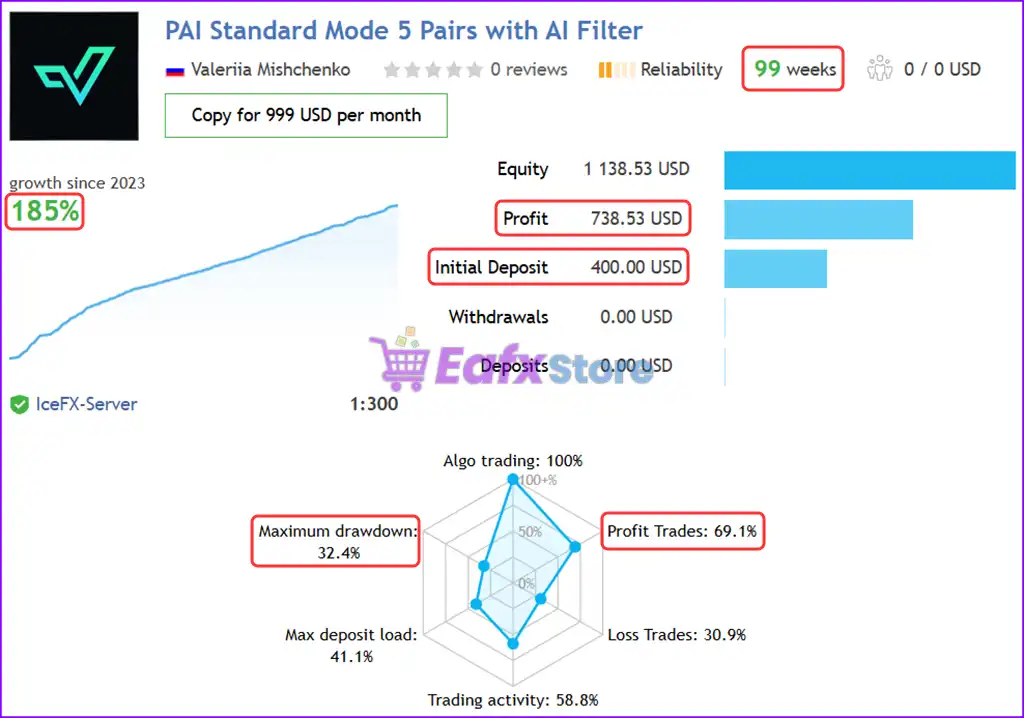
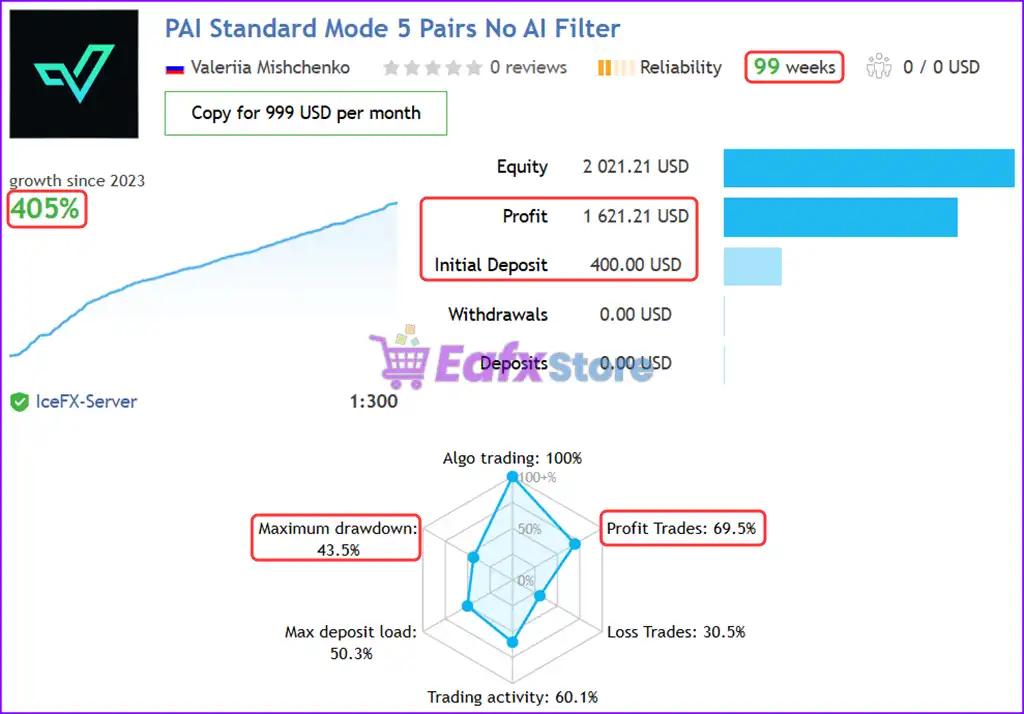
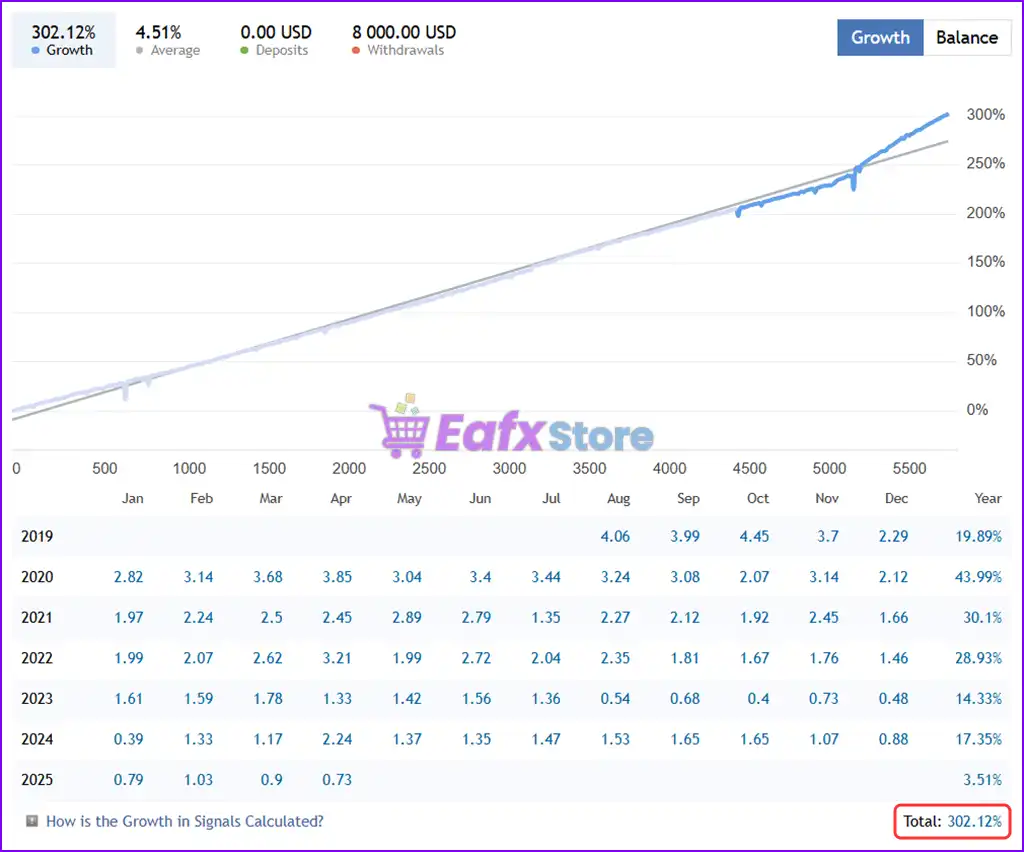
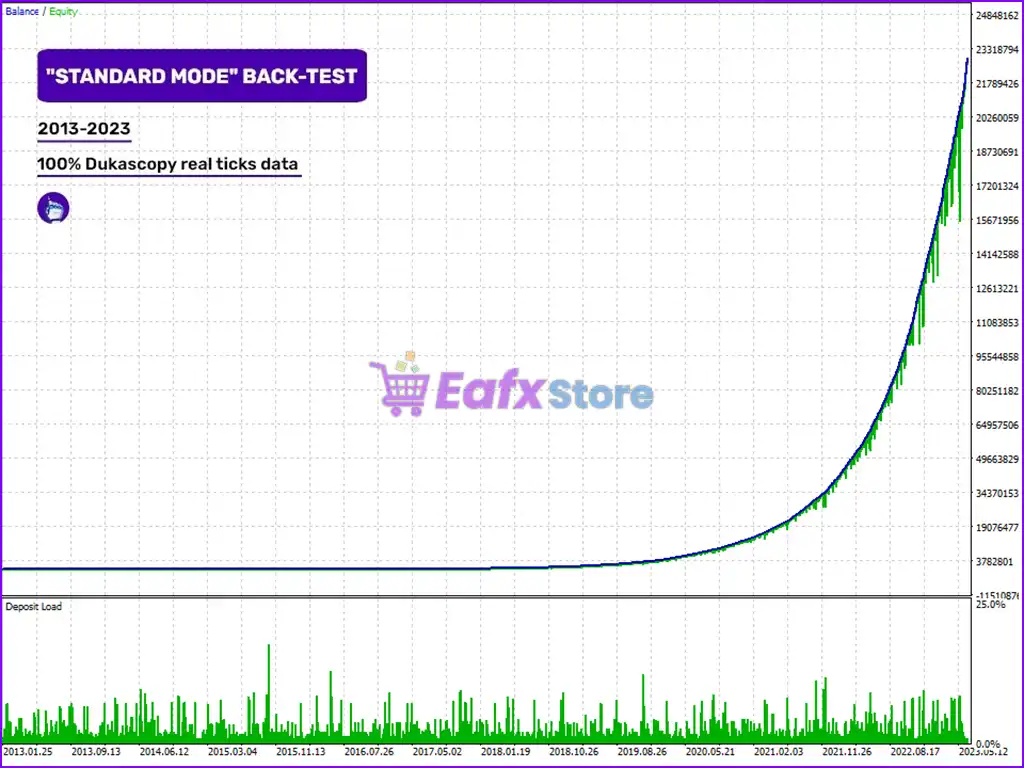
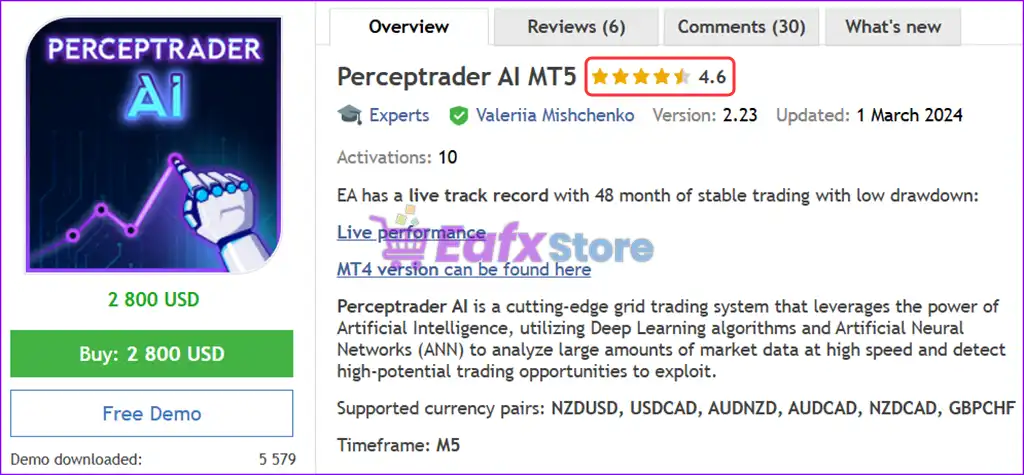
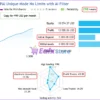
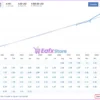
Perceptrader AI MT5 is an automated and optimized robot with 5 currency pairs. Verified performance for 99 weeks and achieved a total profit of 405%.
Select a variant to see availability.
 Reviewed by
 🔢 Perceptrader AI MT5 – Complete Settings Guide and Parameter Explanation
Perceptrader AI MT5 is an advanced artificial intelligence-powered Expert Advisor for MetaTrader 5 that combines machine learning, neural network filtering, portfolio management, grid recovery logic, news filtering, volatility controls and automated risk management.
Designed for multi-currency trading, the EA integrates smart position sizing, drawdown protection, market forecasting, and adaptive trade execution to provide a comprehensive automated trading solution.
- Perceptrader AI MT5 Settings
🔢 Installation Panel Parameters
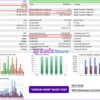
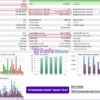
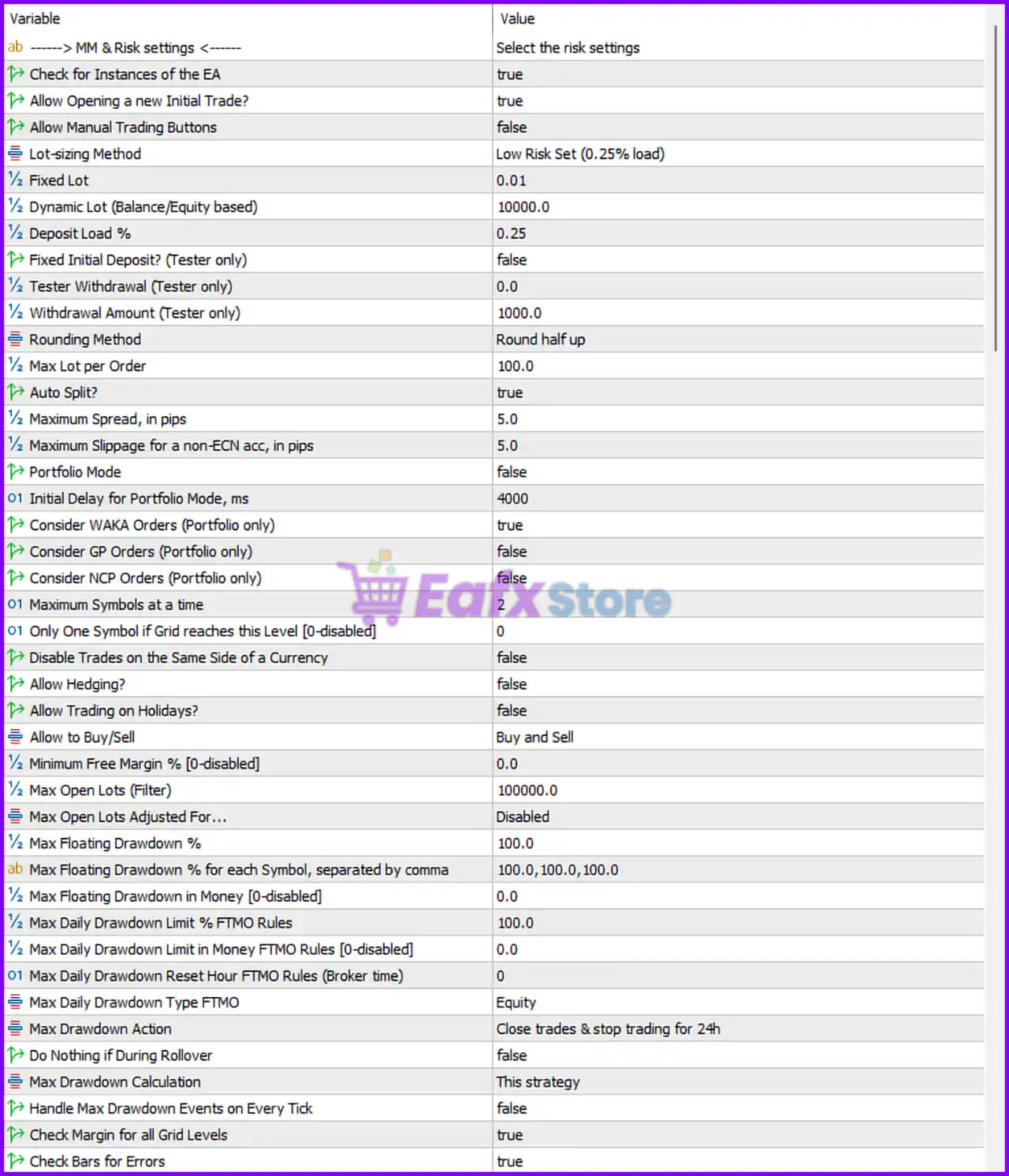
Below are the details of the parameters in the advisor’s trading system settings table:
- Perceptrader AI MT5 Settings Panel
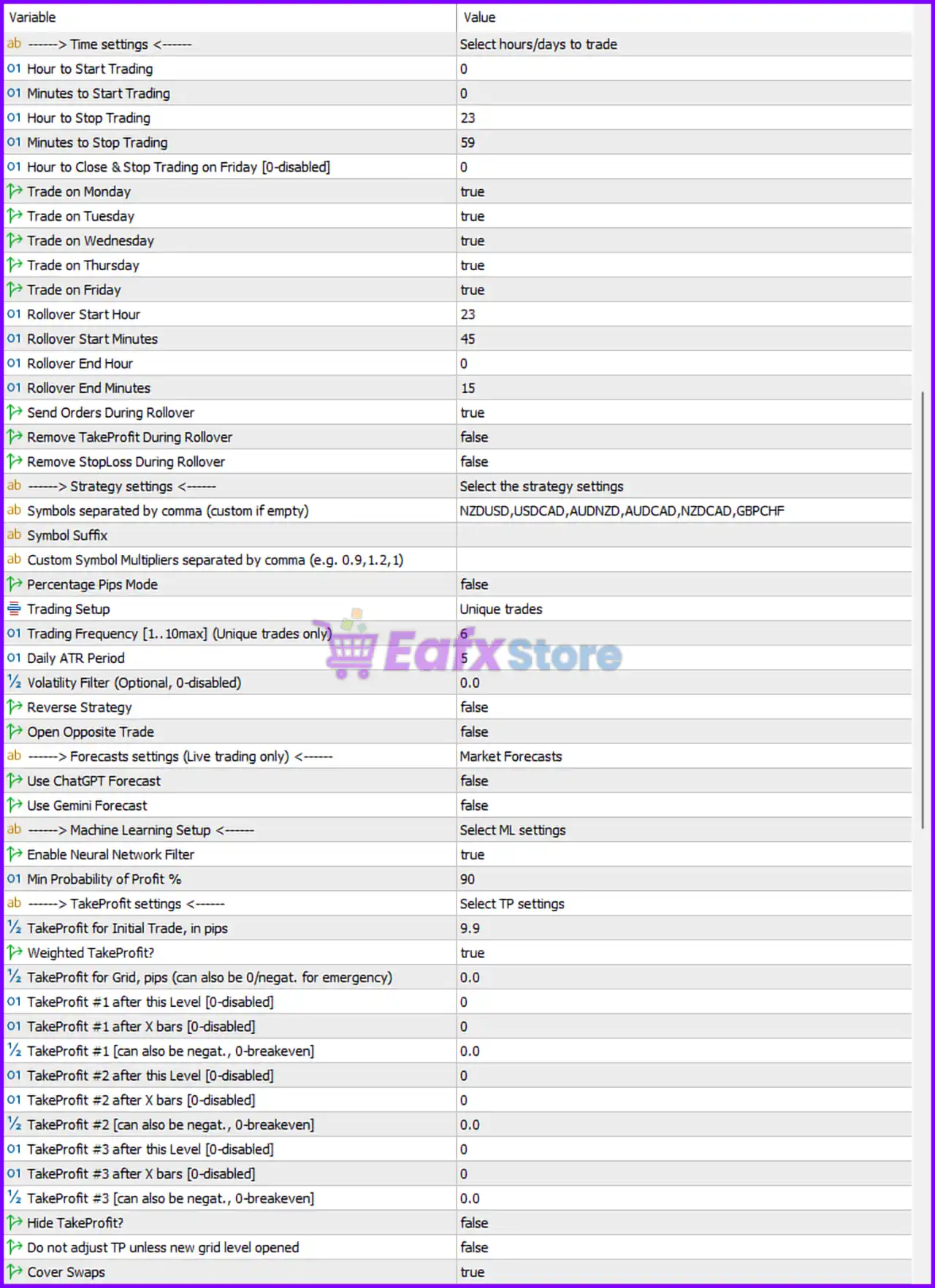
- Perceptrader AI MT5 Setting Panel
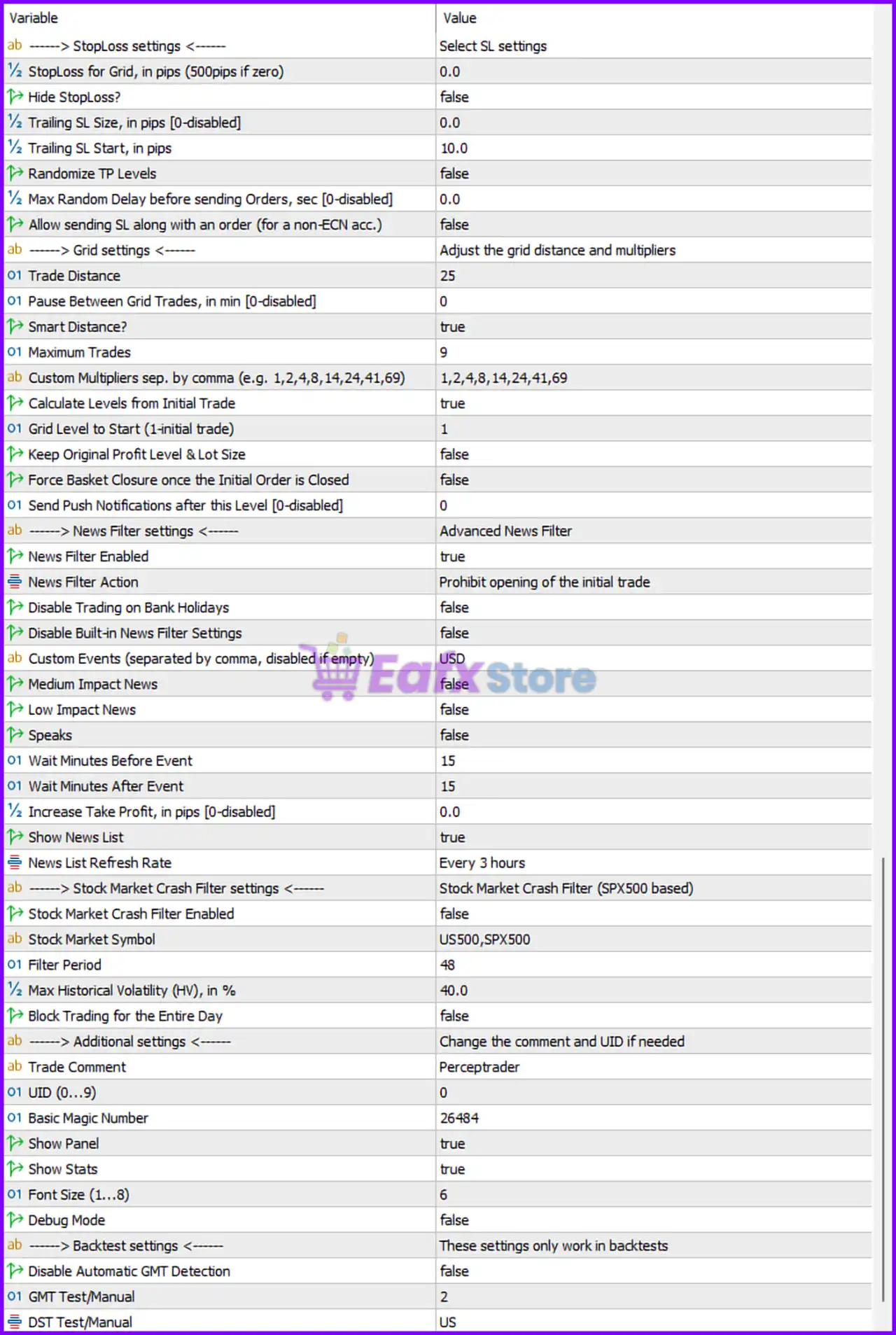
- Perceptrader AI MT5 EA Settings Panel
🔶 Money Management & Risk Settings
🔹 Check for Instances of the EA: Set to true, preventing conflicts when multiple EA instances are running.
🔹 Allow Opening a New Initial Trade?: Set to true, allowing the EA to start new trading cycles.
🔹 Allow Manual Trading Buttons: Set to false, disabling manual trade control buttons.
🔹 Lot-sizing Method: Configured as Low Risk Set (0.25% load), using a conservative money management profile.
🔹 Fixed Lot: Set to 0.01 lots, defining the default lot size.
🔹 Dynamic Lot (Balance/Equity Based): Configured at 10000.0, serving as the balance/equity scaling reference.
🔹 Deposit Load %: Set to 0.25%, defining account exposure per trading cycle.
🔹 Fixed Initial Deposit? (Tester Only): Set to false, disabling fixed deposit simulation.
🔹 Tester Withdrawal (Tester Only): Configured at 0.0, meaning no withdrawals are simulated.
🔹 Withdrawal Amount (Tester Only): Set to 1000.0, defining withdrawal size if enabled.
🔹 Rounding Method: Configured as Round Half Up, controlling lot size rounding calculations.
🔹 Max Lot per Order: Set to 100.0 lots, defining the maximum allowed trade size.
🔹 Auto Split?: Set to true, allowing large orders to be split automatically.
🔹 Maximum Spread (Pips): Configured at 5.0 pips, preventing entries during high-spread conditions.
🔹 Maximum Slippage for a Non-ECN Account (Pips): Set to 5.0 pips, limiting execution slippage.
🔹 Portfolio Mode: Set to false, disabling portfolio-wide trade management.
🔹 Initial Delay for Portfolio Mode (ms): Configured at 4000 ms, used when portfolio mode is enabled.
🔹 Consider WAKA Orders (Portfolio Only): Set to true, allowing WAKA order types in portfolio management.
🔹 Consider GP Orders (Portfolio Only): Set to false, excluding GP orders.
🔹 Consider NCP Orders (Portfolio Only): Set to false, excluding NCP orders.
🔹 Maximum Symbols at a Time: Configured at 2, limiting simultaneous symbol trading.
🔹 Only One Symbol if Grid Reaches This Level [0=disabled]: Set to 0, meaning the restriction is disabled.
🔹 Disable Trades on the Same Side of a Currency: Set to false, allowing multiple directional exposures.
🔹 Allow Hedging?: Set to false, preventing simultaneous opposite positions.
🔹 Allow Trading on Holidays?: Set to false, disabling holiday trading.
🔹 Allow to Buy/Sell: Configured as Buy and Sell, enabling both trade directions.
🔹 Minimum Free Margin % [0=disabled]: Set to 0.0%, meaning no free margin restriction is applied.
🔹 Max Open Lots (Filter): Configured at 100000.0 lots, effectively removing lot restrictions.
🔹 Max Open Lots Adjusted For: Set to Disabled, disabling dynamic lot adjustments.
🔹 Max Floating Drawdown %: Configured at 100.0%, defining the floating drawdown limit.
🔹 Max Floating Drawdown % for Each Symbol: Set to 100.0,100.0,100.0,100.0, defining per-symbol drawdown limits.
🔹 Max Floating Drawdown in Money [0=disabled]: Set to 0.0, disabling money-based drawdown limits.
🔹 Max Daily Drawdown Limit % FTMO Rules: Configured at 100.0%, effectively disabling FTMO daily limits.
🔹 Max Daily Drawdown Limit in Money FTMO Rules [0=disabled]: Set to 0.0, disabling money-based FTMO rules.
🔹 Max Daily Drawdown Reset Hour FTMO Rules (Broker Time): Configured at 0, resetting at midnight.
🔹 Max Daily Drawdown Type FTMO: Set to Equity, using equity-based calculations.
🔹 Max Drawdown Action: Configured as Close Trades & Stop Trading for 24h, enforcing emergency protection.
🔹 Do Nothing if During Rollover: Set to false, allowing normal operation during rollover checks.
🔹 Max Drawdown Calculation: Configured as This Strategy, using EA-specific calculations.
🔹 Handle Max Drawdown Events on Every Tick: Set to false, checking periodically rather than every tick.
🔹 Check Margin for All Grid Levels: Set to true, validating margin requirements.
🔹 Check Bars for Errors: Set to true, ensuring data integrity.
🔶 Stop Loss Settings
🔹 StopLoss for Grid (500 pips if zero): Set to 0.0, meaning the default 500-pip grid stop loss is used.
🔹 Hide StopLoss?: Set to false, displaying Stop Loss levels normally.
🔹 Trailing SL Size (Pips) [0=disabled]: Set to 0.0 pips, disabling trailing stop distance.
🔹 Trailing SL Start (Pips): Configured at 10.0 pips, defining the trailing activation threshold.
🔹 Randomize TP Levels: Set to false, using fixed TP levels.
🔹 Max Random Delay Before Sending Orders (sec) [0=disabled]: Set to 0.0 seconds, disabling random execution delays.
🔹 Allow Sending SL Along with an Order (for a non-ECN account): Set to false, preventing SL submission with order placement.
🔶 Grid Settings
🔹 Trade Distance: Configured at 25, defining spacing between grid positions.
🔹 Pause Between Grid Trades (Minutes) [0=disabled]: Set to 0, disabling delays.
🔹 Smart Distance?: Set to true, allowing dynamic grid spacing.
🔹 Maximum Trades: Configured at 9, limiting total grid positions.
🔹 Custom Multipliers: Set to 1,2,4,8,14,24,41,69, defining lot progression levels.
🔹 Calculate Levels from Initial Trade: Set to true, basing grid calculations on the first trade.
🔹 Grid Level to Start (1=Initial Trade): Configured at 1.
🔹 Keep Original Profit Level & Lot Size: Set to false, allowing dynamic adjustments.
🔹 Force Basket Closure Once the Initial Order is Closed: Set to false, allowing basket continuation.
🔹 Send Push Notifications After This Level [0=disabled]: Set to 0, disabling notifications.
🔶 News Filter Settings
🔹 News Filter Enabled: Set to true, activating economic news protection.
🔹 News Filter Action: Configured as Prohibit Opening of the Initial Trade, preventing new entries during news.
🔹 Disable Trading on Bank Holidays: Set to false, allowing trading unless otherwise filtered.
🔹 Disable Built-in News Filter Settings: Set to false, keeping the built-in filter active.
🔹 Custom Events: Configured as USD, filtering U.S. economic events.
🔹 Medium Impact News: Set to false, ignoring medium-impact events.
🔹 Low Impact News: Set to false, ignoring low-impact events.
🔹 Speaks: Set to false, ignoring central bank speeches.
🔹 Wait Minutes Before Event: Configured at 15 minutes.
🔹 Wait Minutes After Event: Configured at 15 minutes.
🔹 Increase Take Profit (Pips) [0=disabled]: Set to 0.0, disabling TP expansion.
🔹 Show News List: Set to true, displaying upcoming events.
🔹 News List Refresh Rate: Configured as Every 3 Hours.
🔶 Stock Market Crash Filter Settings
🔹 Stock Market Crash Filter Enabled: Set to false, disabling crash protection.
🔹 Stock Market Symbol: Configured as US500,SPX500.
🔹 Filter Period: Set to 48, defining the analysis period.
🔹 Max Historical Volatility (HV) %: Configured at 40.0%.
🔹 Block Trading for the Entire Day: Set to false.
🔶 Additional Settings
🔹 Trade Comment: Configured as Perceptrader, added to all trades.
🔹 UID (0…9): Set to 0, providing a unique EA instance identifier.
🔹 Basic Magic Number: Configured at 26484, identifying EA trades.
🔹 Show Panel: Set to true, enabling the information panel.
🔹 Show Stats: Set to true, displaying trading statistics.
🔹 Font Size (1…8): Configured at 6.
🔹 Debug Mode: Set to false, disabling debug logging.
🔶 Backtest Settings
🔹 Disable Automatic GMT Detection: Set to false, allowing automatic timezone detection.
🔹 GMT Test/Manual: Configured at 2.
🔹 DST Test/Manual: Set to US, using U.S. daylight-saving rules.
🔶 Time Settings
🔹 Hour to Start Trading: Set to 0.
🔹 Minutes to Start Trading: Set to 0.
🔹 Hour to Stop Trading: Configured at 23.
🔹 Minutes to Stop Trading: Set to 59.
🔹 Hour to Close & Stop Trading on Friday [0=disabled]: Set to 0, disabled.
🔹 Trade on Monday: Set to true.
🔹 Trade on Tuesday: Set to true.
🔹 Trade on Wednesday: Set to true.
🔹 Trade on Thursday: Set to true.
🔹 Trade on Friday: Set to true.
🔹 Rollover Start Hour: Configured at 23.
🔹 Rollover Start Minutes: Set to 45.
🔹 Rollover End Hour: Configured at 0.
🔹 Rollover End Minutes: Set to 15.
🔹 Send Orders During Rollover: Set to true.
🔹 Remove TakeProfit During Rollover: Set to false.
🔹 Remove StopLoss During Rollover: Set to false.
🔶 Strategy Settings
🔹 Symbols Separated by Comma: Configured as NZDUSD,USDCAD,AUDNZD,AUDCAD,NZDCAD,GBPCHF.
🔹 Symbol Suffix: Left empty, meaning broker default symbols are used.
🔹 Custom Symbol Multipliers: Empty, using standard symbol weighting.
🔹 Percentage Pips Mode: Set to false.
🔹 Trading Setup: Configured as Unique Trades.
🔹 Trading Frequency [1..10max] (Unique Trades Only): Set to 6.
🔹 Daily ATR Period: Configured at 5.
🔹 Volatility Filter (Optional, 0=disabled): Set to 0.0, disabled.
🔹 Reverse Strategy: Set to false.
🔹 Open Opposite Trade: Set to false.
🔶 Market Forecast Settings
🔹 Use ChatGPT Forecast: Set to false, disabling ChatGPT-based forecasting.
🔹 Use Gemini Forecast: Set to false, disabling Gemini-based forecasting.
🔶 Machine Learning Settings
🔹 Enable Neural Network Filter: Set to true, activating AI-based trade filtering.
🔹 Min Probability of Profit %: Configured at 90%, requiring a very high confidence level before trade entry.
🔶 Take Profit Settings
🔹 TakeProfit for Initial Trade (Pips): Set to 9.9 pips.
🔹 Weighted TakeProfit?: Set to true, enabling basket-based profit calculations.
🔹 TakeProfit for Grid (Pips): Set to 0.0, using automatic management.
🔹 TakeProfit #1 After This Level [0=disabled]: Set to 0.
🔹 TakeProfit #1 After X Bars [0=disabled]: Set to 0.
🔹 TakeProfit #1 Can Also Be Negative (0=breakeven): Set to 0.0.
🔹 TakeProfit #2 After This Level [0=disabled]: Set to 0.
🔹 TakeProfit #2 After X Bars [0=disabled]: Set to 0.
🔹 TakeProfit #2 Can Also Be Negative (0=breakeven): Set to 0.0.
🔹 TakeProfit #3 After This Level [0=disabled]: Set to 0.
🔹 TakeProfit #3 After X Bars [0=disabled]: Set to 0.
🔹 TakeProfit #3 Can Also Be Negative (0=breakeven): Set to 0.0.
🔹 Hide TakeProfit?: Set to false, displaying TP levels.
🔹 Do Not Adjust TP Unless New Grid Level Opened: Set to false.
🔹 Cover Swaps: Set to true, adjusting profits to compensate for swap charges.
🔢 Conclusion
Perceptrader AI MT5 is a highly advanced AI-assisted trading system that integrates neural network filtering, multi-currency portfolio management, intelligent grid recovery, news protection and sophisticated drawdown controls.
With features such as Neural Network Filter enabled, 90% minimum profit probability, advanced news filtering, smart grid spacing, and multi-layer drawdown protection, the EA is designed for traders seeking a data-driven and risk-aware automated trading solution.
Proper optimization of lot sizing, grid parameters, and risk controls is essential to maximize performance while maintaining long-term account stability.
🔢 FAQs
❓ What is Perceptrader AI MT5?
Perceptrader AI MT5 is an AI-powered MetaTrader 5 Expert Advisor that combines machine learning, neural network filtering, grid recovery logic, and advanced risk management.
❓ How does the Neural Network Filter work?
The EA uses a machine-learning filter that only allows trades when the minimum probability of profit reaches 90%, helping improve trade selection quality.
❓ Which currency pairs are included by default?
The default portfolio includes NZDUSD, USDCAD, AUDNZD, AUDCAD, NZDCAD, and GBPCHF.
❓ Does Perceptrader AI MT5 include a news filter?
Yes, the EA includes an advanced news filter that blocks new trade entries around important USD economic events and refreshes news data every 3 hours.
❓ What happens when the maximum drawdown threshold is reached?
The configured Max Drawdown Action will close all trades and stop trading for 24 hours, helping protect the account during adverse market conditions.
User Reviews
Only logged in customers who have purchased this product may leave a review.
1. What type of trading strategy does Perceptrader AI MT5 use?
Perceptrader AI MT5 uses an AI-powered grid trading strategy that combines Deep Learning algorithms and Artificial Neural Networks (ANN) to analyze market conditions and identify optimal trade opportunities.
2. Does the EA use Martingale or other high-risk systems?
No, Perceptrader AI MT5 does not use Martingale. It uses a controlled grid strategy with smart risk management, including hedging support and drawdown controls, making it safer for long-term use.
3. How does the AI improve trading performance?
The AI scans massive real-time market data, applies machine learning filters, and eliminates low-probability trades. This results in more accurate entries, smarter trade exits, and overall improved performance.
4. Which currency pairs does it work best on?
Perceptrader AI MT5 is optimized for:
🔹NZDUSD, USDCAD, AUDNZD, AUDCAD, NZDCAD, and GBPCHF
These pairs have shown strong performance in both backtests and live signals.
5. What is the minimum deposit required to run the EA?
The EA can run on accounts as small as $400, though a larger deposit (e.g., $1,000 or more) is recommended for better grid management and more flexibility.
6. Is Perceptrader AI MT5 suitable for prop firm accounts like FTMO?
Yes, it includes prop-firm friendly features like daily loss limits, hedging, and strict drawdown management, making it compliant with most funded account rules.
7. Does it automatically adjust for GMT and broker timezones?
Yes, Perceptrader AI MT5 comes with Auto GMT detection, ensuring all time-sensitive operations (like news filters) work accurately across brokers without manual input.
8. Can I use this EA on multiple currency pairs at once?
Absolutely. The EA is designed for multi-currency trading from a single chart, saving time and allowing for diversified risk management across several symbols.
9. How does the news and crash filter work?
The EA includes an economic news filter and a stock market crash detector. These features pause trading during major events or unpredictable volatility, helping protect your capital.
10. How does Perceptrader AI perform in real trading conditions?
Live trading results show consistent gains with manageable drawdowns:
✅ Up to +405% gain on small accounts
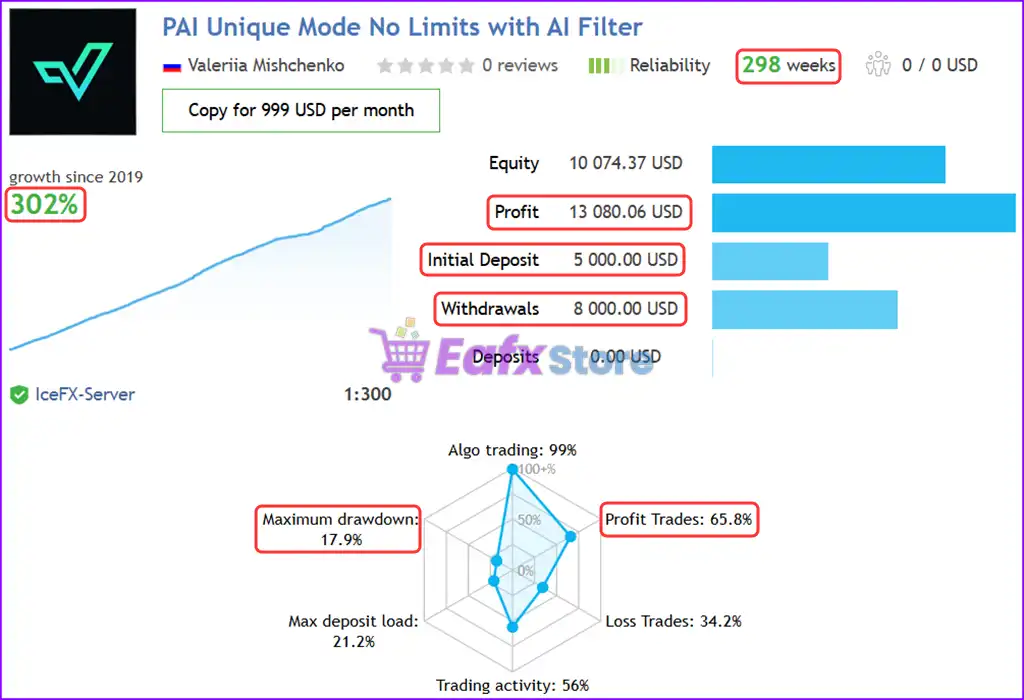
✅ Over +300% gain on larger setups
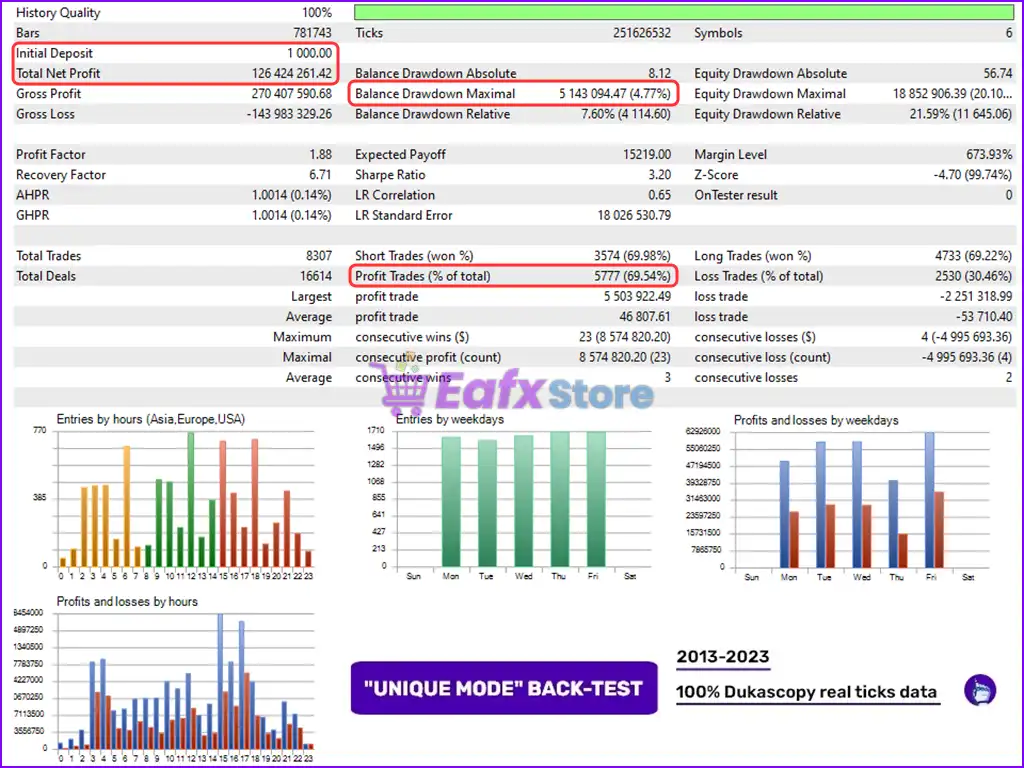
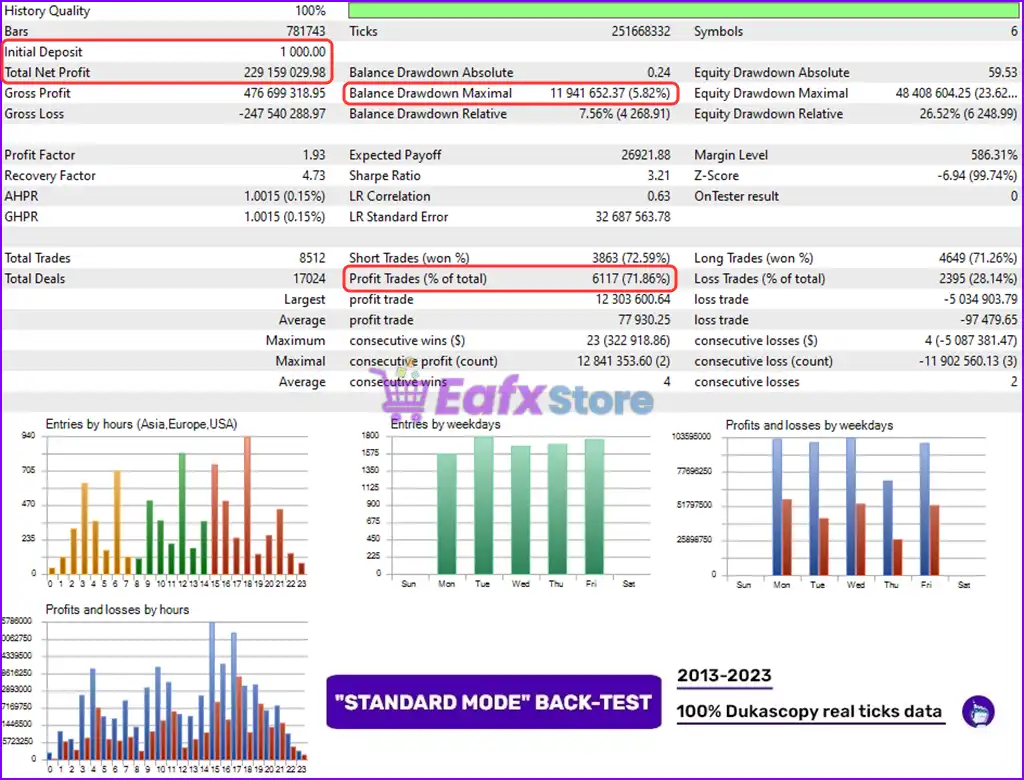
✅ Long-term stability with 65–72% win rates and smart AI filtering.
-
 Price range: $89.00 through $599.00
 -
 Price range: $89.00 through $599.00
 -
 Price range: $89.00 through $599.00
 -
 Price range: $89.00 through $599.00
-
 4
4 -
 0Price range: $89.00 through $599.00
 -
 2
2 -
 0Price range: $89.00 through $1,200.00
There are no reviews yet.