🔢 Quantum Baron EA MT5 Settings Explained – Complete Configuration Guide
Quantum Baron EA is a professional grid trading Expert Advisor for MetaTrader 5 designed to trade synthetic indices and volatile instruments with advanced money management and automated risk control. The EA combines dynamic lot sizing, grid distance management, slippage control and flexible session filters to optimize trading performance.
With customizable risk profiles and intelligent trade execution, Quantum Baron EA MT5 is suitable for traders looking for automated high-frequency grid trading strategies.
🔢 Quantum Baron EA MT5 Full Settings Explanation
Below are the details of the parameters in the advisor’s trading system settings table:
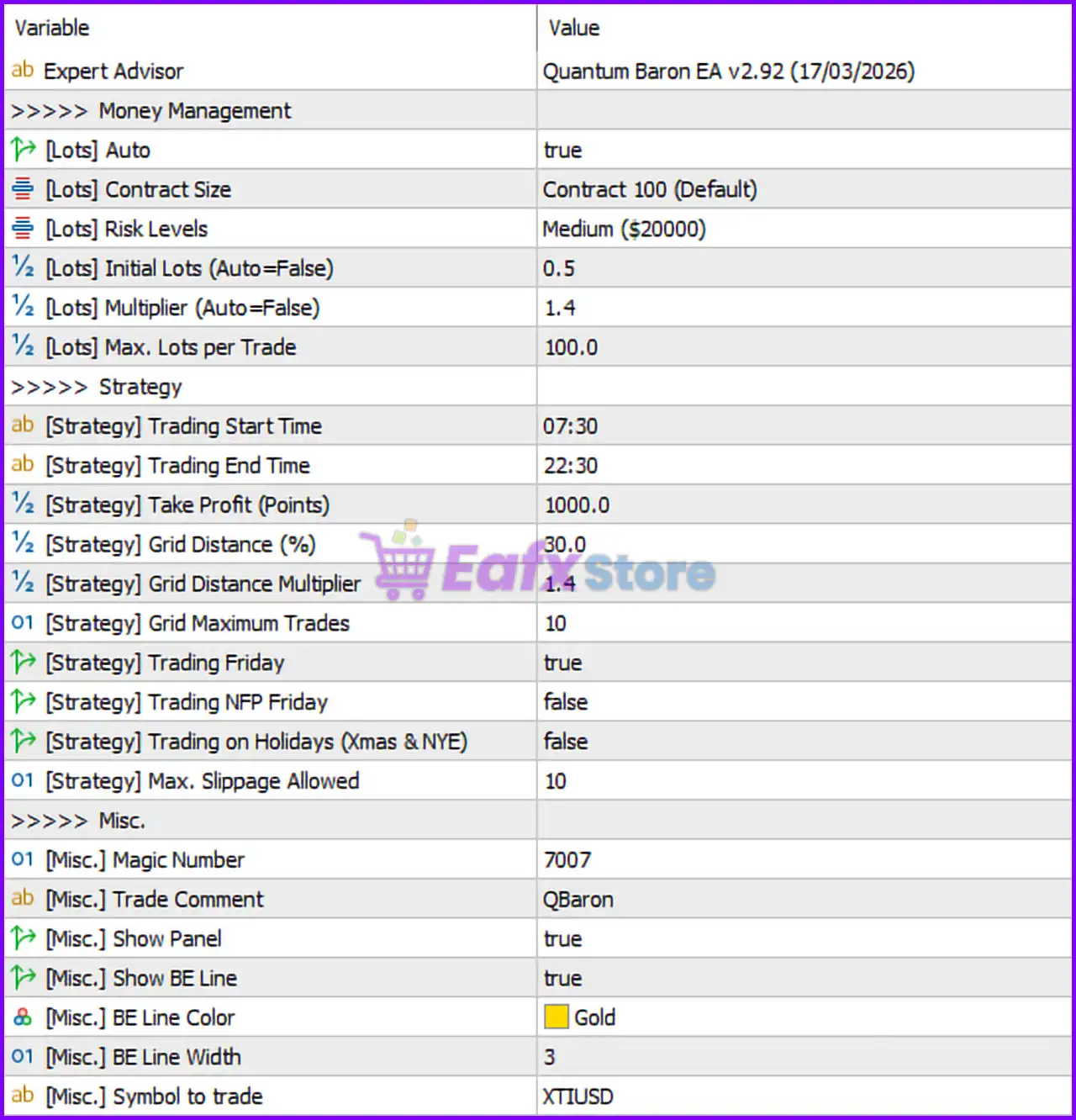
🔶 Expert Advisor Information
🔹 Expert Advisor = Quantum Baron EA v2.92 (17/03/2026): Current EA version is v2.92 released on 17/03/2026.
🔶 Money Management Settings
🔹 [Lots] Auto = true: Enables automatic lot sizing based on account balance and selected risk level.
🔹 [Lots] Contract Size = Contract 100 (Default): Uses Contract 100 as the default trading contract size.
🔹 [Lots] Risk Levels = Medium ($20000): Uses the Medium risk profile optimized for accounts around $20,000.
🔹 [Lots] Initial Lots (Auto=False) = 0.5: Fixed starting lot size is 0.5 when Auto Lot is disabled.
🔹 [Lots] Multiplier (Auto=False) = 1.4: Lot multiplier for grid progression is 1.4.
🔹 [Lots] Max. Lots per Trade = 100.0: Maximum allowed lot size per trade is 100.0.
🔶 Strategy Settings
🔹 [Strategy] Trading Start Time = 07:30: EA begins opening trades at 07:30.
🔹 [Strategy] Trading End Time = 22:30: EA stops opening trades at 22:30.
🔹 [Strategy] Take Profit (Points) = 1000.0: Global Take Profit target is 1000.0 points.
🔹 [Strategy] Grid Distance (%) = 30.0: Distance between grid trades is set to 30.0%.
🔹 [Strategy] Grid Distance Multiplier = 1.4: Grid spacing multiplier is 1.4.
🔹 [Strategy] Grid Maximum Trades = 10: Maximum number of grid trades allowed is 10.
🔹 [Strategy] Trading Friday = true: Trading on Fridays is enabled.
🔹 [Strategy] Trading NFP Friday = false: Trading during Non-Farm Payroll Fridays is disabled.
🔹 [Strategy] Trading on Holidays (Xmas & NYE) = false: Trading during Christmas and New Year holidays is disabled.
🔹 [Strategy] Max. Slippage Allowed = 10: Maximum execution slippage allowed is 10.
🔶 Miscellaneous Settings
🔹 [Misc.] Magic Number = 7007: Unique Magic Number used for identifying EA trades is 7007.
🔹 [Misc.] Trade Comment = QBaron: Adds QBaron as the trade comment.
🔹 [Misc.] Show Panel = true: Displays the EA information panel on the chart.
🔹 [Misc.] Show BE Line = true: Displays the Break-Even line on the trading chart.
🔹 [Misc.] BE Line Color = Gold: Break-Even line color is set to Gold.
🔹 [Misc.] BE Line Width = 3: Break-Even line thickness is 3.
🔹 [Misc.] Symbol to trade = XTIUSD: EA is configured to trade the XTIUSD instrument.
🔢 Conclusion
Quantum Baron EA MT5 is a powerful automated grid trading system designed for traders who want dynamic money management, flexible grid control and advanced session filtering.
The EA includes automatic lot sizing, customizable risk levels, break-even visualization, and intelligent trading filters to help traders manage volatile market conditions effectively.
With support for synthetic and CFD instruments like XTIUSD, Quantum Baron provides a robust solution for advanced MT5 automation.
🔢 FAQs
❓ What is Quantum Baron EA MT5?
Quantum Baron EA MT5 is a grid-based automated trading Expert Advisor for MetaTrader 5.
❓ Does Quantum Baron EA MT5 support auto lot sizing?
Yes, the EA includes automatic lot sizing based on account balance and selected risk profile.
❓ Can Quantum Baron EA MT5 trade during NFP Fridays?
No, trading during Non-Farm Payroll Fridays is disabled by default.
❓ What symbol is configured in the provided settings?
The EA is configured to trade XTIUSD.
❓ Does Quantum Baron EA MT5 include a chart panel?
Yes, the EA includes an on-chart information panel and Break-Even visualization tools.