





Zeno EA MT5 with SetFiles (Latest version) - Unlimited

Subscriptions for Special Plan
- 30 EA package is more economical!
- Special package with 99%
- Download 1 EA/Day

Subscriptions for Premium Membership
- Download Unlimited in 1 Year
- Get 100% Discount
- Get free access to all

Subscriptions for Gold Membership
- 1 Year Membership
- Get 100% Discount
- Access EA+Indicator+Course
Frequently bought together 🎁
Add these products to enhance your purchase




What is Zeno EA?
Zeno EA is a fully automated Expert Advisor (EA) engineered for XAUUSD breakout trading with a focus on stability, adaptability, and strict risk management. Built around support and resistance level breakdown logic, it combines ATR-based volatility filters and structured indicators to detect precise entries. With fixed Stop Loss (SL), Take Profit (TP), and virtual profit tracking, it delivers disciplined automated trading for Gold.
 Vendor Website: View here
About the Author
This product is compiled by Anton Kondratev. This author has more than +6 years of experience working on MQL5 with many famous products such as Zeno EA MT5, Enza EA MT5, Razor MT5, Aurum MT5, Nova EA, DOW King EA MT5, Zonda EA MT5 and other advisors. Among them, Zeno EA is his best performing products.
Delivery time 24h-48h after payment.
Refund if not delivered.
You will receive the current version without any limitations (ID+Time).
Key Features of Zeno EA for MT5
🔹 Fixed Stop Loss (SL) & Take Profit (TP): Every trade protected with predefined risk parameters.
🔹 Virtual Profit Tracking System: Hidden trade management logic enhances execution discretion.
🔹 Market Volatility & News Filters: Blocks trades during strong news and abnormal spreads.
🔹 ATR & Virtual Channel Logic: Adaptive breakout confirmation for precise Gold entries.
🔹 Broker Condition Adaptation: Adjusts to spreads, slippage, delays and market gaps.
🔹 Open Optimization Parameters: Full control for customization and strategy refinement.
Why Choose & Use Zeno EA?
🔹 Gold-Optimized Execution: Designed specifically for XAUUSD volatility behavior.
🔹 Capital Protection First: No Grid or Martingale, structured risk per trade.
🔹 Consistent Automated Trading: Trades almost daily under filtered conditions.
🔹 Adaptive & Transparent System: Fully open parameters with no black-box logic.
🔹 Marketplace-Ready Solution: Suitable for traders seeking resilient breakout automation.
Zeno EA MT5 Review
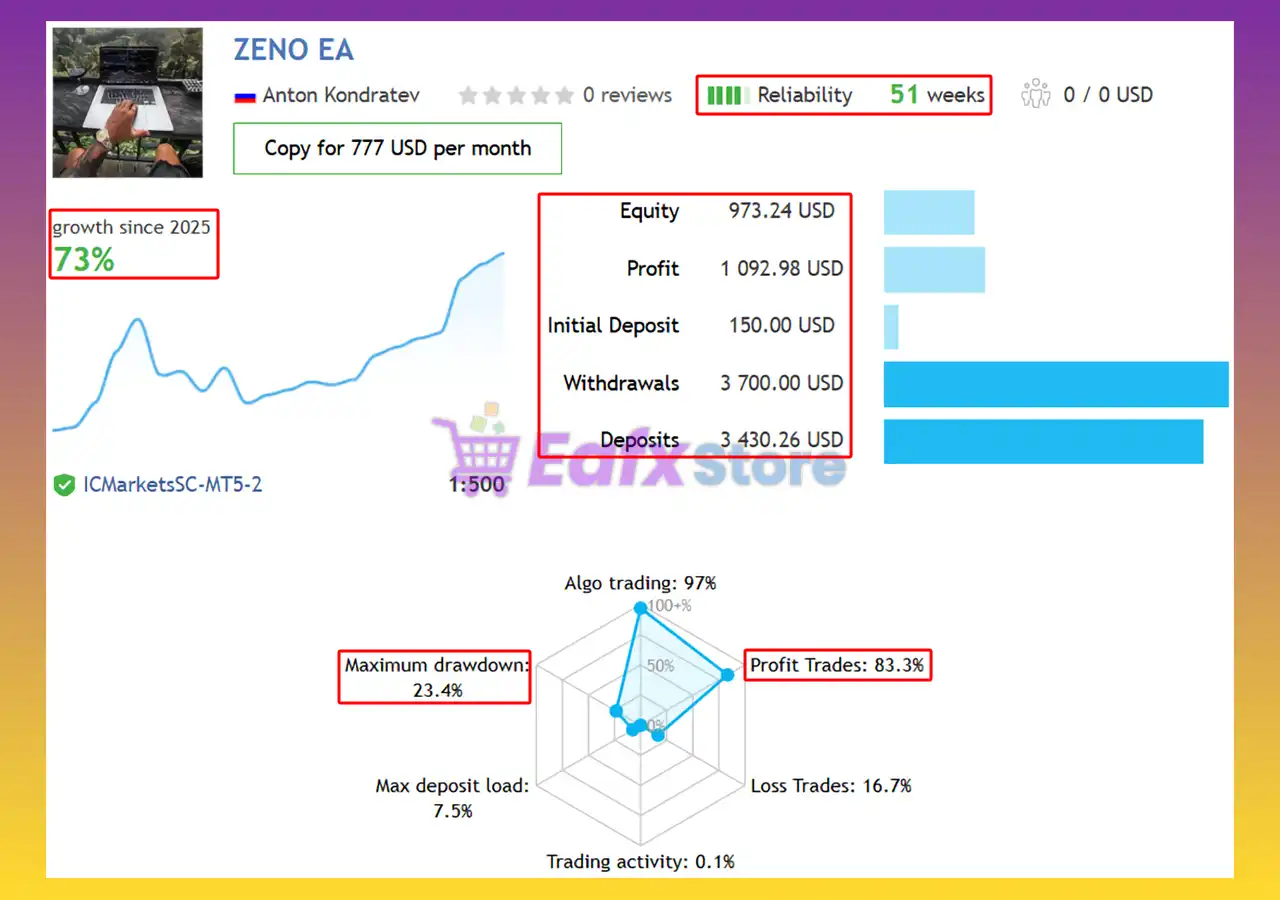
Zeno EA Signal Results
The Zeno EA achieved impressive profit performance when trading with XAUUSD (Gold) pair. Trading results on real account for 51 consecutive weeks of trading:
✅ Initial Deposit: $150
✅ Growth Rate: +73%
✅ Win Rate (% of total): 83.3%
✅ Maximum Drawdown: 23.4%
Zeno EA Signal Results
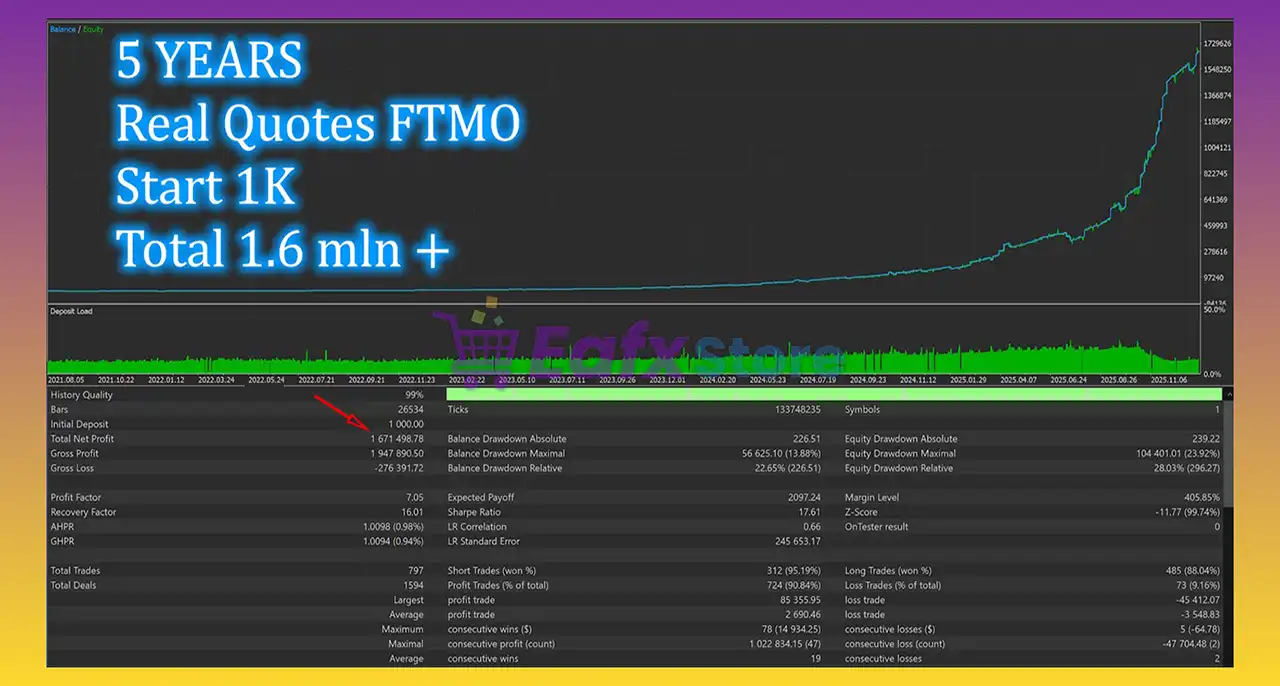
Zeno EA Backtest Results
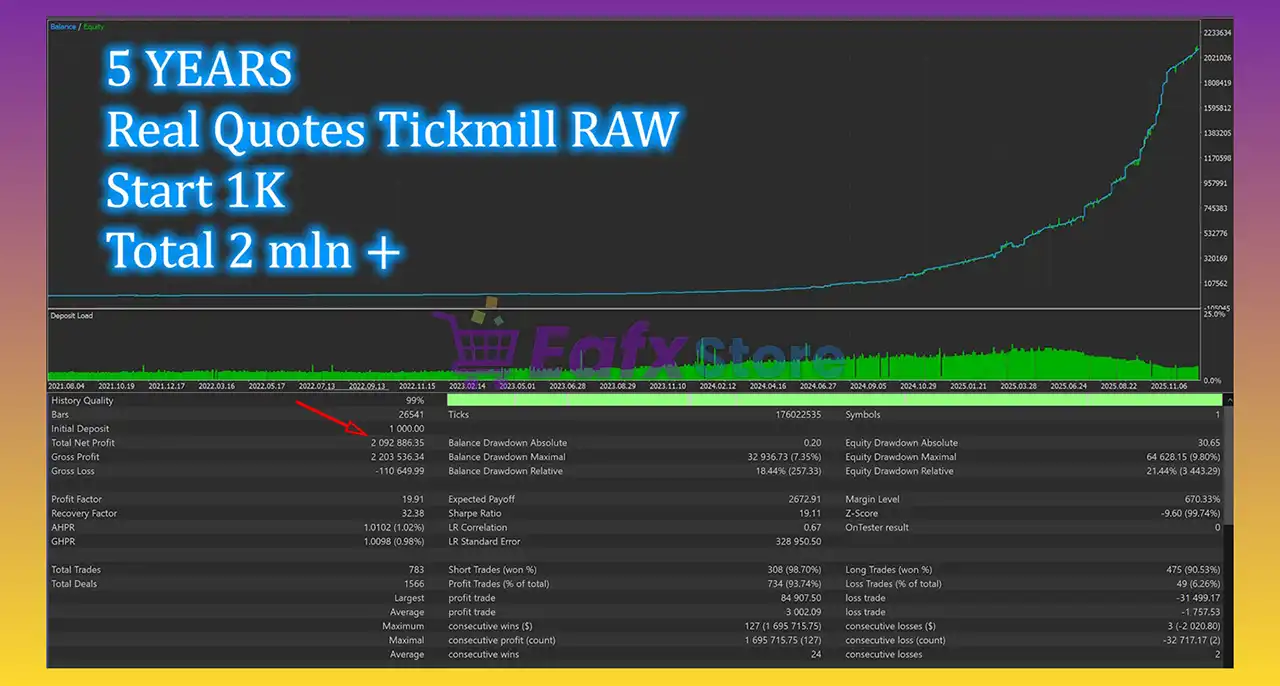
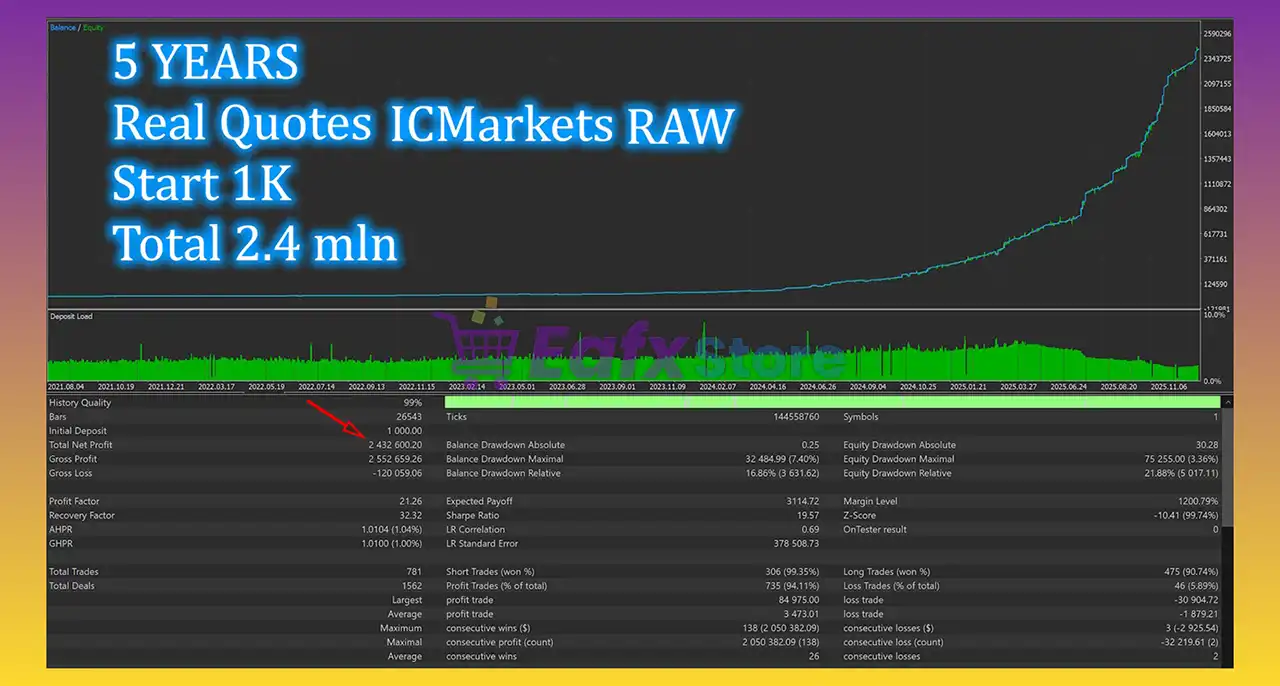
The Zeno EA has achieved impressive profit performance over many years of trading reversion tests with Gold (XAUUSD). This EA demonstrates excellent ability to master the market and increase profits.
✅ Initial Deposit: $1,000
✅ Total Net Profit: $1.67 million
✅ Win Rate (% of total): 90.84%
✅ Maximum Drawdown: 13.88%
Zeno MT5 Backtest
What is the Zeno EA Trading Strategy?
🔹 Support & Resistance Breakdowns: Trades confirmed level breakouts on XAUUSD.
🔹 ATR-Based Volatility Validation: Ensures entries only during strong market movement.
🔹 Structured Risk–Reward Framework: Targets extended TP with controlled SL exposure.
🔹 Time & Expiration Logic: Each deal includes timing control for added stability.
🔹 Optional Recovery Mechanism: Supports additional entries under controlled drawdown.
Is Zeno EA MT5 Safe?
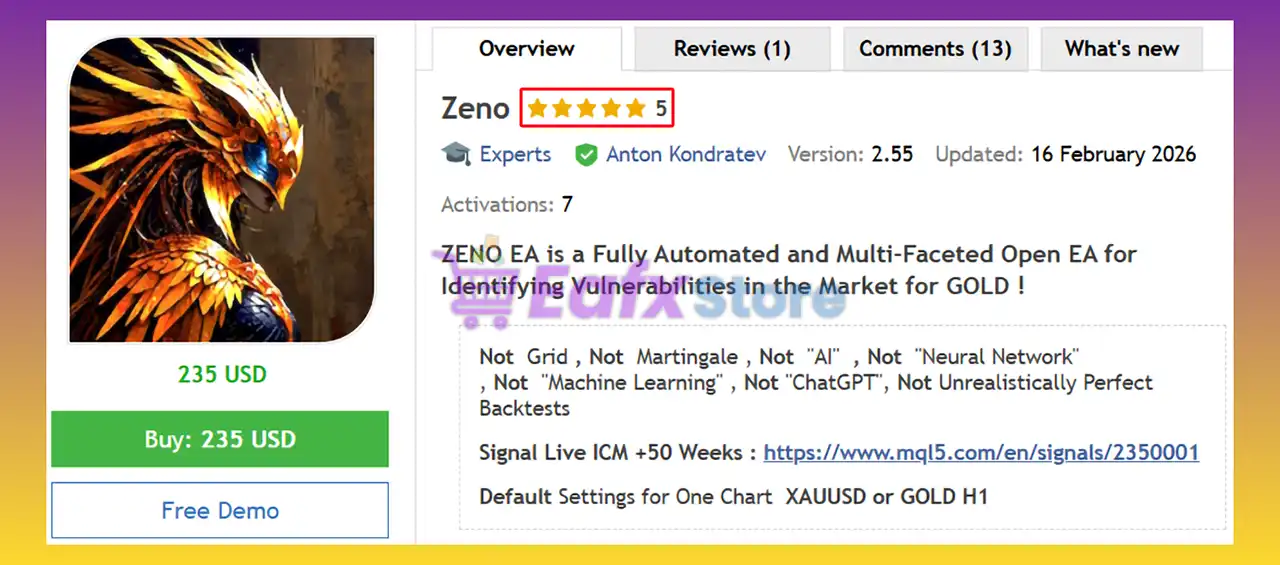
Zeno EA shows significant potential in providing stable and reliable profits, making it a reliable tool in the forex market. The advisor is highly appreciated by the MQL5 community in many aspects and has won the trust of users.
⭐⭐⭐⭐⭐ Sergey Porphiryev (2026.03.01): “Best results of February 1st month of trades – 1st in TOP of results by month.”
⭐⭐⭐⭐⭐ Philipp Hermann (2026.02.07): “The EA performs exactly as shown in backtests with no surprises – what you test is what you get in live trading. I’m particularly impressed with the excellent SL/TP ratio and the clean, fast trailing mechanism that protects profits efficiently.”
Recommended settings
Recommended settings and parameters to pay attention to from developers and experts:
| Features | Type |
|---|---|
| Trading platform | MetaTrader 5 (MT5) |
| Time frames | H1 (60 minute chart) |
| Currency pairs | XAUUSD (Gold) |
| Minimum / Recommended deposit | $300+ |
| Minimum / Recommended leverage | 1:30+ |
| Account type | ICM / RAW / Pro / ECN |
| Product type | Original version |
| Additional services | Unlock and Decompile |
| Recommended brokers | Exness Broker, Icmarkets Broker |
| Recommended VPS | MyfxVPS.com (Blue VPS, Golden VPS). Lowest Latency, 2 week Free Trial, 100% Free for 12-18 Months. |
Product Download Package?
The download package of the product suite includes:
 Experts: Zeno EA.ex5
SetFiles: ZENO_FTMO_100K_XAUUSD.set
 Reviewed by David Easton
Conclusion
In short, Zeno EA stands out as a Gold-optimized Expert Advisor for MetaTrader 5 (MT5), combining breakout precision with strict capital protection. Its predefined Stop Loss (SL) and Take Profit (TP), news filters, and broker-adaptive logic enhance execution reliability. Ideal for traders seeking consistent XAUUSD automation, it balances volatility-driven entries with structured risk–reward discipline.
🔢 Zeno EA MT5 Settings Guide – Complete Inputs Explained
Zeno EA MT5 is a fully automated Expert Advisor designed around the XAUUSD/GOLD market, with the supplied configuration identified as ZENO EA XAUUSD/GOLD H1 DEFAULT SETTINGS. The developer describes Zeno as a flexible, multi-currency and multi-faceted EA designed to identify vulnerabilities in the Gold market, using fixed Take Profit, relatively low Stop Loss, virtual profit tracking, and optional recovery mechanisms.
The visible Inputs panel provides extensive control over risk, fixed TP/SL, virtual profit tracking, recovery, FTMO-style trading controls, BUY/SELL trailing management, broker GMT adaptation, news filtering, Christmas-day protection, and additional trade management.
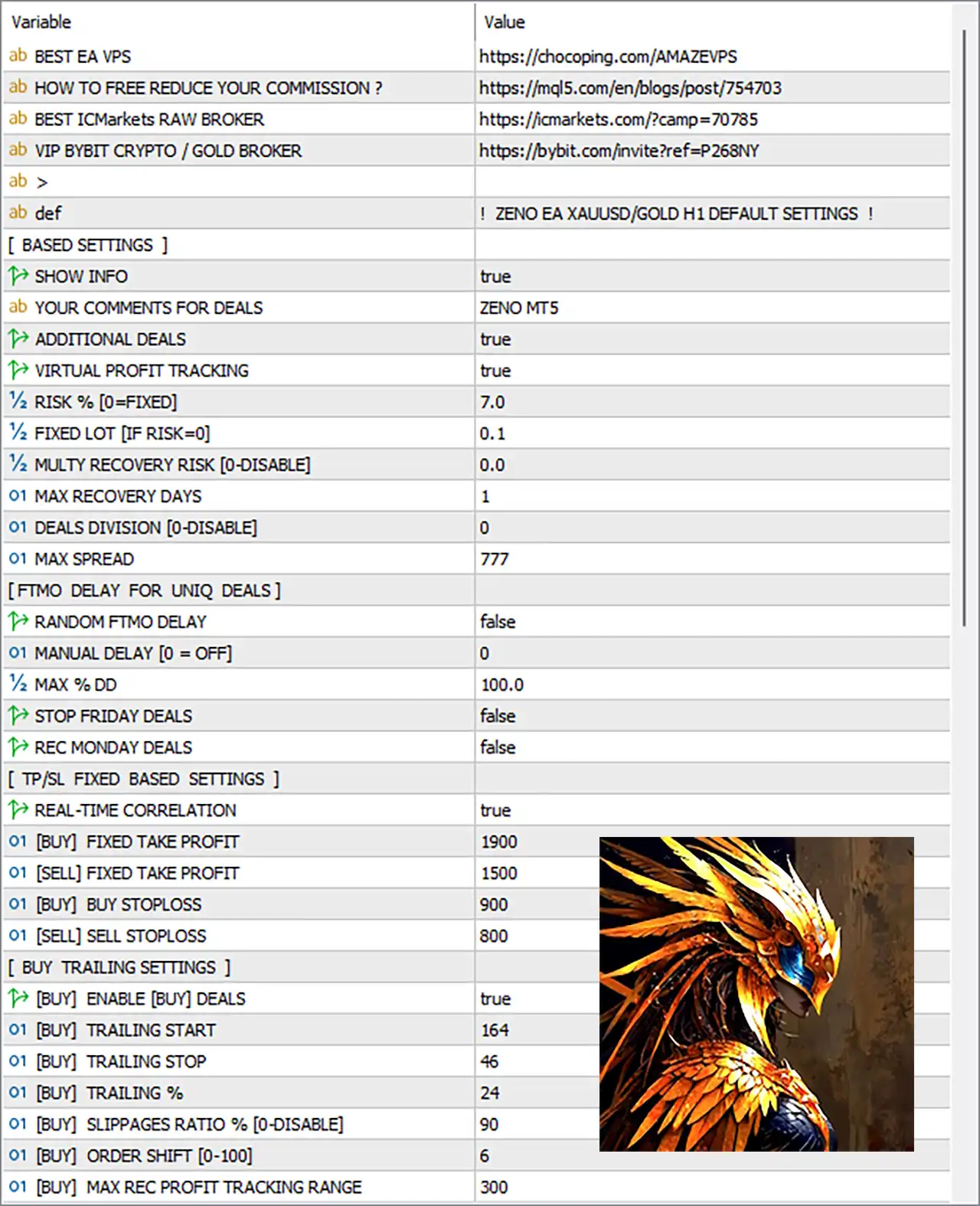
Zeno EA MT5 Settings Panel
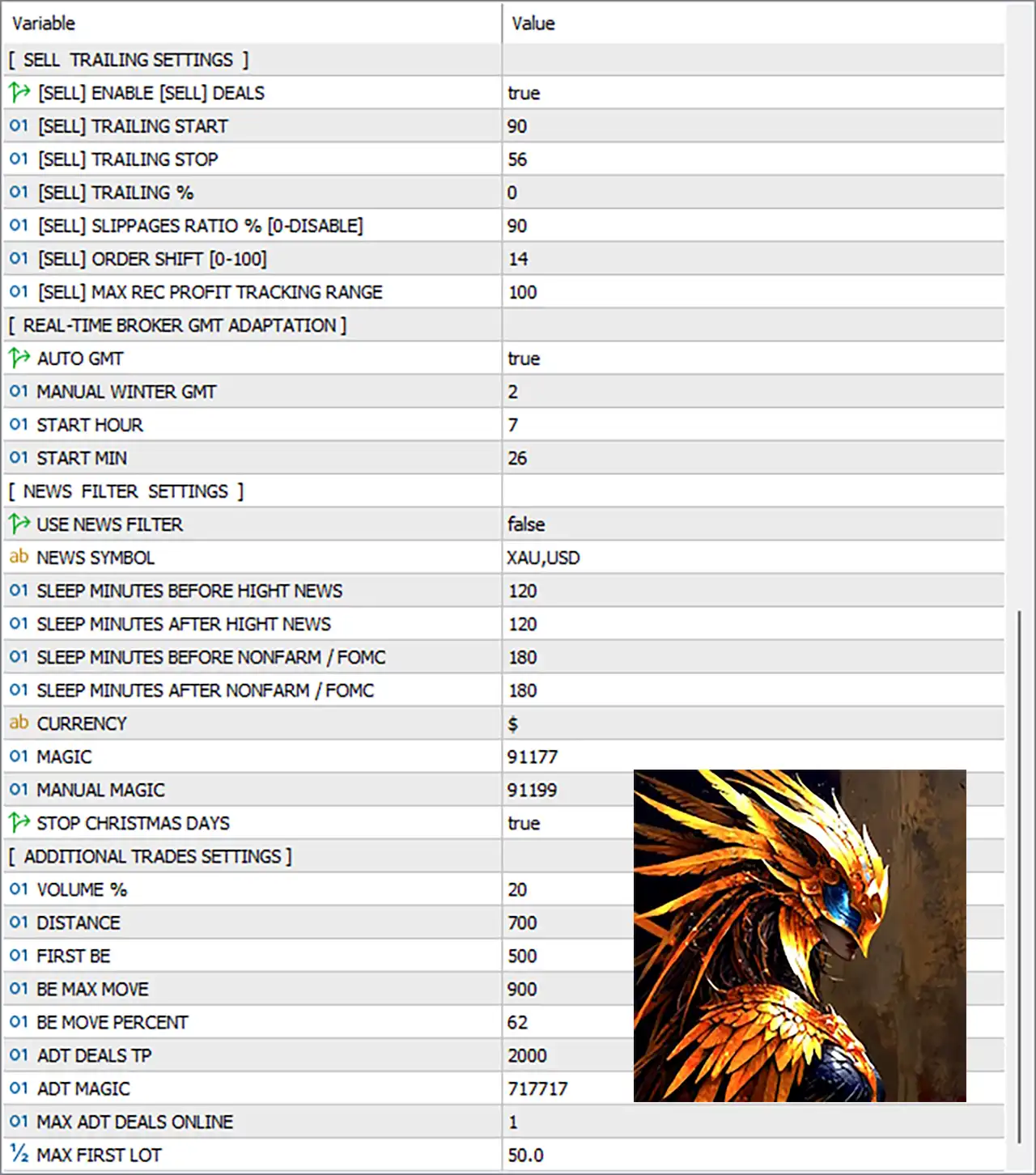
Zeno EA Settings Panel
🔢 Reference & Information Fields
🔹 BEST EA VPS — The Inputs panel contains an external VPS reference link for users who want to run the EA continuously on a VPS.
🔹 HOW TO FREE REDUCE YOUR COMMISSION ? — Provides a reference link containing information about reducing trading commission.
🔹 BEST ICMarkets RAW BROKER — Provides an IC Markets RAW broker reference link.
🔹 VIP BYBIT CRYPTO / GOLD BROKER — Provides a Bybit Crypto/Gold broker reference link.
🔹 > = ZENO EA XAUUSD/GOLD H1 DEFAULT SETTINGS ! — Identifies the displayed configuration as the default settings for ZENO EA XAUUSD/GOLD H1.
🔹 def — Internal/reference text shown in the Inputs panel.
🔢 BASED SETTINGS
🔹 SHOW INFO = true — Enables the EA’s information display or informational interface.
🔹 YOUR COMMENTS FOR DEALS = ZENO MT5 — Sets ZENO MT5 as the custom comment associated with EA trades.
🔹 ADDITIONAL DEALS = true — Enables the EA’s additional-deal functionality, allowing the corresponding additional trade-management system to operate.
🔹 VIRTUAL PROFIT TRACKING = true — Enables Virtual Profit Tracking. The developer describes Zeno as using virtual profit tracking together with fixed TP/SL management.
🔹 RISK % [0=FIXED] = 7.0 — Sets percentage-based risk to 7.0%. A value of 0 would switch this setting to Fixed Lot mode.
🔹 FIXED LOT [IF RISK=0] = 0.1 — Defines the fixed lot size as 0.1 when the risk percentage is set to 0.
🔹 MULTY RECOVERY RISK [0-DISABLE] = 0.0 — Sets the additional recovery-risk percentage to 0.0. A value of 0.0 disables this recovery-risk setting.
🔹 MAX RECOVERY DEALS = 1 — Limits the configured recovery mechanism to a maximum of 1 recovery deal.
🔹 DEALS DIVISION [0-DISABLE] = 0 — Sets deal division to 0, which disables the deal-division function.
🔹 MAX SPREAD = 777 — Sets the maximum permitted spread parameter to 777 according to the EA’s spread-control logic.
The developer states that Zeno includes protection against high spreads and strong news events as part of its trading algorithm.
🔢 FTMO DELAY FOR UNIQUE DEALS
🔹 RANDOM FTMO DELAY = false — Disables randomized FTMO-style execution delays.
🔹 MANUAL DELAY [0 = OFF] = 0 — Sets the manual delay to 0, meaning the manual delay function is disabled.
🔹 MAX % DD = 100.0 — Sets the maximum drawdown parameter to 100.0%.
🔹 STOP FRIDAY DEALS = false — Disables the function that stops new deals on Friday.
🔹 REC MONDAY DEALS = false — Disables the Monday recovery-deal function.
🔢 TP/SL FIXED BASED SETTINGS
🔹 REAL-TIME CORRELATION = true — Enables real-time correlation functionality within the EA’s trade-management logic.
🔹 [BUY] FIXED TAKE PROFIT = 1900 — Sets the fixed Take Profit for BUY positions to 1900 points.
🔹 [SELL] FIXED TAKE PROFIT = 1500 — Sets the fixed Take Profit for SELL positions to 1500 points.
🔹 [BUY] BUY STOPLOSS = 900 — Sets the fixed Stop Loss for BUY positions to 900 points.
🔹 [SELL] SELL STOPLOSS = 800 — Sets the fixed Stop Loss for SELL positions to 800 points.
🔹 These asymmetric BUY/SELL TP and SL values allow the EA to use different exit distances depending on the direction of the position.
🔢 BUY TRAILING SETTINGS
🔹 [BUY] ENABLE [BUY] DEALS = true — Enables BUY trades under the BUY-side trailing configuration.
🔹 [BUY] TRAILING START = 164 — Activates the BUY trailing mechanism after the configured 164-point threshold is reached.
🔹 [BUY] TRAILING STOP = 46 — Sets the BUY trailing distance to 46 points.
🔹 [BUY] TRAILING % = 24 — Sets the BUY trailing percentage parameter to 24%.
🔹 [BUY] SLIPPAGES RATIO % [0-DISABLE] = 90 — Sets the BUY-side slippage ratio to 90%. A value of 0 would disable this parameter.
🔹 [BUY] ORDER SHIFT [0-100] = 6 — Sets the BUY order-shift parameter to 6, within the stated 0–100 range.
🔹 [BUY] MAX REC PROFIT TRACKING RANGE = 300 — Sets the maximum BUY recovery-profit tracking range to 300 points.
🔢 SELL TRAILING SETTINGS
🔹 [SELL] ENABLE [SELL] DEALS = true — Enables SELL trades under the SELL-side trailing configuration.
🔹 [SELL] TRAILING START = 90 — Activates the SELL trailing mechanism after the configured 90-point threshold is reached.
🔹 [SELL] TRAILING STOP = 56 — Sets the SELL trailing distance to 56 points.
🔹 [SELL] TRAILING % = 0 — Sets the SELL trailing percentage to 0.
🔹 [SELL] SLIPPAGES RATIO % [0-DISABLE] = 90 — Sets the SELL-side slippage ratio to 90%. A value of 0 would disable this parameter.
🔹 [SELL] ORDER SHIFT [0-100] = 14 — Sets the SELL order-shift parameter to 14, within the stated 0–100 range.
🔹 [SELL] MAX REC PROFIT TRACKING RANGE = 100 — Sets the maximum SELL recovery-profit tracking range to 100 points.
🔢 REAL-TIME BROKER GMT ADAPTATION
🔹 AUTO GMT = true — Enables automatic detection/adaptation of the broker’s GMT offset.
🔹 MANUAL WINTER GMT = 2 — Sets the manual winter GMT offset to 2 hours. This serves as the configured manual GMT reference when required.
🔹 START HOUR = 7 — Sets the configured starting hour to 7.
🔹 START MIN = 26 — Sets the configured starting minute to 26.
🔹 With AUTO GMT = true, the EA is configured to use automatic broker-time adaptation rather than relying solely on the manual 2-hour winter GMT value.
The developer states that Zeno can independently determine the broker’s GMT and includes a strong-news filter using an external data source.
🔢 NEWS FILTER SETTINGS
🔹 USE NEWS FILTER = false — Disables the news filter in the supplied configuration.
🔹 NEWS SYMBOL = XAU,USD — Specifies XAU and USD as the news-related symbols/currencies monitored by the news configuration.
🔹 SLEEP MINUTES BEFORE HIGHT NEWS = 120 — Sets the trading pause period before high-impact news to 120 minutes when the News Filter is enabled.
🔹 SLEEP MINUTES AFTER HIGHT NEWS = 120 — Sets the trading pause period after high-impact news to 120 minutes.
🔹 SLEEP MINUTES BEFORE NONFARM / FOMC = 180 — Sets the protection period before Nonfarm Payroll / FOMC events to 180 minutes.
🔹 SLEEP MINUTES AFTER NONFARM / FOMC = 180 — Sets the protection period after Nonfarm Payroll / FOMC events to 180 minutes.
🔹 CURRENCY = $ — Sets the currency display/reference symbol to $.
🔹 Although the news-protection parameters are configured with 120 and 180 minute windows, USE NEWS FILTER = false means the news-filter mechanism is currently disabled in this setup.
🔹 The developer’s description states that Zeno has a strong-news protection mechanism covering events such as NONFARM/FOMC.
🔢 MAGIC & EA IDENTIFICATION
🔹 MAGIC = 91177 — Sets the primary EA Magic Number to 91177, allowing the EA to identify and manage its own positions.
🔹 MANUAL MAGIC = 91199 — Sets the Manual Magic Number to 91199, providing a separate identifier for the corresponding manual-trade management functionality.
🔢 CHRISTMAS PROTECTION
🔹 STOP CHRISTMAS DAYS = true — Enables the Christmas-day trading restriction, preventing the EA from operating normally during the configured Christmas protection period.
🔢 ADDITIONAL TRADES SETTINGS
🔹 VOLUME % = 20 — Sets the additional-trade volume parameter to 20%.
🔹 DISTANCE = 700 — Sets the minimum/configured distance for additional trades to 700 points.
🔹 FIRST BE = 500 — Sets the first Break-Even threshold to 500 points.
🔹 BE MAX MOVE = 900 — Sets the maximum Break-Even movement to 900 points.
🔹 BE MOVE PERCENT = 62 — Sets the Break-Even movement percentage to 62%.
🔹 ADT DEALS TP = 2000 — Sets the Take Profit target for additional deals to 2000 points.
🔹 ADT MAGIC = 717717 — Assigns 717717 as the Magic Number for additional trades.
🔹 MAX ADT DEALS ONLINE = 1 — Limits the number of additional deals that can be online simultaneously to 1.
🔹 MAX FIRST LOT = 50.0 — Sets the maximum first-lot parameter to 50.0 lots.
🔢 Zeno EA MT5 Complete Configuration Summary
🔹 Trading Reference = XAUUSD/GOLD H1 — The supplied panel identifies these as ZENO EA XAUUSD/GOLD H1 DEFAULT SETTINGS.
🔹 Show Info = true — Information display is enabled.
🔹 Trade Comment = ZENO MT5 — The trade comment is ZENO MT5.
🔹 Additional Deals = true — Additional trade functionality is enabled.
🔹 Virtual Profit Tracking = true — Virtual profit tracking is enabled.
🔹 Risk = 7.0% — The configured percentage risk is 7.0.
🔹 Fixed Lot = 0.1 — The alternative fixed lot is 0.1 if Risk % is set to 0.
🔹 Multi Recovery Risk = 0.0 — Recovery-risk percentage is disabled at 0.0.
🔹 Maximum Recovery Deals = 1 — Maximum recovery deals are set to 1.
🔹 Deals Division = 0 — Deal division is disabled.
🔹 Maximum Spread = 777 — Maximum spread parameter is 777.
🔹 Random FTMO Delay = false — Random delay is disabled.
🔹 Manual Delay = 0 — Manual delay is disabled.
🔹 Maximum DD = 100.0% — Maximum drawdown parameter is 100.0%.
🔹 Stop Friday Deals = false — Friday deal stopping is disabled.
🔹 Recover Monday Deals = false — Monday recovery deals are disabled.
🔹 Real-Time Correlation = true — Real-time correlation is enabled.
🔹 BUY TP / SL = 1900 / 900 — BUY positions use 1900 points TP and 900 points SL.
🔹 SELL TP / SL = 1500 / 800 — SELL positions use 1500 points TP and 800 points SL.
🔹 BUY Trailing = Start 164 / Stop 46 / 24% — BUY trailing parameters are 164, 46, and 24%.
🔹 BUY Slippage Ratio = 90% — BUY slippage ratio is 90%.
🔹 BUY Order Shift = 6 — BUY order shift is 6.
🔹 BUY Max Recovery Profit Tracking Range = 300 — BUY recovery-profit tracking range is 300.
🔹 SELL Trailing = Start 90 / Stop 56 / 0% — SELL trailing parameters are 90, 56, and 0%.
🔹 SELL Slippage Ratio = 90% — SELL slippage ratio is 90%.
🔹 SELL Order Shift = 14 — SELL order shift is 14.
🔹 SELL Max Recovery Profit Tracking Range = 100 — SELL recovery-profit tracking range is 100.
🔹 Auto GMT = true — Automatic broker GMT adaptation is enabled.
🔹 Manual Winter GMT = 2 — Manual winter GMT reference is 2.
🔹 Start Hour = 7 — Start hour is 7.
🔹 Start Minute = 26 — Start minute is 26.
🔹 News Filter = false — News filtering is currently disabled.
🔹 News Symbol = XAU,USD — News configuration references XAU,USD.
🔹 High-Impact News Protection = 120 / 120 minutes — The configured before/after high-impact news periods are 120 minutes each.
🔹 NONFARM/FOMC Protection = 180 / 180 minutes — The configured before/after Nonfarm/FOMC periods are 180 minutes each.
🔹 Currency = $ — Currency reference is $.
🔹 Magic = 91177 — Primary Magic Number is 91177.
🔹 Manual Magic = 91199 — Manual Magic Number is 91199.
🔹 Stop Christmas Days = true — Christmas protection is enabled.
🔹 Additional Deal Volume = 20% — Additional trade volume is configured at 20%.
🔹 Additional Deal Distance = 700 — Additional trades use a configured 700-point distance.
🔹 First BE = 500 — First Break-Even level is 500 points.
🔹 BE Max Move = 900 — Maximum Break-Even movement is 900 points.
🔹 BE Move Percent = 62% — Break-Even movement percentage is 62%.
🔹 Additional Deals TP = 2000 — Additional-deal Take Profit is 2000 points.
🔹 Additional Deals Magic = 717717 — Additional trades use Magic Number 717717.
🔹 Maximum Additional Deals Online = 1 — Only 1 additional deal can be online according to this setting.
🔹 Maximum First Lot = 50.0 — Maximum first lot is configured at 50.0 lots.
🔢 Conclusion
Zeno EA MT5 provides a highly detailed framework for automated XAUUSD/GOLD trading, combining fixed directional TP/SL values, Virtual Profit Tracking, recovery controls, separate BUY and SELL trailing systems, broker-time adaptation, and additional trade management.
The supplied configuration uses Risk = 7.0%, while Fixed Lot = 0.1 remains available as the alternative when Risk % is set to 0.
The fixed exit structure is asymmetric: BUY trades use 1900 TP / 900 SL, while SELL trades use 1500 TP / 800 SL. This means the EA can manage BUY and SELL positions using different predefined distances.
Virtual Profit Tracking and Additional Deals are both enabled, with VIRTUAL PROFIT TRACKING = true and ADDITIONAL DEALS = true. The developer specifically describes Zeno as using virtual profit tracking together with fixed TP/SL and a multi-faceted profit-taking mechanism.
The recovery settings are important to understand because the configuration includes MULTY RECOVERY RISK = 0.0, MAX RECOVERY DEALS = 1, VOLUME % = 20, DISTANCE = 700, ADT DEALS TP = 2000, and MAX ADT DEALS ONLINE = 1.
BUY and SELL trailing management are configured independently. BUY trailing uses 164 / 46 / 24%, while SELL trailing uses 90 / 56 / 0%, allowing the EA to apply different trade-management behavior depending on direction.
The News Filter is currently false, even though the panel contains 120-minute high-impact-news protection and 180-minute NONFARM/FOMC protection values. These time windows become relevant when the news-filter mechanism is enabled.
The developer describes Zeno as a multi-currency, flexible, fully automated EA designed to identify market vulnerabilities in Gold and states that its algorithm uses a virtual channel, ATR, optional recovery mechanisms, and Virtual Profit Tracking.
Because the current configuration contains a 7.0% risk setting, recovery controls, and a 50.0-lot maximum first-lot parameter, traders should test the exact configuration carefully on a demo or controlled environment before considering live deployment. Actual exposure can also depend on broker contract specifications, leverage, spread, execution, and account size.
User Reviews
Only logged in customers who have purchased this product may leave a review.
❓ What trading strategy does Zeno EA use on XAUUSD?
Zeno EA trades support and resistance breakdowns confirmed by ATR-based volatility filters.
❓ How does Zeno EA manage risk on each trade?
Zeno EA applies fixed Stop Loss and Take Profit levels for disciplined exposure control.
❓ Does Zeno EA use martingale or grid systems?
Zeno EA avoids martingale and grid logic, focusing on structured risk per position.
❓ What timeframe is recommended for Zeno EA?
Zeno EA is optimized for the H1 timeframe on XAUUSD for stable breakout execution.
❓ How does Zeno EA confirm breakout validity?
Zeno EA uses ATR and virtual channel logic to validate strong Gold price movements.
❓ Can Zeno EA handle high-impact news events?
Zeno EA includes volatility and news filters to block trades during unstable sessions.
❓ What is the minimum recommended deposit for Zeno EA?
Zeno EA recommends at least $300 to maintain stable and controlled performance.
❓ Does Zeno EA adapt to broker conditions?
Zeno EA adjusts to spreads, slippage, delays, and market gaps for reliable execution.
❓ Does Zeno EA trade frequently?
Zeno EA trades almost daily when filtered conditions align with breakout structure.
❓ Is Zeno EA suitable for long-term automated trading?
Zeno EA emphasizes capital protection and disciplined breakout logic for resilience.
-
 Original price was: $2,000.00.$199.00Current price is: $199.00.
 -
 Original price was: $30,000.00.$599.00Current price is: $599.00.
 -
 Original price was: $3,750.00.$599.00Current price is: $599.00.
 -
 Original price was: $30,000.00.$599.00Current price is: $599.00.
-
 0Original price was: $2,288.00.$249.00Current price is: $249.00.
 -
 1Original price was: $500.00.$249.00Current price is: $249.00.
 -
 0Original price was: $199.00.$179.00Current price is: $179.00.
 -
 0Original price was: $430.00.$249.00Current price is: $249.00.
There are no reviews yet.