

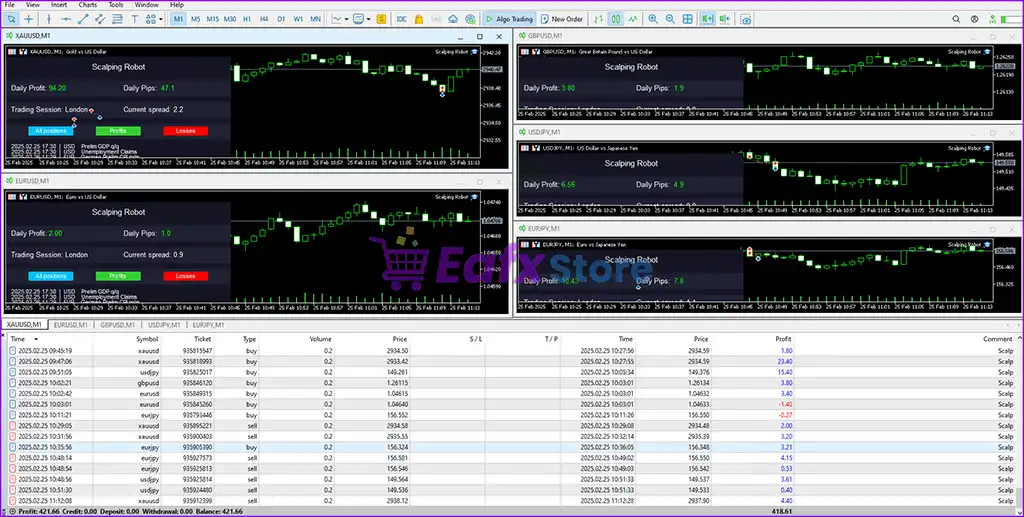

🔢 Scalping Robot MT4 – Complete Settings Guide for Automated Forex Scalping
Scalping Robot MT4 is an automated Forex trading Expert Advisor designed for MetaTrader 4 (MT4). The EA specializes in high-frequency scalping strategies with automatic Take Profit, Stop Loss, Trailing stop management, trading session scheduling and advanced news filtering.
With configurable trading hours, spread control, and risk management tools, Scalping Robot MT4 helps traders automate short-term Forex trading efficiently.
🔢 Installation Panel Parameters
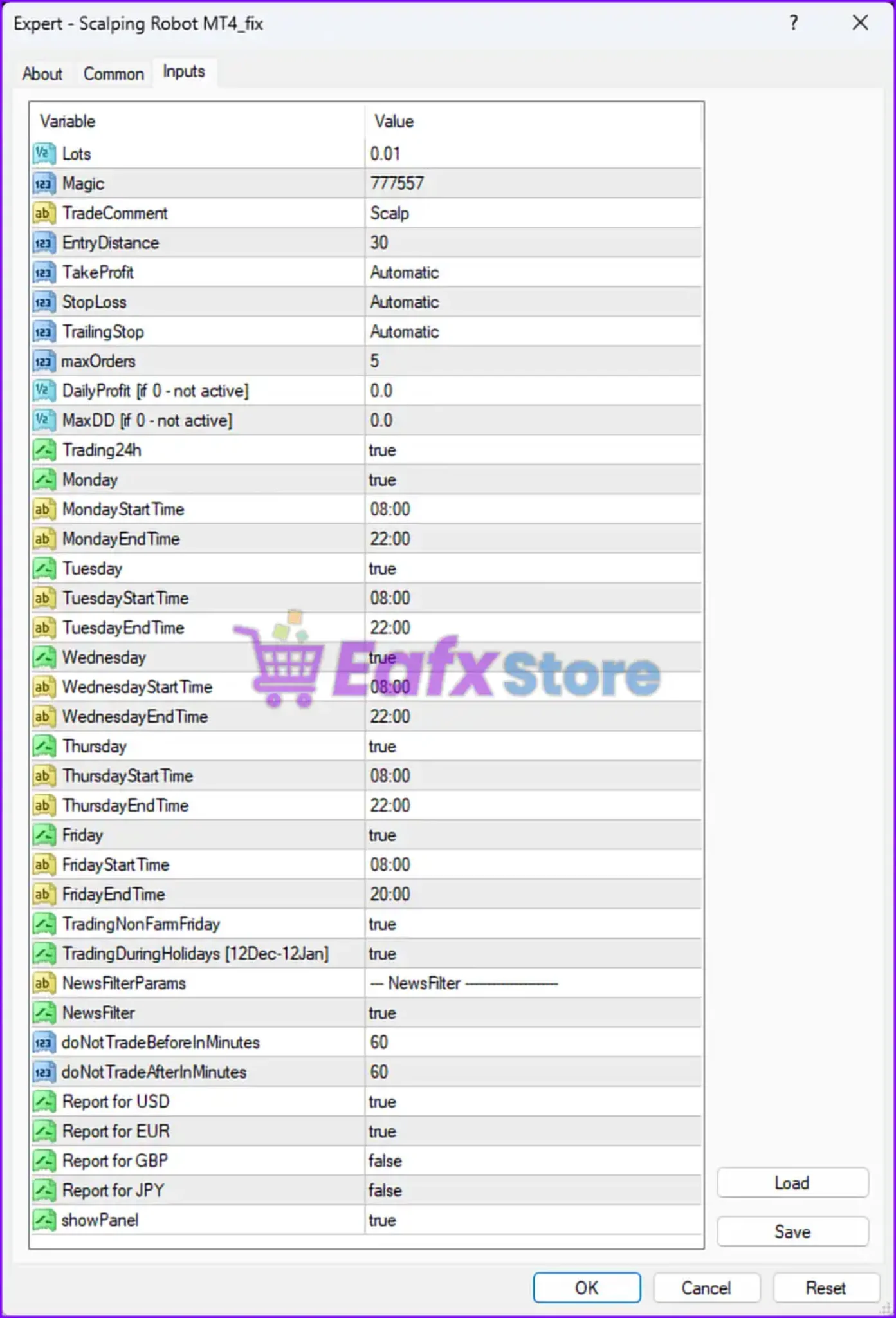
Below are the details of the parameters in the advisor’s trading system settings table:
🔶 General Trading Settings
🔹 Lots = 0.01 — Sets the default trading lot size to 0.01 lots.
🔹 Magic = 777557 — Assigns the unique Magic Number 777557 for identifying and managing EA trades.
🔹 TradeComment = Scalp — Adds the custom comment “Scalp” to all trading orders.
🔹 EntryDistance = 30 — Defines the minimum entry distance between positions as 30 points/pips.
🔹 TakeProfit = Automatic — Enables automatic Take Profit calculation and management.
🔹 StopLoss = Automatic — Enables automatic Stop Loss calculation and management.
🔹 TrailingStop = Automatic — Enables automatic trailing stop management.
🔹 maxOrders = 5 — Limits the maximum number of simultaneous open trades to 5.
🔹 DailyProfit (if 0 - not active) = 0.0 — Disables the daily profit target feature.
🔹 MaxDD (if 0 - not active) = 0.0 — Disables maximum drawdown protection.
🔶 Trading Schedule Settings
🔹 Trading24h = true — Enables 24-hour trading mode.
🔹 Monday = true — Enables trading on Monday.
🔹 MondayStartTime = 08:00 — Sets Monday trading start time to 08:00.
🔹 MondayEndTime = 22:00 — Sets Monday trading end time to 22:00.
🔹 Tuesday = true — Enables trading on Tuesday.
🔹 TuesdayStartTime = 08:00 — Sets Tuesday trading start time to 08:00.
🔹 TuesdayEndTime = 22:00 — Sets Tuesday trading end time to 22:00.
🔹 Wednesday = true — Enables trading on Wednesday.
🔹 WednesdayStartTime = 08:00 — Sets Wednesday trading start time to 08:00.
🔹 WednesdayEndTime = 22:00 — Sets Wednesday trading end time to 22:00.
🔹 Thursday = true — Enables trading on Thursday.
🔹 ThursdayStartTime = 08:00 — Sets Thursday trading start time to 08:00.
🔹 ThursdayEndTime = 22:00 — Sets Thursday trading end time to 22:00.
🔹 Friday = true — Enables trading on Friday.
🔹 FridayStartTime = 08:00 — Sets Friday trading start time to 08:00.
🔹 FridayEndTime = 20:00 — Sets Friday trading end time to 20:00.
🔹 TradingNonFarmFriday = true — Allows trading during Non-Farm Payroll Fridays.
🔹 TradingDuringHolidays (12Dec-12Jan) = true — Allows trading during the holiday period from December 12 to January 12.
🔶 News Filter Settings
🔹 NewsFilterParams = --- NewsFilter ------------ — Displays the news filter configuration section.
🔹 NewsFilter = true — Enables economic news filtering.
🔹 doNotTradeBeforeInMinutes = 60 — Stops trading 60 minutes before important news events.
🔹 doNotTradeAfterInMinutes = 60 — Resumes trading 60 minutes after important news events.
🔹 Report for USD = true — Enables USD-related news event filtering.
🔹 Report for EUR = true — Enables EUR-related news event filtering.
🔹 Report for GBP = false — Disables GBP-related news event filtering.
🔹 Report for JPY = false — Disables JPY-related news event filtering.
🔹 showPanel = true — Displays the EA information panel on the trading chart.
🔢 Conclusion
Scalping Robot MT4 is a professional automated scalping Expert Advisor (EA) built for MetaTrader 4 traders who prefer fast-paced Forex trading strategies.
With automatic Take Profit and Stop Loss management, trailing stop systems, flexible trading schedules, and built-in economic news filters, the EA provides a complete solution for short-term trading automation.
Proper adjustment of lot size, trading hours, and news filter settings can help improve stability and long-term trading performance.
🔢 FAQs
❓ What is Scalping Robot MT4?
Scalping Robot MT4 is an automated Forex trading Expert Advisor designed for high-frequency scalping strategies on MetaTrader 4.
❓ Does Scalping Robot MT4 include automatic Take Profit and Stop Loss?
Yes, both Take Profit and Stop Loss are configured in automatic mode.
❓ Can Scalping Robot MT4 trade during news events?
The EA includes a built-in news filter that pauses trading 60 minutes before and after major economic news events.
❓ How many trades can Scalping Robot MT4 open simultaneously?
The EA allows a maximum of 5 open orders at the same time.
❓ Does Scalping Robot MT4 support 24-hour trading?
Yes, the Trading24h parameter is enabled, allowing continuous trading operation.



