
🔢 Idol EA MT4 – Complete Settings Guide for Automated Forex Trading
Idol EA MT4 is an automated Forex trading Expert Advisor (EA) developed for MetaTrader 4 (MT4). The EA combines Moving Average analysis, ATR-based calculations, trailing stop systems, spread filtering and automated risk management.
With customizable Take Profit, Stop Loss, trailing settings, and visual trading signals, Idol EA MT4 provides traders with a flexible and intelligent automated trading solution for various Forex market conditions.
🔢 Installation Panel Parameters
Below are the details of the parameters in the advisor’s trading system settings table:
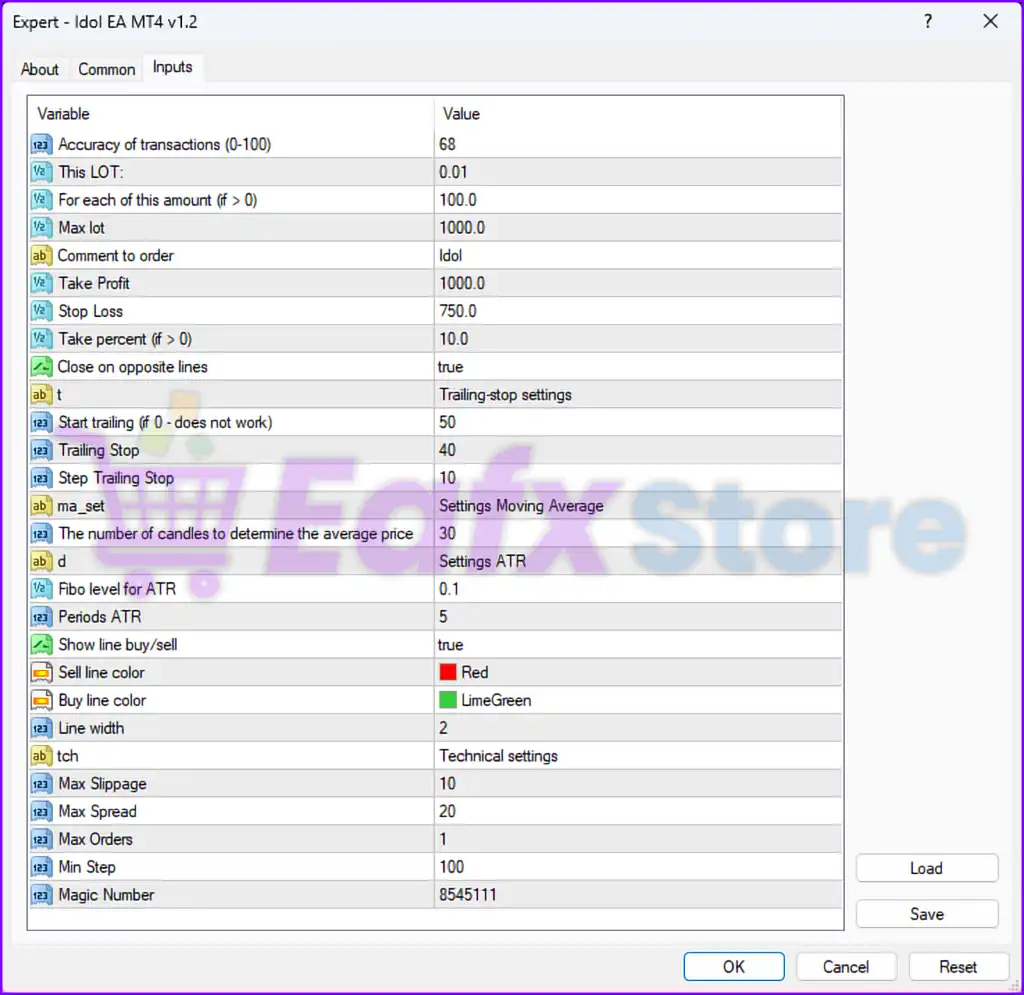
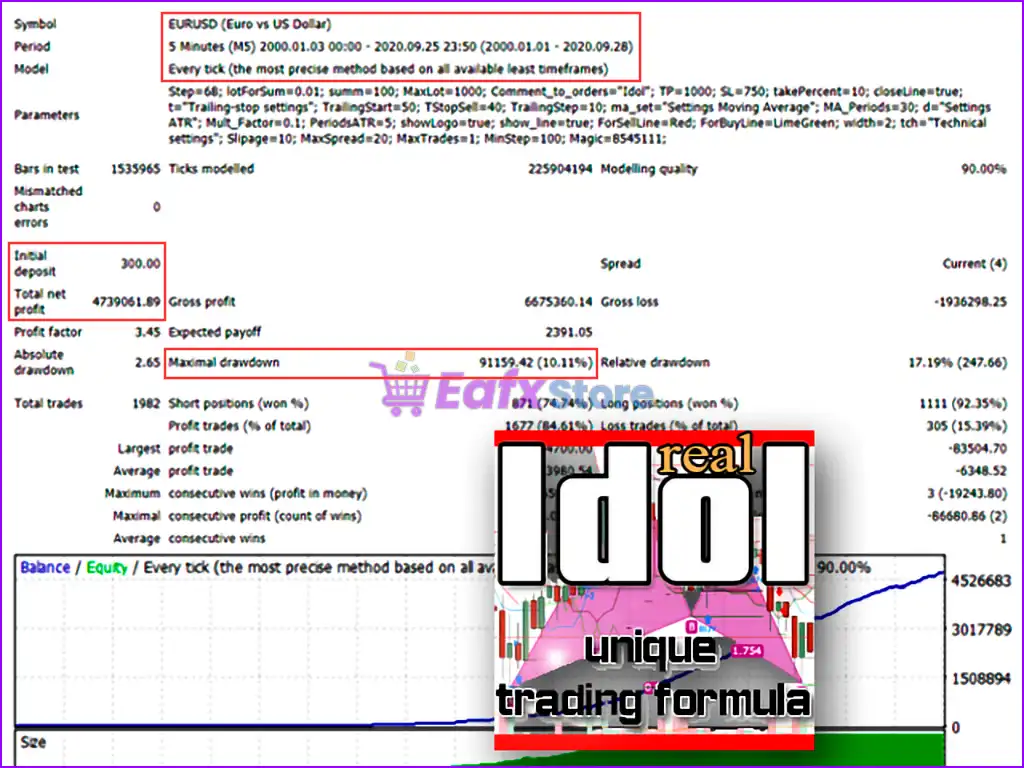
🔹 Accuracy of transactions (0-100) = 68 — Sets the transaction accuracy sensitivity level to 68 for trade signal filtering.
🔹 This LOT = 0.01 — Defines the default starting lot size as 0.01 lots.
🔹 For each of this amount (if > 0) = 100.0 — Uses 100.0 account currency units as the reference amount for lot scaling calculations.
🔹 Max lot = 1000.0 — Sets the maximum allowed trading lot size to 1000.0 lots.
🔹 Comment to order = Idol — Adds the comment “Idol” to all executed trades.
🔹 Take Profit = 1000.0 — Sets the Take Profit target to 1000.0 points/pips.
🔹 Stop Loss = 750.0 — Sets the Stop Loss protection to 750.0 points/pips.
🔹 Take percent (if > 0) = 10.0 — Defines the profit-taking percentage level as 10.0%.
🔹 Close on opposite lines = true — Automatically closes positions when opposite trading signals appear.
🔶 Trailing Stop Settings
🔹 t = Trailing-stop settings — Displays the trailing stop configuration section.
🔹 Start trailing (if 0 - does not work) = 50 — Activates trailing stop after 50 points/pips of profit.
🔹 Trailing Stop = 40 — Sets the trailing stop distance to 40 points/pips.
🔹 Step Trailing Stop = 10 — Defines the trailing stop movement step as 10 points/pips.
🔶 Moving Average Settings
🔹 ma_set = Settings Moving Average — Displays the Moving Average configuration section.
🔹 The number of candles to determine the average price = 30 — Uses 30 candles to calculate the average market price.
🔶 ATR Settings
🔹 d = Settings ATR — Displays the ATR indicator configuration section.
🔹 Fibo level for ATR = 0.1 — Sets the Fibonacci multiplier level for ATR calculations to 0.1.
🔹 Periods ATR = 5 — Defines the ATR calculation period as 5 candles.
🔶 Visual Trading Signal Settings
🔹 Show line buy/sell = true — Displays BUY and SELL signal lines on the chart.
🔹 Sell line color = Red — Sets SELL signal line color to Red.
🔹 Buy line color = LimeGreen — Sets BUY signal line color to LimeGreen.
🔹 Line width = 2 — Defines the chart signal line width as 2.
🔶 Technical Settings
🔹 tch = Technical settings — Displays the technical configuration section.
🔹 Max Slippage = 10 — Sets the maximum allowed slippage to 10 points.
🔹 Max Spread = 20 — Limits the maximum allowed spread to 20 points/pips.
🔹 Max Orders = 1 — Restricts the EA to only 1 open order at a time.
🔹 Min Step = 100 — Defines the minimum step distance between trades as 100 points/pips.
🔹 Magic Number = 8545111 — Assigns the unique Magic Number 8545111 for identifying and managing EA trades.
🔢 Conclusion
Idol EA MT4 is a feature-rich automated Forex trading robot that combines Moving Average analysis, ATR calculations, trailing stop management, and spread filtering for improved trading precision.
With customizable risk management settings, visual trade signals, and automatic trade-closing logic, the EA provides traders with a balanced and flexible automated trading solution for MT4 platforms. Proper optimization of Take Profit, Stop Loss, and trailing settings is essential for stable and consistent long-term trading performance.
🔢 FAQs
❓ What is Idol EA MT4?
Idol EA MT4 is an automated Forex trading Expert Advisor for MetaTrader 4 that uses Moving Average and ATR-based trading strategies.
❓ Does Idol EA MT4 support trailing stop management?
Yes, the EA includes customizable trailing stop settings with activation, distance, and step parameters.
❓ Can Idol EA MT4 automatically close trades on reverse signals?
Yes, the “Close on opposite lines” feature automatically closes trades when opposite signals appear.
❓ What indicators are used in Idol EA MT4?
The EA uses Moving Average and ATR (Average True Range) indicators for market analysis and trade execution.
❓ How many trades can Idol EA MT4 open simultaneously?
The EA is configured to allow only 1 open order at a time using the “Max Orders = 1” setting.