


🔢 Sentinel EA MT5 – Complete Settings Guide
Sentinel EA MT5 is a multi-symbol automated trading system designed to manage basket-based trading across several currency pairs while providing detailed controls for spreads, lot sizes, portfolio protection, recovery logic, news filtering, performance monitoring, and strategy testing.
Its configuration supports EURUSD, GBPUSD, AUDCAD, EURCAD, and NZDCAD by default, with optional support for CADJPY and EURGBP. The settings also include portfolio-level Stop Loss and Take Profit controls, conservative basket TP recovery, simultaneous-trade protection, and a configurable economic-news filter.
🔄 Controller & Fast Tester Defaults
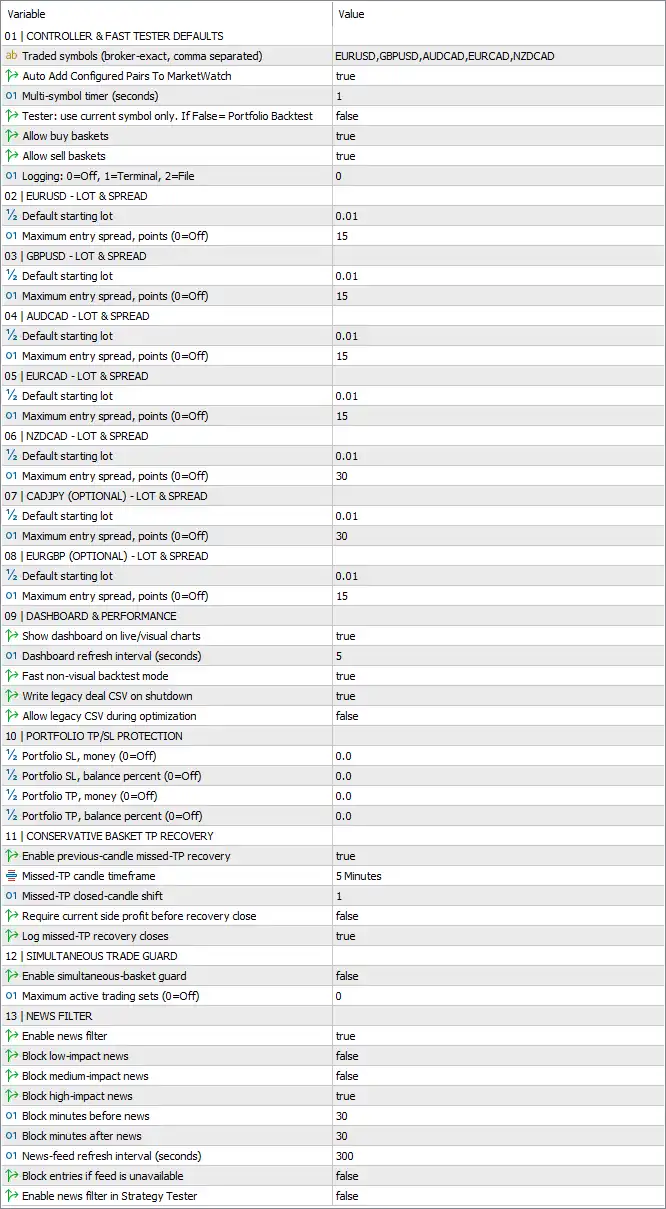
🔹 Traded symbols (broker-exact, comma separated) = EURUSD, GBPUSD, AUDCAD, EURCAD, NZDCAD — Defines the default trading symbols using broker-exact names, separated by commas.
🔹 Auto Add Configured Pairs To MarketWatch = true — Automatically adds the configured currency pairs to the MT5 Market Watch when enabled.
🔹 Multi-symbol timer (seconds) = 1 — Sets the multi-symbol processing timer to 1 second, allowing the EA to refresh and evaluate its supported symbols at short intervals.
🔹 Tester: use current symbol only. If False = Portfolio Backtest = false — Disables current-symbol-only testing, meaning Portfolio Backtest mode is used when the tester operates with this setting disabled.
🔹 Allow buy baskets = true — Allows the EA to create and manage buy baskets across the configured trading symbols.
🔹 Allow sell baskets = true — Allows the EA to create and manage sell baskets across the configured trading symbols.
🔹 Logging: 0=Off, 1=Terminal, 2=File = 0 — Sets logging to 0, meaning logging is Off; 1 would represent Terminal logging and 2 would represent File logging.
🔄 EURUSD – Lot & Spread
🔹 Default starting lot = 0.01 — Sets the default starting position size for EURUSD to 0.01 lots.
🔹 Maximum entry spread, points (0=Off) = 15 — Limits EURUSD entries to a maximum spread of 15 points; a value of 0 would disable this restriction.
🔄 GBPUSD – Lot & Spread
🔹 Default starting lot = 0.01 — Sets the default starting position size for GBPUSD to 0.01 lots.
🔹 Maximum entry spread, points (0=Off) = 15 — Limits GBPUSD entries to a maximum spread of 15 points; 0 would turn the spread restriction off.
🔄 AUDCAD – Lot & Spread
🔹 Default starting lot = 0.01 — Sets the default starting position size for AUDCAD to 0.01 lots.
🔹 Maximum entry spread, points (0=Off) = 15 — Limits AUDCAD entries to a maximum spread of 15 points; 0 would disable the limit.
🔄 EURCAD – Lot & Spread
🔹 Default starting lot = 0.01 — Sets the default starting position size for EURCAD to 0.01 lots.
🔹 Maximum entry spread, points (0=Off) = 15 — Limits EURCAD entries to a maximum spread of 15 points; 0 would turn off the restriction.
🔄 NZDCAD – Lot & Spread
🔹 Default starting lot = 0.01 — Sets the default starting position size for NZDCAD to 0.01 lots.
🔹 Maximum entry spread, points (0=Off) = 30 — Limits NZDCAD entries to a maximum spread of 30 points; 0 would disable the spread filter.
🔄 CADJPY (Optional) – Lot & Spread
🔹 Default starting lot = 0.01 — Sets the default starting position size for optional CADJPY trading to 0.01 lots.
🔹 Maximum entry spread, points (0=Off) = 30 — Limits CADJPY entries to a maximum spread of 30 points; 0 would turn off the restriction.
🔄 EURGBP (Optional) – Lot & Spread
🔹 Default starting lot = 0.01 — Sets the default starting position size for optional EURGBP trading to 0.01 lots.
🔹 Maximum entry spread, points (0=Off) = 15 — Limits EURGBP entries to a maximum spread of 15 points; 0 would disable the spread restriction.
🔄 Dashboard & Performance
🔹 Show dashboard on live/visual charts = true — Displays the Sentinel EA MT5 dashboard on live charts and visual strategy-testing charts.
🔹 Dashboard refresh interval (seconds) = 5 — Refreshes the dashboard every 5 seconds.
🔹 Fast non-backtest mode = true — Enables the EA's faster processing mode when it is not running a standard backtest.
🔹 Write legacy deal CSV on shutdown = true — Enables writing of the legacy deal CSV file when the EA shuts down.
🔹 Allow legacy CSV during optimization = false — Prevents the legacy CSV output from being generated during optimization runs.
🔄 Portfolio TP/SL Protection
🔹 Portfolio SL, money (0=Off) = 0.0 — Sets the portfolio Stop Loss in account money to 0.0, meaning the monetary portfolio SL is Off.
🔹 Portfolio SL, balance percent (0=Off) = 0.0 — Sets the portfolio Stop Loss as a balance percentage to 0.0%, meaning this protection is Off.
🔹 Portfolio TP, money (0=Off) = 0.0 — Sets the portfolio Take Profit in account money to 0.0, meaning the monetary portfolio TP is Off.
🔹 Portfolio TP, balance percent (0=Off) = 0.0 — Sets the portfolio Take Profit as a balance percentage to 0.0%, meaning this protection is Off.
🔄 Conservative Basket TP Recovery
🔹 Enable previous-close missed-TP recovery = true — Enables recovery logic designed to handle baskets where the intended Take Profit was missed after a previous close.
🔹 Missed-TP candle timeframe = 5 Minutes — Uses the 5 Minutes (M5) timeframe to evaluate missed-TP recovery conditions.
🔹 Missed-TP closed-candle shift = 1 — Uses closed candle shift 1 when evaluating the missed-TP recovery condition.
🔹 Require current side profit before recovery close = false — Does not require the currently active side of the basket to be profitable before a recovery close can occur.
🔹 Log missed-TP recovery closes = true — Enables logging of trades or baskets closed through the missed-TP recovery mechanism.
🔄 Simultaneous Trade Guard
🔹 Enable simultaneous-basket guard = false — Disables the simultaneous-basket protection mechanism in the current configuration.
🔹 Maximum active trading sets (0=Off) = 0 — Sets the maximum number of active trading sets to 0, which means this guard is Off.
🔄 News Filter
🔹 Enable news filter = true — Activates the economic-news filtering system.
🔹 Block low-impact news = false — Does not block trading around low-impact economic news.
🔹 Block medium-impact news = false — Does not block trading around medium-impact economic news.
🔹 Block high-impact news = true — Blocks trading around high-impact economic news.
🔹 Block minutes before news = 30 — Blocks applicable trading activity starting 30 minutes before a qualifying high-impact news event.
🔹 Block minutes after news = 30 — Keeps applicable trading activity blocked for 30 minutes after the qualifying news event.
🔹 News-feed refresh interval (seconds) = 300 — Refreshes the economic-news feed every 300 seconds, equivalent to 5 minutes.
🔹 Block entries if feed is unavailable = false — Allows the EA to continue entering trades if the news feed becomes unavailable rather than automatically blocking new entries.
🔹 Enable news filter in Strategy Tester = false — Disables the news filter during Strategy Tester runs.
🔢 Conclusion
Sentinel EA MT5 provides a comprehensive multi-symbol trading framework with extensive controls for basket execution, spread management, portfolio protection, recovery, news filtering, and performance monitoring.
The current configuration supports EURUSD, GBPUSD, AUDCAD, EURCAD, and NZDCAD, with CADJPY and EURGBP available as optional configurations. All configured starting lots are 0.01, while maximum entry spreads are 15 points for EURUSD, GBPUSD, AUDCAD, EURCAD, and EURGBP, and 30 points for NZDCAD and CADJPY.
Portfolio-level monetary and percentage-based TP/SL protections are currently disabled because all four portfolio protection values are 0.0. Conservative missed-TP recovery is enabled and uses the 5 Minutes timeframe with closed-candle shift 1.
The news filter is enabled and specifically blocks high-impact news, with a 30-minute block before and 30-minute block after qualifying events. Low- and medium-impact news are not blocked. The news feed refreshes every 300 seconds, while the EA is configured to continue operating if the news feed is unavailable. News filtering is disabled specifically in the Strategy Tester.
The current configuration is therefore focused on multi-symbol basket trading with high-impact news protection, controlled entry spreads, optional recovery management, and live dashboard monitoring. Traders should nevertheless test the settings under their broker's actual spreads, contract specifications, execution conditions, and account requirements before using the EA with live capital.
🔢 FAQs
❓ Which currency pairs does Sentinel EA MT5 trade by default?
The default symbols are EURUSD, GBPUSD, AUDCAD, EURCAD, and NZDCAD. Optional configurations are also provided for CADJPY and EURGBP.
❓ What are the default starting lot sizes?
The default starting lot is 0.01 lots for every displayed symbol, including EURUSD, GBPUSD, AUDCAD, EURCAD, NZDCAD, CADJPY, and EURGBP.
❓ Does Sentinel EA MT5 use portfolio Take Profit and Stop Loss protection?
The portfolio TP/SL parameters are configured at 0.0, and because 0 = Off, both monetary and balance-percentage portfolio protections are currently disabled.
❓ How does the Sentinel EA MT5 news filter work?
The news filter is enabled and blocks high-impact news only. It blocks entries 30 minutes before and 30 minutes after qualifying events. Low- and medium-impact news blocking are both set to false.
❓ What happens if the news feed becomes unavailable?
Because Block entries if feed is unavailable = false, the EA is not configured to automatically block new entries when the news feed cannot be accessed. The news-feed refresh interval is 300 seconds.


