



🔢 Smart Gold Impulse EA MT5 – Complete Settings Guide
Smart Gold Impulse EA is an automated trading system built around impulse-based signal detection, ATR confirmation, layered order management, trailing-stop protection, account-level safeguards and scheduled trading controls.
Its configuration provides detailed control over signal validation, lot sizing, main and micro orders, profit protection, daily trading limits, trading sessions, and pending-order management. The following guide explains every available parameter shown in the settings panel while preserving all original numerical values.
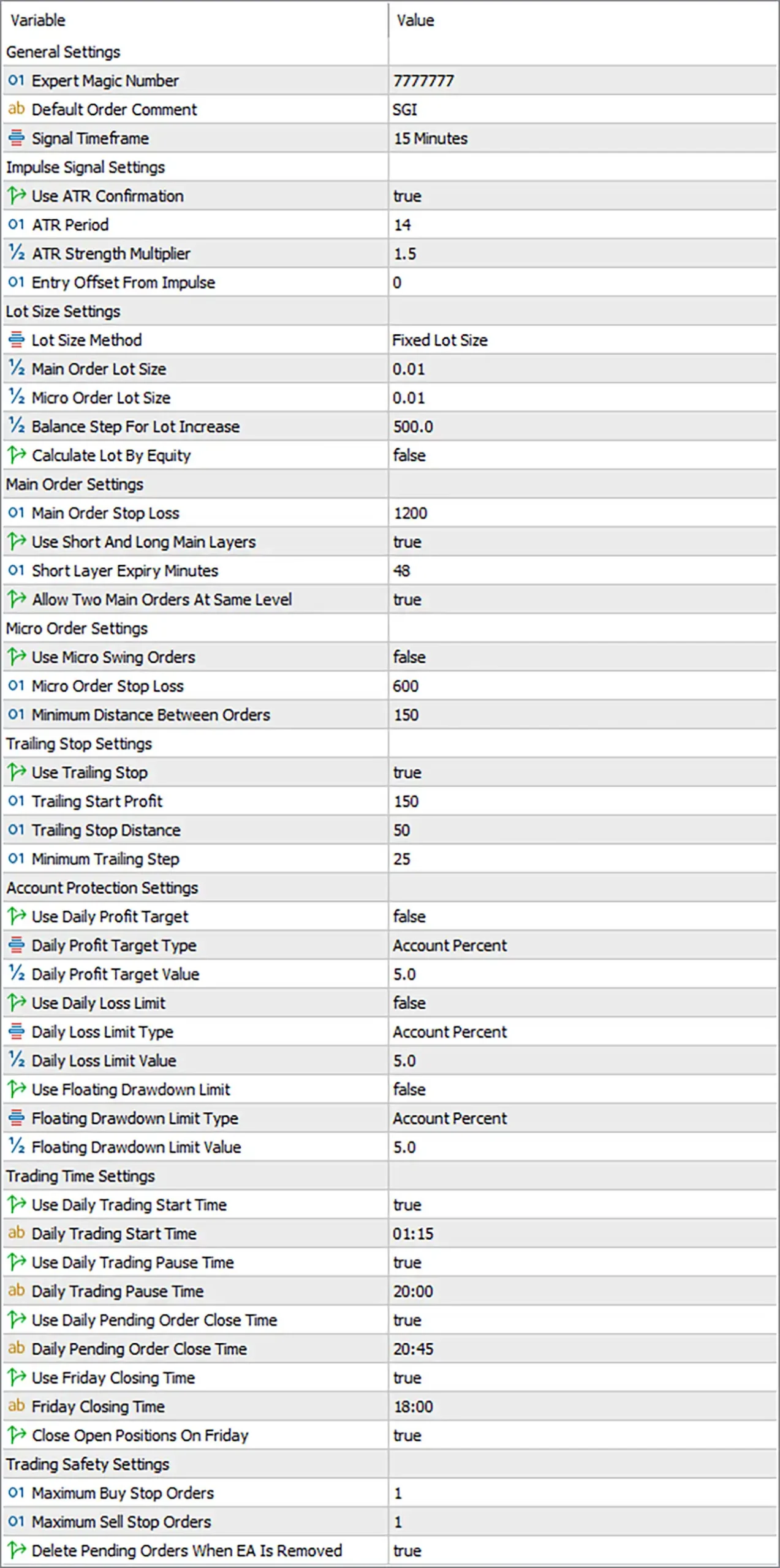
🔄 General Settings
🔹 Expert Magic Number = 7777777 — Sets the unique Magic Number 7777777 used to identify and manage trades opened by Smart Gold Impulse EA MT5.
🔹 Default Order Comment = SGI — Adds the trade comment SGI to orders generated by the EA, making its positions easier to identify.
🔹 Signal Timeframe = 15 Minutes — Sets the primary signal analysis timeframe to 15 Minutes (M15) for the EA's impulse-based trading logic.
🔄 Impulse Signal Settings
🔹 Use ATR Confirmation = true — Enables ATR confirmation, allowing the EA to use volatility information as an additional condition for validating impulse signals.
🔹 ATR Period = 14 — Sets the ATR calculation period to 14, determining the number of periods used to measure market volatility.
🔹 ATR Strength Multiplier = 1.5 — Sets the ATR strength multiplier to 1.5, controlling the required volatility strength for the impulse confirmation logic.
🔹 Entry Offset From Impulse = 0 — Sets the entry offset from the detected impulse level to 0, meaning no additional offset is applied.
🔄 Lot Size Settings
🔹 Lot Size Method = Fixed Lot Size — Selects Fixed Lot Size as the active position-sizing method.
🔹 Main Order Lot Size = 0.01 — Sets the main order volume to 0.01 lots.
🔹 Micro Order Lot Size = 0.01 — Sets the micro-order volume to 0.01 lots.
🔹 Balance Step For Lot Increase = 500.0 — Sets the account-balance increment to 500.0 for the lot-increase calculation.
🔹 Calculate Lot By Equity = false — Disables equity-based lot calculation, so the EA does not calculate position size from account equity under this setting.
🔄 Main Order Settings
🔹 Main Order Stop Loss = 1200 — Sets the main order Stop Loss distance to 1200 points according to the EA's configured point-based parameter.
🔹 Use Short And Long Main Layers = true — Enables both Short and Long Main Layers, allowing the EA to use the configured main-order layers for both market directions.
🔹 Short Layer Expiry Minutes = 48 — Sets the expiry period for short-layer orders to 48 minutes.
🔹 Allow Two Main Orders At Same Level = true — Allows two main orders to be placed at the same price level when the EA's trading logic generates such entries.
🔄 Micro Order Settings
🔹 Use Micro Swing Orders = false — Disables Micro Swing Orders, meaning this additional micro-order mechanism is currently inactive.
🔹 Micro Order Stop Loss = 600 — Sets the Micro Order Stop Loss distance to 600 points.
🔹 Minimum Distance Between Orders = 150 — Requires a minimum distance of 150 points between applicable orders.
🔄 Trailing Settings
🔹 Use Trailing Stop = true — Enables the trailing-stop function to dynamically protect trades as they move into profit.
🔹 Trailing Start Profit = 150 — Activates trailing-stop management after the position reaches 150 points of profit.
🔹 Trailing Stop Distance = 50 — Maintains a trailing distance of 50 points between the current market price and the protective stop.
🔹 Minimum Trailing Step = 25 — Requires a minimum adjustment step of 25 points when updating the trailing stop.
🔄 Account Protection Settings
🔹 Use Daily Profit Target = false — Disables the daily profit-target restriction, so the EA will not stop trading based on the configured daily profit target.
🔹 Daily Profit Target Type = Account Percent — Defines the daily profit target calculation type as Account Percent.
🔹 Daily Profit Target Value = 5.0 — Sets the daily profit target value to 5.0 when the daily profit-target function is enabled.
🔹 Use Daily Loss Limit = false — Disables the daily loss-limit protection under the current configuration.
🔹 Daily Loss Limit Type = Account Percent — Defines the daily loss-limit calculation type as Account Percent.
🔹 Daily Loss Limit Value = 5.0 — Sets the daily loss-limit value to 5.0 when the daily loss-limit function is enabled.
🔹 Use Floating Drawdown Limit = false — Disables the floating drawdown protection mechanism.
🔹 Floating Drawdown Limit Type = Account Percent — Defines the floating drawdown calculation type as Account Percent.
🔹 Floating Drawdown Limit Value = 5.0 — Sets the floating drawdown limit value to 5.0 when this protection feature is enabled.
🔄 Trading Time Settings
🔹 Use Daily Trading Start Time = true — Enables the daily trading start-time restriction.
🔹 Daily Trading Start Time = 01:15 — Sets the daily trading start time to 01:15.
🔹 Use Daily Trading Pause Time = true — Enables the daily trading pause-time function.
🔹 Daily Pause Time = 20:00 — Sets the daily trading pause time to 20:00.
🔹 Use Daily Pending Order Close Time = true — Enables automatic closing of pending orders at the configured daily pending-order close time.
🔹 Daily Pending Order Close Time = 20:45 — Sets the daily pending-order closing time to 20:45.
🔹 Use Friday Closing Time = true — Enables the special Friday closing-time function.
🔹 Friday Closing Time = 18:00 — Sets the Friday closing time to 18:00.
🔹 Close Open Positions On Friday = true — Enables automatic closure of open positions at the configured Friday closing time.
🔄 Trading Safety Settings
🔹 Maximum Buy Stop Orders = 1 — Limits the EA to a maximum of 1 Buy Stop order at a time.
🔹 Maximum Sell Stop Orders = 1 — Limits the EA to a maximum of 1 Sell Stop order at a time.
🔹 Delete Pending Orders When EA Is Removed = true — Automatically deletes the EA's pending orders when Smart Gold Impulse EA MT5 is removed from the chart.
🔢 Conclusion
Smart Gold Impulse EA MT5 offers a comprehensive configuration framework combining impulse signal confirmation, ATR-based volatility analysis, fixed-lot position sizing, layered order execution, trailing-stop management, account protection, and time-based trading controls.
The current configuration uses the 15 Minutes signal timeframe, ATR Period 14, and an ATR Strength Multiplier of 1.5. Position sizing is set to Fixed Lot Size, with both Main Order Lot Size and Micro Order Lot Size at 0.01 lots. Main orders use a 1200-point Stop Loss, while Micro Orders use a 600-point Stop Loss.
Trailing protection is enabled with a 150-point starting profit, 50-point trailing distance, and 25-point minimum trailing step. Although the daily profit target, daily loss limit, and floating drawdown limit are configured at 5.0 Account Percent, all three protection functions are currently disabled.
Trading begins at 01:15, pauses at 20:00, closes pending orders at 20:45, and uses a Friday closing time of 18:00. Open Friday positions are also configured to close automatically. Finally, the EA allows a maximum of 1 Buy Stop and 1 Sell Stop order and removes pending orders when the EA is removed.
For live deployment, traders should test these settings on their specific broker, symbol, spread conditions, contract specifications, and account size before committing real capital.
🔢 FAQs
❓ What timeframe does Smart Gold Impulse EA MT5 use for its trading signals?
The Signal Timeframe is set to 15 Minutes (M15), which is the primary timeframe used for the impulse signal logic.
❓ Does Smart Gold Impulse EA MT5 use ATR confirmation?
Yes. Use ATR Confirmation = true, with an ATR Period of 14 and an ATR Strength Multiplier of 1.5.
❓ What is the configured lot size?
The EA uses Fixed Lot Size, with both Main Order Lot Size = 0.01 and Micro Order Lot Size = 0.01.
❓ What are the trailing-stop settings?
Trailing Stop is enabled with Trailing Start Profit = 150, Trailing Stop Distance = 50, and Minimum Trailing Step = 25.
❓ What time does Smart Gold Impulse EA MT5 stop trading on Friday?
The Friday Closing Time is 18:00, and Close Open Positions On Friday = true, so open positions are configured to close at the specified Friday closing time.


