


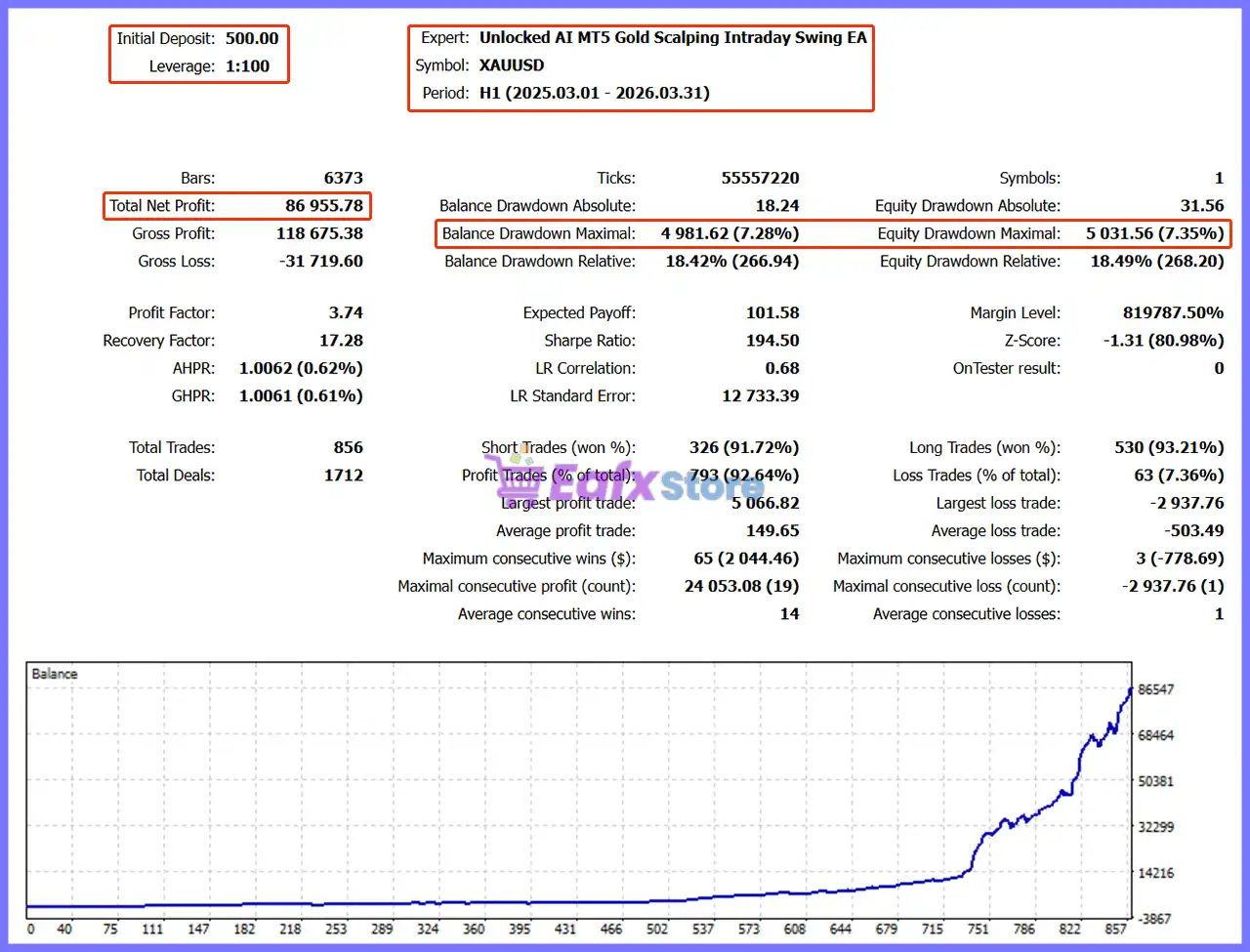
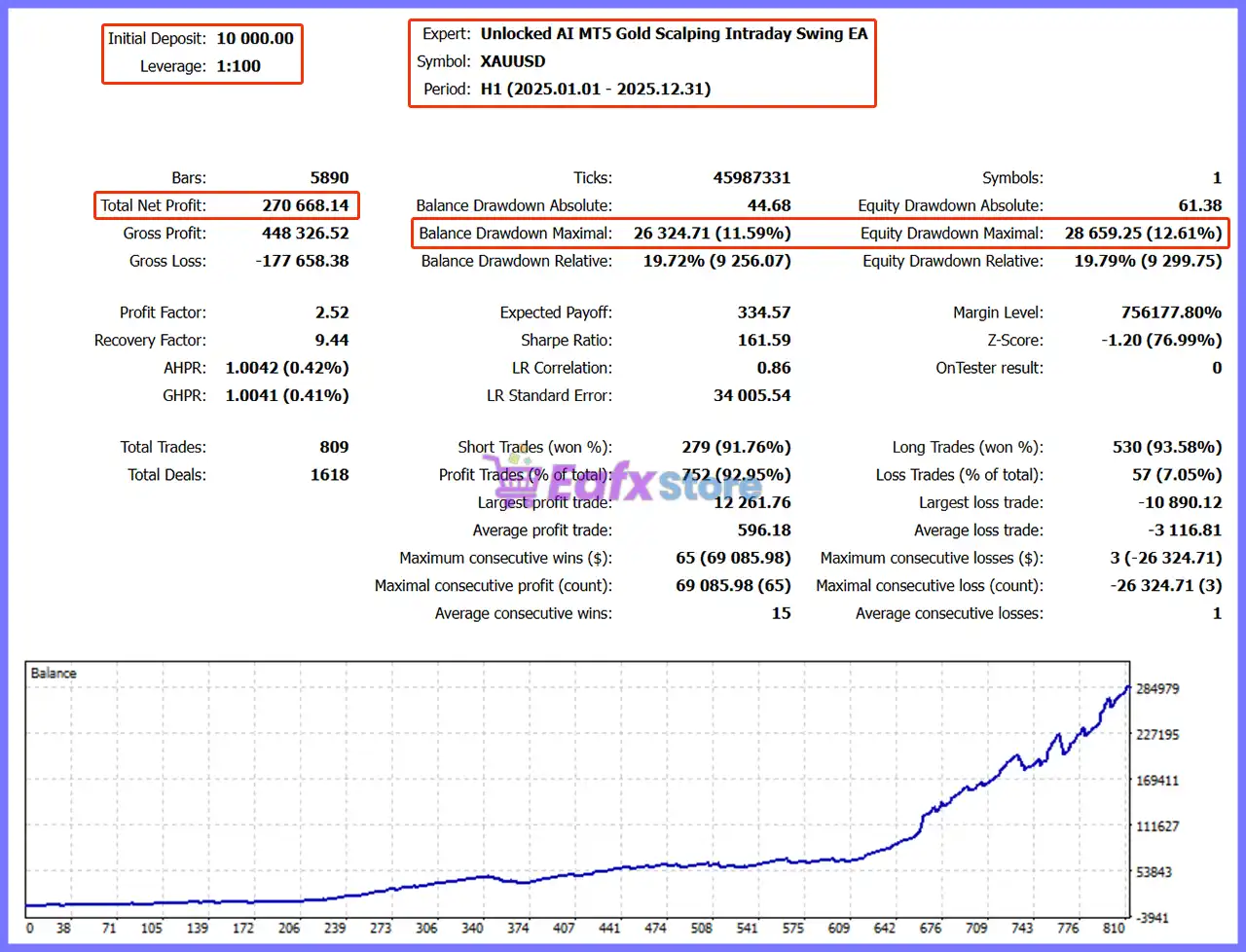
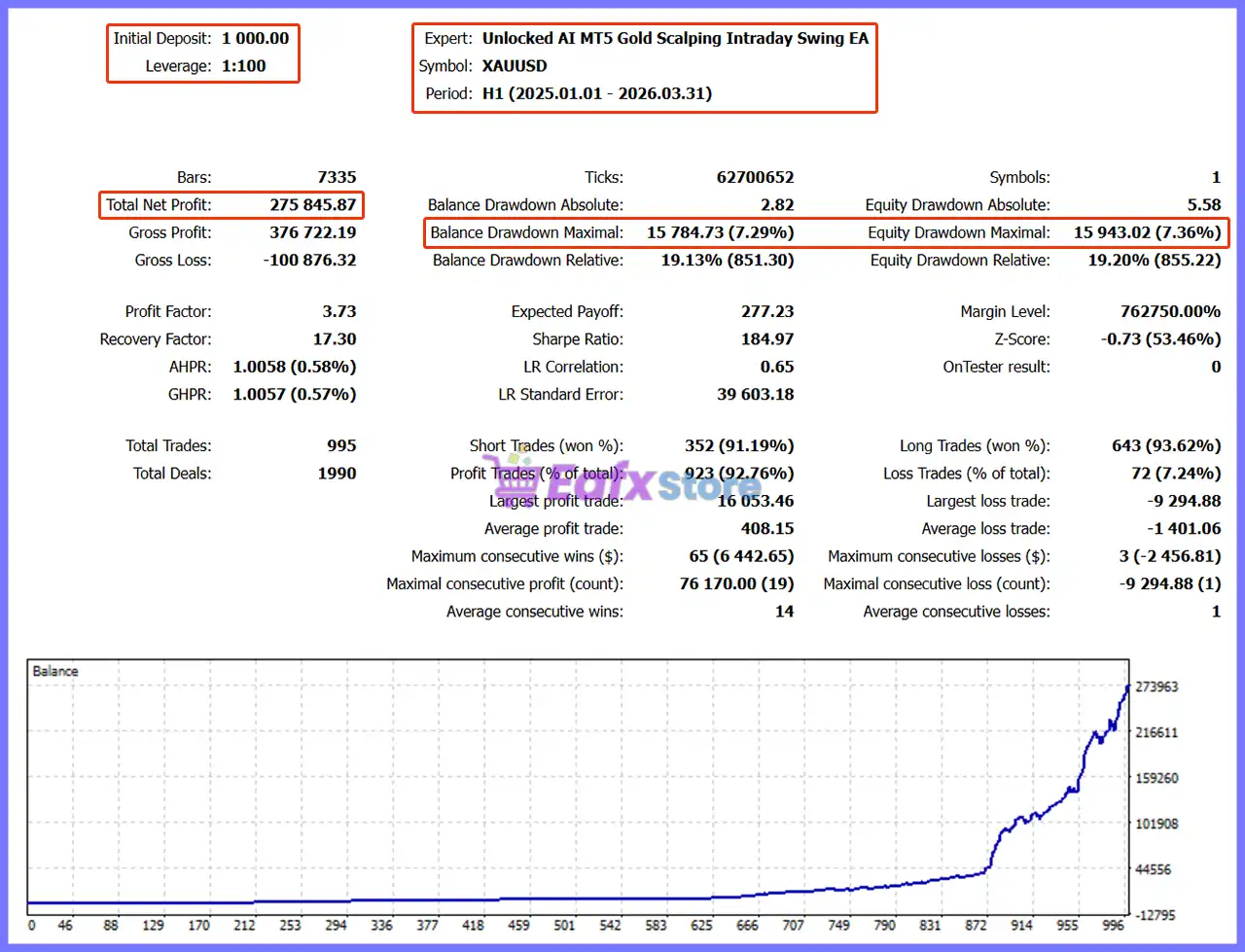
🔢 Unlocked AI MT5 Gold Scalping Intraday Swing EA – Complete Settings Guide
Unlocked AI MT5 Gold Scalping Intraday Swing EA is a multi-mode automated trading system designed to combine AI-powered execution with a local EA strategy across different trading styles.
Its configuration covers AI market and pending orders, automated lot sizing, scalping, intraday, and swing Take Profit/Stop Loss management, trailing stops, AI trade management, economic-news protection, and session restrictions.
1. Trade Engine Control
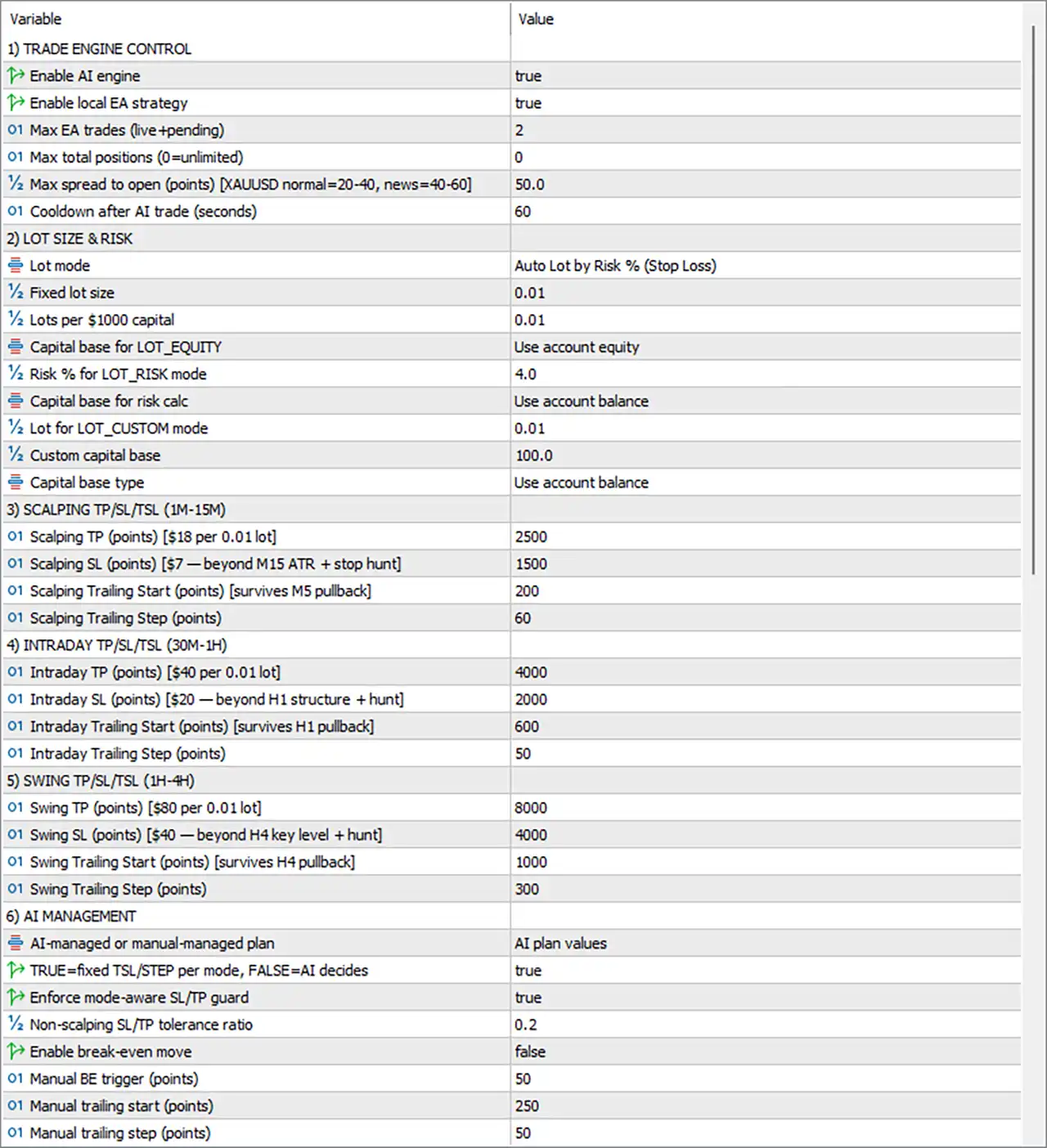
🔹 Enable AI engine = true — Enables the AI trading engine, allowing AI-generated trading decisions to participate in the EA's execution framework.
🔹 Enable local EA strategy = true — Enables the built-in local EA strategy alongside the AI engine.
🔹 Max EA trades (live + pending) = 2 — Limits the local EA strategy to a maximum of 2 live and pending trades combined.
🔹 Max total positions (0 = unlimited) = 0 — Sets the maximum total open-position limit to 0, which means the restriction is unlimited.
🔹 Max spread to open (points) [XAUUSD normal = 20–40, news = 40–60] = 50.0 — Sets the maximum permitted opening spread to 50.0 points; the panel notes typical XAUUSD spreads of 20–40 in normal conditions and 40–60 during news.
🔹 Cooldown after AI trade (seconds) = 60 — Requires a 60-second cooldown period after an AI trade before another applicable AI trade can be initiated.
2. Lot Size & Risk
🔹 Lot mode = Auto Lot by Risk % (Stop Loss) — Selects automatic position sizing based on the configured risk percentage and Stop Loss distance.
🔹 Fixed lot size = 0.01 — Sets the fixed position size to 0.01 lots when a fixed-lot mode is used.
🔹 Lots per $1000 capital = 0.01 — Defines a position-sizing reference of 0.01 lots per $1000 of capital.
🔹 Capital base for LOT_EQUITY = Use account equity — Uses account equity as the capital basis when the LOT_EQUITY calculation mode is selected.
🔹 Risk % for LOT_RISK mode = 4.0 — Sets the risk percentage to 4.0% for the LOT_RISK position-sizing mode.
🔹 Capital base for risk calc = Use account balance — Uses account balance as the capital reference for risk calculations.
🔹 Lot for LOT_CUSTOM mode = 0.01 — Sets the custom-mode lot size to 0.01 lots.
🔹 Custom capital base = 100.0 — Sets the custom capital reference value to 100.0.
🔹 Capital base type = Use account balance — Specifies account balance as the capital-base type for the applicable custom calculation.
3. Scalping TP/SL/TSL (1M–15M)
🔹 Scalping TP (points) [$18 per 0.01 lot] = 2500 — Sets the scalping Take Profit to 2500 points, with the panel indicating approximately $18 per 0.01 lot.
🔹 Scalping SL (points) [$7 — beyond M15 ATR + stop hunt] = 1500 — Sets the scalping Stop Loss to 1500 points, with the configuration referencing $7 and placement beyond M15 ATR + stop hunt.
🔹 Scalping Trailing Start (points) [survives M5 pullback] = 200 — Starts scalping trailing management after 200 points of favorable movement, with the setting designed to survive an M5 pullback.
🔹 Scalping Trailing Step (points) = 60 — Sets the scalping trailing adjustment step to 60 points.
4. Intraday TP/SL/TSL (30M–1H)
🔹 Intraday TP (points) [$40 per 0.01 lot] = 4000 — Sets the intraday Take Profit to 4000 points, with the panel indicating approximately $40 per 0.01 lot.
🔹 Intraday SL (points) [$20 — beyond H1 structure + hunt] = 2000 — Sets the intraday Stop Loss to 2000 points, with the configuration referencing $20 and placement beyond H1 structure + hunt.
🔹 Intraday Trailing Start (points) [survives H1 pullback] = 600 — Starts intraday trailing management at 600 points of favorable movement and is designed to survive an H1 pullback.
🔹 Intraday Trailing Step (points) = 50 — Sets the intraday trailing adjustment step to 50 points.
5. Swing TP/SL/TSL (1H–4H)
🔹 Swing TP (points) [$80 per 0.01 lot] = 8000 — Sets the swing Take Profit to 8000 points, with the panel indicating approximately $80 per 0.01 lot.
🔹 Swing SL (points) [$40 — beyond H4 key level + hunt] = 4000 — Sets the swing Stop Loss to 4000 points, with the configuration referencing $40 and placement beyond the H4 key level + hunt.
🔹 Swing Trailing Start (points) [survives H4 pullback] = 1000 — Activates swing trailing management after 1000 points of favorable movement, with the setting designed to survive an H4 pullback.
🔹 Swing Trailing Step (points) = 300 — Sets the swing trailing adjustment step to 300 points.
6. AI Management
🔹 AI-managed or manual-managed plan = AI plan values — Selects AI plan values as the active trade-management plan.
🔹 TRUE = fixed TSL/STEP per mode, FALSE = AI decides = true — With this setting at true, the EA uses fixed trailing Stop Loss and Step values according to the selected trading mode rather than allowing AI to dynamically decide those values.
🔹 Enforce mode-aware SL/TP guard = true — Enables protection that enforces the appropriate Stop Loss and Take Profit rules according to the active trading mode.
🔹 Non-scalping SL/TP tolerance ratio = 0.2 — Sets the Stop Loss/Take Profit tolerance ratio for non-scalping modes to 0.2.
🔹 Enable break-even move = false — Disables automatic break-even movement.
🔹 Manual BE trigger (points) = 50 — Sets the manual break-even trigger to 50 points if break-even functionality is enabled or manually applied.
🔹 Manual trailing start (points) = 250 — Sets the manual trailing activation threshold to 250 points.
🔹 Manual trailing step (points) = 50 — Sets the manual trailing adjustment step to 50 points.
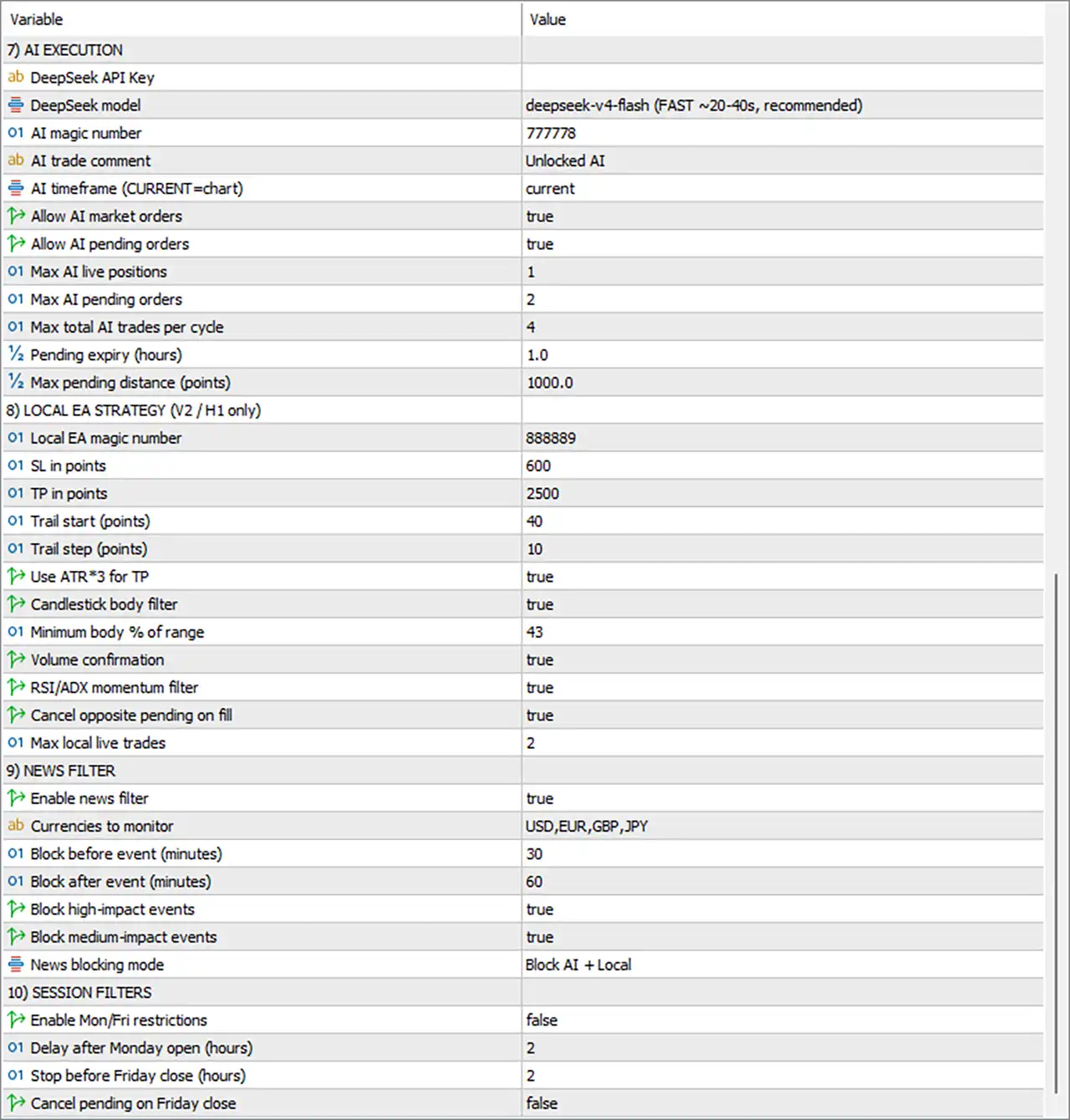
7. AI Execution
🔹 DeepSeek API Key = [blank/not shown] — The supplied settings panel does not display a value for the DeepSeek API Key. No API key value is visible, so no value is inferred or added.
🔹 DeepSeek model = deepseek-v4-flash (FAST ~20–40s, recommended) — Selects deepseek-v4-flash as the AI model, with the panel describing it as FAST ~20–40s and recommended.
🔹 AI magic number = 777778 — Assigns the Magic Number 777778 to AI-generated trades.
🔹 AI trade comment = Unlocked AI — Uses Unlocked AI as the trade comment for AI-generated positions.
🔹 AI timeframe (CURRENT = chart) = current — Uses the current chart timeframe for AI analysis.
🔹 Allow AI market orders = true — Allows the AI engine to open market orders.
🔹 Allow AI pending orders = true — Allows the AI engine to place pending orders.
🔹 Max AI live positions = 1 — Limits AI-generated live positions to a maximum of 1.
🔹 Max AI pending orders = 2 — Limits AI-generated pending orders to a maximum of 2.
🔹 Max total AI trades per cycle = 4 — Limits the total number of AI trades per execution cycle to 4.
🔹 Pending expiry (hours) = 1.0 — Sets pending-order expiry to 1.0 hour.
🔹 Max pending distance (points) = 1000.0 — Limits the maximum distance of an AI pending order to 1000.0 points.
8. Local EA Strategy (V2 / H1 Only)
🔹 Local EA magic number = 888889 — Assigns Magic Number 888889 to trades generated by the local EA strategy.
🔹 SL in points = 600 — Sets the local EA Stop Loss to 600 points.
🔹 TP in points = 2500 — Sets the local EA Take Profit to 2500 points.
🔹 Trail start (points) = 40 — Activates the local trailing stop after 40 points of favorable movement.
🔹 Trail step (points) = 10 — Sets the local trailing adjustment step to 10 points.
🔹 Use ATR*3 for TP = true — Enables the ATR × 3 calculation as part of the Take Profit logic.
🔹 Candlestick body filter = true — Enables the candlestick-body filter to help validate local strategy entries.
🔹 Minimum body % of range = 43 — Requires a minimum candlestick body size of 43% of the candle's total range for the filter condition.
🔹 Volume confirmation = true — Enables volume confirmation as an additional entry validation condition.
🔹 RSI/ADX momentum filter = true — Enables the combined RSI/ADX momentum filter.
🔹 Cancel opposite pending on fill = true — Automatically cancels the opposite pending order when one side is filled.
🔹 Max local live trades = 2 — Limits the local EA strategy to a maximum of 2 live trades.
9. News Filter
🔹 Enable news filter = true — Activates the economic-news filter.
🔹 Currencies to monitor = USD,EUR,GBP,JPY — Configures the news system to monitor USD, EUR, GBP, and JPY economic events.
🔹 Block before event (minutes) = 30 — Blocks applicable trading activity 30 minutes before a qualifying economic event.
🔹 Block after event (minutes) = 60 — Keeps applicable trading activity blocked for 60 minutes after a qualifying economic event.
🔹 Block high-impact events = true — Enables blocking around high-impact economic events.
🔹 Block medium-impact events = true — Enables blocking around medium-impact economic events.
🔹 News blocking mode = Block AI + Local — Applies the news restrictions to both AI and Local EA trading engines.
10. Session Filters
🔹 Enable Mon/Fri restrictions = false — Disables the special Monday and Friday trading restrictions in the current configuration.
🔹 Delay after Monday open (hours) = 2 — Sets the Monday opening delay to 2 hours when the Mon/Fri restriction feature is enabled.
🔹 Stop before Friday close (hours) = 2 — Sets the Friday trading stop period to 2 hours before market close when the restriction feature is enabled.
🔹 Cancel pending on Friday close = false — Does not automatically cancel pending orders at Friday close under the current configuration.
🔢 Conclusion
Unlocked AI MT5 Gold Scalping Intraday Swing EA combines AI-driven execution and local EA logic with three distinct trading profiles: Scalping, Intraday, and Swing. This structure allows the system to use different Take Profit, Stop Loss, and trailing parameters depending on the intended trading horizon.
The current configuration enables both engines, with Max EA trades = 2, Max total positions = 0 (unlimited), and a 50.0-point maximum spread. AI execution uses Magic Number 777778, while the local strategy uses Magic Number 888889.
For risk management, the EA uses Auto Lot by Risk % (Stop Loss) with Risk % = 4.0, while the fixed lot reference is 0.01. The scalping profile uses 2500 TP / 1500 SL, the intraday profile uses 4000 TP / 2000 SL, and the swing profile uses 8000 TP / 4000 SL.
AI management is configured to use AI plan values, with fixed TSL/Step per mode enabled and a 0.2 non-scalping SL/TP tolerance ratio. Break-even is currently disabled. The AI engine allows 1 live position, 2 pending orders, and 4 total AI trades per cycle, with pending orders expiring after 1.0 hour and a maximum pending distance of 1000.0 points.
The news filter is enabled for USD, EUR, GBP, and JPY, blocking high- and medium-impact events from 30 minutes before until 60 minutes after the event. The blocking mode applies to both AI and Local strategies. Monday/Friday restrictions are currently disabled.
For live trading, users should carefully validate the 4.0% risk setting, point-based TP/SL values, AI API configuration, spread conditions, and news-filter behavior with their broker and account size. Demo testing and historical testing are strongly recommended before deploying the EA with real capital.
🔢 FAQs
❓ What trading modes does Unlocked AI MT5 Gold Scalping Intraday Swing EA support?
The EA supports Scalping (1M–15M), Intraday (30M–1H), and Swing (1H–4H) trading profiles, alongside its AI execution and local EA strategy.
❓ What are the main Scalping, Intraday, and Swing TP/SL settings?
Scalping uses 2500 TP / 1500 SL, Intraday uses 4000 TP / 2000 SL, and Swing uses 8000 TP / 4000 SL.
❓ How is the position size calculated?
The selected Lot mode is Auto Lot by Risk % (Stop Loss), with Risk % for LOT_RISK mode = 4.0. The fixed-lot reference is 0.01, and the EA also provides 0.01 lots per $1000 capital.
❓ How many AI trades can the EA open?
The configuration allows a maximum of 1 AI live position, 2 AI pending orders, and 4 total AI trades per cycle. Pending orders have a 1.0-hour expiry.
❓ How does the news filter protect the EA?
The news filter monitors USD, EUR, GBP, and JPY, blocks high- and medium-impact events, and pauses trading 30 minutes before and 60 minutes after qualifying events. The Block AI + Local mode applies the restrictions to both trading engines.


