

🔢 Umbra Vault AI EA MT5 – Complete Settings Guide
Umbra Vault AI EA MT5 is an automated trading Expert Advisor designed with a structured framework covering trade identification, entry logic, money management, exit management, trading conditions, safety controls, and event filtering.
Its configuration provides traders with precise control over position sizing, profit and loss distances, trailing-stop behavior, spread and slippage limits, drawdown protection, Friday trading, and economic-news filtering. The following guide explains every setting shown in the configuration panel while preserving all original values.
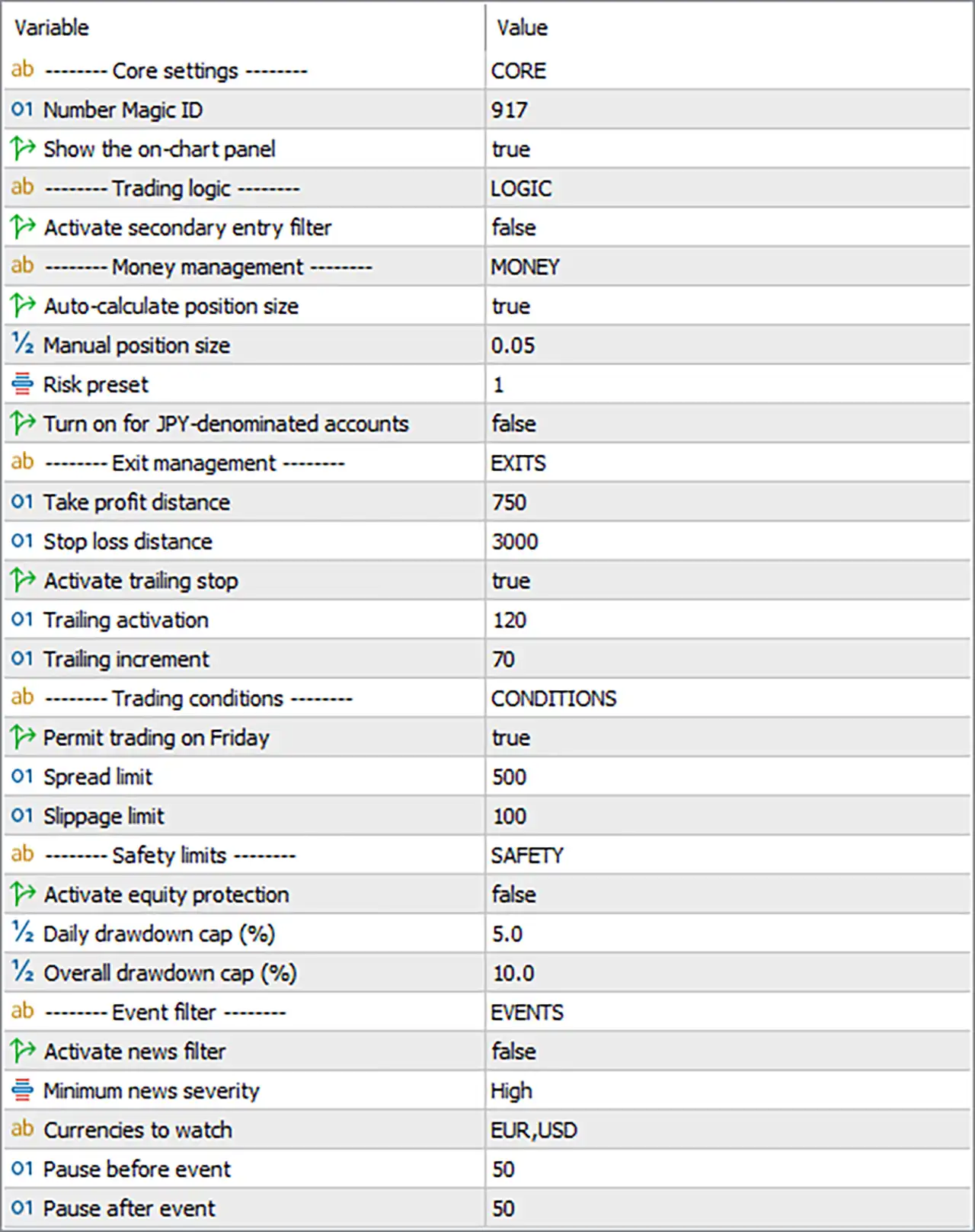
🔄 Core Settings
🔹 Core Settings = CORE — Identifies the main configuration section of Umbra Vault AI EA MT5.
🔹 Number Magic ID = 917 — Sets the unique Magic ID to 917, allowing the EA to identify and manage its own trades separately from other positions.
🔹 Show the on-chart panel = true — Enables the EA's on-chart information panel so trading and system information can be displayed directly on the chart.
🔄 Trading Logic
🔹 Trading logic = LOGIC — Identifies the configuration section containing the EA's entry and signal-processing controls.
🔹 Activate secondary entry filter = false — Disables the secondary entry filter, meaning the additional entry-confirmation mechanism is not active in the current configuration.
🔄 Money Management
🔹 Money management = MONEY — Identifies the section containing the EA's position-sizing and risk-management parameters.
🔹 Auto-calculate position size = true — Enables automatic position-size calculation instead of relying exclusively on the manually specified position size.
🔹 Manual position size = 0.05 — Sets the manual position size to 0.05 lots, which can be used when automatic position sizing is disabled.
🔹 Risk preset = 1 — Sets the selected risk preset to 1, determining the predefined risk-management profile used by the EA.
🔹 Turn on for JPY-denominated accounts = false — Disables the special configuration intended for JPY-denominated accounts.
🔄 Exit Management
🔹 Exit management = EXITS — Identifies the section containing Take Profit, Stop Loss, and trailing-stop controls.
🔹 Take profit distance = 750 — Sets the Take Profit distance to 750 points.
🔹 Stop loss distance = 3000 — Sets the Stop Loss distance to 3000 points.
🔹 Activate trailing stop = true — Enables the trailing-stop mechanism to dynamically adjust protection as a trade moves favorably.
🔹 Trailing activation = 120 — Sets the trailing-stop activation threshold to 120 points, after which trailing management can begin.
🔹 Trailing increment = 70 — Sets the trailing adjustment increment to 70 points, controlling the minimum movement used when updating the trailing stop.
🔄 Trading Conditions
🔹 Trading conditions = CONDITIONS — Identifies the section containing trading-day and execution-condition restrictions.
🔹 Permit trading on Friday = true — Allows Umbra Vault AI EA MT5 to open and manage trades on Friday.
🔹 Spread limit = 500 — Sets the maximum permitted spread to 500, helping prevent execution during excessively wide-spread conditions.
🔹 Slippage limit = 100 — Sets the maximum permitted slippage to 100, defining the configured tolerance for price deviation during order execution.
🔄 Safety Limits
🔹 Safety limits = SAFETY — Identifies the section containing account-level drawdown protection settings.
🔹 Activate equity protection = false — Disables the EA's equity-protection mechanism in the current configuration.
🔹 Daily drawdown cap (%) = 5.0 — Sets the daily drawdown cap to 5.0% when equity protection is enabled.
🔹 Overall drawdown cap (%) = 10.0 — Sets the overall drawdown cap to 10.0% when equity protection is enabled.
🔄 Event Filter
🔹 Event filter = EVENTS — Identifies the section containing economic-news and event-filtering parameters.
🔹 Activate news filter = false — Disables the news filter in the current configuration, so the configured event restrictions are not actively applied.
🔹 Minimum news severity = High — Sets the minimum economic-news severity level to High when the news filter is enabled.
🔹 Currencies to watch = EUR,USD — Configures the news filter to monitor economic events affecting EUR and USD.
🔹 Pause before event = 50 — Sets the trading pause period before a qualifying economic event to 50.
🔹 Pause after event = 50 — Sets the trading pause period after a qualifying economic event to 50.
🔢 Conclusion
Umbra Vault AI EA MT5 offers a comprehensive set of controls for automated trading, covering position sizing, entry filtering, exit management, execution conditions, account safety, and economic-event filtering.
The current configuration has automatic position sizing enabled, with a manual position-size reference of 0.05 lots and Risk Preset = 1. The EA uses Magic ID 917 and displays its on-chart panel because Show the on-chart panel = true.
For trade exits, the configuration uses a 750-point Take Profit, 3000-point Stop Loss, and an active trailing stop that begins at 120 points with a 70-point trailing increment. Friday trading is permitted, while the maximum configured Spread Limit is 500 and Slippage Limit is 100.
The equity-protection function is currently disabled, although the configured safety thresholds are 5.0% daily drawdown and 10.0% overall drawdown. Similarly, the news filter is disabled, but it is configured to monitor High-severity events affecting EUR and USD, with a 50-unit pause before and 50-unit pause after qualifying events.
Traders should carefully test these parameters with their broker, symbol specifications, account size, and execution environment before using Umbra Vault AI EA MT5 with real funds. In particular, the automatic position sizing, 3000-point Stop Loss, 500 spread limit, 100 slippage limit, and disabled equity protection should be evaluated according to individual risk tolerance.
🔢 FAQs
❓ What is the Magic ID of Umbra Vault AI EA MT5?
The Number Magic ID is 917, which identifies trades managed by the EA.
❓ What are the Take Profit and Stop Loss distances?
The configured Take Profit distance is 750 points, while the Stop Loss distance is 3000 points.
❓ Is the trailing stop enabled?
Yes. Activate trailing stop = true, with Trailing activation = 120 and Trailing increment = 70.
❓ Does Umbra Vault AI EA MT5 use equity protection?
The equity-protection feature is currently disabled with Activate equity protection = false. However, the configured limits are 5.0% daily drawdown and 10.0% overall drawdown.
❓ Is the news filter enabled and which currencies does it monitor?
The news filter is currently disabled with Activate news filter = false. If enabled, it is configured for High-severity events involving EUR,USD, with 50 before-event and 50 after-event pause settings.


