


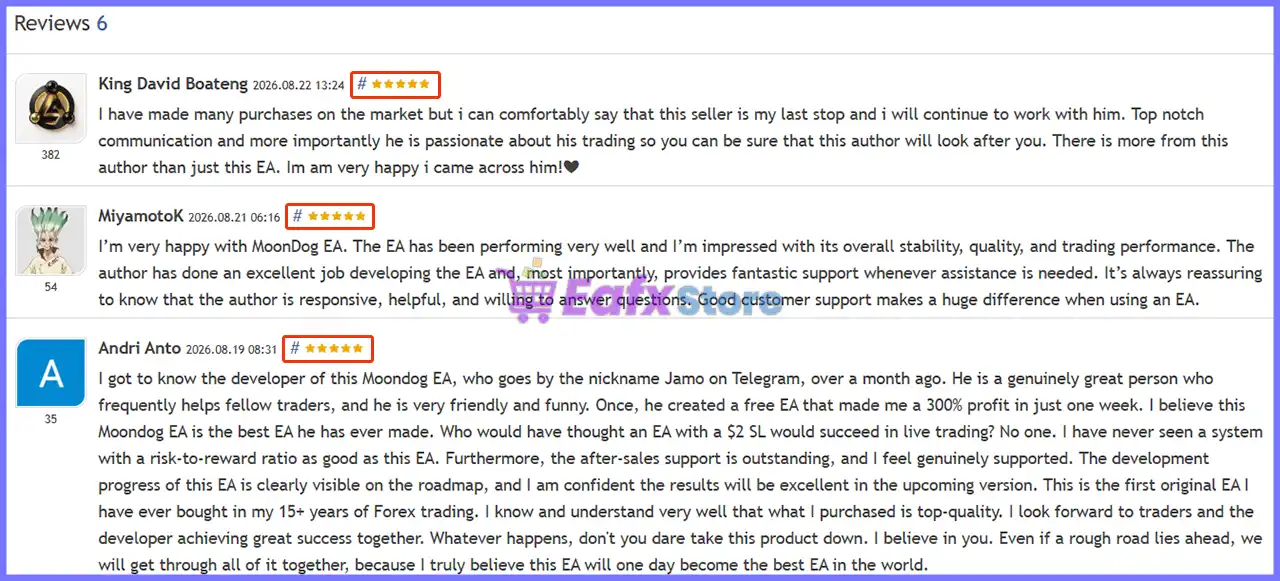
🔢 MoonDog EA MT5 – Complete Settings & Configuration Guide
MoonDog EA MT5 is a feature-rich automated trading Expert Advisor built around a modular trading framework that combines multiple Moon strategy modules, risk-based position sizing, automatic lot scaling, trading-hour controls, economic-news protection, adaptive entry and Take Profit management, physical and virtual Stop Loss protection, trailing systems, MoonLock profit protection, emergency exit guards, prop-firm protection, execution-quality monitoring, and visual testing tools.
The settings shown in the supplied panels provide extensive control over how MoonDog manages entries, risk, open positions, major economic events, profits, drawdowns, and execution conditions. Below is a complete parameter-by-parameter explanation, with all displayed numerical values preserved.
01 | Trade Control
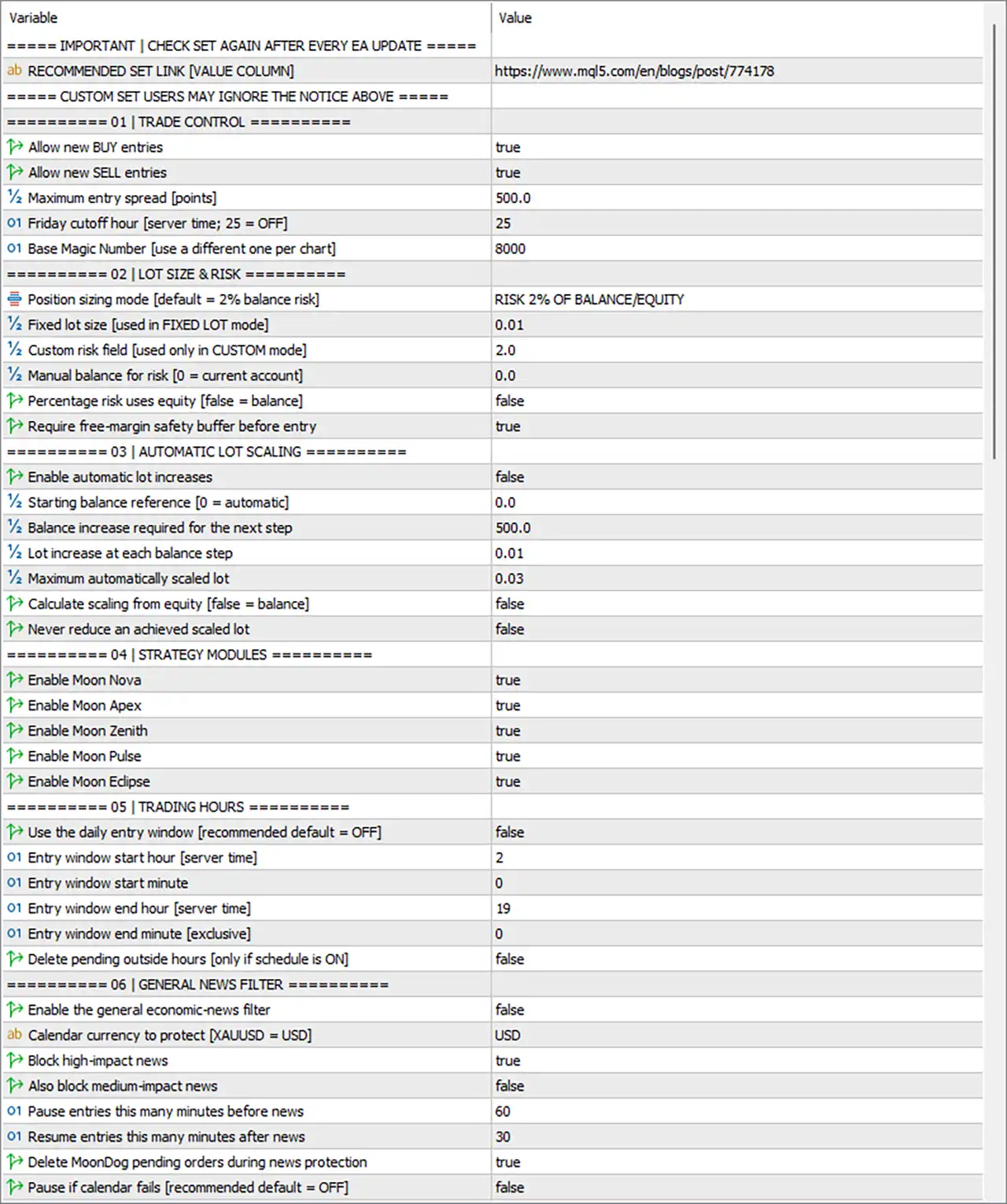
🔹 Allow new BUY entries = true — Allows MoonDog EA MT5 to open new BUY positions.
🔹 Allow new SELL entries = true — Allows MoonDog EA MT5 to open new SELL positions.
🔹 Maximum entry spread [points] = 500.0 — Prevents new entries when the spread exceeds 500.0 points.
🔹 Friday cutoff hour [server time; 25 = OFF] = 25 — Sets the Friday trading cutoff to 25 server-time hours; because 25 = OFF, the Friday cutoff is disabled.
🔹 Base Magic Number [use a different one per chart] = 8000 — Assigns 8000 as the base Magic Number used to identify MoonDog trades on the chart.
02 | Lot Size & Risk
🔹 Position sizing mode [default = 2% balance risk] = RISK 2% OF BALANCE/EQUITY — Selects risk-based position sizing using 2% of account balance/equity.
🔹 Fixed lot size [used in FIXED LOT mode] = 0.01 — Sets the fixed lot size to 0.01 lots when Fixed Lot mode is selected.
🔹 Custom risk field [used only in CUSTOM mode] = 2.0 — Sets the custom risk value to 2.0 for CUSTOM position-sizing mode.
🔹 Manual balance for risk [0 = current account] = 0.0 — Uses 0.0 as the manual balance reference; 0.0 means the current account is used.
🔹 Percentage risk uses equity [false = balance] = false — Uses account balance, rather than equity, for the percentage-risk calculation.
🔹 Require free-margin safety buffer before entry = true — Requires a free-margin safety buffer before allowing a new position to be opened.
03 | Automatic Lot Scaling
🔹 Enable automatic lot increases = false — Disables automatic increases in lot size.
🔹 Starting balance reference [0 = automatic] = 0.0 — Sets the starting balance reference to 0.0, meaning the starting balance is determined automatically.
🔹 Balance increase required for the next step = 500.0 — Requires a 500.0 increase in the selected balance reference before advancing to the next lot-scaling step.
🔹 Lot increase at each balance step = 0.01 — Specifies a 0.01-lot increase for each balance-scaling step.
🔹 Maximum automatically scaled lot = 0.03 — Caps the automatically scaled position size at 0.03 lots.
🔹 Calculate scaling from equity [false = balance] = false — Calculates scaling from balance, rather than equity.
🔹 Never reduce an achieved scaled lot = false — Allows the automatically scaled lot size to decrease if the relevant scaling conditions later require it.
04 | Strategy Modules
🔹 Enable Moon Nova = true — Enables the Moon Nova strategy module.
🔹 Enable Moon Apex = true — Enables the Moon Apex strategy module.
🔹 Enable Moon Zenith = true — Enables the Moon Zenith strategy module.
🔹 Enable Moon Pulse = true — Enables the Moon Pulse strategy module.
🔹 Enable Moon Eclipse = true — Enables the Moon Eclipse strategy module.
05 | Trading Hours
🔹 Use the daily entry window [recommended default = OFF] = false — Disables the daily entry-time restriction.
🔹 Entry window start hour [server time] = 2 — Sets the configured entry-window start to 02:00 server time when the schedule is enabled.
🔹 Entry window start minute = 0 — Sets the entry-window starting minute to 00.
🔹 Entry window end hour [server time] = 19 — Sets the configured entry-window end to 19:00 server time.
🔹 Entry window end minute [exclusive] = 0 — Sets the exclusive ending minute to 00, making the configured endpoint 19:00.
🔹 Delete pending outside hours [only if schedule is ON] = false — Does not delete pending orders when they fall outside the configured trading window.
06 | General News Filter
🔹 Enable the general economic-news filter = false — Disables the general economic-news filter.
🔹 Calendar currency to protect [XAUUSD = USD] = USD — Sets USD as the economic-calendar currency to protect, which is particularly relevant for XAUUSD.
🔹 Block high-impact news = true — Configures the system to block trading around high-impact news when the general news filter is active.
🔹 Also block medium-impact news = false — Does not block medium-impact news under the general news-filter configuration.
🔹 Pause entries this many minutes before news = 60 — Sets the pre-news entry pause to 60 minutes.
🔹 Resume entries this many minutes after news = 30 — Allows entries to resume 30 minutes after the relevant news event.
🔹 Delete MoonDog pending orders during news protection = true — Deletes MoonDog pending orders when news protection is active.
🔹 Pause if calendar fails [recommended default = OFF] = false — Does not pause trading if the economic-calendar feed fails.
07 | NFP – CPI – FOMC
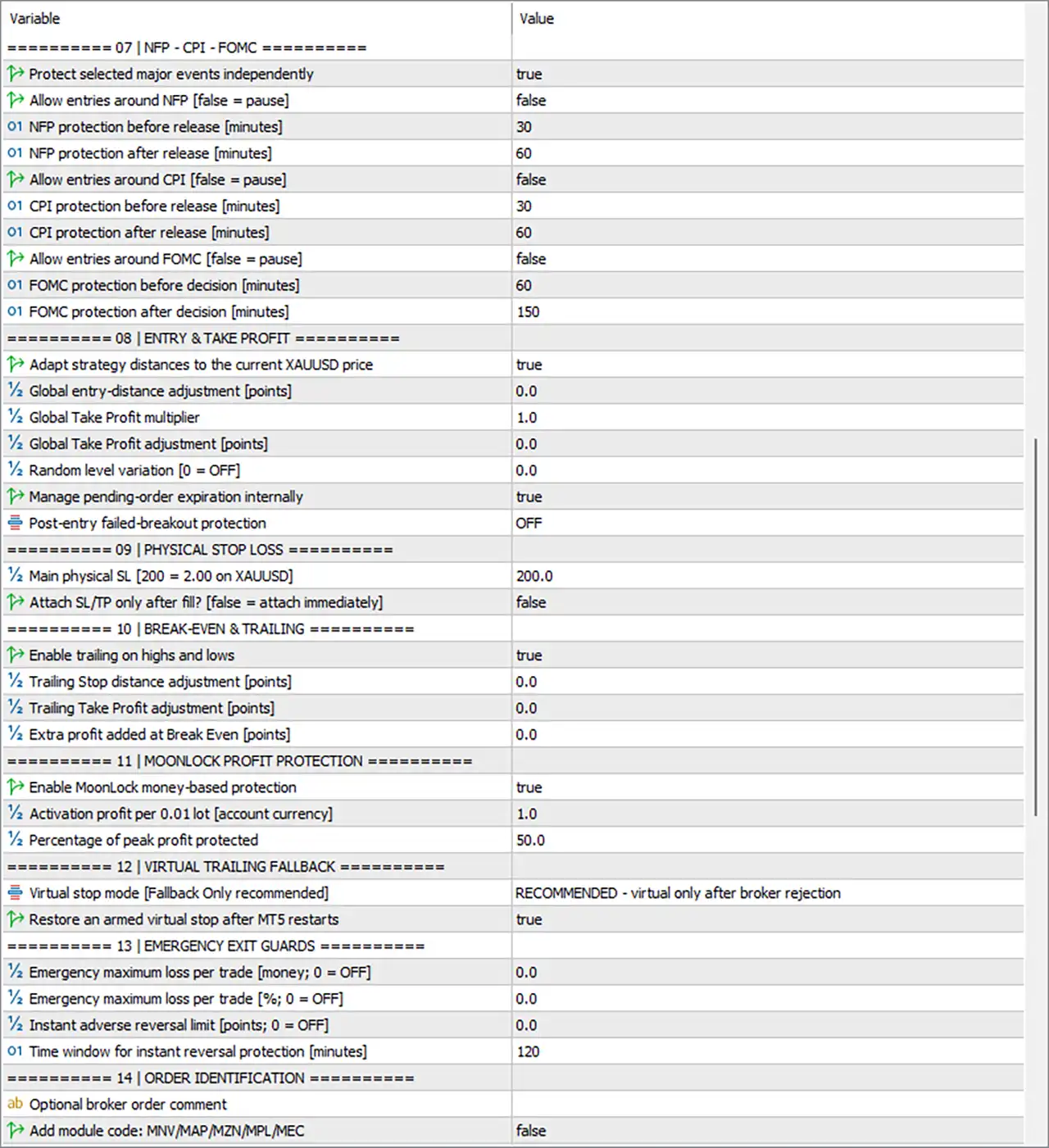
🔹 Protect selected major events independently = true — Enables independent protection for the specifically selected major economic events.
🔹 Allow entries around NFP [false = pause] = false — Does not allow entries around NFP, meaning trading is paused during the configured NFP protection period.
🔹 NFP protection before release [minutes] = 30 — Applies NFP protection beginning 30 minutes before the release.
🔹 NFP protection after release [minutes] = 60 — Maintains NFP protection for 60 minutes after the release.
🔹 Allow entries around CPI [false = pause] = false — Does not allow entries around CPI, meaning trading is paused during the configured CPI protection period.
🔹 CPI protection before release [minutes] = 30 — Applies CPI protection beginning 30 minutes before the release.
🔹 CPI protection after release [minutes] = 60 — Maintains CPI protection for 60 minutes after the release.
🔹 Allow entries around FOMC [false = pause] = false — Does not allow entries around FOMC announcements.
🔹 FOMC protection before decision [minutes] = 60 — Begins FOMC protection 60 minutes before the decision.
🔹 FOMC protection after decision [minutes] = 150 — Maintains FOMC protection for 150 minutes after the decision.
08 | Entry & Take Profit
🔹 Adapt strategy distances to the current XAUUSD price = true — Enables automatic adaptation of strategy entry and Take Profit distances to the current XAUUSD price.
🔹 Global entry-distance adjustment [points] = 0.0 — Applies a global entry-distance adjustment of 0.0 points, meaning no additional adjustment is applied.
🔹 Global Take Profit multiplier = 1.0 — Uses a 1.0× global Take Profit multiplier, leaving the base Take Profit distance unchanged.
🔹 Global Take Profit adjustment [points] = 0.0 — Applies 0.0 points of additional global Take Profit adjustment.
🔹 Random level variation [0 = OFF] = 0.0 — Sets random entry-level variation to 0.0, effectively turning this feature off.
🔹 Manage pending-order expiration internally = true — Enables MoonDog's internal management of pending-order expiration.
🔹 Post-entry failed-breakout protection = OFF — Disables the post-entry failed-breakout protection mode.
09 | Physical Stop Loss
🔹 Main physical SL [200 = 2.00 on XAUUSD] = 200.0 — Sets the main physical Stop Loss to 200.0 points; the panel specifies that 200 points = 2.00 on XAUUSD.
🔹 Attach SL/TP only after fill? [false = attach immediately] = false — Attaches the Stop Loss and Take Profit immediately, rather than waiting until after the order is filled.
10 | Break-Even & Trailing
🔹 Enable trailing on highs and lows = true — Enables trailing management based on relevant highs and lows.
🔹 Trailing Stop distance adjustment [points] = 0.0 — Applies 0.0 points of additional trailing Stop Loss distance adjustment.
🔹 Trailing Take Profit adjustment [points] = 0.0 — Applies 0.0 points of additional trailing Take Profit adjustment.
🔹 Extra profit added at Break Even [points] = 0.0 — Adds 0.0 points of additional profit beyond the break-even level.
11 | MoonLock Profit Protection
🔹 Enable MoonLock money-based protection = true — Enables the MoonLock profit-protection mechanism based on monetary profit.
🔹 Activation profit per 0.01 lot [account currency] = 1.0 — Activates MoonLock after reaching 1.0 unit of account-currency profit per 0.01 lot.
🔹 Percentage of peak profit protected = 50.0 — Protects 50.0% of the peak profit once MoonLock becomes active.
12 | Virtual Trailing Fallback
🔹 Virtual stop mode [Fallback Only recommended] = RECOMMENDED - virtual only after broker rejection — Uses virtual Stop Loss protection only as a fallback after the broker rejects the physical stop.
🔹 Restore an armed virtual stop after MT5 restarts = true — Restores an armed virtual Stop Loss after an MT5 restart.
13 | Emergency Exit Guards
🔹 Emergency maximum loss per trade [money; 0 = OFF] = 0.0 — Sets the emergency monetary loss limit to 0.0, meaning this protection is OFF.
🔹 Emergency maximum loss per trade [%; 0 = OFF] = 0.0 — Sets the emergency percentage loss limit to 0.0%, meaning this protection is OFF.
🔹 Instant adverse reversal limit [points; 0 = OFF] = 0.0 — Sets the instant adverse-reversal limit to 0.0 points, meaning this protection is OFF.
🔹 Time window for instant reversal protection [minutes] = 120 — Sets the monitoring window for instant adverse-reversal protection to 120 minutes.
14 | Order Identification
🔹 Optional broker order comment = [blank / not specified] — No broker order comment value is displayed in the supplied settings panel.
🔹 Add module code: MNV/MAP/MZN/MPL/MEC = false — Disables adding the strategy-module code MNV/MAP/MZN/MPL/MEC to order identification.
15 | Prop Firm Protection
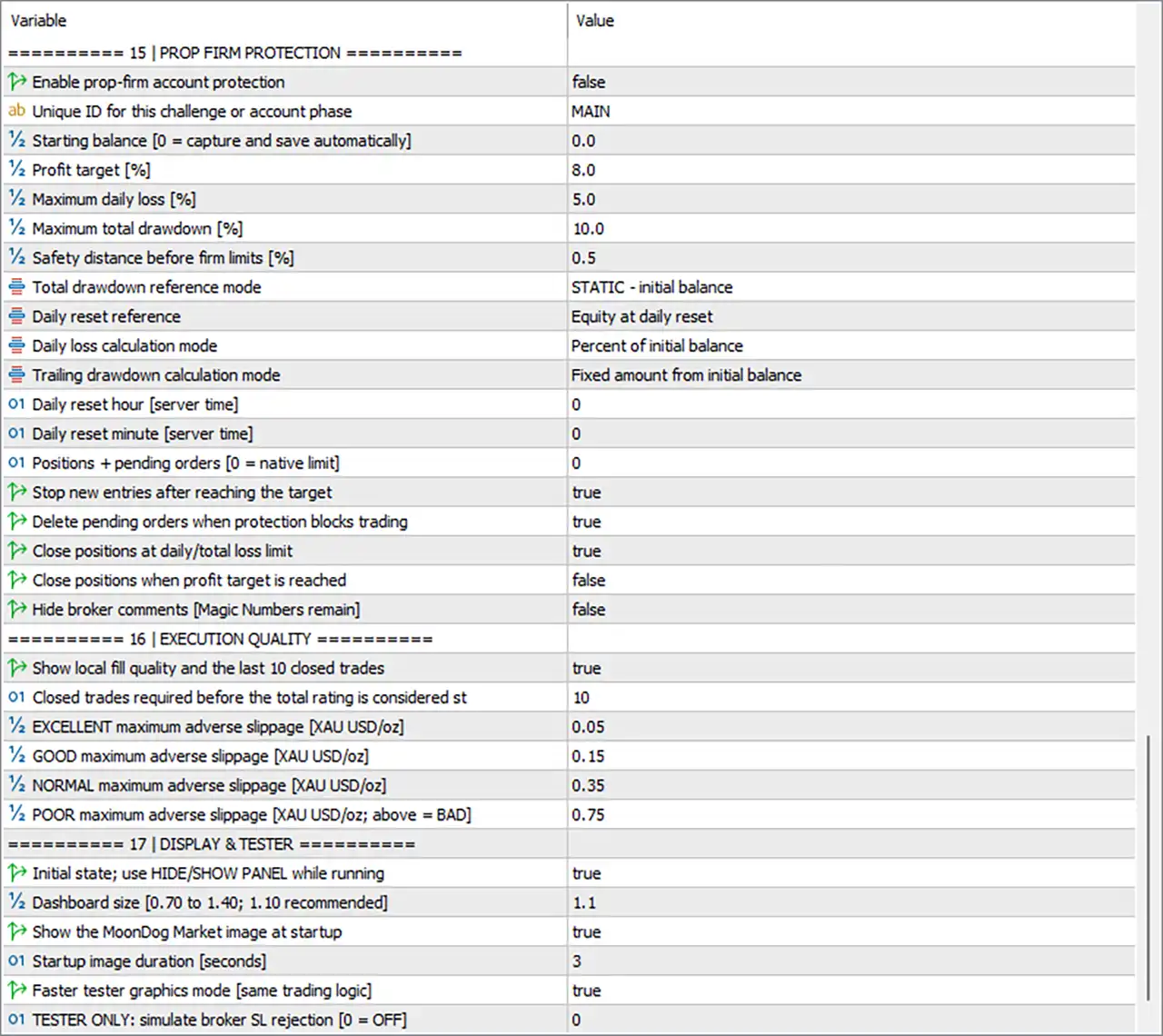
🔹 Enable prop-firm account protection = false — Disables the dedicated prop-firm account protection system.
🔹 Unique ID for this challenge or account phase = MAIN — Uses MAIN as the unique identifier for the challenge or account phase.
🔹 Starting balance [0 = capture and save automatically] = 0.0 — Sets the starting balance to 0.0, allowing the EA to capture and save it automatically.
🔹 Profit target [%] = 8.0 — Sets the configured prop-firm profit target to 8.0%.
🔹 Maximum daily loss [%] = 5.0 — Sets the maximum daily loss threshold to 5.0%.
🔹 Maximum total drawdown [%] = 10.0 — Sets the maximum overall drawdown threshold to 10.0%.
🔹 Safety distance before firm limits [%] = 0.5 — Establishes a 0.5% safety buffer before reaching the configured prop-firm limits.
🔹 Total drawdown reference mode = STATIC - initial balance — Calculates total drawdown against the initial balance using a static reference.
🔹 Daily reset reference = Equity at daily reset — Uses the equity at the daily reset as the reference for daily protection.
🔹 Daily loss calculation mode = Percent of initial balance — Calculates daily loss as a percentage of the initial balance.
🔹 Trailing drawdown calculation mode = Fixed amount from initial balance — Calculates trailing drawdown using a fixed amount from the initial balance.
🔹 Daily reset hour [server time] = 0 — Sets the daily reset hour to 0 server time.
🔹 Daily reset minute [server time] = 0 — Sets the daily reset minute to 0.
🔹 Positions + pending orders [0 = native limit] = 0 — Sets this limit to 0, meaning the native platform/account limit is used.
🔹 Stop new entries after reaching the target = true — Stops opening new trades after the configured profit target is reached.
🔹 Delete pending orders when protection blocks trading = true — Deletes pending orders when prop-firm protection prevents new trading.
🔹 Close positions at daily/total loss limit = true — Enables closing of open positions when the daily or total loss limit is reached.
🔹 Close positions when profit target is reached = false — Does not automatically close existing positions when the profit target is reached.
🔹 Hide broker comments [Magic Numbers remain] = false — Leaves broker comments visible while Magic Numbers remain available.
16 | Execution Quality
🔹 Show local fill quality and the last 10 closed trades = true — Displays local execution/fill quality information and data from the last 10 closed trades.
🔹 Closed trades required before the total rating is considered st = 10 — Requires 10 closed trades before the total execution-quality rating is considered statistically meaningful.
🔹 EXCELLENT maximum adverse slippage [XAU USD/oz] = 0.05 — Sets 0.05 as the maximum adverse-slippage threshold for the EXCELLENT execution-quality category.
🔹 GOOD maximum adverse slippage [XAU USD/oz] = 0.15 — Sets 0.15 as the maximum adverse-slippage threshold for the GOOD category.
🔹 NORMAL maximum adverse slippage [XAU USD/oz] = 0.35 — Sets 0.35 as the maximum adverse-slippage threshold for the NORMAL category.
🔹 POOR maximum adverse slippage [XAU USD/oz; above = BAD] = 0.75 — Sets 0.75 as the maximum threshold for the POOR category; values above 0.75 are classified as BAD.
17 | Display & Tester
🔹 Initial state; use HIDE/SHOW PANEL while running = true — Starts the EA with the panel functionality available through the HIDE/SHOW PANEL control while running.
🔹 Dashboard size [0.70 to 1.40; 1.10 recommended] = 1.1 — Sets the dashboard size to 1.1, which matches the recommended value shown in the parameter description.
🔹 Show the MoonDog Market image at startup = true — Displays the MoonDog Market image when the EA starts.
🔹 Startup image duration [seconds] = 3 — Displays the startup image for 3 seconds.
🔹 Faster tester graphics mode [same trading logic] = true — Enables faster graphics processing in the Strategy Tester while retaining the same trading logic.
🔹 TESTER ONLY: simulate broker SL rejection [0 = OFF] = 0 — Sets simulated broker Stop Loss rejection to 0, meaning the simulation is OFF.
🔢 Conclusion
MoonDog EA MT5 offers a highly configurable framework centered on XAUUSD trading, combining multiple proprietary strategy modules with detailed risk, execution, news, profit-protection, and account-safety controls.
The current configuration enables both BUY and SELL entries, uses RISK 2% OF BALANCE/EQUITY, and requires a free-margin safety buffer before entry. Automatic lot increases are currently disabled, although the scaling framework is configured with a 500.0 balance step, 0.01 lot increase, and 0.03 maximum automatically scaled lot.
All five strategy modules—Moon Nova, Moon Apex, Moon Zenith, Moon Pulse, and Moon Eclipse—are enabled. The daily entry schedule is currently disabled, while the configured schedule remains 02:00–19:00 server time.
News protection is particularly important in the current setup. General economic-news filtering is disabled, but independent protection for NFP, CPI, and FOMC is enabled. Entries are paused around these events, with NFP/CPI protection of 30 minutes before and 60 minutes after, and FOMC protection of 60 minutes before and 150 minutes after.
The EA uses a 200.0-point physical Stop Loss, with the panel specifying 200 = 2.00 on XAUUSD. Trailing on highs and lows is enabled, while MoonLock protection activates at 1.0 account-currency unit per 0.01 lot and protects 50.0% of peak profit.
Prop-firm protection is currently disabled, but its configured framework contains an 8.0% profit target, 5.0% maximum daily loss, 10.0% maximum total drawdown, and 0.5% safety distance. Emergency monetary, percentage, and adverse-reversal limits are all currently set to 0.0, meaning they are off.
Overall, MoonDog EA MT5 provides a sophisticated set of controls for traders who want to customize entry behavior, position sizing, news avoidance, trailing protection, profit locking, prop-firm parameters, and execution-quality monitoring. Because several parameters can materially affect risk—especially the 2% risk model, 200.0-point physical SL, 5.0% daily loss, 10.0% total drawdown, and event-protection windows—the configuration should be thoroughly backtested and demo-tested before live deployment.
🔢 FAQs
❓ What trading strategies are enabled in MoonDog EA MT5?
All five displayed modules are enabled: Moon Nova, Moon Apex, Moon Zenith, Moon Pulse, and Moon Eclipse.
❓ What position-sizing method is currently selected?
The active setting is RISK 2% OF BALANCE/EQUITY. The fixed-lot reference is 0.01, while automatic lot scaling is currently disabled.
❓ How does MoonDog EA MT5 handle major economic events?
Independent major-event protection is enabled for NFP, CPI, and FOMC. NFP and CPI use 30 minutes before / 60 minutes after, while FOMC uses 60 minutes before / 150 minutes after.
❓ What is the physical Stop Loss setting?
The main physical Stop Loss is 200.0 points, and the panel specifies that 200 points = 2.00 on XAUUSD.
❓ Does MoonDog EA MT5 include prop-firm protection?
Yes. The prop-firm protection framework is available, with a configured 8.0% profit target, 5.0% maximum daily loss, 10.0% maximum total drawdown, and 0.5% safety distance. However, Enable prop-firm account protection = false, so it is currently disabled.


