


🔢 BitcoinQuasar EA MT5 – Complete Settings Guide
BitcoinQuasar EA MT5 is a multi-strategy automated trading Expert Advisor built around BOT 1 – SMC MultiStrategy and BOT 2 – SMC AutoUpdate. Its configuration provides detailed controls for lot calculation, risk management, order timing, strategy activation, Stop Loss, Take Profit, break-even, trailing protection, trading days, trading hours, Magic Numbers, order comments, and visual dashboard settings.
The following guide explains every parameter shown in the supplied settings panels, preserving all original numerical values and Boolean settings.
🔄 BOT 1 Settings
🔶 BOT 1 – Lot Management
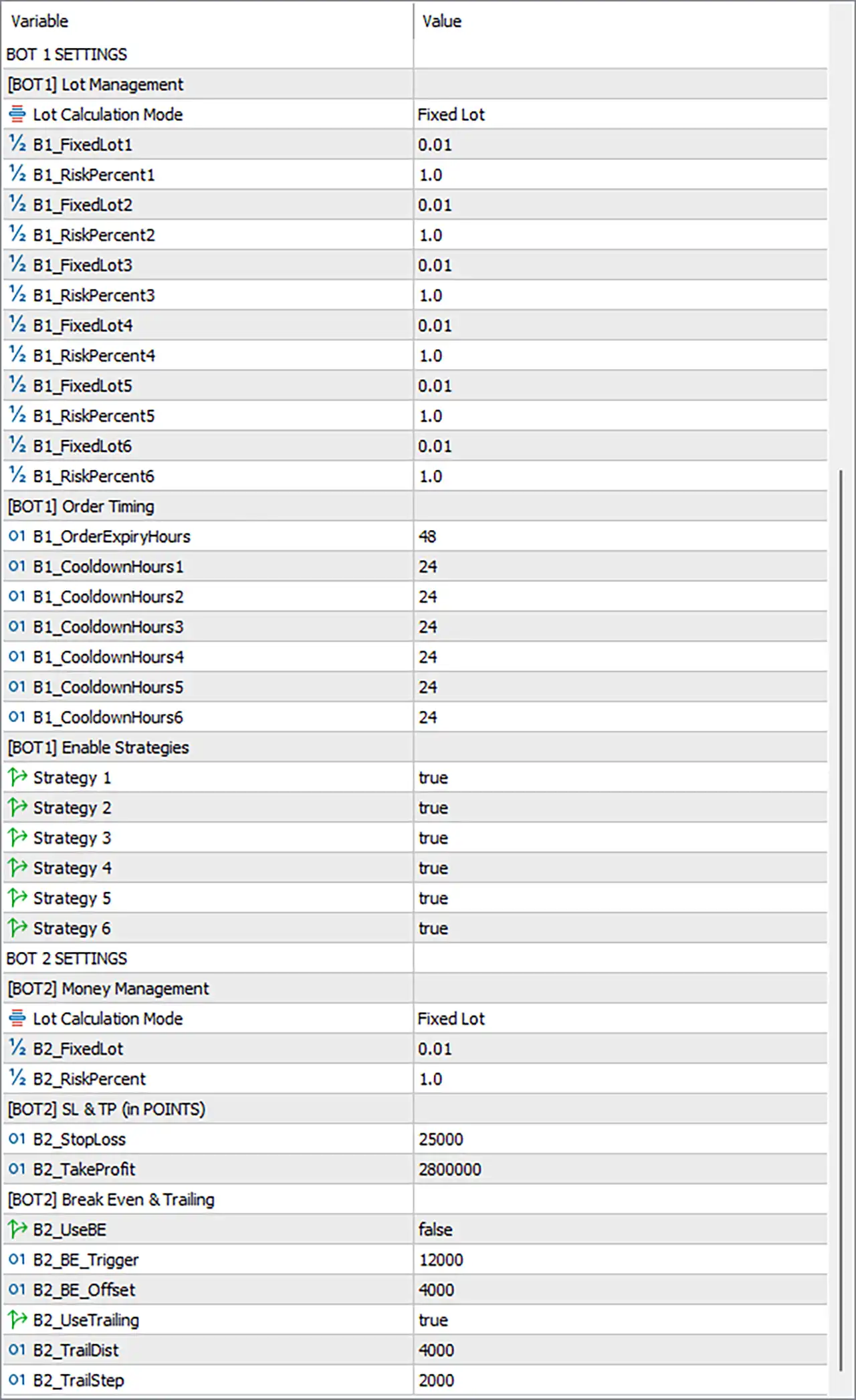
🔹 Lot Calculation Mode = Fixed Lot — Selects Fixed Lot as the active position-sizing method for BOT 1.
🔹 B1_FixedLot1 = 0.01 — Sets the first BOT 1 fixed lot size to 0.01 lots.
🔹 B1_RiskPercent1 = 1.0 — Sets the first BOT 1 risk parameter to 1.0 when the corresponding risk-based calculation is used.
🔹 B1_FixedLot2 = 0.01 — Sets the second BOT 1 fixed lot size to 0.01 lots.
🔹 B1_RiskPercent2 = 1.0 — Sets the second BOT 1 risk parameter to 1.0.
🔹 B1_FixedLot3 = 0.01 — Sets the third BOT 1 fixed lot size to 0.01 lots.
🔹 B1_RiskPercent3 = 1.0 — Sets the third BOT 1 risk parameter to 1.0.
🔹 B1_FixedLot4 = 0.01 — Sets the fourth BOT 1 fixed lot size to 0.01 lots.
🔹 B1_RiskPercent4 = 1.0 — Sets the fourth BOT 1 risk parameter to 1.0.
🔹 B1_FixedLot5 = 0.01 — Sets the fifth BOT 1 fixed lot size to 0.01 lots.
🔹 B1_RiskPercent5 = 1.0 — Sets the fifth BOT 1 risk parameter to 1.0.
🔹 B1_FixedLot6 = 0.01 — Sets the sixth BOT 1 fixed lot size to 0.01 lots.
🔹 B1_RiskPercent6 = 1.0 — Sets the sixth BOT 1 risk parameter to 1.0.
🔶 BOT 1 – Order Timing
🔹 B1_OrderExpiryHours = 48 — Sets the BOT 1 order-expiration period to 48 hours.
🔹 B1_CooldownHours1 = 24 — Sets the first BOT 1 strategy cooldown period to 24 hours.
🔹 B1_CooldownHours2 = 24 — Sets the second BOT 1 strategy cooldown period to 24 hours.
🔹 B1_CooldownHours3 = 24 — Sets the third BOT 1 strategy cooldown period to 24 hours.
🔹 B1_CooldownHours4 = 24 — Sets the fourth BOT 1 strategy cooldown period to 24 hours.
🔹 B1_CooldownHours5 = 24 — Sets the fifth BOT 1 strategy cooldown period to 24 hours.
🔹 B1_CooldownHours6 = 24 — Sets the sixth BOT 1 strategy cooldown period to 24 hours.
🔶 BOT 1 – Enable Strategies
🔹 Strategy 1 = true — Enables Strategy 1 for BOT 1.
🔹 Strategy 2 = true — Enables Strategy 2 for BOT 1.
🔹 Strategy 3 = true — Enables Strategy 3 for BOT 1.
🔹 Strategy 4 = true — Enables Strategy 4 for BOT 1.
🔹 Strategy 5 = true — Enables Strategy 5 for BOT 1.
🔹 Strategy 6 = true — Enables Strategy 6 for BOT 1.
🔄 BOT 2 Settings
🔶 BOT 2 – Money Management
🔹 Lot Calculation Mode = Fixed Lot — Selects Fixed Lot as the position-sizing method for BOT 2.
🔹 B2_FixedLot = 0.01 — Sets the BOT 2 fixed lot size to 0.01 lots.
🔹 B2_RiskPercent = 1.0 — Sets the BOT 2 risk parameter to 1.0 when the applicable risk-based calculation is used.
🔶 BOT 2 – SL & TP (in Points)
🔹 B2_StopLoss = 25000 — Sets the BOT 2 Stop Loss distance to 25,000 points.
🔹 B2_TakeProfit = 2800000 — Sets the BOT 2 Take Profit distance to 2,800,000 points.
🔶 BOT 2 – Break Even & Trailing
🔹 B2_UseBE = false — Disables the BOT 2 break-even function.
🔹 B2_BE_Trigger = 12000 — Sets the break-even activation trigger to 12,000 points if the break-even feature is enabled.
🔹 B2_BE_Offset = 4000 — Sets the break-even offset to 4,000 points.
🔹 B2_UseTrailing = true — Enables the BOT 2 trailing-stop function.
🔹 B2_TrailDist = 4000 — Sets the BOT 2 trailing-stop distance to 4,000 points.
🔹 B2_TrailStep = 2000 — Sets the BOT 2 trailing adjustment step to 2,000 points.
🔄 Visual Effects
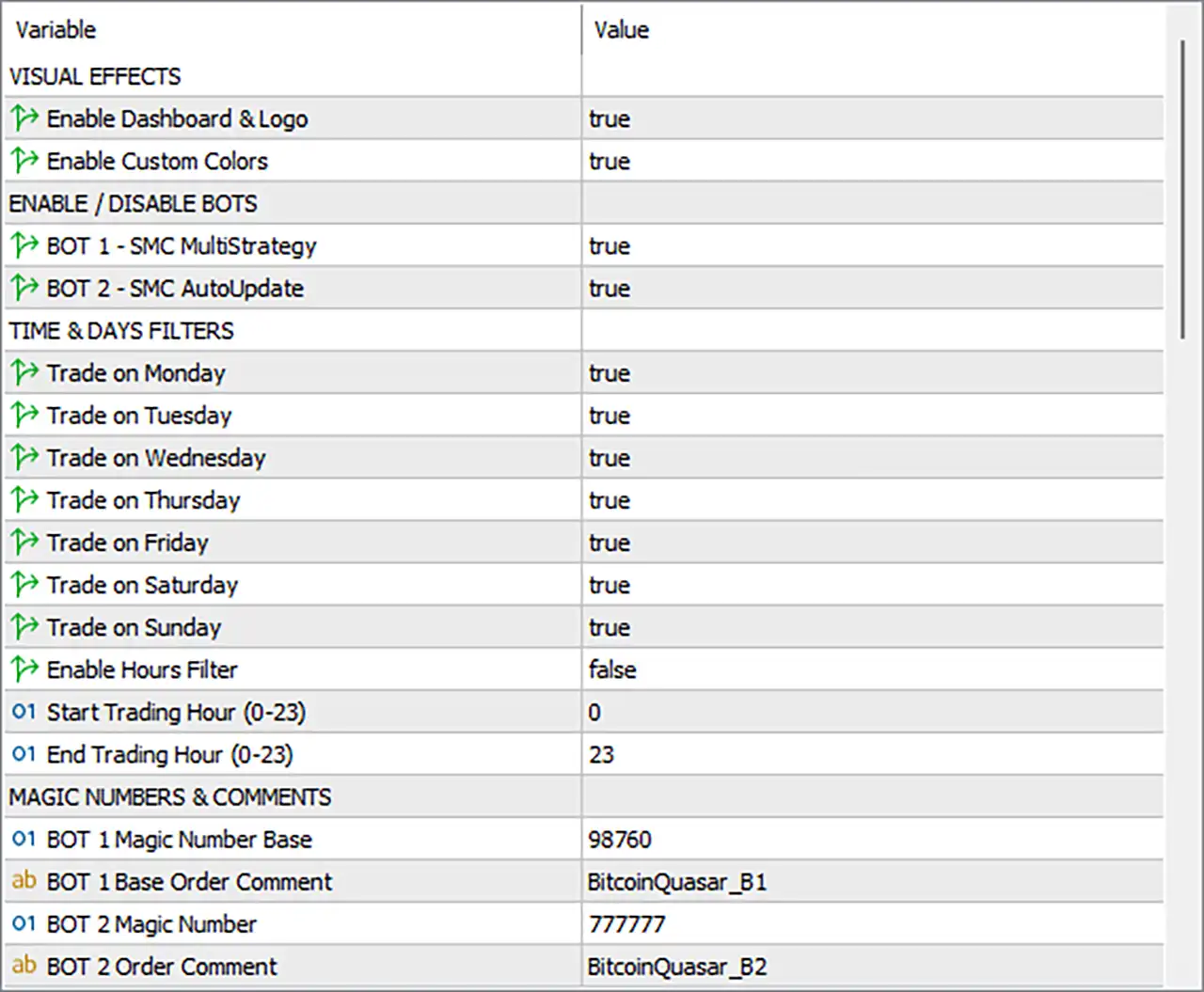
🔹 Enable Dashboard & Logo = true — Enables the EA's dashboard and logo display on the trading chart.
🔹 Enable Custom Colors = true — Enables custom color settings for the EA's visual interface.
🔄 Enable / Disable Bots
🔹 BOT 1 – SMC MultiStrategy = true — Enables BOT 1 – SMC MultiStrategy, allowing its configured strategies to operate.
🔹 BOT 2 – SMC AutoUpdate = true — Enables BOT 2 – SMC AutoUpdate alongside BOT 1.
🔄 Time & Days Filters
🔹 Trade on Monday = true — Allows BitcoinQuasar EA MT5 to trade on Monday.
🔹 Trade on Tuesday = true — Allows the EA to trade on Tuesday.
🔹 Trade on Wednesday = true — Allows the EA to trade on Wednesday.
🔹 Trade on Thursday = true — Allows the EA to trade on Thursday.
🔹 Trade on Friday = true — Allows the EA to trade on Friday.
🔹 Trade on Saturday = true — Allows the EA to trade on Saturday.
🔹 Trade on Sunday = true — Allows the EA to trade on Sunday.
🔹 Enable Hours Filter = false — Disables the specific trading-hours restriction in the current configuration.
🔹 Start Trading Hour (0–23) = 0 — Sets the configured trading start hour to 0 when the Hours Filter is enabled.
🔹 End Trading Hour (0–23) = 23 — Sets the configured trading end hour to 23 when the Hours Filter is enabled.
🔄 Magic Numbers & Comments
🔹 BOT 1 Magic Number Base = 98760 — Assigns 98760 as the base Magic Number for BOT 1 trades.
🔹 BOT 1 Base Order Comment = BitcoinQuasar_B1 — Sets BitcoinQuasar_B1 as the base order comment for BOT 1 positions.
🔹 BOT 2 Magic Number = 777777 — Assigns 777777 as the Magic Number for BOT 2 trades.
🔹 BOT 2 Order Comment = BitcoinQuasar_B2 — Sets BitcoinQuasar_B2 as the order comment for BOT 2 positions.
🔢 Conclusion
BitcoinQuasar EA MT5 provides a detailed multi-strategy configuration with two independently controlled trading engines: BOT 1 – SMC MultiStrategy and BOT 2 – SMC AutoUpdate. Both bots are currently enabled, giving the EA access to both configured strategy frameworks.
BOT 1 uses Fixed Lot sizing with all six fixed-lot values set to 0.01 and all six risk parameters set to 1.0. All six strategies are enabled, while each strategy has a 24-hour cooldown. BOT 1 orders have an expiry period of 48 hours.
BOT 2 also uses Fixed Lot sizing at 0.01 lots, with B2_RiskPercent = 1.0. Its Stop Loss is set to 25,000 points, while the Take Profit is configured at 2,800,000 points. Break-even is disabled, but trailing protection is enabled with a 4,000-point trailing distance and 2,000-point trailing step.
The EA is configured to trade on Monday through Sunday, while the Hours Filter is disabled. If the Hours Filter is activated, the configured trading window is 00:00 to 23:00.
For trade identification, BOT 1 uses the base Magic Number 98760 with the comment BitcoinQuasar_B1, while BOT 2 uses Magic Number 777777 with the comment BitcoinQuasar_B2. The dashboard, logo, and custom colors are also enabled.
Because the configuration contains very large point-based values, particularly B2_TakeProfit = 2800000, traders should verify the point-to-price conversion for their specific Bitcoin symbol and broker. Demo testing, backtesting, and careful risk evaluation are recommended before deploying BitcoinQuasar EA MT5 on a live account.
🔢 FAQs
❓ What trading strategies are enabled in BitcoinQuasar EA MT5?
All six BOT 1 strategies are enabled with Strategy 1 through Strategy 6 = true, while both BOT 1 – SMC MultiStrategy and BOT 2 – SMC AutoUpdate are enabled.
❓ What is the default lot size for BitcoinQuasar EA MT5?
BOT 1 uses 0.01 lots for all six fixed-lot parameters, while BOT 2 uses B2_FixedLot = 0.01. The active Lot Calculation Mode for both bots is Fixed Lot.
❓ What are the BOT 2 Stop Loss and Take Profit settings?
BOT 2 has B2_StopLoss = 25000 points and B2_TakeProfit = 2800000 points.
❓ Does BOT 2 use break-even and trailing stop protection?
Break-even is disabled with B2_UseBE = false, while trailing is enabled with B2_UseTrailing = true, B2_TrailDist = 4000, and B2_TrailStep = 2000.
❓ What are the trading days and hours?
Trading is enabled for Monday, Tuesday, Wednesday, Thursday, Friday, Saturday, and Sunday. The Hours Filter is disabled with Enable Hours Filter = false. Its configured hours are Start = 0 and End = 23.


