


🔢 Akali MT5 Settings Guide – Complete Parameter Explanation
Akali MT5 is a configurable MetaTrader 5 Expert Advisor built around flexible execution, risk management, pending-order trading, trailing strategies, and optional news filtering. The supplied configuration is set to use Pending Orders, the Tighter Trailing (Recommended) strategy, and a 5.0% risk percentage of balance.
With separate controls for execution, order identification, position sizing, news protection, and trading days, Akali MT5 gives traders a structured way to adapt the EA to different account sizes, broker conditions, and trading preferences.
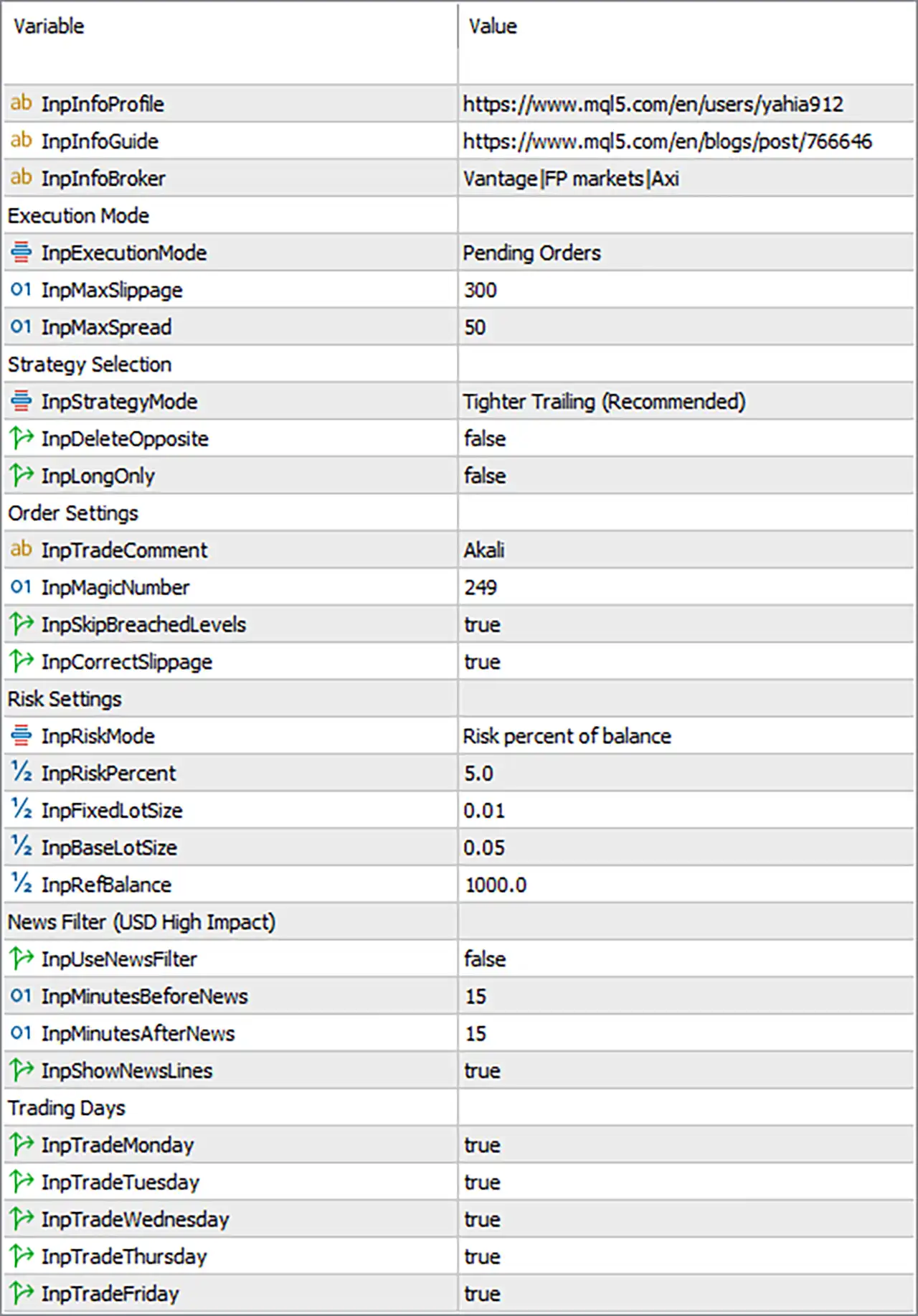
🔄 Execution Mode
🔹 InpExecutionMode = Pending Orders — Sets the EA to operate using pending orders rather than relying exclusively on immediate market execution.
🔹 InpMaxSlippage = 300 — Defines the maximum permitted execution slippage as 300 points.
🔹 InpMaxSpread = 50 — Sets the maximum acceptable spread to 50 points before the EA can execute its trading logic.
🔄 Strategy Selection
🔹 InpStrategyMode = Tighter Trailing (Recommended) — Selects the Tighter Trailing strategy profile, which is explicitly marked as Recommended in the supplied settings.
🔹 InpDeleteOpposite = false — Keeps opposite pending orders rather than automatically deleting them when another side becomes active.
🔹 InpLongOnly = false — Long-only trading is disabled, allowing the EA to consider both long and short directions.
🔄 Order Settings
🔹 InpTradeComment = Akali — Sets Akali as the trade comment used to identify EA-generated orders.
🔹 InpMagicNumber = 249 — Assigns 249 as the EA's Magic Number for identifying and managing its own trades.
🔹 InpSkipBreachedLevels = true — Instructs the EA to skip trading levels that have already been breached.
🔹 InpCorrectSlippage = true — Enables the EA's slippage-correction mechanism to account for execution-price differences.
🔄 Risk Settings
🔹 InpRiskMode = Risk percent of balance — Selects percentage-based risk calculation using the account balance as the reference.
🔹 InpRiskPercent = 5.0 — Sets the configured risk level to 5.0% of account balance according to the selected risk mode.
🔹 InpFixedLotSize = 0.01 — Defines a fixed position size of 0.01 lot for situations where the fixed-lot calculation mode is used.
🔹 InpBaseLotSize = 0.05 — Sets the base lot size to 0.05 lot, which can be used as a reference for the EA's position-sizing calculations.
🔹 InpRebalance = 1000.0 — Sets the rebalance threshold/reference amount to 1000.0.
Risk-setting note: The active mode shown is Risk percent of balance, so InpRiskPercent = 5.0 is the primary risk parameter in this configuration, while the fixed/base lot parameters provide alternative or supporting sizing values.
🔄 News Filter – USD High Impact
🔹 InpUseNewsFilter = false — Disables the EA's automated news filter in the current configuration.
🔹 InpMinutesBeforeNews = 15 — If the news filter is enabled, the EA is configured to consider a 15-minute protection period before a relevant news event.
🔹 InpMinutesAfterNews = 15 — If enabled, the EA is configured to maintain the news protection period for 15 minutes after the event.
🔹 InpShowNewsLines = true — Enables the display of news-event lines on the MT5 chart.
🔄 Trading Days
🔹 InpTradeMonday = true — Trading is enabled on Monday.
🔹 InpTradeTuesday = true — Trading is enabled on Tuesday.
🔹 InpTradeWednesday = true — Trading is enabled on Wednesday.
🔹 InpTradeThursday = true — Trading is enabled on Thursday.
🔹 InpTradeFriday = true — Trading is enabled on Friday.
🔢 Current Akali MT5 Configuration Summary
🔹 Execution Mode = Pending Orders — The EA is configured around pending-order execution.
🔹 Maximum Slippage = 300 points — Execution slippage allowance is 300 points.
🔹 Maximum Spread = 50 points — The configured spread threshold is 50 points.
🔹 Strategy = Tighter Trailing (Recommended) — The recommended tighter trailing profile is selected.
🔹 Delete Opposite Orders = false — Opposite orders are not automatically deleted.
🔹 Long Only = false — The EA is not restricted to long positions.
🔹 Trade Comment = Akali — EA trades are identified with the Akali comment.
🔹 Magic Number = 249 — EA trade identification number is 249.
🔹 Skip Breached Levels = true — Already-breached levels are skipped.
🔹 Correct Slippage = true — Slippage correction is enabled.
🔹 Risk Mode = Risk percent of balance — Position sizing is based on a percentage of balance.
🔹 Risk Percent = 5.0 — Configured account-balance risk is 5.0%.
🔹 Fixed Lot Size = 0.01 — Alternative fixed lot size is 0.01 lot.
🔹 Base Lot Size = 0.05 — Base lot reference is 0.05 lot.
🔹 Rebalance = 1000.0 — Rebalance reference is 1000.0.
🔹 News Filter = false — Automated news protection is currently disabled.
🔹 News Protection Before = 15 minutes — Configured pre-news period is 15 minutes.
🔹 News Protection After = 15 minutes — Configured post-news period is 15 minutes.
🔹 News Lines = true — News lines remain visible on the chart.
🔹 Monday Trading = true — Enabled.
🔹 Tuesday Trading = true — Enabled.
🔹 Wednesday Trading = true — Enabled.
🔹 Thursday Trading = true — Enabled.
🔹 Friday Trading = true — Enabled.
🔢 Conclusion
Akali MT5 provides a relatively straightforward but highly configurable framework for automated trading on MetaTrader 5. The supplied configuration emphasizes pending-order execution, tighter trailing management, and percentage-based account risk.
The most important settings in the current setup are Pending Orders, Tighter Trailing (Recommended), 5.0% risk, 300 maximum slippage, 50 maximum spread, and Magic Number 249.
All five trading days from Monday through Friday are enabled, while the USD High-Impact News Filter is disabled. Traders should pay particular attention to the 5.0% risk setting, because percentage-based risk can result in substantially larger position sizes as account balance changes.
Before using Akali MT5 on a live account, it is advisable to validate the EA on a demo account or strategy tester and confirm that the 300-point slippage, 50-point spread, and 5.0% risk settings are appropriate for the broker, symbol, and account type being used.
🔢 FAQs
❓ What execution mode is Akali MT5 currently using?
Akali MT5 is configured to use Pending Orders through InpExecutionMode = Pending Orders.
❓ What is the current risk setting?
The active risk mode is Risk percent of balance, with InpRiskPercent = 5.0.
❓ What is the Magic Number for Akali MT5?
The configured Magic Number is 249, which helps the EA identify and manage its own trades.
❓ Is the news filter enabled?
No. InpUseNewsFilter = false, so the automated USD high-impact news filter is currently disabled. The configured protection values are still 15 minutes before and 15 minutes after news.
❓ Which days can Akali MT5 trade?
Trading is enabled on Monday, Tuesday, Wednesday, Thursday, and Friday, with all five corresponding parameters set to true.


