





Finvesting EA MT5 (Latest version) – GroupBuy
Select a variant to see availability.
What is Finvesting EA MT5?
Finvesting EA is an advanced Expert Advisor (EA) designed to optimize forex trading by combining cutting-edge algorithms, AI-powered market analysis, and risk management strategies. Whether you’re a beginner or a seasoned trader, this EA will help you achieve consistent returns while minimizing risk.
🔶 Vendor Website: View here
🔶 This is GroupBuy ==> How to Join
About the Author
This product is compiled by Ugochukwu Mobi. This author has more than +6 years of experience working on MQL5 with many famous products such as Finvesting EA MT5, Marvelous EA MT5, Bonnitta Gold MT5, AI Nodiurnal EA MT5 and other advisors. Among them, Finvesting EA MT5 is his best performing products.
Key Features of Finvesting EA for MT5
🔹 Advanced Algorithmic Trading Engine: Combines technical analysis, sentiment signals and historical data.
🔹 Multi-Currency Portfolio Trading: Capable of trading multiple forex pairs simultaneously for diversification.
🔹 Integrated Risk Management System: Uses Stop Loss (SL), Take Profit (TP) and position sizing for capital protection.
🔹 Flexible Lot Size Configuration: Supports fixed, dynamic and percentage-based lot calculation modes.
🔹 Built-in News and Spread Filters: Avoids trading during unstable market conditions or major events.
What is the Finvesting EA MT5 Trading Strategy?
🔹 Indicator-Driven Market Analysis: Uses multiple indicators to identify high-probability trading signals.
🔹 Adaptive Algorithmic Decision Logic: Continuously adjusts trading behavior to changing market trends.
🔹 Multi-Symbol Opportunity Detection: Scans several currency pairs to find profitable trade setups.
🔹 Structured Trade Management Model: Combines controlled entries with predefined exit conditions.
🔹 Automated News-Aware Trading Logic: Pauses trading around economic events to reduce volatility risk.
Finvesting EA MT5 Review
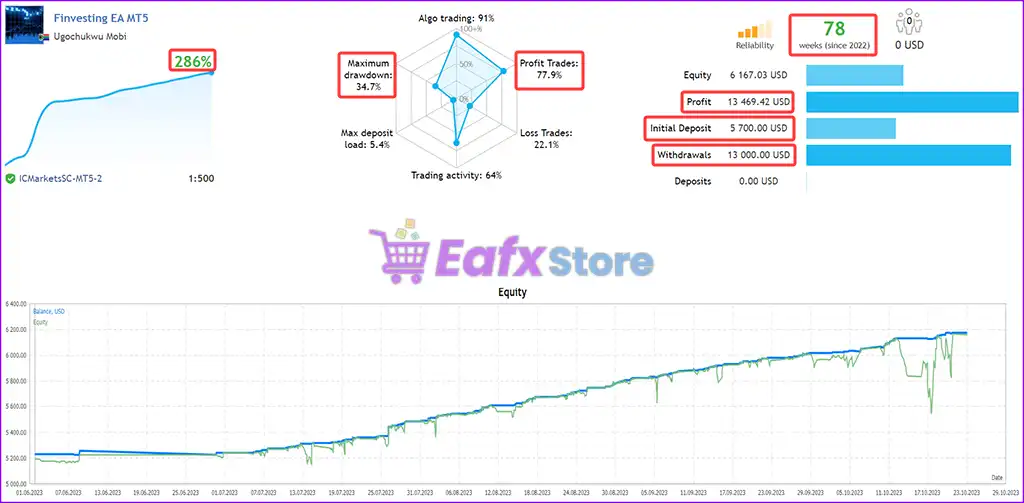
The Finvesting EA MT5 achieved impressive profit performance when trading with Forex pairs. Trading results on real account for 78 consecutive weeks of trading:
✅ Initial Deposit: $5,700
✅ Total Gain: +286%
✅ Win Rate (% of total): 77.9%
✅ Maximum Drawdown: 34.7%
Finvesting EA MT5 Live Trading
Why Choose & Use Finvesting EA MT5?
🔹 Consistent Automated Trading Approach: Removes emotional decisions with rule-based execution.
🔹 Diversified Forex Exposure: Trades multiple pairs to spread risk across different markets.
🔹 Flexible Strategy Customization: Adjustable settings allow traders to match their risk profile.
🔹 Professional Risk Protection Tools: Includes drawdown limits, spread control and trading filters.
🔹 Marketplace-Ready Trading Solution: Suitable for traders seeking structured automated forex systems.
Is Finvesting EA MT5 Safe?
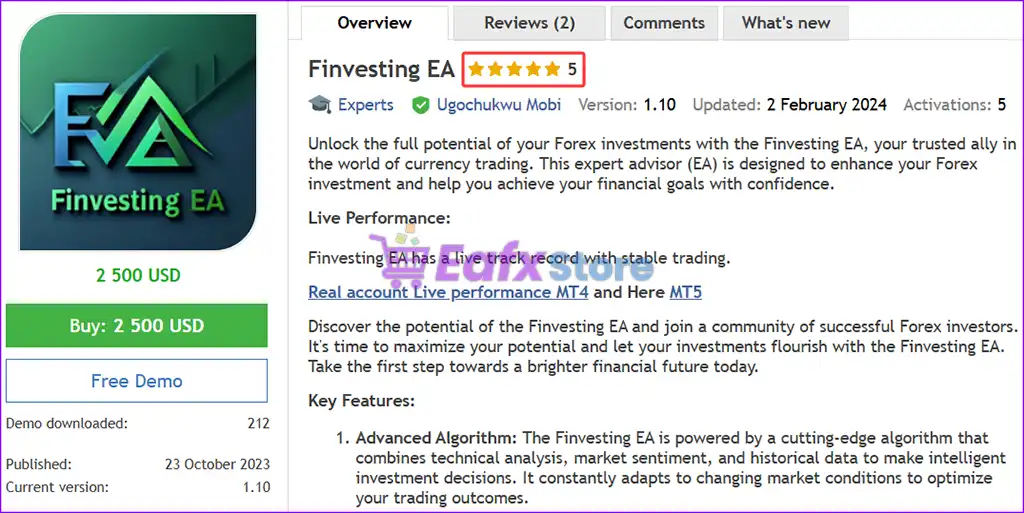
Finvesting EA shows significant potential in providing stable and reliable profits, becoming a reliable tool in the forex market. This advisor is highly appreciated by the community in many aspects and has won the trust of users.
➡️ Mr.Jorgb1990 (2024.06.21): “Very comfortable EA with low risk and quality entries. Running it on several forex pairs. Recommended EA.”
Trading Specifications
Recommended settings and parameters to pay attention to from developers and experts:
| Features | Type |
|---|---|
| Trading platform | MetaTrader 5 (MT5) |
| Time frames | Any |
| Currency pairs | EUR, GBP, USD, CAD, AUD, NZD |
| Minimum / Recommended deposit | $1,000 |
| Minimum / Recommended leverage | 1:50+ |
| Product type | Original version |
| Additional services | Unlock and Decompile |
| Recommended brokers | Exness Broker, Icmarkets Broker |
| Recommended VPS | MyfxVPS.com ( Blue VPS, Golden VPS). Lowest Latency, 2 week Free Trial, 100% Free for 12-18 Months. |
➡️ Reviewed by David Easton
Product Download Package?
The download package of the product suite includes:
✅ Setting (If Any).docx
✅ Installation Guide.docx
Conclusion
In short, Finvesting EA MT5 is a powerful and innovative forex trading solution designed to maximize returns while minimizing risk. By integrating AI-powered market analysis, advanced trading algorithms, and comprehensive risk management, this EA provides traders with an efficient and automated trading strategy. Whether you’re a beginner or an experienced trader, Finvesting EA offers an easy-to-use interface with customizable strategies, making it suitable for all skill levels.
🔢 Finvesting EA MT5 – Complete Settings & Parameters Guide
Finvesting EA is an automated Forex trading Expert Advisor (EA) designed with dynamic money management, smart grid trading, hedging support, news filtering and advanced risk control features.
The EA combines flexible lot sizing, customizable trade multipliers, and economic news protection to help traders manage positions efficiently across multiple currency pairs.
Finvesting EA MT5 Settings
🔢 Finvesting EA Settings Explained
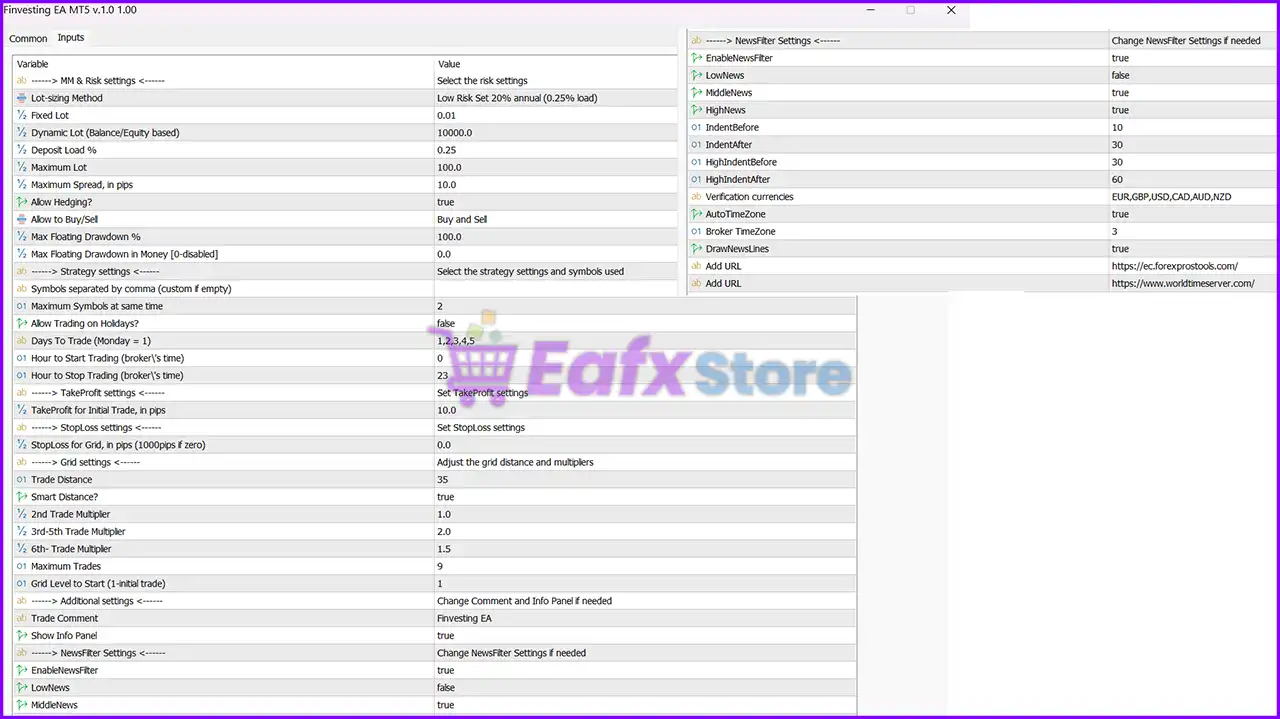
Below are the details of the parameters in the advisor’s trading system settings table:
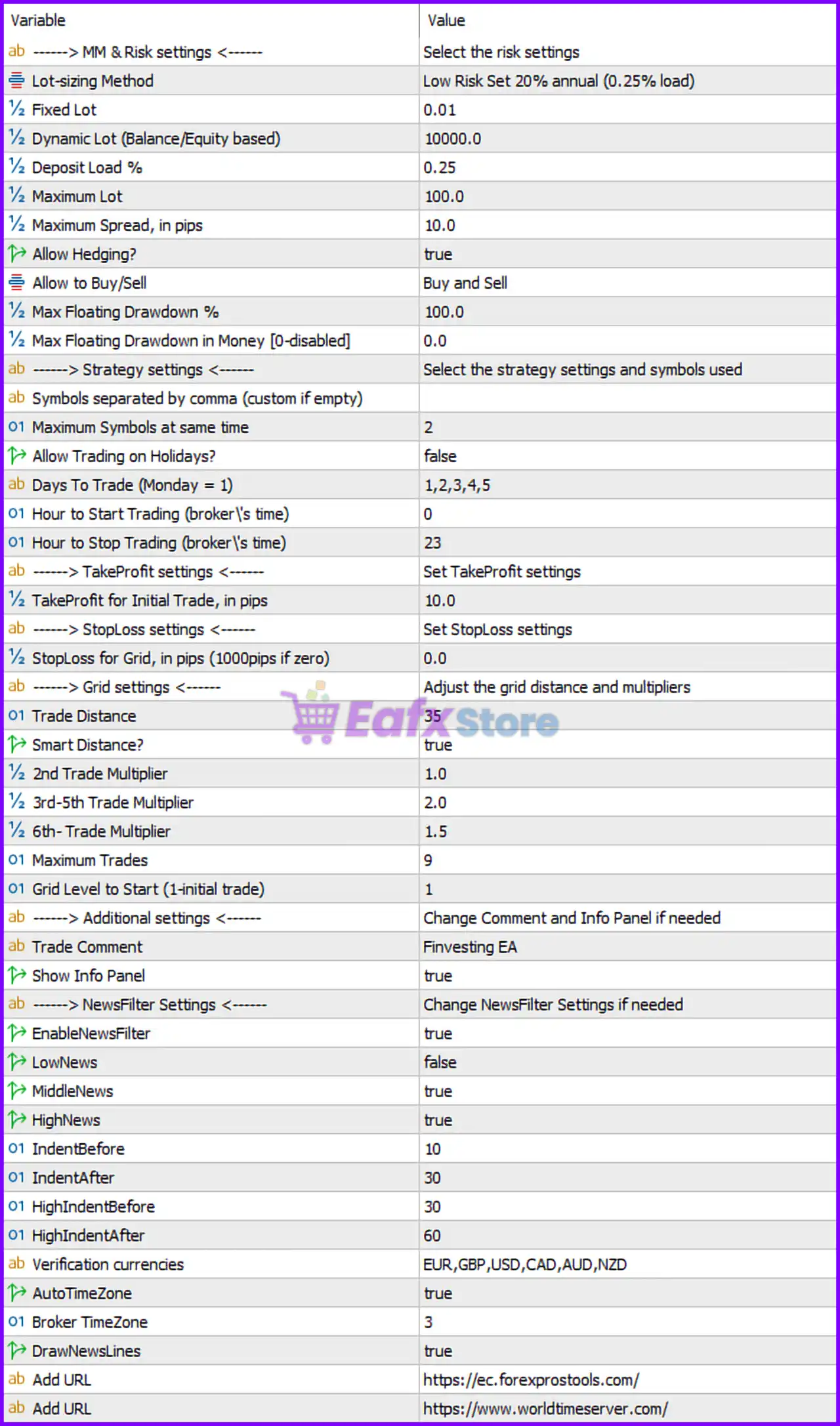
Finvesting EA MT5 Settings Panel
🔶 MM & Risk Settings
🔹 Lot-sizing Method = Low Risk Set 20% annual (0.25% load) — Uses a conservative money management profile targeting approximately 20% annual growth with 0.25% risk load.
🔹 Fixed Lot = 0.01 — Fixed trading volume set to 0.01 lots when fixed lot sizing is used.
🔹 Dynamic Lot (Balance/Equity based) = 10000.0 — Dynamic lot sizing is calculated using a reference balance/equity of 10,000.0.
🔹 Deposit Load % = 0.25 — The EA uses 0.25% deposit load for position sizing calculations.
🔹 Maximum Lot = 100.0 — Maximum allowed trading volume is 100.0 lots.
🔹 Maximum Spread, in pips = 10.0 — Prevents trade entries when spread exceeds 10.0 pips.
🔹 Allow Hedging? = true — Enables simultaneous Buy and Sell positions on the same symbol.
🔹 Allow to Buy/Sell = Buy and Sell — Both Buy and Sell trading directions are permitted.
🔹 Max Floating Drawdown % = 100.0 — Floating drawdown protection threshold is set to 100.0%.
🔹 Max Floating Drawdown in Money [0-disabled] = 0.0 — Monetary drawdown protection is disabled because the value is 0.0.
🔶 Strategy Settings
🔹 Symbols separated by comma (custom if empty) — Allows traders to specify custom trading symbols if required.
🔹 Maximum Symbols at same time = 2 — The EA can trade a maximum of 2 symbols simultaneously.
🔹 Allow Trading on Holidays? = false — Trading is disabled during configured holiday periods.
🔹 Days To Trade (Monday = 1) = 1,2,3,4,5 — Trading is allowed from Monday through Friday.
🔹 Hour to Start Trading (broker’s time) = 0 — Trading starts at 00:00 broker server time.
🔹 Hour to Stop Trading (broker’s time) = 23 — Trading stops at 23:00 broker server time.
🔶 Take Profit Settings
🔹 TakeProfit for Initial Trade, in pips = 10.0 — Initial trade Take Profit target is 10.0 pips.
🔶 Stop Loss Settings
🔹 StopLoss for Grid, in pips (10000pips if zero) = 0.0 — A value of 0.0 disables the grid Stop Loss and effectively uses the default large limit of 10,000 pips.
🔶 Grid Settings
🔹 Trade Distance = 35 — Distance between grid entries is 35 pips.
🔹 Smart Distance? = true — Enables automatic adjustment of grid spacing based on market conditions.
🔹 2nd Trade Multiplier = 1.0 — The second trade uses a multiplier of 1.0.
🔹 3rd-5th Trade Multiplier = 2.0 — Trades three through five use a lot multiplier of 2.0.
🔹 6th- Trade Multiplier = 1.5 — Trades from the sixth level onward use a multiplier of 1.5.
🔹 Maximum Trades = 9 — Allows a maximum of 9 grid positions.
🔹 Grid Level to Start (1-initial trade) = 1 — Grid management starts from the first trade level.
🔶 Additional Settings
🔹 Trade Comment = Finvesting EA — Custom comment attached to all EA-generated trades.
🔹 Show Info Panel = true — Displays the information panel directly on the trading chart.
🔶 News Filter Settings
🔹 EnableNewsFilter = true — Activates the built-in economic news protection system.
🔹 LowNews = false — Low-impact news events are ignored.
🔹 MiddleNews = true — Medium-impact news events are filtered.
🔹 HighNews = true — High-impact news events are filtered.
🔹 IndentBefore = 10 — Trading restrictions begin 10 minutes before medium-impact news releases.
🔹 IndentAfter = 30 — Trading resumes 30 minutes after medium-impact news releases.
🔹 HighIndentBefore = 30 — Trading restrictions begin 30 minutes before high-impact news events.
🔹 HighIndentAfter = 60 — Trading resumes 60 minutes after high-impact news events.
🔹 Verification currencies = EUR,GBP,USD,CAD,AUD,NZD — News events are monitored for EUR, GBP, USD, CAD, AUD, and NZD currencies.
🔹 AutoTimeZone = true — Automatically detects broker time zone settings.
🔹 Broker TimeZone = 3 — Broker server operates on GMT+3.
🔹 DrawNewsLines = true — Displays economic news markers directly on the chart.
🔹 Add URL = https://ec.forexprostools.com/ — Economic calendar data source.
🔹 Add URL = https://www.worldtimeserver.com/ — Time synchronization source.
🔢 Conclusion
Finvesting EA is a versatile automated trading system that combines conservative risk management, smart grid functionality, hedging support and comprehensive news filtering.
With features such as dynamic lot sizing, adaptive trade spacing, multi-symbol support, and economic event protection, the EA provides traders with a structured framework for managing risk while seeking trading opportunities across multiple market conditions.
🔢 FAQs
❓ What lot sizing method does Finvesting EA use by default?
The EA uses Low Risk Set 20% annual (0.25% load) as its default lot-sizing profile.
❓ How many symbols can Finvesting EA trade simultaneously?
The EA can trade up to 2 symbols at the same time.
❓ Does Finvesting EA support hedging?
Yes, Allow Hedging = true, enabling both Buy and Sell positions on the same instrument.
❓ What is the default Take Profit for the initial trade?
The initial Take Profit target is 10.0 pips.
❓ Which economic news events are filtered by default?
The EA filters medium-impact and high-impact news events related to EUR, GBP, USD, CAD, AUD, and NZD currencies.
User Reviews
Only logged in customers who have purchased this product may leave a review.
1. What is Finvesting EA MT5?
Finvesting EA MT5 is an automated trading system that utilizes AI-powered market analysis, risk management, and advanced trading algorithms to optimize forex trading. It is designed for both beginners and experienced traders to achieve consistent profits with minimal risk.
2. What makes Finvesting EA MT5 different from other EAs?
Finvesting EA MT5 combines multiple trading strategies, including technical analysis, market sentiment, and historical data processing, to enhance trading precision. It also features a news filter, grid trading system, and customizable risk management settings to adapt to different market conditions.
3. What is the minimum deposit required to use Finvesting EA MT5?
The recommended minimum deposit to start using Finvesting EA MT5 is $1,000, which ensures optimal trade execution and risk management.
4. Which currency pairs can I trade with Finvesting EA MT5?
Finvesting EA MT5 supports multiple currency pairs, including EUR, GBP, USD, CAD, AUD, and NZD. This allows traders to diversify their portfolio and reduce risk exposure.
5. Can Finvesting EA MT5 adapt to different market conditions?
Yes, the EA is designed to dynamically adjust to volatility changes and major news events using its integrated news filter and holiday-based trading settings, ensuring optimal performance across different market conditions.
6. How does Finvesting EA MT5 manage risk?
The EA includes comprehensive risk management settings, such as Stop-Loss (SL), Take-Profit (TP), drawdown limits, and customizable lot sizing. These features help minimize losses and maximize profit potential.
7. What is the historical performance of Finvesting EA MT5?
Since 2022, Finvesting EA MT5 has achieved:
Total Gain: +286%
Withdrawals: $13,000
Maximum Drawdown: 34.7%
High Win Rate: 77.9%
These results are based on live trading data from real accounts.
8. Does Finvesting EA MT5 support backtesting?
Yes, Finvesting EA MT5 includes backtesting capabilities, allowing traders to test strategies on historical data before applying them to live markets. This helps optimize trading performance.
-
 Price range: $70.00 through $599.00
 -
 Price range: $65.00 through $599.00
 -
 Price range: $70.00 through $599.00
 -
 Price range: $80.00 through $599.00
-
 3Price range: $89.00 through $599.00
 -
 1Price range: $89.00 through $599.00
 -
 1Price range: $89.00 through $599.00
 -
 2
2
There are no reviews yet.