




Apex Trader MT5 with SetFiles (Latest version) – GroupBuy
Select a variant to see availability.
What is Apex Trader MT5?
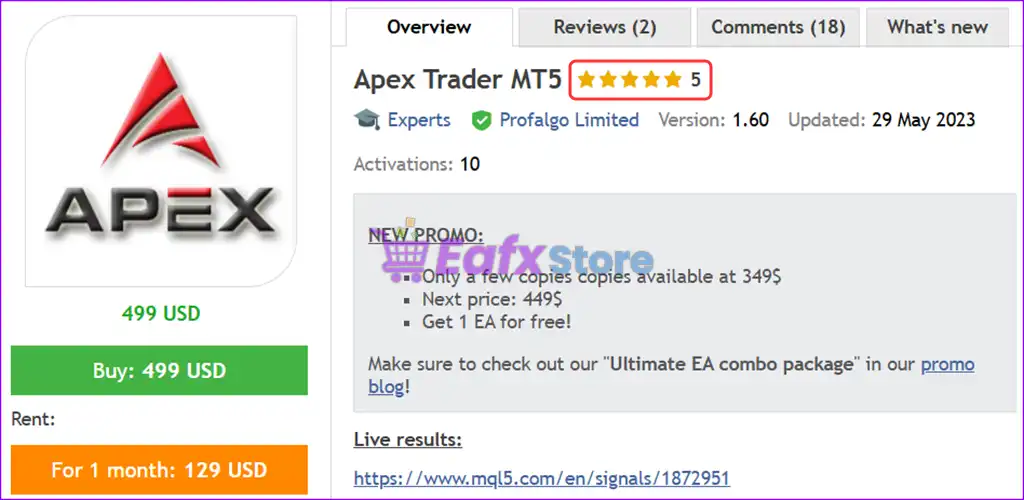
Apex Trader MT5 is a next-generation forex Expert Advisor (EA) designed to master the markets with a powerful and adaptive grid-based trading strategy. Developed with years of algorithmic trading experience, Apex Trader utilizes both mean-reversion and trend-following strategies to perform under a wide range of market conditions.
🔶 Vendor Website: View here
🔶 This is GroupBuy ==> How to Join
About the Author
This product is compiled by Wim Schrynemakers. This Malta author has more than +13 years of experience working on MQL5 with many famous products such as Apex Trader MT5, Goldbot One MT5, Stability Pro MT5, The Gold Reaper MT5 and others. Among them, Apex Trader MT5 is his best performing products.
Apex Trader MT5 Overview
Key Features of Apex Trader MT5
🔹 Adaptive Trading Logic: Combines trend-following and mean-reversion analysis for broader market coverage.
🔹 Smart Position Management: Uses dynamic profit targets that adjust according to evolving conditions.
🔹 Multi-Pair Trading System: Optimized to trade selected currency pairs through a unified framework.
🔹 Advanced Risk Controls: Integrates protective mechanisms to reduce exposure during adverse scenarios.
🔹 Market-Adaptive Execution: Continuously responds to volatility and changing price behavior patterns.
What is the Apex Trader MT5 Trading Strategy?
🔹 Hybrid Market Analysis: Merges trend and reversal concepts to identify high-probability opportunities.
🔹 Dynamic Position Scaling: Manages multiple positions strategically based on market development.
🔹 Adaptive Take-Profit Logic: Adjusts profit objectives to align with current volatility conditions.
🔹 Multi-Layer Confirmation: Evaluates price action and market structure before executing trades.
🔹 Risk-Aware Trade Management: Balances opportunity and exposure through intelligent position control.
Apex Trader MT5 Review
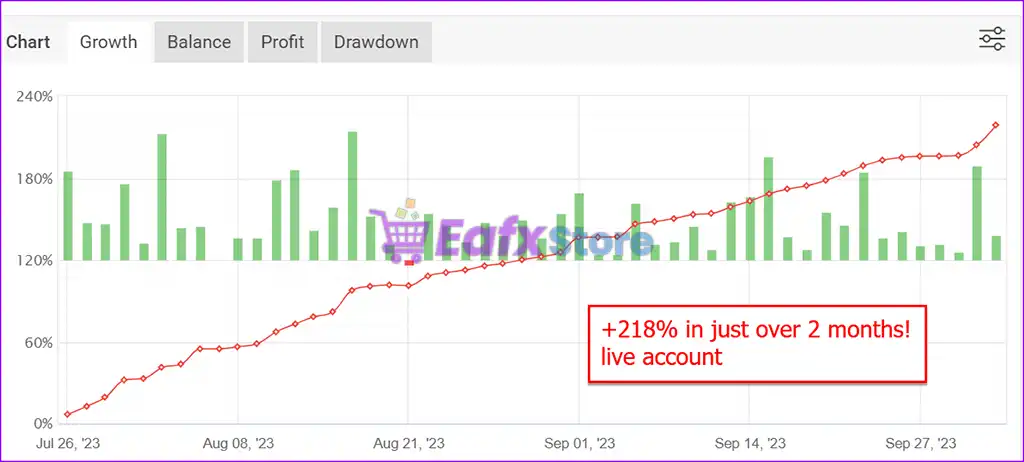
Apex Trader MT5 MyFxBook Results
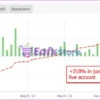
Apex Trader MT5 is a high-performance Expert Advisor (EA) designed for aggressive yet controlled growth. The chart above shows verified live account results, reflecting powerful gains in a short timeframe—ideal for prop trading challenges and high-yield strategies.
✅ Growth: +218%
✅ Timeframe: Just over 2 months (from July 26 to end of September 2023)
Apex Trader MT5 Live Signal Myfxbook
Apex Trader MT5 Backtest Results
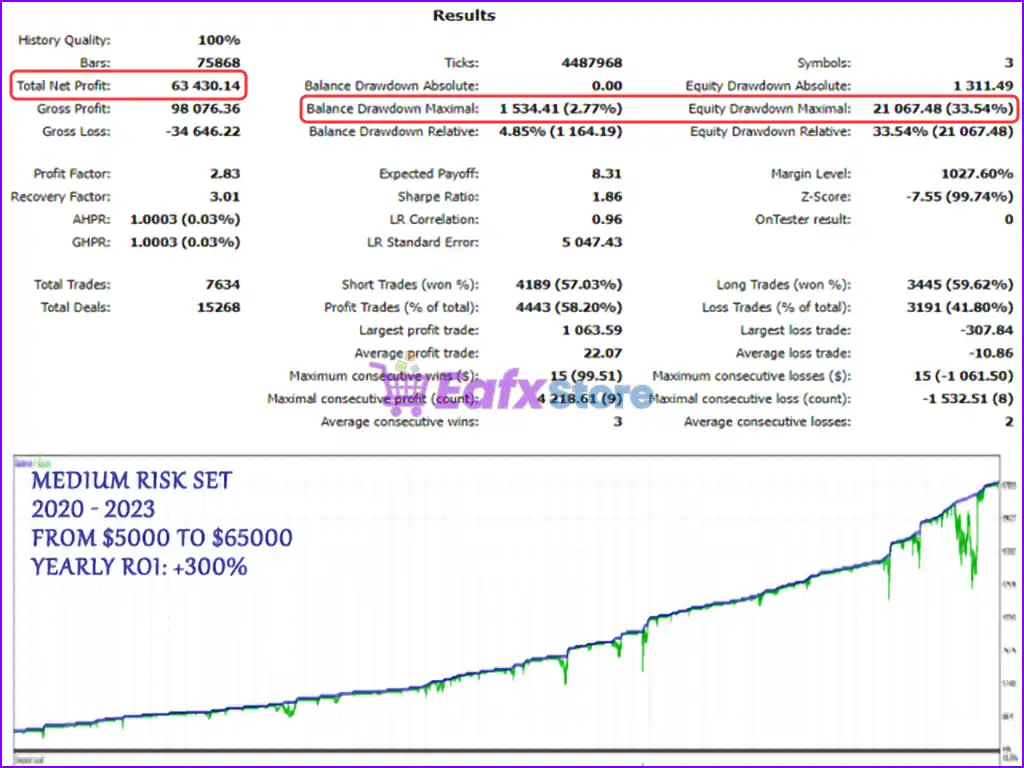
Apex Trader MT5 is a high-frequency, algorithmic trading system designed for consistent growth with medium risk. This backtest report provides valuable insights into the bot’s historical performance over 3 years using real tick data, simulating realistic market conditions.
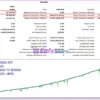
🔶 Apex Trader MT5 3-year backtest results show impressive returns using the MEDIUM RISK setting. Detailed performance metrics include:
✅ Backtest Period: 2020 – 2023
✅ Initial Deposit: $5,000
✅ Total Net Profit: $63,430.14
✅ Maximum Drawdown: 2.77%
Apex Trader MT5 Backtest Results
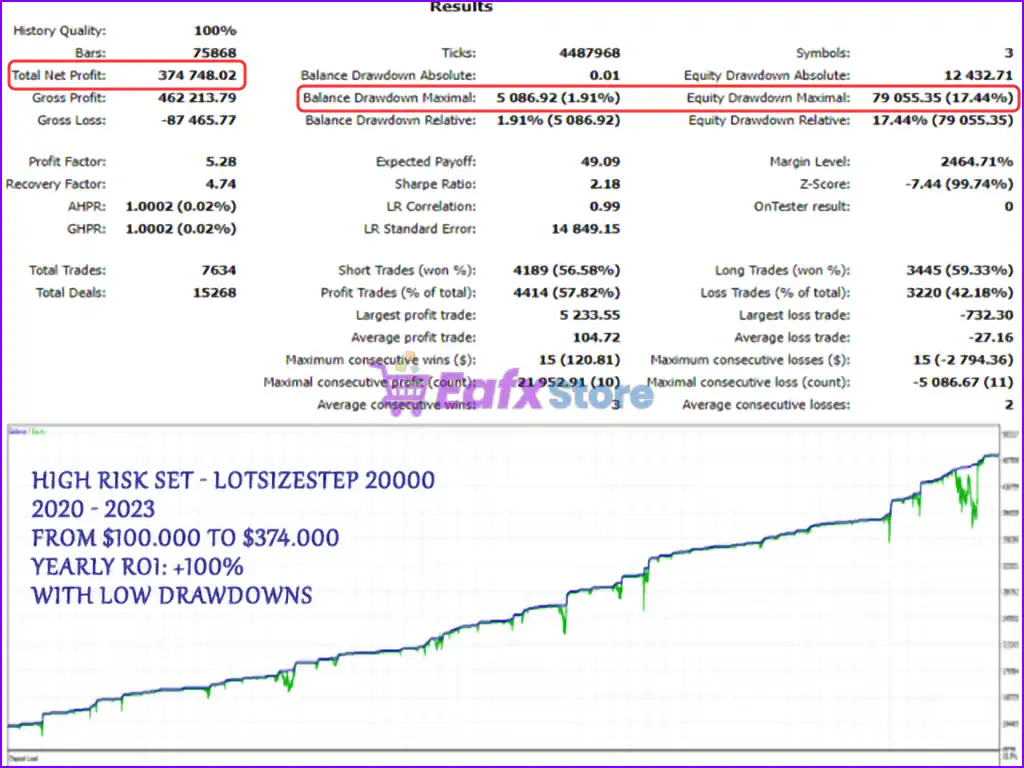
🔶 Apex Trader MT5 3-year backtest trading results are impressively profitable using the HIGH RISK setting. Detailed performance metrics include:
✅ Backtest Period: 2020 – 2023
✅ Initial Deposit: $100,000
✅ Total Net Profit: $374,748.02
✅ Maximum Drawdown: 1.91%
Apex Trader MT5 Backtest Trading Results
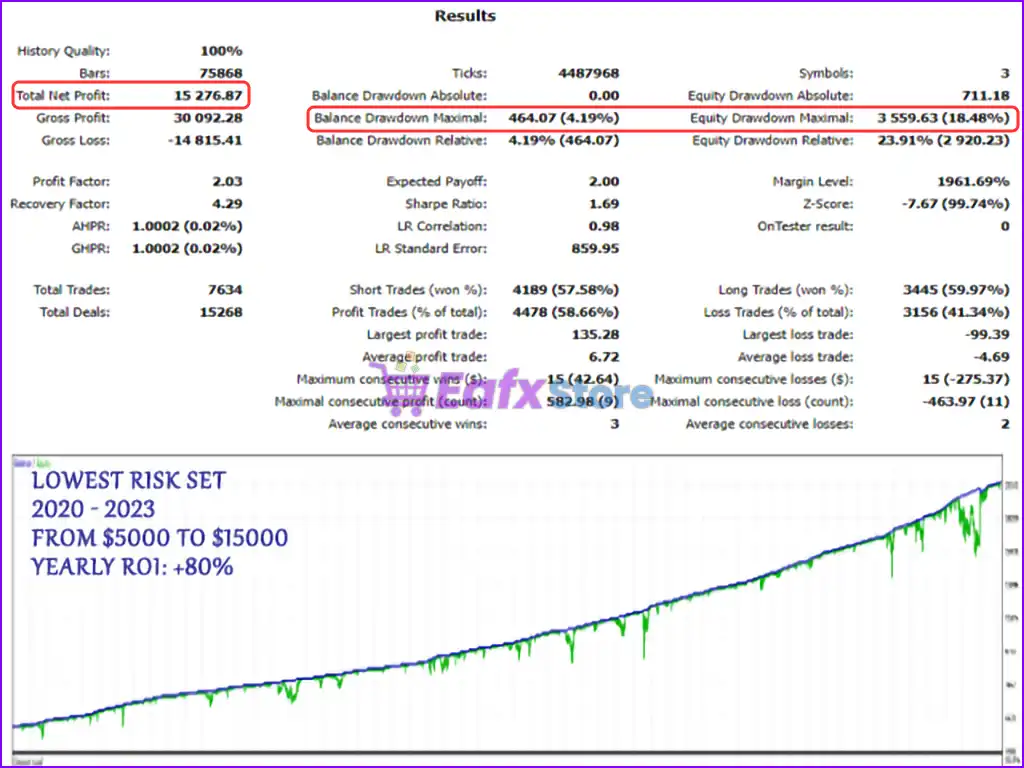
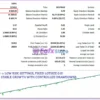
🔶 Apex Trader MT5 3-year backtest trading results achieved impressive returns using the LOWEST RISK setting. Detailed performance parameters include:
✅ Backtest Period: 2020 – 2023
✅ Initial Deposit: $5,000
✅ Total Net Profit: $15,276.87
✅ Maximum Drawdown: 4.19%
Apex Trader MT5 Backtests Results
Why choose Apex Trader MT5?
🔹 Stable Automated Trading: Designed to maintain consistency across diverse market environments.
🔹 Enhanced Risk Management: Focuses on capital protection through adaptive control mechanisms.
🔹 Long-Term Sustainability: Built to improve resilience during changing volatility and trend cycles.
🔹 Efficient Multi-Pair Operation: Manages several optimized instruments from a streamlined setup.
🔹 Professional Trading Solution: Combines automation, adaptability and structured execution logic.
Is Apex Trader MT5 safe?
Apex Trader MT5 shows significant potential in providing stable and reliable profits, becoming a reliable tool in the forex market. This advisor is highly appreciated by the community in many aspects and has won the trust of users.
➡️ Sh_Mikhail (2023.11.26): “Very pleased with Apex. Started using it on a live account in Feb 23. Running smoothly since then using the ultra conservative set.”
➡️ Wolfgang Zaunschirm (2023.01.28): “Ich habe Apex EA gleich nach dem Erscheinen gekauft, der Autor ist so grosszügig und bietet seine Neuerscheinungen sehr kostengünstig an. Backtests sind wundervoll, allerdings interessieren mich weder Backtests, noch Demo Konten; da habe ich leider von anderen Autoren viel zuviel erlebt.”
Recommended settings
Recommended settings and parameters to pay attention to from developers and experts:
| Features | Type |
|---|---|
| Trading platform | MetaTrader 5 (MT5) |
| Time frames | M15 (15 minute chart) |
| Currency pairs | AUDCAD, AUDNZD and NZDCAD |
| Minimum / Recommended deposit | $1,000 |
| Minimum / Recommended leverage | Any |
| Product type | Original version |
| Additional services | Unlock and Decompile |
| Recommended brokers | Exness Broker, Icmarkets Broker |
| Recommended VPS | MyfxVPS.com ( Blue VPS, Golden VPS). Lowest Latency, 2 week Free Trial, 100% Free for 12-18 Months. |
➡️ Reviewed by David Easton
Product Download Package?
The download package of the product suite includes:
Experts
✅ Setting (If Any).docx
✅ Installation Guide.docx
SetFiles
✅Apex_extreme_risk__1.set
✅Apex_OptimalGrid__1.set
✅Apex_ElevatedGrid__1.set
✅Apex_ConservativeGrid__1.set
✅Apex_Ultra_ConservativeGrid__1.set
Conclusion
In short, Apex Trader MT5 stands out as one of the most sophisticated and reliable Expert Advisors on the MetaTrader 5 platform, crafted by Wim Schrynemakers, a seasoned MQL5 developer with over 13 years of experience. Known for creating top-tier trading systems like Goldbot One MT5 and Stability Pro MT5, his most acclaimed product, Apex Trader MT5, combines professional-grade performance with exceptional adaptability.
🔢 Apex Trader MT5 Settings Explained – Complete Parameter Guide
Apex Trader MT5 is a professional grid-based Expert Advisor for MetaTrader 5 that provides flexible money management, pending order execution, drawdown protection, GMT synchronization and adaptive lot sizing.
With configurable spread filters, virtual take profit options, and advanced risk controls, Apex Trader MT5 allows traders to optimize automated trading while maintaining strict capital management.
Apex Trader MT5 Settings
🔢 Installation Panel Parameters
Below are the details of the parameters in the advisor’s trading system settings table:
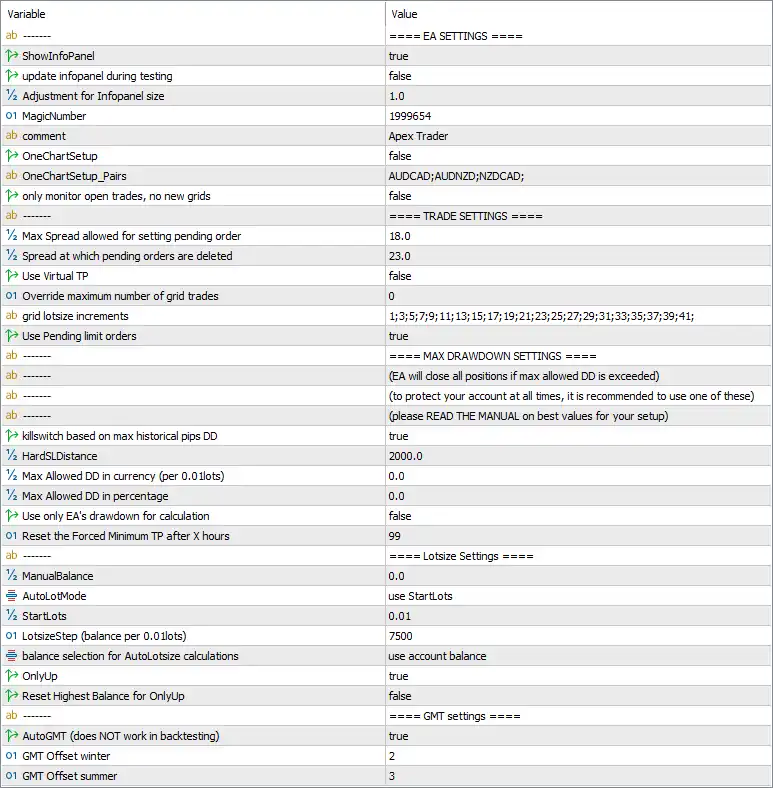
Apex Trader MT5 Settings Panel
🔶 EA Settings
🔹 ShowInfoPanel = true – Displays the EA information panel directly on the chart for real-time monitoring.
🔹 update infopanel during testing = false – Disables updating the information panel while running Strategy Tester.
🔹 Adjustment for Infopanel size = 1.0 – Sets the scaling factor of the information panel to 1.0.
🔹 MagicNumber = 1999654 – Assigns the unique identifier 1999654 to all trades opened by Apex Trader MT5.
🔹 comment = Apex Trader – Adds the trade comment “Apex Trader” to every position opened by the EA.
🔹 OneChartSetup = false – Disables one-chart multi-symbol trading mode.
🔹 OneChartSetup_Pairs = AUDCAD;AUDNZD;NZDCAD; – Lists the symbols available for One Chart Setup: AUDCAD, AUDNZD, and NZDCAD.
🔹 only monitor open trades, no new grids = false – Allows the EA to continue opening new grid positions instead of only monitoring existing trades.
🔶 Trade Settings
🔹 Max Spread allowed for setting pending order = 18.0 – Pending orders are placed only when the market spread is 18.0 points or lower.
🔹 Spread at which pending orders are deleted = 23.0 – Automatically removes pending orders if the spread reaches 23.0 points.
🔹 Use Virtual TP = false – Uses broker-side Take Profit orders instead of virtual Take Profit management.
🔹 Override maximum number of grid trades = 0 – Keeps the default maximum grid trade limitation. A value of 0 means no custom override.
🔹 grid lotsize increments = 1;3;5;7;9;11;13;15;17;19;21;23;25;27;29;31;33;35;37;39;41; – Defines the custom lot increment sequence used for successive grid orders.
🔹 Use Pending limit orders = true – Enables pending limit orders for grid entries.
🔶 Max Drawdown Settings
🔹 killswitch based on max historical pips DD = true – Activates an emergency kill switch based on the maximum historical drawdown measured in pips.
🔹 HardSLDistance = 2000.0 – Sets a hard emergency Stop Loss distance of 2000.0 points.
🔹 Max Allowed DD in currency (per 0.01 lots) = 0.0 – Currency-based drawdown protection is disabled with a value of 0.0.
🔹 Max Allowed DD in percentage = 0.0 – Percentage-based drawdown protection is disabled with a value of 0.0.
🔹 Use only EA’s drawdown for calculation = false – Calculates drawdown using the entire trading account instead of only this EA.
🔹 Reset the Forced Minimum TP after X hours = 99 – Resets the forced minimum Take Profit after 99 hours.
🔶 Lotsize Settings
🔹 ManualBalance = 0.0 – Uses the actual account balance instead of a manually specified balance.
🔹 AutoLotMode = use StartLots – Uses the StartLots method for position sizing.
🔹 StartLots = 0.01 – Opens the first trade with 0.01 lots.
🔹 LotsizeStep (balance per 0.01 lots) = 7500 – Increases the lot size by 0.01 lots for every 7500 units of account balance.
🔹 balance selection for AutoLotsize calculations = use account balance – Calculates automatic lot sizing based on the current account balance.
🔹 OnlyUp = true – Allows automatic lot sizes to increase with account growth but not decrease after temporary balance reductions.
🔹 Reset Highest Balance for OnlyUp = false – Keeps the historical highest balance for OnlyUp calculations without resetting it.
🔶 GMT Settings
🔹 AutoGMT (does NOT work in backtesting) = true – Automatically detects the broker’s GMT offset during live trading.
🔹 GMT Offset winter = 2 – Uses a GMT offset of +2 during winter.
🔹 GMT Offset summer = 3 – Uses a GMT offset of +3 during daylight saving (summer).
🔢 Conclusion
Apex Trader MT5 offers a comprehensive combination of grid trading, adaptive lot sizing, pending order management, spread protection, and drawdown safety controls. Features such as automatic GMT detection, emergency kill switch protection, configurable lot progression, and flexible money management make it a robust Expert Advisor for traders seeking automated and disciplined grid trading on MetaTrader 5.
🔢 FAQs
❓ What is the purpose of the AutoLotMode in Apex Trader MT5?
AutoLotMode automatically determines position sizing based on the configured StartLots and balance growth settings.
❓ Does Apex Trader MT5 include drawdown protection?
Yes. It provides multiple protection mechanisms including a historical drawdown kill switch, Hard Stop Loss, and optional currency or percentage drawdown limits.
❓ Can Apex Trader MT5 trade multiple currency pairs from one chart?
Yes. The OneChartSetup feature supports multi-symbol trading, although it is currently disabled in these settings.
❓ Why are spread filters important in Apex Trader MT5?
The EA prevents placing or maintaining pending orders when spreads exceed the configured thresholds (18.0 and 23.0 points), helping reduce trading costs during volatile conditions.
❓ What does the OnlyUp option do?
The OnlyUp feature allows automatic lot sizes to increase as the account balance grows while preventing lot sizes from decreasing after temporary equity declines, maintaining consistent position scaling.
User Reviews
Only logged in customers who have purchased this product may leave a review.
1. What is Apex Trader MT5 and how does it work?
Apex Trader MT5 is a smart grid-based Expert Advisor (EA) for MetaTrader 5 that trades AUDCAD, AUDNZD, and NZDCAD. It combines mean-reversion and trend-following strategies with adaptive TP levels to generate consistent profits under various market conditions.
2. Which currency pairs is Apex Trader MT5 optimized for?
This EA is specifically optimized for AUDCAD, AUDNZD, and NZDCAD, offering the best performance on the M15 timeframe.
3. Is Apex Trader MT5 safe to use with grid trading?
Yes. Unlike traditional grid systems, Apex Trader uses a safety-focused approach, including risk-based lot sizing, adaptive TP, and account size-specific risk profiles to reduce the typical dangers of grid trading.
4. How much capital do I need to start using Apex Trader MT5?
The recommended minimum deposit is $1,000, although it can be used with different account sizes by selecting from five built-in risk profiles ranging from ultra-conservative to high risk.
5. Can I run multiple currency pairs with this EA at the same time?
Yes. You can trade all three optimized pairs simultaneously using one of five automated presets that are included for easy setup.
6. Is this EA suitable for beginners or only for experienced traders?
Apex Trader MT5 is user-friendly and adaptable, making it suitable for both beginners and experienced traders. Its built-in presets simplify the process for new users, while advanced users can tweak settings as needed.
7. What kind of performance can I expect from Apex Trader MT5?
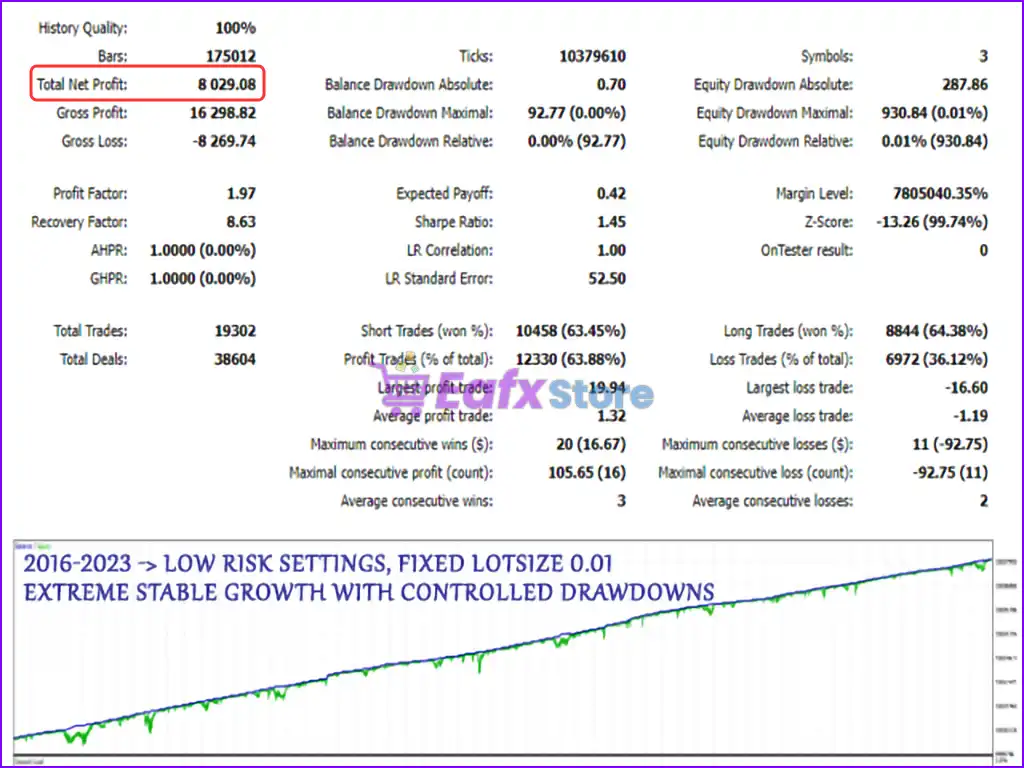
In live trading, the EA has shown +218% gain in just over 2 months. Backtests over 3 to 7 years show strong returns with low drawdowns—as low as 0.01% under the fixed lot setting.
8. Does Apex Trader MT5 use Martingale or arbitrage strategies?
No. Apex Trader MT5 does not use Martingale or arbitrage. Instead, it uses a structured grid system that adjusts lot sizes and TP levels based on real-time market and account data.
9. Is this EA compatible with prop firm challenges like FTMO?
Yes. With its controlled drawdown, flexible risk settings, and high consistency, Apex Trader MT5 is well-suited for prop firm challenges and funded trading accounts.
-
 Price range: $89.00 through $599.00
 -
 Price range: $89.00 through $599.00
 -
 Price range: $89.00 through $599.00
 -
 Price range: $89.00 through $599.00
-
 3
3 -
 7Original price was: $1,199.00.$229.00Current price is: $229.00.
 -
 2
2 -
 3Price range: $89.00 through $599.00
There are no reviews yet.