






Luna AI Pro MT5 with SetFiles (Latest version) – GroupBuy
Select a variant to see availability.
Luna AI Pro MT5: The Ultimate Night Scalping Expert Advisor (EA)
Luna AI Pro MT5 is a next-generation AI-powered night scalping Expert Advisor (EA) developed for MetaTrader 5 (MT5). Built upon years of live trading experience using a proven mean-reversion strategy, Luna AI offers one of the most reliable and advanced scalping solutions available today. With its cutting-edge smart features, risk controls, and AI-enhanced adaptability, it is designed for traders who value safety, consistency, and profitability.
🔶 Vendor Website: View here
🔶 This is GroupBuy ==> How to Join
About the Author
This product is compiled by Wim Schrynemakers. This Malta author has more than +14 years of experience working on MQL5 with many famous products such as Luna AI Pro MT5, The Gold Reaper MT5, Bitcoin Scalp Pro MT5, Daytrade Pro Algo MT5, Advanced Scalper MT5 and others. Among them, Luna AI Pro MT5 is his best performing products.
Luna AI Pro MT5 Review
Key Features of Luna AI Pro MT5
🔹 One-Chart Multi-Pair Trading System: Manage and trade multiple currency pairs from a single chart setup.
🔹 Individual Performance Risk Monitor: Automatically adjusts risk levels based on each pair’s performance.
🔹 Advanced News and Swap Filters: Avoids trading during high-impact news and unfavorable swap periods.
🔹 Correlation Exposure Control: Limits trades with highly correlated currencies to reduce risk.
🔹 Strict Risk Management Framework: Designed without Martingale, Grid or other high-risk methods.
What is the Luna AI Pro MT5 Trading Strategy?
🔹 Night Scalping Mean-Reversion Strategy: Captures price reversals during quiet market hours.
🔹 Multi-Pair Portfolio Trading Model: Trades a diversified basket of optimized currency pairs.
🔹 Adaptive Risk Adjustment Logic: Dynamically modifies risk according to pair performance.
🔹 Liquidity and Rollover Filtering System: Avoids unstable trading conditions during rollovers.
🔹 Indicator-Based Market Confirmation: Uses technical indicators to validate scalping entries.
Luna AI Pro MT5 Review
Luna AI Pro MT5 Myfxbook Results
Luna AI Pro MT5’s live account trading performance is thoroughly verified by MyFxBook. The EA combines intelligent automation with robust risk management to deliver consistent monthly returns and low drawdowns—ideal for traders who prefer long-term capital preservation with consistent growth. Detailed performance metrics include:
✅ Total Gain: +33.69%
✅ Total Profit: $2,644.44
✅ Monthly Gain: 1.22%
✅ Maximum Drawdown: 4.98%
Luna AI Pro MT5 Live Signal MyFxBook
Luna AI Pro MT5 Live MyFxBook
Luna AI Pro MT5 Backtest Results
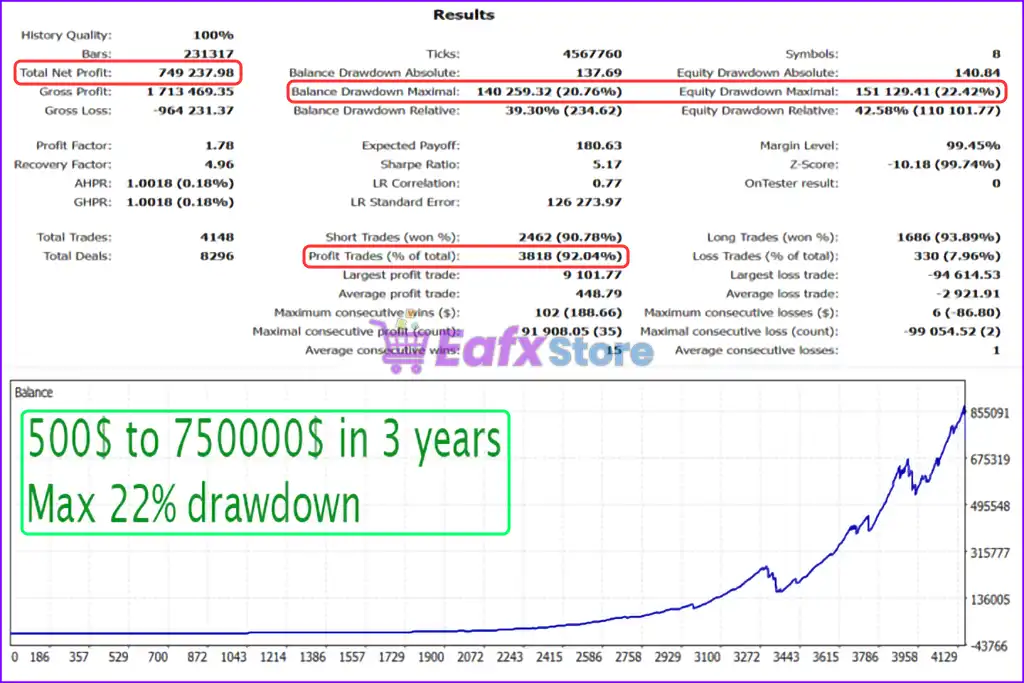
Luna AI Pro MT5 has achieved impressive profit performance over many years of trading reversion tests. This EA demonstrates excellent ability to master the market and increase profits.
✅ Initial Deposit: $500
✅ Total Net Profit: $749,237.98
✅ Win Rate (% of total): 92.04%
✅ Maximum Drawdown: 22.42%
Luna AI Pro MT5 Backtest Trading Results
Why Choose & Use Luna AI Pro MT5?
🔹 Stable Automated Trading Structure: Designed for consistent performance during low-volatility sessions.
🔹 Smart Portfolio Risk Management: Balances exposure across multiple currency pairs automatically.
🔹 Adaptive Market Response: Adjusts trading behavior as market conditions evolve.
🔹 Proven Live Trading Performance: Demonstrates consistent results on verified real trading accounts.
🔹 Marketplace-Ready Scalping EA: Suitable for traders seeking structured automated night trading.
Is Luna AI Pro MT5 safe?
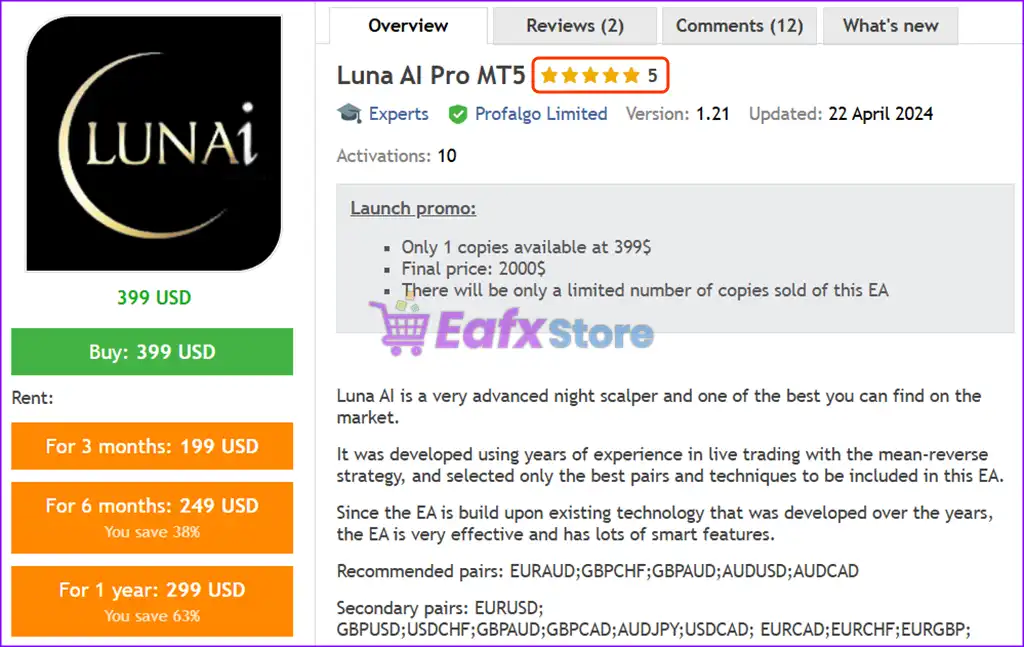
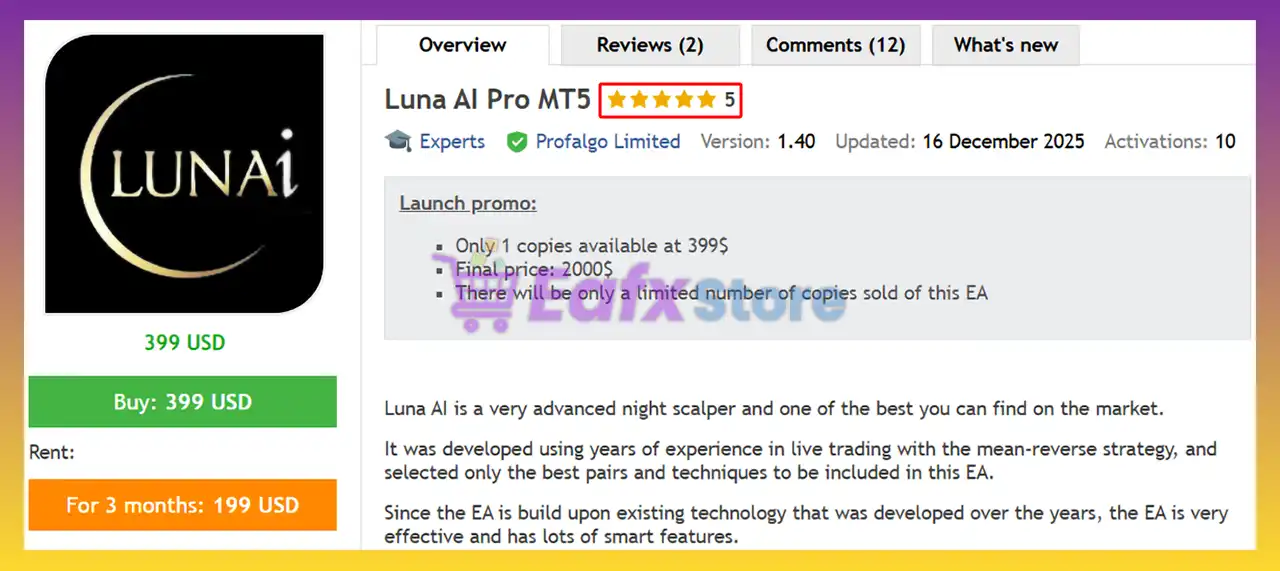
Luna AI Pro MT5 shows significant potential in providing stable and reliable profits, making it a reliable tool in the forex market. The advisor is highly appreciated by the MQL5 community in many aspects and has won the trust of users.
⭐⭐⭐⭐⭐ Kris Jef Saelen (2026.05.13)
“I bought Luna AI because I want to diversify my portfolio, and it’s an EA I can use long-term without worries. I know Wim his EAs are working long-term and will recover each time.”
⭐⭐⭐⭐⭐ Martin Lougas (2026.05.12)
“Been using Luna AI Pro for a bit now, and honestly, it’s been pretty solid. So far, the results have been good, and it feels way more reliable than some other EAs I’ve tried before. Nice to wake up and see trades already in profit.”
⭐⭐⭐⭐⭐ Gunther64 (2024.02.22)
“Installed this a few days ago and already made some profit. This EA has MANY parameters, so I’m very happy Wim helped with a setfile. I’m running it on 2 different accounts. It does exact same trades on both sides: strike, SL an TP are the same.”
Recommended settings
Recommended settings and parameters to pay attention to from developers and experts:
| Features | Type |
|---|---|
| Trading platform | MetaTrader 5 (MT5) |
| Time frames | M5 (5 minute chart) |
| Currency pairs | 15 currency pairs |
| Minimum / Recommended deposit | $200+ |
| Minimum / Recommended leverage | 1:50+ |
| Product type | Original version |
| Additional services | Unlock and Decompile |
| Recommended brokers | Exness Broker, Icmarkets Broker |
| Recommended VPS | MyfxVPS.com ( Blue VPS, Golden VPS). Lowest Latency, 2 week Free Trial, 100% Free for 12-18 Months. |
Product Download Package?
The download package of the product suite includes:
Experts
✅ Setting (If Any).docx
✅ Installation Guide.docx
SetFiles
✅ Luna_AI_recommended_medium_risk.set
 Reviewed by David Easton
Conclusion
In short, Luna AI Pro stands out as a premier night scalping expert advisor powered by next-generation AI intelligence and refined through years of live trading experience. Built for MetaTrader 5, this EA applies a proven mean-reversion strategy designed specifically for low-risk, high-probability trades during overnight sessions. Whether you’re a conservative trader aiming for capital preservation or a professional seeking consistent returns with advanced risk controls, Luna AI Pro delivers a powerful, data-backed solution.
🔢 Luna AI Pro MT5 Settings Guide
Luna AI Pro MT5 is an advanced automated trading Expert Advisor designed with a comprehensive set of controls for lot sizing, performance-based risk adjustment, pair selection, rollover protection, trading sessions, pending-order management, spread filtering, swap control and economic-news protection.
The configuration shown in the provided settings panels gives traders extensive control over how trading volume is calculated, how performance affects position sizing, which currency pairs are monitored, and when the EA can open or manage trades.
Understanding each parameter is essential for configuring Luna AI Pro MT5 according to account size, trading conditions and individual risk preferences.
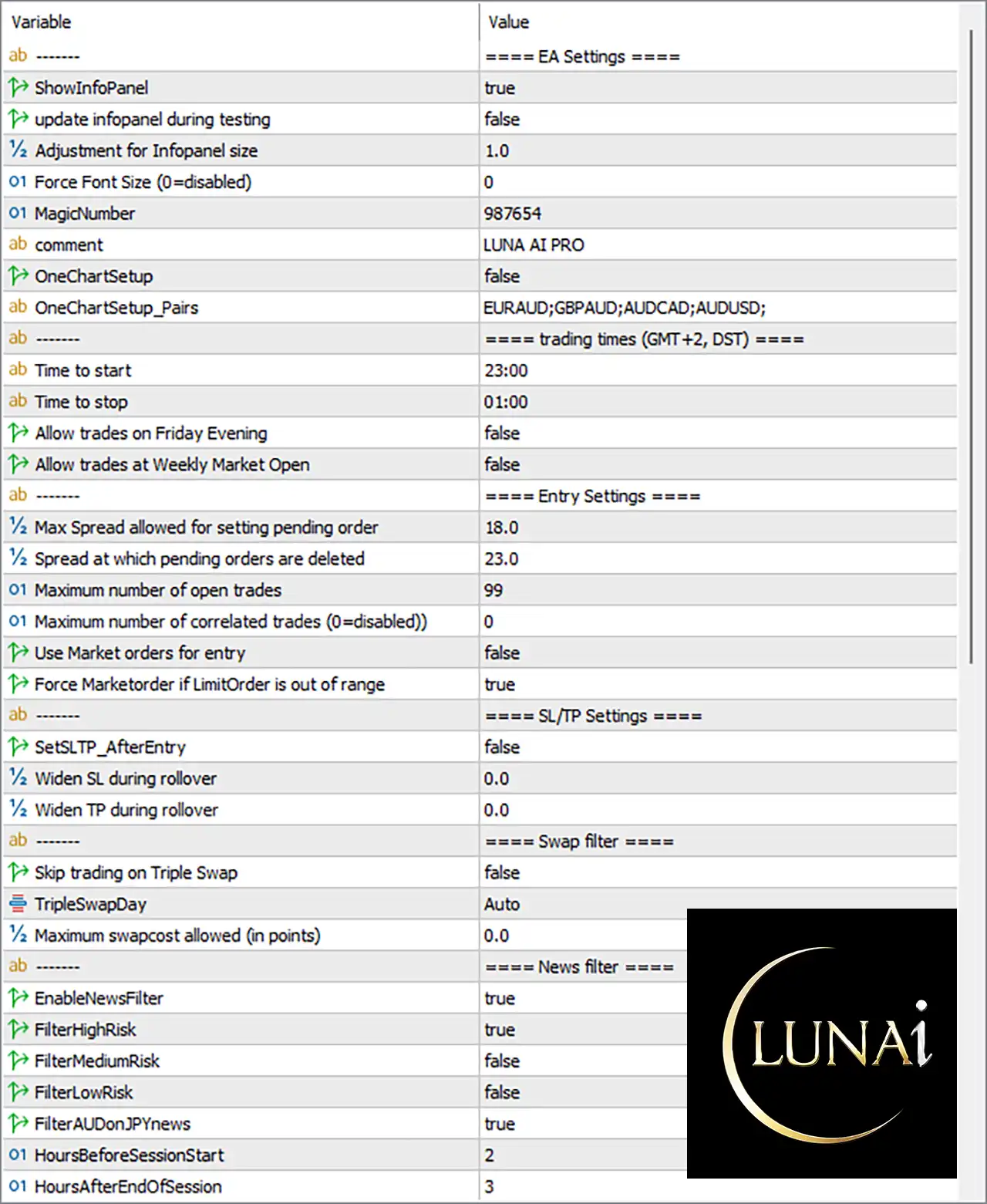
Luna AI Pro MT5 Settings Panel
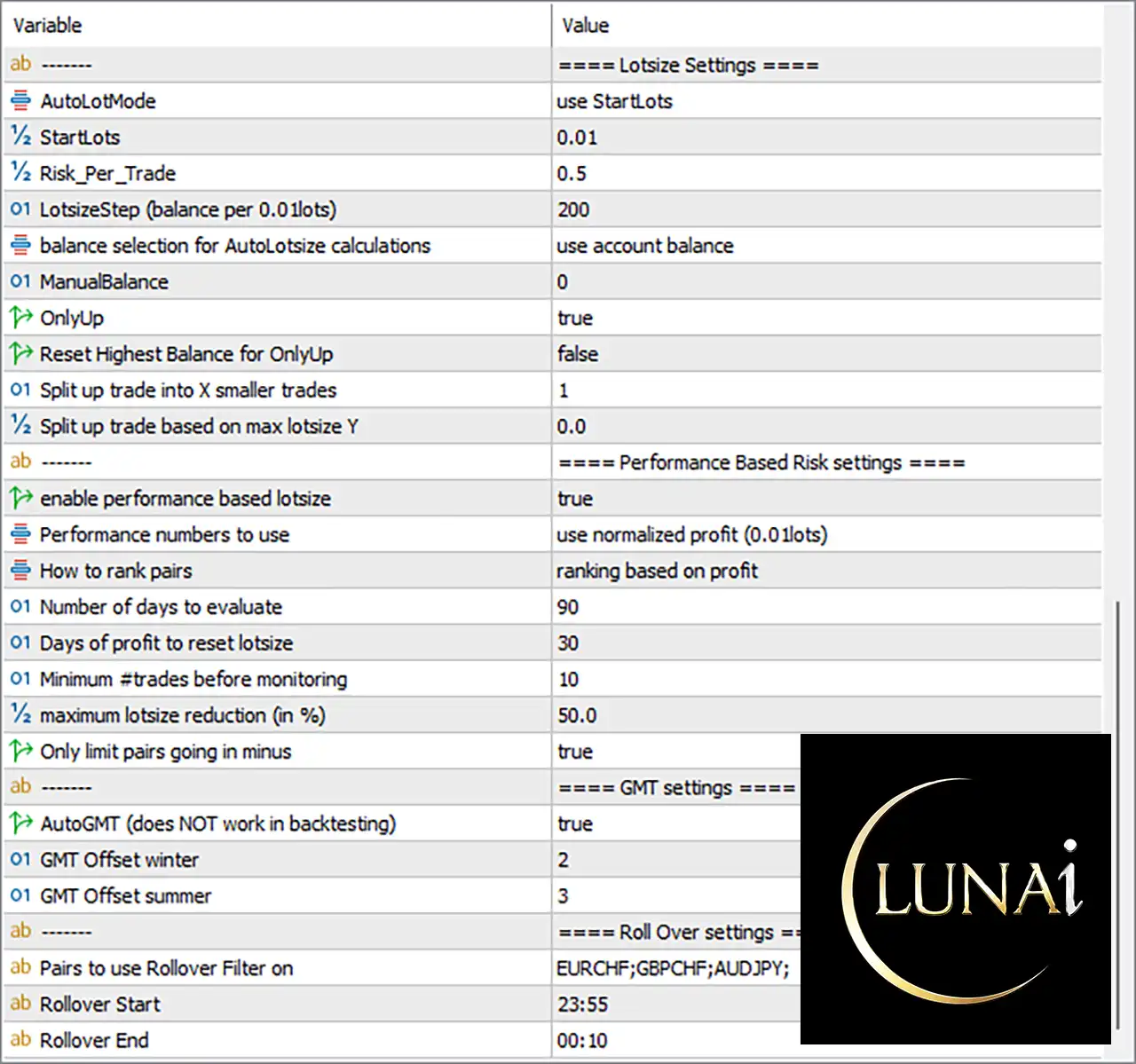
Luna AI Pro MT5 EA Settings Panel
🔢 Luna AI Pro MT5 Settings Explained
🔶 Lotsize Settings
🔹 AutoLotMode: use StartLots — Determines the automatic lot-sizing mode. The current setting uses the predefined StartLots value as the basis for initial position sizing.
🔹 StartLots: 0.01 — Sets the starting trade volume to 0.01 lots, providing the initial position size used by the EA.
🔹 Risk_Per_Trade: 0.5 — Defines the configured risk level per trade at 0.5, which can be used by the EA’s risk-based position-sizing calculations.
🔹 LotSizeStep (balance per 0.01lots): 200 — Sets the balance increment to 200 for each 0.01 lots, providing a balance-to-volume reference for lot-size calculations.
🔹 balance selection for AutoLotsize calculations: use account balance — Specifies that the EA uses the account balance when calculating automatic lot size.
🔹 ManualBalance: 0 — Sets the manually specified balance to 0. The current configuration therefore relies on the selected account-balance calculation method rather than a custom manual balance.
🔹 OnlyUp: true — Enables the OnlyUp function, allowing the performance-based balance reference to move upward according to the EA’s internal logic.
🔹 Reset Highest Balance for OnlyUp: false — Disables automatic resetting of the highest balance reference, with the value set to false.
🔹 Split up trade into X smaller trades: 1 — Sets the number of smaller trades created from one intended position to 1, meaning no additional splitting is configured.
🔹 Split up trade based on max lotsize Y: 0.0 — Sets the maximum-lot-based trade-splitting threshold to 0.0, indicating that no positive maximum lot-size threshold is configured here.
🔶 Performance-Based Risk Settings
🔹 enable performance based lotsize: true — Activates performance-based lot sizing, allowing the EA to adjust trading volume according to the configured performance calculations.
🔹 Performance numbers to use: use normalized profit (0.01lots) — Instructs the EA to evaluate performance using normalized profit based on 0.01 lots, helping compare results across different position sizes.
🔹 How to rank pairs: ranking based on profit — Ranks currency pairs according to their profit performance, which can influence pair-selection or lot-sizing decisions.
🔹 Number of days to evaluate: 90 — Sets the performance evaluation period to 90 days, providing the historical window used to assess pair performance.
🔹 Days of profit to reset lotsize: 30 — Sets the lot-size reset period to 30 days based on the EA’s configured profit evaluation logic.
🔹 Minimum #trades before monitoring: 10 — Requires a minimum of 10 trades before the EA begins applying its performance-monitoring logic.
🔹 maximum lotsize reduction (in %): 50.0 — Limits the maximum reduction in calculated lot size to 50.0% under the performance-based risk system.
🔹 Only limit pairs going in minus: true — Enables the option to limit or reduce exposure specifically for currency pairs that are performing negatively.
🔶 GMT Settings
🔹 AutoGMT (does NOT work in backtesting): true — Enables automatic GMT detection. The setting is true, and the panel explicitly notes that this function does NOT work in backtesting.
🔹 GMT Offset winter: 2 — Sets the winter GMT offset to 2 hours.
🔹 GMT Offset summer: 3 — Sets the summer GMT offset to 3 hours, accommodating the configured daylight-saving-time adjustment.
🔶 Rollover Settings
🔹 Pairs to use Rollover Filter on: EURCHF;GBPCHF;AUDJPY — Applies the rollover filter to EURCHF, GBPCHF, and AUDJPY.
🔹 Rollover Start: 23:55 — Sets the beginning of the rollover-filter period at 23:55.
🔹 Rollover End: 00:10 — Sets the end of the rollover-filter period at 00:10, covering the configured rollover window across midnight.
🔶 EA Settings
🔹 ShowInfoPanel: true — Enables the EA’s information panel, allowing trading information to be displayed directly on the chart.
🔹 update infopanel during testing: false — Disables information-panel updates during testing, with the value set to false.
🔹 Adjustment for Infopanel size: 1.0 — Sets the information-panel size adjustment factor to 1.0, representing the default scaling value.
🔹 Force Font Size (0=disabled): 0 — Sets the forced font size to 0, meaning the forced font-size function is disabled.
🔹 MagicNumber: 987654 — Uses 987654 as the EA’s unique Magic Number for identifying and managing its own trades.
🔹 comment: LUNA AI PRO — Sets the trade/comment label to LUNA AI PRO, allowing positions generated by the EA to be identified more easily.
🔹 OneChartSetup: false — Disables the one-chart setup mode with the value false.
🔹 OneChartSetup_Pairs: EURAUD;GBPAUD;AUDCAD;AUDUSD — Defines the currency pairs associated with the one-chart setup configuration: EURAUD, GBPAUD, AUDCAD, and AUDUSD.
🔶 Trading Time Settings
🔹 Trading times (GMT+2, DST): GMT+2, DST — Indicates that the configured trading schedule is based on GMT+2 with DST.
🔹 Time to start: 23:00 — Sets the daily trading start time to 23:00 according to the configured GMT+2/DST time reference.
🔹 Time to stop: 01:00 — Sets the trading stop time to 01:00, creating a trading window that crosses midnight.
🔹 Allow trades on Friday Evening: false — Disables trading during the configured Friday evening period.
🔹 Allow trades at Weekly Market Open: false — Prevents the EA from trading at the weekly market opening period.
🔶 Entry Settings
🔹 Max Spread allowed for setting pending order: 18.0 — Allows pending orders to be set when the spread is within the configured maximum of 18.0.
🔹 Spread at which pending orders are deleted: 23.0 — Sets 23.0 as the spread level at which existing pending orders are deleted according to the EA’s spread-protection logic.
🔹 Maximum number of open trades: 99 — Sets the maximum number of open trades to 99.
🔹 Maximum number of correlated trades (0=disabled): 0 — Sets the correlated-trade limit to 0, which means the correlated-trade restriction is disabled.
🔹 Use Market orders for entry: false — Disables market-order entries, with the setting configured as false.
🔹 Force Marketorder if LimitOrder is out of range: true — Enables the EA to use a market order when a configured Limit Order falls outside the acceptable range.
🔶 SL/TP Settings
🔹 SetSLTP_AfterEntry: false — Disables the option to set Stop Loss and Take Profit after the entry has been executed.
🔹 Widen SL during rollover: 0.0 — Sets the rollover Stop Loss widening value to 0.0, meaning no additional SL widening is configured.
🔹 Widen TP during rollover: 0.0 — Sets the rollover Take Profit widening value to 0.0, meaning no additional TP widening is configured.
🔶 Swap Filter Settings
🔹 Skip trading on Triple Swap: false — Disables the option to automatically skip trading on the broker’s Triple Swap day.
🔹 TripleSwapDay: Auto — Sets the Triple Swap day detection mode to Auto, allowing the EA to determine the relevant day automatically.
🔹 Maximum swapcost allowed (in points): 0.0 — Sets the maximum permitted swap cost to 0.0 points according to the displayed configuration.
🔶 News Filter Settings
🔹 EnableNewsFilter: true — Enables the economic-news filter, allowing the EA to restrict trading around relevant scheduled news events.
🔹 FilterHighRisk: true — Enables filtering for high-risk news events, providing the strongest news-event protection in the displayed configuration.
🔹 FilterMediumRisk: false — Disables filtering for medium-risk news events.
🔹 FilterLowRisk: false — Disables filtering for low-risk news events.
🔹 FilterAUDonJPYnews: true — Enables the special AUD-on-JPY news filter, allowing the EA to apply the relevant news restriction to AUD/JPY-related events.
🔹 HoursBeforeSessionStart: 2 — Sets the news-filter protection period to 2 hours before the relevant session start.
🔹 HoursAfterEndofSession: 3 — Sets the post-session news protection period to 3 hours after the relevant session end.
🔶 Key Highlights of Luna AI Pro MT5
🔹 Starting Position Size: The EA is configured with StartLots = 0.01, establishing the initial trading volume.
🔹 Risk Configuration: The displayed Risk_Per_Trade value is 0.5, while performance-based lot sizing is enabled.
🔹 Performance Analysis: The EA evaluates pair performance over 90 days and requires at least 10 trades before monitoring.
🔹 Risk Reduction: The maximum configured performance-based lot-size reduction is 50.0%.
🔹 Pair Ranking: Currency pairs are ranked according to profit, allowing performance to influence the EA’s pair-management logic.
🔹 Rollover Protection: The rollover filter covers EURCHF, GBPCHF, and AUDJPY between 23:55 and 00:10.
🔹 Trading Schedule: The EA is configured to trade from 23:00 to 01:00 using the GMT+2, DST time reference.
🔹 Weekend Protection: Trading on Friday Evening and at the Weekly Market Open is disabled.
🔹 Pending Orders: The EA allows up to 99 open trades, while pending orders can be controlled using spread thresholds of 18.0 and 23.0.
🔹 Correlated Trades: The value 0 disables the maximum correlated-trade restriction.
🔹 News Protection: The news filter is enabled, with High-Risk = true, Medium-Risk = false, and Low-Risk = false.
🔢 Conclusion
Luna AI Pro MT5 provides an extensive configuration framework that goes beyond basic lot sizing and entry management. Its settings include automatic and performance-based position sizing, pair ranking, historical performance evaluation, rollover filtering, GMT adjustment, trading-session controls, spread protection, pending-order management, swap filtering, and economic-news protection.
The displayed configuration uses 0.01 StartLots, a 0.5 Risk_Per_Trade value, a 90-day performance evaluation period, a 50.0% maximum lot-size reduction, and a 99-trade maximum. It also uses 23:00–01:00 trading hours, applies rollover filtering from 23:55–00:10, and enables High-Risk news filtering.
Before deploying these settings on a live MT5 account, traders should carefully test how the EA’s performance-based lot sizing, 0.5 risk setting, 99-trade limit, spread thresholds, and news-filter timing interact with their broker’s execution conditions. Backtesting and forward testing on a demo account can help verify that the configuration behaves as expected before live deployment.
🔢 FAQs
❓ What is the starting lot size of Luna AI Pro MT5?
The displayed StartLots value is 0.01, which is the configured starting trade volume.
❓ Does Luna AI Pro MT5 support performance-based lot sizing?
Yes. enable performance based lotsize = true, and the EA uses normalized profit based on 0.01 lots to evaluate performance. It reviews 90 days of data and requires at least 10 trades before monitoring.
❓ What are the trading hours configured for Luna AI Pro MT5?
The displayed trading schedule is 23:00 to 01:00, using the GMT+2, DST time reference. Friday evening trading and weekly market-open trading are both disabled.
❓ How does the news filter work in the displayed settings?
The news filter is enabled with EnableNewsFilter = true. High-Risk news is filtered, while Medium-Risk and Low-Risk news are not filtered. The settings also enable FilterAUDonJPYnews = true.
❓ Which currency pairs are included in the rollover filter?
The rollover filter is applied to EURCHF, GBPCHF, and AUDJPY, with the configured rollover period running from 23:55 to 00:10.
User Reviews
Only logged in customers who have purchased this product may leave a review.
1. What strategy does Luna AI Pro MT5 use?
Luna AI Pro MT5 is based on a mean-reversion night scalping strategy, optimized for low-volatility overnight market conditions. It identifies high-probability reversal points and executes trades with precision.
2. Which currency pairs does Luna AI Pro MT5 work best on?
It is optimized for high-performance pairs such as EURAUD, GBPCHF, GBPAUD, AUDUSD, and AUDCAD, but also supports up to 15 currency pairs, including major and minor crosses.
3. Does Luna AI Pro use risky strategies like martingale or grid?
No. Luna AI Pro strictly avoids martingale, grid trading, and large stop losses. It uses fixed SL/TP levels, strong risk control, and smart trade management to protect your account.
4. Is Luna AI Pro MT5 suitable for beginners or small accounts?
Yes. With a minimum recommended deposit of $200, the EA is beginner-friendly and includes setup files. The built-in AI automatically adjusts lot size and risk based on your account size and preferences.
5. Does the EA support trading during news or rollover periods?
No. Luna AI Pro MT5 includes filters for news, swap days, and rollover times, which help avoid trading in risky or unfavorable market conditions.
6. How does Luna AI manage risk across multiple pairs?
It uses a pair-specific performance monitor that reduces risk on underperforming pairs and increases exposure on high-performing ones — offering dynamic portfolio management and consistent profitability.
7. What kind of performance has Luna AI Pro shown in backtests and live trading?
Live Myfxbook results show +33.69% gain with 4.98% max drawdown, while backtests show over $749,000 profit from a $500 deposit and a 92.04% win rate, proving strong reliability and performance.
8. Is Luna AI Pro MT5 prop firm friendly?
Yes. It is designed with strict risk rules and no disqualifying tactics, making it compatible with prop firm requirements, including daily drawdown limits and risk control.
9. On what platforms and timeframes can I run this EA?
Luna AI Pro is available for both MT5 and MT4, and it can run on any timeframe, although actual performance is governed by its internal logic, not the chart timeframe.
-
 Original price was: $499.00.$249.00Current price is: $249.00.
 -
 Original price was: $30,000.00.$249.00Current price is: $249.00.
 -
 Original price was: $30,000.00.$249.00Current price is: $249.00.
 -
 Original price was: $30,000.00.$249.00Current price is: $249.00.
-
 3
3 -
 0
0 -
 2
2 -
 3Price range: $89.00 through $599.00
There are no reviews yet.