



🔢 Bitcoin Scalp Pro MT5 – Complete Settings Guide and Parameter Explanation
Bitcoin Scalp Pro MT5 is a professional cryptocurrency scalping Expert Advisor (EA) designed for the MetaTrader 5 platform. The EA specializes in automated Bitcoin and cryptocurrency trading by combining advanced trade execution, pending order management, spread filtering, risk management, lot size optimization, breakeven protection and flexible trading schedules.
The extensive configuration options allow traders to customize the EA according to their preferred risk level and market conditions.

🔢 Installation Panel Parameters
Below are the details of the parameters in the advisor’s trading system settings table:
🔶 Trading Hours Settings
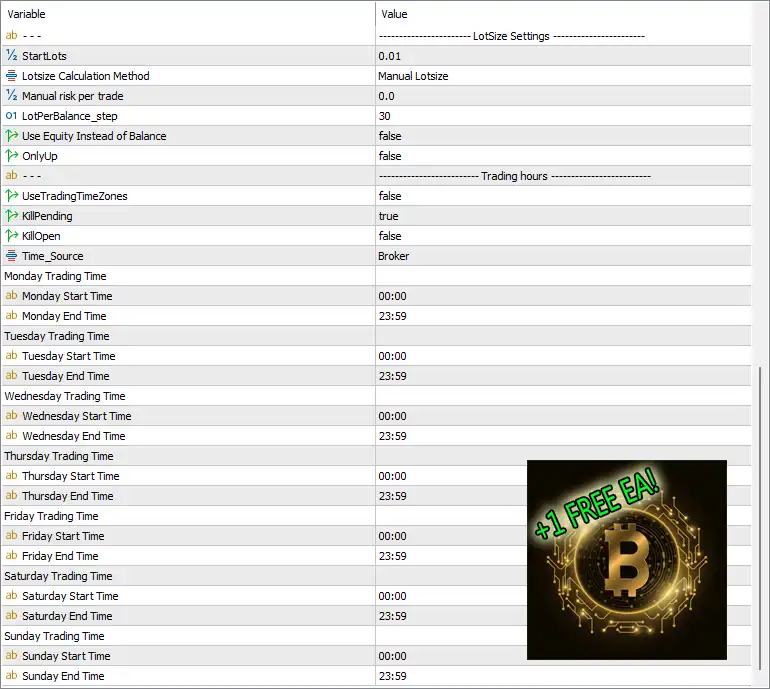
🔹 UseTradingTimeZones: Set to false, meaning trading time restrictions are disabled and the EA can trade continuously.
🔹 KillPending: Set to true, allowing the EA to automatically delete pending orders when required by its strategy.
🔹 KillOpen: Set to false, meaning the EA will not automatically close active positions.
🔹 Time_Source: Set to Broker, meaning all trading schedules use the broker server time.
🔹 Monday Start Time: Configured at 00:00, allowing trading from midnight on Monday.
🔹 Monday End Time: Configured at 23:59, allowing trading until the end of Monday.
🔹 Tuesday Start Time: Configured at 00:00.
🔹 Tuesday End Time: Configured at 23:59.
🔹 Wednesday Start Time: Configured at 00:00.
🔹 Wednesday End Time: Configured at 23:59.
🔹 Thursday Start Time: Configured at 00:00.
🔹 Thursday End Time: Configured at 23:59.
🔹 Friday Start Time: Configured at 00:00.
🔹 Friday End Time: Configured at 23:59.
🔹 Saturday Start Time: Configured at 00:00.
🔹 Saturday End Time: Configured at 23:59.
🔹 Sunday Start Time: Configured at 00:00.
🔹 Sunday End Time: Configured at 23:59.
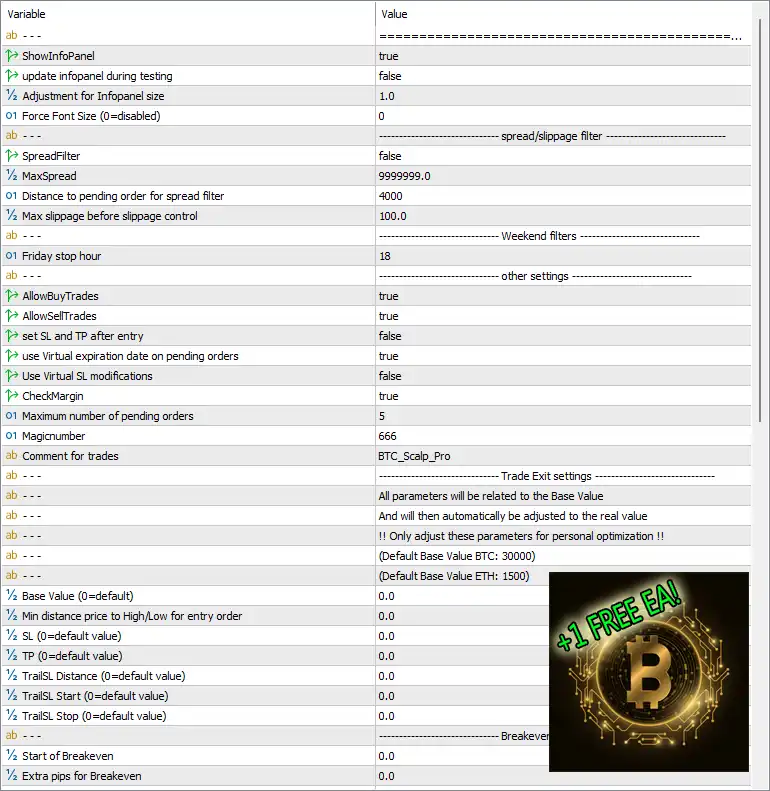
🔶 Information Panel Settings
🔹 ShowInfoPanel: Set to true, enabling the on-chart information panel.
🔹 Update Infopanel During Testing: Set to false, disabling panel updates during strategy testing.
🔹 Adjustment for Infopanel Size: Configured at 1.0, using the default panel scaling factor.
🔹 Force Font Size (0=disabled): Set to 0, meaning automatic font sizing is enabled.
🔶 Spread and Slippage Filter Settings
🔹 SpreadFilter: Set to false, meaning spread filtering is disabled.
🔹 MaxSpread: Configured at 9999999.0, effectively removing spread restrictions.
🔹 Distance to Pending Order for Spread Filter: Configured at 4000, defining the minimum distance used by the spread filter calculation.
🔹 Max Slippage Before Slippage Control: Configured at 100.0, setting the maximum acceptable slippage threshold.
🔶 Weekend Filter Settings
🔹 Friday Stop Hour: Configured at 18, instructing the EA to stop opening new trades after 18:00 on Friday.
🔶 General Trading Settings
🔹 AllowBuyTrades: Set to true, allowing BUY positions.
🔹 AllowSellTrades: Set to true, allowing SELL positions.
🔹 Set SL and TP After Entry: Set to false, meaning Stop Loss and Take Profit are not applied after order execution.
🔹 Use Virtual Expiration Date on Pending Orders: Set to true, enabling virtual expiration management for pending orders.
🔹 Use Virtual SL Modifications: Set to false, disabling virtual Stop Loss management.
🔹 CheckMargin: Set to true, enabling margin verification before opening trades.
🔹 Maximum Number of Pending Orders: Configured at 5, limiting the EA to five pending orders.
🔹 MagicNumber: Set to 666, serving as the unique identifier for EA trades.
🔹 Comment for Trades: Configured as BTC_Scalp_Pro, adding this comment to all EA-generated trades.
🔶 Trade Exit Settings
🔹 Base Value (0=default): Set to 0.0, using the default internal calculation values.
🔹 Default Base Value BTC: Defined as 30000 for Bitcoin optimization.
🔹 Default Base Value ETH: Defined as 1500 for Ethereum optimization.
🔹 Min Distance Price to High/Low for Entry Order: Set to 0.0, using default distance calculations.
🔹 SL (0=default value): Set to 0.0, allowing the EA to use its default Stop Loss calculation.
🔹 TP (0=default value): Set to 0.0, allowing the EA to use its default Take Profit calculation.
🔹 TrailSL Distance (0=default value): Configured at 0.0, using default trailing stop distance.
🔹 TrailSL Start (0=default value): Configured at 0.0, using default trailing activation levels.
🔹 TrailSL Stop (0=default value): Configured at 0.0, using default trailing stop settings.
🔶 Breakeven Stop Loss Settings
🔹 Start of Breakeven: Configured at 0.0, meaning default breakeven activation logic is used.
🔹 Extra Pips for Breakeven: Configured at 0.0, meaning no additional breakeven offset is specified.
🔶 Lot Size Settings
🔹 StartLots: Configured at 0.01 lots, representing the initial trading lot size.
🔹 Lotsize Calculation Method: Set to Manual Lotsize, meaning position sizes are manually controlled.
🔹 Manual Risk Per Trade: Configured at 0.0, indicating no percentage-based risk calculation is used.
🔹 LotPerBalance_Step: Configured at 30, defining the balance step used for automatic lot calculations if enabled.
🔹 Use Equity Instead of Balance: Set to false, meaning account balance is used instead of equity.
🔹 OnlyUp: Set to false, allowing lot calculations to increase or decrease based on account conditions.
🔢 Conclusion
Bitcoin Scalp Pro MT5 is a sophisticated cryptocurrency trading EA that combines automated scalping, pending order management, spread and slippage control, flexible trading schedules, breakeven protection, and advanced lot sizing features. With configurable parameters such as MagicNumber 666, StartLots 0.01, MaxSpread 9999999.0, and Maximum Pending Orders 5, traders can tailor the EA to different Bitcoin and cryptocurrency market conditions while maintaining effective risk management and execution control.



