





EA TREND MT4 & MT5 v1.80 with SetFiles (Original version)

Subscriptions for Special Plan
- 30 EA package is more economical!
- Special package with 99%
- Download 1 EA/Day

Subscriptions for Premium Membership
- Download Unlimited in 1 Year
- Get 100% Discount
- Get free access to all

Subscriptions for Gold Membership
- 1 Year Membership
- Get 100% Discount
- Access EA+Indicator+Course
Frequently bought together 🎁
Add these products to enhance your purchase




What is EA TREND?
EA TREND is a powerful, fully automated Expert Advisor (EA) tailored for trend-based forex trading, combining intelligent order execution, dynamic lot sizing, and built-in news filtering. Designed to meet the needs of both retail traders and prop firm traders, it offers full flexibility with manual confirmation options and adaptive risk control.
🔶 Vender Website: View here
About the Author
This product was created and programmed by Victorhamber. This author has more than +5 years of experience working with many famous products such as EA TREND MT4, Status Robot, EA TREND MT5 and other advisors. Among them, EA TREND is his best performing products.
Key Features of EA TREND
🔹 Advanced Trend Detection Logic: Uses automated indicators and filters for precise trade entries.
🔹 Dynamic Risk Management Tools: Combines drawdown limits with flexible lot control systems.
🔹 Integrated News Protection: Pauses trading automatically during medium and high-impact news.
🔹 Adaptive Timeframe Switching: Changes chart timeframe automatically during drawdown periods.
🔹 Smart Order Control Features: Supports PipStep spacing and simultaneous BUY/SELL execution.
🔹 Flexible Automated Trading Setup: Allows customizable trading filters for various market styles.
What is the EA TREND Trading Strategy?
🔹 Trend-Following Trading Logic: Executes BUY and SELL trades using directional market analysis.
🔹 Automated PipStep Management: Controls spacing between new positions during volatility shifts.
🔹 Booster Recovery Execution: Applies controlled multiplier logic during negative trade conditions.
🔹 Drawdown Protection Framework: Adjusts trading behavior when predefined loss levels occur.
🔹 News Event Filtering System: Avoids unstable market conditions during major economic events.
🔹 Time-Based Trade Optimization: Uses session filters for more disciplined market execution.
EA TREND Review
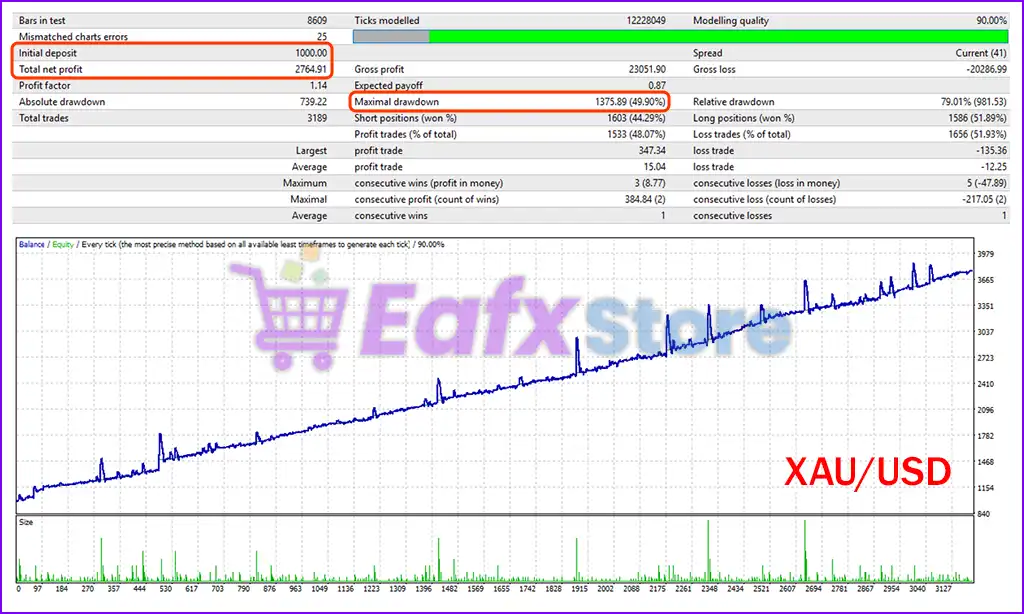
EA TREND Backtest Results based on the provided report. This summary is ideal for traders, Prop Firm evaluators, and algorithmic trading enthusiasts looking for insights into performance, risk, and profitability.
✅ Initial Deposit: $1,000
✅ Total Net Profit: $2,764.91
✅ Maximum Drawdown: 49.90%
EA TREND MT4 Backtest Results
Why choose EA TREND?
🔹 Professional Trading Automation: Designed for structured and disciplined Forex execution.
🔹 Stable Risk-Control Structure: Focuses on account protection and controlled market exposure.
🔹 Adaptive Market Trading Logic: Responds efficiently to changing volatility and trend shifts.
🔹 Flexible Strategy Configuration: Supports multiple trading styles and account preferences.
🔹 Advanced Safety Protection Tools: Includes drawdown monitoring and automated trade closure.
🔹 Marketplace-Ready Expert Advisor: Suitable for traders seeking resilient automated systems.
Recommended Settings
Recommended settings and parameters to pay attention to from developers and experts:
| Features | Type |
|---|---|
| Trading platform | MetaTrader 4 (MT4) |
| Time frames | M1, M5, M15, M30, H1, H4 |
| Currency pairs | XAUUSD (Gold) & GBPUSD |
| Minimum / Recommended deposit | $500 |
| Minimum / Recommended leverage | Any |
| Product type | NoDLL / Fix |
| Additional services | Unlock and Decompile |
| Recommended brokers | Exness Broker, Icmarkets Broker |
| Recommended VPS | MyfxVPS.com ( Blue VPS, Golden VPS). Lowest Latency, 2 week Free Trial, 100% Free for 12-18 Months. |
 Reviewed by David Easton
Product Download Package?
The download package of the product suite includes:
1. Experts:
✅ EA TREND v1.8_fix.ex4
✅ EA TREND v1.8_fix.ex5
2. SetFiles:
✅ GOLD_GBPUSD.set (MT4)
Conclusion
In short, EA TREND stands out as a sophisticated trend-based expert advisor for MetaTrader 4 (MT4), purpose-built to balance aggressive opportunity-seeking with disciplined risk control. Whether you’re a retail trader or pursuing prop firm funding, EA TREND’s dual-direction strategy, signal confirmation panel, and advanced news filtering give you an edge in fast-moving markets.
🔢 EA TREND MT4 – Complete Settings Guide for Forex Automation
EA TREND MT4 is an automated Forex trading Expert Advisor (EA) designed to detect market trends and execute trades automatically based on predefined trading logic.
It includes advanced risk management, trade filtering, money management, trailing systems, drawdown protection and news filters.
This EA is suitable for traders who want to automate buy/sell operations while maintaining flexible control over Lot size, Stop Loss (SL), Take Profit (TP) and market conditions.
EA TREND MT4 Setting
🔹 Operational Mode (Modo Operacional) = Ambos — Defines the trading direction mode; “Ambos” means the EA can open both BUY and SELL trades simultaneously.
🔹 ConfirmarEntradaComPainel = Sim — Enables confirmation of trade entries through the trading panel before executing positions.
🔹 confirmacaoSinalPainel = “CompraForteVendaForte” — Uses strong BUY and strong SELL signals from the panel as confirmation criteria for trade execution.
🔹 Abrir Compra? = Sim — Allows the EA to open BUY orders automatically.
🔹 Abrir Venda? = Sim — Allows the EA to open SELL orders automatically.
🔹 Número máximo de ordens de COMPRA = 100 — Sets the maximum number of BUY orders the EA can open at the same time.
🔹 Número máximo de ordens de VENDA = 100 — Sets the maximum number of SELL orders the EA can maintain simultaneously.
🔹 Tamanho do lote padrão = 0.01 — Defines the default trading lot size used by the EA.
🔹 Usar lote baseado no saldo da conta? = Nao — Disables automatic lot size calculation based on account balance.
🔹 Percentual do saldo para determinar o lote = 0.01 — Specifies the percentage of account balance used for dynamic lot calculation when enabled.
🔹 Usar Take Profit? = Nao — Disables automatic Take Profit functionality.
🔹 Take Profit em pips = 10.0 — Sets the Take Profit target distance to 10.0 pips.
🔹 Usar Stop Loss? = Nao — Disables Stop Loss protection for trades.
🔹 Stop Loss em pips = 30.0 — Defines the Stop Loss distance at 30.0 pips.
🔹 Habilitar trailing stop = Nao — Disables the trailing stop feature.
🔹 Ativar PipStep Automático = Sim — Enables automatic PipStep calculation for spacing between new orders.
🔹 Distância de pips para novas entradas = 30.0 — Sets a 30.0 pip distance before opening additional positions.
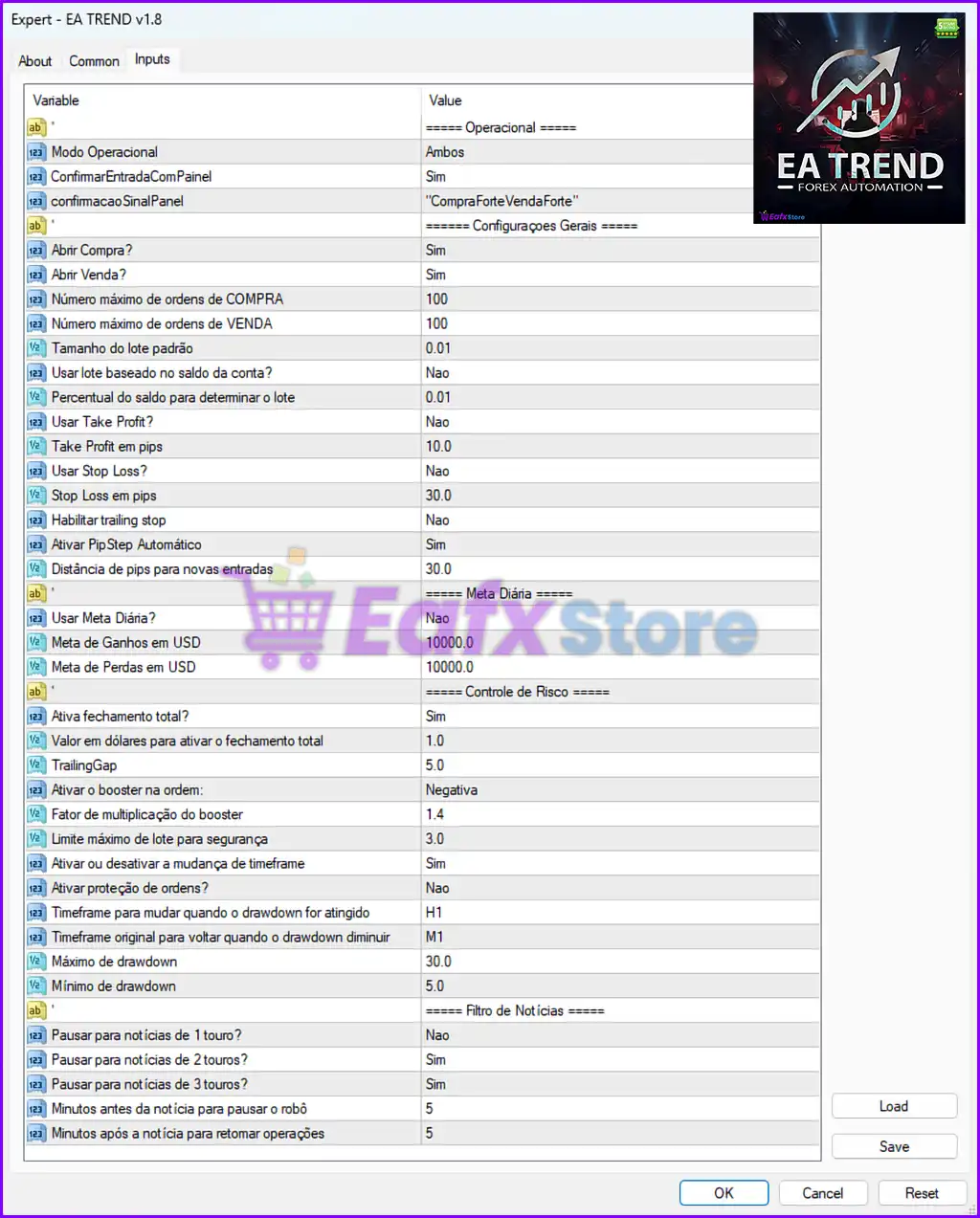
EA TREND MT4 Settings Panel
🔢 Daily Target Settings
🔹 Usar Meta Diária? = Nao — Disables the daily profit/loss target system.
🔹 Meta de Ganhos em USD = 10000.0 — Sets the daily profit target to 10000.0 USD.
🔹 Meta de Perdas em USD = 10000.0 — Sets the maximum daily loss limit to 10000.0 USD.
🔢 Risk Management Settings
🔹 Ativa fechamento total? = Sim — Enables total position closure when risk conditions are met.
🔹 Valor em dólares para ativar o fechamento total = 1.0 — Triggers total closure when reaching 1.0 USD defined condition.
🔹 TrailingGap = 5.0 — Defines the trailing gap distance as 5.0 points/pips.
🔹 Ativar o booster na ordem = Negativa — Activates booster logic only when trades are in negative conditions.
🔹 Fator de multiplicação do booster = 1.4 — Multiplies lot size by 1.4 for booster/recovery trades.
🔹 Limite máximo de lote para segurança = 3.0 — Limits the maximum lot size to 3.0 for account protection.
🔹 Ativar ou desativar a mudança de timeframe = Sim — Enables automatic timeframe switching during drawdown situations.
🔹 Ativar proteção de ordens? = Nao — Disables additional order protection mechanisms.
🔹 Timeframe para mudar quando o drawdown for atingido = H1 — Changes trading timeframe to H1 when drawdown threshold is reached.
🔹 Timeframe original para voltar quando o drawdown diminuir = M1 — Returns to the original M1 timeframe after drawdown decreases.
🔹 Máximo de drawdown = 30.0 — Sets the maximum allowed drawdown level to 30.0%.
🔹 Mínimo de drawdown = 5.0 — Defines the minimum drawdown recovery threshold as 5.0%.
🔢 News Filter Settings
🔹 Pausar para notícias de 1 touro? = Nao — Does not pause trading for low-impact news events.
🔹 Pausar para notícias de 2 touros? = Sim — Pauses trading during medium-impact news events.
🔹 Pausar para notícias de 3 touros? = Sim — Pauses trading during high-impact news events.
🔹 Minutos antes da notícia para pausar o robô = 5 — Stops EA trading 5 minutes before important news releases.
🔹 Minutos após a notícia para retomar operações = 5 — Resumes EA trading 5 minutes after the news event ends.
🔢 Conclusion
EA TREND MT4 is a powerful automated Forex trading robot equipped with advanced trend-following capabilities, dynamic risk management tools, drawdown protection, news filters and flexible order management settings.
With features such as automatic PipStep, booster multiplication, timeframe switching, and customizable trading limits, the EA provides traders with strong automation and control for various market conditions. Proper configuration of these settings is essential to optimize performance and reduce trading risks.
🔢 FAQs
❓ What is EA TREND MT4 used for?
EA TREND MT4 is an automated Forex trading Expert Advisor designed to identify market trends and execute trades automatically.
❓ Can EA TREND MT4 trade both BUY and SELL positions?
Yes, the Operational Mode is set to “Ambos,” which allows both BUY and SELL trading operations.
❓ Does EA TREND MT4 include risk management features?
Yes, it includes Stop Loss, Take Profit, drawdown control, lot limitation, booster management, and total closure protection.
❓ How does the news filter work in EA TREND MT4?
The EA pauses trading before medium and high-impact news events and resumes trading after the specified waiting period.
❓ Can the lot size be adjusted automatically in EA TREND MT4?
Yes, the EA supports automatic lot calculation based on account balance when enabled.
User Reviews
Only logged in customers who have purchased this product may leave a review.
1. What is EA TREND MT4 and how does it work?
EA TREND MT4 is a fully automated trend-following Expert Advisor that trades both Buy and Sell signals based on trend confirmation, dynamic lot sizing, and smart grid order management, with features ideal for both retail and prop firm traders.
2. Which trading pairs and timeframes does EA TREND MT4 support?
The EA is optimized for XAUUSD (Gold) and GBPUSD, and it supports multiple timeframes including M1, M5, M15, M30, H1, and H4 for flexible strategy adaptation.
3. Does the EA trade automatically or require manual input?
EA TREND MT4 operates automatically but includes a Signal Confirmation Panel. This allows trades to be executed only when strong trend signals appear, blending the precision of manual input with automated execution.
4. Is EA TREND MT4 suitable for prop firm challenges?
Yes. It includes daily gain/loss targets, drawdown protection, and smart risk controls, making it well-suited for funded account evaluations and prop firm rules.
5. What kind of risk management features does EA TREND offer?
The EA has booster logic, max lot caps, full-position closure at set profit/loss levels, timeframe switching during drawdowns, and news filtering to prevent overexposure and protect capital.
6. What are the drawdown and profitability results in backtesting?
In a backtest with a $1,000 deposit, EA TREND generated $2,765 net profit with a maximum drawdown of 49.90%, reflecting its high recovery capability under risk.
7. What is the minimum recommended deposit to use EA TREND MT4 effectively?
The minimum recommended deposit is $500, though higher capital is advised for better performance and safer risk distribution, especially when using grid logic.
8. How does EA TREND handle news events?
It includes a built-in news filter that automatically pauses trading before and after medium and high-impact news events, helping to avoid volatility-related losses.
9. Can I customize lot sizes, trade spacing, and trailing stops?
Yes. You can fully customize fixed lot sizes, entry distance (minimum 30 pips), and trailing stop logic (e.g., 5.0 pip gap) to match your strategy and risk preferences.
🔥 Get This EA for FREE with Our Membership! 🚀🚀
Unlock access to this EA, premium Indicators, and exclusive trading tools completely FREE with any of our Membership Plans! Thousands of traders already benefit from our VIP library—join them and level up your trading instantly. Choose Your Membership:
- SPECIAL – 1 Month Membership
- GOLD – 1 Year Membership
- PREMIUM – 1 Year Membership
-
 Price range: $65.00 through $599.00
 -
 Price range: $89.00 through $599.00
 -
 Price range: $89.00 through $599.00
 -
 Price range: $60.00 through $599.00
-
 0Original price was: $500.00.$69.00Current price is: $69.00.
 -
 3Original price was: $999.00.$69.00Current price is: $69.00.
 -
 3Original price was: $999.00.$69.00Current price is: $69.00.
 -
 10Original price was: $2,100.00.$59.00Current price is: $59.00.
There are no reviews yet.