
🧩What is Tiger Trade Pro MT5?
The Tiger Trade Pro EA for MetaTrader 5 (MT5) is a semi-automated Grid and Martingale-based trading system designed to capitalize on market corrections and price swings. The settings displayed in the image show a balanced configuration focusing on controlled risk, dynamic lot scaling, and moderate profitability.
➡️ Vendor Website: View here
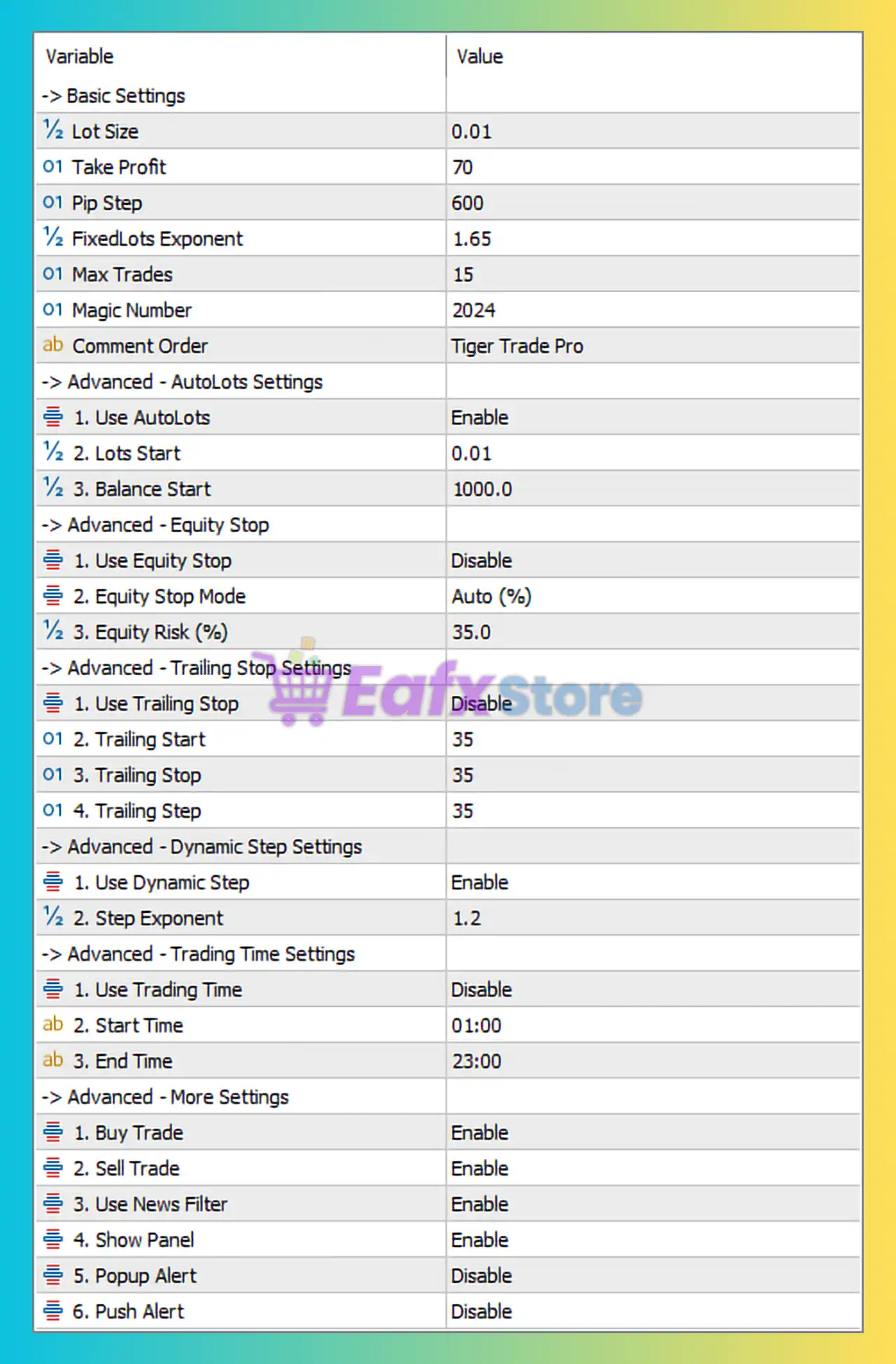
🧩Basic Settings
- Lot Size:
0.01
The smallest possible trading volume per initial position. Ideal for small accounts or conservative risk management. - Take Profit:
70
Each trading cycle aims to close when a profit of 70 pips is reached. - Pip Step:
600
Distance between grid trades. This large value means the EA will only open additional trades when price moves significantly — reducing risk and exposure. - Fixed Lots Exponent:
1.65
Multiplier for increasing lot sizes in subsequent trades (a mild martingale). For example, each new position is 1.65× larger than the previous one. - Max Trades:
15
Caps the maximum number of open grid positions to avoid overexposure. - Magic Number:
2024
Unique identifier for this EA’s trades, separating them from other systems. - Comment Order:
Tiger Trade Pro
Custom comment added to orders for identification in trading history.
🧩AutoLots Settings
- Use AutoLots:
Enable
The EA automatically adjusts lot sizes based on account equity. - Lots Start:
0.01
Minimum starting lot size. - Balance Start:
1000.0
The base balance reference. Lot size increases proportionally when account equity exceeds $1000.
Interpretation:
If your account grows, the EA increases lot size accordingly — maintaining consistent percentage-based risk exposure.
🧩Equity Stop Settings
- Use Equity Stop:
Disable
The EA does not automatically close all trades when a certain drawdown occurs. - Equity Stop Mode:
Auto (%)
If enabled, it would trigger based on percentage drawdown. - Equity Risk (%):
35.0
Maximum allowed drawdown of 35% before emergency closure (currently inactive since disabled).
Recommendation: Enable this feature for additional capital protection.
🧩Trailing Stop Settings
- Use Trailing Stop:
Disable
The trailing stop is turned off, meaning trades will close only via Take Profit. - Trailing Start / Stop / Step:
35 / 35 / 35
Defines when and how the trailing stop activates (not applicable while disabled).
Comment: Disabling trailing stops allows the EA to fully reach Take Profit targets but can risk giving back floating profits during reversals.
🧩Dynamic Step Settings
- Use Dynamic Step:
Enable
The EA dynamically adjusts grid distance (Pip Step) based on market volatility. - Step Exponent:
1.2
Each subsequent trade’s step increases by a factor of 1.2, helping reduce drawdown during trending markets.
Conclusion: This feature adds flexibility — preventing over-trading during strong price movements.
🧩Trading Time Settings
- Use Trading Time:
Enable
Time filter limits the EA to operate only during specified hours. - Start Time:
01:00
The EA begins trading after the first market hour (likely avoiding early volatility). - End Time:
23:00
Stops trading before daily rollover — avoiding swaps and spreads widening.
Purpose: Ensures stable execution during liquid market hours and prevents night-session risk.
🧩More Settings
- Buy Trade:
Enable
Allows long (buy) positions. - Sell Trade:
Enable
Allows short (sell) positions. - Use News Filter:
Enable
The EA pauses trading during high-impact economic news to avoid volatility spikes. - Show Panel:
Enable
Displays an on-chart control panel for visual tracking of EA activity. - Popup Alert:
Enable
Sends on-screen alerts for key EA actions. - Push Alert:
Disable
Push notifications (to mobile) are turned off.
🧩Conclusion
The Tiger Trade Pro EA configuration in this image represents a moderately conservative grid system with auto-lot scaling and dynamic grid steps. The setup prioritizes safety and long-term growth over aggressive profit-taking.