The configuration of Quantum King MT4 demonstrates a well-structured trading system designed for AUDCAD on the M5 timeframe, with emphasis on stable execution, controlled money management, flexible grid parameters, and practical risk controls. These settings highlight a strategy optimized for consistency and low-to-medium risk performance.
📌📌📌Buy this unlimited Quantum King MT4 product here📌📌📌
🧩GENERAL SETTINGS
● Strategy Description
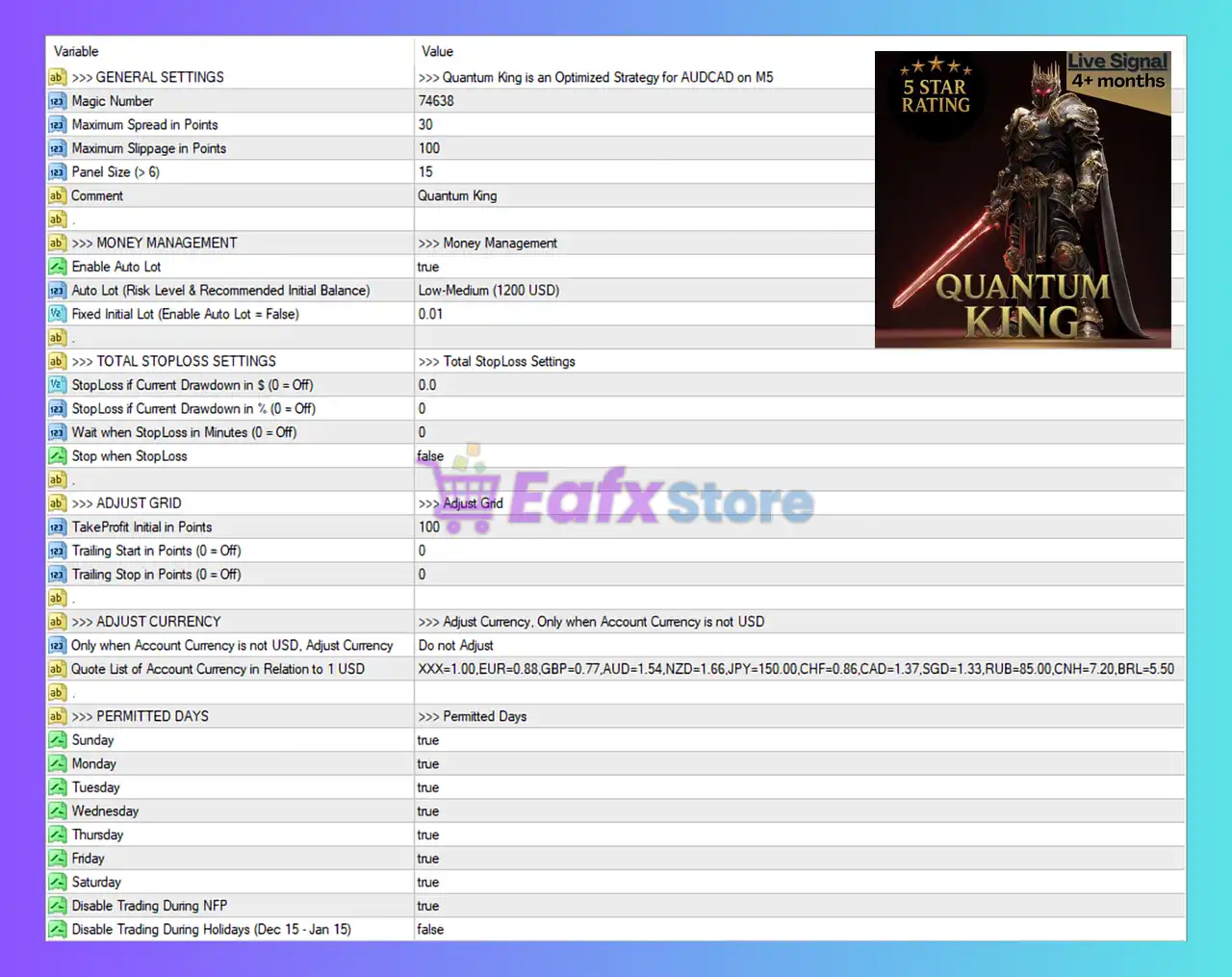
The comment confirms that “Quantum King is an Optimized Strategy for AUDCAD on M5”, indicating the EA is fine-tuned for short-term trend and volatility patterns unique to AUDCAD.
● Magic Number – 74638
A dedicated magic number ensures that trades executed by Quantum King remain isolated from other EAs, preventing any trade-management conflicts.
● Maximum Spread: 30 Points
This filter protects the EA from entering trades during spread spikes, ensuring better entry quality and reduced slippage in volatile sessions.
● Maximum Slippage: 100 Points
Allows the EA to accept broader slippage when execution is fast or during minor market jumps, maintaining strategy continuity.
● Panel Size: 15
This controls the on-chart display size, improving visibility without affecting trading logic.
🧩MONEY MANAGEMENT
● Auto Lot: Enabled
The EA automatically adjusts lot size based on account balance and recommended risk.
Risk Level: Low–Medium (1200 USD) means the EA expects a minimum balance of $1200 for optimal safety.
● Fixed Initial Lot: 0.01
When Auto Lot is disabled, this is the default lot size.
This shows that the EA is designed to operate safely even at small accounts.
🧩TOTAL STOPLOSS SETTINGS
These parameters provide full protection against unexpected market conditions.
● StopLoss if Current Drawdown in $ = 0
Disabled, meaning the trader has not set a dollar-based global stop loss.
● StopLoss if Current Drawdown in % = 0
Also disabled. The EA will rely on its internal trade logic instead of equity-based shutdown protection.
● Wait When StopLoss in Minutes = 0
No cooldown period is used after an equity stop is triggered.
● Stop When StopLoss = false
The EA continues trading without halting after internal stop conditions.
➡️ These settings indicate the trader prefers continuous operation instead of forced global stop-loss interruptions.
🧩GRID ADJUSTMENTS
● TakeProfit Initial in Points: 100
A fixed TP of 10 pips, showing the EA pursues frequent, short-term profits typical of grid or semi-grid strategies.
● Trailing Start & Trailing Step = 0
Trailing functions are disabled, meaning the EA focuses on fixed profit targets rather than dynamic trailing exits.
🧩ADJUST CURRENCY
● Adjust Currency (Non-USD Accounts): Disabled
The EA will not adjust lot sizes or profit targets based on account currency.
● Currency Quote List
A detailed conversion list is included (EUR, GBP, AUD, NZD, JPY, CHF, CAD, etc.), but is unused unless currency adjustment is enabled.
🧩PERMITTED TRADING DAYS
● Enabled Days: Sunday → Saturday (all true)
Quantum King is allowed to trade every day of the week, maximizing trading coverage.
● Disable Trading During NFP: true
The EA automatically blocks trading during Non-Farm Payroll news, protecting against extreme spikes and spreads that often blow grid strategies.
● Disable Trading During Holidays (Dec 15 – Jan 15): false
Holiday trading is still allowed, meaning the trader doesn’t restrict trading during low-liquidity periods unless manually adjusted.
🧩Conclusion
The configuration of Quantum King MT4 reveals an automated trading system optimized for AUDCAD M5 with a strong focus on controlled risk, efficient lot sizing, and stable grid-based profit targets. With Auto Lot enabled, fixed TP, spread protection, and NFP-safety mode, the EA aims to deliver consistent low-medium risk returns while avoiding dangerous news volatility. Although global equity stop-loss features are disabled, the setup emphasizes continuous operation and short-term profitability. Overall, Quantum King presents itself as a balanced, disciplined, and highly adaptive MT4 trading robot suitable for traders seeking steady growth on AUDCAD.