
Introduction to BTCore EA MT5
BTCore EA is a flexible automated trading Expert Advisor (EA) designed for MetaTrader 5, offering full-day trading capability across all weekdays and weekends. It combines structured lot scaling with customizable risk modes and visual chart settings, making it suitable for traders who want continuous market exposure with adaptable money management.
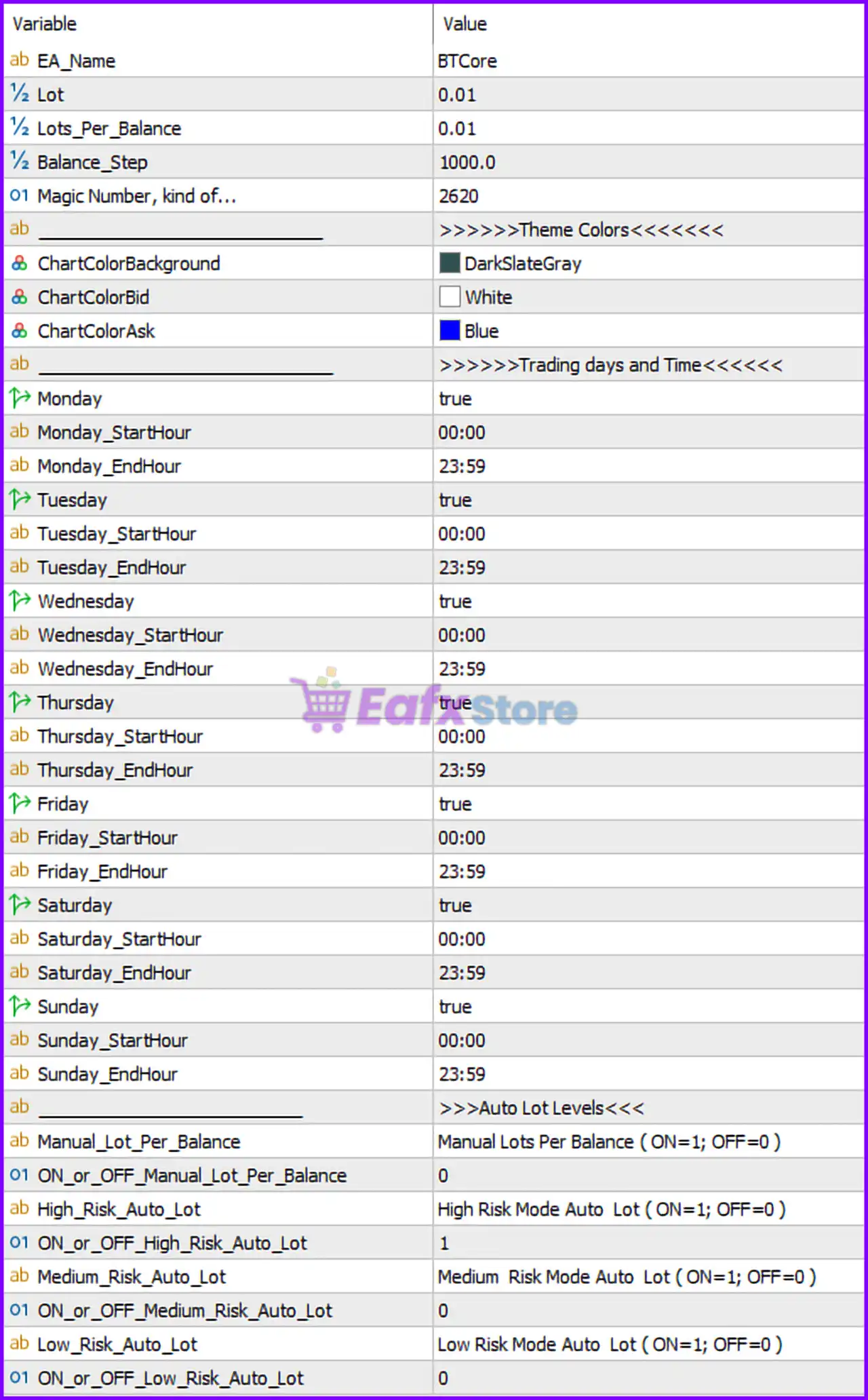
Full Parameters
- EA_Name = BTCore: Defines the Expert Advisor name as “BTCore”.
- Lot = 0.01: Sets the base fixed lot size to 0.01 for each trade.
- Lots_Per_Balance = 0.01: Specifies that 0.01 lot is allocated per balance step increment.
- Balance_Step = 1000.0: Defines that every 1000.0 units of account balance increases the lot size proportionally.
- Magic Number, kind of… = 2620: Unique identifier (2620) used to manage and track EA trades.
>>>>> Theme Colors <<<<<<
- ChartColorBackground = DarkSlateGray: Sets the chart background color to DarkSlateGray.
- ChartColorBid = White: Defines the bid price line color as White.
- ChartColorAsk = Blue: Defines the ask price line color as Blue.
>>>>> Trading days and Time <<<<<<
- Monday = true: Enables trading on Monday.
- Monday_StartHour = 00:00: Trading starts at 00:00 on Monday.
- Monday_EndHour = 23:59: Trading ends at 23:59 on Monday.
- Tuesday = true: Enables trading on Tuesday.
- Tuesday_StartHour = 00:00: Trading starts at 00:00 on Tuesday.
- Tuesday_EndHour = 23:59: Trading ends at 23:59 on Tuesday.
- Wednesday = true: Enables trading on Wednesday.
- Wednesday_StartHour = 00:00: Trading starts at 00:00 on Wednesday.
- Wednesday_EndHour = 23:59: Trading ends at 23:59 on Wednesday.
- Thursday = true: Enables trading on Thursday.
- Thursday_StartHour = 00:00: Trading starts at 00:00 on Thursday.
- Thursday_EndHour = 23:59: Trading ends at 23:59 on Thursday.
- Friday = true: Enables trading on Friday.
- Friday_StartHour = 00:00: Trading starts at 00:00 on Friday.
- Friday_EndHour = 23:59: Trading ends at 23:59 on Friday.
- Saturday = true: Enables trading on Saturday.
- Saturday_StartHour = 00:00: Trading starts at 00:00 on Saturday.
- Saturday_EndHour = 23:59: Trading ends at 23:59 on Saturday.
- Sunday = true: Enables trading on Sunday.
- Sunday_StartHour = 00:00: Trading starts at 00:00 on Sunday.
- Sunday_EndHour = 23:59: Trading ends at 23:59 on Sunday.
>>>> Auto Lot Levels <<<<
- Manual_Lot_Per_Balance = Manual Lots Per Balance (ON=1; OFF=0): Describes manual lot scaling based on balance.
- ON_or_OFF_Manual_Lot_Per_Balance = 0: Disables manual lot per balance mode.
- High_Risk_Auto_Lot = High Risk Mode Auto Lot (ON=1; OFF=0): Description of high-risk auto lot mode.
- ON_or_OFF_High_Risk_Auto_Lot = 1: Enables high-risk auto lot mode.
- Medium_Risk_Auto_Lot = Medium Risk Mode Auto Lot (ON=1; OFF=0): Description of medium-risk mode.
- ON_or_OFF_Medium_Risk_Auto_Lot = 0: Disables medium-risk auto lot mode.
- Low_Risk_Auto_Lot = Low Risk Mode Auto Lot (ON=1; OFF=0): Description of low-risk mode.
- ON_or_OFF_Low_Risk_Auto_Lot = 0: Disables low-risk auto lot mode.
Conclusion
The BTCore EA MT5 settings provide a comprehensive and always-active trading configuration, enabling operations across all seven days with full-time trading hours. Combined with dynamic lot scaling and high-risk mode activation, this EA is built for aggressive traders seeking maximum market exposure. Understanding these parameters helps optimize performance, manage risks effectively, and align the EA with individual trading strategies.
FAQs
❓ Can BTCore EA MT5 trade on weekends?
Yes, both Saturday and Sunday are enabled with full trading hours (00:00–23:59).
❓ What does Balance_Step = 1000.0 control?
It determines how lot size scales with account balance increments.
❓ Why is ON_or_OFF_High_Risk_Auto_Lot = 1 important?
It activates aggressive lot sizing, increasing both risk and potential returns.
❓ What is the purpose of Magic Number = 2620?
It uniquely identifies trades opened by this EA.
❓ Is manual lot scaling enabled?
No, ON_or_OFF_Manual_Lot_Per_Balance = 0 means it is disabled.